How Long Can a Dash Cam Record While Parked?
A dash cam can record while parked for 1 to 3 hours on its internal battery, up to 24 to 72 hours with a hardwire kit, and potentially several days with a dedicated external battery pack. The exact duration depends on your power source, memory card size, and which parking mode type your cam uses.
I came back to my car one afternoon and found a fresh dent on the rear bumper. No note. No witness. My dash cam was there the whole time — but it had stopped recording two hours after I parked because the internal battery ran out.
That experience cost me hundreds in repairs and a lot of frustration. I’m Alex Rahman, and I’ve been researching and testing dash cams for years. I know exactly how that mistake happens — and how to avoid it.
The truth is, most drivers set up parking mode without understanding what actually limits it. Power source, memory card size, voltage cutoff — these three things decide everything. Get them right and your dash cam becomes a 24-hour security guard for your car. Get them wrong and you get exactly what I got: a gap in the footage right when you needed it most.
This guide covers everything — from the basics of parking mode to exact recording hours by power source, hardwire kit setup, and the most common mistakes that cut your coverage short.
- Internal dash cam batteries last only 1 to 3 hours in parking mode before they run out.
- A hardwire kit connected to your fuse box can power parking mode for 24 to 72 hours or longer.
- Voltage cutoff protection is essential — it stops the cam before your car battery dies completely.
- A 64GB memory card holds roughly 8 to 10 hours of 1080p parking footage before loop recording kicks in.
- Motion detection parking mode saves the most power and storage compared to continuous recording.
What Is Dash Cam Parking Mode and Why Does It Matter for Your Car’s Safety?
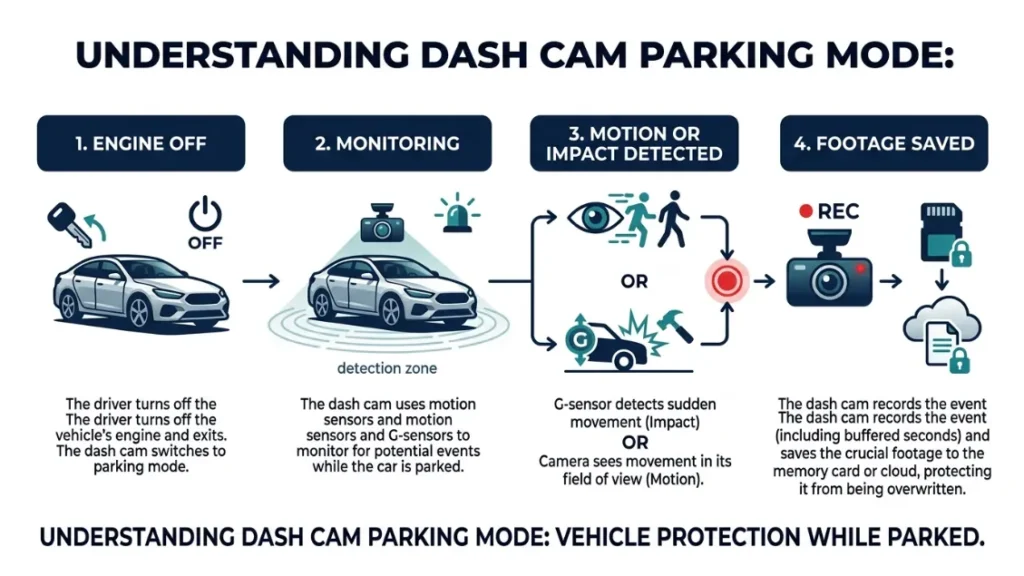
Parking mode is a dash cam feature that keeps recording after you turn off your engine and walk away. It monitors your parked vehicle for motion, impacts, or suspicious activity — and captures footage of anything that happens. Without it, your dash cam goes completely dark the moment you leave your car.
Think about how often your car sits unattended. Work parking lots, shopping centres, overnight street parking, airport lots. Your car is stationary and unprotected for far more hours than it spends on the road. Parking mode closes that gap.
Hit-and-run incidents, vandalism, break-in attempts, and side-swipes in car parks happen constantly. According to data from road safety researchers, over 69% of parking lot accidents involve a stationary vehicle. Without parking mode footage, you have no evidence and no recourse.
How Parking Mode Differs from Regular Driving Recording
Regular driving mode records continuously while your engine runs. Your car’s alternator powers the dash cam directly through the cigarette lighter or OBD port. Power is never a problem while you drive.
Parking mode is different. Your engine is off. The alternator stops charging. Now your dash cam has to pull power from somewhere else — either its own internal battery, your car battery via a hardwire connection, or an external battery pack you’ve added separately.
That power source is the single biggest factor controlling how long your dash cam records while parked. Everything else — recording quality, motion sensitivity, loop settings — comes second.
The Three Types of Parking Mode You Should Know About
Not all parking modes work the same way. Your cam likely offers one or more of these three options, and each one affects battery life and storage use very differently.
- Motion Detection Mode: The cam stays on standby and only starts recording when it detects movement near your car. This saves the most power and storage. Best for longer parking sessions.
- Impact Detection Mode: The cam triggers only when the G-sensor detects a physical bump or collision. Saves even more power than motion detection. Best for overnight parking.
- Time-Lapse Mode: The cam captures one frame every few seconds rather than full video. Creates a compressed record of everything that happens around your car. Uses very little storage but lacks the detail of full video.
If you park overnight regularly, use impact detection mode as your primary setting. It draws the least power and still captures the moment that matters most — when something actually hits your car.
How Long Can a Dash Cam Actually Record While Parked?
The honest answer depends entirely on your power setup. There is no single number that applies to every dash cam in every situation. But here are the real figures broken down by power source so you know exactly what to expect.
Recording Time on Internal Battery Alone
Most dash cams use a small internal battery or supercapacitor. On battery alone, parking mode typically lasts 1 to 3 hours maximum. Some budget models cut out in under 45 minutes.
The internal battery is not designed for long parking sessions. It exists to give the cam enough juice to save the last file and shut down safely when you turn the engine off. Using it as your primary parking mode power source will consistently leave gaps in your coverage.
Supercapacitors — used by brands like Viofo and Thinkware — charge and discharge faster than lithium-ion batteries and handle heat better. But they store even less energy, meaning parking mode on a supercapacitor alone may last under 30 minutes in some models.
Recording Time with a Hardwire Kit Connected
A hardwire kit connects your dash cam directly to your car’s fuse box. It draws power from your car battery while the engine is off. This is the most popular solution for extended parking mode and gives you the longest recording times.
With a hardwire kit and a healthy car battery, most drivers see 24 to 72 hours of parking mode recording — depending on mode type and how often motion triggers the cam. The voltage cutoff protection built into the kit stops the cam before your car battery drops to a dangerous level (more on that below).
Brands like BlackVue and Thinkware design their cameras specifically around hardwire setups. The BlackVue DR900X-2CH, for example, can run for over 48 hours in parking mode on a standard car battery using its impact detection setting.
Recording Time with an External Battery Pack
External battery packs — sometimes called parking mode battery packs or auxiliary batteries — give you the longest recording times without any risk to your car’s main battery. Products like the BlackVue Power Magic Battery Pack B-124X and the Cellink Neo are popular choices among serious dash cam users.
A quality external battery pack can power your dash cam for 3 to 7 days of parking mode, completely independent of your car battery. This is ideal for airport parking, long trips, or high-theft areas where you want maximum coverage.
| Power Source | Typical Duration | Car Battery Risk | Best For |
|---|---|---|---|
| Internal Battery | 1–3 hours | None | Short stops only |
| Hardwire Kit | 24–72 hours | Low (with cutoff) | Daily parking |
| External Battery Pack | 3–7 days | None | Airport / long trips |
What Drains Your Dash Cam Faster in Parking Mode Than You Think?
Power source is the primary limit, but two other factors cut your parking mode coverage shorter than most drivers expect — file size and motion event frequency. Understanding these helps you squeeze more recording time from whatever setup you have.
File Size, Resolution, and How They Eat Your Storage
Higher resolution means larger files. 4K parking mode footage uses roughly 3 to 4 times more storage per hour than 1080p footage. If your cam supports 4K parking mode, your memory card fills up much faster and loop recording kicks in sooner.
Here is a practical breakdown of how file size affects your total recording time:
- 1080p at standard bitrate: approximately 6 to 8 GB per hour
- 1440p (2K) recording: approximately 10 to 12 GB per hour
- 4K Ultra HD recording: approximately 18 to 24 GB per hour
For parking mode specifically, most experienced users drop resolution to 1080p or even 720p. You lose some detail, but you gain significantly more coverage time before the card loops.
Motion Events — How Frequent Triggers Shorten Recording Time
Every time your cam detects motion and starts recording, it draws more power. In a busy car park, that could mean dozens of triggers per hour — each one waking the processor, spinning up the recording engine, and writing to the card.
High motion sensitivity in a busy area can cut your effective parking mode time in half compared to a quiet residential street. If your cam keeps triggering on passing pedestrians and shadows, adjust the motion sensitivity down to medium or low in the settings.
Never set motion sensitivity to maximum in a busy location. In a city car park, your cam could trigger hundreds of times overnight, drain your car battery faster, and fill your card with useless footage of passing strangers — missing the actual incident you needed to capture.
Does Parking Mode Drain Your Car Battery and How Do You Stop It?
Yes — parking mode can drain your car battery if you have no protection in place. A dash cam in continuous parking mode draws between 200mA and 500mA constantly. Over 24 hours, that is enough to kill a weak or older battery completely, leaving you stranded.
This is the number one fear drivers have about parking mode — and it is completely justified without the right setup. But the solution is simple and built into every quality hardwire kit.
What Voltage Cutoff Protection Actually Does
Voltage cutoff (also called low battery cutoff) is a circuit built into hardwire kits that monitors your car battery’s voltage in real time. When the voltage drops to your preset threshold, the kit automatically cuts power to the dash cam — protecting your battery from going so low it cannot start your car.
Think of it as an automatic off-switch that triggers before any damage is done. Your cam stops recording, saves the last file cleanly, and shuts down. Your car starts perfectly fine the next morning.
Quality hardwire kits from brands like Viofo, BlackVue, and Thinkware all include voltage cutoff as a standard feature. Budget hardwire kits sometimes skip this — which is exactly when batteries die overnight.
Safe Voltage Cutoff Settings You Should Use
Most hardwire kits let you set the cutoff threshold manually. Here are the safe levels used by experienced dash cam installers:
- 11.8V: Standard cutoff for most vehicles — safe for regular use
- 12.0V: Conservative cutoff — better for older batteries or colder climates
- 11.6V: Maximum draw — only for newer batteries in good condition
If your car battery is more than three years old, set cutoff at 12.0V or higher. A degraded battery has less reserve capacity and drops voltage faster under load.
Drive your car for at least 30 minutes after each parking session to let the alternator fully recharge what parking mode consumed. Short drives of under 10 minutes may not restore enough charge, especially in winter.
How Does a Hardwire Kit Change Everything for Parking Mode?
A hardwire kit is a simple wiring harness that connects your dash cam directly to your car’s fuse box instead of the cigarette lighter socket. It draws power from a fuse that only activates when the ignition is on (for driving) and from a constant fuse that stays live even when the engine is off (for parking mode).
This single upgrade transforms your dash cam from a part-time recorder into a full-time vehicle security system. Without it, you are relying on a battery that lasts under three hours. With it, you can cover an entire weekend of parking on a single healthy car battery.
How to Connect a Hardwire Kit to Your Fuse Box (Step-by-Step)
- Purchase a hardwire kit compatible with your dash cam brand — Viofo, BlackVue, and Thinkware all make brand-specific kits.
- Locate your car’s fuse box — usually under the dashboard on the driver’s side or in the engine bay.
- Use a fuse tester to identify one switched fuse (power only when ignition is on) and one constant fuse (power at all times).
- Attach the add-a-fuse connectors from the hardwire kit to both identified fuses.
- Run the power cable from the fuse box along the headliner or A-pillar to your dash cam’s mount position.
- Connect the ground wire to a bare metal bolt on the car’s chassis — not to a painted surface.
- Connect the cable to your dash cam and test both driving mode and parking mode before finalising the install.
- Set your voltage cutoff threshold in the dash cam app or settings menu before your first parking session.
If you are not comfortable working with your car’s fuse box, most automotive accessory shops will install a hardwire kit for a small labour fee. The job typically takes under one hour.
For a detailed guide to fuse box types and add-a-fuse connectors, Crutchfield’s dash cam installation guide covers every vehicle type with clear diagrams.
Hardwire Kit vs Internal Battery vs External Battery Pack Compared
Each power option suits a different type of driver and parking situation. Here is how they stack up across the factors that matter most:
| Factor | Internal Battery | Hardwire Kit | External Battery Pack |
|---|---|---|---|
| Max recording time | 1–3 hours | 24–72 hours | 3–7 days |
| Installation difficulty | None (built-in) | Moderate (fuse box) | Easy (plug-in) |
| Car battery risk | None | Low (with cutoff) | None |
| Cost | $0 extra | $15–$40 | $80–$200 |
| Best for | Quick errands | Daily parking | Long-term parking |
How Much Memory Card Storage Do You Actually Need for Overnight Parking Mode?
Storage size directly controls how far back your parking mode footage goes. When the card fills up, loop recording overwrites the oldest files automatically. So the question is not just how long the cam records — it is how long the footage survives before being overwritten.
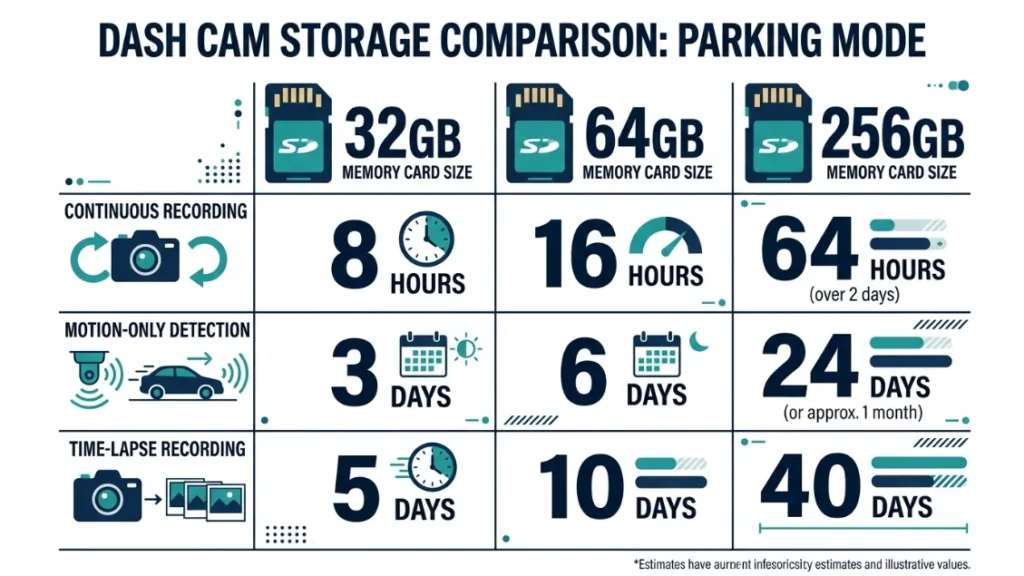
Storage Math — How Many Hours Fit on 32GB, 64GB, and 256GB
Here is a practical breakdown based on standard 1080p parking mode recording at a moderate bitrate:
| Card Size | 1080p Continuous | 1080p Motion Only | Time-Lapse Mode |
|---|---|---|---|
| 32GB | ~4–5 hours | ~8–12 hours | ~48+ hours |
| 64GB | ~8–10 hours | ~16–24 hours | ~96+ hours |
| 256GB | ~32–40 hours | ~64–90 hours | ~400+ hours |
For most drivers doing overnight parking, a 64GB card hits the sweet spot. It covers a full working day plus overnight without looping over critical footage. If you park in high-traffic or high-risk areas, step up to 128GB or 256GB.
Always use a dash cam-rated endurance microSD card — standard cards are not built for the constant read-write cycles that parking mode demands. Samsung Pro Endurance and Kingston Canvas Go Plus cards are widely recommended for 24/7 dash cam use.
How Loop Recording Protects You When the Card Gets Full
Loop recording splits your footage into short clips — typically 1, 2, or 3 minutes long. When the card fills completely, the oldest clips get overwritten automatically, keeping the most recent footage always available.
This is the safety net that keeps your cam recording indefinitely. You never need to manually delete files or worry about the cam stopping because storage ran out.
Most dash cams also offer a locked file feature — triggered by a button press or impact detection — that protects specific clips from being overwritten. Use this immediately after an incident to preserve your evidence before loop recording can delete it.
The smartest parking mode setup combines three things working together: a hardwire kit for sustained power, a 64GB or larger endurance card for maximum footage retention, and impact detection mode to conserve both power and storage during quiet overnight sessions.
Which Dash Cam Brands Handle Parking Mode Best?
Parking mode quality varies significantly across brands. Some cameras treat it as an afterthought. Others build their entire product around it. Here is what the leading brands actually deliver.
BlackVue, Thinkware, Viofo, Nextbase — What Each Does Differently
BlackVue (a Korean brand that pioneered cloud-connected dash cams) offers the most advanced parking mode ecosystem. Their DR900X series supports live remote viewing via the BlackVue Cloud app, so you can check your parked car from anywhere in the world in real time. Their buffered parking mode also captures the 10 to 20 seconds before a motion trigger — so you see exactly what happened leading up to an incident.
Thinkware (another Korean brand known for reliability in extreme temperatures) uses a sophisticated Energy Saving Parking Mode that drops power consumption dramatically while still capturing any impact event. Their F800 Pro and U1000 models are popular among drivers who prioritise long parking sessions without battery worry.
Viofo (a budget-friendly brand that competes directly with premium options) delivers hardwire parking mode performance at nearly half the price. Their A119 Mini 2 and A229 Pro models support full motion, impact, and time-lapse parking modes with voltage cutoff — making them the top choice for cost-conscious buyers.
Nextbase (the UK’s best-selling dash cam brand trusted by over 2 million drivers) focuses on ease of use over advanced parking features. Their 622GW supports parking mode via their Nextbase Hardwire Kit, with a clean app interface. It works well for everyday parking but lacks the deep customisation options of BlackVue or Thinkware.
For a full comparison of parking mode specifications across these brands, DashCamTalk’s community forum maintains one of the most detailed up-to-date reference threads available.
BlackVue wins for advanced features and cloud connectivity. Thinkware wins for extreme temperature reliability. Viofo wins for budget performance. Nextbase wins for simplicity and ease of use. All four support hardwire parking mode — your power and storage setup matters more than brand choice alone.
What Are the Most Common Parking Mode Mistakes Drivers Make?
After years of testing and helping other drivers set up their systems, I keep seeing the same errors repeat. These mistakes either kill the car battery, create gaps in footage, or render parking mode recordings completely useless when it matters.
- Relying on internal battery for overnight parking. A 1 to 3 hour battery will not cover an 8-hour overnight session. Ever. If you park for more than two hours, you need a hardwire kit or external battery pack — full stop.
- Skipping voltage cutoff configuration. Installing a hardwire kit without setting the correct cutoff threshold is one of the most common reasons drivers kill their car battery. Always configure this before your first parking session.
- Using a regular consumer SD card. Standard microSD cards — even high-capacity ones — degrade quickly under the constant writing cycles of parking mode. Use a purpose-built endurance card rated for dash cam use.
- Setting motion sensitivity too high in busy areas. This fills your card with irrelevant triggers and drains power faster. Start at medium sensitivity and adjust based on your environment.
- Never reviewing or maintaining the card. Loop recording protects you automatically, but SD cards still need formatting every 2 to 4 weeks to prevent file corruption. Most dash cams have a format option directly in their settings menu.
- Forgetting to lock footage immediately after an incident. Loop recording will overwrite your evidence if you wait too long. Lock the relevant clip within minutes of noticing any damage to your car.
Never leave a dash cam in parking mode without voltage cutoff protection if your car battery is older than 3 years. Older batteries have significantly reduced reserve capacity and can drop below safe levels in under 12 hours of parking mode draw — leaving you with a car that will not start.
Frequently Asked Questions
The Bottom Line on Dash Cam Parking Mode Recording Time
Your dash cam’s parking mode duration comes down to three decisions: your power source, your memory card size, and your mode setting. Get all three right and you have a reliable vehicle security system that runs day and night without drama.
Start with a hardwire kit if you park for more than a few hours regularly. Set your voltage cutoff to 11.8V or higher. Use a 64GB endurance card. Choose impact or motion detection mode over continuous recording. Those four steps alone will cover the vast majority of real-world parking scenarios.
I’m Alex Rahman, and I learned this the hard way from a dented bumper and zero footage. You now have everything you need to make sure the same thing never happens to you. Check your current setup tonight — your footage gap might already be there without you knowing it.

I’m Alex Rahman, a car enthusiast and automotive writer focused on practical solutions, car tools, and real-world driving advice. I share simple and honest content to help everyday drivers make better decisions.
