Do Dash Cams Record All the Time — Here Is Exactly How It Works
Yes — dash cams record continuously while the engine is running using loop recording, which overwrites the oldest footage automatically when the card fills up. Many models also record in parking mode when the car is off. Important clips are locked by a G-sensor so they never get deleted.
I bought my first dash cam after a van ran a red light and clipped my front bumper. The driver denied everything. I had no proof. That was an expensive lesson.
After that, I spent weeks researching how these cameras actually work before buying one. One question kept coming up — does a dash cam record all the time, or does it only record when something happens?
I’m Alex Rahman, and I’ve tested and written about car tech and road safety electronics for several years. The answer to that question is more interesting than a simple yes or no.
A dash cam records in a very smart loop. It captures everything, protects what matters, and quietly deletes what you no longer need. Once you understand how it works, you’ll know exactly what footage you have — and when you might lose it.
Let’s walk through the full picture.
- Dash cams record continuously while the engine is on, using loop recording to manage storage automatically.
- A G-sensor locks event clips so they are never overwritten, even as the loop continues.
- Parking mode lets a dash cam record when the engine is off — but it needs a constant power source.
- How long footage lasts depends on your card size and recording resolution — not just time.
- Overwritten footage cannot be recovered — protecting important clips manually is critical.
What Does “Recording All the Time” Actually Mean for a Dash Cam?
A dash cam records continuously from the moment it powers on until it powers off — but it does not store every second of footage forever. It records in a continuous loop, keeping only the most recent footage and quietly replacing the oldest files as new ones come in.
Think of it like a cassette tape being recorded over. The camera never stops — it just reuses the space it already has.
This design solves a real problem. A 64GB memory card fills up fast at high resolution. Without loop recording, your camera would stop recording the moment the card was full. That is the worst time for it to fail you.
With loop recording, the camera never stops. It divides the recording into short clips — usually one, three, or five minutes each — and saves them in sequence. When the card fills up, it deletes the oldest clip and records a new one in its place.
You always have the most recent footage available. And the camera never needs you to manage the storage manually.
How Loop Recording Keeps Your Dash Cam Running Without Filling Up
Loop recording splits continuous video into short, manageable segments that rotate automatically as storage fills — so the camera always has space to record without any input from the driver.
Here is how the cycle works in practice:
- You start the car. The dash cam powers on automatically.
- The camera starts recording and saves a clip — typically one to three minutes long.
- When that clip ends, a new one begins immediately. No gap. No pause.
- Files fill the memory card in order — clip 1, clip 2, clip 3, and so on.
- When the card is full, clip 1 is deleted and replaced by the newest clip.
- The loop continues until the engine turns off and the camera loses power.
Most cameras let you choose your clip length. Shorter clips — one minute — give you more granular control. Longer clips — five minutes — mean fewer files to scroll through but more footage lost if one clip gets corrupted.
Three-minute clips are the most common default, and they work well for most drivers.
What Happens to Old Footage When the Memory Card Gets Full?
When a dash cam’s memory card is full, the camera automatically deletes the oldest unprotected clip and records a new one in its place — this happens silently in the background without any warning or notification.
The key word there is “unprotected.” Not all clips are treated equally.
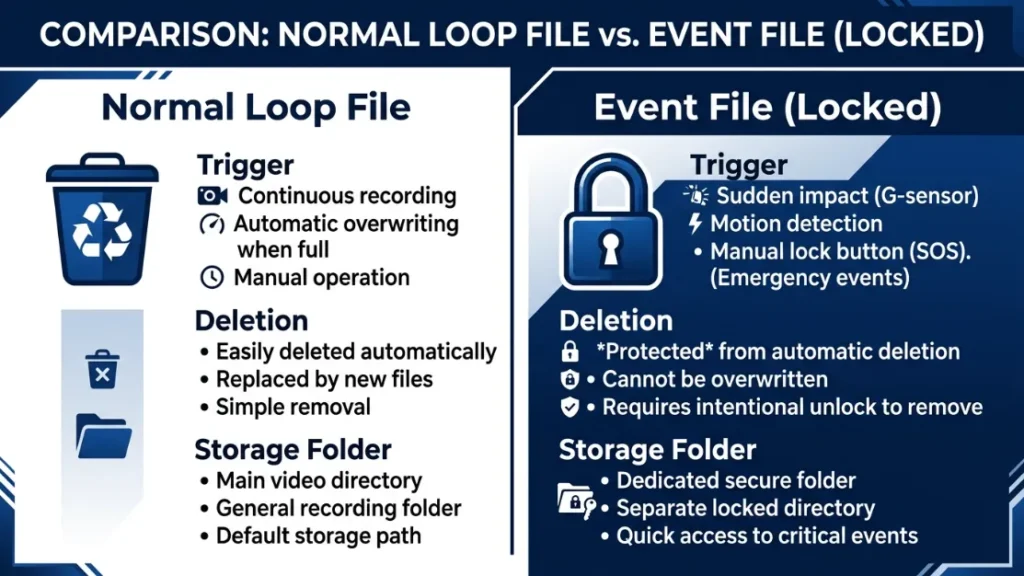
Normal loop files — the everyday driving footage — are fair game for deletion. Event files — clips where the G-sensor detected a jolt or impact — are locked and protected from the loop. They sit in a separate folder and will not be overwritten unless you delete them manually.
If your memory card fills up with too many locked event files, the camera may stop recording entirely. Check your event folder regularly and delete clips you no longer need.
This is one of the most common reasons drivers find gaps in their footage. The camera was not broken — the card was full of old locked files with nowhere to write new ones.
How Does a Dash Cam Know What Footage to Save and What to Delete?
A dash cam uses a built-in G-sensor — a small accelerometer — to detect sudden changes in speed or force, and automatically locks any clip recorded during that event so it cannot be overwritten by the recording loop.
This is the intelligence at the heart of every modern dash cam. The camera is not just recording blindly. It is constantly monitoring the forces acting on the vehicle.
When it detects something unusual — a hard brake, a collision, a sharp swerve — it flags that clip immediately. That footage moves to a protected folder and stays there, safe from the loop.
What Is a G-Sensor and How Does It Lock Important Clips Automatically?
A G-sensor (gravitational force sensor) measures the physical forces acting on the dash cam in three axes — forward/backward, left/right, and up/down — and triggers an automatic file lock when those forces exceed a set threshold.
Most cameras set the G-sensor sensitivity on a scale from low to high. Here is what each level means:
- Low sensitivity — only locks files during significant impacts, like a collision
- Medium sensitivity — locks files during hard braking and sharp corners too
- High sensitivity — locks files during almost any bump, including speed bumps and potholes
High sensitivity sounds better — but it creates a problem. Every speed bump locks a clip. Your event folder fills up fast. And as we just covered, a full event folder can stop your camera from recording new footage.
Start with medium G-sensor sensitivity. Test it for a week on your normal routes. If you are getting too many false event locks on rough roads, dial it back to low.
What Is the Difference Between an Event File and a Normal Loop File?
A normal loop file is standard driving footage that gets overwritten automatically as the memory card fills up. An event file is a locked clip triggered by the G-sensor or a manual button press, stored separately and protected from the recording loop.
Here is a side-by-side comparison:
| Feature | Normal Loop File | Event File (Locked) |
|---|---|---|
| Triggered by | Continuous recording | G-sensor or manual button |
| Gets overwritten? | Yes — automatically | No — protected |
| Storage folder | Normal folder | Event / Emergency folder |
| Manual deletion needed? | No | Yes — you must delete it |
| Use for evidence? | Only if accessed quickly | Yes — stored long-term |
If you are ever in an incident, pressing the manual lock button immediately is a good habit. It protects the clip even if the impact did not trigger the G-sensor automatically.
Does a Dash Cam Record When the Car Is Turned Off — Parking Mode Explained
Yes — many dash cams can record when the engine is off using parking mode, which activates motion detection or impact detection to capture footage of anyone approaching, touching, or hitting your parked vehicle.
Parking mode is one of the most useful features on a modern dash cam. It turns your camera into a 24/7 security camera for your car.
Brands like BlackVue (a South Korean manufacturer known for always-on cloud recording) and Thinkware (another South Korean brand specializing in parking surveillance) have built their entire product lines around this feature. Their cameras can record in parking mode for hours — even days — depending on the power source.
There are three main types of parking mode recording:
- Motion detection — camera wakes up when movement enters the frame
- Impact detection — camera activates when the G-sensor detects a bump or hit
- Time-lapse — camera takes a low-resolution frame every few seconds to create a compressed record of what happened while you were away
What Power Source Does Parking Mode Need to Work Properly?
Parking mode requires a continuous power supply because the camera needs to stay on after the engine cuts out — standard 12V car sockets turn off with the ignition, so a dedicated power source is essential for parking mode to work.
Most dash cams get power from the cigarette lighter or 12V socket. When you turn off the engine, the socket cuts power. The camera shuts down. Parking mode never activates.
To run parking mode properly, you need one of two solutions: a hardwire kit or a battery pack.
Hardwire Kit vs Battery Pack — Which One Should You Use for Parking Mode?
A hardwire kit connects the dash cam directly to the car’s fuse box for constant low-power electricity, while a battery pack is a portable power bank that keeps the camera running independently — each suits a different driver and setup.
| Feature | Hardwire Kit | Battery Pack |
|---|---|---|
| Power source | Car fuse box | Built-in battery |
| Installation | Requires wiring (professional recommended) | Plug and play |
| Parking mode duration | Hours to days | Typically 12-24 hours |
| Battery drain risk | Low — has auto cut-off voltage protection | None — uses its own battery |
| Best for | Long-term, daily use | Occasional or rental cars |
A hardwire kit is the better long-term solution for most drivers. The Nextbase Hardwire Kit (compatible with the Nextbase 622GW and other Series 2 models) includes a voltage cutoff circuit that stops drawing power if the car battery drops below 11.6V — protecting you from a flat battery on a cold morning.
If you park in the same spot every night and want 24/7 coverage, invest in a hardwire kit. If you switch between cars or park in different locations, a battery pack gives you flexibility without wiring.
How Long Does Dash Cam Footage Actually Last Before It Gets Overwritten?
How long dash cam footage lasts before being overwritten depends entirely on your memory card size and your recording resolution — a 32GB card at 1080p typically holds around four to six hours of footage, while a 128GB card at the same resolution holds roughly 16 to 20 hours.
Most drivers assume their dash cam holds days of footage. In reality, it holds far less — and that gap matters if you need footage from yesterday’s commute.
Storage Time by Resolution and Card Size — Practical Reference Table
| Card Size | 1080p Full HD | 1440p Quad HD | 4K Ultra HD |
|---|---|---|---|
| 32GB | ~4–5 hours | ~2–3 hours | ~1–2 hours |
| 64GB | ~8–10 hours | ~5–6 hours | ~3–4 hours |
| 128GB | ~16–20 hours | ~10–12 hours | ~6–8 hours |
| 256GB | ~32–40 hours | ~20–24 hours | ~12–16 hours |
These are approximate figures. Actual storage varies by camera brand, bitrate settings, and whether HDR or GPS data is being recorded alongside video.
For most commuters driving one to two hours a day, a 64GB card at 1080p is plenty. For dual-channel cameras (front and rear recording simultaneously), double the card size — the rear camera adds roughly the same data as the front.
Your dash cam stores only the most recent footage. Once the card is full, older clips are deleted automatically to make room. The only way to keep footage long-term is to lock it via the G-sensor event feature — or copy it off the card manually before it is overwritten.
Does Running a Dash Cam All the Time Drain Your Car Battery?
A dash cam running while the engine is on does not drain the car battery — the alternator is recharging the battery continuously during driving, and a standard dash cam draws only around 200 to 500 milliamps, which is negligible compared to your car’s electrical system.
The battery drain concern is valid — but only in parking mode, and only without the right setup.
Here is the reality. A typical car battery holds around 45 to 60 amp-hours of charge. A dash cam in parking mode draws roughly 100 to 200 milliamps. Left running without a voltage cutoff, a dash cam could drain a healthy battery in 10 to 25 hours.
This is exactly why hardwire kits include a low-voltage cutoff circuit. When the battery drops below a safe threshold — usually between 11.6V and 12V — the kit cuts power to the camera automatically. Your car always has enough charge to start.
Never run parking mode from a standard 12V socket without a voltage protection device. Older or smaller batteries drain faster than you expect — especially in cold weather when battery performance drops significantly.
If your battery is more than three years old, parking mode overnight can be risky even with a hardwire kit. A battery health check is worth doing before committing to extended parking mode recording.
Do Dash Cams Record Audio as Well as Video — All the Time?
Most dash cams record audio continuously alongside video using a built-in microphone — capturing everything said inside the vehicle during the entire drive, which raises important privacy considerations depending on where you live.
Audio recording is on by default on most cameras. Brands like Vantrue (a US-based dash cam manufacturer popular for interior and cabin recording) and Garmin (whose Dash Cam series includes clear in-cabin audio capture) both enable this out of the box.
You can disable audio recording in the camera’s settings menu. This saves a small amount of storage and addresses privacy concerns if you regularly carry passengers.
In the United States, audio recording laws vary by state. Some states — including California, Florida, and Illinois — require all parties in a conversation to consent to being recorded. Recording passengers without their knowledge in those states may create legal complications.
In the United Kingdom, dash cam audio recording is legal under current guidelines, but the Nextbase legal guidance page recommends informing passengers that the vehicle has a recording device active.
The safest approach is to inform anyone entering your vehicle that you have a dash cam running — audio and video included.
Can You Recover Dash Cam Footage After It Has Been Overwritten?
No — once dash cam footage has been overwritten by the loop recording cycle, it cannot be recovered. The data is permanently erased when the new clip is written in its place, leaving no recoverable file on the memory card.
This is different from accidentally deleted files on a computer, where the data may still exist until overwritten. With loop recording, the old data is physically replaced, not just marked as deleted.
Some data recovery tools claim to retrieve dash cam footage — but in practice, loop-overwritten files are gone. Do not rely on recovery software as a safety net.
The only reliable protection is acting before overwrite happens. Here is what that means practically:
- After any incident, pull over safely and press the manual lock button immediately
- Copy important clips to a phone or laptop as soon as possible after arriving home
- Use the companion app (available with most Nextbase and BlackVue models) to transfer clips wirelessly
- Check your event folder weekly and download anything important to permanent storage
The golden rule of dash cam footage: if it matters, save it today. Tomorrow it might already be gone. Your loop recording is not an archive — it is a short window of protection.
Do Cloud Dash Cams Record Differently Than Standard Models?
Cloud-connected dash cams record in the same loop format locally — but they also upload flagged clips to a remote server in real time, giving you access to footage from anywhere via a smartphone app even if the local memory card is overwritten or the camera is stolen.
BlackVue is the most recognized name in cloud dash cams. Their DR970X-2CH model (a dual-channel 4K camera with built-in LTE) connects via a SIM card and uploads event clips automatically. If someone breaks into your car and steals the camera, the footage is already safe in the cloud.
Thinkware’s U1000 offers a similar approach with remote live view, so fleet managers can check any vehicle’s camera feed in real time from a web dashboard.
Cloud dash cams do have trade-offs. They are more expensive. They require a monthly data plan. And upload speed depends on your mobile network signal.
For most private drivers, a standard dash cam with a large memory card is sufficient. For fleet operators, delivery drivers, or anyone regularly parking in high-risk areas, cloud recording offers a level of protection no standard camera can match. BlackVue’s cloud platform overview explains how their live streaming and remote access features work in more detail.
If you run a small fleet or frequently park an expensive vehicle in unfamiliar areas, a cloud-connected dash cam like the BlackVue DR970X or Thinkware U1000 is worth the subscription cost. The peace of mind alone justifies it.
Conclusion
Dash cams do record all the time — but not in the way most people imagine. They record in a smart, continuous loop that manages itself, protects what matters, and quietly discards what you no longer need.
The key things to remember: your footage window is shorter than you think, your G-sensor is your best friend after an incident, and parking mode needs the right power setup to actually work overnight.
I’m Alex Rahman, and the biggest mistake I see from new dash cam owners is assuming the camera is handling everything automatically. It mostly is — but you still need to check your event folder, manage your memory card, and act fast when something important happens on the road.
Set it up right once, understand how it works, and your dash cam will protect you reliably for years. If you want to go deeper on choosing the right camera for your setup, Which? magazine’s tested dash cam rankings are a solid independent starting point.
Frequently Asked Questions
Does a dash cam record when the car is parked and the engine is off?
Yes — if your dash cam supports parking mode and has a continuous power source like a hardwire kit or battery pack. Without a constant power supply, the camera shuts off when the engine stops and cannot record anything until you start driving again.
How long does dash cam footage stay on the memory card before being deleted?
It depends on your card size and recording resolution. A 64GB card at 1080p holds roughly 8 to 10 hours of footage before the loop overwrites the oldest clips. Event files are locked and stay until you delete them manually.
Will my dash cam drain my car battery if I leave it on overnight?
In parking mode without a voltage cutoff device, yes — a dash cam can drain a car battery overnight. A hardwire kit with a built-in low-voltage cutoff prevents this by switching off the camera when the battery drops below a safe level, typically around 11.6 to 12 volts.
Can I recover dash cam footage that has already been overwritten?
No. Once loop recording overwrites a file, that footage is permanently gone. Data recovery tools are not effective for loop-overwritten dash cam clips. The only way to keep important footage is to lock it immediately after an event or copy it to another device before the loop reaches it.
Does a dash cam record audio as well as video while driving?
Most dash cams record audio continuously by default using a built-in microphone. You can disable this in the camera settings. Audio recording laws vary by country and US state — in two-party consent states like California, recording passengers without their knowledge may raise legal issues.
What is the difference between a standard dash cam and a cloud dash cam?
A standard dash cam saves footage only to the local memory card. A cloud dash cam — like those from BlackVue or Thinkware — also uploads event clips to a remote server via mobile data, letting you access footage remotely even if the camera is stolen or the card is overwritten.

I’m Alex Rahman, a car enthusiast and automotive writer focused on practical solutions, car tools, and real-world driving advice. I share simple and honest content to help everyday drivers make better decisions.
