What Are 5 Common Mistakes to Avoid When Using a Dashcam?
The most common dashcam mistakes include poor placement, using low-quality SD cards, wrong settings, skipping maintenance, and ignoring laws. These errors can cause lost or unusable footage. Fixing them ensures your dashcam records clearly and reliably when you need it most.
I once checked my dashcam after a close call on the road. The footage was useless. The angle was wrong. The file was corrupted. That moment taught me a hard lesson.
I’m Alex Rahman, and I help drivers use tech smarter and safer every day. A dashcam can protect you, but only if you use it right.
Many drivers trust their dash camera without checking it. That trust can fail at the worst time. Let’s fix that before it happens to you.
- Wrong placement leads to blocked or shaky footage.
- Cheap SD cards often fail and corrupt important videos.
- Bad settings can miss key moments or reduce clarity.
- Skipping maintenance causes silent recording failures.
Why Do Dashcam Mistakes Matter More Than You Think?
Dashcam mistakes matter because even small errors can stop your camera from recording clear, usable footage during critical moments, which means you lose proof in accidents, disputes, or insurance claims when you need it most.
A dashcam works as your silent witness. Brands like Nextbase and Garmin design them to capture every detail. But user mistakes often break that promise.
Rule: A dashcam only helps if it records correctly every time.
If your setup fails, you lose evidence. That can affect insurance claims or legal cases. You can learn more about safe driving evidence from official road safety guidelines.
Now, let’s look at the most common mistakes and how to fix them.
Small mistakes can make your dashcam useless. Fixing them ensures reliable proof and peace of mind while driving.
What Happens When You Place Your Dashcam in the Wrong Position?
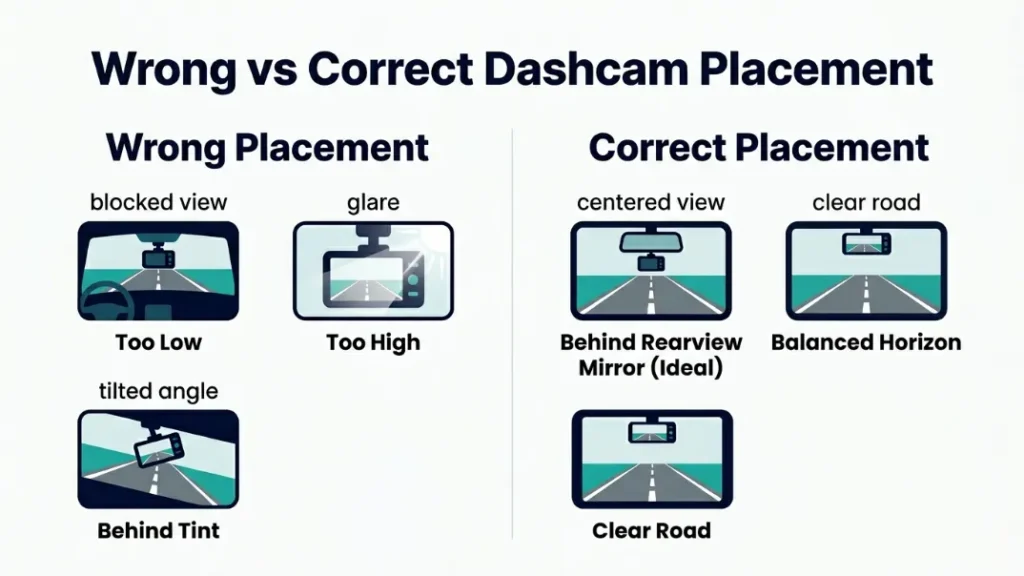
Wrong dashcam placement can block your view, miss key angles, or create glare, which leads to incomplete or unusable footage during accidents or incidents.
Many drivers mount their camera too low or too high. Some place it behind tinted glass. Others block it with stickers or mirrors.
Rule: Your camera must capture the full road clearly without obstruction.
Where Should You Mount Your Dashcam for Best Results?
The best position is near the center of your windshield, just below the rearview mirror. This spot gives a balanced and clear road view.
- Clean your windshield area before mounting.
- Place the dashcam behind the rearview mirror.
- Adjust angle to capture both road and horizon.
- Check footage preview before final fixing.
Test your camera during daytime and nighttime to ensure clear visibility.
Next, let’s talk about a hidden issue many drivers ignore.
Why Using a Cheap or Wrong SD Card Can Ruin Your Footage?
Using a low-quality or incompatible SD card can cause recording failures, corrupted files, or missing footage, especially during long drives or high-resolution recording.
Dashcams record continuously. That puts heavy stress on memory cards. Regular cards cannot handle this load.
Rule: Always use high-endurance SD cards designed for dashcams.
What Type of Memory Card Works Best for Dashcams?
High-endurance cards from trusted brands work best. These cards support constant writing without failure.
- 32GB to 128GB capacity for daily use
- Class 10 or UHS-I speed rating
- Heat-resistant design for hot climates
Brands like Garmin recommend endurance cards for their devices. You can check memory guidelines from SD Association standards.
Cheap SD cards may fail without warning and erase important evidence.
Let’s move to another mistake that silently ruins recordings.
Are Your Dashcam Settings Causing You to Miss Important Moments?
Incorrect dashcam settings can reduce video clarity, fail to capture key events, or overwrite important clips too quickly, making your footage unreliable when you need it most.
Many users never change default settings. That leads to poor quality or missed details.
Rule: Optimize settings for clarity, storage, and event detection.
What Are the Best Settings for Clear and Reliable Recording?
Use balanced settings that ensure clarity without filling storage too fast.
- Resolution: 1080p or higher
- Loop recording: enabled
- G-sensor: medium sensitivity
- Exposure: adjusted for lighting
Review sample clips weekly to ensure your settings work in real conditions.
Now, let’s look at a mistake that most drivers never notice.
Why Ignoring Maintenance Can Lead to Silent Dashcam Failure?
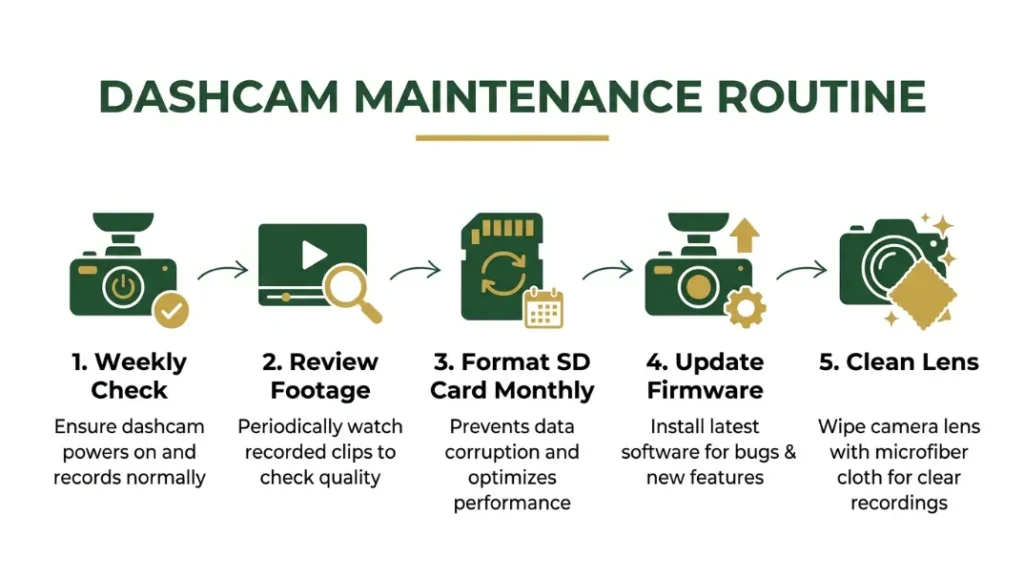
Skipping regular maintenance can cause silent dashcam failure where the device appears on but stops recording, leading to missing footage without any warning signs.
This issue happens more than people think. Heat, dust, and storage errors build over time.
Rule: Treat your dashcam like any critical device. Check it often.
How Often Should You Check and Maintain Your Dashcam?
You should check your dashcam at least once a week and perform full maintenance monthly.
- Check if the camera powers on properly.
- Review recent footage for errors or gaps.
- Format the SD card once per month.
- Update firmware if available.
A dashcam can fail silently for weeks. You may never know until it’s too late.
Next, let’s explore a mistake that can cause legal trouble.
Can You Get in Trouble for Using a Dashcam Legally?
Yes, you can face legal issues if you use a dashcam without following local laws, especially regarding privacy, audio recording, and sharing footage publicly.
Different countries have different rules. For example, United Kingdom road laws allow dashcams but restrict misuse of footage.
Rule: Know your local laws before recording or sharing videos.
What Are the Key Dashcam Laws You Should Know?
Here are the most common legal points to follow:
- Do not block driver view with your camera
- Avoid recording private property without consent
- Be careful when sharing videos online
You can review general privacy principles from GDPR guidelines.
Posting dashcam footage online without consent may lead to legal issues.
Let’s bring everything together with simple actions.
How Can You Avoid All These Dashcam Mistakes Easily?
You can avoid all common dashcam mistakes by following simple setup, maintenance, and usage habits that ensure consistent recording and legal compliance every time you drive.
Most problems come from neglect, not technology. Fixing them is simple.
- Install your dashcam in the correct position.
- Use a high-endurance SD card.
- Adjust settings for clarity and storage balance.
- Check your camera weekly.
- Follow local recording laws.
Follow these steps, and your dashcam will work when it matters most.
Final Thoughts: Are You Using Your Dashcam the Right Way?
Most drivers make at least one dashcam mistake, but fixing these five issues can turn your device into a reliable safety tool that captures clear and useful footage every time you drive.
Small fixes create big results. You do not need expensive gear. You need correct habits.
I’m Alex Rahman, and I always say this: a dashcam is only as good as how you use it.
Take five minutes today and check your setup. Future you will thank you.
Frequently Asked Questions
What are the most common dashcam mistakes?
The most common mistakes include wrong placement, poor SD cards, bad settings, lack of maintenance, and ignoring laws. These issues can cause missing or unusable footage.
Why is my dashcam not recording properly?
Your dashcam may fail due to a faulty SD card, incorrect settings, or overheating. Regular checks help prevent this problem.
How should I place my dashcam?
Place your dashcam near the center of the windshield, behind the rearview mirror. This position gives the best road view.
Can a bad SD card affect dashcam recording?
Yes, a low-quality SD card can corrupt files or stop recording. Always use high-endurance cards for reliable performance.
How often should I check my dashcam?
You should check your dashcam weekly and review footage regularly. Monthly maintenance ensures long-term reliability.
Is it illegal to use a dashcam?
Using a dashcam is legal in many places, but rules vary. You must follow privacy and recording laws in your region.

I’m Alex Rahman, a car enthusiast and automotive writer focused on practical solutions, car tools, and real-world driving advice. I share simple and honest content to help everyday drivers make better decisions.
