Do Dash Cams Need Wi-Fi, Bluetooth, or a Subscription to Work?
No — most dash cams do not need Wi-Fi, Bluetooth, or a subscription to record. They save footage directly to an SD card and work the moment you plug them in. Wi-Fi and Bluetooth add convenience. Subscriptions only apply to 4G cloud-connected models.
I remember the first time I bought a dash cam. I stared at the box for ten minutes wondering if I needed to set up an account, connect it to my router, or pay a monthly fee just to get it recording. I’m Alex Rahman, and I’ve tested and reviewed dash cams for years — and I still hear this question every week.
The confusion is real. Some dash cams come loaded with Wi-Fi, Bluetooth, and app features. Others have zero wireless tech. And a handful require a subscription to unlock their best features. So how do you know what you actually need?
By the end of this guide, you’ll know exactly what each connectivity type does, which features cost money, and how to choose the right dash cam setup for your driving life — without paying for anything you don’t use.
- Most dash cams record to an SD card with zero internet or wireless connection required.
- Wi-Fi lets you transfer footage to your phone wirelessly — it is a convenience feature, not a necessity.
- Bluetooth connects your dash cam to a mobile app for basic controls and alerts.
- Subscriptions are only required on 4G/LTE cloud dash cams for live streaming and remote access.
- You can get excellent dash cam protection without spending a single dollar on monthly fees.
What Does a Dash Cam Actually Need to Record Footage?
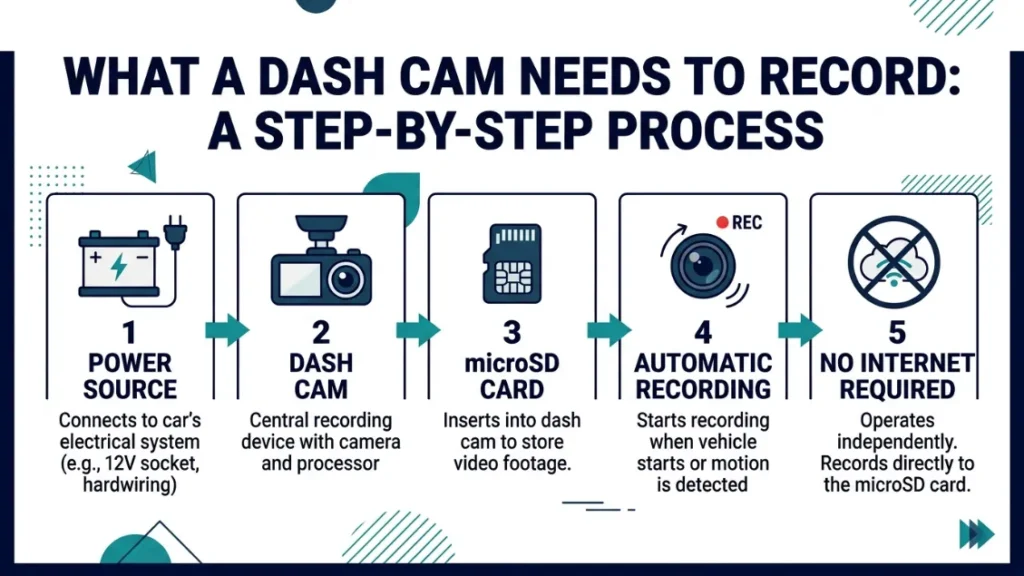
A dash cam needs just two things to record: power from your car and a memory card to save footage. That is it. No internet. No phone. No app. No account. Plug it into your 12V socket or hardwire it to your fuse box, insert a microSD card, and it records automatically every time you drive.
This surprises a lot of people — especially after seeing how app-heavy some modern models look. But the core function of every dash cam, from a $30 budget unit to a $400 premium model, is the same: record what happens in front of your car and save it to a card.
Wireless features like Wi-Fi and Bluetooth are layered on top of that core. They make your life easier. They are not the engine.
How Loop Recording Works Without Any Internet Connection
Loop recording is the feature that keeps a dash cam recording forever without you lifting a finger — and it needs zero connectivity to work. When your SD card fills up, the camera deletes the oldest footage and records over it. Your most recent hours of driving are always saved.
A standard 32GB card holds roughly 3 to 4 hours of 1080p footage. A 64GB card doubles that. The dash cam manages all of this on its own. No cloud upload needed. No internet check. No subscription required.
Use a high-endurance microSD card rated for dash cam use — brands like Samsung Pro Endurance or SanDisk High Endurance handle the constant write cycles far better than standard cards.
What Happens If You Never Connect Your Dash Cam to Wi-Fi?
Nothing bad happens. Your dash cam records every trip, saves the footage, and protects it with incident detection — all without a single wireless signal. The only limitation is how you access your footage. Without Wi-Fi, you pull the SD card out, plug it into a computer, and copy the files manually.
For most everyday drivers, that is perfectly fine. You only need footage after an accident — and that happens rarely. A quick card swap every few weeks to back up important clips is all the maintenance most people do.
What Does Wi-Fi Do on a Dash Cam and Do You Really Need It?
Wi-Fi on a dash cam creates a direct hotspot between the camera and your smartphone. It lets you view live footage, download clips, and adjust settings — all from the dash cam’s companion app, without removing the SD card. It does not connect your dash cam to your home router or the internet.
This is one of the biggest misunderstandings I see. Dash cam Wi-Fi is a device-to-phone connection — a local link, not a home network connection. Your dash cam is not uploading footage to the cloud just because it has Wi-Fi. It is only talking to your phone when you open the app.
How Dash Cam Wi-Fi Transfers Files to Your Phone
When you open the companion app — Vantrue’s app, Nextbase’s MyNextbase Connect, or Garmin’s Drive app — your phone connects directly to the dash cam’s Wi-Fi signal. You browse your recorded clips inside the app, tap the ones you want, and download them to your camera roll. No cables. No card reader. No computer needed.
This is genuinely useful if you need to share a clip quickly — for an insurance claim or to send to police. What used to take ten minutes with a card reader now takes under two minutes with Wi-Fi.
- Open your dash cam’s companion app on your smartphone.
- Enable Wi-Fi on your phone — the dash cam broadcasts its own hotspot signal.
- Connect your phone to the dash cam’s Wi-Fi network in your phone settings.
- Return to the app — it will load your recorded footage list automatically.
- Select the clip you want and tap download to save it to your phone.
Can You Update Dash Cam Firmware Without Wi-Fi?
Yes. Every major dash cam brand offers firmware updates via SD card — you download the update file to your computer, copy it onto the card, insert it into the dash cam, and the camera installs it automatically. Wi-Fi makes this slightly faster on models like the Garmin Dash Cam 67W, but it is never the only option.
What Does Bluetooth Do on a Dash Cam and Is It Worth Having?
Bluetooth on a dash cam handles low-data tasks — pairing with your phone for app setup, sending alert notifications, and enabling voice commands on models like the Nextbase 622GW with built-in Alexa. It uses far less power than Wi-Fi and stays connected passively in the background.
Think of Bluetooth as the always-on background link and Wi-Fi as the on-demand file transfer link. Most dash cams that have both use Bluetooth to stay connected to your phone app and switch to Wi-Fi only when you need to download footage.
How Bluetooth Connects Your Dash Cam to a Mobile App
Pair your dash cam to your phone once through the app’s setup process. After that, Bluetooth keeps the two devices linked passively. You receive incident alerts on your phone, can trigger emergency recording with a tap, and get notified if the dash cam detects a collision while parked — all over Bluetooth without launching the app manually.
Nextbase (a UK-based dash cam brand trusted by drivers across 70 countries) uses Bluetooth as the backbone of their smart ecosystem. Their 622GW pairs via Bluetooth first, then upgrades to Wi-Fi for clip downloads automatically — so the handoff is seamless.
Bluetooth vs Wi-Fi on a Dash Cam — What Is the Real Difference?
| Feature | Bluetooth | Wi-Fi |
|---|---|---|
| Connection Type | Background, always-on | On-demand, high speed |
| Best For | Alerts, app pairing, voice control | File transfer, live view, settings |
| Speed | Slow — small data only | Fast — video transfer ready |
| Range | ~10 metres | ~10–15 metres |
| Power Use | Very low | Moderate |
Do Dash Cams Use Mobile Data or Need a SIM Card to Work?
Standard dash cams do not use mobile data or need a SIM card. Only 4G/LTE dash cams — a specific category designed for fleet tracking and remote monitoring — require a SIM and a data plan. If your dash cam does not have a SIM card slot, it will never consume mobile data.
This matters because some buyers worry their dash cam silently runs up a data bill in the background. That cannot happen on a standard Wi-Fi or Bluetooth model. There is no cellular radio inside — so there is nothing to bill.
What Is a 4G LTE Dash Cam and Who Actually Needs One?
A 4G LTE dash cam contains a built-in cellular modem and SIM card slot. This lets it upload footage to the cloud in real time, stream live video to a remote viewer, and send GPS location data — all while the car drives down the road. BlackVue (a South Korean brand and pioneer of cloud dash cams) built their DR770X LTE series around this exact capability.
The honest answer: most private car owners do not need a 4G dash cam. This technology shines for:
- Fleet managers tracking multiple commercial vehicles
- Rideshare companies monitoring driver behaviour remotely
- Parents who want real-time location data on a teen driver
- Business owners protecting high-value vehicles overnight
How Much Does a 4G Dash Cam Subscription Cost?
BlackVue’s cloud service (BlackVue Cloud) runs from around $7.99 to $29.99 per month depending on storage tier and number of cameras as of 2024. Thinkware’s cloud plan sits in a similar range. These fees cover live GPS tracking, remote video access, and cloud storage beyond the local SD card.
Do not buy a 4G dash cam expecting to skip the subscription and still get full functionality. Without an active plan, features like live view, cloud backup, and remote alerts are disabled. The camera will still record locally — but that is all.
Do Dash Cams Require a Monthly Subscription to Function?
The vast majority of dash cams require no subscription — ever. They record, store, and replay footage completely free after your one-time purchase. Subscriptions only enter the picture with 4G cloud-connected models, and even then, the camera still records locally without a paid plan.
This is the single most important thing to check before buying. Look at the product listing and ask: does this camera have a SIM slot or a built-in cellular modem? If no, you will never pay a subscription fee.
Which Dash Cam Features Are Always Free?
- Loop recording — continuous SD card recording, always free
- G-sensor / incident detection — locks footage during a collision automatically
- Parking mode — records motion or impact while parked (hardwiring required)
- GPS speed and location logging — records your route data onto the card
- Wi-Fi file transfer — download clips to your phone, always free
- Night vision recording — sensor-based, no connectivity needed
- Lane departure and speed alerts — processed locally, no cloud required
Which Features Actually Require a Paid Subscription?
- Cloud video storage — footage uploaded and stored remotely
- Live remote video streaming — watch your car’s camera in real time from anywhere
- Remote GPS tracking — live location visible on a map from your phone
- Fleet management dashboards — multi-vehicle monitoring tools
- Crash notification alerts — automatic alert sent to a contact after an incident (4G models only)
If your dash cam has no SIM card slot, you will never pay a subscription. Every core recording feature — loop recording, incident lock, parking mode, GPS logging, and Wi-Fi transfer — is free forever. Subscriptions exist only on 4G cloud models and are optional even then for local recording.
Wi-Fi vs Bluetooth vs 4G vs No Connectivity — Which Dash Cam Type Fits You?
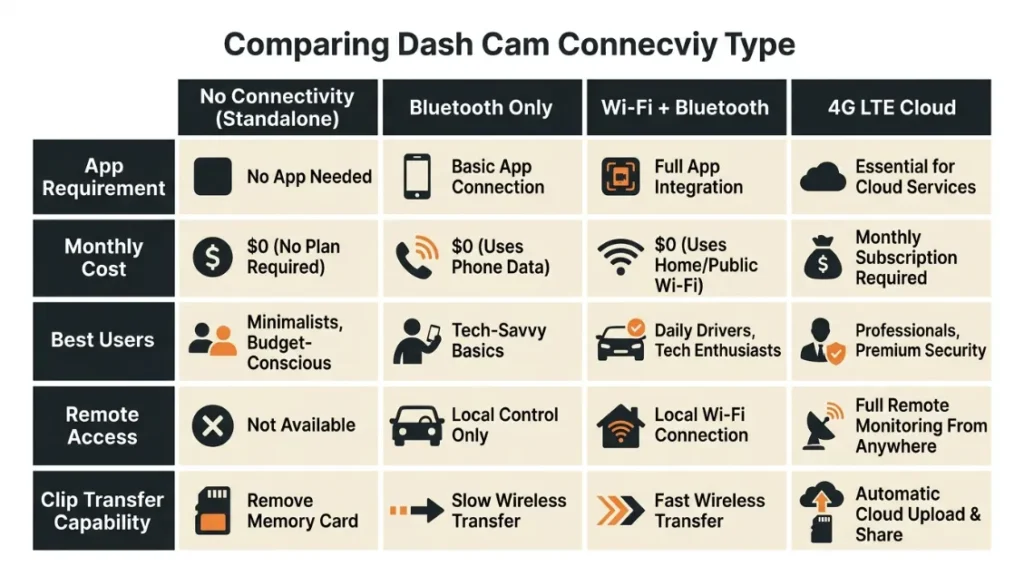
Choosing the right connectivity level comes down to how you plan to use your footage and how much you want to pay long-term. Here is a clear breakdown to help you decide.
| Connectivity Type | Best For | Ongoing Cost | App Required? |
|---|---|---|---|
| No Connectivity | Budget buyers, simple protection | Free forever | No |
| Bluetooth Only | App alerts, voice control, basic remote | Free forever | Yes |
| Wi-Fi + Bluetooth | Everyday drivers who want easy clip access | Free forever | Yes |
| 4G / LTE + Cloud | Fleet managers, remote monitoring | $8–$30/month | Yes |
The sweet spot for most drivers is a Wi-Fi and Bluetooth model with no subscription. You get wireless clip transfer, app control, and full recording features — all for a one-time camera cost with zero ongoing fees.
Which Dash Cam Brands Offer No-Subscription Models Worth Buying?
Several well-established brands build excellent dash cams with Wi-Fi and Bluetooth — and zero subscription fees. These are the names worth knowing.
Vantrue (a US-based brand popular among rideshare drivers and daily commuters) produces their E1 Lite and N4 Pro models with built-in Wi-Fi and a free companion app. No account required after setup. Every feature works offline.
Garmin — a brand millions trust for GPS navigation — brings the same reliability to their Dash Cam 67W and Mini 3 models. Wi-Fi firmware updates and the Garmin Drive app are both fully free. No subscription, no hidden fees.
Nextbase offers their full 322GW and 422GW range with Wi-Fi and Bluetooth included. Their MyNextbase Connect app is free and handles clip downloads, emergency contacts, and live view over the local Wi-Fi connection — not a cloud server.
Thinkware gives buyers a choice. Their U1000 and Q800PRO work perfectly with the free Thinkware app over Wi-Fi. Their cloud service is available as an add-on — but you never need it for the camera to function fully.
Check the product page for the words “SIM card slot” or “LTE” before purchasing. If you do not see them, the camera has no cellular radio — and you will never be charged a subscription fee.
For more detailed independent testing and comparisons, DashCamTalk and Techmoan’s YouTube reviews are two of the most trusted resources in the dash cam community.
Common Mistakes People Make About Dash Cam Connectivity
After years of answering dash cam questions, I keep seeing the same misunderstandings come up. Here are the ones worth clearing up before you buy.
Mistake 1: Assuming Wi-Fi means cloud upload. Dash cam Wi-Fi is a local hotspot — not a connection to your home network or the internet. Your footage stays on the SD card unless you manually download it through the app or own a 4G model.
Mistake 2: Thinking Bluetooth is required to record. Bluetooth is completely optional. Your dash cam records perfectly without it. Bluetooth only activates features that talk to your phone.
Mistake 3: Buying a 4G dash cam without budgeting for the plan. The camera price is just the start. A 4G dash cam without an active data subscription works like a standard SD-card model — you lose all the cloud features that made it worth buying.
Some newer dash cams require you to create an account to access the full app. Account creation is free — but read the privacy policy carefully. You are often granting the brand access to your video clips and location data for analytics purposes.
Mistake 4: Skipping the SD card on a “smart” dash cam. Even the most connected 4G cloud dash cam needs an SD card. Cloud upload is a backup — the primary recording always goes to the local card. Running without one means no footage is saved at all.
Mistake 5: Expecting Wi-Fi to work at long range. Dash cam Wi-Fi signals typically reach 10 to 15 metres. You need to be near the vehicle — ideally inside or standing beside it — to connect through the app. It is not a remote access tool.
For a trustworthy breakdown of data privacy practices across dash cam brands, the FTC’s guidance on connected device privacy is a useful starting point.
Conclusion
Here is the simple truth: your dash cam does not need Wi-Fi, Bluetooth, or a subscription to protect you on the road. It needs power, an SD card, and a clear view through your windscreen. Everything else is a bonus.
Wi-Fi makes it faster to grab a clip after an accident. Bluetooth keeps your phone app in the loop. And a 4G subscription opens up remote monitoring for those who genuinely need it — like fleet managers or parents tracking new drivers. But for the everyday driver? The core recording is completely free, completely offline, and completely reliable from day one.
I’m Alex Rahman, and the advice I give everyone is the same: decide which features you will actually use before you spend a penny on connectivity upgrades. A $80 no-Wi-Fi dash cam that records crystal-clear 1080p footage is worth more than a $300 cloud model you never configure properly.
Pick the right tool for your real driving life — and let the camera do the rest.
Frequently Asked Questions

I’m Alex Rahman, a car enthusiast and automotive writer focused on practical solutions, car tools, and real-world driving advice. I share simple and honest content to help everyday drivers make better decisions.
