How Much Should You Pay for a Dashcam? (A Buyer’s Guide by Price Tier)
A dashcam typically costs between $30 and $400. Budget models ($30–$80) cover the basics. Mid-range cameras ($80–$200) add GPS, better night vision, and Wi-Fi. Premium models ($200+) deliver 4K video, dual cameras, and parking mode. For most drivers, spending $80 to $150 hits the sweet spot between quality and value.
A few years ago, I watched a friend lose a minor insurance dispute. The other driver said he ran a red light. My friend said he didn’t. Neither had proof. The claim cost him $900 out of pocket.
He bought a dashcam the next day. So did I.
The problem? Walking into that purchase without a clue. The price range is wild — $25 to $500 for what looks like the same little black box on a windshield. I’m Alex Rahman, and after testing and researching dashcams for years, I can tell you exactly what you’re paying for at every price point.
This guide breaks it all down — no fluff, no guesswork. By the end, you’ll know exactly how much to spend and why.
- Most drivers get everything they need from a dashcam priced between $80 and $150.
- Budget cams under $50 record basic footage but often fail at night and lack GPS.
- Premium cams over $200 are worth it for 4K resolution, dual cameras, or parking mode users.
- The real cost includes a microSD card ($10–$30) and possibly a hardwire kit ($15–$40).
- Some insurers offer discounts of 5–15% for dashcam owners — check before you buy.
What Is a Dashcam and Why Does the Price Vary So Much?
A dashcam is a small camera that mounts to your windshield and records everything in front of your car while you drive. It runs on loop recording — automatically overwriting old footage — so your card never fills up. Most models activate the moment you start your engine.
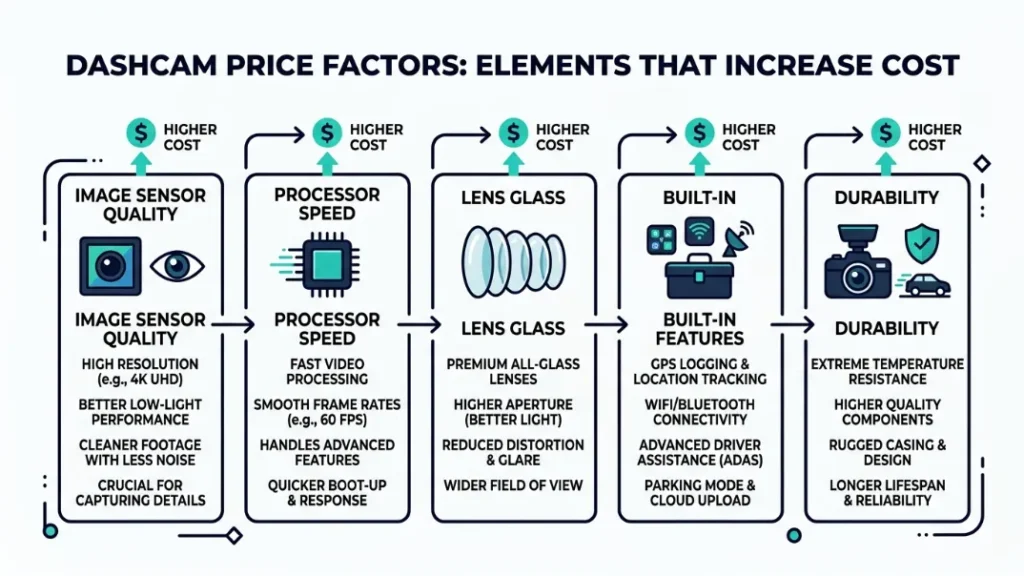
The price gap between a $30 model and a $350 model isn’t marketing. It reflects real differences in the image sensor quality, processor speed, lens glass, built-in features, and build durability. A cheap camera uses a small, basic sensor that struggles in low light. A premium camera uses a Sony or Sony-class sensor that captures clear plates even at night.
Beyond the hardware, price also reflects features — GPS logging, Wi-Fi for phone transfers, parking surveillance mode, and dual-channel recording (front and rear simultaneously). Each feature adds cost.
What Features Drive the Price of a Dashcam Up?
Six things push a dashcam’s price higher. Knowing them helps you decide what you actually need.
- Resolution: Moving from 1080p to 1440p or 4K increases sensor and processor cost significantly.
- Night vision quality: Better low-light performance requires a larger aperture lens and a more sensitive image sensor — both expensive.
- GPS: Embeds speed and location data into every frame. Adds $10–$30 to manufacturing cost.
- Wi-Fi and app connectivity: Lets you pull footage to your phone wirelessly. Convenient but adds cost.
- Parking mode: Records impacts while your car is parked and switched off. Requires either a large capacitor or battery buffer, plus hardwire capability.
- Dual-channel (front + rear): Two cameras, two lenses, one processor. Nearly doubles the hardware cost.
What Features Come Standard Even on Cheap Dashcams?
Even the most affordable dashcams include a handful of core features. You shouldn’t pay extra for these — they’re table stakes.
- 1080p Full HD recording (on any reputable brand after 2020)
- Loop recording — automatic overwriting when the card fills
- G-sensor — detects impacts and locks footage from deletion
- Wide-angle lens — usually 120° to 140°
- Timestamp overlay on footage
If a dashcam doesn’t offer these five at any price, skip it.
How Much Does a Budget Dashcam Cost — and Is It Good Enough?
Budget dashcams cost between $30 and $80 and handle the core job — recording daytime footage of the road ahead. They record in 1080p, have a G-sensor, and loop automatically. Where they fall short is night vision quality, build longevity, and the absence of GPS or Wi-Fi.
At this price, you’re buying basic protection. If someone rear-ends you in broad daylight, a $40 camera can absolutely save you in a dispute. But in a dark car park at 11pm, the footage may be too grainy to read a license plate.
If you go budget, stick to known brands like Viofo or Garmin’s entry-level lines rather than unbranded options from marketplace sellers. Unknown brands often ship with poor lenses regardless of the spec sheet claims.
What Do You Actually Get for $30 to $80?
| Feature | $30–$50 Range | $50–$80 Range |
|---|---|---|
| Resolution | 1080p (basic sensor) | 1080p (better sensor) |
| Night Vision | Poor to average | Average |
| GPS | No | Rarely |
| Wi-Fi | No | Occasionally |
| Parking Mode | No | No |
| Build Quality | Plastic, basic | Decent plastic |
When Does a Cheap Dashcam Make Sense for Your Situation?
A budget dashcam is the right call in three specific situations. First, you drive mostly during the day in well-lit areas. Second, you park in a private garage or low-risk spot overnight. Third, you simply want basic accident evidence without committing to more features.
If any of those match you, a $50–$70 dashcam from a reputable brand does the job. Don’t let anyone upsell you beyond your real needs.
What Does a Mid-Range Dashcam ($80–$200) Get You That Budget Cams Don’t?
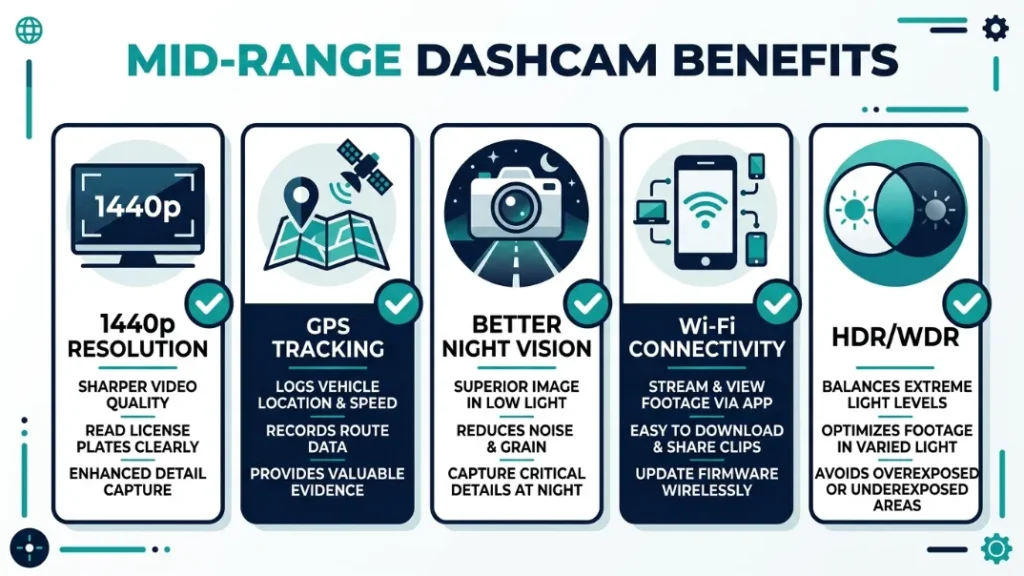
Mid-range dashcams ($80–$200) are where most drivers find genuine value — this tier delivers noticeably better night vision, built-in GPS, 1440p or entry-level 4K resolution, and often Wi-Fi app connectivity. These features aren’t luxuries — they’re the difference between useful evidence and useless blurry footage.
Brands like Viofo, Vantrue, and Nextbase dominate this range. Viofo’s A119 Mini 2, priced around $80–$100, consistently earns praise from dashcam enthusiasts for outperforming cameras twice its price. Nextbase’s 322GW (around $120–$140) adds built-in Alexa and excellent 1080p performance with GPS.
Which Mid-Range Features Are Worth Paying For?
Not every mid-range feature earns its price equally. Here’s what genuinely matters versus what’s nice but skippable.
- GPS — worth it. Embeds your speed and exact location into footage. In an insurance dispute, timestamped GPS data is powerful supporting evidence.
- 1440p resolution — worth it. The jump from 1080p to 1440p is clearly visible. License plates at distance become readable. Night footage improves meaningfully.
- Wi-Fi — nice, not essential. Useful for pulling clips to your phone without removing the card. Worth having if it’s included, but not worth chasing.
- HDR / WDR (Wide Dynamic Range) — worth it. Helps balance exposure when driving from dark tunnels into bright sunlight. Prevents blown-out white skies in footage.
Is the $100 to $150 Range the Sweet Spot for Most Drivers?
For most everyday drivers, yes — $100 to $150 is the ideal dashcam budget. At this price, you get solid 1440p or strong 1080p recording, GPS, decent night vision, and reliable brand support. You’re not paying for features you’ll never use.
The honest truth: A $120 camera from Viofo or Nextbase will handle 95% of real-world driving situations better than a $400 model handles them differently. Spend more only when you have a specific reason to.
Are Premium Dashcams ($200–$400+) Worth the Price — or Just Overkill?
Premium dashcams ($200–$400+) deliver 4K front recording, high-quality rear cameras included in the box, advanced parking surveillance, and long-term build durability. They are not overkill for everyone — but they are for most casual drivers who park in safe locations and drive typical commuting distances.
Brands like Garmin (the Dash Cam 67W at ~$200), Thinkware (the U1000 at ~$300), and Nextbase’s 622GW (~$250) define this tier. The Nextbase 622GW, for instance, shoots 4K at 30fps, includes image stabilization, and features built-in Amazon Alexa — a level of polish you simply won’t find below $200.
What Justifies Spending Over $200 on a Dashcam?
Three real-world situations justify the premium price tag.
- You park on the street or in public car parks regularly. Parking mode surveillance is critical for you. Premium cameras handle this reliably; budget ones don’t offer it.
- You drive in low-light conditions frequently. Night driving on rural roads, early morning commutes, and winter driving all expose the limitations of cheaper sensors. 4K with a large aperture lens changes what you can see.
- You need front and rear coverage together. Many premium packages bundle a rear camera. Buying front and rear separately in the mid-range can cost the same as one premium dual-channel unit.
Which Drivers Actually Need a Premium Dashcam?
Rideshare drivers. People who park in busy urban areas. Drivers who commute long distances at night. Fleet managers buying for company vehicles. Anyone who has already been involved in one disputed claim and knows how much good footage matters.
If that’s not you, a mid-range camera does the job just as well for a fraction of the cost.
Some sellers list dashcams as “4K” when they use software upscaling rather than a true 4K sensor. Check that the native resolution — not the interpolated resolution — is 3840×2160 before buying at a premium price.
Front and Rear Dashcam vs. Front-Only — How Much More Should You Pay?
A front-and-rear dashcam system costs roughly $50 to $120 more than a front-only camera, depending on the rear camera quality included. Front-only cameras protect you from the most common claim scenario — a rear-end collision where someone hits you from behind. But a rear camera also catches tailgaters, protects you if you’re accused of reversing into someone, and records incidents behind you in a car park.
You have two buying paths for dual-channel coverage. The first: buy a dashcam that bundles a rear camera in the box (common in the $130–$250 range from brands like Vantrue and Thinkware). The second: buy a standalone front camera now and add a compatible rear camera later for $30–$80.
| Setup | Typical Cost | Best For |
|---|---|---|
| Front-only (budget) | $30–$80 | Drivers who park safely, daytime use |
| Front-only (mid-range) | $80–$200 | Most everyday drivers |
| Front + rear bundle | $130–$300 | Urban drivers, anyone worried about rear claims |
| Premium dual-channel | $250–$400+ | Night drivers, rideshare, street parkers |
Most drivers benefit from adding a rear camera. The extra $50–$80 for a bundled rear lens is almost always worth it — rear-end disputes are extremely common, and having that footage removes all ambiguity.
What Are the Hidden Costs of Owning a Dashcam Nobody Talks About?
The sticker price of a dashcam isn’t the full cost. Two additional purchases catch many buyers off guard: a microSD card and, for parking mode users, a hardwire kit. Budget for both before you buy.
Does a Dashcam Need a Memory Card — and How Much Does It Cost?
Yes — nearly all dashcams require a microSD card sold separately. Most cameras include no card in the box, or include a small low-quality card not suited for continuous recording. Dashcams need high-endurance microSD cards — regular cards wear out quickly under the heat and constant write cycles of loop recording.
Expect to spend $10–$30 on a quality card. The Samsung Pro Endurance microSD and SanDisk High Endurance series are purpose-built for dashcam use and widely recommended. For most cameras, a 64GB card ($15–$20) gives you 4 to 6 hours of footage before loop recording kicks in.
Never use a standard camera or phone microSD card in a dashcam long-term. They’re not rated for continuous read/write cycles and will fail within months, often corrupting footage silently.
What Does a Hardwire Kit Cost and Do You Need One?
A hardwire kit connects your dashcam directly to your car’s fuse box, enabling parking mode — the camera keeps recording motion or impacts even when the engine is off. Kits cost $15 to $40 and require a basic installation (DIY-friendly for most cars, or about $30–$60 at a car audio shop).
You only need a hardwire kit if your dashcam supports parking mode and you park in higher-risk locations. If you use the cigarette lighter adapter and turn off parking mode, no hardwire kit is needed.
Budget setup: $50 camera + $15 card = ~$65 total
Mid-range setup: $120 camera + $20 card = ~$140 total
Premium with parking mode: $250 camera + $25 card + $35 hardwire kit = ~$310 total
Can a Dashcam Actually Save You Money on Car Insurance?
Yes — some insurers offer discounts of 5% to 15% for policyholders who use dashcams, though this varies significantly by country and provider. In the UK, insurers like Adrian Flux explicitly offer dashcam-related discounts. In the US, the benefit is less standardized — discounts depend on your insurer and state.
Beyond listed discounts, the real financial value of a dashcam is in dispute resolution. A clear recording can prevent a fraudulent claim or a disputed at-fault decision — either of which would raise your premiums far more than the camera costs. One prevented false claim typically saves more than the camera’s entire purchase price.
According to the National Insurance Crime Bureau, staged accidents cost the US insurance industry over $200 million annually — and dashcam footage is increasingly cited in fraud investigations. For high-mileage drivers, the ROI on a good dashcam is clear.
Dashcam footage can work against you. If the camera captures you speeding, running a light, or using your phone while driving, that footage may be used as evidence in a claim or legal case. Drive as if your camera is always watching — because it is.
Which Price Tier Is Right for You? (Quick Decision Guide)
Use this simple framework to find your ideal dashcam budget based on your actual situation — not the most expensive option available.
- Do you park on the street or in public car parks? If yes — budget at least $150 and add a hardwire kit for parking mode.
- Do you drive frequently at night or in low-light conditions? If yes — skip the budget tier. Spend $100–$150 minimum for a decent night sensor.
- Do you want rear coverage? If yes — look for front-and-rear bundle cameras in the $130–$250 range.
- Is this purely for accident evidence during daytime driving? If yes — a solid $60–$80 camera does this job well.
- Are you a rideshare driver or high-mileage professional driver? If yes — invest in a $200+ model with interior cabin recording capability.
| Driver Type | Recommended Budget | Key Features to Prioritize |
|---|---|---|
| Occasional driver, garage parker | $50–$80 | 1080p, G-sensor, loop recording |
| Daily commuter, mixed conditions | $100–$150 | 1440p, GPS, night vision, Wi-Fi |
| Urban driver, street parking | $150–$250 | Parking mode, dual-channel, 1440p+ |
| Night driver / long-haul commuter | $150–$300 | 4K or strong low-light sensor, dual-channel |
| Rideshare / professional driver | $200–$400 | Interior cabin cam, 4K, dual-channel, cloud |
The honest answer is this: most drivers fit the second or third row of that table. A $100–$150 camera covers the vast majority of real-world situations with room to spare.
I’ve used cameras at every tier. The gap between $60 and $120 is real and noticeable. The gap between $200 and $400 is much smaller for daily driving. Spend where it matters for your specific situation, then stop.
Frequently Asked Questions
The Bottom Line: What Should You Actually Pay?
Here’s what I tell anyone who asks me directly: spend $100 to $150 and buy from a brand with a track record. That range gets you everything that matters for everyday protection — solid resolution, GPS, dependable night vision, and a camera built to last.
Go cheaper only if your driving situation genuinely warrants it. Go premium only if parking mode, 4K, or rear coverage is a real need — not just a nice-to-have.
Add $15–$25 for a good microSD card no matter what tier you choose. That purchase is not optional.
A dashcam is insurance for your insurance. Spend what makes sense for your situation, mount it, forget it’s there, and let it work. I hope this breakdown — something I wish I’d had before my own first purchase — helps you make that call with confidence.
— Alex Rahman

I’m Alex Rahman, a car enthusiast and automotive writer focused on practical solutions, car tools, and real-world driving advice. I share simple and honest content to help everyday drivers make better decisions.
