Downside of a Dashcam: 7 Real Risks You Should Know
The main downsides of a dashcam include battery drain, heat-related hardware failure, SD card data loss, windshield obstruction, privacy law violations, and the risk that your own footage gets used against you in court. These risks are real — but most of them have straightforward fixes.
I bought my first dashcam after a parking lot hit-and-run left me with a $900 repair bill and zero proof. I was convinced a dashcam would fix everything.
It helped. But it also brought surprises I never expected — a dead battery on a winter morning, a corrupted SD card with no footage from the exact day I needed it, and a moment where I realized I had no idea if recording my passengers was even legal.
I’m Alex Rahman, and after years of researching and writing about car technology, I want to give you the honest picture. Dashcams are genuinely useful — but they come with real trade-offs that most buyers never hear about until something goes wrong.
Here is every significant downside of a dashcam, explained clearly, with a fix for each one.
- Dashcam parking mode can drain a car battery dead overnight if not hardwired correctly.
- Heat above 140°F (60°C) — common inside parked cars — destroys SD cards and corrupts footage.
- Your dashcam footage can be subpoenaed and used against you in civil or criminal court.
- Recording passengers without consent may violate two-party consent laws in 11 US states and GDPR in Europe.
- Cloud-connected dashcams carry data breach risk if the manufacturer’s servers are compromised.
What Exactly Is a Dashcam and Why Do People Overlook Its Risks?
A dashcam is a small video camera that mounts to your windshield or dashboard and records your drive continuously. Most models loop-record onto a microSD card, overwriting old footage when storage fills up.
The appeal is obvious. Dashcam sales grew by over 20% year-on-year between 2020 and 2023 according to market tracking firm IDC, driven largely by insurance fraud awareness and road rage incidents going viral online.
But the marketing almost always leads with benefits — accident proof, insurance protection, peace of mind. The downsides get buried in one-star Amazon reviews and Reddit threads. That is exactly the gap this article fills.
Understanding these risks does not mean avoiding dashcams. It means using them smarter.
Can a Dashcam Drain Your Car Battery and Leave You Stranded?
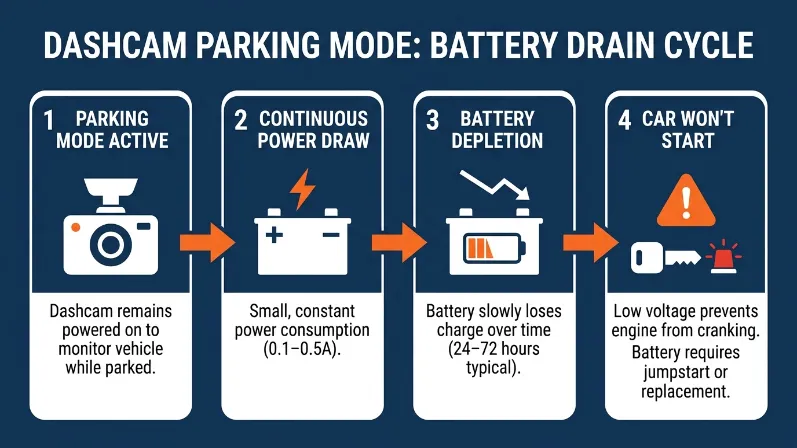
Yes, a dashcam can drain your car battery completely — especially when using parking mode, which keeps the camera recording while the engine is off. A dashcam in parking mode draws between 0.1 and 0.5 amps continuously, and most standard car batteries cannot sustain that load for more than 24 to 72 hours without the engine running to recharge them.
This caught me off guard the first time. I left my Nextbase 622GW in parking mode over a long weekend. By Sunday evening, my car would not start.
How Parking Mode Makes Battery Drain Worse
Parking mode is the feature that keeps your dashcam alive when the car is parked — watching for motion or impact events. It sounds perfect for catching someone who bumps your car in a lot.
The problem? Most dashcams in parking mode draw power directly from your car battery via the fuse box. Without a voltage cutoff, the camera keeps running until the battery hits zero. Cheaper models from brands like Vantrue and Thinkware offer voltage cutoffs, but they only protect down to 11.6 volts — and some batteries die before reaching that threshold in cold weather.
How to Use a Dashcam Without Killing Your Battery
- Install a hardwire kit with a voltage cutoff set to 12.0V or higher.
- Add a dedicated dashcam battery pack (like the Cellink Neo) that charges while you drive and powers parking mode independently.
- Set parking mode to a time limit — most dashcams allow 6-hour or 12-hour caps in the settings menu.
- If battery packs feel like too much, disable parking mode entirely and accept the trade-off.
A dedicated dashcam battery pack costs $80 to $150 and pays for itself the first time it saves your main car battery from going flat.
Why Do Dashcams Fail in Hot Weather — and Lose Your Footage?
Dashcams are heat-sensitive devices mounted behind glass in direct sunlight — one of the worst possible environments for electronics. Interior car temperatures in summer regularly hit 160°F to 180°F (71°C to 82°C), well above the operating limit of most dashcam components, which typically cap out around 140°F (60°C).
When a dashcam overheats, it does one of three things: it shuts down automatically, it records corrupted files, or it permanently damages the lens coating and internal chipset.
How Heat Destroys SD Cards and Lenses
The SD card is the most vulnerable component. MicroSD cards — even high-endurance ones from brands like Samsung and SanDisk — degrade faster under repeated heat cycles. A card that works perfectly at room temperature may corrupt footage or stop writing entirely after a summer inside a parked car in Texas or Arizona.
Lens coatings are the second casualty. Direct sunlight through glass acts like a magnifier. Over time, the anti-glare and UV coatings on budget dashcam lenses bubble and peel, degrading image quality permanently.
What Temperature Range Is Safe for a Dashcam?
| Temperature | Effect on Dashcam | Risk Level |
|---|---|---|
| Below 32°F (0°C) | Battery capacity drops, slow startup | Low–Medium |
| 32°F to 104°F (0–40°C) | Normal operation | None |
| 104°F to 140°F (40–60°C) | Thermal throttling, reduced recording quality | Medium |
| Above 140°F (60°C) | Shutdown, data corruption, permanent damage | High |
The fix: Remove the dashcam when parking in direct sun for long periods. Use a capacitor-based model (like the Thinkware U1000) instead of a battery-based one — capacitors handle extreme heat far better than lithium cells.
Never leave a battery-powered dashcam in a hot car without removing it first. Lithium batteries exposed to sustained heat above 140°F can swell, leak, or in rare cases ignite.
Does a Dashcam on Your Windshield Block Your View and Distract You?
A dashcam mounted in the wrong spot on your windshield legally constitutes an obstruction in several US states and many countries. Even a well-placed dashcam — positioned behind the rearview mirror — creates a small but real visual blind spot, and the glowing LED recording indicator on many models pulls your eye off the road.
What NHTSA Says About Windshield Obstructions
The US National Highway Traffic Safety Administration (NHTSA) classifies anything mounted in a driver’s direct line of sight as a potential distraction. Several states — including California, New Jersey, and Pennsylvania — have specific laws restricting objects on windshields. In California, Vehicle Code Section 26708 restricts dashcam placement to a small zone in the lower-left corner or behind the rearview mirror.
Placing a dashcam in the center of your windshield — the instinct most new buyers follow — may technically be illegal in those states and could void your insurance coverage if you cause an accident while the camera is mounted there.
Where Should You Mount a Dashcam to Stay Legal and Safe?
Mount directly behind the rearview mirror, as close to the top center of the windshield as possible. This position puts the camera in the mirror’s existing blind spot, keeping your forward view clean. Check your specific state or country’s windshield obstruction laws before installing — they vary more than most people realize.
Choose a dashcam with a discreet low-profile design and no blinking LED indicators. The Vantrue E1 Lite and Garmin Dash Cam Mini 2 are both small enough to hide almost completely behind the mirror.
Can Dashcam Footage Be Used Against You in Court?
Yes — dashcam footage is legally admissible in most countries, and it works both ways. Your recording can prove another driver’s fault, but it can also prove yours. If you ran a yellow light at 52mph in a 35mph zone and your dashcam captured it, that footage is evidence of your violation — evidence that police, lawyers, or insurance investigators can request.
When Your Own Recording Becomes Evidence Against You
This is the downside almost no dashcam review mentions. Most buyers think of footage as protection. But footage is neutral — it records what happened, not what you wish had happened.
In 2019, a UK driver’s dashcam footage was used against him after a collision when the recording showed he had been tailgating for several miles before the impact. His insurer used the footage to deny his claim. That case made news precisely because it surprised so many drivers.
The rule: If you drive aggressively, tailgate, speed, or use your phone while driving — a dashcam is a liability, not an asset. The camera does not take your side.
Can Police or Lawyers Subpoena Your Dashcam Footage?
In the US and UK, dashcam footage stored on an SD card or cloud service is subject to legal discovery. Police can request it during a crash investigation. Lawyers can subpoena it in civil litigation. If your dashcam uploads to a cloud service — like Nextbase’s MyNextbase platform — that cloud server is also subject to a court order, even if you deleted the local copy.
The practical advice: Drive the way you would drive if a police officer was in your back seat. Because now, effectively, one is.
What Privacy Laws Apply to Dashcam Recording — and Can You Break Them Without Knowing?
Dashcam recording intersects with privacy law in ways most drivers have never considered. Recording public roads is generally legal — but recording audio conversations inside your vehicle may not be, depending on where you live. And recording other people’s private property or faces in certain jurisdictions triggers data protection regulations.
One-Party vs Two-Party Consent States in the US
The US divides into two types of audio recording consent laws. In one-party consent states — including Texas, New York, and Florida — only one person in the conversation needs to consent to audio recording. That person can be you. But in two-party (or all-party) consent states — including California, Illinois, Michigan, and Washington — everyone being recorded must consent.
| Consent Type | Key States | Audio Recording in Car Legal? |
|---|---|---|
| One-Party Consent | TX, NY, FL, OH, and 38 others | Yes — driver consent is enough |
| Two-Party Consent | CA, IL, MI, WA, MD, and 10 others | No — all passengers must consent |
How GDPR Affects Dashcam Use in Europe
In the European Union, dashcam footage that captures identifiable people — faces, license plates — falls under the General Data Protection Regulation (GDPR). Private individuals using dashcams for personal use generally qualify for a household exemption. But if you share footage online — even on social media — you may become a data controller under GDPR and face obligations around consent, storage, and deletion.
Germany went further: courts there have ruled dashcam footage inadmissible in some civil cases precisely because the continuous recording of public spaces violates proportionality principles under German privacy law. The rules vary by EU member state, so local legal advice matters.
Are You Allowed to Record Passengers in Your Car?
Rideshare drivers face a particularly complex version of this problem. Uber and Lyft both permit dashcam use, but they require drivers to notify passengers of recording — usually via a visible sticker. In two-party consent states, a sticker alone may not constitute valid legal consent for audio recording. Several rideshare drivers in California have faced lawsuits over undisclosed cabin audio recording.
If you drive rideshare in a two-party consent state, disable audio recording in your dashcam settings entirely. The legal risk of an undisclosed audio recording far outweighs any benefit.
How Secure Is Your Dashcam Footage — Could It Be Hacked?
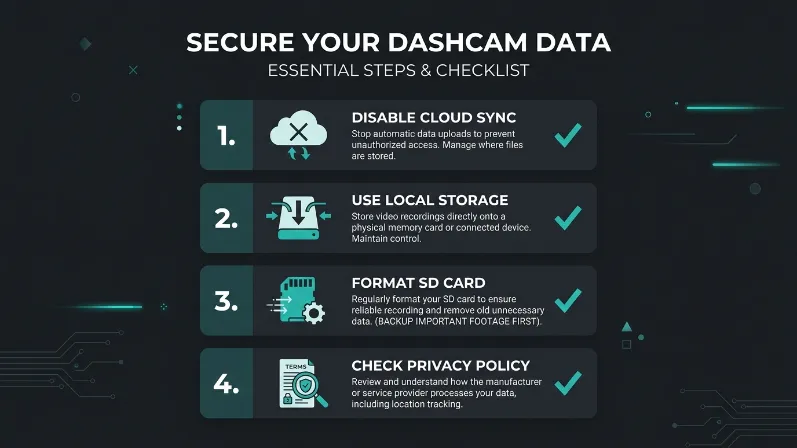
Cloud-connected dashcams create a data security risk that hardware-only models avoid entirely. When your dashcam uploads footage to a manufacturer’s server — as models from Nextbase, Garmin, and Owl Cam do — that footage lives on a remote server you do not control. A breach of that server exposes your driving history, home address (identifiable from GPS trip data), and daily routine.
The Risk With Cloud-Connected Dashcams
In 2021, security researchers discovered that several popular connected dashcam apps transmitted GPS data without encryption during firmware updates. While no mass breach occurred, the vulnerability showed that dashcam manufacturers often prioritize features over security infrastructure.
GPS trip logs are especially sensitive. A week of dashcam GPS data reveals when you leave home, where you work, which gym you use, and when your house is empty. That data has value to thieves, stalkers, and advertisers — and you hand it over every time your dashcam syncs to the cloud.
How to Protect Your Dashcam Data
- Disable cloud sync if you do not actively use it — most dashcams work perfectly as local-only devices.
- Use a dashcam that does not require an account or app to function (Garmin Dash Cam 67W is a strong example).
- Format your SD card every 30 to 60 days and do not keep footage older than you actually need.
- Check the manufacturer’s privacy policy — specifically what data is collected, stored, and whether it is sold to third parties.
What Are the Ongoing Costs of Owning a Dashcam Most People Forget?
The sticker price of a dashcam is only the beginning. Most buyers calculate the upfront cost — $50 to $400 depending on the model — and stop there. But dashcam ownership carries real recurring costs that add up over time.
- MicroSD cards: Standard cards wear out within 6 to 12 months under constant loop recording. High-endurance cards (Samsung Pro Endurance, SanDisk High Endurance) cost $15 to $40 and need annual replacement.
- Hardwire kit: Proper battery-safe installation of parking mode requires a hardwire kit, typically $20 to $50, plus labor if you take it to a shop.
- Cloud subscriptions: Brands like Owl Cam charge $10 to $20 per month for cloud storage and live streaming features.
- Replacement mounts: Suction cup mounts fail in heat over time. Adhesive mounts leave residue on windshields. Replacement mount kits cost $8 to $25.
- Firmware updates: Not a cost in money, but in attention — failing to update firmware on connected models creates the security vulnerabilities described above.
Over three years, a mid-range dashcam setup with cloud service and proper accessories realistically costs $300 to $600 total — two to three times the purchase price.
The hidden costs of dashcam ownership — SD cards, hardwire kits, cloud plans, and replacement mounts — can add $200 to $400 to your total three-year spend. Budget for these before you buy, not after.
Is a Dashcam Still Worth It Despite All These Downsides?
For most drivers, yes — a dashcam is still worth it. But that answer depends entirely on how you use it and whether you account for the risks above before something goes wrong.
The Insurance Institute for Highway Safety (IIHS) notes that documented evidence significantly increases the likelihood of a fair insurance claim resolution. Dashcam footage has helped thousands of drivers prove they were not at fault in accidents where the other driver fled or lied.
The drivers who get hurt by dashcams are the ones who treat them as a passive magic shield. They forget the footage is neutral. They skip the legal research. They leave the camera running in a 170°F parked car and wonder why their SD card is dead.
A dashcam protects you — but only if you protect it and understand what it records.
| Downside | Severity | Fix Available? |
|---|---|---|
| Battery drain (parking mode) | Medium | Yes — hardwire kit + voltage cutoff |
| Heat damage and data loss | High | Yes — capacitor model, remove in summer |
| Windshield obstruction | Low–Medium | Yes — correct mounting position |
| Footage used against you | Medium | Partial — drive legally, accept the risk |
| Privacy law violations | High | Yes — disable audio, check local law |
| Cloud data security risk | Medium | Yes — disable cloud sync, use local storage |
| Hidden ongoing costs | Low | Yes — budget for accessories upfront |
If you drive safely and set up your dashcam correctly, the benefits — accident evidence, insurance protection, theft deterrence — comfortably outweigh the downsides. If you skip the setup steps, the risks compound fast.
I hope this breakdown saves you from the surprises I had to learn the hard way. — Alex Rahman
Frequently Asked Questions
Can a dashcam drain my car battery overnight?
Yes, a dashcam using parking mode can fully drain a car battery in 24 to 72 hours. The risk is highest with direct fuse-box wiring and no voltage cutoff. A hardwire kit with a voltage cutoff set at 12.0V or higher prevents this from happening.
Can dashcam footage be used against me by police or in court?
Yes. Dashcam footage is legally admissible in most countries and can be subpoenaed by police or lawyers in both civil and criminal cases. If your footage shows you speeding, tailgating, or driving carelessly, it becomes evidence against you regardless of who requests it.
Is it illegal to record passengers with a dashcam?
Audio recording of passengers without consent is illegal in 11 two-party consent states in the US, including California, Illinois, and Washington. Video recording is generally legal. The safest fix is to disable audio recording in the dashcam settings and display a visible recording notice in your vehicle.
Why does my dashcam keep losing footage in summer?
Interior car temperatures in summer regularly exceed 140°F (60°C), which causes MicroSD cards to overheat, corrupt data, and eventually fail. Capacitor-based dashcam models handle extreme heat better than battery-based ones. Removing the dashcam when parking in direct sunlight prevents most heat-related data loss.
Do cloud-connected dashcams pose a privacy risk?
Yes. Cloud-connected dashcams upload GPS trip data, footage, and timestamps to manufacturer servers. A data breach on those servers could expose your home address, daily schedule, and driving history. Disabling cloud sync and using the dashcam as a local-only device eliminates this risk.
Are dashcams legal everywhere?
Dashcam use varies significantly by country. They are legal in the US, UK, and Australia with placement restrictions. In some EU countries like Germany, courts have limited their use as evidence due to privacy law conflicts. In Russia and South Korea, dashcams are encouraged by law. Always check your specific country and state regulations before installing one.

I’m Alex Rahman, a car enthusiast and automotive writer focused on practical solutions, car tools, and real-world driving advice. I share simple and honest content to help everyday drivers make better decisions.
