Do Dash Cams Require Wi-Fi to Work? or Is It Just a Bonus Feature?
Dash cams do not require Wi-Fi to record. Every dash cam stores video directly to a microSD card the moment you start driving. Wi-Fi is an optional feature that lets you connect a smartphone app to view or transfer footage wirelessly. Without Wi-Fi, your dash cam works perfectly fine.
A friend of mine almost returned his brand-new dash cam because he couldn’t get the Wi-Fi to connect. He thought the camera was broken. Turns out — it was recording perfectly the entire time. He just didn’t know Wi-Fi had nothing to do with the actual recording.
I’m Alex Rahman, and I’ve tested and reviewed dash cams for years. This confusion comes up constantly. Buyers see “Wi-Fi enabled” on the box and assume it’s required to make the camera work. It isn’t.
Here’s what Wi-Fi actually does — and more importantly, what your dash cam does without it.
- Dash cams record to a microSD card — no Wi-Fi, internet, or phone needed.
- Wi-Fi is an add-on feature for app control and wireless footage transfer, not a requirement.
- You can retrieve footage without Wi-Fi using a card reader or USB cable.
- Cellular (4G LTE) dash cams are different — they use mobile data, not your home Wi-Fi.
- Parking mode, loop recording, and G-sensor alerts all work 100% offline.
What Does a Dash Cam Actually Need to Record Footage?
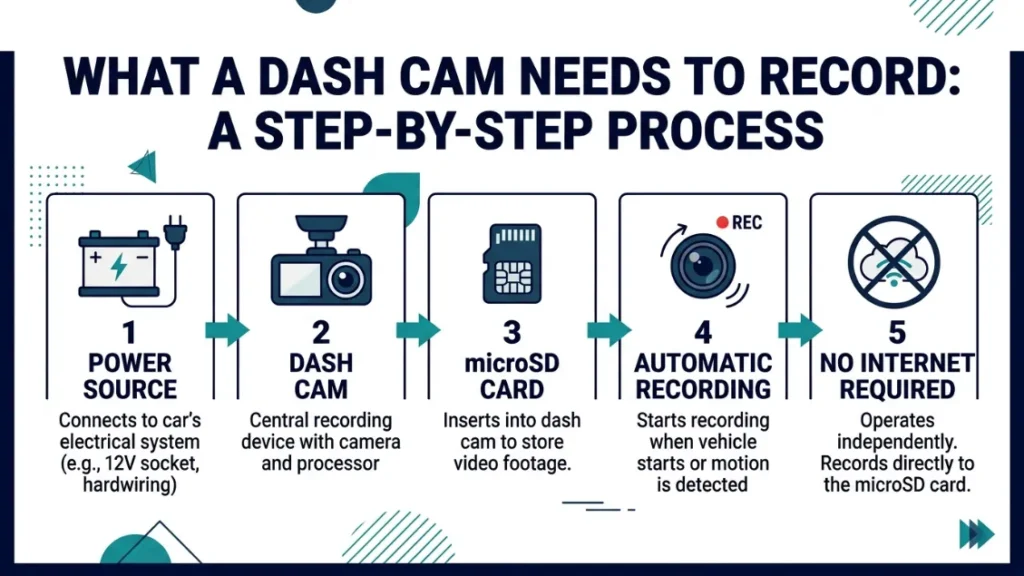
A dash cam needs three things to record: power from your car, a microSD card for storage, and a clear view through your windshield. That is it. No internet. No Wi-Fi. No phone nearby.
The moment your engine starts, the dash cam powers on and begins recording. It writes video files continuously to the SD card in short loops — usually one to three minutes each. When the card fills up, the oldest clips overwrite automatically.
This process runs completely offline. The camera does not check for a signal. It does not look for your phone. It just records, saves, and keeps going.
How SD Cards Handle Everything Without Any Wireless Connection
The microSD card is the real engine behind every dash cam. Cards ranging from 32GB to 256GB hold between four and thirty hours of footage depending on resolution. Most dash cams in 2024 ship with a 32GB card included.
Loop recording — the system that overwrites old files — manages storage automatically. You never have to manually delete clips. The camera handles it in the background while you drive.
Use a high-endurance microSD card rated for dash cam use — brands like Samsung Pro Endurance or SanDisk High Endurance handle constant rewriting without failing. Standard cards wear out fast under loop recording.
Why So Many People Think Wi-Fi Is Required
Marketing language creates this confusion. Boxes say “Wi-Fi enabled” in big letters. Apps appear in setup instructions. It looks like a connected device — similar to a smart speaker or security camera.
But a dash cam is not a smart home device. Wi-Fi is layered on top of a system that already works without it. Think of Wi-Fi like power windows in a car — nice to have, but the car drives fine without them.
What Does Wi-Fi on a Dash Cam Actually Do for You?
Wi-Fi on a dash cam creates a direct connection between the camera and your smartphone. This lets you view live footage, play back saved clips, change camera settings, and download video — all from your phone screen without touching the SD card.
The Wi-Fi here is not your home network or a cellular signal. The dash cam itself broadcasts a small local Wi-Fi hotspot. Your phone connects to that hotspot the same way it would connect to a router.
How the Companion App Works With Your Dash Cam’s Wi-Fi
Every major brand ships a free companion app. Nextbase has the Nextbase App. Vantrue uses the Vantrue app. Garmin integrates with the Garmin Drive app. Each one lets you do the same core things:
- Watch a live view from the camera in real time
- Browse and play saved video clips
- Download specific footage directly to your phone’s camera roll
- Adjust settings like video resolution, loop length, and exposure
- Update firmware wirelessly without removing the SD card
The app works only when your phone is within range of the camera’s hotspot — typically 10 to 15 meters. You are not controlling it remotely from miles away. It’s a short-range, in-vehicle feature.
Can You Live Stream Dash Cam Footage Over Wi-Fi?
Standard Wi-Fi dash cams cannot stream footage live to a remote viewer over the internet. The Wi-Fi they use is a direct peer-to-peer connection between the camera and your phone. It stops at your phone screen.
True remote live streaming requires a cellular (4G LTE) dash cam like the BlackVue DR900X-2CH Plus or Thinkware U1000. These cameras use a SIM card and mobile data to stream over the internet — which is an entirely different feature at a higher price point.
How Do You Get Footage Off a Dash Cam Without Wi-Fi?
You get footage off a dash cam without Wi-Fi by removing the SD card and reading it on a computer or phone using a card reader. This method is fast, reliable, and works on every single dash cam ever made — Wi-Fi or not.
- Turn off your dash cam or remove it from power.
- Eject the microSD card from the camera slot.
- Insert the card into a USB card reader (under $10 on Amazon).
- Plug the card reader into your laptop, desktop, or phone.
- Open the card as a drive — video files appear in folders by date.
- Copy the clips you need to your device and save them.
- Reinsert the card into your dash cam and resume use.
Using a Card Reader — The Fastest No-Wi-Fi Method
A microSD card reader costs $6 to $15 and works instantly. Files appear as a standard drive on your computer. You browse, copy, and save clips just like any USB drive. No software needed. No app needed. No connection issues.
This is actually faster than Wi-Fi transfer for large video files. A 1GB clip transfers to a laptop via card reader in seconds. Over Wi-Fi, the same file can take two to four minutes depending on signal strength.
Connecting Your Dash Cam Directly to a Computer
Some dash cams include a USB port that allows direct connection to a computer. The camera appears as a removable storage device. You drag files across just like a card reader.
Check your specific model’s manual — not all dash cams support this. Nextbase models typically support it. Most budget cams do not.
Never remove an SD card while the dash cam is actively recording. Always power the camera off first or disconnect it from your cigarette lighter adapter. Removing a card mid-write can corrupt your footage files.
What Is the Difference Between Wi-Fi, Bluetooth, and Cellular on a Dash Cam?
Wi-Fi, Bluetooth, and cellular all connect a dash cam to other devices — but they work differently, serve different purposes, and are not interchangeable. Understanding the difference saves you from buying the wrong camera.
| Connection Type | How It Works | What It Enables | Range |
|---|---|---|---|
| Wi-Fi | Camera broadcasts its own hotspot | App control, footage transfer, settings | 10–15 meters |
| Bluetooth | Paired device-to-device connection | Basic app pairing, GPS data sync | Up to 10 meters |
| Cellular (4G LTE) | Uses SIM card and mobile network | Remote access, live streaming, cloud backup | Anywhere with signal |
| No Connectivity | SD card only | Records and stores locally — offline | N/A |
When Cellular (4G LTE) Beats Wi-Fi for Dash Cam Users
Cellular dash cams like the BlackVue DR770X LTE or Thinkware F200 Pro LTE let fleet managers and remote users check footage from anywhere with a mobile signal. They use a monthly data plan — typically $5 to $15 per month — and connect to a cloud platform.
This is a professional feature. For personal drivers, Wi-Fi or no connectivity is usually enough. For small business owners monitoring delivery drivers or taxis, cellular connectivity is worth every cent.
Does Bluetooth Replace Wi-Fi on a Dash Cam?
Bluetooth on a dash cam does not replace Wi-Fi. Bluetooth handles lightweight tasks — pairing the camera to an app initially or syncing GPS metadata. It cannot transfer full HD video files at useful speed. Wi-Fi is needed for actual footage download.
Some entry-level cams use Bluetooth only. These require SD card removal for footage access. That’s fine — it just means no wireless video transfer option.
Does Parking Mode Work Without Wi-Fi or Internet?
Parking mode works completely without Wi-Fi, internet, or any wireless connection. It is a fully offline feature built into the dash cam’s firmware. When your car parks and the engine cuts, the camera switches to a low-power standby state and monitors for motion or impact.
A G-sensor inside the camera detects vibrations or collisions. If a force threshold is triggered — like someone bumping your parked car — the camera records a short clip automatically and saves it as a flagged event file.
Parking mode is one of the most valuable dash cam features for urban drivers — and it has zero dependency on internet, Wi-Fi, or a connected phone. The camera protects your parked car silently and independently.
To use parking mode, your dash cam needs a constant power source when the engine is off. This comes from either a hardwire kit connected to your fuse box or a dedicated dash cam battery pack like the Cellink Neo.
Do You Actually Need Wi-Fi on Your Dash Cam — Or Can You Skip It?
Whether you need Wi-Fi depends entirely on how you plan to use your dash cam. For most everyday drivers, a non-Wi-Fi dash cam covers every core need — recording, loop storage, G-sensor protection, and evidence capture. Wi-Fi adds convenience, not capability.
Drivers Who Benefit Most From a Wi-Fi Dash Cam
- Drivers who want to check footage quickly without carrying a laptop
- People who frequently need to share clips with insurers or police
- Riders who want to adjust camera settings without removing the unit
- Anyone who dislikes handling small SD cards regularly
- Tech-comfortable users who enjoy app-based control
Drivers Who Do Fine With a Non-Wi-Fi Dash Cam
- Budget buyers who want reliable recording at lower cost
- Drivers who rarely need to access footage
- People comfortable with a card reader and computer workflow
- Older drivers who prefer simple, no-app operation
- Fleet operators using cellular-connected systems instead
If you only access your dash cam footage two or three times a year — after incidents — a non-Wi-Fi cam with a $10 card reader is all you need. Save the extra cost and put it toward a larger SD card instead.
Wi-Fi vs No Wi-Fi vs Cellular — Which Dash Cam Type Is Right for You?
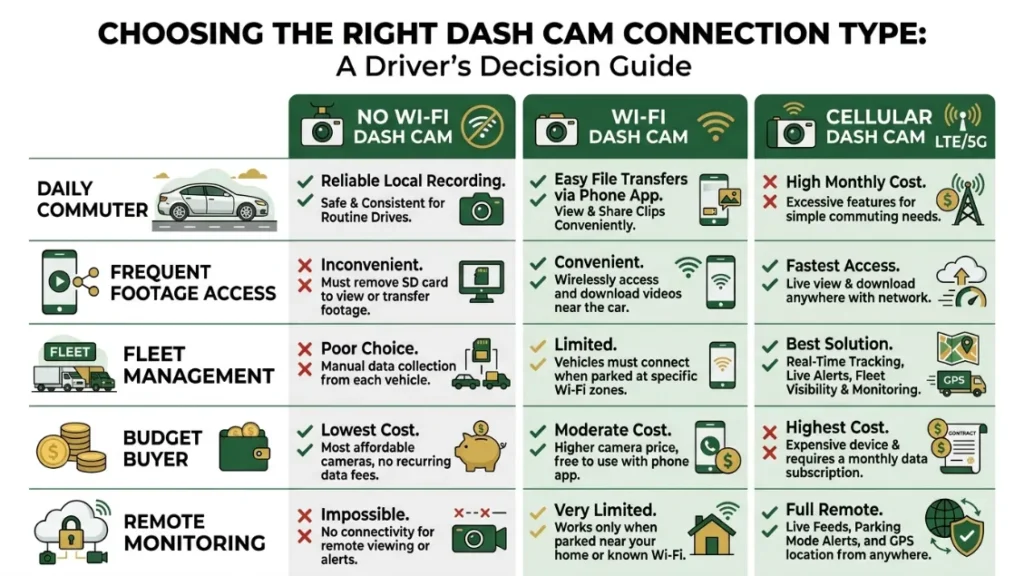
Choosing the right connectivity comes down to three questions: How often will you access footage? Do you need remote access? And what is your budget? Here is a clear breakdown to help you decide fast.
| Driver Type | Best Option | Why |
|---|---|---|
| Casual daily commuter | No Wi-Fi | Records reliably, costs less, simple to use |
| Frequent footage reviewer | Wi-Fi | Easy wireless access — no card removal needed |
| Rideshare or taxi driver | Wi-Fi or Cellular | Quick access to incident footage is often critical |
| Fleet manager | Cellular (4G LTE) | Remote access to multiple vehicles in real time |
| Budget-conscious buyer | No Wi-Fi | Full recording function at the lowest cost |
For most personal drivers, a reliable non-Wi-Fi dash cam from a brand like Vantrue, Garmin, or Nextbase gives everything needed. Wi-Fi becomes worth the premium when you genuinely access footage regularly or share clips often.
Does a Wi-Fi Dash Cam Use Your Phone’s Data or Battery?
A Wi-Fi dash cam does not use your phone’s mobile data. The connection between the camera and your phone is a direct local hotspot — similar to a router in your home. No data leaves your mobile plan. No internet required on either device.
Your phone’s battery does use a small amount of charge while connected to the camera’s hotspot. Most app sessions last five to fifteen minutes, which drains less than 3% of a typical smartphone battery. It’s negligible for occasional use.
When your phone connects to the dash cam’s Wi-Fi hotspot, it loses access to the internet temporarily. Some phones warn you about “no internet on this network.” That’s normal — just dismiss the alert and continue using the app.
The dash cam itself draws power from your car’s 12V socket or hardwire kit. It does not drain your phone in any way beyond the standard hotspot connection load. Running the app for a quick clip download will not noticeably affect your phone.
If you’re curious about how dash cams compare in real-world safety scenarios, Consumer Reports has a thorough breakdown worth reading alongside this guide.
Dash cams record to SD cards without any wireless connection. Wi-Fi adds app control and wireless footage transfer — it’s a convenience feature, not a requirement. You can retrieve footage anytime with a card reader. Parking mode and loop recording both work fully offline. Cellular dash cams are a separate, premium category that use mobile data for remote access.
Conclusion
The short answer is no — your dash cam does not need Wi-Fi. It records the moment you start driving and stores everything locally on an SD card. That process happens entirely offline, every single time.
Wi-Fi is a genuine upgrade if you access footage often or hate removing SD cards. But it’s not what makes the camera work. The core protection you’re buying — recording incidents, parking mode, loop storage — runs independently of any wireless connection.
I’m Alex Rahman, and the clearest advice I can give is this: buy the best recording quality your budget allows first. Then consider Wi-Fi as a bonus if your usage habit calls for it. Don’t pay extra for a feature you’ll use three times a year.
Pick the right camera for how you actually drive — and let the footage take care of itself.
Frequently Asked Questions

I’m Alex Rahman, a car enthusiast and automotive writer focused on practical solutions, car tools, and real-world driving advice. I share simple and honest content to help everyday drivers make better decisions.
