Is Dash Cam Killing My Car Battery?
Yes, a dash cam can drain your car battery — but only under specific conditions. Parking mode is the main culprit. Without a hardwire kit that includes a low-voltage cutoff, your dash cam keeps drawing power after the engine stops. A healthy setup prevents this completely.
I got a panicked message from a friend last winter. He had parked at the airport for five days, came back, and his car would not start. The breakdown crew told him his battery was completely flat. His dash cam had been running in parking mode the entire time.
Sound familiar? You are not alone. Battery drain is one of the most common problems dash cam owners face. And the frustrating part is that most guides give you vague advice without explaining why it happens or exactly how to fix it.
I’m Alex Rahman, and I have been writing about car tech for years. In this guide, I will walk you through the real cause of dash cam battery drain, give you actual power figures, and show you the exact setup that keeps your battery safe.
- Parking mode is the primary cause of dash cam battery drain — not the camera itself.
- A hardwire kit with low-voltage cutoff is the safest way to power a dash cam.
- Older and weaker batteries are far more vulnerable to drain from parking mode.
- The cigarette lighter socket cuts power when the ignition is off — parking mode will not work from it.
- Capacitor dash cams do not hold their own charge and are safer for the car battery in some ways.
What Actually Drains Your Car Battery When a Dash Cam Is Installed?
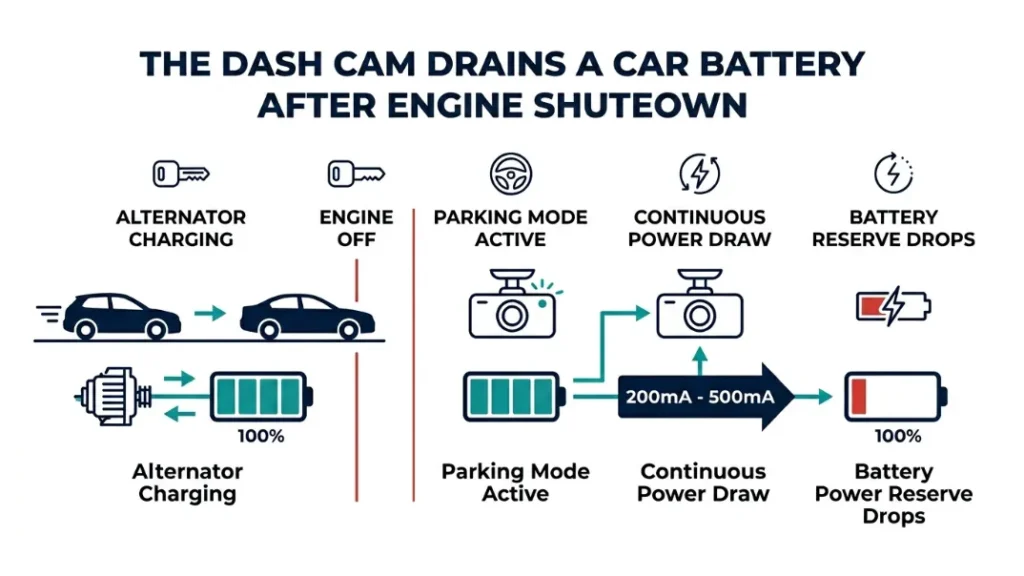
A dash cam drains your battery when it stays powered after the engine turns off. During normal driving, your alternator recharges the battery continuously. The moment your engine stops, that charging stops too — and anything drawing power starts eating into your reserve.
Most dash cams use between 200 mA and 500 mA while recording. That is not much during a drive. But left running overnight or for several days, that steady draw adds up fast.
The math is straightforward. A standard 60Ah car battery holds roughly 30Ah of usable charge before damage risk starts. At 300 mA draw, a dash cam in parking mode can drain your battery to danger levels in under four days — sometimes less if the battery is old.
How Parking Mode Keeps Your Dash Cam Running All Night
Parking mode is a feature that keeps your dash cam recording even when the car is parked. Brands like Blackvue and Viofo built their systems around this feature because it catches hit-and-runs, vandalism, and theft while you are away.
Here is the problem. Parking mode requires a constant 12V power supply. If your dash cam is connected to the fuse box without a voltage cutoff circuit, it will draw power continuously — day and night — until your battery dies.
Blackvue’s DR970X, for example, draws around 280 mA in parking mode. That is 6.72Ah per day. Leave it for four days and you have used nearly 27Ah — almost all of your safe usable reserve on an average battery.
Never leave parking mode active for more than 24 hours without a low-voltage cutoff in place. On a standard 60Ah battery, extended parking mode without protection can cause deep discharge damage — permanently reducing your battery’s capacity.
Why the Cigarette Lighter Socket Is the Riskiest Power Option
The cigarette lighter socket — also called the 12V accessory socket — cuts power automatically when you turn off the ignition on most cars. That means parking mode simply cannot work from this socket.
But some cars have always-on accessory sockets. If yours does, and your dash cam is plugged in there, it will run continuously and drain your battery exactly as parking mode would.
Check your car’s manual or use a multimeter to test whether your socket stays live after the ignition is off. This single check can save you a dead battery.
How Much Power Does a Dash Cam Actually Draw From Your Battery?
Most dash cams draw between 150 mA and 500 mA depending on the model, resolution, and whether parking mode is active. That translates to roughly 1.8Wh to 6Wh per hour — modest individually, but significant over time.
Knowing your dash cam’s exact draw matters because it tells you how long your battery can safely last without the engine running.
Milliamp Draw by Dash Cam Type and Brand
| Dash Cam Model | Recording Draw | Parking Mode Draw | Power Source Type |
|---|---|---|---|
| Blackvue DR970X | ~480 mA | ~280 mA | Internal battery |
| Viofo A229 Pro | ~350 mA | ~200 mA | Capacitor |
| Nextbase 622GW | ~420 mA | ~240 mA | Internal battery |
| Garmin Dash Cam 67W | ~300 mA | ~180 mA | Capacitor |
How to Calculate How Long Your Battery Can Sustain Parking Mode
You can estimate your safe parking mode window with a simple formula. Take your battery’s Ah rating, multiply by 0.5 (the safe usable limit), then divide by your dash cam’s parking mode draw in amps.
- Find your battery’s Ah rating — check the label on the battery itself.
- Multiply the Ah rating by 0.5 to get your safe usable capacity.
- Find your dash cam’s parking mode draw in mA — check the spec sheet or manufacturer site.
- Convert mA to A by dividing by 1000 (e.g., 280 mA = 0.28A).
- Divide safe capacity by the draw in amps to get safe hours of parking mode.
Example: 60Ah battery × 0.5 = 30Ah usable. Dash cam draws 0.28A. 30 ÷ 0.28 = 107 hours — roughly 4.5 days. That is your theoretical maximum. In practice, set a cutoff much earlier, especially on batteries older than three years.
Use a dedicated dash cam battery calculator to get a more precise estimate based on your exact battery model and ambient temperature. Cold weather reduces battery capacity by up to 30%.
Is Your Car Battery Already Too Weak to Handle a Dash Cam?
A weak or aging battery makes dash cam battery drain far worse than it would be on a healthy one. If your battery is already struggling, even a modest dash cam draw can tip it over the edge — and you will blame the camera when the real problem is battery health.
Car batteries typically last three to five years. After that, their reserve capacity drops significantly. A five-year-old 60Ah battery might only deliver 35Ah of actual usable capacity — sometimes less in cold weather.
Signs Your Battery Is Struggling Before the Dash Cam Gets the Blame
Before you rewire your dash cam setup, rule out a failing battery. These signs point to a battery problem that existed before your dash cam made it worse:
- Slow cranking when you start the engine — especially in cold mornings
- Headlights that dim noticeably at idle
- Battery warning light on the dashboard
- Battery older than four years with no capacity test done recently
- Car needed a jump-start at any point in the last 12 months
If any of these apply, get your battery tested before adjusting your dash cam setup. Most auto parts stores test batteries free. A battery showing below 70% state of health should be replaced — not asked to carry parking mode duty.
Why AGM Batteries Handle Parking Mode Better Than Standard Ones
AGM (Absorbent Glass Mat) batteries are a step up from standard lead-acid batteries for drivers who want reliable parking mode. They tolerate deeper discharge cycles without the same level of long-term damage that a standard flooded battery would suffer.
Brands like Optima and Odyssey make AGM batteries specifically suited for vehicles with high accessory loads. Drivers using long-duration parking mode — airport trips, overnight parking — benefit significantly from upgrading to AGM.
An AGM battery with a 70Ah rating and a low-voltage cutoff set at 12.2V gives you a reliable, safe parking mode setup that most standard batteries simply cannot match.
How to Hardwire Your Dash Cam So It Never Drains Your Battery Again
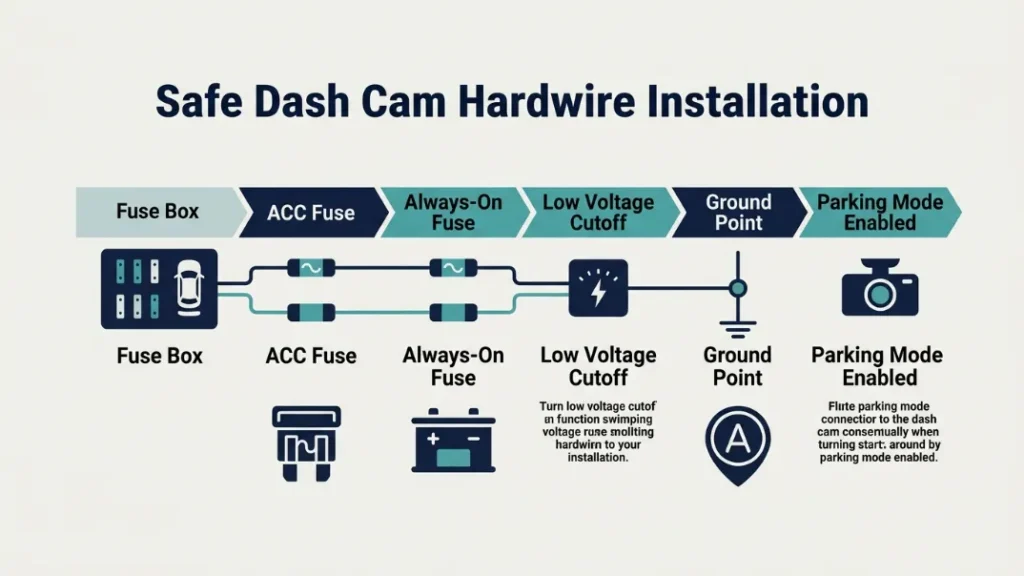
Hardwiring your dash cam to the fuse box — with a low-voltage cutoff module — is the permanent solution to battery drain. It gives your camera a stable power supply, enables full parking mode, and protects your battery automatically.
A hardwire kit costs between $15 and $40. Brands like Nextbase, Viofo, and Blackvue all sell kits designed for their cameras — and most work with any 12V dash cam.
What a Low-Voltage Cutoff Does and Why You Need One
A low-voltage cutoff (LVC) is a protection circuit built into quality hardwire kits. It monitors your battery voltage continuously. The moment voltage drops to a set threshold — typically 11.6V to 12.2V — it cuts power to the dash cam and protects the battery from deep discharge.
Without an LVC, your dash cam runs until the battery dies. With one, the camera shuts itself off automatically before any damage occurs. This single component is what separates a safe parking mode setup from a battery-killing one.
Most hardwire kits let you set the cutoff voltage manually. For a standard lead-acid battery, set it at 12.0V. For AGM, you can safely go as low as 11.8V.
Step-by-Step Guide to Hardwiring a Dash Cam to Your Fuse Box
- Purchase a hardwire kit compatible with your dash cam — check your camera brand’s own kit first.
- Locate your car’s fuse box — usually under the dashboard on the driver’s side.
- Use a fuse tester to find a fuse that only activates with the ignition (for normal mode) and one that is always live (for parking mode).
- Connect the hardwire kit’s ACC wire to the ignition-switched fuse using an add-a-fuse adapter.
- Connect the constant power wire to the always-live fuse.
- Run the ground wire to a metal bolt or grounding point on the car’s chassis.
- Route the dash cam cable along the headliner and A-pillar for a clean, hidden install.
- Set the low-voltage cutoff threshold on the hardwire kit — 12.0V for standard batteries.
- Test the setup by turning the car off and confirming the dash cam switches to parking mode.
If you are not comfortable working with fuses, a professional auto electrician can hardwire a dash cam in under an hour. The labor cost is usually $50 to $80 — worth every cent for the peace of mind. Check a trusted guide like Crutchfield’s dash cam installation guide for detailed visuals.
OBD-II Port vs Hardwire Kit — Which Power Method Is Actually Safe?
The OBD-II port is a tempting power source — it is easy to access, requires no wiring, and fits a simple plug-in adapter. But it carries a hidden risk that most drivers do not know about.
On most vehicles, the OBD-II port remains live even after the ignition is off. That means any dash cam or accessory plugged in there draws power continuously from the battery — exactly the same risk as an always-on cigarette lighter socket.
| Power Method | Parking Mode Support | Battery Risk | Best For |
|---|---|---|---|
| Cigarette Lighter | No (cuts on ignition off) | Low | Basic recording while driving |
| OBD-II Port | Yes — but risky | High (always live) | Temporary only — not recommended |
| Hardwire Kit (with LVC) | Yes — safely | Very Low | Full-time parking mode users |
| External Battery Pack | Yes — independent | None to car battery | Long-term parked vehicles |
The hardwire kit wins for most drivers. It is the only method that offers full parking mode capability with active battery protection built in. The OBD-II port is fine for diagnostics — not ideal for powering a device that runs overnight.
Powering a dash cam through the OBD-II port for long periods also risks interfering with your vehicle’s ECU communication protocols. Some modern vehicles flag diagnostic errors when the OBD-II port is in continuous use by a non-diagnostic device.
Capacitor vs Battery Dash Cam — Which One Is Safer for Your Car?
Dash cams use either an internal battery or a supercapacitor to manage short-term power needs — like safely writing footage when power is suddenly cut. The choice affects heat tolerance, lifespan, and how the camera behaves during parking mode.
Capacitor-based dash cams store almost no charge independently. They charge and discharge rapidly from the car’s power supply. Models like the Viofo A229 Pro and Garmin Dash Cam 67W use capacitors because they handle heat far better than lithium batteries — critical in hot climates where a parked car interior can exceed 70°C.
Battery-based dash cams like the Nextbase 622GW and Blackvue DR970X hold a small internal charge — enough to finish writing a clip and shut down safely after power is removed. They do not power parking mode from their own battery; that still comes from the car.
| Feature | Capacitor Dash Cam | Battery Dash Cam |
|---|---|---|
| Heat tolerance | Excellent | Poor above 60°C |
| Independent power storage | Minimal | Small buffer only |
| Parking mode power source | Car battery (via hardwire) | Car battery (via hardwire) |
| Lifespan | 7-10 years typically | 2-5 years typically |
| Best climate | Hot regions | Moderate climates |
Neither type drains your car battery differently in parking mode — both depend entirely on car power. The choice between capacitor and battery comes down to where you live and how hot your car gets when parked.
Common Mistakes That Cause Dash Cam Battery Drain (And How to Fix Them)
Most battery drain problems come from a handful of setup mistakes. The good news — every one of them has a simple fix.
Mistake 1: Using an always-on power socket without knowing it. Some cigarette lighter sockets stay live after ignition off. Test yours with a multimeter. If it is always live, use it only with a dash cam that lacks parking mode — or switch to a hardwire kit with LVC.
Mistake 2: Skipping the low-voltage cutoff. Many budget hardwire kits omit the LVC circuit. Always buy a kit that lists a programmable voltage cutoff. Check the spec sheet before purchasing.
Mistake 3: Setting the LVC too low. A cutoff of 11.0V means your battery is already deeply discharged by the time the camera shuts off. Set it at 12.0V for standard batteries, 11.8V for AGM.
Mistake 4: Ignoring battery age. A four-year-old battery has significantly less reserve capacity than its rated Ah suggests. If your battery is over three years old, test it before relying on it for parking mode.
Mistake 5: Leaving parking mode on during a long trip away. If you are parking for more than 48 hours, consider disabling parking mode entirely — or connect your dash cam to a dedicated external power pack like the Blackvue Power Magic Battery Pack, which powers the camera independently without touching your car battery at all.
If you travel frequently and park for multiple days at a time, a dedicated dash cam battery pack is the cleanest solution. It isolates the camera from your car battery entirely and eliminates drain risk.
Dash cam battery drain is almost always caused by parking mode running without a low-voltage cutoff. Fix it with a proper hardwire kit, set the cutoff at 12.0V, and test your battery health before anything else. Capacitor cams and AGM batteries both help — but the LVC is non-negotiable.
Frequently Asked Questions

I’m Alex Rahman, a car enthusiast and automotive writer focused on practical solutions, car tools, and real-world driving advice. I share simple and honest content to help everyday drivers make better decisions.
