Can I Leave a Dash Cam Plugged Into the Cigarette Lighter Safely?
Yes — leaving a dash cam plugged into the cigarette lighter is safe while you drive. The risk comes when the engine is off. If your socket stays live after the ignition cuts out, the cam keeps drawing power and can drain your battery flat overnight. A hardwire kit with voltage cutoff prevents this entirely.
I made this mistake myself on a cold Tuesday morning last winter. I walked out to my car, turned the key, and got nothing. Completely dead battery. After an embarrassing call to roadside assistance, the mechanic pointed straight at my dash cam cable dangling from the 12V socket.
I had no idea my socket stayed powered overnight. My Viofo A129 had been quietly drawing power for 11 hours straight.
I’m Alex Rahman, and I’ve tested and reviewed dash cams for several years. I’ve seen this exact mistake trip up dozens of drivers. The good news? It’s completely fixable once you understand how power delivery actually works in your car.
This guide gives you the full picture — from why it happens to exactly how to stop it.
- Leaving a dash cam plugged in is safe while driving — the alternator keeps the battery charged.
- If your cigarette lighter socket stays live after the ignition, your cam will drain the battery overnight.
- A standard 12V car battery can go flat in as little as 5–20 hours from a single dash cam draw.
- A hardwire kit with voltage cutoff is the permanent fix — it kills power before the battery gets dangerously low.
- Parking mode requires constant power and should never run from a cigarette lighter socket alone.
What Happens When You Leave a Dash Cam in the Cigarette Lighter?
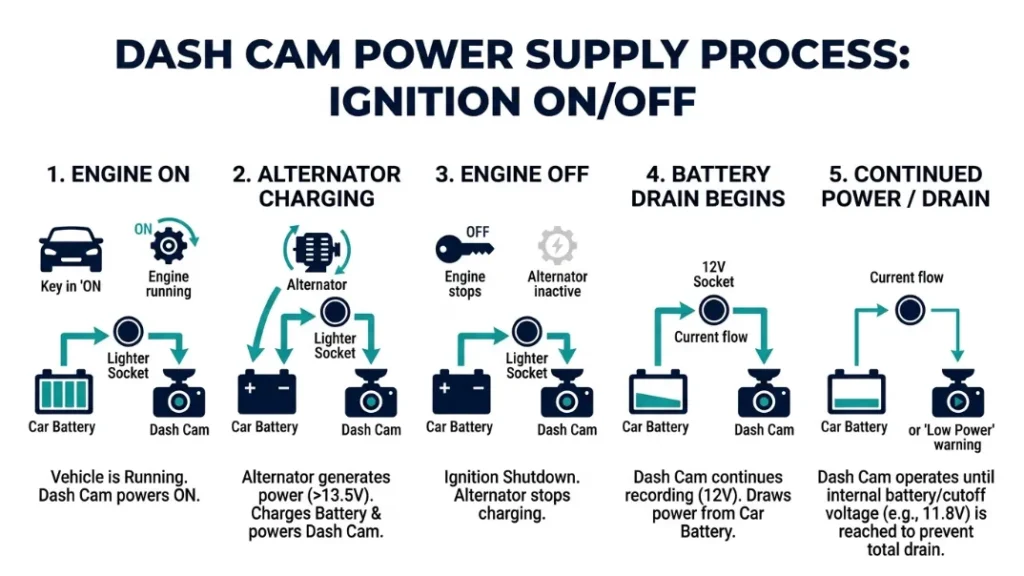
Leaving a dash cam plugged into the cigarette lighter is perfectly fine while you drive — your alternator replenishes any power the camera uses in real time. The danger starts the moment you switch the engine off, and it depends entirely on one thing: whether your socket cuts power with the ignition or stays live 24/7.
Most modern cars wire the cigarette lighter through the ignition. Turn the key off, and the socket goes dead. Your dash cam stops immediately. No drain. No problem.
But plenty of cars — especially older models and some European brands — keep that socket permanently live. Walk away, and your dash cam keeps recording, buffering, or simply sitting in standby. Every hour, it pulls a small but steady current from your battery.
Small currents over long periods add up fast.
How a Cigarette Lighter Socket Actually Delivers Power
The cigarette lighter socket (officially called the 12V accessory socket) connects directly to your car’s electrical system. It delivers 12 volts of direct current at up to 10–20 amps, depending on your car’s fuse rating.
Your dash cam uses a small fraction of that — typically 0.5 to 1.5 amps. But the socket itself doesn’t know or care what’s plugged into it. It just keeps supplying current as long as it has voltage behind it.
When the engine runs, the alternator produces around 13.8–14.4 volts and recharges the battery constantly. Every amp your dash cam draws gets replaced almost instantly.
When the engine stops, that replenishment stops too. Now the battery is the only source. And every amp your dash cam pulls is gone for good until you start the engine again.
Does Your Socket Stay On When the Engine Is Off?
This is the single most important question to answer about your car. Some sockets cut power the instant the ignition turns off. Others stay live until the battery dies or you disconnect the cable yourself.
There is no universal rule. It depends on your car’s wiring, make, model, and year. Even two cars from the same manufacturer can behave differently depending on trim level.
Later in this guide, I’ll show you exactly how to test yours in under two minutes with no tools needed.
Check your owner’s manual under “power outlets” or “accessory sockets.” Many manufacturers list whether the socket is ignition-controlled or permanent. It takes 60 seconds and could save your battery.
Will a Dash Cam Drain Your Car Battery If Left Plugged In?
Yes — a dash cam will drain your car battery if the socket stays live and you leave it plugged in for long enough. The speed of that drain depends on your battery’s capacity, your dash cam’s power draw, and any other accessories drawing current at the same time.
This is not a theoretical risk. It is one of the most common reasons drivers call roadside assistance after a night out or a weekend away.
How Much Power Does a Dash Cam Actually Draw?
Most single-channel dash cams draw between 0.5 and 1.0 amps at 12V while recording. Front-and-rear dual-channel systems like the Nextbase 522GW or Viofo A129 Duo typically pull 1.0 to 1.5 amps total. Premium cams with 4K recording or built-in GPS can reach 2.0 amps.
In watts, that’s roughly 6 to 24 watts — comparable to a low-energy LED bulb left on in your car all night.
Even in standby or parking mode, most dash cams still draw 0.3 to 0.8 amps. The camera never truly goes to zero while connected to live power.
How Long Before Your Battery Goes Flat?
A typical car battery holds 45–70 amp-hours (Ah) of usable capacity. But you should never drain a standard lead-acid battery below 50% without risking permanent damage. That gives you roughly 20–35 Ah of safe usable power.
| Dash Cam Draw | Battery Size (50Ah) | Time to 50% Drain |
|---|---|---|
| 0.5A (small cam) | 50Ah | ~50 hours |
| 1.0A (standard cam) | 50Ah | ~25 hours |
| 1.5A (dual channel) | 50Ah | ~17 hours |
| 2.0A (4K premium) | 50Ah | ~13 hours |
Those numbers assume your dash cam is the only thing drawing power. In reality, your car has other parasitic draws — the clock, alarm system, key fob receiver — typically adding another 20–50 milliamps. On a cold night, battery performance drops further still.
Leave a dual-channel cam plugged into a live socket on a Friday evening, and by Saturday morning you may well have a dead car.
Repeatedly draining a standard lead-acid battery below 50% shortens its lifespan significantly. A battery that should last 4–5 years can fail within 18 months if deep-drained regularly. If you use parking mode, invest in a hardwire kit with voltage cutoff — it’s not optional.
How Do You Test If Your Cigarette Lighter Turns Off With the Ignition?
Testing your socket takes under two minutes and requires nothing but your phone charger. Plug any USB charger or your dash cam into the socket, then turn the ignition fully off and remove the key. If the device powers off immediately, your socket is ignition-controlled. If it stays on — your socket is permanently live.
- Plug your dash cam or any USB charger into the cigarette lighter socket.
- Turn the ignition to the “on” or “accessory” position — confirm the device powers on.
- Turn the ignition fully off and remove the key completely.
- Wait 30 seconds and check the device — is it still powered?
- If yes: your socket is permanently live — do not leave the dash cam plugged in unattended.
- If no: your socket cuts power with the ignition — you’re safe to leave it plugged in overnight.
If your socket is permanently live, you have two practical options: unplug the dash cam every time you leave the car, or install a hardwire kit. Unplugging works short-term but becomes annoying fast. The hardwire kit is the proper long-term solution.
What Is a Hardwire Kit and Why Does It Solve the Battery Problem?
A hardwire kit is a small adapter that connects your dash cam directly to your car’s fuse box instead of the cigarette lighter socket. It gives the camera a permanent, clean power source — and includes a voltage cutoff circuit that protects your battery automatically.
Most hardwire kits cost between $15 and $35. Brands like Viofo, Blackvue, and Nextbase sell their own kits, and third-party options from Cellink and Nextbase are widely trusted. Installation takes 30–60 minutes for most drivers with basic tools.
How a Voltage Cutoff Protects Your Battery
The voltage cutoff is the most important feature in any hardwire kit. It monitors your battery voltage continuously. When voltage drops to a preset threshold — typically 11.6V to 12.0V — it cuts all power to the dash cam automatically.
This keeps your battery above the danger zone, so you always have enough charge to start the engine. Most kits let you set the cutoff point. A setting of 11.8V is safe for most standard lead-acid batteries. If you have an AGM or lithium battery, set it slightly higher — around 12.0V — because those battery types are less tolerant of deep discharge.
Without voltage cutoff, your dash cam will keep drawing power until the battery is completely flat. With it, the camera shuts off with a comfortable safety margin remaining.
What Is Parking Mode and Why Does It Need Constant Power?
Parking mode is a dash cam feature that keeps recording — or starts recording on motion/impact — while your engine is off. It protects your car from hit-and-run incidents, vandalism, and theft attempts while parked.
Brands like Blackvue and Viofo have built strong reputations for parking mode performance. Blackvue’s DR900X series uses a tiered parking mode that switches between buffered continuous recording and motion-triggered recording to conserve power intelligently.
Parking mode requires a constant power supply. A cigarette lighter socket can physically provide that power — but without voltage cutoff, it will drain your battery flat every single night. Parking mode only makes sense with a hardwire kit. Full stop.
Some drivers use a dedicated dash cam battery pack — like the Cellink Neo or Blackvue B-130X — as an alternative to hardwiring. These external battery packs charge while you drive and power the cam in parking mode independently, with no risk to your car battery at all. They cost more, but installation is effortless.
Cigarette Lighter vs. Hardwire Kit vs. Battery Pack Which Should You Use?
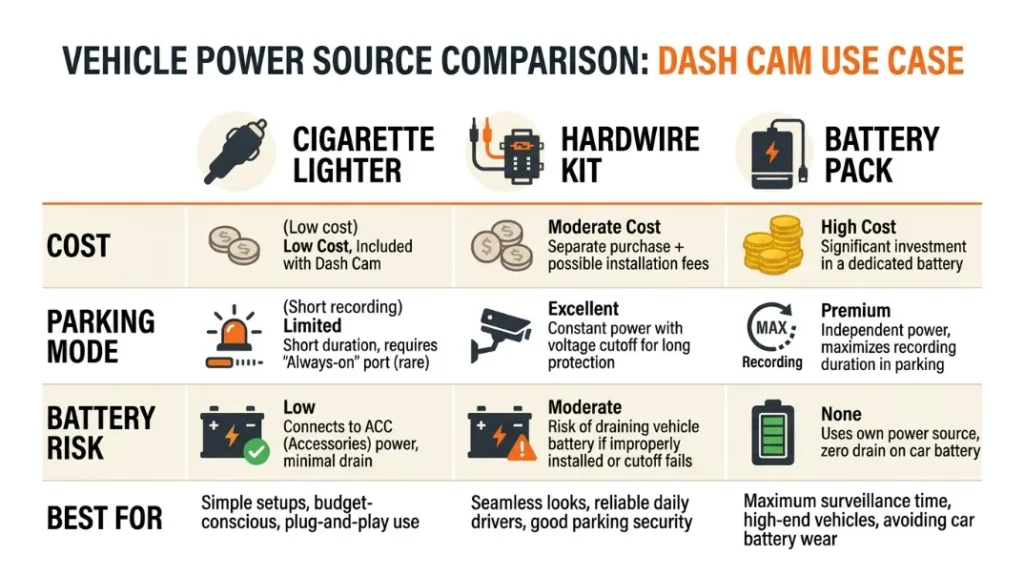
The right power solution depends on what you actually need from your dash cam. If you only want recording while you drive, the cigarette lighter works fine in most cars. If you want parking mode or your socket stays live overnight, you need a different approach.
| Method | Cost | Parking Mode | Battery Risk | Best For |
|---|---|---|---|---|
| Cigarette Lighter | $0 (included) | No | High (if live) | Drive-only recording, switched socket |
| Hardwire Kit | $15–$35 | Yes | Low (with cutoff) | Most drivers wanting clean setup |
| Battery Pack | $80–$200 | Yes | None | Renters, lease cars, max protection |
For most drivers, a hardwire kit is the sweet spot. It costs little, installs in under an hour, frees up the cigarette lighter socket for other things, and gives you parking mode capability whenever you want it.
Battery packs shine for renters who cannot modify their car’s wiring or drivers who want zero electrical risk to the vehicle. The Cellink Neo (around $130) and Blackvue B-130X (around $200) are the two most recommended options in 2025.
The decision in one sentence: If your socket cuts off with the ignition and you don’t need parking mode — use the lighter. If your socket stays live, you want parking mode, or you want a cleaner install — hardwire it.
How to Hardwire a Dash Cam to Your Car’s Fuse Box Step by Step
Hardwiring a dash cam means connecting its power cable directly to your car’s fuse box. This replaces the cigarette lighter plug entirely and gives the camera a reliable, voltage-protected power source. Most drivers with basic tools complete this in under an hour.
You need: a hardwire kit (matched to your dash cam brand), a fuse tap or add-a-fuse adapter, a multimeter or circuit tester, a trim removal tool, and basic electrical tape or cable clips.
- Locate your car’s fuse box — usually under the dashboard on the driver’s side.
- Use a circuit tester to find a switched fuse (one that only has power with ignition on) and a permanent live fuse.
- Connect the hardwire kit’s ACC wire (red) to the switched fuse using a fuse tap.
- Connect the hardwire kit’s battery wire (yellow) to the permanent live fuse using a second fuse tap.
- Connect the ground wire (black) to a bare metal bolt on the car’s chassis — this is your earth connection.
- Set the voltage cutoff on the hardwire kit to 11.8V (lead-acid) or 12.0V (AGM/lithium).
- Route the cable tidily behind the headliner and A-pillar trim to the dash cam.
- Connect the hardwire kit to your dash cam and test — camera should power on with ignition and activate parking mode after shutdown.
Check your specific dash cam manufacturer’s documentation before starting. Viofo’s support page and Nextbase’s installation guides have model-specific wiring diagrams that make this process much clearer.
Never tap into a fuse that controls safety-critical systems — airbags, ABS, or the engine management unit. Stick to low-current accessory fuses like interior lights, radio, or the cigarette lighter itself. If you’re unsure, a professional auto electrician can complete this job for $40–$80.
Common Mistakes People Make When Powering a Dash Cam
Most dash cam power problems come from a handful of avoidable mistakes. Knowing them upfront saves you from a dead battery, failed parking mode footage, or a damaged camera.
- Assuming the socket cuts off with ignition — always test it first. Don’t assume.
- Using parking mode from a cigarette lighter — this will drain your battery flat. Hardwire or use a battery pack.
- Skipping the voltage cutoff setting — set it correctly for your battery type or you lose the protection entirely.
- Tapping a high-draw fuse — adding more load to a fuse that’s already near capacity risks blowing it.
- Loose ground connection — a poor earth causes power fluctuations, random reboots, and corrupted footage.
- Running a cheap no-name hardwire kit — poor voltage cutoff accuracy can either kill your battery or cut power too early. Stick to branded kits from Viofo, Nextbase, or Blackvue.
The two most common mistakes are assuming your socket is ignition-controlled when it isn’t, and trying to run parking mode from the cigarette lighter without voltage protection. Test your socket, choose the right power method, and set your voltage cutoff correctly — those three steps prevent 90% of dash cam power problems.
Which Dash Cam Brands Handle Power Best?
Power management quality varies noticeably between brands. The best brands build intelligent power handling directly into the camera firmware, not just the accessory hardware.
Blackvue (South Korea) leads the field in parking mode power management. Their Cloud-connected cameras dynamically switch between recording modes based on battery voltage, event activity, and time of day. The DR900X-2CH is widely considered the benchmark for intelligent parking mode in 2024–2025.
Viofo offers the best value for hardwire setups. Their A139 Pro and A229 Pro series support parking mode reliably and pair well with their own branded hardwire kits. Viofo’s cameras also have low standby draw — around 0.3A — which extends parking mode duration significantly.
Nextbase (UK) caters to mainstream users. Their 622GW and 522GW both include Intelligent Parking Mode that activates on motion detection. Nextbase’s hardwire kit includes an adjustable voltage cutoff and is genuinely one of the easiest to install for first-timers.
Garmin takes a different approach — their Dash Cam line is designed primarily for ignition-controlled power. Garmin cameras work very well from a cigarette lighter socket and don’t emphasize parking mode the way Blackvue or Viofo do.
Frequently Asked Questions

I’m Alex Rahman, a car enthusiast and automotive writer focused on practical solutions, car tools, and real-world driving advice. I share simple and honest content to help everyday drivers make better decisions.
