How Do I Turn My Phone Into a Dashcam and Record Every Drive Safely?
Quick Answer
You can turn your phone into a dashcam by installing a dashcam app, mounting it securely on your windshield, and keeping it powered while driving. The app records continuous video, often with loop recording and GPS tracking, just like a real dashcam.
I once missed recording a minor accident because I forgot my dashcam. That felt frustrating. I’m Alex Rahman, and I test practical car tech for everyday drivers. Your smartphone can solve this problem fast. With the right setup, your phone becomes a reliable road recorder. Let’s break it down step by step.
Key Takeaways
- You need a dashcam app, mount, and charger to get started.
- Loop recording ensures your phone never runs out of space.
- Proper mounting improves video quality and safety.
- Heat and storage are the biggest real-world challenges.
What Does It Mean to Use Your Phone as a Dashcam?
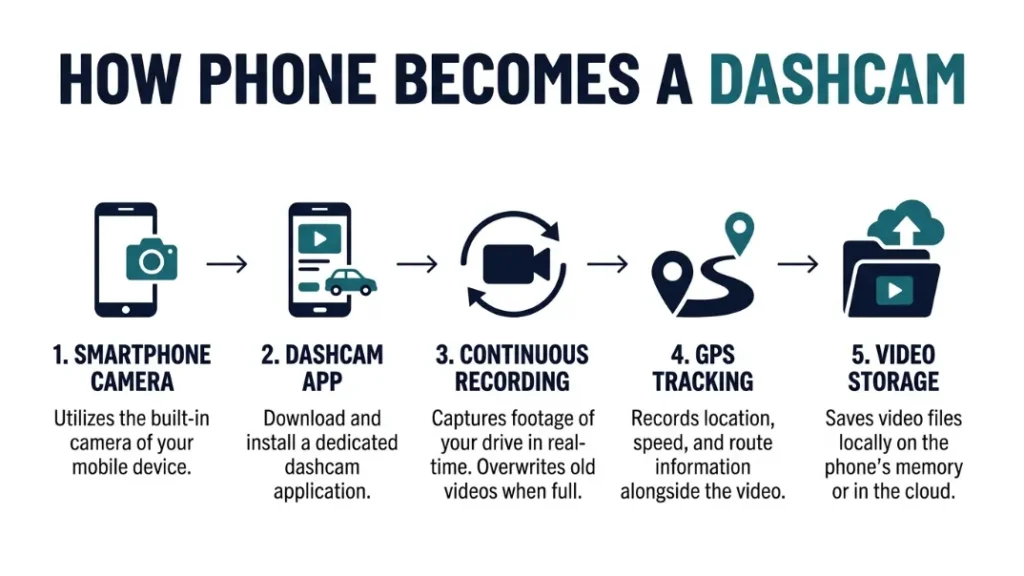
Using your phone as a dashcam means turning it into a continuous video recorder that captures your driving using a dedicated app, camera lens, and storage system, similar to how a built-in dash camera works in modern vehicles.
A dashcam records the road while you drive. It saves video clips for safety or evidence. Your smartphone already has a camera, GPS, and storage. That makes it perfect for this job.
The key rule is simple: your phone must record automatically and continuously. A proper app handles this for you.
Set it once, then let it run every time you drive. That keeps things simple and reliable.
Quick Summary
A phone dashcam uses your camera, storage, and GPS to record every drive automatically. The right app makes it work like a real dashcam.
What Do You Need to Turn Your Phone Into a Dashcam?
You need three main things to turn your phone into a dashcam: a dashcam app for recording, a stable mount for positioning, and a car charger to keep the phone powered during long drives.
These tools create a complete setup. Without one, the system fails.
- Dashcam app: Handles recording and storage
- Phone mount: Keeps the camera steady and aligned
- Car charger: Prevents battery drain
The rule here is clear: stability and power matter more than camera quality.
Start with basic gear. Upgrade later if needed.
Use a windshield mount with suction grip for the most stable footage.
Which Apps Turn Your Phone Into a Dashcam Best?
The best apps for turning your phone into a dashcam include reliable options like AutoBoy Dash Cam, Droid Dashcam, and Nexar, which offer loop recording, GPS tracking, and automatic start features for consistent recording.
AutoBoy Dash Cam works well for Android users. It offers loop recording and background mode.
Droid Dashcam adds more control and customization. You can tweak resolution and storage easily.
Nexar uses AI to detect incidents and save clips to the cloud. That helps protect important footage.
The key rule is this: choose an app with auto-start and loop recording.
You can compare features before choosing. Here is a simple breakdown.
| App | Best For | Key Feature |
|---|---|---|
| AutoBoy | Beginners | Simple setup |
| Droid Dashcam | Advanced users | Custom controls |
| Nexar | Safety focus | Cloud backup |
Check app permissions carefully. You want camera and storage access only.
For more details on safe recording, see
NHTSA distracted driving guidelines.
How Do You Set Up Your Phone Dashcam Step by Step?
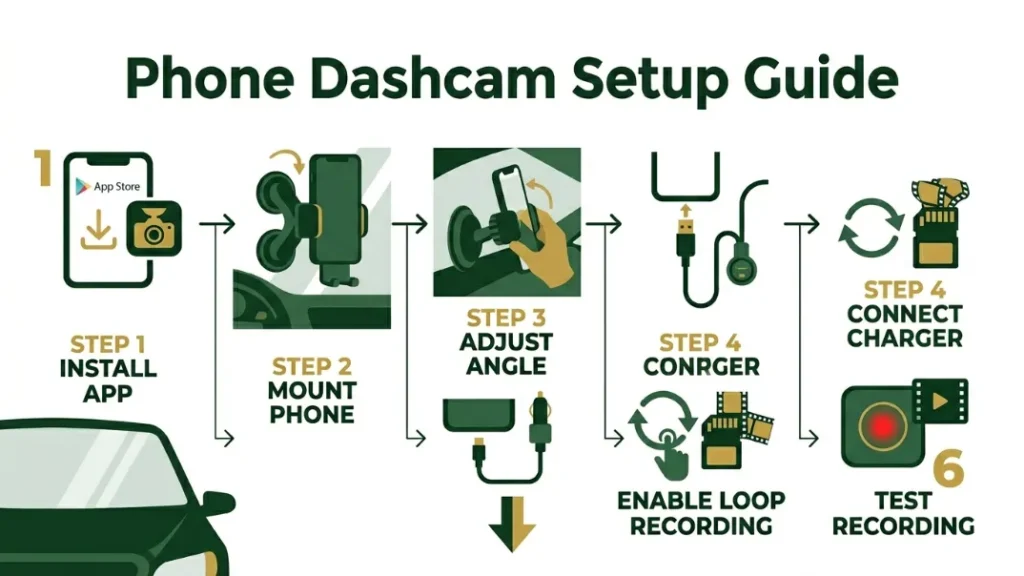
You set up your phone dashcam by installing a recording app, mounting your phone securely, adjusting the camera angle toward the road, and connecting a charger to ensure continuous recording during every drive.
Step-by-Step
- Install a dashcam app from your app store
- Mount your phone on the windshield or dashboard
- Adjust the camera to capture the full road view
- Connect a car charger to keep power steady
- Enable loop recording and auto-start settings
Always test your setup before driving. Record a short clip and review it.
The rule is simple: if you cannot see license plates clearly, adjust again.
Once set, your phone becomes a silent witness on every drive.
A properly mounted phone captures better footage than a poorly placed expensive dashcam.
How Do You Optimize Video Quality, Storage, and Battery Life?
You optimize your phone dashcam by choosing balanced resolution settings like 1080p, enabling loop recording to manage storage, and keeping your phone plugged in to avoid battery drain during long trips.
Higher resolution looks better but uses more space. A one-hour 1080p video uses about 6–8 GB.
The rule is clear: balance quality with storage capacity.
- Use 1080p for daily driving
- Lower FPS to save battery
- Enable loop recording to overwrite old clips
Turn on airplane mode to reduce heat and save battery while recording.
Learn more about storage and device care from
Android storage management guide.
What Are Common Mistakes When Using a Phone as a Dashcam?
Common mistakes include poor mounting, overheating the phone, and running out of storage, which can stop recording or produce unusable footage when you need it most.
Bad mounting creates shaky video. Overheating shuts down apps. Full storage stops recording.
The rule here is simple: prevent failure before it happens.
- Do not block your camera view
- Do not ignore heat buildup
- Do not forget to check storage
Direct sunlight can overheat your phone and stop recording without warning.
Fix these early, and your setup stays reliable.
Is It Legal to Use Your Phone as a Dashcam While Driving?
Using your phone as a dashcam is legal in many places if it does not block your view and follows local privacy laws, but rules vary by country and region, so you must check your local regulations before recording.
In places like Bangladesh, enforcement focuses on safe driving and visibility. In regions like the United States, laws vary by state.
The rule is clear: never place your phone where it blocks your vision.
Check official guidance like
road safety rules before using your setup.
Can a Phone Replace a Real Dashcam Completely?
A phone can replace a dashcam for basic recording, but it lacks features like dedicated sensors, heat resistance, and parking mode, which makes real dashcams more reliable for long-term or professional use.
| Feature | Phone Dashcam | Real Dashcam |
|---|---|---|
| Cost | Low | Medium |
| Reliability | Medium | High |
| Heat Handling | Low | High |
The rule is simple: phones work well for casual use, not extreme conditions.
Choose based on your driving habits.
When Should You Upgrade to a Dedicated Dashcam?
You should upgrade to a dedicated dashcam when you need better reliability, longer recording time, or features like parking mode, which phones cannot provide consistently during daily or professional driving.
Upgrade if you drive long hours or in hot weather. Ride-share drivers benefit the most.
The rule: upgrade when reliability matters more than convenience.
Brands like Nextbase offer dedicated solutions built for this purpose.
Final Thoughts: Is a Phone Dashcam Worth It for You?
A phone dashcam works well for beginners who want a low-cost solution, but it requires careful setup and maintenance to stay reliable over time.
I’m Alex Rahman, and I use this setup often during testing. It works when done right.
Start simple. Test your setup. Improve step by step.
Your phone can protect you on the road. You just need to use it correctly.
Frequently Asked Questions
Can I use my phone while the dashcam app is running?
Yes, but it depends on the app. Some apps support background recording, while others stop when you switch screens.
Does a phone dashcam drain battery quickly?
Yes, recording video uses a lot of power. Always keep your phone connected to a charger while driving.
How much storage do I need for dashcam recording?
You need at least 32GB for basic use. Higher resolution recording requires more storage quickly.
Can I record while the car is parked?
Yes, but it drains battery fast. Dedicated dashcams handle parking mode better.
Do dashcam apps record automatically?
Most apps support auto-start. You need to enable this feature in settings.
Is a phone dashcam safe to use while driving?
Yes, if mounted properly. Never hold or adjust your phone while driving.

I’m Alex Rahman, a car enthusiast and automotive writer focused on practical solutions, car tools, and real-world driving advice. I share simple and honest content to help everyday drivers make better decisions.
