Is a Front Facing Dash Cam Enough? Here’s the Truth
A front facing dash cam covers what happens ahead of your car. It protects you in head-on collisions and most at-fault disputes. But it won’t record rear-end hits, parking lot damage, or side-swipe accidents. For full protection, a dual dash cam with a rear camera gives you far better coverage.
A few years ago, a driver I know got rear-ended at a red light. Clear case, right? The other driver hit him from behind. But without footage, it turned into a “he said, she said” nightmare with his insurer. He had a dash cam. A front-facing one. It recorded everything — ahead of him. Not behind him.
That story stuck with me. I’m Alex Rahman, and I’ve spent years researching car safety tech, including how dash cams actually perform when it matters most. I’ve seen how the right setup saves drivers hundreds — sometimes thousands — of dollars. And I’ve seen how the wrong setup leaves them with almost nothing useful.
So let’s answer this properly. Is a front facing dash cam enough — or are you leaving a dangerous gap in your protection?
- A front dash cam records what happens ahead — it won’t capture rear-end collisions or parking damage.
- Most accidents involving stopped or parked cars happen from behind or beside — exactly where front-only cams go blind.
- A dual dash cam (front and rear) costs only slightly more and covers the most common coverage gaps.
- Parking mode on a front cam helps, but only covers what’s directly in front of your parked car.
- Rideshare drivers, highway commuters, and city parkers benefit most from adding a rear camera.
What Does a Front Facing Dash Cam Actually Record and Cover?
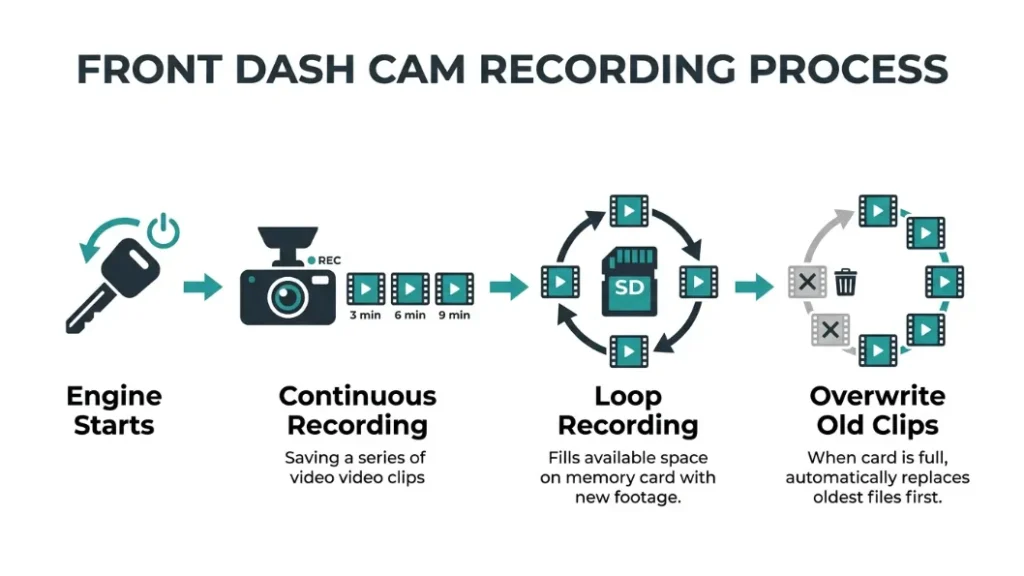
A front facing dash cam mounts on your windshield and continuously records everything ahead of your vehicle. It captures the road, other cars, traffic signals, pedestrians, and any incident that happens in front of you — all saved to a looping SD card.
Most front dash cams record in 1080p Full HD at minimum. Higher-end models from brands like Nextbase and Garmin now offer 1440p or 4K, which helps capture licence plates clearly even at speed.
The camera runs from the moment you start your engine. It records in short clips — usually 1, 3, or 5 minutes long. When the memory card fills up, loop recording kicks in and overwrites the oldest footage automatically. You never have to manage storage manually.
How Far Does a Front Dash Cam See and What Angle Does It Capture?
Most front facing dash cams cover a field of view between 120° and 170°. That’s wide enough to see multiple lanes of traffic and activity on both sides of the road ahead. Some ultra-wide models push past 170°, but image distortion can become a trade-off at the edges.
In terms of distance, a quality front cam can clearly capture events up to 30–50 metres ahead in daylight. Night vision quality varies more — look for Sony STARVIS or similar low-light sensors if you drive regularly after dark.
A wider FOV captures more of the road — but check sample footage from your specific model. Some cheap wide-angle cams distort images badly, making licence plates unreadable. Test before you trust it.
What Happens to the Footage — How Loop Recording and G-Sensors Work Together?
Your front dash cam does two important things to protect critical footage. First, loop recording keeps the camera recording constantly without you pressing anything. Second, the built-in G-sensor detects sudden movement — a hard brake, a collision, or a sharp swerve — and automatically locks that clip so loop recording won’t overwrite it.
This matters a lot after an accident. Without the G-sensor lock, your incident footage could be erased within minutes as new clips record over it. Brands like Vantrue and BlackVue have refined their G-sensor sensitivity settings so you can avoid false locks from speed bumps while still catching real impacts.
Some cams also let you manually press a button to lock a clip immediately — useful if you witness something but your G-sensor didn’t trigger.
What Does a Front Dash Cam Miss — and Why That Gap Can Cost You?
A front facing dash cam records only what’s ahead of your car. Anything happening behind you, beside you, or around your parked vehicle stays completely off-camera. That’s a bigger problem than most drivers realise until after an accident.
According to NHTSA data, rear-end collisions account for nearly 29% of all crashes in the United States. That’s the single most common accident type — and a front-only camera misses every single one of them from the perspective that matters most: what hit you from behind.
What Happens If Someone Rear-Ends You and You Only Have a Front Cam?
If someone hits you from behind, your front cam records your car jolting forward — maybe the car in front of you if the impact was bad. It does not record the vehicle that caused the collision. You have no footage of the other driver’s speed, behaviour, or licence plate before impact.
That creates a real problem with insurance. You know you were hit. But without rear footage, you can’t prove the other driver was speeding, distracted, or driving aggressively. Insurers rely on evidence. Witness accounts are unreliable and often unavailable.
In some rear-end disputes, insurers have questioned fault even when the stopped driver appeared clearly innocent — especially in multi-car pile-ups. Without rear footage, you have no way to show what actually happened behind you. That gap can seriously affect your claim outcome.
What About Parking Lot Hit-and-Runs — Can a Front Cam Catch That?
Parking lot damage is one of the most frustrating situations a driver faces. Someone scrapes your car, dents your bumper, or clips your side mirror — and drives away. A front dash cam in parking mode can only catch this if the damage happens directly in front of your car. Side impacts and rear bumper scrapes go completely unrecorded.
Parking lots account for roughly 20% of all vehicle accidents, according to estimates cited by the Insurance Institute for Highway Safety. Most of that damage occurs at the sides and rear — exactly where a front-only cam goes blind.
Do Side-Swipe and Blind Spot Incidents Show Up on a Front Cam?
A front cam with a wide 170° field of view might catch the very edge of a side-swipe if it happens close to the front of your vehicle. But a mid-car or rear-quarter panel hit? Almost never visible on a forward-facing camera.
Lane-change accidents, merging disputes, and blind-spot collisions are almost always captured only partially — or not at all — on a single front cam. The car that hit you enters your lane from the side, behind your camera’s coverage zone.
When Is a Front-Only Dash Cam Actually Enough for Most Drivers?
A single front facing dash cam gives solid protection for specific driver profiles. If your main concern is proving you didn’t cause a front-end collision — running a red light, rear-ending someone, or a road rage claim — a front cam handles that well.
Front-only setups work well if you:
- Drive mostly on quiet roads with light traffic
- Park in a private garage or secure compound every night
- Mainly want protection against false accusations of causing an accident
- Have a tight budget and want basic coverage now, with plans to upgrade later
For these drivers, a reliable 1080p or 1440p front cam from a brand like Garmin (the Dash Cam Mini 2 is a popular compact option) covers the most likely scenarios they’ll actually face.
A front-only dash cam is enough if you park safely, drive low-traffic routes, and mainly want to defend against at-fault accusations in forward collisions. If you park on streets, drive highways, or want full incident coverage, you need a rear cam too.
When Do You Need a Rear Dash Cam — and Who Should Upgrade Now?
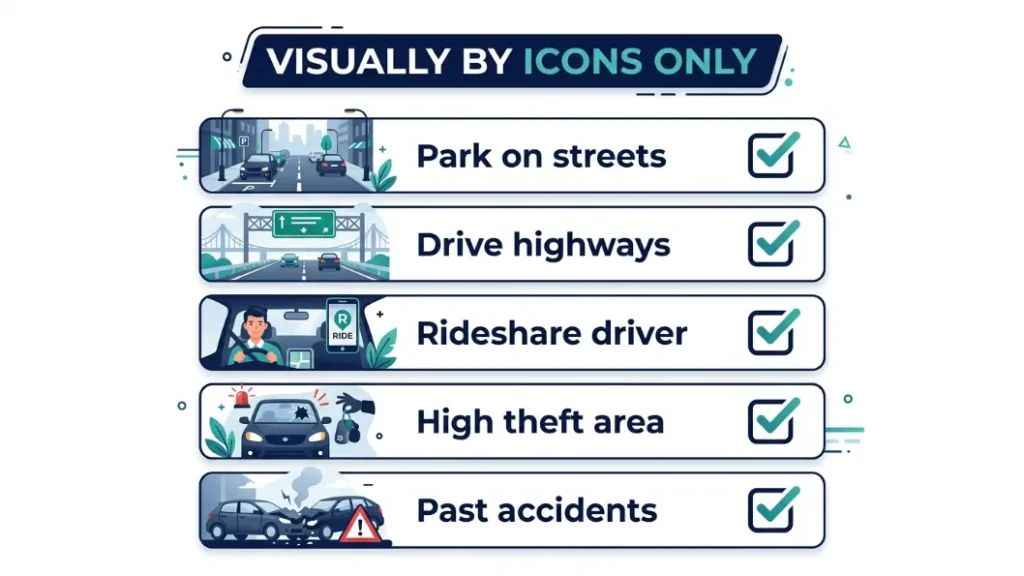
A rear dash cam fills every gap a front-only camera leaves open. It records what approaches you from behind — and what happens around your parked vehicle. For many drivers, this addition changes everything about how protected they actually are.
You need a rear camera if you:
- Park on public streets, in car parks, or outside overnight
- Drive on busy motorways or highways where rear-end risks are high
- Work as a rideshare driver (Uber, Lyft, or similar) and need interior + front + rear coverage
- Live in a city with high rates of vehicle theft or parking damage
- Have previously had a rear-end accident or parking lot incident
Rideshare and taxi drivers in particular benefit from a three-camera setup — front, rear, and interior cabin cam. Vantrue‘s dual and triple-channel systems are popular in this segment for exactly that reason.
If you’re adding a rear cam, choose a dual-channel system from the same brand as your front cam when possible. Synced systems share one app, one SD card slot (sometimes), and make reviewing footage much easier than managing two separate devices.
Front Dash Cam vs. Dual Dash Cam — Which Setup Gives You Better Protection?
The decision between a front-only and a dual dash cam setup comes down to where you’re most vulnerable — and what evidence you’d need in your most likely accident scenario.
| Feature | Front-Only Cam | Dual Cam (Front + Rear) |
|---|---|---|
| Records front collisions | Yes | Yes |
| Records rear-end hits | No | Yes |
| Parking lot hit-and-run (rear) | No | Yes |
| Licence plate capture (rear) | No | Yes |
| Average cost | $50–$150 | $100–$250 |
| Installation complexity | Simple | Moderate |
| Best for | Low-risk drivers, secure parking | City drivers, highway commuters, rideshare |
The price difference between a good front-only cam and a solid dual system is often just $50–$80. That small gap buys you protection against the most common accident types that a front-only camera completely misses.
How Does Dash Cam Footage Actually Help With Insurance Claims?
Dash cam footage works as objective evidence in an insurance dispute. It shows exactly what happened, in what order, at what speed — without relying on anyone’s memory or account. Insurers and courts treat timestamped video footage as one of the strongest forms of incident evidence available.
In the UK, studies have shown that dash cam footage helps resolve insurance claims faster and often results in reduced premiums for drivers who submit it. In the US, several major insurers now offer discounts of 5–10% for verified dash cam installation.
For the footage to help, it needs to show the relevant event. A front cam can prove you didn’t run a red light. It can show the other driver crossed into your lane. But it cannot show who hit your parked car from behind or what vehicle fled the scene after a rear-end collision. That’s the critical limitation.
The most useful footage for insurance purposes shows:
- The other vehicle’s licence plate (before or after impact)
- The moment of collision from the relevant angle
- Traffic conditions and signals at the time
- Any reckless behaviour by the other driver before the accident
A rear camera gives you all four for rear-end and parking incidents. A front-only cam gives you all four only for front-facing collisions. The gap is real and significant in claims.
What Should You Look for in a Front Facing Dash Cam If You’re Buying One?
If you’ve decided a front facing dash cam is right for your situation — or you’re buying one as part of a dual setup — here are the features that actually matter versus the ones that are marketing fluff.
- Check video resolution — 1080p minimum, 1440p or 4K for clear licence plate capture
- Confirm night vision quality — look for Sony STARVIS sensor or equivalent
- Check the field of view — 130°–160° is the sweet spot for most vehicles
- Confirm G-sensor is included and adjustable — prevents false clip-locking
- Check parking mode availability — does it need hardwire kit or does it run on battery?
- Verify loop recording is standard — it should be on all modern dash cams
- Look for GPS logging if you want speed and location data on your footage
Does Resolution Matter — Is 1080p Good Enough or Do You Need 4K?
Resolution matters most for one specific task: reading licence plates. A 1080p front cam does this adequately in good daylight at typical road distances. At night, at high speeds, or at long distances, 1440p or 4K gives meaningfully clearer footage.
For most everyday drivers, 1440p is the sweet spot — sharper than 1080p, smaller file sizes than 4K, and compatible with standard SD cards. BlackVue’s DR970X and Nextbase’s 622GW (which includes built-in Alexa for voice control) are two popular examples of cameras that balance resolution and usability well.
If budget is tight, a quality 1080p cam is far better than a cheap 4K cam. Sensor quality and lens glass matter more than resolution numbers on spec sheets.
What Is Parking Mode and Do You Really Need It on a Front Cam?
Parking mode keeps your dash cam recording even when your engine is off. It activates either by motion detection (something moves in front of the camera) or by G-sensor (something physically hits your car). Some systems do both.
On a front cam only, parking mode covers the space directly ahead of your car. It won’t catch someone reversing into your rear bumper or keying your side door. It’s useful — but limited without a rear cam to match it.
Most parking mode setups require a hardwire kit to draw constant power from your car’s fuse box. Battery-powered buffer parking mode (found in cams like the Vantrue E1 Lite) is a simpler option — but it runs for a shorter duration before the camera shuts off.
If you park on a busy street regularly, hardwired parking mode on a dual cam system is one of the best investments you can make. It turns your dash cam from a driving tool into a 24/7 vehicle security system.
Conclusion
A front facing dash cam is a genuinely useful piece of kit. It protects you in the most common at-fault disputes, records reckless driving ahead of you, and gives insurers clear footage when you need it most. For some drivers — those with secure parking and lighter risk profiles — it’s absolutely enough.
But for most drivers? The gap it leaves is significant. Rear-end collisions, parking lot damage, and hit-and-run incidents all happen behind or beside your car. A front-only cam records none of that. And those are exactly the situations where clear footage matters most.
My honest take, after all the research I’ve done on this topic: if you’re on a budget, start with a solid front cam and add a rear cam when you can. If you’re buying fresh, spend the extra $50–$80 and go dual from day one. The protection difference is worth every penny.
— Alex Rahman
Frequently Asked Questions
Does a front facing dash cam record rear-end accidents?
No. A front facing dash cam only records what’s ahead of your vehicle. If someone hits you from behind, the camera captures your car jolting forward but not the vehicle that caused the impact. You would need a rear dash cam to record that footage.
Is a front dash cam enough for an insurance claim?
A front dash cam is enough for insurance claims involving forward collisions — like proving you didn’t run a red light or cause a head-on accident. For rear-end collisions and parking lot incidents, front-only footage often lacks the evidence insurers need to determine fault.
What is the difference between a front dash cam and a dual dash cam?
A front dash cam records only what’s ahead of your car. A dual dash cam includes both a front camera and a rear camera, giving you coverage of incidents behind and in front of your vehicle simultaneously. Dual systems cost slightly more but protect against a much wider range of accident types.
Can a front dash cam record parking lot damage?
A front dash cam with parking mode can detect and record incidents that happen directly in front of your parked car. It cannot capture damage to your rear bumper, side panels, or doors — for that, you need a rear camera or a multi-camera setup with side coverage.
How much does a good front facing dash cam cost?
A reliable front facing dash cam costs between $50 and $150 for most drivers. Budget models from reputable brands start around $50–$80 and cover the basics well. Premium models with 4K, GPS, and parking mode from brands like Nextbase, Garmin, or Vantrue range from $100 to $200.
Do dash cams deter car theft and vandalism?
Visible dash cams can deter opportunistic theft and vandalism, especially in well-lit areas where a potential criminal can see the camera mounted on your windshield. However, a front-only cam won’t capture activity at your rear or sides while parked, so its deterrent effect is limited compared to a full dual or multi-camera system.

I’m Alex Rahman, a car enthusiast and automotive writer focused on practical solutions, car tools, and real-world driving advice. I share simple and honest content to help everyday drivers make better decisions.
