Will a Dash Cam Record While the Car Is Off at Night? (Complete Guide)
A dash cam will only record while the car is off if it has parking mode enabled and a constant power source — either a hardwire kit, OBD-II adapter, or built-in battery. Without one of these, your dash cam shuts off the moment the engine stops.
I parked my car outside a restaurant one evening and came back to find a fresh dent on the driver’s door. No note. No witness. And my dash cam? Completely useless — it had turned off the second I killed the engine.
That night taught me something important. A dash cam is not automatically a security camera. Most drivers assume it keeps watching while they are parked. It does not — unless you set it up correctly.
I’m Alex Rahman, and after years of testing dash cams and helping drivers choose the right setup, I want to give you the straight answer most guides skip over. By the end of this article, you will know exactly how to make your dash cam record all night — without killing your battery.
Let’s get into it.
- Most dash cams stop recording the moment the engine turns off — this is normal default behavior.
- Parking mode keeps your cam recording while parked, but it needs a constant power source to work.
- A hardwire kit is the most reliable power method; an OBD adapter is the easiest to install yourself.
- Low voltage cutoff is a critical safety feature that prevents parking mode from draining your car battery dead.
- Storage and battery protection — not night vision — are the two biggest challenges with overnight recording.
What Happens to Your Dash Cam When You Turn the Engine Off?
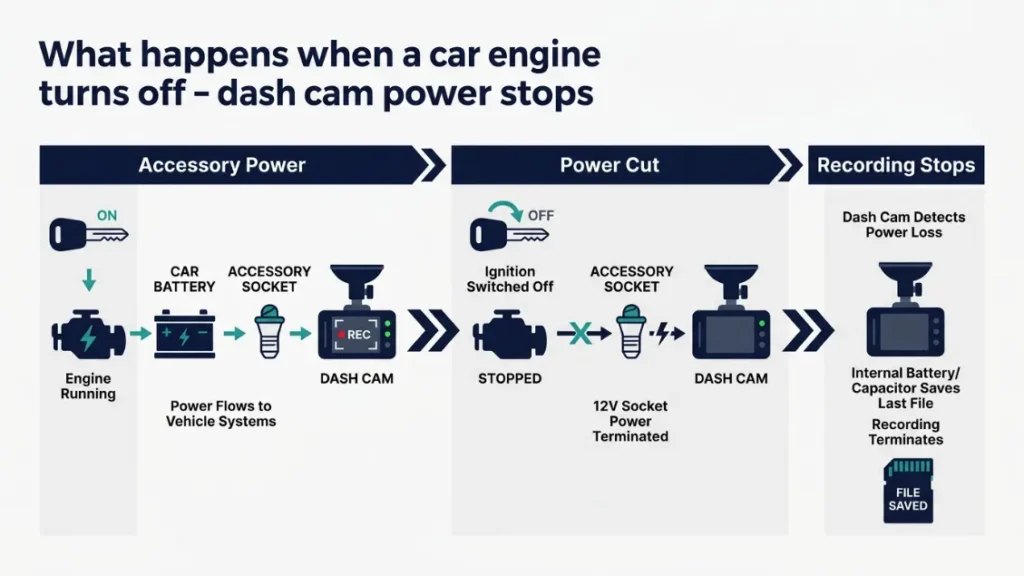
When you turn off your engine, most dash cams lose power instantly and stop recording. This happens because the camera draws power from your car’s 12V accessory socket — which shuts off with the ignition on most modern vehicles. No power means no recording, full stop.
This is not a flaw. It is how dash cams are designed by default. Manufacturers do this deliberately to prevent the camera from draining your car battery while you are away.
Think of it this way. Your dash cam draws roughly 2 to 5 watts per hour while running. Over 8 hours parked overnight, that is 16 to 40 watt-hours of energy pulled from your battery. Most car batteries hold around 600 to 800 watt-hours of usable energy — so you can see how an unprotected setup could leave you stranded.
The good news? This default behavior is completely overridable. You just need the right setup.
Why Most Dash Cams Stop Recording When Parked
Your car’s accessory socket is wired to a switched circuit — meaning it only receives power when the ignition key is in the “on” or “accessory” position. The moment you turn the key off or open the door on a keyless car, that circuit cuts out.
Dash cams powered through the cigarette lighter or USB socket follow this same circuit. No ignition, no power, no recording.
To record while parked, you need to tap into a constant 12V circuit — one that stays live even with the engine off. That is exactly what hardwire kits and OBD adapters do.
What Is Parking Mode and How Does It Actually Work?
Parking mode is a special recording setting that keeps your dash cam active while the engine is off — triggered either by detected motion, a physical impact, or continuous time-lapse capture. It turns your dash cam into a security camera the moment you walk away from your car.
Not every dash cam has parking mode. Budget cams under $50 rarely include it. Mid-range and premium cams from brands like Vantrue, Nextbase, BlackVue, and Garmin typically build it in — but you still need to enable it and supply a constant power source.
Parking mode recording works in three main trigger styles.
- Motion detection: The cam watches for movement in the frame. A person walking past or a car pulling in next to you triggers a short clip to save.
- G-sensor / impact detection: The accelerometer inside the cam detects a physical jolt — someone bumping your car, a door ding, or a collision. This triggers an emergency clip that saves automatically.
- Time-lapse: The cam captures one frame every few seconds and stitches them into a fast-forward video. Great for long parking stints — uses much less storage.
Event-Based Recording vs Time-Lapse — What Is the Difference?
Event-based recording saves full-resolution clips only when the camera detects motion or impact. Time-lapse records constantly but compresses hours into minutes of video. Both protect your car — they just do it differently.
| Feature | Event-Based | Time-Lapse |
|---|---|---|
| Storage Use | Low — clips only | Very low — compressed |
| Detail Quality | Full resolution | Lower — frame gaps |
| Misses Slow Events? | Possible if motion low | Rarely |
| Best For | Hit-and-run, vandalism | Long airport trips |
| Power Draw | Moderate | Very low |
What Does Buffered Parking Mode Mean and Why Does It Matter?
Buffered parking mode continuously holds a short loop of footage in memory — typically 10 to 30 seconds — even before a trigger event. When impact or motion is detected, the cam saves that pre-event footage along with what happens after.
This is a big deal. Standard event-based parking mode only captures what happens after the trigger. If someone clips your car and drives off in three seconds, standard mode might miss the license plate. Buffered mode already has those 20 seconds before impact saved.
Buffered parking mode is the single most underrated feature in dash cam shopping. If catching a hit-and-run is your priority, look for this specifically — Vantrue E1 Lite and BlackVue DR970X both offer it.
How Do You Power a Dash Cam When the Engine Is Off?
To keep a dash cam recording while parked, you need power from a source that stays live after the engine shuts off. There are three practical options: a hardwire kit, an OBD-II adapter, or an internal or external battery. Each has real trade-offs.
Option 1 — Hardwire Kit: The Most Reliable Method
A hardwire kit connects your dash cam directly to your car’s fuse box — giving it constant 12V power from a circuit that stays active even with the engine off. This is the most reliable and clean-looking setup available.
The kit includes a low voltage cutoff module (more on that shortly) and two fuse taps — one for a constant 12V circuit, one for the switched circuit. The switched circuit tells the cam when the engine is on so it switches between normal drive recording and parking mode automatically.
- Buy a hardwire kit that matches your dash cam brand (e.g., Nextbase Hardwire Kit, Vantrue HK3).
- Locate your car’s fuse box — usually under the dashboard on the driver’s side.
- Use a test light or multimeter to find a constant 12V fuse slot (stays live with engine off).
- Find a switched fuse slot (only live when ignition is on).
- Insert the fuse tap adapters into both slots — match the correct amperage.
- Route the wiring up the A-pillar and along the headliner to the cam.
- Set your voltage cutoff threshold in the dash cam app or settings menu.
- Test by turning the engine off — the cam should switch to parking mode automatically.
If you are not comfortable working with fuse boxes, most car audio shops will install a hardwire kit for $30 to $60 in labor. It is a 30-minute job for an experienced tech.
Option 2 — OBD-II Adapter: The Easiest Plug-In Option
An OBD-II adapter plugs into your car’s OBD-II diagnostic port (found under the dashboard on virtually every car made after 1996) and delivers constant 12V power to your dash cam. No wiring, no tools, no fuse box needed.
Brands like Vantrue and Thinkware sell OBD-II power adapters specifically designed for parking mode use. They include built-in voltage protection just like a hardwire kit.
The trade-off is that the OBD port draws from a slightly different circuit than a fuse tap. On some vehicles, this can interfere with diagnostic readings. It also adds a visible cable dangling under the dash — less clean than a hardwired setup.
For renters, people who switch cars often, or anyone who just wants parking mode working today without installation, the OBD adapter is the fastest path.
Option 3 — Internal Battery or External Battery Pack
Some dash cams include a small internal battery (like a capacitor or lithium cell) that provides a few minutes of recording after the engine shuts off. This is not enough for overnight protection — it is designed for safe file saving and short-event capture only.
A proper solution here is an external battery pack — a dedicated power bank designed for dash cam use, like the Cellink Neo or Vantrue B1. These sit in your trunk, wire to the cam, and provide 8 to 24 hours of parking mode power completely independent of your car battery.
Do not use a standard USB power bank to run parking mode overnight. Most power banks auto-shut off after 30 to 60 seconds when they detect low draw from a dash cam. You will think it is recording — and it will not be.
Will Parking Mode Drain Your Car Battery Overnight?
Parking mode can drain your car battery if it runs without protection — but a properly configured low voltage cutoff prevents this completely. The risk is real but fully manageable with the right settings.
A typical dash cam in parking mode draws 1.5 to 4 watts continuously. Over 10 hours, that equals 15 to 40 watt-hours. A standard 60Ah car battery stores roughly 720 watt-hours of usable energy. So in theory, a dash cam could run for 18 to 48 hours before draining a healthy battery.
But here is the problem. Car batteries do not like being drained below 50% capacity. Repeated deep discharges kill a battery fast. And if your battery is old or already weak, parking mode can drain it enough to prevent a cold-weather start.
Low voltage cutoff solves this entirely.
What Is Low Voltage Cutoff and How Does It Protect Your Battery?
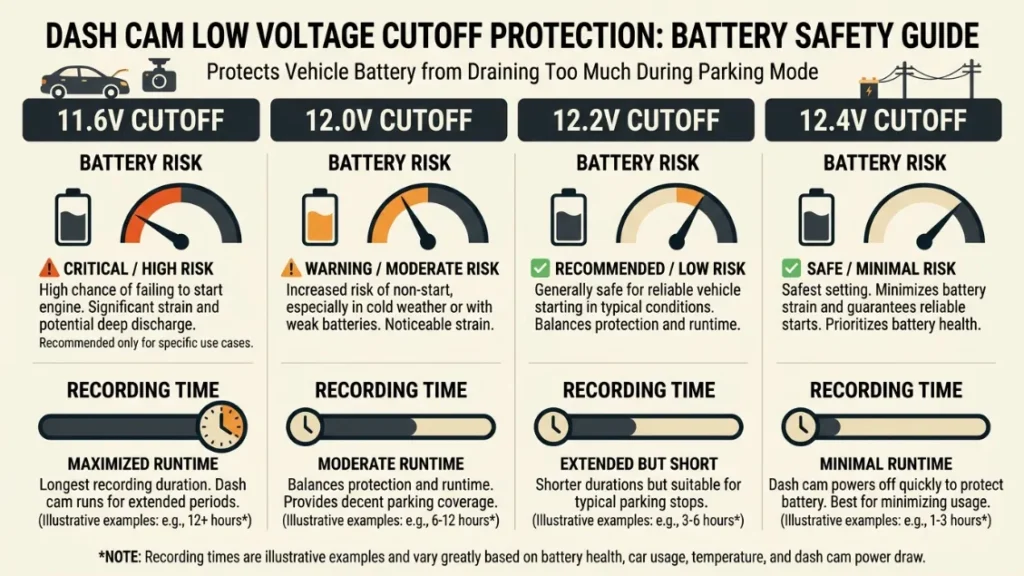
Low voltage cutoff (LVC) is a protection feature built into hardwire kits and OBD adapters that monitors your battery voltage and shuts the dash cam off automatically before the voltage drops to a dangerous level. It acts as a safety valve between your cam and your battery.
Most hardwire kits let you set a cutoff voltage — typically between 11.6V and 12.4V. When your battery voltage drops to that number, the kit cuts power to the cam. Your car battery stays safe. Your engine starts normally in the morning.
What Voltage Cutoff Setting Should You Use?
For most drivers with a healthy battery, a cutoff of 12.0V is a safe and balanced choice. This protects the battery while allowing several hours of parking mode recording. Here is a quick reference.
| Cutoff Voltage | Battery Risk | Recording Time | Best For |
|---|---|---|---|
| 11.6V | Higher risk | Longest | New battery, warm climate |
| 12.0V | Low risk | 6–12 hours typical | Most drivers — balanced choice |
| 12.2V | Very low risk | Shorter | Older battery, cold climate |
| 12.4V | Minimal risk | Very short | Weak or aging battery |
If you drive your car every day and take trips of at least 20 minutes, your alternator will fully recharge the battery each morning. A 12.0V cutoff with daily driving is almost always completely safe.
How Long Will a Dash Cam Record in Parking Mode Before Storage Runs Out?
On a 64GB memory card with event-based parking mode, most dash cams store 8 to 16 hours of triggered clips before overwriting older footage via loop recording. Time-lapse mode stretches that same card to cover 3 to 5 days of parking easily.
Here is why the numbers vary. Full HD 1080p video at typical parking mode bitrates uses roughly 1 to 1.5GB per hour. A 64GB card holds about 40 to 60 hours of raw footage. But most parking mode cameras do not record continuously — they record short 1 to 3 minute clips per event and then sleep. So 64GB can hold dozens or hundreds of individual parking events before the card fills up.
Loop recording handles overflow automatically. When storage is full, the oldest non-protected clips delete themselves to make room for new footage. Protected clips — those flagged by G-sensor or manually locked — stay safe and do not get overwritten.
Use at least a 64GB card for overnight parking mode. Choose a card rated for dashcam use — standard SD cards wear out fast with constant write cycles. Brands like Samsung Endurance Pro and SanDisk High Endurance are built for this exact use case.
Does Night Vision Work in Parking Mode? What to Expect After Dark
Parking mode night vision works as well as your dash cam’s sensor and IR lighting allow — but most dash cams capture usable footage in parking lots and street-lit areas, while completely dark environments produce blurry or grainy results. Night vision quality depends heavily on the camera model, not just the parking mode setting.
Dash cams use one of two approaches for low-light capture.
- Sony STARVIS sensor: Found in higher-end cams like the Vantrue E3 and BlackVue DR970X, this sensor captures more light at lower noise — producing genuinely readable plates and faces in dimly lit conditions.
- Standard CMOS sensors: Common in budget to mid-range cams. These produce acceptable footage under street lighting but struggle in true darkness.
Infrared (IR) LEDs — found in some interior-facing cameras — illuminate the inside of your car at night without visible light. Useful for rideshare monitoring, but not relevant for exterior parking surveillance.
The honest reality? Even a budget cam with a standard sensor captures enough detail in a standard parking lot to identify a vehicle color, make, and often a partial plate. That is enough to file a police report or insurance claim in most real-world scenarios.
If night recording quality is your top priority, look specifically for “Sony STARVIS” in the specifications. This single sensor upgrade makes a larger difference to night footage than resolution or bitrate.
Which Dash Cam Brands Do Parking Mode Best?
The brands that consistently lead for parking mode performance are Vantrue, BlackVue, Nextbase, and Thinkware — each with different strengths depending on budget and use case.
- Vantrue — Excellent parking mode features across the range. The Vantrue E1 Lite offers buffered parking mode at a mid-range price. Great value for dedicated overnight recording.
- BlackVue — Premium brand with cloud-connected parking mode. The BlackVue DR970X lets you check live footage remotely via the BlackVue Cloud app. Best for drivers who want real-time alerts while away from their car.
- Nextbase — The UK market leader trusted by millions of drivers. The Nextbase 622GW and 522GW both offer parking mode via the Nextbase Hardwire Kit. Strong build quality and app support.
- Thinkware — Known for reliable motion detection and clean Korean engineering. The Thinkware U3000 supports parking mode with excellent sensitivity tuning.
- Garmin — Solid mid-range option with Garmin Dash Cam Mini 2 and 67W both supporting parking mode via hardwire. Reliable for everyday use.
For a deeper comparison of specific models, Consumer Reports’ dash cam buying guide is a useful independent reference.
How Do You Set Up Parking Mode Step by Step?
Setting up parking mode takes three things: enabling the feature in your cam’s settings, supplying constant power via hardwire or OBD adapter, and setting your voltage cutoff threshold correctly. Here is the full process.
- Check your dash cam manual or product page — confirm parking mode is a supported feature.
- Purchase the correct hardwire kit or OBD-II adapter for your camera brand and model.
- Install the hardwire kit at the fuse box OR plug in the OBD adapter under the dash.
- Open your dash cam’s settings app or on-device menu.
- Navigate to Parking Mode settings — enable it and select your preferred trigger type (motion, impact, or time-lapse).
- Set sensitivity levels for motion detection and G-sensor — start at medium to avoid false triggers.
- Set your low voltage cutoff threshold (12.0V recommended for most drivers).
- Park and walk away — test by tapping the car gently and checking whether a clip was saved.
What Are the Biggest Parking Mode Mistakes Drivers Make?
Parking mode failures almost always come down to four mistakes — and every one of them is preventable once you know what to look for.
Never rely on parking mode without a hardwire kit or OBD adapter installed. Plugging into the cigarette lighter gives you zero parking mode functionality on most vehicles — the socket dies with the ignition.
- Mistake 1 — No constant power source: The most common error. The dash cam is physically installed but still powered by the accessory socket. It stops recording the second the engine turns off. Solution: install a hardwire kit or OBD adapter.
- Mistake 2 — Sensitivity set too high or too low: Too high, and every passing car triggers a clip, filling storage within hours. Too low, and a slow key scratch never triggers a recording. Start at medium and adjust based on your environment.
- Mistake 3 — No voltage cutoff set: Running parking mode with no cutoff protection risks a dead battery on cold mornings. Always configure the LVC threshold before relying on parking mode regularly.
- Mistake 4 — Wrong memory card: Standard SD cards wear out within months under constant dash cam write cycles. Use an endurance-rated card — Samsung Pro Endurance, SanDisk High Endurance, or Kingston Canvas Go Plus — designed for 24/7 recording environments.
The drivers who get the most out of parking mode are the ones who tested it before they needed it. Park in your driveway, tap the car, and check the footage. Know your setup works before you park in a risky location.
Conclusion
A dash cam will absolutely record while your car is off at night — but only if you give it a constant power source and enable parking mode. Without those two things in place, your cam is just sitting there doing nothing while your car sits unprotected.
The setup is simpler than most drivers think. A hardwire kit or OBD adapter handles the power. Low voltage cutoff handles the battery protection. A good endurance-rated SD card handles the storage. And parking mode itself handles the recording.
I’m Alex Rahman, and in my experience helping drivers choose and set up dash cams, parking mode is the single most valuable feature most people never use — simply because nobody told them it needed a proper power setup to work.
Now you know. Set it up once, and your cam watches your car every night without you having to think about it again.
If you are still choosing a camera, the Which? dash cam reviews are worth checking for independent UK-market testing data.
Frequently Asked Questions

I’m Alex Rahman, a car enthusiast and automotive writer focused on practical solutions, car tools, and real-world driving advice. I share simple and honest content to help everyday drivers make better decisions.
