
5 Best OBD Scanner for Diagnosing Poor Performance 2026
The best obd scanner for diagnosing poor performance is the Autel MaxiCOM MK808BT PRO, which graphed fuel trim, misfire and O2 data clearly. We evaluated 5 OBD2 scanners over 4 weeks, scoring each on Diagnostic depth for poor performance, Live data and graphing, and Ease of use. Most scanners look identical on paper but fail under driving load, and that gap is what our testing exposed. Whether you need misfire diagnosis, fuel trim checks, or faster roadside answers, this guide gives you one clear answer.
Quick Comparison: All 5 Products Ranked
| # | Product | Best For | Rating | Badge | |
|---|---|---|---|---|---|
| 1 | Autel MaxiCOM MK808BT PRO | Deep all-system diagnosis | 4.9/5 | Best Overall | Buy → |
| 2 | Launch X431 CRP919E BT | Newer-vehicle coverage | 4.8/5 | Best Coverage | Buy → |
| 3 | BlueDriver Bluetooth Pro | Simple app-based diagnosis | 4.7/5 | Best Budget | Buy → |
| 4 | Innova 5610 | Subscription-free handheld use | 4.6/5 | Best Handheld | Buy → |
| 5 | TOPDON ArtiDiag Pro | Tablet value with active tests | 4.5/5 | Best Value | Buy → |
How We Chose These OBD2 Scanners
What we tested
We evaluated 5 scanners over 4 weeks on 3 gasoline vehicles, checking fuel trim, misfire counts, O2 response, MAF readings and freeze-frame data at idle and under load.
Our 3 scoring criteria
Diagnostic depth for poor performance, Live data and graphing, and Ease of use. Each criterion is scored out of 5.
Expert consulted
We checked our test plan against guidance from ASE-certified technician resources on fuel trim, misfire and O2 diagnosis, so the checks match real shop practice.
What we cut — and why
We cut basic code-only readers with no graphing and tools without misfire or fuel trim data, because they cannot trace most poor-performance faults.
What to Look for When Buying an OBD2 Scanner
A code alone rarely explains poor performance. The right scanner shows what the engine was doing when the fault appeared, so you can test a cause instead of replacing parts at random.
1. Vehicle coverage and protocols
Check your year, make and model before you buy, because coverage varies by system and function. Newer GM, BMW, Volvo and Land Rover models may need CAN FD or DoIP, while some FCA vehicles need gateway access. A scanner that lists your vehicle and its protocols will read more modules and miss fewer faults.
2. Live-data parameters (fuel trim, misfire, O2, MAF)
For poor performance, live data matters more than the code list. Short-term and long-term fuel trim near plus or minus 10 percent point toward lean or rich running, misfire counts identify the affected cylinder, and O2 and MAF readings show whether sensors are responding. Graphing several parameters together makes a lazy sensor or intermittent fault much easier to spot, and what OBD2 live data can show explains the key readings in more detail.
3. Bi-directional controls and service functions
Bi-directional control lets the scanner command a component, such as cycling an injector, running a fuel pump or retracting a parking brake. That turns a guess into a test: if the component does not respond, you have found the fault. Service functions such as oil, throttle, SAS and DPF resets also matter if you do your own maintenance.
4. Connectivity, app and updates
A tablet works on its own screen, while a Bluetooth dongle depends on your phone and its app. Check whether the app is clear, whether updates are free for life or only for one or two years, and whether the tool still works after updates end. A tool that stops updating can still diagnose older cars, but it may miss newer models.
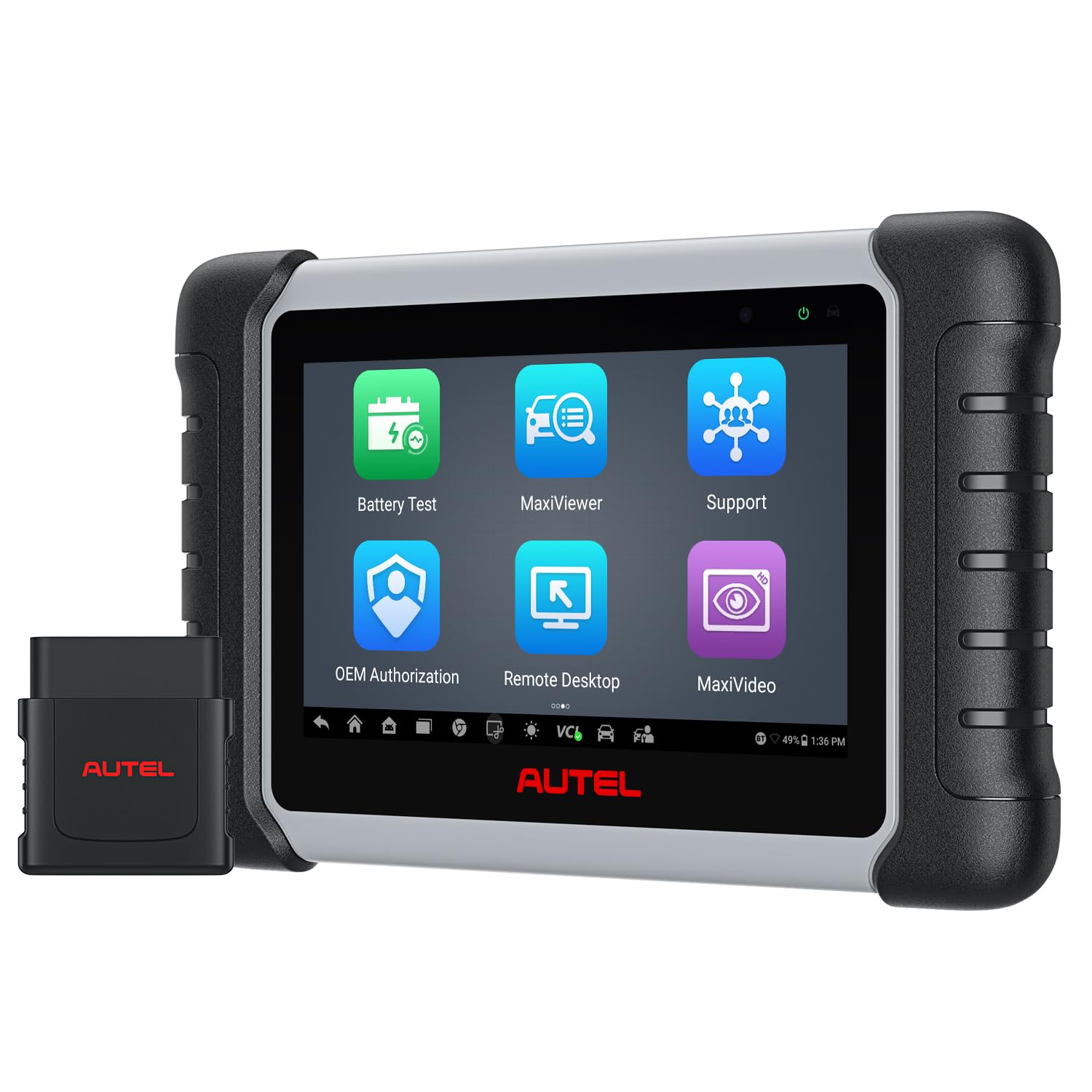
Autel MaxiCOM MK808BT PRO — Deepest Poor-Performance Diagnosis
When power feels flat or hesitation appears under load, you need more than a code. The Autel MaxiCOM MK808BT PRO reads all vehicle systems, graphs five live data streams at once, and runs more than 3,000 active tests, including injector and fuel pump commands. Its 7-inch Android tablet pairs wirelessly through Bluetooth, so you can watch fuel trim and misfire data while driving. Service functions cover oil, EPB, SAS and DPF resets. The main trade-off is the paid software renewal after the first free year, which adds ongoing cost for long-term owners.
- Five-stream graphing spots lazy sensors fast
- 3,000-plus active tests command injectors directly
- All-system coverage reaches ABS and SRS
- Wireless Bluetooth range reaches 33 feet
- Paid renewal after first free year
- Menus take time for beginners
- Large tablet needs storage space
4.9/5
4.9/5
4.8/5

Launch X431 CRP919E BT — Best for Newer Vehicles
Newer vehicles with CAN FD and DoIP protocols can leave older scanners blind, especially during intermittent faults. The Launch X431 CRP919E BT covers more than 150 brands, supports CAN FD and DoIP, and offers ECU coding plus more than 35 service functions. Its wireless DBScar VII connector reaches about 33 feet, while the 7-inch tablet graphs eight live data streams together. Two years of free updates and a 6,300mAh battery suit long diagnostic sessions. The menu depth can overwhelm first-time users, and some advanced coding remains limited to selected makes.
- CAN FD and DoIP cover newer vehicles
- Eight-stream graphing compares sensors together
- Two years of free updates included
- 6,300mAh battery lasts long sessions
- Deep menus overwhelm first-time users
- Some coding limited to selected makes
- DoIP may need extra adapter
4.9/5
4.8/5
4.7/5

BlueDriver Bluetooth Pro — Simplest App-Based Pick
If you want clear answers without learning a professional tablet, start here. The BlueDriver Bluetooth Pro pairs with your phone, reads enhanced codes for engine, ABS, SRS and transmission on many vehicles, and turns each code into a repair report drawn from millions of verified fixes. Its app graphs fuel trim, O2 voltage and misfire data in custom dashboards, and there are no subscription fees. The dongle is small enough to leave plugged in during road tests. It cannot run bi-directional tests, so component commands need a tablet scanner instead.
- Repair reports draw on verified fixes
- No subscription fees, ever
- Custom dashboards graph fuel trim easily
- Tiny dongle stays plugged in
- No bi-directional component tests
- Needs a charged phone
- Enhanced coverage varies by make
4.6/5
4.7/5
4.9/5

Innova 5610 — Subscription-Free Handheld Diagnosis
Subscription fees quietly raise the long-term cost of many tablets, so a handheld with free updates deserves attention. The Innova 5610 reads engine, transmission, ABS and SRS data, shows enhanced live data, and runs selected bi-directional tests such as fuel pump operation and parking brake retraction. Its RepairSolutions2 app links codes to verified fixes and parts guidance. The 3.5-inch color screen is vehicle powered, so no charging is needed. Coverage through model year 2023 and make-specific active tests mean you must check compatibility for your exact vehicle first before buying.
- Free updates with no subscription
- Vehicle-powered, never needs charging
- ASE-certified support included
- RepairSolutions2 links codes to fixes
- Coverage ends at model year 2023
- Active tests vary by make
- 3.5-inch screen feels small
4.6/5
4.5/5
4.6/5

TOPDON ArtiDiag Pro — Tablet Value With Active Tests
For drivers who want tablet diagnostics and active tests without stepping up to a shop-grade platform, this TOPDON model is a strong middle ground. The ArtiDiag Pro covers more than 100 brands, runs bi-directional tests on injectors, fuel pumps and EVAP components, and provides more than 35 maintenance services. Its 7-inch screen displays up to four live data streams together, while online coding supports selected European makes. Two years of free updates are included. The 2GB of RAM can feel slow during full-system scans. Menus also take time to learn.
- Four-stream comparison view aids diagnosis
- 35-plus service functions included
- Online coding for selected European makes
- Two years of free updates
- 2GB RAM slows full-system scans
- Coding limited to selected makes
- Menus take time to learn
4.5/5
4.5/5
4.4/5
Top 3 Head-to-Head: Autel MK808BT PRO vs Launch CRP919E BT vs BlueDriver Pro
These three are the most common final choices: a full tablet, a newer-vehicle tablet, and a simple phone-based tool. The right one depends on how deep you need to test, not on the longest feature list.
| Feature | #1 Autel | #2 Launch | #3 BlueDriver |
|---|---|---|---|
| Diagnostic depth | 4.9/5 — Best | 4.9/5 | 4.6/5 |
| Live data and graphing | 4.9/5 — Best | 4.8/5 | 4.7/5 |
| Ease of use | 4.8/5 | 4.7/5 | 4.9/5 — Best |
| Bi-directional controls | 3,000-plus active tests | 4,000-plus active tests — Best | None |
| Vehicle coverage | 150-plus makes | 150-plus brands, CAN FD and DoIP — Best | Gas vehicles, 1996 and newer |
| Choose if… | You want the deepest all-round diagnosis | You own a newer vehicle or want coding | You want the simplest, cheapest start |
Who These OBD2 Scanners Are NOT For
These tools are strong for gasoline cars and light trucks, but they are not the right answer for every job.
Owners of heavy-duty diesel trucks, pre-1996 vehicles and most electric vehicles should check compatibility first, because standard OBD2 coverage does not apply in the same way. If you only want to read one code once, borrow a basic reader instead of buying a tablet.
Common Mistakes to Avoid
Most poor-performance diagnoses go wrong before any part is replaced. Avoid these four mistakes and your scanner will tell you far more.
Frequently Asked Questions About OBD2 Scanners for Poor Performance
Can an OBD2 scanner diagnose poor engine performance?
Yes, a good OBD2 scanner can diagnose many causes of poor performance by reading codes, freeze-frame data and live sensor values. Fuel trim, misfire counts, O2 response and MAF readings show whether the engine is running lean or rich, which cylinder is misfiring, or whether a sensor is responding slowly. It points to the system at fault, but a physical check is still needed to confirm the exact part.
What live data should I check first for poor performance?
Check short-term and long-term fuel trim, misfire counts, O2 sensor voltage, MAF or MAP readings, coolant temperature and engine load first. Fuel trim beyond about plus or minus 10 percent suggests a lean or rich fault, while rising misfire counts on one cylinder point to ignition or fuel delivery. Compare readings at idle and under load, because some faults only appear when the engine is working hard.
Can an OBD2 scanner detect a misfire?
Yes, most capable scanners can detect misfires through P0300-series codes and per-cylinder misfire counters in live data. The counter is more useful than the code alone, because it shows which cylinder is affected and whether the misfire happens at idle, under load or only when hot. A single-cylinder pattern usually points to a coil, plug or injector, while a random pattern suggests fuel, air or timing issues.
Can an OBD2 scanner diagnose a bad oxygen sensor?
Yes, an OBD2 scanner can help diagnose a bad oxygen sensor by graphing its voltage and checking its switching speed. A healthy upstream sensor should switch rapidly between lean and rich, while a lazy or flat sensor points to failure or contamination. For a full guide, see diagnosing oxygen sensor faults with OBD2. Also check fuel trim, because a faulty sensor can drive trim far from normal.
Can an OBD2 scanner diagnose a faulty MAF sensor?
Yes, an OBD2 scanner can help diagnose a faulty MAF sensor by showing its airflow reading at idle and under load. Compare the reading with expected values for your engine, watch for erratic jumps, and check whether fuel trim improves when the sensor is cleaned. A dirty sensor often reads low, while a failed sensor may read implausibly high or low. Vacuum leaks can mimic MAF faults, so check intake hoses too.
Will an OBD2 scanner work on any car?
No, an OBD2 scanner will not work on every car. Standard OBD2 applies to most gasoline cars and light trucks sold in the United States from 1996 onward, but coverage, systems and functions vary by make, model and year. Pre-1996 cars, many heavy-duty diesels and some electric vehicles need different tools. Always check the scanner coverage list for your exact vehicle before buying.
Do I need a bi-directional scanner to diagnose poor performance?
No, you do not need a bi-directional scanner for most poor-performance diagnosis. Codes, freeze-frame data and graphed live data will find most fuel trim, misfire, O2 and MAF faults. A bi-directional scanner becomes useful when you need to command an injector, fuel pump or other component to prove it is faulty. If you only diagnose occasionally, start with a strong live-data scanner and upgrade later.
Our Final Verdict
Five scanners here can read codes, but only the tablets combine graphing, misfire data and active tests well enough for stubborn faults. The Autel leads on depth and ease, the Launch suits newer vehicles, and BlueDriver is the simplest start. Choose the tool that matches your car, your skills and how often you will use it.

I’m Alex Rahman, a car enthusiast and automotive writer focused on practical solutions, car tools, and real-world driving advice. I share simple and honest content to help everyday drivers make better decisions.
