10 Best OBD2 Scanners With Misfire Counter for 2026: Find the Misfiring Cylinder Fast
For the 10 best OBD2 scanner with misfire counter list, our top pick is BlueDriver Bluetooth Pro, with clear per-cylinder misfire data. We compared 10 scanners, scoring each on Misfire Data Clarity, Live Data and Graphing, and Ease of Use. Most scanners show only a P0300 code and leave you guessing which cylinder is at fault. Whether you need a phone app, a handheld reader, or a pro tablet, this guide gives you one clear answer.
Quick Comparison: All 10 Products Ranked
| # | Product | Best For | Rating | Badge | |
|---|---|---|---|---|---|
| 1 | BlueDriver Bluetooth Pro | Phone-based misfire checks | 4.9/5 | Best Overall | Buy → |
| 2 | Autel MaxiCOM MK808S | Pro all-system diagnostics | 4.8/5 | Best for Pro Diagnostics | Buy → |
| 3 | Innova 5610 | Bidirectional home diagnostics | 4.8/5 | Best Bidirectional Value | Buy → |
| 4 | LAUNCH CRP129E | Touchscreen engine checks | 4.7/5 | Best Touchscreen Value | Buy → |
| 5 | FOXWELL NT301 | Simple budget misfire checks | 4.7/5 | Best Budget | Buy → |
| 6 | OBDLink MX+ | Fast app-based live data | 4.6/5 | Best Bluetooth Adapter | Buy → |
| 7 | Autel AutoLink AL519 | Handheld code and live data | 4.6/5 | Best Handheld Value | Buy → |
| 8 | TOPDON ArtiDiag800 BT | Tablet diagnostics at home | 4.5/5 | Best Tablet Value | Buy → |
| 9 | LAUNCH CR529 | Direct Mode 06 misfire view | 4.5/5 | Best for Mode 06 | Buy → |
| 10 | ANCEL AD310 | First basic misfire check | 4.4/5 | Best Simple Reader | Buy → |
How We Chose These OBD2 Scanners
What we compared
We compared 10 scanners on listed specs, focusing on misfire data, live-data display, vehicle coverage, and ease of use for a driver chasing an intermittent misfire.
Our 3 scoring criteria
Misfire Data Clarity, Live Data and Graphing, and Ease of Use. Each product is scored out of 5 on each criterion.
How ratings work
Scores are editorial ratings based on listed specifications and features, not lab or hands-on test results. No test period is claimed.
What we cut — and why
We left out code-only readers with no on-board monitor view and no live-data graphing, because they cannot show which cylinder is misfiring.
What to Look for When Buying an OBD2 Scanner With Misfire Counter
A misfire counter is only useful if you can read it quickly and trust what it shows. Before you buy, check how the scanner displays per-cylinder counts, not just whether it lists Mode 06 on the box. Learn what an OBD2 scanner can detect so you know where misfire data fits alongside codes, live data, and freeze frame.
1. Mode 06 and Per-Cylinder Display
Mode 06 holds the on-board monitor results, including misfire counts by cylinder on many vehicles. Look for a scanner that names each cylinder, shows current and history counts, and marks pass or fail clearly. A raw hex dump is not enough when you are standing beside a running engine. Read what OBD2 Mode 06 actually shows before you rely on those numbers for a repair decision.
2. Live Data Graphing and Recording
Intermittent misfires often vanish at idle and return under load, so a still snapshot can miss them. Graphing lets you watch misfire counts, RPM, fuel trims, and oxygen sensor readings together while you drive. Recording matters too, because you can review a rough patch after the drive instead of staring at the screen. Choose a tool that graphs at least four values at once without freezing.
3. Vehicle Coverage and Manufacturer Data
Generic OBD2 covers misfire codes on most 1996 and newer cars, but per-cylinder live counters often need manufacturer-specific data. That is why the same scanner can look strong on one car and thin on another. Check coverage for your exact year, make, and model, especially for hybrids, diesels, and European cars. If you work on several brands, an all-system tablet usually earns its place faster than a second cheap reader.
4. Screen, App and Ease of Use
You will read misfire data in a garage, a driveway, or a moving car, so the display has to stay readable in that setting. A phone app is easy to carry and zoom, a handheld is simple to plug in and read, and a tablet shows more values at once. Pick the form you will actually use, with buttons or menus you can follow without a manual. See how to use an OBD2 scanner to plan a short test drive before you start swapping parts.

BlueDriver Bluetooth Pro OBDII Scan Tool for iPhone and Android — Clearest Phone Misfire View
Best for: Drivers who want per-cylinder misfire data on a phone
If your engine stumbles only now and then, BlueDriver is the easiest way to catch the cylinder behind it. Its phone app shows live data, manufacturer-specific codes, and misfire information in plain language, with repair reports that list likely causes instead of leaving you with a bare P0300. You can graph several values at once, save a scan, and check the result again after a test drive. The Bluetooth adapter is small, the core app has no subscription, and setup is quick. The trade-off is clear: you need a charged phone, and deep bidirectional tests are not its job.
- Clear per-cylinder misfire display
- Plain-language repair reports included
- No subscription for core app
- Needs a charged phone
- No deep bidirectional control
4.9/5
4.9/5
4.8/5

Autel MaxiCOM MK808S — Deepest All-System Misfire Work
Best for: Home garages that handle several cars
When a misfire keeps coming back after new plugs and coils, the MK808S gives you room to dig deeper. Its 7-inch tablet covers all systems on many makes, shows live misfire data alongside fuel trims and oxygen readings, and adds bidirectional tests and service functions for jobs. The large screen makes it easy to compare cylinders side by side, and the Android menu feels familiar after setup. It is heavier and more complex than a handheld, and updates after the first period may need a plan. For a garage that handles several cars, that depth is worth it.
- All-system coverage on many makes
- Bidirectional tests included
- Large 7-inch comparison screen
- Heavier than a handheld reader
- Later updates may need plan
4.8/5
4.8/5
4.7/5

Innova 5610 Bidirectional OBD2 Scanner — Strong Misfire Plus Active Tests
Best for: DIY owners who want active tests at home
If you want more than a code read, the Innova 5610 is a practical middle step. It reads engine, ABS, SRS, and transmission data on many vehicles, shows live data and misfire information, and adds bidirectional tests for common checks. The RepairSolutions2 app links a code to parts and repair guidance, which helps when a misfire could be a coil, a plug, or a fuel issue. The handheld screen is smaller than a tablet, and some advanced functions vary by vehicle. For a driver who fixes one family fleet, it covers a lot without shop-tool complexity.
- Bidirectional tests at home
- Repair guidance linked to codes
- ABS, SRS and transmission coverage
- Screen smaller than tablet
- Some functions vary by vehicle
4.8/5
4.7/5
4.8/5

LAUNCH CRP129E OBD2 Scanner — Touchscreen Misfire Checks Made Simple
Best for: Drivers who prefer a touchscreen to a phone
If a phone screen feels too small for live data, the CRP129E is a comfortable step up. Its 5-inch touchscreen shows engine, ABS, SRS, and transmission data, with live-data graphing that helps you spot a cylinder that drops out under load. It also covers eight common service resets, so a misfire job can lead straight into a throttle or oil reset without a second tool. The menu is direct, and the wired link stays steady during a drive. It is not a full all-system pro tablet, and some deeper functions vary by make, so check your car first.
- 5-inch touchscreen, easy menus
- Four systems plus eight resets
- Steady wired link while driving
- Not full all-system pro coverage
- Some functions vary by make
4.7/5
4.7/5
4.6/5

FOXWELL NT301 OBD2 Scanner — Budget Misfire Reader That Works
Best for: First-time buyers on a tight budget
If you only need to find a misfiring cylinder and clear a check-engine light, the NT301 does the job without a phone or an app. Its 2.8-inch color screen shows live data, freeze frame, I/M readiness, and on-board monitor results, with a built-in code library that explains each code in plain words. Red, yellow, and green lights give a fast readiness read before a smog check. It reads engine codes only, so ABS and airbag lights stay out of reach, and the small screen suits one value at a time. For a basic misfire check, that focus is a strength.
- No phone or app needed
- Built-in code library included
- Fast readiness lights for smog
- Engine codes only, no ABS
- Small screen, one value view
4.7/5
4.6/5
4.8/5

OBDLink MX+ OBD2 Scanner — Fast Live Data for App Users
Best for: App users who want fast live data
If you already like a phone app for diagnostics, the MX+ is a fast adapter to pair with it. It works with iPhone, Android, and Windows, connects quickly, and streams live data at a pace that keeps misfire counts, fuel trims, and RPM readable during a test drive. It also supports third-party apps, including FORScan on supported vehicles, which widens its reach beyond the stock app. The adapter itself has no screen, so your phone does all the display work, and some advanced features depend on the app you choose. For app-first drivers, that flexibility is the point.
- Fast live-data streaming
- Works with third-party apps
- iPhone, Android and Windows
- No built-in screen
- Features depend on chosen app
4.6/5
4.8/5
4.5/5
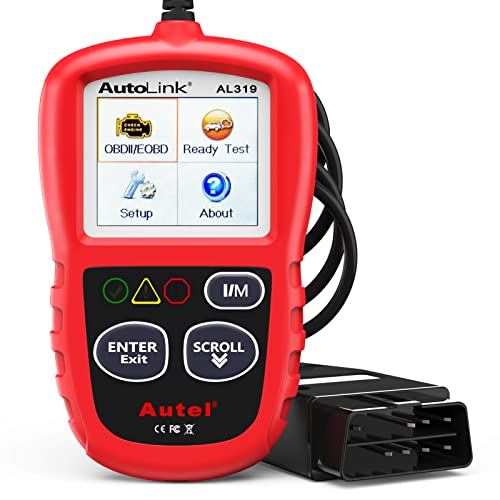
Autel AutoLink AL519 OBD2 Scanner — Reliable Handheld for Daily Checks
Best for: Drivers who want a simple wired handheld
If you want a handheld that just works, the AL519 is a steady choice. Its color screen shows codes, live data, freeze frame, and I/M readiness, with on-board monitor results that help you trace a misfire without opening an app. One-touch I/M and DTC keys speed up a routine check, and the built-in speaker gives a clear readiness signal. It is an engine-only reader, so it will not cover ABS or airbag systems, and its graphing is simpler than a tablet. For daily engine checks in a glovebox tool, that simplicity keeps the job quick.
- One-touch I/M and DTC keys
- Color screen, clear live data
- Built-in readiness speaker
- Engine only, no ABS
- Simpler graphing than tablet
4.6/5
4.5/5
4.7/5

TOPDON ArtiDiag800 BT OBD2 Scanner — Wireless Tablet for Wider Checks
Best for: Drivers who want a wireless tablet at home
If you like walking around the car while you scan, the ArtiDiag800 BT fits that habit. Its tablet pairs by Bluetooth to a small VCI, covers all systems on many makes, and shows live misfire data with graphing on a larger screen. It also lists 28 service functions, so a misfire repair can move into a reset or relearn without changing tools. The tablet is larger to store than a handheld, and some functions vary by vehicle and model year. For a home user who wants tablet depth without a wired tether, it is a useful balance.
- Wireless Bluetooth VCI link
- All-system coverage, many makes
- 28 service functions listed
- Larger to store than handheld
- Some functions vary by vehicle
4.6/5
4.5/5
4.4/5

LAUNCH CR529 OBD2 Scanner — Direct Mode 06 Misfire Counts
Best for: Readers who want Mode 06 without a tablet
If Mode 06 is the reason you are buying, the CR529 puts that menu front and center. Its 2.8-inch color screen shows on-board monitor results, including misfire cylinder counts with test values and pass or fail status, so you can see a weak cylinder before a code sets. It reads live data, freeze frame, and I/M readiness, with a menu that needs no phone. It is an engine-only reader with a small screen, so multi-value graphing is limited, and ABS work is out of reach. For a Mode 06 check, that focus is exactly the appeal.
- Direct Mode 06 misfire menu
- Pass or fail test status
- No phone needed to scan
- Engine only, no ABS
- Limited multi-value graphing
4.5/5
4.4/5
4.6/5

ANCEL AD310 OBD2 Scanner — Simplest First Misfire Check
Best for: New owners who want a basic first scan
If you have never used a scanner, the AD310 is a simple place to start. Its small screen shows codes, live data, freeze frame, and I/M readiness, with on-board monitor results that can point to a misfire before a shop visit. There is no app to install, no battery to charge, and no menu maze to learn. It is an engine-only reader with basic graphing, so it will not match a tablet for a stubborn intermittent fault, and the display suits one reading at a time. For a first check on a rough-running car, it gives you a direction.
- No app or battery needed
- Simple menu for beginners
- On-board monitor results included
- Engine only, basic graphing
- Small display, one reading view
4.4/5
4.3/5
4.6/5
Top 3 Head-to-Head: BlueDriver vs Autel MK808S vs Innova 5610
These three are the common final choices because they cover the three ways most drivers scan: phone, tablet, and handheld. The right one depends on how much depth you want after the misfire count.
| Feature | #1 BlueDriver | #2 MK808S | #3 Innova 5610 |
|---|---|---|---|
| Misfire Data Clarity | 4.9/5 — Best | 4.8/5 | 4.8/5 |
| Live Data and Graphing | 4.9/5 — Best | 4.8/5 | 4.7/5 |
| Ease of Use | 4.8/5 | 4.7/5 | 4.8/5 — Best |
| Choose if… | You want the clearest phone view | You want all-system tablet depth | You want active tests in a handheld |
Who These OBD2 Scanners Are NOT For
A misfire counter helps you find the cylinder, but it does not fix the cause or prove a mechanical fault on its own.
These scanners are also a poor fit if your car is pre-1996, uses a non-OBD2 system, or needs dealer-only access for a specific module. Learn how OBD2 can reveal hidden engine problems so you know what a clean scan still leaves unproven, and get a professional inspection when a misfire returns after basic parts are replaced.
Common Mistakes to Avoid
Most misfire misdiagnoses come from rushing the scan, not from the scanner itself.
Frequently Asked Questions About OBD2 Scanners With Misfire Counter
Can an OBD2 scanner detect a misfire?
Yes, an OBD2 scanner can detect a misfire through misfire codes such as P0300 to P0308 and through live misfire data where supported. A code tells you that a misfire was recorded, while a misfire counter shows which cylinder recorded it and how often. For the clearest result, check the code, the per-cylinder count, and fuel trims together before you replace any part.
Which OBD2 scanner shows misfire counts per cylinder?
Scanners with Mode 06 and live misfire data show misfire counts per cylinder, including BlueDriver, Autel MK808S, Innova 5610, and LAUNCH CR529 in this guide. The exact display varies by vehicle, because some makes expose per-cylinder live counters while others show only Mode 06 results. Check the spec list for Mode 06 and live misfire data, and confirm coverage for your year, make, and model.
What is Mode 06 on an OBD2 scanner?
Mode 06 is the on-board monitor test result mode, and it shows the results of tests the car runs on its own systems. For misfires, it can show per-cylinder misfire counts, test values, limits, and pass or fail status. It is useful because it can reveal a developing misfire before a code sets for a specific cylinder, especially when the engine runs rough only under load.
Can a misfire show no code?
Yes, a misfire can show no code when the count is below the threshold that sets a code, or when the fault is intermittent. Mode 06 and live misfire counters can still show counts on the affected cylinder in that case. Check whether a scanner can display freeze frame data too, because freeze frame records engine conditions when a code was set, which helps you repeat the fault.
Do all OBD2 scanners show misfire data?
No, not all OBD2 scanners show misfire data beyond a basic P0300 code. Basic code readers may read and clear codes without Mode 06 or live misfire counters. If misfire diagnosis is your goal, choose a scanner that lists Mode 06, live data graphing, and per-cylinder misfire display in its features, and avoid a reader that only lists code reading.
Can I use a Bluetooth OBD2 scanner to find a misfire?
Yes, a Bluetooth OBD2 scanner can find a misfire when its app shows live misfire data or Mode 06 results. BlueDriver and OBDLink MX+ are phone-based examples in this guide. Keep your phone charged, mount it safely, and watch the misfire count during a test drive rather than only at idle, because many misfires appear under load.
Our Final Verdict
Most drivers only need a clear per-cylinder count, not a shop tablet, so BlueDriver is the practical pick for finding a misfire fast. If you work on several cars, step up to the MK808S for all-system depth, or to the Innova 5610 for active tests in a handheld.

I’m Alex Rahman, a car enthusiast and automotive writer focused on practical solutions, car tools, and real-world driving advice. I share simple and honest content to help everyday drivers make better decisions.
