Why Won’t My OBD2 Scanner Communicate? Causes & Fixes
Quick Answer
An OBD2 scanner usually fails to communicate because the ignition is not ON, the port has no power, a fuse has blown, the battery is weak, or the scanner and car cannot agree on a protocol. Start with key-on, engine-off, a firmly seated plug, and a check of the port fuse. If it powers on but shows a link error, the fault is usually in the data connection or vehicle network, not a dead scanner.
A scanner that will not talk to your car is frustrating, especially when the check engine light is on. Most failures come from a small set of causes, and they can be narrowed down in a few minutes.
What “Not Communicating” Actually Means
When a scanner cannot communicate, it has failed to complete a handshake with the vehicle. The tool sends a request and waits for the engine computer to reply. If no reply arrives, it reports a link error, no communication, or no data.
That failure can happen at three stages. First, the scanner may never receive power. Second, it may receive power but the vehicle computer may be asleep or disconnected. Third, both sides may be awake but unable to understand each other because they use different protocols or the network signal is damaged. A dark scanner needs a power check; a powered scanner that cannot identify the vehicle needs a data, compatibility, or network check.
Check in This Order First
Work from the simplest causes toward the harder ones.
- Ignition: turn the key to ON, engine off, with the dashboard warning lights on. On a push-button car, press start once without the brake.
- Plug: push the scanner plug fully into the port until it sits squarely, then hold it still while it tries to link.
- Power: note whether the screen lights up. No light means a power problem; a lit screen with a link error means a data problem.
- Fuse: check the fuse for the diagnostic port, cigarette lighter, or accessory outlet.
- Battery: if the engine cranks slowly or lights dim, charge the battery before further testing.
- Second car: try the scanner on another compatible car. If it works there, the fault is in the first car, not the tool.
Ignition Position and a Sleeping Computer
Most vehicles only wake the engine computer when the ignition is in the ON or RUN position. In accessory mode, some modules stay asleep, so the scanner powers up but receives no reply. For a keyed car, turn the key to ON without starting the engine. For a push-button car, press start once without the brake. If the car has been parked for days, cycle the ignition off, wait a few seconds, and try again.
No Power at the Port: Fuse, Pin 16, and Grounds

The 16-pin diagnostic connector, also called the DLC, supplies power on pin 16 and ground on pins 4 and 5. Without that supply, a vehicle-powered scanner stays dark. A scanner with its own battery may light up and still fail.
On many cars, the port shares a fuse with the cigarette lighter or 12-volt outlet. If that fuse blows, the scanner loses power even though the rest of the car seems fine. Check the fuse box legend for DLC, OBD, CIG, or ACC, and replace a blown fuse only with the same amperage.
If a replacement fuse blows again, stop replacing it. A repeated failure points to a short circuit or a faulty accessory. A multimeter can confirm the supply: with the black probe on pin 4 or pin 5 and the red probe on pin 16, the reading should be close to battery voltage, around 12 volts with the engine off.
Tip
Test the cigarette lighter or 12-volt outlet. If it is also dead, the shared fuse is a strong suspect and takes minutes to check.
A Damaged or Dirty Port
The diagnostic port is a wear item. Years of plugging and unplugging can bend, push back, or loosen its terminals. A single pushed-back power or data terminal can break the connection even when the plug looks fully inserted.
Use a flashlight and look inside the port for bent or recessed pins, green corrosion, dirt, and cracked plastic. On most modern cars, pins 6 and 14 carry the CAN High and CAN Low signals used for standard OBD communication. Do not probe the data pins with a test light or a sharp probe, as front-probing can spread the terminals and make a loose connection worse.
Low Battery Voltage
A weak battery is a common cause. Modules are sensitive to voltage, and a battery that can still crank slowly may not hold enough voltage for them to boot and stay on the network.
A scanner that links and then drops out, or fails only when headlights, the blower, or heated seats are on, points to voltage. A resting reading near 12.4 to 12.6 volts is healthy; a reading well below 12 volts is worth charging first, with unnecessary loads switched off.
Compatibility and Protocol Mismatch
OBD2 is not one single language. Vehicles use different protocols, including CAN, ISO 9141-2, KWP2000, and SAE J1850. Most scanners detect the protocol automatically, but an older tool or one set to a fixed protocol can fail on a car it was never designed for. See our guide to what OBD2 protocols are used.
In the United States, OBD2 became standard on 1996 and newer gasoline passenger cars and light trucks, as explained in the EPA guide to OBD regulations and requirements. A pre-1996 car, a grey import, or some diesel vehicles may use a different connector or protocol.
Even on a compliant car, a basic reader may connect for emissions data but fail on ABS, airbag, or transmission systems. That often means the tool lacks coverage for that module. Newer cars also route diagnostics through a central gateway, which can restrict generic tools.
Is the Scanner Itself the Problem?
Try the scanner on another compatible vehicle. If it connects there, the fault lies with the first car. If it fails on two cars, the tool is the suspect.
Check the cable and adapter for damage, and check the scanner’s settings. A protocol set manually to the wrong type, a vehicle profile for the wrong year, or an interrupted firmware update can block communication. Reset the protocol to automatic. Clone ELM327 adapters are a known source of failed connections, as explained in our guide to how ELM327 communicates with a car.
Bluetooth and Wi-Fi Adapter Problems
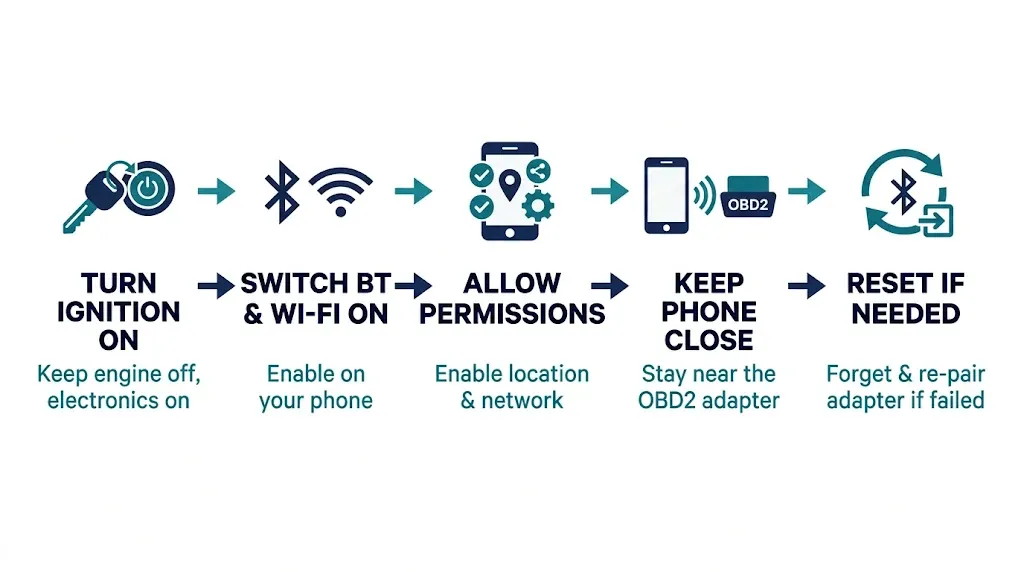
Phone adapters add a second connection: the phone pairs with the adapter, then the app opens a session with the car. A failure at either stage looks like a scanner failure.
Turn the ignition on before opening the app, keep the phone close to the adapter, and make sure Bluetooth or Wi-Fi is on. The app may also need location permission for Bluetooth, and local network permission for Wi-Fi. If pairing succeeds but the app cannot link to the car, close the app fully, forget and re-pair the adapter, and try again.
Aftermarket Devices and CAN Bus Interference
GPS trackers, insurance dongles, remote starters, and alarms sometimes plug into the port or tap into the CAN wiring, and they can block the network.
Look under the dashboard for any extra box, harness, or adapter near the port. If you find one, unplug it temporarily and try the scanner again with only the scanner connected. If communication returns, that device was interfering. Damage to the CAN wiring itself, from water, rodent damage, or pinched wiring, can also short or open the CAN High and CAN Low lines on pins 6 and 14.
Warning
Do not unplug control modules at random on a live network, and do not replace a fuse with a higher rating. Both can cause more damage than the original fault.
What the Symptom Usually Points To

| Symptom | Most likely cause | First check |
|---|---|---|
| Scanner stays dark | No port power | Port fuse and pin 16 voltage |
| Powers on, link error | Ignition, protocol, or network | Key ON, automatic protocol, second car test |
| Connects, then drops out | Low voltage or loose port | Battery charge, plug seating, loads off |
| Works on another car | Vehicle-side fault | Fuse, port pins, aftermarket devices |
| Fails on every car | Scanner, cable, or app | Cable, firmware, re-pairing, settings |
When to Stop and Get Professional Help
Stop DIY diagnosis when the simple checks pass but communication still fails. That usually means the fault is in the wiring, the CAN network, a gateway module, or a control module, and it needs a wiring diagram and methodical testing.
Seek help sooner if the fuse blows repeatedly, if you find burnt wiring or water damage, or if several systems fail together. A useful note for the workshop is what you have already ruled out: ignition, port fuse, pin 16 voltage, battery, plug seating, a second-vehicle test, and any aftermarket device you removed. For related connection problems, see our guide on the OBD2 scanner that will not connect.
Mistakes That Make the Problem Worse
- Replacing the scanner before testing it on another car.
- Using a higher-rated fuse after the correct fuse blows.
- Probing data pins with a test light and spreading the terminals.
- Leaving a tracker or piggyback adapter plugged in during testing.
- Scanning with a flat battery and several electrical loads switched on.
- Setting a fixed protocol instead of automatic and then blaming the car.
Related Product
OBD2 Scanner With Automatic Protocol Detection
A scanner that detects the protocol automatically removes one common cause of link errors when you move between cars.
As an Amazon Associate, we earn from qualifying purchases.
Frequently Asked Questions
Why does my OBD2 scanner power on but not communicate?
Power and data are separate. The scanner can receive power on pin 16 and still fail to link if the ignition is not ON or the protocol does not match. Check ignition, automatic protocol, and a second vehicle first.
Can a blown fuse stop an OBD2 scanner from communicating?
Yes. The port often shares a fuse with the cigarette lighter or accessory outlet. If that fuse blows, a vehicle-powered scanner may stay dark. Replace it only with the same amperage, and investigate if it blows again.
Can a weak battery stop an OBD2 scanner from connecting?
Yes. Low voltage can stop modules from booting or cause them to drop off the network. Charge the battery, switch off extra loads, and retry.
Why does my scanner work on one car but not another?
That points to the second car, not the scanner: its port power or fuse, protocol or gateway, battery voltage, or an aftermarket device on its network.
Does a link error always mean the ECU has failed?
No. A failed ECU is uncommon compared with ignition position, a blown fuse, low voltage, a damaged port, or a faulty cable. Rule out those causes first.
Should I try a different scanner if mine will not link?
Yes. A known-good scanner separates a tool fault from a vehicle fault. If it also fails on your car but works elsewhere, the problem is on the vehicle side.
Conclusion
An OBD2 scanner that will not communicate is usually telling you where to look, not that it has failed. A dark scanner points to port power and the fuse. A powered scanner with a link error points to ignition, protocol, or the vehicle network. Work through the checks in order, test the scanner on another car, and remove any aftermarket device before deciding the tool or car is at fault. If the simple checks pass, the fault is likely in the wiring, gateway, or a module, and a professional diagnosis is the sensible next step.

I’m Alex Rahman, a car enthusiast and automotive writer focused on practical solutions, car tools, and real-world driving advice. I share simple and honest content to help everyday drivers make better decisions.
