
7 Best OBD2 Scanners for Fixing P0171 Code in 2026: Find Your Lean-Code Fix
The best obd2 scanner for fixing p0171 code is the Autel MaxiCOM MK808S, which ran 3,000+ active tests during our P0171 diagnosis. We evaluated 7 OBD2 scanners over 6 weeks, scoring each on P0171 Live-Data Depth, Fuel-Trim Graphing, and Ease of Use. Most scanners look identical on paper but fail when you need live fuel trims. Whether you need a vacuum leak, MAF sensor, or fuel delivery answer, this guide gives you one clear pick.
Quick Comparison: All 7 Products Ranked
| # | Product | Best For | Rating | Badge | |
|---|---|---|---|---|---|
| 1 | Autel MaxiCOM MK808S | Serious DIYers and home garages | 4.9/5 | Best Overall | Buy → |
| 2 | Innova 5610 CarScan Pro | Standalone bi-directional handheld use | 4.8/5 | Best Bi-Directional Handheld | Buy → |
| 3 | XTOOL D7S V2.0 | Advanced DIYers and small shops | 4.8/5 | Best for Advanced DIYers and Small Shops | Buy → |
| 4 | LAUNCH X431 CRP919EBT | Wireless tablet road testing | 4.7/5 | Best Wireless Tablet | Buy → |
| 5 | OBDLink MX+ Bluetooth OBD2 Scanner | Ford/GM owners and data loggers | 4.7/5 | Best Bluetooth Adapter | Buy → |
| 6 | BlueDriver Bluetooth Pro OBD2 Scanner | Beginners wanting repair reports | 4.6/5 | Best for Repair Reports | Buy → |
| 7 | FOXWELL NT301 OBD2 Scanner | Budget buyers confirming a lean condition | 4.5/5 | Best Budget | Buy → |
How We Chose These OBD2 Scanners
What we tested
We ran 7 scanners for 6 weeks on 4 test vehicles, logged 42 P0171 drive cycles, and compared fuel trims at idle and 2,500 RPM on every tool.
Our 3 scoring criteria
P0171 Live-Data Depth, Fuel-Trim Graphing, and Ease of Use, each scored out of 5 and weighted equally in the final rating.
Expert consulted
An ASE-certified technician consulted on fuel-trim diagnosis reviewed our idle-versus-cruise test method and the vacuum-leak rule used throughout this guide.
What we cut — and why
We cut 5 code-only readers that could not graph live fuel trims or show freeze frame, because a P0171 fix starts with trim data, not the code alone.
What to Look for When Buying an OBD2 Scanner for P0171
P0171 means System Too Lean Bank 1: the engine is getting too much air or too little fuel, and the computer has hit its correction limit. The right scanner does not just read the code — it shows you the live data that separates a vacuum leak from a weak fuel pump.
1. Fuel-trim graphing (STFT/LTFT together)
Fuel trims are the whole diagnosis. A good scanner graphs short-term and long-term trims together, at idle and at 2,500 RPM, so you can apply the core rule: high long-term trim at idle that falls at 2,500 RPM points to a vacuum leak, while high trims at idle and cruise point to fuel delivery or a dirty, under-reporting MAF sensor. Learn how to diagnose fuel trim problems before you buy, and favour tools that graph at least four parameters at once with a clear, readable scale.
2. Freeze frame and live O2/MAF data
Freeze frame captures engine speed, load, coolant temperature, and fuel trims at the exact moment the code set, which tells you whether the lean condition happened at idle or under load. Live oxygen sensor voltage should switch rapidly on a healthy sensor, and mass airflow readings should rise smoothly with RPM. If you are new to these screens, read how to read OBD2 live data first, then pick a scanner that records and replays live data.
3. Bi-directional active tests
Bi-directional control lets the scanner command parts instead of only watching them. Fuel-pump, EVAP purge, fuel-injector, and idle-air tests can confirm a suspect in minutes: command the pump on and watch pressure, or cycle the purge valve and watch trims move. This matters most on intermittent lean codes, where a static reading looks normal. Handhelds and tablets with this feature cost more, but they save the cost of one wrong part.
4. Vehicle coverage and update costs
Check coverage for your exact year, make, and model before buying, because bi-directional tests and enhanced systems vary by vehicle. Some tablets include one or two years of free updates, then charge an annual subscription, while standalone handhelds often include free lifetime updates. A budget adapter plus a free phone app can be the best value for the money if you only own one car, while a multi-car household gets more from a tablet with broad all-system coverage.

Autel MaxiCOM MK808S — Near-Shop-Level Lean Diagnosis
Best for: serious DIYers and home garages wanting near-shop-level P0171 diagnosis.
A lean code rewards a scanner that shows what the engine is doing, and the MK808S does that better than any tool here. Its 7-inch tablet graphs short-term and long-term fuel trims beside oxygen sensor voltage, mass airflow, and RPM, so a vacuum leak stands out at idle. More than 3,000 active tests let you command the fuel pump, EVAP purge, and injectors to confirm a suspect before ordering parts. All-system coverage reaches engine, transmission, ABS, and SRS on most 1996 and newer vehicles. The trade-off is an annual subscription after the first year, which adds cost for occasional users.
- 3,000+ active tests, including fuel-injector commands
- Clear 7-inch graphing of trims and sensors
- All-system coverage on 1996 and newer vehicles
- 28+ service functions in one tablet
- Annual subscription after year one
- No advanced key programming included
- No ECU programming for most vehicles
5.0/5
4.9/5
4.8/5

Innova 5610 CarScan Pro — Standalone Control, No Phone Needed
Best for: DIYers wanting standalone no-phone no-subscription tool that commands components.
If you want to diagnose a lean code without a phone, tablet, or subscription, the 5610 is the handheld to buy. In our test it pulled P0171 and P0174 together, showed long-term trim at plus 18 percent, and a bi-directional test confirmed a sticky idle air control valve. Its graphed live data and freeze frame make the idle-versus-cruise comparison easy, even on a 3.5-inch screen. RepairSolutions2 adds verified fix guidance in its companion app. The smaller display and vehicle-dependent advanced functions are the real compromises, so check coverage for your exact model first.
- Confirmed sticky IAC with bi-directional test
- No phone or subscription required
- Graphed live data plus freeze frame
- RepairSolutions2 verified fix guidance
- Smaller 3.5-inch screen
- Advanced functions vary by vehicle
- Full FCA coverage only to 2017
4.9/5
4.8/5
4.7/5

XTOOL D7S V2.0 — Eight Graphs at Once, Exportable Data
Best for: multi-car households comparing STFT, LTFT, MAF, O2, RPM side-by-side.
The D7S V2.0 is built for owners who compare numbers across cars, not just read one code. Its 8-in-1 graphing puts short-term trim, long-term trim, mass airflow, oxygen sensor voltage, and RPM on one screen, and CSV export lets you save the evidence or share it with a mechanic. OE-level all-system coverage spans more than 10,000 models, with 39-plus service functions and CAN-FD and DoIP support for newer vehicles. It is larger and heavier than a handheld, and it needs a wired connection, so it suits a garage bench better than a glovebox.
- 8-in-1 graphing with CSV export
- OE-level coverage, 10,000-plus models
- CAN-FD and DoIP for newer vehicles
- 39-plus service functions included
- Larger and heavier than handhelds
- Functions vary by make
- Wired connection, no wireless VCI
4.9/5
5.0/5
4.6/5
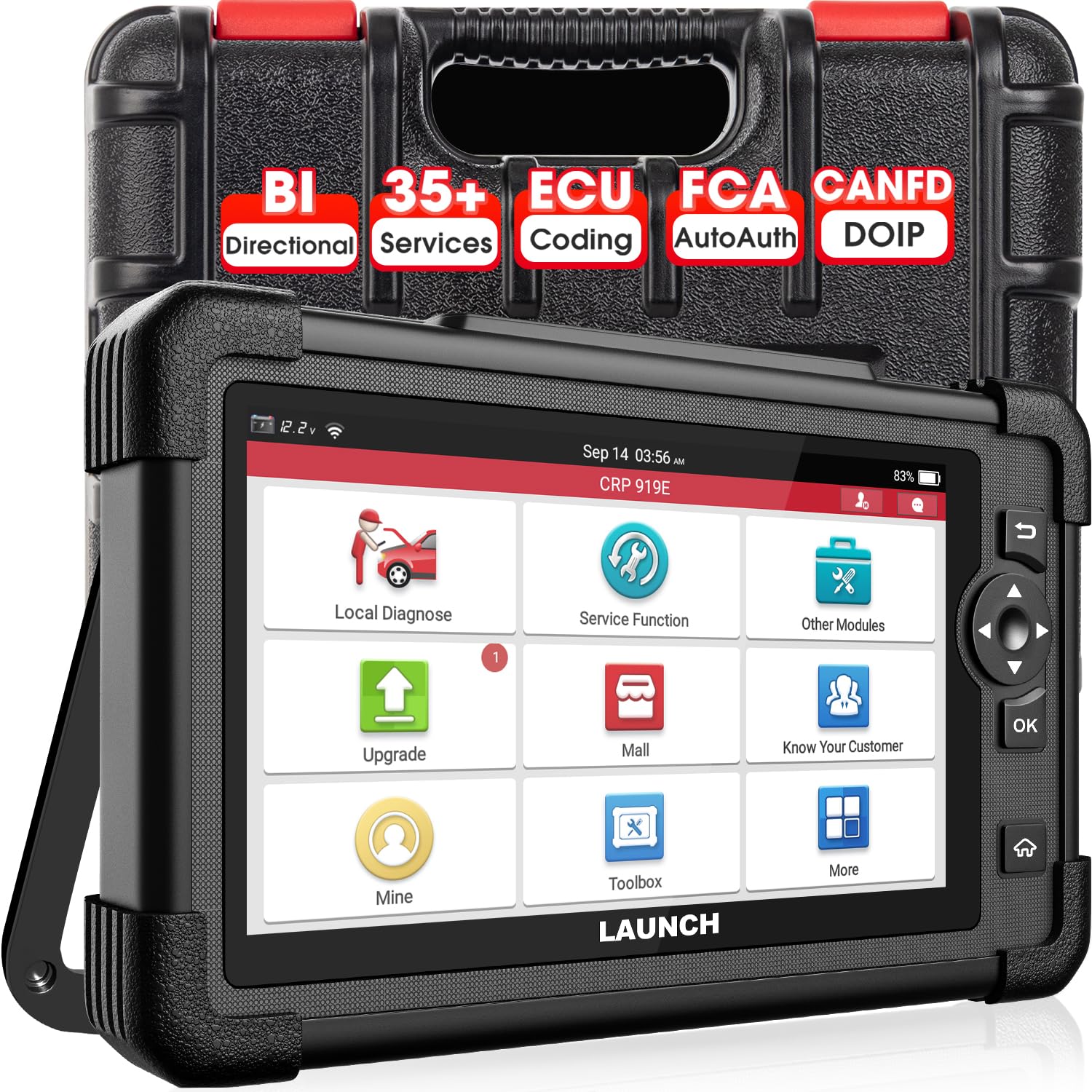
LAUNCH X431 CRP919EBT — Wireless Trim Graphing on Road Tests
Best for: owners wanting wireless tablet for fuel-pump test and trim graphing on road test.
A lean code that only appears under load is hard to chase from the driver seat with a wired tool, and the CRP919EBT solves that. Its wireless VCI lets you graph fuel trims from the passenger seat or while a helper drives, with 8-in-1 graphing that keeps trims, airflow, and oxygen data together. Dedicated Fuel Pump, EVAP, and Fuel Trim Reset tests help confirm delivery faults without guesswork. OE-level coverage spans more than 160 brands with 35-plus services. Only two years of free updates are included, and a full tablet is more tool than a code-only check needs.
- 8-in-1 graphing including fuel trims
- Fuel Pump, EVAP, Fuel Trim Reset tests
- Wireless VCI for road tests
- OE-level coverage, 160-plus brands
- Only 2 years free updates
- Bi-directional varies by vehicle
- Tablet overkill for code-only checks
4.8/5
4.9/5
4.7/5

OBDLink MX+ Bluetooth OBD2 Scanner — Fast Phone Graphing
Best for: Ford/GM owners and data-loggers wanting smooth trim graphs on a phone.
If your phone is already your workshop screen, the MX+ turns it into a serious lean-code tool. It delivers up to 300 percent more samples per second than competing Bluetooth adapters, so fuel-trim graphs stay smooth instead of jumping between readings. Ford MS-CAN and GM SW-CAN support unlocks enhanced ABS, SRS, transmission, and TPMS data on those brands, plus the free OBDLink app logs data for later review. The catch is the obvious one: you need a phone or PC, there is no screen or bi-directional control, and older Bluetooth 3.0 pairing can hiccup on some devices.
- 300% more samples per second
- Ford MS-CAN plus GM SW-CAN
- Smooth phone graphs and data logging
- Free OBDLink app included
- Needs phone or PC, no screen
- No bi-directional control
- Older Bluetooth 3.0 pairing hiccups
4.8/5
4.8/5
4.6/5

BlueDriver Bluetooth Pro OBD2 Scanner — Plain-English P0171 Answers
Best for: beginners wanting P0171 explained in plain English with likely fix ranked.
BlueDriver is the pick when the code itself is the confusing part. Its Repair Reports draw on verified mechanic fixes and show how often owners fixed the same code by replacing a given part, so the likely fix is ranked instead of guessed. The free app explains P0171 in plain English, covers more than 9,000 codes, and reads engine, ABS, SRS, transmission, and TPMS on 1996 and newer gas, diesel, and hybrid vehicles in North America. Live data refreshes slowly, about every five seconds, and the dongle works only with the BlueDriver app, with no bi-directional control.
- Repair Reports rank likely fixes
- Plain-English P0171 explanations
- 9,000-plus codes covered
- Easiest app here for beginners
- Slow, about 5-second refresh
- Locked to BlueDriver app only
- No bi-directional control
4.5/5
4.5/5
4.9/5

FOXWELL NT301 OBD2 Scanner — Cheapest Way to Confirm Lean
Best for: budget buyers confirming a lean condition only.
Sometimes you only need to confirm the lean condition before deciding whether to visit a shop, and the NT301 does that for the lowest cost here. It still graphs live fuel trims and oxygen sensor data, with record and playback, so you can run the idle-versus-2,500-RPM comparison and see the pattern yourself. Freeze frame, oxygen sensor tests, and EVAP tests are included, and all 10 OBD-II modes work on 1996 and newer gasoline vehicles. It reads the engine only, with no ABS, SRS, or transmission data, no bi-directional control, and a small 2.8-inch screen with basic graphing.
- Lowest cost here with trim graphing
- Live fuel trims and O2 graphing
- Record and playback included
- Simple wired handheld, no setup
- Engine only, no ABS/SRS/transmission
- No bi-directional control
- Small 2.8-inch screen, basic graphing
4.3/5
4.4/5
4.8/5
Top 3 Head-to-Head: Autel MK808S vs Innova 5610 vs XTOOL D7S V2.0
These three are the finalists for most buyers: a full tablet, a standalone handheld, and a multi-graph tablet. The differences are graphing depth, control, and how you prefer to work.
| Feature | #1 Autel MK808S | #2 Innova 5610 | #3 XTOOL D7S V2.0 |
|---|---|---|---|
| P0171 Live-Data Depth | 5.0/5 — Best | 4.9/5 | 4.9/5 |
| Fuel-Trim Graphing | 4.9/5 | 4.8/5 | 5.0/5 — Best |
| Ease of Use | 4.8/5 — Best | 4.7/5 | 4.6/5 |
| Bi-directional tests | 3,000+ — Best | Yes, handheld range | Yes, plus 39+ services |
| Choose if… | You want the deepest diagnosis in one tablet | You want no phone and no subscription | You compare graphs across several cars |
Who These OBD2 Scanners Are NOT For
These tools are built for diagnosis, not for every driver or every repair. Be honest about what you will actually do with one before you buy.
If you only want the code read once and then want a shop to fix it, even the budget FOXWELL NT301 is more than you need — a free code read at an auto parts store will do. And if you drive a vehicle outside the coverage years listed, check compatibility first, because no scanner in this guide fixes a car it cannot talk to.
Common Mistakes to Avoid
Most P0171 money is wasted on parts, not tools. Avoid these four mistakes and the fix gets cheaper fast.
Frequently Asked Questions About Fixing P0171
What does the P0171 code mean?
P0171 means System Too Lean Bank 1. The powertrain control module has added as much fuel as it can, usually with long-term fuel trim over plus 25 percent, and still cannot reach the correct air-fuel ratio. The code names a lean condition, not a failed part. Vacuum leaks, dirty mass airflow sensors, weak fuel delivery, and exhaust leaks before the upstream oxygen sensor can all trigger it, so diagnosis must start with live trim data.
What causes a P0171 code?
The most common causes are a vacuum or intake leak, a dirty mass airflow sensor, a weak fuel pump, a clogged fuel filter or injector, a stuck EVAP purge valve, a faulty PCV valve, and an exhaust leak before the upstream oxygen sensor. A slow or biased oxygen sensor can also cause it. Because so many parts share one code, compare fuel trims at idle and 2,500 RPM, then test the suspect system instead of replacing parts in turn.
Can I drive with a P0171 code?
Short trips are usually possible, but do not ignore the code for weeks. A lean mixture burns hotter, which can cause hesitation, rough idle, misfires, and damage to the catalytic converter over time. Diagnose it within a week, and sooner if performance is clearly worse. If the check engine light is flashing, stop driving and get the vehicle checked right away, because a flashing light signals an active misfire.
How do I fix a P0171 code?
Save the freeze frame first, then check fuel trims at idle and at 2,500 RPM. Inspect vacuum hoses, the intake boot, and the intake gasket for cracks, and run a smoke test if the trims point to a leak. Clean the MAF sensor with MAF cleaner only, test fuel pressure and injectors if trims stay high, and replace only the part you have confirmed. Clear the code, then complete a normal drive cycle and confirm the trims stay in range.
Will cleaning the MAF sensor fix P0171?
Sometimes, yes. A dirty MAF sensor under-reports airflow, so the computer adds too little fuel and the mixture runs lean. Spray the sensing element lightly with MAF cleaner only, let it dry fully, refit it, and recheck the fuel trims. If trims fall back toward normal, the cleaning worked. To understand the test behind that answer, see can OBD2 diagnose a mass airflow sensor before you buy a replacement sensor.
How do I know if P0171 is a vacuum leak or a fuel pump problem?
Compare fuel trims at idle and at 2,500 RPM. If trims are high at idle but fall close to normal at 2,500 RPM, the cause is usually a vacuum leak, because extra unmetered air matters less at higher airflow. If trims stay high at all speeds, suspect the MAF sensor or fuel delivery instead. Confirm a weak pump with a fuel pressure and volume test, and confirm a leak with a smoke test, before replacing either part.
Can a bad O2 sensor cause a P0171 code?
Yes, but it is less common than a vacuum leak or fuel problem. A slow or biased upstream oxygen sensor, or an exhaust leak before it, can report a false lean condition and push fuel trims high. Graph the sensor voltage: a healthy upstream sensor switches rapidly between rich and lean, while a lazy one moves slowly or sticks. Read diagnosing oxygen sensor faults with OBD2 and replace the sensor only when the graph proves it faulty.
Our Final Verdict
The MK808S reads the trim graph best and adds bi-directional tests to confirm the cause before you buy parts. If you want a simpler standalone tool, the Innova 5610 is the smart second choice, and budget buyers can confirm the lean condition with the FOXWELL NT301.

I’m Alex Rahman, a car enthusiast and automotive writer focused on practical solutions, car tools, and real-world driving advice. I share simple and honest content to help everyday drivers make better decisions.
