How Often Should You Replace a Dash Cam SD Card to Avoid Data Loss?
Replace your dash cam SD card every 6 to 12 months. Constant loop recording wears out memory cells quickly. If you drive daily or use parking mode, replace it closer to every 6 months to avoid sudden data loss.
I learned this the hard way during a minor accident. My dash cam recorded nothing. The SD card had failed silently.
I’m Alex Rahman, and I help drivers understand dash cam technology in simple terms. Many people trust their dash cam but ignore the SD card inside.
That tiny card decides whether your footage exists or disappears. Let’s fix that before it fails you.
- Replace SD cards every 6–12 months depending on usage
- Heat and loop recording reduce lifespan quickly
- High endurance cards last much longer than regular ones
- Warning signs appear before total failure—watch for them
How Often Should You Replace a Dash Cam SD Card?
You should replace your dash cam SD card every 6 to 12 months because constant loop recording wears down memory cells, especially in hot environments or with daily driving, making early replacement the safest way to prevent footage loss.
Dash cams record continuously. They overwrite old files again and again. This process slowly damages the card.
Rule: The more you drive, the faster your SD card wears out.
If you drive daily or use parking mode, aim for 6 months. Light users can stretch to 12 months.
Think of it like tires. You replace them before failure, not after.
Why Do Dash Cam SD Cards Wear Out So Quickly?
Dash cam SD cards wear out quickly because they use NAND flash memory, which has limited write cycles, and continuous recording pushes the card to its limit every single day.
Unlike photos on your phone, dash cam footage constantly overwrites itself. That constant writing causes wear.
Each memory cell has a lifespan. Once it reaches the limit, it stops working properly.
Key insight: Dash cams create one of the harshest environments for SD cards.
That is why regular cards fail faster than expected.
What Are Write Cycles and Why Do They Matter?
Write cycles refer to how many times data can be written to a memory cell before it degrades, and in dash cams, these cycles get used up quickly due to nonstop recording.
Each time your dash cam records, it writes data. Then it deletes and writes again.
Over time, those cycles run out.
Fix: Use high endurance cards designed for heavy write usage.
How Loop Recording Damages SD Cards Over Time
Loop recording damages SD cards because it constantly deletes and rewrites data, creating nonstop stress on memory cells and accelerating wear far faster than normal usage.
This feature keeps your storage from filling up. But it also increases wear.
Every minute of driving adds more stress.
Solution: Replace cards regularly and format them monthly.
What Factors Affect Dash Cam SD Card Lifespan?
Several factors affect dash cam SD card lifespan including video resolution, heat exposure, usage frequency, and whether parking mode runs continuously, all of which increase how fast memory cells wear out.
Not all drivers use their dash cam the same way. Your habits matter.
Let’s break down the biggest factors.
Does Video Resolution Reduce Lifespan?
Yes, higher video resolution like 2K or 4K reduces SD card lifespan because it writes larger files more often, increasing the number of write cycles used each day.
More pixels mean more data. More data means more writing.
Rule: Higher quality equals faster wear.
If you use 4K, replace your card sooner.
How Heat Inside Your Car Impacts Storage
Heat inside your car shortens SD card lifespan because high temperatures damage memory cells and reduce reliability, especially in hot climates like Bangladesh.
Cars can reach over 60°C in the sun. That heat affects electronics badly.
Warning: Heat is one of the biggest killers of SD cards.
Leaving your car parked in direct sunlight can reduce SD card lifespan by months. Always consider heat when planning replacement.
Does Parking Mode Drain SD Card Life Faster?
Yes, parking mode drains SD card life faster because it records even when the car is off, increasing total recording hours and accelerating wear.
This feature protects your car when parked. But it doubles usage.
Fix: Use high endurance cards if parking mode stays active.
What Are the Warning Signs Your SD Card Is Failing?
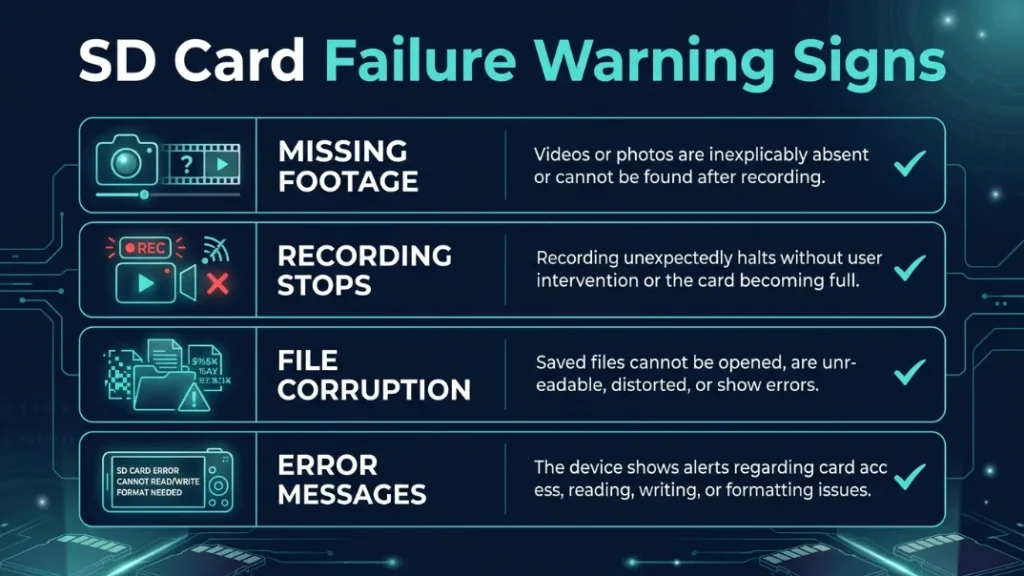
Common warning signs include missing footage, corrupted files, frequent errors, or the dash cam stopping recording randomly, all of which signal the SD card is nearing failure.
- Videos missing or not saved
- Recording stops without warning
- File corruption or playback errors
- Dash cam shows “card error” message
Rule: If you see one sign, replace immediately.
Do not wait for total failure.
Check your footage once a week. A quick check can save you from losing critical evidence.
What Happens If You Don’t Replace Your SD Card on Time?
If you don’t replace your SD card on time, it can fail without warning and stop recording, meaning you lose important footage exactly when you need it most.
This is the biggest risk. The dash cam still turns on. But it records nothing.
Key insight: SD card failure often happens silently.
That means no alerts. No warning. Just missing footage.
What Type of SD Card Lasts Longest in a Dash Cam?
High endurance SD cards last the longest in dash cams because they are designed for continuous writing, offering higher durability and longer lifespan compared to standard memory cards.
Regular cards work for phones. Dash cams need something stronger.
High endurance cards handle constant recording better.
High Endurance vs Regular SD Cards
| Feature | Regular SD Card | High Endurance SD Card |
|---|---|---|
| Usage | Photos, apps | Continuous recording |
| Lifespan | Short | Long |
| Heat Resistance | Low | High |
| Reliability | Moderate | High |
Conclusion: Always choose high endurance for dash cams.
Best Brands for Reliability
Trusted brands like SanDisk, Samsung, and Kingston offer reliable high endurance SD cards designed for heavy use in dash cams and security systems.
- SanDisk High Endurance — widely trusted and durable
- Samsung PRO Endurance — excellent lifespan for heavy use
- Kingston High Endurance — budget-friendly option
Learn more about SD card durability from SD Association official guide.
How Can You Extend the Life of Your Dash Cam SD Card?
You can extend SD card life by using high endurance cards, formatting regularly, avoiding extreme heat, and replacing the card before it reaches its write limit.
- Format your SD card once every month
- Avoid cheap or fake memory cards
- Park in shaded areas when possible
- Use proper storage size for your needs
Always buy SD cards from trusted stores to avoid counterfeit products that fail early.
For more technical details, check this memory card lifespan guide by Kingston.
Step-by-Step: How to Replace Your Dash Cam SD Card Safely
Replacing your SD card safely ensures your dash cam works properly and prevents data corruption during the process.
- Turn off your dash cam completely
- Remove the old SD card carefully
- Insert the new high endurance SD card
- Format the card using the dash cam menu
- Test recording to confirm it works
Rule: Always format inside the dash cam, not your computer.
Replacement Timeline Based on Usage (Beginner to Pro)
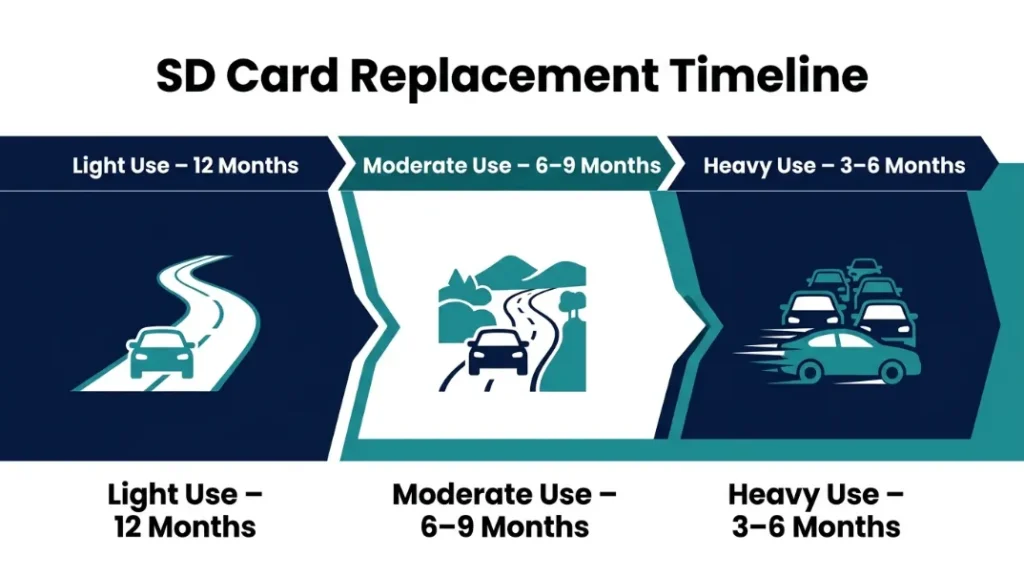
Your replacement timeline depends on how often you drive and how heavily your dash cam records, making usage level the most important factor in deciding when to replace your SD card.
| Usage Type | Driving Pattern | Replacement Time |
|---|---|---|
| Light | Occasional driving | 12 months |
| Moderate | Daily commuting | 6–9 months |
| Heavy | Ride-sharing / long hours | 3–6 months |
Key insight: More recording equals faster wear.
Replace SD cards based on usage, not just time. Heavy drivers need frequent replacement, while occasional users can wait longer. Heat and resolution also speed up wear.
Common Mistakes That Kill SD Cards Early
Many users shorten SD card lifespan by making simple mistakes like using low-quality cards, skipping formatting, or ignoring heat exposure.
- Using cheap non-endurance cards
- Never formatting the card
- Ignoring warning signs
- Leaving the car in extreme heat
Ignoring early warning signs can lead to total data loss without any chance of recovery.
Final Thoughts: When Should You Replace It?
You should replace your dash cam SD card before it fails, typically every 6 to 12 months, based on usage, heat exposure, and recording settings.
This small habit protects your footage and gives peace of mind.
I’m Alex Rahman, and I always treat SD cards like consumables. Replace them early, and your dash cam will never let you down.
Frequently Asked Questions

I’m Alex Rahman, a car enthusiast and automotive writer focused on practical solutions, car tools, and real-world driving advice. I share simple and honest content to help everyday drivers make better decisions.
