Do Dashcams Record Everything? What They Capture, Miss, and Delete
A dash cam records continuously while your engine runs, saving footage in loops that overwrite the oldest clips. A built-in G-sensor locks important clips automatically during a collision. Most dash cams do not record when parked unless you add parking mode hardware.
I bought my first dash cam after a driver ran a red light and clipped my bumper. No witnesses. No camera. Nothing. The other driver denied it completely.
That experience taught me something expensive: a dash cam on your dashboard doesn’t automatically mean every moment is saved forever. I’m Alex Rahman, and I’ve spent years researching, testing, and writing about vehicle safety technology. I want to give you the honest, complete answer that most articles skip right past.
The truth is — dash cams do not record everything. They record a lot. But storage limits, power requirements, and sensitivity settings all decide what actually gets saved. Understanding how this works could be the difference between winning an insurance claim and losing one.
Let’s break down exactly what your dash cam captures, what it misses, and how to make sure it never lets you down when it matters most.
- Dash cams record continuously while driving but overwrite old footage in loops.
- A G-sensor automatically locks clips during sudden impact or hard braking.
- Parking mode requires a hardwire kit — most dash cams won’t record with the engine off by default.
- A 64GB card typically holds 6 to 8 hours of 1080p footage before overwriting begins.
- Cloud-connected dash cams like BlackVue can back up footage automatically without a size limit.
What Does a Dash Cam Actually Record on Every Drive?
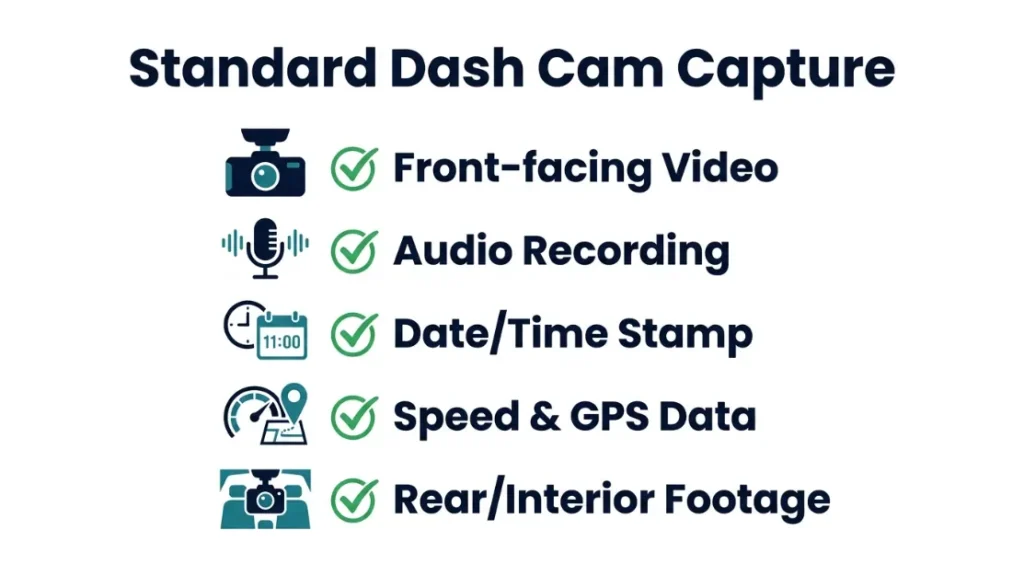
A dash cam records video of the road ahead — and depending on the model — the road behind, the interior of the car, GPS coordinates, speed data, and audio inside the cabin. Most entry-level dash cams capture video and audio simultaneously from the moment you start the engine.
Here is what the average dash cam captures on a standard drive:
- Continuous video footage from the front-facing lens
- Audio from a built-in microphone (usually the interior cabin)
- Date and time stamp burned into the footage
- Speed and GPS location on models with a built-in GPS module
- Rear footage on dual-channel models like the Vantrue E2 Lite
- Interior cabin footage on three-channel models with an IR cabin lens
Most drivers are surprised to learn their dash cam hears every conversation inside the car. That matters more than you might think.
Does a Dash Cam Record Video Continuously While You Drive?
Yes — a dash cam records video non-stop from engine start to engine off. It saves footage in short clips, usually 1, 2, or 3 minutes long, and writes them to a microSD card one after another. Once the card is full, the oldest clip gets replaced by the newest one. This is called loop recording.
The key word here is loop. You are not building a permanent archive. You are maintaining a rolling window of the most recent footage. On a 64GB card at 1080p, that window is roughly 6 to 8 hours.
Set your clip length to 1 minute. Shorter clips mean a small corruption issue only loses 60 seconds of footage — not 3 minutes.
Does a Dash Cam Also Record Audio Inside the Car?
Yes — nearly every dash cam records audio by default using a built-in microphone. The microphone picks up voices inside the car, road noise, and any sounds from outside when windows are down. Most models let you disable audio recording in the settings menu.
This matters for privacy. In several countries and US states, recording audio without consent from all passengers carries legal implications. Nolo’s state-by-state recording law guide gives a clear breakdown if you are unsure of the rules in your area.
If you share your car with others, it is worth telling them the dash cam records sound. It avoids awkward surprises — and potential legal issues.
Does a Dash Cam Record GPS Location and Speed?
Many dash cams include a built-in GPS module that records your exact location, driving speed, and route on every trip. This GPS data gets embedded into each video clip as metadata. After an accident, you can pull up the footage and see your speed at the exact moment of impact.
GPS logging is one of the most underappreciated features in dash cam technology. In a disputed insurance claim, proving you were doing 35 mph — not 60 mph — can close the case instantly. Models like the Nextbase 622GW (a UK-based brand trusted by over 2 million drivers) display live speed directly on the footage.
How Does Loop Recording Work and Why Does It Overwrite Your Footage?
Loop recording works by dividing your microSD card into short video clips and continuously overwriting the oldest clip with the newest one once the card fills up. This keeps recording going indefinitely without you ever needing to manually delete files.
Think of it like a conveyor belt. New footage pushes old footage off the end. The camera never stops. The storage never fills up. But old footage disappears unless it gets locked.
This is not a design flaw — it is an intentional feature. Dash cams are not meant to be DVR systems storing months of footage. They are meant to keep a short, recent window of what happened on the road.
How Long Does Dashcam Footage Last Before It Gets Deleted?
Dashcam footage lasts between 1 hour and 4 days before it gets overwritten, depending on your card size, video resolution, and frame rate. At 1080p and 30fps — the most common setting — a 32GB card holds roughly 3 to 4 hours of footage. A 128GB card holds around 12 to 16 hours.
Most drivers never look at their footage unless something happens. That means the loop works perfectly for its purpose — keeping the most recent driving session available while the rest rolls away quietly.
How Much Footage Does a 32GB, 64GB, or 128GB Card Hold?
| Card Size | Resolution | Approx. Recording Time |
|---|---|---|
| 32GB | 1080p @ 30fps | 3–4 hours |
| 64GB | 1080p @ 30fps | 6–8 hours |
| 128GB | 1080p @ 30fps | 12–16 hours |
| 256GB | 1080p @ 30fps | 24–32 hours |
| 64GB | 4K @ 30fps | 2–3 hours |
Higher resolution eats storage faster. If you shoot in 4K, a 64GB card fills in about 2 to 3 hours. Drop to 1080p and that same card gives you 6 to 8 hours. Choose your resolution based on how far back you need footage to reach.
What Triggers a Dashcam to Save Footage and Never Overwrite It?
A dash cam saves footage permanently — protecting it from the overwrite loop — when the G-sensor detects a sudden impact, sharp braking, or aggressive swerving. The camera automatically flags that clip as an event file and moves it to a protected folder. Loop recording continues normally around it.
This is the most important feature in any dash cam. Without it, a crash clip could get overwritten in hours. With it, your evidence stays locked until you manually delete it.
How Does the G-Sensor Protect Your Most Important Clips?
The G-sensor is an accelerometer built into the dash cam that measures sudden changes in force or direction. When it detects a hit, a hard stop, or a sharp turn above its sensitivity threshold, it immediately locks the current clip. That clip moves to a separate protected folder and will not be overwritten.
Most dash cams let you adjust G-sensor sensitivity on a scale — usually Low, Medium, or High. High sensitivity sounds safer, but it causes false triggers on speed bumps, potholes, and rough roads. Those false events fill your protected folder fast. Medium sensitivity is the right setting for most drivers.
If your protected folder fills up completely, some dash cams stop recording entirely. Check your event folder regularly and delete false-trigger clips to keep space open.
Can You Manually Lock a Video Clip on a Dash Cam?
Yes — most dash cams have a dedicated button on the body of the device that manually locks the current clip when pressed. Some models let you trigger a manual lock from a companion app via Wi-Fi. This is useful when something interesting happens that the G-sensor did not detect — like a near-miss or unusual road behavior.
Get in the habit of pressing that button immediately after a notable event. Do not wait. The clip being recorded right now is the one that gets locked — not a past clip you already recorded.
After any incident — even a minor one — pull over safely and copy the locked clip to your phone immediately using the Wi-Fi app. Do not rely on the protected folder alone.
Does a Dashcam Record When the Car Is Parked and the Engine Is Off?
A standard dash cam does not record when the engine is off because it loses power when you leave the car. To record while parked, your dash cam needs a feature called parking mode — and parking mode needs a separate power source to work.
This surprises most new dash cam owners. The cigarette lighter socket or OBD port that powers your dash cam while driving cuts power when you turn the engine off. No power means no recording. A hit-and-run in a parking lot goes completely uncaptured unless you have the right setup.
What Is Parking Mode and How Does It Work?
Parking mode is a low-power recording state that keeps the dash cam active after the engine shuts off. It uses one of three methods to trigger recording: motion detection (starts recording when movement appears in frame), impact detection (triggers on a physical bump), or time-lapse (captures one frame every few seconds to compress hours into minutes).
Motion detection and impact detection are the most useful for capturing incidents. Time-lapse is better for long-term monitoring with minimal storage use — like leaving your car at an airport for a week.
What Hardware Do You Need to Enable Parking Mode?
Parking mode requires one of three power setups:
- Hardwire kit — wires the dash cam directly to your car’s fuse box. Provides constant low-power draw. Best option for most drivers. Typical cost: $15–$30.
- Capacitor or built-in battery — some premium models like the BlackVue DR970X have internal batteries that power parking mode independently for 12 to 24 hours.
- External battery pack — a dedicated power bank designed for dash cams (like the BlackVue B-130X) powers parking mode for 24 to 72 hours without touching the car battery.
A hardwire kit is the most popular option. It includes an in-line fuse that cuts power to the dash cam if your car battery drops below a safe voltage — so you never come back to a dead battery.
What Are the Four Dash Cam Recording Modes Compared?
| Recording Mode | When It Activates | Power Required | Best For |
|---|---|---|---|
| Continuous | Engine on | Vehicle power | All driving situations |
| Event / G-Sensor | Impact or hard braking | Vehicle power | Crash evidence protection |
| Parking (Motion) | Movement near car | Hardwire / battery | Hit-and-run capture |
| Parking (Time-Lapse) | Always on (low power) | Hardwire / battery | Long-term surveillance |
What Do Dash Cams Miss or Fail to Record?
Dash cams miss anything that happens outside their field of view, after their storage runs out, or when they lose power. The most common gaps are: side-angle collisions outside the lens coverage, incidents while parked without parking mode, and audio in some models that can be disabled by the driver.
Sound familiar? Most drivers assume their dash cam covers everything. It covers a lot — but knowing the blind spots helps you configure it better.
What Happens When the Memory Card Is Full?
When the memory card fills up, loop recording automatically deletes the oldest clip to make room for the newest one. This happens seamlessly in the background with no notification. If the protected event folder is also full, some dash cams pause recording entirely and display a “memory full” error on screen.
This is one of the most dangerous failure scenarios. Imagine your G-sensor triggers during a crash — but the protected folder is already packed with speed bump false alarms. Some cameras cannot lock the crash clip. The footage gets overwritten within hours.
Check your dash cam’s event folder every 2 to 4 weeks. Delete false-trigger clips. A full event folder can prevent crash footage from being saved when you need it most.
Why Is Crucial Footage Sometimes Missing After an Accident?
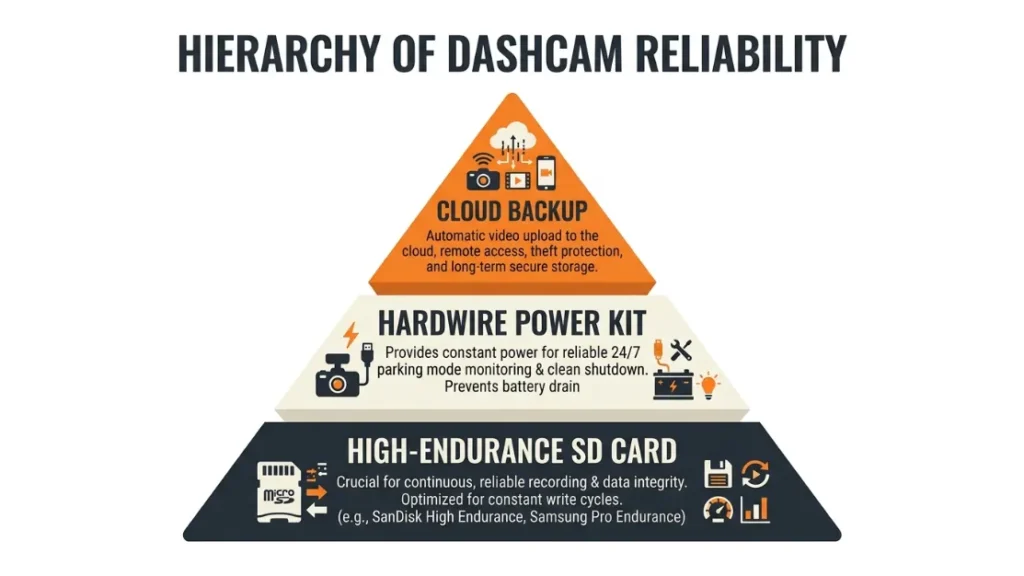
Crucial footage goes missing for four main reasons: the dash cam lost power at impact (airbag deployment can cut vehicle power), the protected folder was already full, the driver removed the SD card incorrectly and corrupted it, or the card itself failed due to heat exposure or low quality.
Heat is a silent killer for dash cam cards. A car dashboard in summer sun can reach 140°F (60°C). Standard microSD cards are only rated to 85°F (30°C). Use a card rated for high temperatures — Samsung Endurance Pro and SanDisk High Endurance are both specifically designed for continuous dash cam recording in harsh conditions. Samsung’s endurance card lineup is a good starting point.
Always use a microSD card rated for high-endurance, continuous write cycles — standard cards fail faster in dash cam heat conditions than most people expect.
How Do Cloud-Connected Dash Cams Change What Gets Saved?
Cloud-connected dash cams upload footage automatically to a remote server over LTE or Wi-Fi, bypassing the physical storage limit entirely. This means even if your dash cam is stolen or destroyed in a crash, the footage already uploaded to the cloud is safe and retrievable from any device.
BlackVue (a South Korean brand and pioneer in cloud dash cams) built their DR970X series around this concept. Their CloudVault subscription lets you store up to 2TB of footage remotely. You can watch live footage from your car, get push notifications when the camera detects movement, and pull historical clips from your phone in seconds.
Cloud connectivity also solves the parking mode power problem in one specific way: even a brief parking mode recording can be uploaded instantly before the battery runs low. No power, no local storage worries — the clip is already off the device.
The tradeoff is cost. Cloud subscriptions add a monthly fee, and LTE-connected cams require a data SIM. For most daily commuters, a large SD card with a quality hardwire kit is enough. For business fleets or high-value vehicles, cloud connectivity is worth every penny. BlackVue Cloud explains their subscription tiers in full detail.
Cloud dash cams solve the permanent storage problem but cost more per month. Standard dash cams with large SD cards solve the problem for most drivers at a one-time cost. Choose cloud if you park in high-risk areas, run a business fleet, or need remote access to footage.
How Do You Make Sure Your Dash Cam Never Misses Important Footage?
You can protect against the most common footage failures by following five straightforward practices. These cover storage, hardware, settings, and maintenance — and take less than 10 minutes a month to manage.
- Use a high-endurance microSD card — Samsung Endurance Pro or SanDisk High Endurance only. Replace it every 12 to 18 months regardless of visible issues.
- Set G-sensor sensitivity to Medium — reduces false event triggers and keeps your protected folder from filling with pothole clips.
- Check the event folder every 4 weeks — delete any false-trigger clips manually so real events always have room to be saved.
- Install a hardwire kit if you park in high-risk areas — driveways, streets, public car parks, and airports all benefit from parking mode coverage.
- Back up any important clip immediately after an incident — copy it to your phone via Wi-Fi app or remove the SD card and transfer to a computer before the car goes anywhere.
These five steps take the guess work out of dash cam reliability. They are the difference between footage that holds up in court and footage that simply was not there.
Frequently Asked Questions
Do dash cams record when the car is off?
Not by default. A standard dash cam loses power when the engine turns off. To record while parked, you need parking mode enabled and a hardwire kit or external battery pack to supply continuous power to the camera.
How long does dashcam footage last before it is overwritten?
It depends on your card size and resolution. A 64GB card at 1080p holds roughly 6 to 8 hours before loop recording starts overwriting the oldest clips. A 128GB card holds 12 to 16 hours at the same settings.
Does a dash cam record audio as well as video?
Yes — nearly all dash cams record audio through a built-in microphone by default. You can disable audio recording in the settings menu. Check your local laws, as some regions require consent from all passengers before recording audio in a vehicle.
Can important footage be accidentally deleted from a dash cam?
Yes. If the protected event folder fills up with false G-sensor triggers, some cameras cannot save new crash clips. Regular manual cleanup of the event folder prevents this. Using a high-quality, high-endurance microSD card also prevents corruption-related loss.
What is the best card size for a dash cam?
A 64GB or 128GB high-endurance microSD card suits most drivers recording at 1080p. Larger cards mean more footage history before the loop overwrites it. Always choose a card specifically rated for continuous write cycles — standard photo or phone cards fail faster under dash cam heat.
Do cloud dash cams still use a memory card?
Most cloud-connected dash cams still use a local SD card as the primary storage and upload key events or footage to the cloud as a backup. Some premium models can operate in SD-card-free cloud-only mode, but these require a consistent LTE or Wi-Fi data connection at all times.
Wrapping Up
A dash cam is one of the smartest investments you can make for your car. But it only protects you if you understand how it actually works.
The short answer is no — dash cams do not record everything forever. They record continuously while you drive, overwrite old footage in loops, lock important clips via G-sensor, and only cover parked incidents if you add the right hardware.
Know your card size, check your event folder regularly, set your G-sensor to medium, and add a hardwire kit if parking matters to you. Do those four things and your dash cam will be there when you need it most.
I’m Alex Rahman — and if this helped you understand your dash cam better, share it with a fellow driver who could use the same peace of mind on the road.

I’m Alex Rahman, a car enthusiast and automotive writer focused on practical solutions, car tools, and real-world driving advice. I share simple and honest content to help everyday drivers make better decisions.
