Do Dash Cams Work When a Car Is Parked? (The Complete Guide to Parking Mode)
Yes — dash cams can record while your car is parked, but only if they have parking mode enabled and a continuous power source. Most dash cams need a hardwire kit or external battery to stay on when the engine is off. Without one, your dash cam stops recording the moment you turn the key.
I came back to my car after a grocery run and found a dent on the rear bumper. No note. No witness. Nothing.
My dash cam had recorded the entire drive there. But the moment I switched off the engine, it went dark. The hit-and-run happened ten minutes later — and I had zero footage.
That experience pushed me to learn everything about parking mode. I’m Alex Rahman, and after testing and researching dash cams for years, I can tell you the full picture clearly.
The short answer is yes — dash cams can work when your car is parked. But there’s a catch. Most standard dash cams do not record while parked unless you set them up correctly. The difference comes down to power, mode type, and a feature called low voltage cutoff.
By the end of this guide, you’ll know exactly how parking mode works, what you need to activate it, and whether it’s worth the setup for your situation.
- Dash cams only record while parked if they have parking mode and a continuous power source.
- A hardwire kit is the most reliable way to power parking mode — it connects directly to your car’s fuse box.
- Three parking mode types exist: motion detection, impact (G-sensor), and time-lapse — each works differently.
- Low voltage cutoff prevents parking mode from draining your car battery dead.
- Not everyone needs parking mode — it depends on where you park and the value of your vehicle.
What Does “Parking Mode” on a Dash Cam Actually Mean?
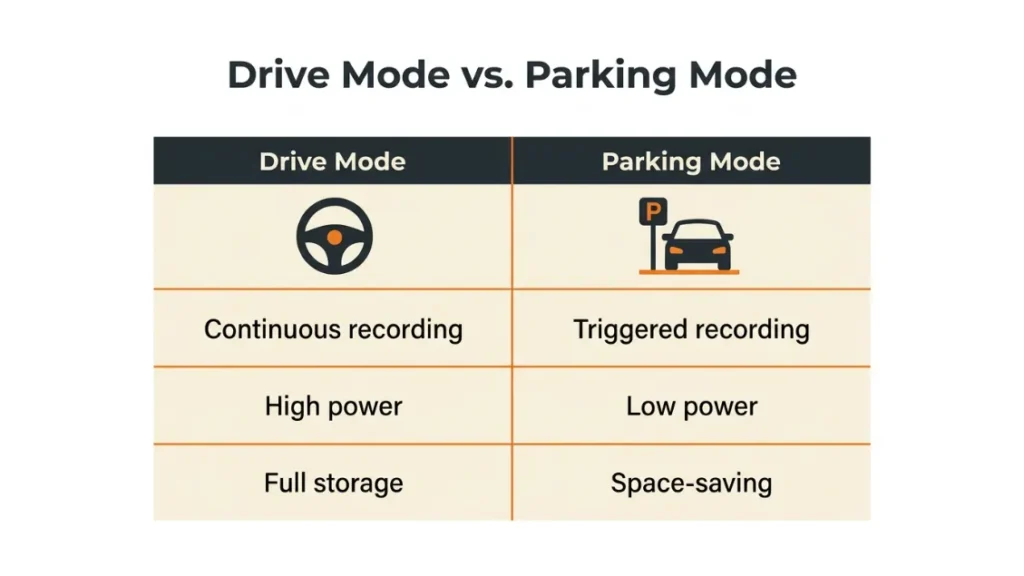
Parking mode is a dash cam feature that keeps the camera active and recording — or on standby ready to record — after you turn off the engine and leave your vehicle. It turns your dash cam into a parked car surveillance system.
In normal drive mode, your dash cam records the road while you drive. It runs off the power your engine produces. The moment the engine stops, most dash cams lose power and shut down.
Parking mode solves this. It gives the camera a way to stay alert, detect threats, and capture footage — even at 2am in an empty car park.
How Parking Mode Differs from Normal Drive Recording
Drive mode records continuously at full resolution. Parking mode is smarter and more efficient — it only records when something triggers it, or it records at a reduced frame rate to save storage and power.
Think of drive mode as a security guard walking a beat. Parking mode is more like a motion-sensor light — it activates only when something moves near your car.
This matters because parking mode has to run for hours, sometimes overnight. Constant full-resolution recording would eat through a 128GB card in a few hours and would stress your car battery far more.
Why Most Dash Cams Don’t Record While Parked by Default
The reason is power. Your car only produces electricity when the engine runs. When the engine stops, the 12V accessory socket — where most dash cams plug in — cuts out too.
No power, no recording. It’s that simple.
This is why parking mode requires either a hardwire kit that taps directly into your car’s fuse box, a built-in battery, or an external battery pack. Without one of these, your dash cam is just a decorative windscreen ornament after you park.
Check your dash cam’s manual before buying a hardwire kit. Some cameras like the Garmin Dash Cam Mini 2 do not support parking mode at all — no amount of power will enable it.
How Do Dash Cams Stay Powered When the Engine Is Off?
To record while parked, your dash cam needs power from a source that stays live after the engine shuts off. There are three main options — and they’re not all equal.
Hardwire Kits — The Most Reliable Power Solution for Parking Mode
A hardwire kit connects your dash cam directly to your car’s fuse box. It taps into a constant 12V fuse — one that stays powered even when the ignition is off. This gives the dash cam a steady supply of electricity around the clock.
Most hardwire kits include a built-in low voltage cutoff circuit (more on this shortly). When your car battery drops to a set threshold — typically 11.6V to 12V — the kit automatically cuts power to the dash cam. This stops the camera from draining your battery to the point where the car won’t start.
Hardwire kits cost between £15 and £40 in the UK and $15 to $40 in the US. Installation takes 30 to 60 minutes. Many drivers get it done at a car audio shop for a small fee.
Brands like Nextbase, Vantrue, and BlackVue sell their own branded hardwire kits designed to work perfectly with their cameras. Third-party kits from Cellink and Mio also work well with most cameras.
Built-In Batteries and Capacitors — What They Can and Can’t Do
Some dash cams include a small internal battery or a supercapacitor. These store just enough energy to save the current clip and shut down safely when power cuts. They are not designed to power parking mode for hours.
A typical dash cam capacitor stores enough power for 30 to 90 seconds of operation — enough for a safe shutdown, not enough for overnight surveillance.
A few premium cameras — like the Vantrue E1 Lite — include a larger built-in battery that can power parking mode for 24 to 48 hours of standby. These are exceptions, not the standard.
For reliable long-duration parking mode, you still need a hardwire kit or an external battery.
OBD-II Power Adapters — A Middle-Ground Option Worth Knowing
Your car’s OBD-II diagnostic port sits under the dashboard and stays powered even when the ignition is off. Some dash cam brands sell OBD-II power cables that plug into this port to run parking mode.
The upside: no wiring, no installation — just plug and go.
The downside: OBD-II ports deliver less stable power than a hardwire kit. Some cars cut OBD-II power after a set time. And unlike hardwire kits, many OBD-II adapters lack a proper low voltage cutoff, which puts your battery at risk.
Use an OBD-II adapter only as a temporary solution or if your vehicle explicitly supports always-on OBD-II power.
What Are the Three Types of Parking Mode and How Does Each One Work?
Not all parking modes work the same way. There are three distinct types — and understanding the difference helps you choose the right camera and the right settings for your situation.
| Parking Mode Type | Trigger | Best For | Battery Use |
|---|---|---|---|
| Motion Detection | Movement in camera frame | Parking lots, side streets | Moderate |
| Impact / G-Sensor | Physical bump or collision | Hit-and-run, vandalism | Very Low |
| Time-Lapse | Constant recording at 1–2fps | Long-term monitoring | Low |
Motion Detection Parking Mode — How It Triggers and What It Captures
Motion detection parking mode watches the camera’s field of view. When it detects movement — a person walking past, a car pulling up, a door swinging open — it starts recording a short clip.
The camera stays in a low-power standby state between clips. This saves power and storage space. Most cameras record 30-second to 60-second clips per trigger, then return to standby.
The limitation: motion detection can be triggered by shadows, blowing leaves, or passing headlights. In busy areas, this can fill your SD card with false positives and drain your battery faster than expected.
Cameras like the Nextbase 622GW let you adjust motion sensitivity — high, medium, or low — to reduce false triggers in busy environments.
Impact and G-Sensor Parking Mode — The Hit-and-Run Catcher
Impact parking mode uses the dash cam’s built-in G-sensor — an accelerometer that measures physical force. When your parked car is bumped, nudged, or hit, the G-sensor detects the sudden movement and triggers recording.
This mode uses almost no power while on standby. It’s the most battery-friendly parking mode available. The camera is essentially asleep — until something physically touches or shakes the car.
The G-sensor sensitivity matters. Set it too high and every heavy truck rumbling past triggers a clip. Set it too low and a light tap won’t register. Most cameras allow you to calibrate sensitivity in settings.
Vantrue’s E1 Pro (released in 2023) combines motion detection with G-sensor in dual-trigger mode — the camera records on either a visual movement or a physical impact, whichever comes first.
Time-Lapse Parking Mode — When You Need Hours of Coverage on a Small Card
Time-lapse parking mode records continuously but at a very low frame rate — typically 1 to 2 frames per second instead of the normal 30fps. This compresses hours of footage into a short, fast-forward style clip.
The result: a 128GB SD card that normally stores 12 hours of drive footage can store over 100 hours of time-lapse parking footage.
Time-lapse is perfect for monitoring a car parked for days at an airport or for drivers who want full-coverage peace of mind without worrying about motion sensitivity settings. The tradeoff is that time-lapse footage looks choppy and may miss fast events like a quick hit-and-run.
What Is Buffered Parking Mode and Why Does It Matter for Evidence?
Buffered parking mode is one of the most useful features in modern dash cams — and one of the least explained. It solves a frustrating problem with standard impact-triggered parking mode.
Here’s the problem: a standard G-sensor parking mode starts recording when the impact happens. But the most important footage is the 10 to 15 seconds before the impact — the moment a car pulls up alongside yours, the driver who bumps your door and looks around to see if anyone noticed.
Buffered parking mode keeps a short rolling buffer of footage in memory at all times. When an impact triggers recording, the camera saves both the buffer footage from before the event and the footage after it. You get the full picture.
The BlackVue DR970X-2CH and Vantrue N4 Pro both offer buffered parking mode with a 10-second pre-event buffer. This makes the difference between footage that shows the aftermath and footage that shows exactly who did it.
If you park in busy areas and you’re serious about capturing full incident evidence, prioritise a camera that supports buffered parking mode. It’s a game-changer for insurance claims.
Will Parking Mode Drain Your Car Battery and How Do You Stop It?
Yes — parking mode draws power from your car battery, and yes, it can drain it if used incorrectly. But with the right setup, the risk is minimal and manageable.
A standard 60Ah car battery carries roughly 720Wh of usable energy. A typical dash cam in parking mode draws between 3W and 8W of power. At 5W, that’s roughly 144 hours of run time from a full battery — six full days.
In practice, you should never let a dash cam run your battery down more than 30 to 40%. Below that, you risk not being able to start the car. This is exactly what low voltage cutoff is designed to prevent.
How Low Voltage Cutoff Protects Your Battery
Low voltage cutoff (LVC) is an automatic shutoff system built into most hardwire kits and some dash cams. When your car battery voltage drops to a set threshold — commonly 11.6V, 11.8V, or 12V — the hardwire kit cuts power to the dash cam automatically.
This protects your car battery from dropping too low to start the engine. Most hardwire kits let you choose between two or three cutoff thresholds depending on your battery type and how cautious you want to be.
If your car battery is old or weak — below 70% health — parking mode can drain it enough to prevent starting, even with low voltage cutoff set. Get your battery tested before relying on parking mode for extended periods.
How Long Can a Dash Cam Run on Parking Mode Before It’s a Problem?
For most modern cars with a healthy battery, parking mode running for 12 to 24 hours is completely safe with a hardwire kit and LVC enabled.
If you park for several days at a time — at an airport, for instance — consider a dedicated parking mode battery pack like the Cellink Neo or BlackVue B-130X. These external batteries power your dash cam for 24 to 72 hours without touching your car battery at all.
The Cellink Neo 8 (a 7800mAh lithium battery pack) can power a standard dash cam in parking mode for up to 40 hours. It charges from your car’s 12V system while you drive, then runs independently while parked.
How Do You Set Up Parking Mode on a Dash Cam Step by Step?
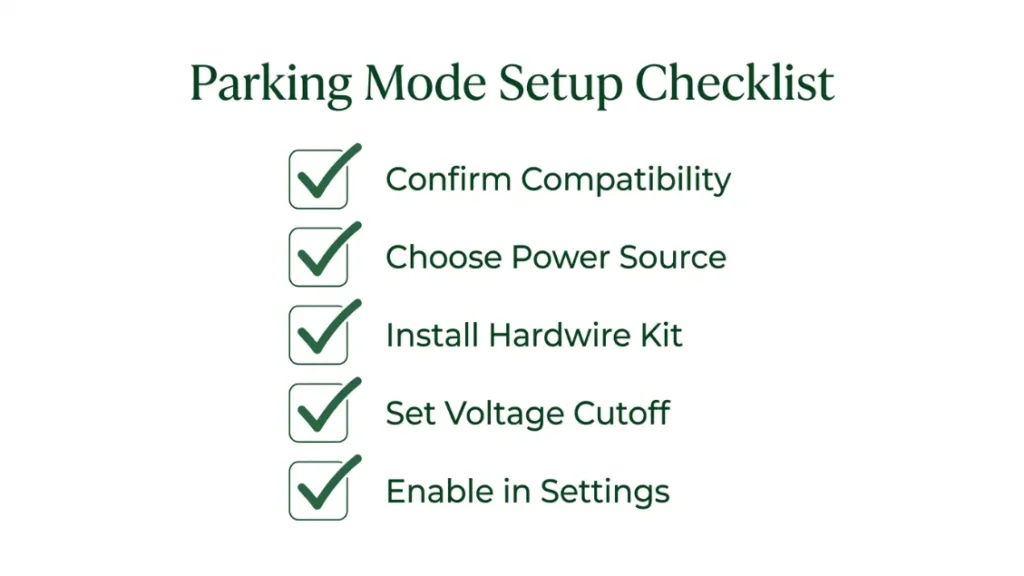
Setting up parking mode takes between 30 minutes and two hours depending on your power method. Here’s how to do it correctly from start to finish.
- Confirm your dash cam supports parking mode — check the manufacturer’s spec page.
- Choose your power method: hardwire kit (recommended), OBD-II adapter, or external battery pack.
- If hardwiring: identify a constant-on fuse in your car’s fuse box using a fuse finder tool or your car manual.
- Connect the hardwire kit’s ACC wire to a switched fuse (one that turns off with the ignition) and the constant wire to your chosen always-on fuse.
- Route the cable neatly behind the headliner and A-pillar trim to the dash cam — avoid pinching wires in door seals.
- Set your low voltage cutoff in the hardwire kit or app: 12V is safe for most standard batteries; 11.8V for AGM batteries.
- In your dash cam’s settings, enable parking mode and choose your trigger type: motion, impact, time-lapse, or buffered.
- Adjust motion sensitivity and G-sensor sensitivity to reduce false triggers.
- Test the setup — walk past your parked car and check if a motion clip is saved to the SD card.
Use a fuse tap or add-a-circuit adapter rather than splicing into existing wires. It’s cleaner, safer, and fully reversible if you sell the car.
Which Dash Cams Have the Best Parking Mode in 2025?
Not all parking mode implementations are equal. These cameras consistently stand out for parking mode performance, power management, and real-world reliability.
| Camera | Parking Mode Types | Standout Feature | Best For |
|---|---|---|---|
| BlackVue DR970X-2CH | Motion, Impact, Buffered, Time-Lapse | Cloud access to live parking footage | Premium users, fleet managers |
| Vantrue N4 Pro | Motion, Impact, Buffered | 3-channel with interior cam, ultra-low 11.4V cutoff | Rideshare drivers, family cars |
| Nextbase 622GW | Motion, Impact, Time-Lapse | Built-in Alexa, Nextbase app integration | UK drivers, everyday commuters |
| Garmin Dash Cam 67W | Parking Guard (motion via magnetic mount) | Wide 180° lens, compact and discreet | Drivers wanting minimal setup |
| Thinkware U3000 | Motion, Impact, Buffered, Time-Lapse, Energy Saving | 4K front, dedicated energy-save parking mode | High-value vehicle owners |
For a full breakdown of how these cameras compare on resolution, night vision, and app quality, Nextbase’s official buying guide and BlackVue’s parking mode explainer are both worth reading.
If you want the simplest parking mode without any hardwiring, the Garmin Dash Cam 67W uses a magnetic mount that detects when the car stops moving and switches to parking guard mode automatically — powered by its internal battery for short durations.
Do You Actually Need Parking Mode — Or Is It Overkill for Your Situation?
Parking mode is genuinely useful — but it’s not necessary for every driver. The honest answer depends on where you park and how much you value peace of mind.
You probably need parking mode if you park on a public street overnight, in a high-density urban area, in an unsupervised car park, if your vehicle is a high-value or classic car, or if you’ve had a previous hit-and-run with no evidence.
You probably don’t need parking mode if you park in a private locked garage every night, in a staffed or CCTV-monitored car park, or in a low-traffic residential area with a strong community watch presence.
The setup cost of parking mode — a hardwire kit plus professional installation — typically runs £50 to £100 total. Weighed against the average UK car insurance excess of £250 to £500, a single captured hit-and-run pays for itself many times over.
Dash cams work when parked only with parking mode enabled and a continuous power source. The three parking mode types — motion, impact, and time-lapse — each suit different situations. A hardwire kit with low voltage cutoff is the safest and most reliable setup. Buffered parking mode gives you pre-impact footage that standard modes miss. For most urban drivers, parking mode is worth every penny of the setup cost.
Conclusion
Yes — your dash cam can absolutely work while your car is parked. But it won’t do it alone.
The right combination of hardware and settings turns a standard drive recorder into a round-the-clock parking sentinel. A hardwire kit with low voltage cutoff, a camera with buffered parking mode, and correctly calibrated sensitivity settings give you reliable coverage without ever touching your car battery health.
I’ve set this up on three different cars now — and the peace of mind it delivers is real. Knowing that any hit-and-run or vandalism attempt is captured in full changes how relaxed you feel about leaving your car.
Start with the Step-by-Step setup section above, pick a camera from the comparison table that fits your budget, and get it installed correctly. Once it’s done, you’ll wonder how you drove without it.
— Alex Rahman
Have questions about a specific camera or a tricky installation situation? Drop them in the comments below — I read everything and reply to every question.
For more on dash cam regulations and what footage is admissible as evidence, the UK Government’s official guidance on dash cams is a useful starting point.
Frequently Asked Questions

I’m Alex Rahman, a car enthusiast and automotive writer focused on practical solutions, car tools, and real-world driving advice. I share simple and honest content to help everyday drivers make better decisions.
