Should I Leave My Dash Cam in My Car Overnight? Here Is the Honest Answer
You can leave your dash cam in the car overnight — but whether you should depends on three things: your camera’s internal power type, your local temperature, and where you park. Capacitor-based dash cams handle heat well. Lithium battery models degrade faster in hot cars. In high-theft areas, a visible dash cam can attract break-ins.
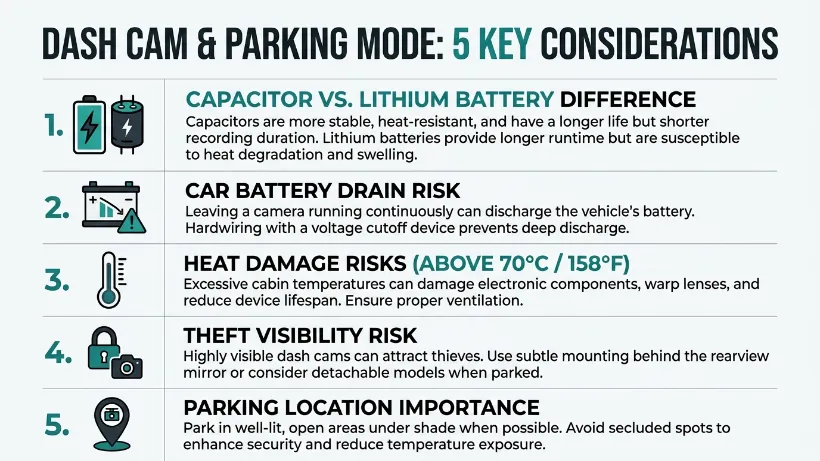
I used to leave my dash cam in the car without thinking twice. Then one July afternoon, I came back to a camera that wouldn’t turn on. The internal battery had cooked in a parked car that hit over 70°C inside.
I’m Alex Rahman, and I’ve been testing and writing about dash cams for years. That experience taught me that “leaving your dash cam in the car” isn’t a single decision — it’s actually five different decisions bundled into one.
Whether you’re worried about your car battery, your camera melting, or someone smashing your window, this guide covers every scenario. By the end, you’ll know exactly what to do — for your specific camera, your climate, and where you park.
- Capacitor dash cams tolerate heat far better than lithium battery models — they’re safer to leave in a parked car.
- A dash cam in parking mode can drain your car battery overnight unless it’s hardwired with a voltage cutoff.
- In hot climates, interior car temperatures can exceed 70°C — enough to permanently damage a lithium battery dash cam.
- A visible dash cam in a public parking spot can attract smash-and-grab theft in high-crime areas.
- Where you park matters as much as what camera you own — a driveway situation is very different from a city street.
What Actually Happens to Your Dash Cam When You Leave It Overnight?
When you leave a dash cam in the car overnight, two things happen: the camera sits in whatever temperature your car reaches, and it either records or stays dormant depending on its power and settings. Understanding both factors shapes every decision that follows.
Most drivers assume the camera just “sleeps” safely. That’s true some of the time. But overnight parked conditions vary wildly — a cool garage is nothing like a sun-blasted parking lot in summer.
Does Your Dash Cam Keep Recording When the Car Is Off?
A standard dash cam stops recording the moment you cut the engine — unless you’ve enabled parking mode or hardwired it with a continuous power supply. Without one of those two setups, your camera is simply sitting there, doing nothing, waiting for you to start the car again.
That’s fine for most drivers who just want road footage while driving. But if you’ve ever wanted to capture someone hitting your parked car, you need more than a default setup.
Parking mode changes things. It keeps the camera on a low-power watch — recording only when it detects motion or an impact. Some cameras, like those from BlackVue and Thinkware, are designed specifically for long parking mode sessions and include built-in voltage protection.
How Does Temperature Affect a Dash Cam Left in a Parked Car?
Temperature is the biggest hidden risk most drivers never think about. A car parked in direct sun can reach interior temperatures of 60°C to 80°C within an hour — even on a mild 25°C day outside.
Most dash cams are rated to operate between -20°C and 60°C. Leave a lithium battery model in a car that hits 70°C, and you’re past the safe operating limit. Do that repeatedly, and the battery degrades permanently — often within a single summer season.
If your dash cam uses a built-in lithium battery and you park in direct sunlight regularly, heat damage is a genuine risk — not a rare edge case. Check your camera’s operating temperature spec in the manual before leaving it unattended in summer.
Will Leaving a Dash Cam in Your Car Drain the Battery?
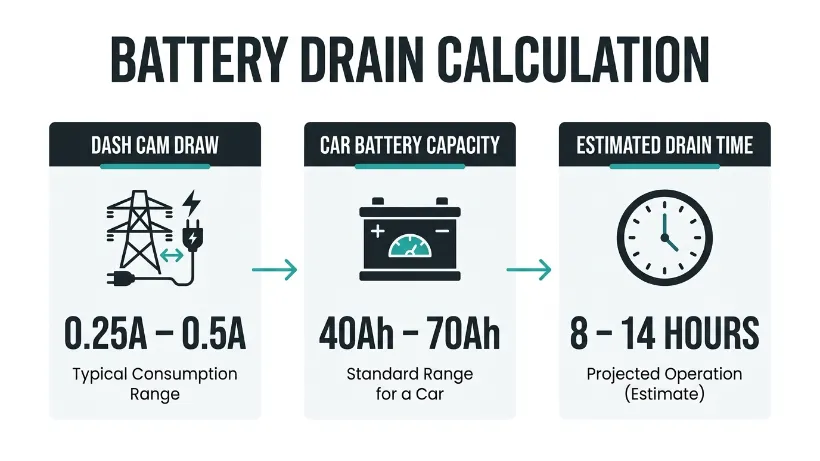
A dash cam in standby mode will not drain your car battery. A dash cam actively recording in parking mode overnight almost certainly will — unless you have the right setup to prevent it.
This is one of the most misunderstood areas of dash cam ownership. The answer hinges entirely on whether your camera is drawing power while the car is off.
How Much Power Does a Dash Cam Actually Use Overnight?
A typical dash cam draws between 0.25A and 0.5A of current during parking mode. A standard 12V car battery holds roughly 40-70Ah of usable charge. Run the math, and a camera in parking mode can flatten a weak battery in 8-14 hours.
That’s a real risk for anyone leaving their car parked for long stretches — overnight in a lot, or over a weekend. A newer battery in good condition handles it better. An older battery with reduced capacity may not start your car in the morning.
What Is a Voltage Cutoff and Why Does It Protect Your Battery?
A voltage cutoff is a built-in or hardwire-kit feature that automatically stops the dash cam from recording when your car battery drops below a set voltage — usually around 11.6V to 12V. This leaves enough charge in the battery to start the engine.
Brands like Vantrue and Garmin include voltage cutoff settings directly in their parking mode configurations. If your dash cam doesn’t have this, a hardwire kit with its own cutoff module solves the problem cleanly.
If you want parking mode without battery drain risk, invest in a quality hardwire kit with voltage cutoff. It connects to your fuse box and cuts power automatically when the battery gets low.
Is a Capacitor Dash Cam Safer to Leave in a Hot Car Than a Battery Model?
Yes — capacitor-based dash cams are significantly safer to leave in a hot car than models with internal lithium batteries. This is one of the most important distinctions in the entire dash cam market, and most buyers never hear about it.
A capacitor stores a small charge to handle the camera’s power needs during shutdown — it doesn’t hold the large energy reserves that a lithium battery does. That means less energy to generate heat, and much better tolerance for high temperatures.
What Temperature Can a Dash Cam Tolerate Before It Gets Damaged?
Most lithium battery dash cams are rated to a maximum storage temperature of around 60°C to 70°C. Capacitor models, by contrast, often tolerate up to 80°C or higher. That gap matters enormously in summer parking conditions.
| Feature | Lithium Battery Dash Cam | Capacitor Dash Cam |
|---|---|---|
| Max safe temperature | ~60–70°C | ~80°C+ |
| Heat degradation risk | High over time | Low |
| Safe for hot-climate parking | Risky in direct sun | Generally yes |
| Lifespan in hot conditions | Shorter — 1–2 summers | Longer — 3–5+ years |
| Example brands | Nextbase 622GW, Garmin 67W | Vantrue E1 Lite, Thinkware U1000 |
Which Dash Cam Brands Build Better Heat Resistance Into Their Cameras?
Thinkware (a South Korean brand known for its focus on driver safety technology) builds most of its flagship models with capacitors specifically because of heat durability. Vantrue also offers capacitor options across its product range and explicitly recommends them for warm climates.
Nextbase — the UK-based brand trusted by millions of European drivers — uses lithium batteries in most of its models. Their cameras are excellent on the road but are better removed in extreme heat conditions.
If you live somewhere that gets hot summers — and most places do — check whether your dash cam uses a capacitor or a battery before leaving it in the car. It’s usually listed in the product specs under “power” or “internal storage.”
Does Leaving Your Dash Cam in the Car Make It a Target for Theft?
A visible dash cam mounted to your windshield can attract theft — particularly in urban areas, public parking lots, and locations with higher crime rates. Thieves target dash cams because they’re small, portable, and resaleable.
The risk isn’t universal. A camera on your driveway at home is a different situation from a camera left in a city-centre parking garage overnight. But it’s worth thinking through before you assume leaving it is always fine.
How Visible Is Your Dash Cam to Someone Walking Past Your Car?
Most front-facing dash cams mount directly behind the rearview mirror — which means they’re clearly visible through the windshield from outside the car. A passerby can see it in seconds. In a busy car park, that’s hundreds of people who could notice it.
Rear cameras are less visible from the outside but still present. Any camera with a large screen or bright LED indicator is even more obvious in a dark car park at night.
What Can You Do to Reduce Dash Cam Theft Risk When Parked?
There are four practical steps that genuinely reduce the risk without removing your camera every time you park.
- Mount the camera as close to the rearview mirror as possible — it’s harder to spot from outside.
- Turn off or tape over any LED indicators that glow when the camera is in standby mode.
- Remove the camera’s memory card even if you leave the mount — the card holds your footage and has value on its own.
- Consider a slim or low-profile dash cam model — smaller cameras are far less visible than large ones with big screens.
Never leave a dash cam’s suction mount or adhesive bracket visible on the windshield without the camera. A bracket alone signals to thieves that a camera is stored in the glovebox — which often leads to a break-in anyway.
Should You Use Parking Mode or Just Leave the Dash Cam Plugged In?
Parking mode is worth using if you want to capture incidents while your car is parked — but only if your camera is set up correctly to avoid draining your battery. Simply leaving the dash cam plugged into a 12V socket with parking mode off does almost nothing protective.
Understanding what parking mode actually does — and what powers it — is the key to making a good decision here.
What Does Parking Mode Actually Do and Is It Worth It?
Parking mode puts the dash cam into a low-power monitoring state. Instead of recording continuously, it watches for motion in its field of view or a sudden impact on the vehicle. When triggered, it starts recording — usually saving a short clip of 30-60 seconds around the event.
This is genuinely useful for hit-and-run incidents in car parks, vandalism, or catalytic converter theft attempts. BlackVue (a Korean company known for cloud-connected parking surveillance features) and Thinkware both have strong reputations for parking mode reliability. You can read more about how parking mode compares across cameras at DashCam Talk, a community-driven resource with real-world testing.
Do You Need a Hardwire Kit to Run Parking Mode Overnight?
Yes — for any parking mode session lasting more than 2-3 hours, a hardwire kit is the responsible setup. Plugging into a 12V cigarette socket works for short stints, but many cars cut power to that socket when the ignition is off anyway.
A hardwire kit connects the dash cam directly to your car’s fuse box. It draws power continuously — and a quality kit includes a voltage cutoff module that stops the camera before the battery gets too low. Installation takes about 30 minutes and the kits typically cost £15-£40 / $20-$50.
Parking mode = useful if your camera supports it. Hardwire kit = necessary for safe overnight use. Voltage cutoff = the feature that keeps your battery safe. Without all three working together, overnight parking mode is a risk, not a benefit.
Should You Leave Your Dash Cam In or Take It Out? A Scenario-by-Scenario Answer
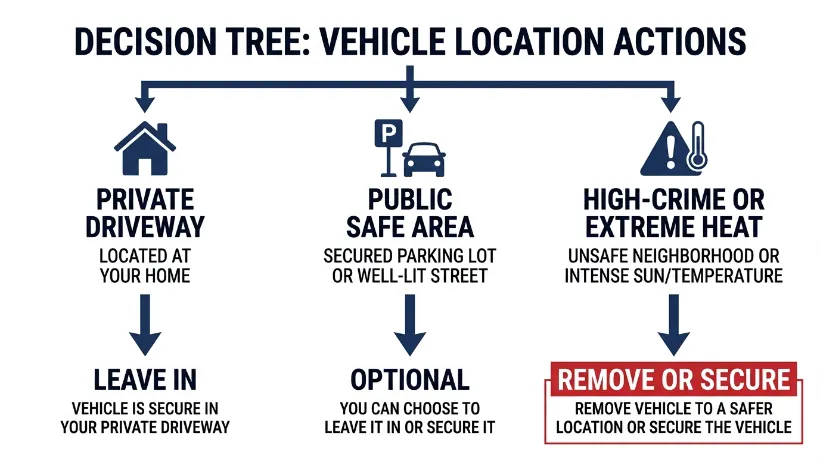
The honest answer is: it depends on your situation. Here’s a clear breakdown of the three most common overnight parking scenarios — with a direct recommendation for each one.
Parked in Your Own Driveway Overnight
Leave it in. If you park on a private driveway, theft risk is low. Temperature risk depends on your climate — a garage is better than open-air parking in summer. If your dash cam uses a capacitor, leaving it in is essentially risk-free. If it uses a lithium battery and summer temperatures in your area are high, consider removing it during heat waves or parking in shade.
Battery drain isn’t a concern unless parking mode is running — and for a driveway situation overnight, you probably don’t need parking mode on at all.
Parked in a Public Lot or on a Street Overnight
It depends on the area. In a low-crime neighbourhood, leaving it in is usually fine with basic precautions (hide the memory card, minimise visibility). In a higher-crime urban area, remove the camera — or at minimum, remove the memory card and use a low-profile mount position.
If you’re using parking mode here, a hardwire kit with voltage cutoff is essential. You want the footage coverage — but not a flat battery in the morning.
Parked in Extreme Heat or a Hot Climate
Remove it if it has a lithium battery. If you live in a climate where summer temperatures regularly exceed 35°C outside, your car’s interior can hit 70°C or more on a sunny day. A lithium battery dash cam left in those conditions repeatedly will degrade and eventually fail.
Capacitor models handle this better — but even then, parking in shade and cracking a window reduces the interior temperature significantly, extending your camera’s lifespan.
The simple rule: If you own a capacitor dash cam and park in a safe, temperate location — leave it in. If you own a lithium battery model and park in heat or a high-theft area — take it out, or at least take the memory card.
How to Set Up Your Dash Cam for Safe Overnight Use
If you want your dash cam to work well overnight — recording parking incidents without draining your battery or risking damage — follow this setup process once and you’re covered every night after that.
- Check your dash cam’s spec sheet — confirm whether it uses a capacitor or a lithium battery.
- Check the maximum operating temperature — compare it to your typical summer car interior temperature.
- If you want parking mode: install a hardwire kit with a voltage cutoff set to 11.8V or 12V.
- Enable parking mode in your camera’s settings — choose motion detection or impact detection based on your parking environment.
- Position the camera behind the rearview mirror to minimise visibility from outside.
- Remove the memory card when parking in high-risk areas overnight — even if you leave the camera body.
- If you own a lithium battery model and face regular extreme heat, build a habit of removing the camera in summer months.
Following this process takes about an hour of setup — and it protects both your camera and your car battery for every overnight park after that. For a detailed look at hardwire kit options and compatibility, the r/Dashcam community on Reddit has extensive real-world guides and model-specific advice.
Conclusion
Leaving your dash cam in the car overnight isn’t automatically safe or automatically dangerous. It’s a decision that depends on your camera’s power type, the temperature where you live, and where you park.
Capacitor dash cams are the better choice for anyone who wants to leave a camera in the car without worrying. Lithium battery models need more attention — especially in summer or in busy public car parks.
If you want parking mode coverage, do it properly: hardwire kit, voltage cutoff, and the right sensitivity settings. Half-measures lead to flat batteries and missed footage.
I’m Alex Rahman, and the single best thing I did for my own setup was switching to a capacitor model after that summer meltdown. It changed how relaxed I feel about leaving the camera in year-round.
Take five minutes to check what’s inside your camera — battery or capacitor. That one fact will tell you everything you need to know.
Frequently Asked Questions
Will leaving a dash cam plugged in drain my car battery overnight?
It can. A dash cam in active parking mode draws 0.25A–0.5A of current, which can flatten a weak or older battery over 8–14 hours. A hardwire kit with a voltage cutoff prevents this by stopping the camera before the battery drops too low to start the engine.
Is it safe to leave a dash cam in a car in hot weather?
It depends on the camera type. Capacitor-based dash cams tolerate temperatures up to 80°C and are generally safe to leave in a hot car. Lithium battery models are rated to around 60–70°C — regular exposure to higher temperatures in a sun-baked car will degrade the battery permanently over time.
Should I remove my dash cam every time I park?
Not necessarily. In a private driveway or safe area, leaving it in is fine — especially with a capacitor model. In a high-theft area or during extreme heat, it’s worth removing the camera or at least taking out the memory card. The decision depends on your situation, not a single universal rule.
Can a dash cam record while the car is parked and turned off?
Yes — but only if parking mode is enabled and the camera has a power source while the ignition is off. Most cameras need a hardwire kit connected to the fuse box to power parking mode reliably. Without that, most 12V sockets cut power when the ignition is off.
Does a visible dash cam attract break-ins?
It can, particularly in urban car parks and high-crime areas. A clearly visible camera signals to thieves that there may be a valuable memory card inside. Mounting the camera close behind the rearview mirror and removing the memory card when parked in risky locations reduces this risk considerably.
What is the difference between a capacitor and a battery dash cam for overnight use?
A capacitor stores a small charge to manage shutdown safely — it doesn’t hold the large energy reserves of a lithium battery. This makes capacitor models more heat-resistant, longer-lasting in warm conditions, and generally better suited for leaving in a parked car. Lithium battery models are more common but degrade faster in heat.

I’m Alex Rahman, a car enthusiast and automotive writer focused on practical solutions, car tools, and real-world driving advice. I share simple and honest content to help everyday drivers make better decisions.
