Can a Dash Cam Record When the Car Is Off? (Complete Parking Mode Guide)
Yes — a dash cam can record when the car is off, but only if it has parking mode enabled and a constant power source. Most dash cams need a hardwire kit or OBD-II adapter to stay powered. A built-in battery alone typically lasts only a few minutes. Low-voltage cutoff protects your car battery automatically.
I came back to my car one afternoon to find a fresh dent on the rear bumper. No note. No witness. Nothing.
I had a dash cam — but it had switched off the moment I turned the engine off. So I had zero footage. That dent cost me $400 out of pocket.
That day I learned what parking mode actually is, why most dash cams don’t use it by default, and what you need to make it work properly. I’m Alex Rahman, and I’ve spent years testing and writing about dash cams, car tech, and vehicle security.
In this guide, I’ll explain exactly how a dash cam records when the car is off, what power options you have, and how to make sure you never lose critical footage while parked. Let’s get into it.
- A dash cam records when parked only if parking mode is enabled and it has a constant power supply.
- A hardwire kit is the most reliable power method — it connects directly to the car’s fuse box.
- Low-voltage cutoff (usually set at 11.6V–12.4V) prevents the dash cam from draining your car battery dead.
- Parking mode triggers through motion detection, G-sensor impact, or time-lapse — depending on your settings.
- Dedicated battery packs like the Cellink NEO give you parking mode recording with zero battery drain risk.
What Does “Recording When the Car Is Off” Actually Mean for a Dash Cam?
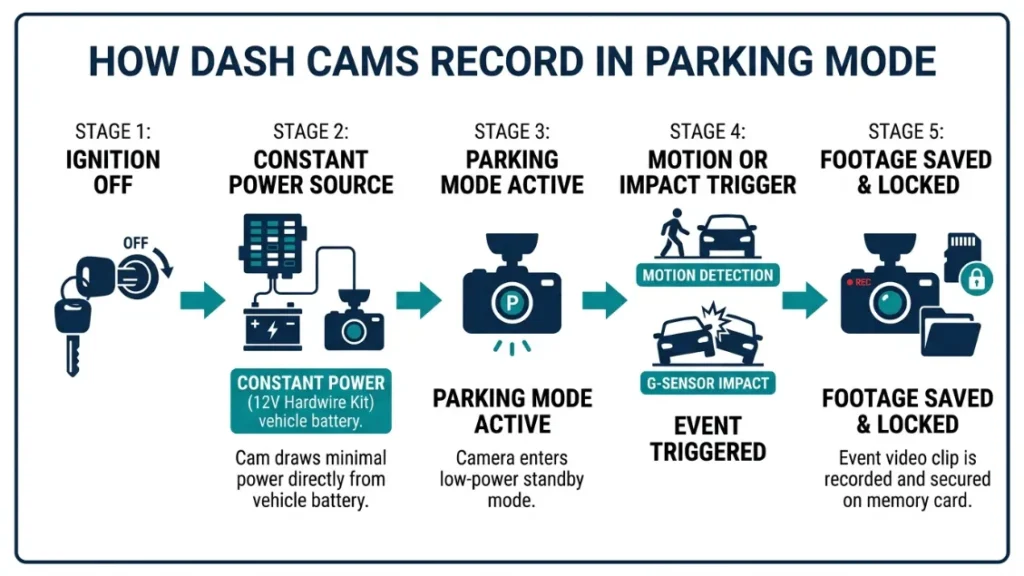
When your car is off, the engine stops supplying power through the ignition circuit — and most dash cams are wired to that same circuit. So when the ignition cuts out, the dash cam cuts out too. Parking mode changes that by keeping the camera powered even after you walk away.
Why Dash Cams Stop Recording When You Turn the Engine Off
Most factory-installed power sources in a car — like the 12V cigarette lighter socket — are connected to the ignition. When you turn the key or press the start button to off, that circuit loses power. Your dash cam plugged into that socket loses power too.
This is actually intentional design. It stops accessories from draining the car battery while the vehicle sits idle. It makes sense for phone chargers. It doesn’t work for parking surveillance.
To record while parked, the dash cam needs power from a constant live circuit — one that stays on regardless of the ignition position.
What Parking Mode Does Differently and Why It Matters
Parking mode is a dash cam operating state that keeps the camera in a low-power monitoring stance while you’re away. Instead of recording continuously at full resolution, it waits for a trigger — a movement, a bump, or a set time interval.
When it detects that trigger, it records a clip. Then it goes back to monitoring. This saves storage and reduces power draw dramatically.
The result? Evidence captured automatically — even when you’re not in the car. Hit-and-runs, vandalism, attempted break-ins — parking mode catches all of it.
Even if your dash cam has parking mode as a feature, it won’t activate unless it has a constant power source. Check your power setup first — the feature alone isn’t enough.
How Does Dash Cam Parking Mode Work in Practice?
Parking mode works through one of four recording methods — motion detection, impact detection, time-lapse, or buffered recording. Most modern dash cams support multiple modes, and you choose which one activates based on your situation and storage capacity.
Motion Detection Mode — How It Spots Activity Around Your Car
Motion detection uses the camera’s image processor to scan each frame for pixel changes. When something moves in the field of view — a person walking past, a car reversing nearby, a shopping trolley rolling in — the camera flags it and starts recording.
It then records for a set number of seconds (usually 10–60 seconds) before returning to standby. This is the most storage-efficient parking mode for busy environments like car parks.
One downside: sensitivity calibration matters. Set it too high and every passing shadow triggers a clip. Set it too low and you miss the actual event.
Impact Detection Mode — How the G-Sensor Triggers a Recording
The G-sensor (gyroscope-accelerometer built into the dash cam) measures physical force applied to the vehicle. When someone hits your car, nudges it, or slams a door nearby, that force exceeds a preset threshold and triggers a recording instantly.
Impact detection is ideal for parking lots where pedestrian traffic is constant but physical contact is what matters most. It ignores visual movement and only reacts to force.
Brands like Vantrue and Thinkware let you fine-tune G-sensor sensitivity in three to five levels — critical for avoiding false triggers from passing trucks or strong wind.
Time-Lapse Parking Mode — How It Saves Storage Without Missing Events
Time-lapse mode records one frame every few seconds — typically 1 frame per second down to 1 frame per 5 seconds — instead of full 30fps video. The result is a dramatically compressed record of everything that happened around your car.
A full overnight session in time-lapse might use only 2–4GB of storage. The same session in continuous mode would fill a 128GB card in hours.
The trade-off is clear: you get coverage of the full period, but not high-definition footage of each moment. For identifying a vehicle that scraped your car, time-lapse often captures enough detail. For reading a license plate in low light, it sometimes doesn’t.
Buffered Parking Mode — What It Captures Before the Trigger Happens
Buffered parking mode keeps a short rolling video buffer — usually 5 to 15 seconds — in the camera’s RAM at all times. When the G-sensor or motion trigger fires, the camera saves that buffer plus the post-trigger recording.
This means you get footage of what happened immediately before the impact — not just after it. For hit-and-runs, this is enormously valuable because you can see the approaching vehicle before contact.
Thinkware’s Continuous Incident Recording and Vantrue’s buffered parking mode both offer this. It requires more processing power, which is why it’s typically found on mid-range and premium models.
Parking mode has four types: motion detection (triggers on visual movement), impact detection (triggers on physical force via G-sensor), time-lapse (records at low frame rate continuously), and buffered mode (saves footage from before the trigger). Most drivers use motion or impact detection for daily parking.
What Power Source Does a Dash Cam Need to Record While Parked?
To record while parked, a dash cam needs access to power that stays live when the ignition is off. There are four ways to achieve this — each with different costs, installation complexity, and reliability levels.
Hardwire Kit — The Most Reliable Way to Power Parking Mode
A hardwire kit connects your dash cam directly to the car’s fuse box using three wires: a constant power wire (always live), an ACC wire (ignition-triggered, used to detect when you start driving), and a ground wire.
The constant wire keeps the dash cam powered in parking mode. The ACC wire tells the camera when the engine starts so it switches from parking mode back to normal driving mode automatically.
Most hardwire kits come with a low-voltage cutoff module inline — this monitors the battery voltage and cuts power to the dash cam before the battery drops too low to start the car.
Installation takes 30–60 minutes and requires basic tools plus a fuse tap. Many auto electricians will do it for $30–$80 labour. This is the method recommended by Vantrue, Thinkware, and BlackVue for reliable long-term parking mode use.
- Purchase a hardwire kit compatible with your dash cam brand.
- Locate your car’s fuse box (usually under the dashboard or in the engine bay).
- Use a fuse tap to connect the constant power wire to a always-live fuse slot.
- Connect the ACC wire to an ignition-switched fuse slot.
- Run the ground wire to a bare metal bolt on the car chassis.
- Route the dash cam cable neatly along the headliner and A-pillar.
- Set the low-voltage cutoff threshold in your dash cam’s settings app.
OBD-II Adapter — The Easiest Setup with a Key Trade-Off
The OBD-II port under your dashboard provides constant 12V power — even with the ignition off on most vehicles. Certain dash cam brands sell OBD-II power adapters that plug straight in, giving you parking mode without any wiring work.
Garmin’s Parking Mode Cable uses this method. It’s genuinely plug-and-play. No tools, no fuse box, no installation time.
The trade-off is output current. Most OBD-II ports deliver limited amperage — enough for a single-channel dash cam in low-power parking mode, but potentially insufficient for dual-channel systems drawing higher current. Always check your dash cam’s parking mode power draw against your OBD-II adapter’s rated output before relying on this method.
Also worth noting: some vehicles disable OBD-II power after a set period to prevent battery drain — check your car’s manual to confirm yours stays live.
Built-In Battery or Supercapacitor — What the Difference Means for You
Almost every dash cam has either a small lithium battery or a supercapacitor built in. Neither is designed to power extended parking mode recording — they exist primarily to allow the camera to save its final clip and shut down safely when power is cut.
A typical built-in battery gives you 2 to 5 minutes of recording after the ignition turns off. That’s useful for a final clip, not for overnight surveillance.
The real difference between lithium batteries and supercapacitors matters in extreme temperatures. Lithium batteries degrade and can swell above 60°C (140°F) — a real risk inside a parked car in summer in hot climates. Supercapacitors handle heat far better and have a longer operational lifespan, which is why brands like BlackVue and Thinkware use them in their premium models.
| Feature | Lithium Battery | Supercapacitor |
|---|---|---|
| Heat tolerance | Up to ~60°C | Up to ~85°C |
| Cold weather performance | Good | Excellent |
| Extended parking recording | 2–5 minutes only | 2–5 minutes only |
| Lifespan | 2–3 years typical | 5–10 years typical |
| Best for | Moderate climates | Hot or extreme climates |
Dedicated External Battery Pack — The Premium Option for All-Night Recording
A dedicated dash cam battery pack — like the Cellink NEO series or the BlackVue B-124X — sits between your car’s electrical system and your dash cam. It charges while you drive and powers the dash cam independently while parked.
Because it has its own power reservoir (typically 3,200–9,950mAh depending on model), it can run parking mode for 12–40 hours without touching the car battery at all. Zero battery drain risk.
The Cellink NEO 6S, for example, provides up to 40 hours of motion-detection parking mode on a single charge — enough for an international flight plus some margin. It charges back to full in about 45 minutes of driving.
These packs cost $80–$250 depending on capacity, which puts them in the premium tier. But for anyone parking in high-risk areas regularly, the peace of mind is worth it.
Bottom line on power: For most drivers, a hardwire kit is the sweet spot — reliable, permanent, and affordable. If you want zero installation effort, use an OBD-II adapter. If you need truly independent overnight recording, invest in a dedicated battery pack.
Does Parking Mode Drain Your Car Battery and How Do You Prevent It?
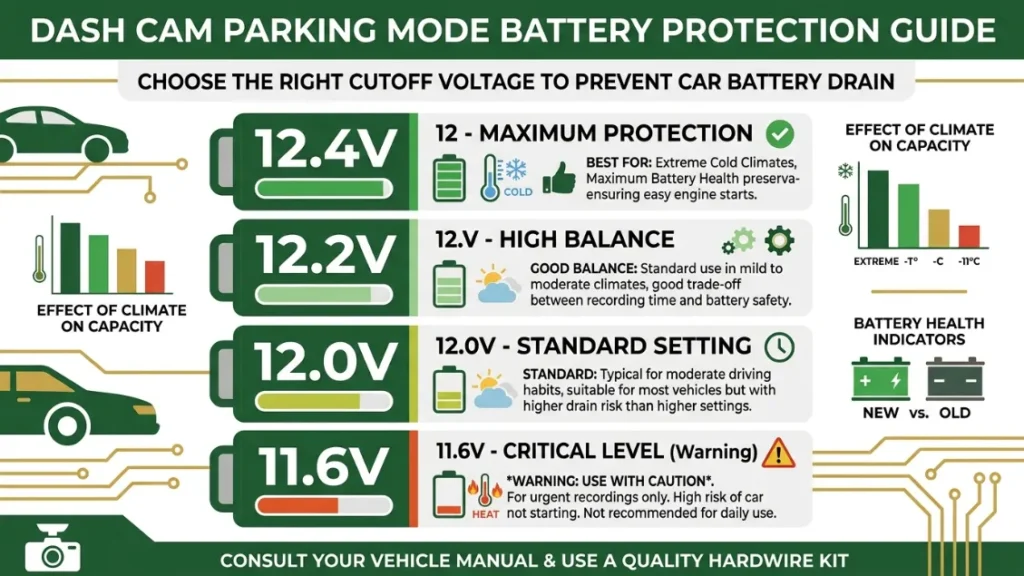
Yes — parking mode does draw power from the car battery, and without protection, it can drain it enough to prevent starting. The good news is that every quality hardwire kit and most modern dash cams include automatic low-voltage cutoff that handles this for you.
How Low-Voltage Cutoff Protects Your Car Battery Automatically
A healthy car battery sits at around 12.6V when fully charged and resting. Your car needs at least 11.6–12.0V to start reliably. Low-voltage cutoff monitors the battery voltage in real time and cuts power to the dash cam before the voltage drops below a set threshold.
When the voltage hits your cutoff point, the dash cam saves its current file, shuts down safely, and disconnects from the power source. When you return and start the engine, the battery charges back up and the dash cam restarts automatically in normal driving mode.
This process is entirely automatic. You set it once during installation and never think about it again — unless you forget to set it at all, which is the most common mistake I see new hardwire users make.
If you hardwire a dash cam without setting a low-voltage cutoff — or if you disable it — parking mode will run until the battery is completely dead. This can strand you with a car that won’t start. Always configure voltage cutoff before using parking mode.
What Voltage Cutoff Setting Should You Use?
The right cutoff voltage depends on your battery type and how cold your climate gets. Here’s a practical guide:
- Standard lead-acid battery, moderate climate: Set cutoff at 12.0V
- Standard lead-acid battery, cold climate: Set cutoff at 12.2V (cold reduces battery performance)
- AGM or lithium car battery: Set cutoff at 12.4V (these batteries behave differently under load)
- Older battery (3+ years): Set cutoff at 12.2V to compensate for reduced capacity
Most dash cam apps and hardwire kits offer three presets: low (11.6V), medium (12.0V), and high (12.4V). Medium is a safe default for most drivers with a standard battery in good condition.
If your car battery is more than 3 years old, consider replacing it before relying on long-duration parking mode. An aging battery with reduced capacity will hit the voltage cutoff much faster — sometimes within just a few hours.
How to Set Up Dash Cam Parking Mode Step by Step
Setting up parking mode takes one of two paths — hardwire installation for the full experience, or OBD-II adapter for a quick no-tools setup. Here’s how to do both correctly.
Setting Up via Hardwire Kit (Fuse Box Method)
This method gives you permanent, reliable parking mode power. It takes about an hour the first time and requires a fuse tap tool, wire stripper, and basic confidence working around a car’s fuse box.
- Buy the correct hardwire kit for your dash cam — brands like Vantrue and Thinkware sell model-specific kits ($15–$35).
- Open your car’s fuse box and use a fuse tester to identify: one always-live fuse slot and one ignition-switched fuse slot.
- Insert fuse taps into both slots and connect the constant wire (usually yellow) to the always-live slot.
- Connect the ACC wire (usually red) to the ignition-switched slot.
- Attach the ground wire (black) to a bare metal bolt on the car’s chassis — not painted metal.
- Route and tuck the dash cam cable along the headliner to the windshield mount.
- Power on the dash cam, enter settings, and set your low-voltage cutoff threshold.
- Enable parking mode in the dash cam settings and choose your preferred trigger type.
Setting Up via OBD-II Adapter (No Tools Needed)
If your dash cam brand supports an OBD-II parking mode cable — Garmin does, and some Nextbase models do — the setup takes under 5 minutes.
- Locate your OBD-II port — usually under the steering column on the driver’s side.
- Plug the OBD-II parking mode adapter into the port.
- Route the cable to your dash cam mount and connect it.
- Confirm the OBD-II port on your vehicle stays powered with the ignition off (check your car manual).
- Enable parking mode in the dash cam settings menu.
- Verify the cam switches to parking mode automatically after you lock the car.
Which Dash Cams Have the Best Parking Mode in 2025?
Not all parking modes are equal. The hardware matters, the sensitivity calibration matters, and the power management matters. Here are the dash cams that get it right across different budgets.
Best for Reliability — Vantrue and Thinkware Options
Vantrue E1 Lite and N4 are consistently rated among the best for parking mode depth. The N4 supports four recording modes — continuous, motion, impact, and time-lapse — all from a single device. It uses a supercapacitor for safe operation in hot climates up to 80°C.
Thinkware U3000 brings Thinkware’s excellent Energy Save parking mode — which reduces power draw to just 90mA — alongside radar-based motion detection that outperforms camera-based systems in accuracy. According to Thinkware’s official product page, the U3000 also supports cloud-connected parking alerts sent directly to your phone.
Best for Cloud Monitoring — BlackVue DR970X Series
BlackVue DR970X-2CH connects to BlackVue’s Cloud platform (via built-in Wi-Fi or LTE dongle), enabling real-time push notifications to your phone when parking mode is triggered. You can live-stream footage from anywhere in the world.
For anyone parking in a high-theft area or leaving a vehicle at an airport for extended periods, this real-time monitoring capability is unmatched at its price point. BlackVue provides full documentation on Cloud parking mode at their official Cloud page.
Best Budget Option with Parking Mode
The Vantrue E1 Lite at around $80–$100 delivers genuine parking mode with motion and impact detection at a price most drivers can justify. It requires the separately purchased hardwire kit but performs solidly for everyday parking surveillance without the premium price tag.
| Dash Cam | Best For | Parking Modes | Price Range |
|---|---|---|---|
| Vantrue N4 | Reliability + heat | All 4 modes | $150–$180 |
| Thinkware U3000 | Radar detection + cloud | Motion, impact, energy save | $280–$320 |
| BlackVue DR970X-2CH | Cloud + remote alerts | Motion, impact, time-lapse | $350–$420 |
| Garmin Dash Cam 67W | Easy OBD-II setup | Motion, incident detection | $130–$160 |
| Vantrue E1 Lite | Budget entry point | Motion, impact | $80–$100 |
For a full breakdown of current parking mode performance testing, the team at DashCamTalk runs regular independent comparisons worth checking.
Is It Safe to Leave a Dash Cam Recording Overnight?
Yes — it is safe to leave a dash cam recording overnight, provided three conditions are met: the voltage cutoff is correctly configured, the camera is rated for your local temperature range, and the storage card has enough free space to continue recording.
The most common overnight parking mode problem isn’t a dead battery — it’s a full memory card. Most dash cams use loop recording to overwrite old footage, but parking mode clips are often locked as “protected events” and won’t overwrite automatically. After a few nights, the card fills with protected files and the camera stops recording new events entirely.
To prevent this, check your parking mode clip settings and either reduce clip lock duration or manually clear old protected files weekly.
Heat is the second concern for overnight summer parking. If your dash cam uses a lithium battery and you park in direct sun in a hot climate, interior temperatures can exceed 80°C (176°F). At that temperature, lithium cells can swell and fail. If you park in a hot climate, use a supercapacitor-based model.
Use a high-endurance microSD card rated for dash cam use — like the Samsung PRO Endurance or SanDisk High Endurance series. Standard cards wear out faster under the constant read/write cycle of parking mode and can corrupt after a few months.
Frequently Asked Questions
Final Thoughts on Dash Cam Parking Mode
The short answer is yes — a dash cam absolutely can record when the car is off. But it needs the right power setup to do it reliably.
A hardwire kit is the best starting point for most drivers. It’s a one-time install, costs under $40, and gives you permanent parking mode coverage with automatic battery protection. If you want zero installation effort, an OBD-II adapter works well for compatible models. If you need multi-day coverage or zero battery drain risk, a dedicated battery pack like the Cellink NEO is worth the investment.
Set your low-voltage cutoff correctly. Use a high-endurance memory card. Choose impact detection in busy car parks and motion detection in quieter areas overnight.
I’m Alex Rahman — and if there’s one thing I’ve learned from testing these systems, it’s that the camera you have means nothing if it switches off the moment you walk away. Set up parking mode properly, and it becomes one of the most genuinely useful pieces of safety technology you can put in your car.

I’m Alex Rahman, a car enthusiast and automotive writer focused on practical solutions, car tools, and real-world driving advice. I share simple and honest content to help everyday drivers make better decisions.
