
Best App for Bluetooth OBD2 Scanner: How to Choose
Quick Answer
The best app for bluetooth obd2 scanner use depends on your phone, your adapter, and your goal. Car Scanner ELM OBD2 suits most drivers because it is free to start, works on iPhone and Android, and reads codes with live data. Torque Pro suits Android drivers who want custom gauges. BlueDriver suits drivers who want plain repair reports.
- Start with Car Scanner ELM OBD2 for free code reading on iPhone and Android.
- Pick Torque Pro on Android for custom gauges, graphs, and trip logs.
- Pick BlueDriver when you want repair reports in plain words.
- Match the adapter to the phone first, or no app can connect.
You have a check engine light, a small Bluetooth adapter, and a phone full of apps. This guide helps you pick the app that fits your phone, your adapter, and the job you want to do. After reading, you can install one app with confidence and run a first scan without guesswork.
In this article
- What does a Bluetooth OBD2 scanner app do?
- Why does the adapter matter more than the app name?
- Which app fits a simple check engine light check?
- What is the best free app for a Bluetooth OBD2 scanner?
- Which app fits Android live data and gauges?
- Which app fits iPhone users?
- When does a paired adapter and app kit make sense?
- How do brand specific apps differ?
- How do you set up a Bluetooth OBD2 scanner app?
- What mistakes cause most connection failures?
- What can an app not tell you?
- Frequently Asked Questions
What does a Bluetooth OBD2 scanner app do?
A Bluetooth OBD2 scanner app turns your phone into a screen for data from your car. The app reads fault codes, shows live sensor data, and checks emissions readiness. It does not plug into the car by itself.
The adapter plugs into the OBD2 port, which sits under the dash in most cars. The adapter sends data to the phone over Bluetooth. The app then turns that data into codes, gauges, and plain words you can read.
A good app shows the code, a short description, and the sensor values at the time of the fault. That set is called freeze frame data. It helps you, or a shop, see what the car was doing when the fault appeared. You can also phone as a scanner guide for the full phone setup, if you want the phone route in more detail.
Why does the adapter matter more than the app name?
The adapter matters more than the app name because the app cannot talk to the car without a working link. A strong app with the wrong adapter shows no data at all. A plain app with the right adapter can still read codes and live data.
Most generic adapters use the ELM327 design. ELM327 is a common chip design for OBD2 adapters. Quality varies a lot between cheap copies and known brands. A weak copy can drop the link, show slow data, or fail on some cars.
Phone type changes the adapter you need. Android phones accept classic Bluetooth adapters in most cases. iPhone users need a Bluetooth Low Energy adapter, often called BLE, or a Wi-Fi adapter in most cases. A classic Bluetooth adapter that works on Android may not pair with an iPhone.
Some apps lock you to one adapter. BlueDriver and FIXD work with their own adapters. Car Scanner, Torque Pro, and OBD Fusion work with a wide range of generic ELM327 adapters. Check the supported adapter list before you buy or install.
Which app fits a simple check engine light check?
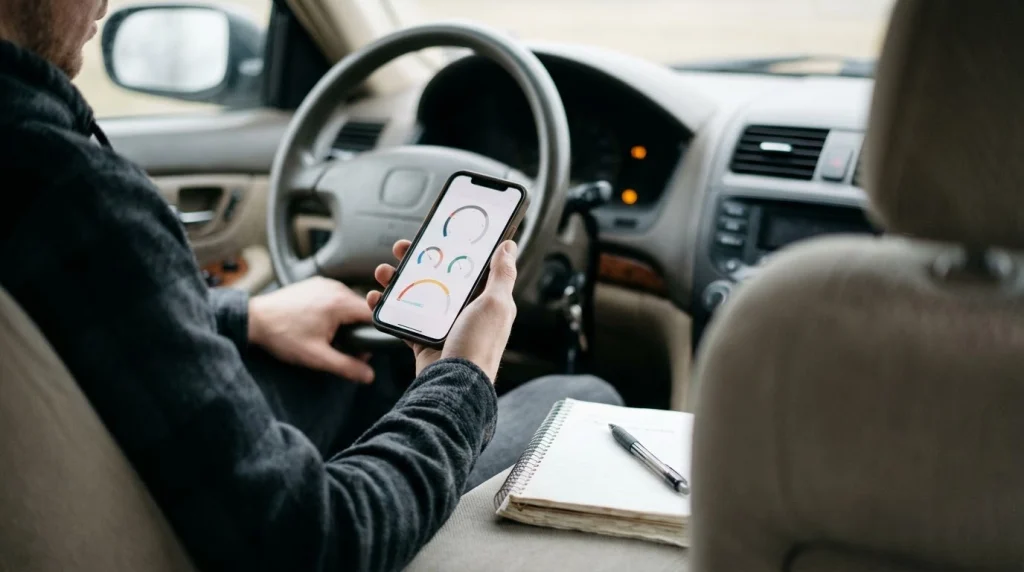
Car Scanner ELM OBD2 fits a simple check engine light check for most drivers. It reads and clears generic codes, shows a short code description, and runs on iPhone and Android. BlueDriver also fits this job when you want repair reports in plain words.
For a simple check, you need three things from the app. You need clear code reading, a plain description, and a way to note the code before you clear it. You do not need custom gauges, coding, or deep brand data for this job.
Start by reading the code and writing it down. Note the code number, such as P0300, and the short description. Then check if the light is steady or flashing. A flashing light can mean a misfire that harms the catalytic converter, so get help soon and drive less.
Do not clear the code right away. Clearing turns the light off, but it also wipes freeze frame data a shop could use. Clearing also resets emissions readiness, so avoid it before an emissions test. To learn more, see how to read DTCs with an app and what to do after the scan.
What is the best free app for a Bluetooth OBD2 scanner?
Car Scanner ELM OBD2 is the best free app for a Bluetooth OBD2 scanner for most drivers. The free version reads and clears codes, shows live data, and checks emissions readiness. It works on iPhone and Android with generic ELM327 adapters.
The free version suits daily use because it covers the core jobs without a paid plan. It shows live sensor data in gauges and charts. It also supports profiles for many car brands, which can add data beyond the generic set.
Torque Lite is a free Android option to try first. Torque Lite is the free version of Torque Pro. It gives a taste of the gauges and code reading, with fewer features than the paid app. It suits Android drivers who want to test the style before they pay.
OBD Auto Doctor also has a free version with code reading and live data. Its free tier is more limited than Car Scanner in most cases. Read what is free in the store listing before you install, because free tiers change by app and by phone.
For the official feature list and download links, see the Car Scanner official site. The site lists iPhone and Android versions and notes that the app puts live car data on your phone.
Which app fits Android live data and gauges?
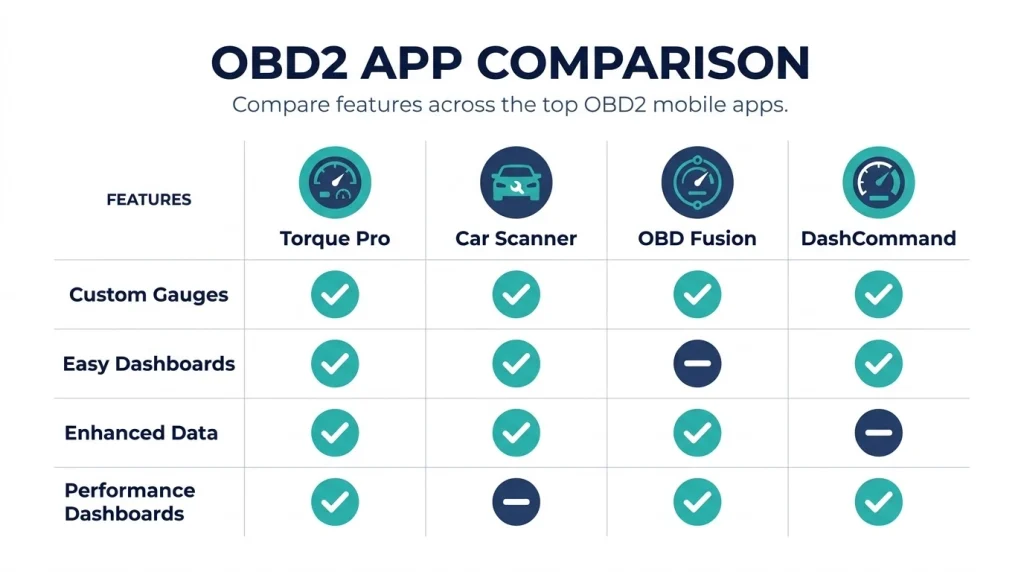
Torque Pro fits Android live data and gauges for drivers who want full control. It lets you build custom dashboards with dials, graphs, and readouts. It also logs data and records trips, which helps track a fault that comes and goes.
Torque Pro is Android only, so iPhone users need a different app. It works with standard ELM327 adapters in most cases. Its strength is the gauge builder and the large set of add-ons for brand data.
Car Scanner also fits Android live data, with a cleaner first setup than Torque Pro. Its dashboards are easy to build, and its brand profiles add useful data for many cars. Pick Car Scanner when you want live data without a long setup.
OBD Fusion fits Android drivers who want enhanced data on iPhone and Android. It can read manufacturer data with the right add-on, beyond the generic code set. That extra data helps when a generic scan shows no code but the fault stays.
DashCommand is another Android option for performance dashboards. It focuses on gauges and trip data, with less depth for code work than Car Scanner. Use it when the dashboard is the main goal, not fault finding.
For more Android picks and setup notes, see the guide to Android OBD2 apps. That guide goes deeper on Android choices and adapter notes.
Tip
Test the app with the car parked and the ignition on, then add one gauge at a time until the screen shows the data you use most.
Which app fits iPhone users?
Car Scanner ELM OBD2 fits iPhone users who want a free start with a generic adapter. It works on iPhone with a Bluetooth Low Energy adapter or a Wi-Fi adapter. It reads codes, shows live data, and checks emissions readiness.
OBD Fusion is a strong iPhone pick for drivers who want enhanced data. It runs on iPhone and Android, and it can read brand data with the right add-on. Its layout suits drivers who want more than a basic code list.
BlueDriver also fits iPhone users who want a simple kit. The app is free, and it pairs with the BlueDriver adapter. It gives plain repair reports and works on iPhone and Android.
Torque Pro does not work on iPhone, and Infocar is Android only in most cases. Do not buy an Android only app for an iPhone. Check the store listing for iPhone support and for the adapter type it needs.
Wi-Fi adapters can work on iPhone, but they have a trade off. The phone joins the adapter Wi-Fi network, so you may lose internet access during the scan. A Bluetooth Low Energy adapter avoids that trade off in most cases.
For iPhone setup, adapter notes, and common errors, see the guide to iPhone OBD2 apps. That guide covers the iPhone adapter trap in more detail.
The table below compares the main app types on phone support, adapter needs, and main strength. Use it to narrow the list to two apps, then test the free one first.
| App type | Phone | Adapter | Main strength |
|---|---|---|---|
| Car Scanner | iPhone and Android | Generic ELM327 | Free code reading and live data |
| Torque Pro | Android only | Generic ELM327 | Custom gauges and logging |
| BlueDriver | iPhone and Android | Own adapter only | Plain repair reports |
| OBD Fusion | iPhone and Android | Generic ELM327 | Enhanced brand data |
Car Scanner is the safe first pick when you want one app for both phones. Torque Pro wins on Android gauges, and BlueDriver wins on plain reports.
When does a paired adapter and app kit make sense?
A paired adapter and app kit makes sense when you want a simple setup with no adapter guesswork. BlueDriver and FIXD sell an adapter that works with their own app. You plug it in, pair it, and the app guides the scan.
BlueDriver gives repair reports that list likely fixes for the code and your car. Those reports use a database of past fixes, so they rank causes by how often they solved the same code. The report is a guide, not a firm diagnosis.
FIXD gives plain code meanings and tracks maintenance in the app. It suits drivers who want simple words and reminders. Some useful features sit behind a paid plan, so read the free tier before you buy the adapter.
A kit costs more than a generic adapter in most cases. You also lose the choice to switch apps, because the adapter works with one app. Pick a kit when ease matters more than app choice. Pick a generic adapter when you want to try more than one app.
For the official kit features, see the BlueDriver official site. The site lists code reading, repair reports, freeze frame, and live data for the kit.
How do brand specific apps differ?
Brand specific apps differ because they read data beyond the generic OBD2 set. Generic OBD2 covers engine and emissions codes in most cars. Brand apps can read ABS, airbag, transmission, and body data for some makes.
OBDeleven fits Volkswagen, Audi, Seat, and Skoda drivers. It reads brand codes and offers one click changes for some settings. It uses its own adapter and a credit system for some features.
Carly fits BMW and Mercedes drivers who want brand depth and coding. It can read brand codes, register a new battery, and change some settings. Its full features need a paid plan, so check the cost before you commit.
Carista fits drivers who want light coding on some brands, such as Volkswagen, Audi, BMW, and Toyota. It can change lock and light settings in some cars. It needs its own adapter for coding in most cases.
Brand apps do not replace a shop tool for all jobs. They help when a generic scan is clean but a brand warning stays on. Use them for brand data, and use a generic app for quick engine checks.
How do you set up a Bluetooth OBD2 scanner app?
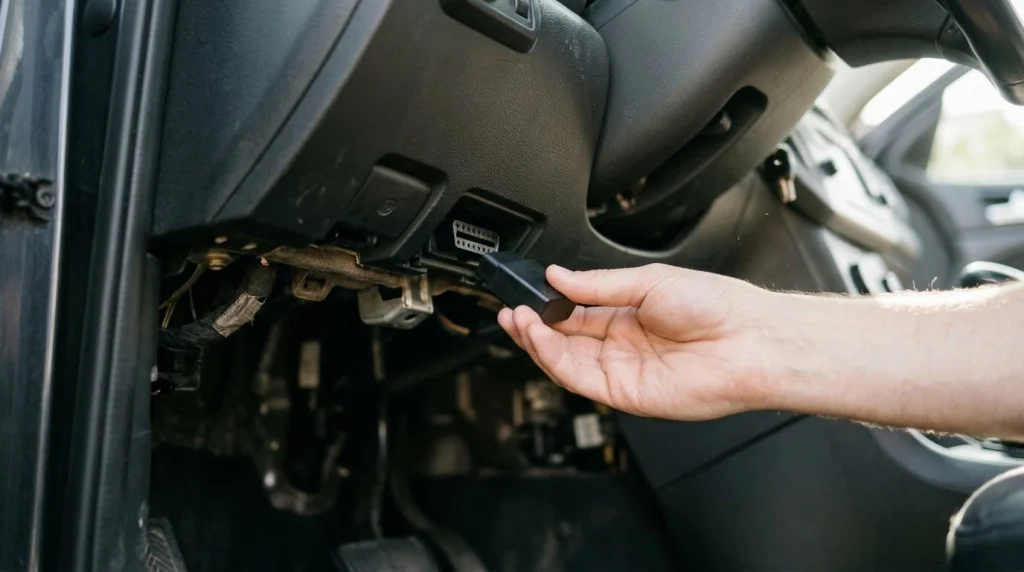
You set up a Bluetooth OBD2 scanner app by pairing the adapter, picking the car profile, and running a first scan. The full setup takes a few minutes when the adapter and phone match.
Step 1
Plug in the adapter
Find the OBD2 port under the dash, near the steering column. Push the adapter in until it sits firm.
Step 2
Turn the ignition on
Turn the key to on, or press start without starting the engine if your car allows it. The adapter needs power from the car.
Step 3
Pair the adapter in the phone settings
Open Bluetooth settings and pair the adapter. Some BLE adapters pair inside the app, not in phone settings, so follow the app prompt.
Step 4
Open the app and pick the adapter
Open the app, pick the adapter type, and pick your car brand if the app asks. A brand profile can add data for your car.
Step 5
Run a first scan and note the codes
Run a fault scan, write down each code, and save the freeze frame data. Do not clear codes until you have noted them.
If the app shows no link, check power, ignition, and pairing first. Try the adapter in the app settings, not just in the phone list. A different adapter often fixes a link that no app setting can fix.
What mistakes cause most connection failures?
Most connection failures come from the adapter, the phone, or the car state, not from the app name. The app is the last part to blame when the link fails. Work through the hardware first.
The most common mistake is a classic Bluetooth adapter on an iPhone. iPhone needs a Bluetooth Low Energy adapter in most cases. A classic adapter may show in the phone list but never link to the app.
Another common mistake is a dead port or a flat ignition state. The OBD2 port needs power, and the car needs the ignition on for most scans. Check the port fuse if the adapter light stays off.
Cheap ELM327 copies cause many failures too. A copy can link once, then drop the link on the next drive. It can also show slow data or miss some codes. A known adapter brand costs more but links with less fuss.
Wi-Fi adapters cause a different failure. The phone may join the adapter network and lose mobile data. The app may then fail to load maps or code help. Use a BLE adapter when you want data and internet at the same time.
App settings cause the last group of failures. Picking the wrong adapter type in the app can block the link. Picking the wrong car profile can hide brand data. Reset the app link, pick the adapter type again, and test with one app at a time.
If you
Want a free start on any phone
Choose Car Scanner, because it reads codes and live data on iPhone and Android.
If you
Use Android and want gauges
Choose Torque Pro, because it builds custom dashboards and logs drives.
If you
Want plain repair reports
Choose BlueDriver, because it turns codes into repair steps in plain words.
If you
Own a VW, Audi, BMW, or Mercedes
Choose a brand app, because generic OBD2 often misses brand system codes.
What can an app not tell you?
An app cannot tell you if the car is safe to drive. It reports a code, not a verdict on risk. A loose gas cap and a misfire can both turn the light on, but they mean far different things for the car.
An app cannot fix a fault by clearing the code. Clearing turns the light off, but the fault can return on the next drive. Clearing also wipes data a shop could use to find the cause.
An app cannot see past the engine in most cases. Generic OBD2 covers engine and emissions data. ABS, airbag, and many body systems need enhanced or brand tools. A clean generic scan does not mean all systems are clear.
An app cannot judge a repair cost or a part choice by itself. Repair reports rank likely causes, but they do not test the car. A shop can test the part, the wire, and the sensor before you buy a part.
Warning
A flashing check engine light, hot coolant, low oil pressure, or brake fault means stop and get help. Do not keep driving while you scan codes.
Use the app as a first step, not as a final word. Note the code, note the live data, and get help when the fault affects brakes, heat, oil, or drive feel. That order keeps the scan useful and the car safe.
Bluetooth OBD2 Scanner
A Bluetooth OBD2 scanner adapter plugs into your car and sends fault codes and live data to the app on your phone.
Frequently Asked Questions
Can a free Bluetooth OBD2 app read codes?
A free Bluetooth OBD2 app can read and clear generic engine codes on a compatible car when paired with a working adapter. It can also show live sensor data and emissions readiness in many cases. Brand specific systems often need a different app or tool.
Why will my Bluetooth OBD2 app not connect?
A Bluetooth OBD2 app fails to connect when the adapter, phone, or car port does not match the app needs. iPhone users need a Bluetooth Low Energy adapter in most cases. Check power, ignition, and pairing before you change apps.
Does Torque Pro work on an iPhone?
Torque Pro does not work on an iPhone because the app is made for Android phones and tablets. iPhone users can use Car Scanner or OBD Fusion with a Bluetooth Low Energy adapter. Pick the app that lists your adapter as supported.
Can an OBD2 app clear a check engine light?
An OBD2 app can clear a check engine light after you read and note the code, but the light returns if the fault stays. Clearing also resets emissions readiness, so avoid it before an emissions test. Fix the cause first, then clear the code.
Do I need the same brand adapter and app?
You do not need the same brand adapter and app when the app supports generic ELM327 adapters and your phone. BlueDriver and FIXD are exceptions because each app works with its own adapter. Check the app page for a supported adapter list.
Which app shows live data while I drive?
Car Scanner and Torque Pro show live data while you drive, with gauges for coolant, fuel trim, speed, and other sensor values. Mount the phone where you can see it without looking away from the road. Do not change settings while the car is moving.
Conclusion
The best app for bluetooth obd2 scanner use is the one that matches your phone, adapter, and goal. If you want a free start, install Car Scanner first and test it with a Bluetooth Low Energy adapter on iPhone or a generic adapter on Android.

I’m Alex Rahman, a car enthusiast and automotive writer focused on practical solutions, car tools, and real-world driving advice. I share simple and honest content to help everyday drivers make better decisions.
