
Bluetooth vs Wired OBD2 Scanners: Pick the Right One
Quick Answer
Bluetooth and wired OBD2 scanners read the same car port, but they show results in different ways. A Bluetooth adapter sends data to a phone app for graphs, logs, and plain code notes. A wired handheld shows codes on its own screen with no phone or app.
- Bluetooth suits phone graphs, saved reports, and live data.
- Wired suits quick checks with no pairing, app, or phone battery.
- Both types can read engine codes on a car with an OBD2 port.
- Phone fit matters more for Bluetooth, while screen size matters more for wired tools.
Your check engine light is on, and you need a clear answer before you spend money on a repair. This guide is for a driver who wants a simple tool for home checks. After reading, you will know how each type works, where each type shines, and which type fits your car, phone, and habits.
In this article
- What Is a Bluetooth OBD2 Scanner?
- What Is a Wired OBD2 Scanner?
- Bluetooth vs Wired OBD2 Scanners at a Glance
- How Does Setup Differ Between the Two Types?
- Which Type Gives Clearer Codes and Live Data?
- Which Type Is More Reliable in Daily Use?
- Does Phone Compatibility Change the Choice?
- What About Cost, Apps, and Updates?
- Can a Bluetooth Adapter Drain the Battery?
- Which Scanner Fits Your Situation?
- Common Mistakes When Choosing a Scanner Type
What Is a Bluetooth OBD2 Scanner?
A Bluetooth OBD2 scanner is a small adapter that plugs into the car port and sends data to a phone or tablet. The adapter has no large screen of its own. Your phone app shows codes, live values, graphs, and saved reports.
The adapter still plugs into the same 16-pin port as a wired tool. The link from the car to the adapter is wired, while the link from the adapter to your phone is wireless. That split shapes the whole experience, from setup to daily use.
The California Air Resources Board describes OBD II as the second generation of on-board self-diagnostic equipment for light and medium duty vehicles. The system watches parts that can affect emissions, stores fault data, and lights the check engine lamp when a fault is found. A Bluetooth adapter is one way to read that stored data.
To learn the request and reply loop in plain terms, read how an OBD2 scanner works before you pick a type. The loop is the same for both types, while the screen and controls change.
What does a Bluetooth adapter need to work?
A Bluetooth adapter needs a charged phone, a matching app, and a clear Bluetooth link. The app must support the adapter type and your phone system. A mismatch in any of those three parts can stop a scan, even when the adapter fits the port.
Some apps connect through system Bluetooth settings, while others connect only inside the app. Check the adapter guide for the exact path before you pair it. A short test at home can save time at the roadside.
What Is a Wired OBD2 Scanner?
A wired OBD2 scanner is a handheld tool with a cable, a built-in screen, and buttons. You plug the cable into the port, and the tool draws power from the car. You read codes on the tool screen, with no phone or app in the chain.
Wired tools range from simple code readers to larger handheld scanners with more systems. A simple reader reads engine codes, shows freeze frame data, and checks readiness. A larger handheld may also read ABS, airbag, or transmission codes on supported cars, but that reach depends on the tool, not on the cable alone.
The screen is the main limit of a basic wired reader. Text is small, graphs are rare, and code notes are short. The tool is still direct and easy to trust for a quick check, because it has fewer parts that can fail.
For a closer look at handheld models, see handheld OBD2 scanners and compare screen size, system reach, and update terms. A handheld that fits one car may not fit the next car in the same way.
Bluetooth vs Wired OBD2 Scanners at a Glance
Bluetooth vs wired OBD2 scanners differ most in screen, setup, and phone use. The table below compares the two types on the points that change daily use.
| Feature | Bluetooth scanner | Wired handheld scanner |
|---|---|---|
| Screen | Phone or tablet screen | Built-in screen and buttons |
| Setup | Adapter, pairing, and app | Plug in and use |
| Phone needed | Yes, for every scan | No, for core scans |
| Live data and logs | Graphs, logs, and reports in the app | Basic live data, few logs |
| Updates | App updates on the phone | Tool updates vary by model |
| Size and storage | Small adapter, easy to store | Larger tool and cable |
| Left in the port | Can draw power if left in | No draw after removal |
The table shows a clear trade. Bluetooth trades a simple start for a larger screen and more data tools. Wired trades screen depth for a direct start with no phone in the way.
How Does Setup Differ Between the Two Types?
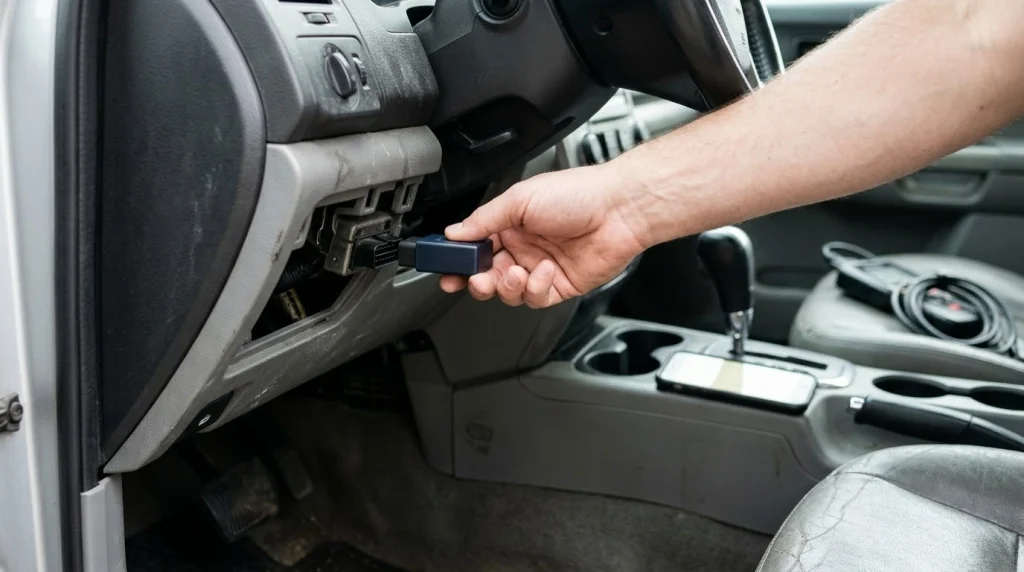
Setup differs because a Bluetooth scanner adds a phone, an app, and a wireless link to the job. A wired scanner adds only a cable and a screen. That extra chain explains most Bluetooth setup trouble.
A wired scan follows a short path. Plug the tool into the port, turn the ignition on, and read the screen. The tool gets power from the port, so a dead phone battery cannot stop the scan. A loose port fit or a blown port fuse can still stop it, so check power first when the screen stays dark.
A Bluetooth scan follows a longer path, and each step must match. The steps below show the order that works for most adapters and apps.
Step 1
Plug in the adapter
Push the adapter into the 16-pin port under the driver side dashboard. The port gives the adapter power from the car battery.
Step 2
Turn the ignition on
Turn the key to the on position, with the engine off unless the scan needs the engine on. This wakes the car computer.
Step 3
Pair in the right place
Pair Classic Bluetooth in phone settings when the adapter needs it. Connect Bluetooth Low Energy inside the app when the adapter needs that path.
Step 4
Grant permissions
Grant Bluetooth and location permission when the app asks. A blocked permission can hide the adapter from the app.
Step 5
Select the adapter in the app
Open the app, pick the adapter in its connection settings, and wait for the car protocol to link. Then run a code scan and check live data.
Common Bluetooth faults follow the same chain. A paired adapter that never shows data often means the app and the adapter use different Bluetooth types. A wrong app for that adapter can also cause the same fault. Check adapter type, app choice, and permission in that order before you blame the car.
Which Type Gives Clearer Codes and Live Data?
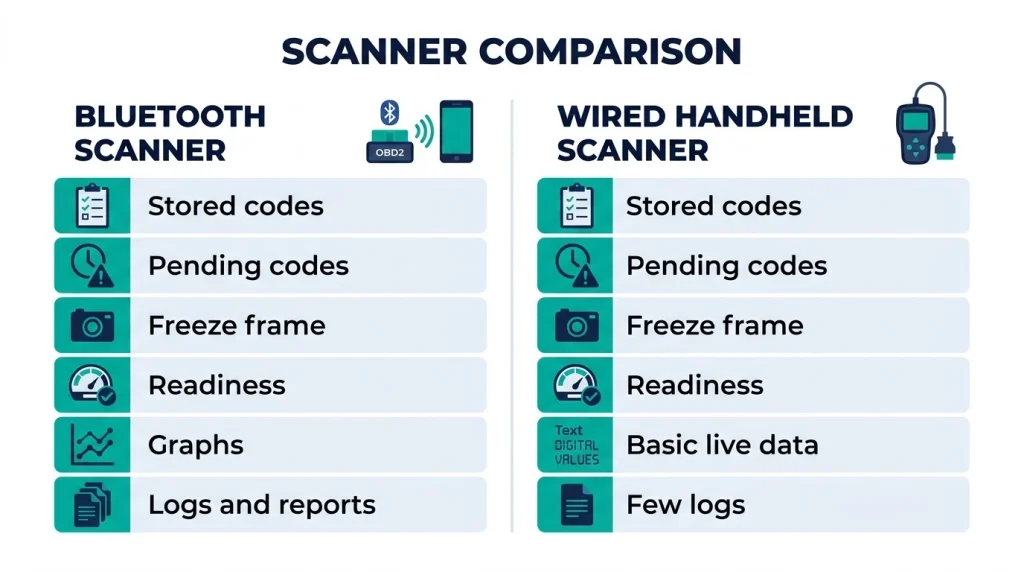
Bluetooth gives clearer codes and live data for most drivers, because the phone screen is larger and the app can add notes, graphs, and logs. A wired reader gives the same basic code, but with less context on a small screen.
Both types can read stored codes, pending codes, freeze frame data, and readiness. The difference is how much of that data you can see at once. A phone app can show engine speed, coolant heat, fuel trim, and oxygen sensor values in graphs side by side. A basic wired tool may show one or two values at a time.
Logging is the sharpest split. A Bluetooth app can save a drive, replay a fault, and export a report to share with a mechanic. A wired reader rarely saves a full drive log. If you track a fault that comes and goes, that log can point to the right test.
Tip
Save each code and its freeze frame values before you clear anything, so you keep the fault record for the next test.
Code depth still depends on the tool and the car, not on the link type alone. A generic tool reads shared engine codes. A tool with brand profiles or a more capable scanner may reach more modules on supported cars. The U.S. Environmental Protection Agency explains that OBD software monitors emission parts and lights the check engine lamp when a fault can harm emissions. That shared base is why both types start from the same codes.
Do not judge a scanner by code count alone. A long code list with no plain notes can waste time. A short list with a clear note, a freeze frame snapshot, and a live graph can lead to a faster test.
Which Type Is More Reliable in Daily Use?
A wired scanner is more reliable for a quick check, because it has fewer links that can break. A Bluetooth scanner is reliable once it is set up, but it depends on a phone, an app, and a wireless link.
Phone updates can change Bluetooth behavior, app pricing, or permission rules. A phone with a low battery can also stop a scan at the wrong time. A wired tool avoids those risks, because the screen, buttons, and software live in one device.
Bluetooth has its own edge in the garage. A phone app can update fast, add a new car profile, or fix a link fault with a new app version. A wired tool may need a computer link or a cable update, and some basic readers offer no updates at all. Check update terms before you buy either type.
Cheap adapters cause most Bluetooth reliability complaints. A weak adapter can drop the link, show slow live data, or fail to link on some cars. A wired reader can also fail, but the fault is often easier to spot, since the screen, cable, and port are all in view.
Does Bluetooth mean slower live data?
Bluetooth does not always mean slower live data. Speed depends on the adapter, the app, the car protocol, and the number of live values you ask for. A quality adapter can give smooth data for normal checks. A cheap adapter can lag, while a wired tool can also lag when it asks for too many values at once.
Ask for fewer live values when the graph looks slow. Two or three key values often tell you more than a crowded screen. That rule holds for both types.
Does Phone Compatibility Change the Choice?
Phone compatibility can change the choice for Bluetooth, while it changes little for a wired tool. A wired handheld works with no phone at all. A Bluetooth adapter works only when the adapter type, the app, and the phone system agree.
Android phones often work with Classic Bluetooth adapters and a wide range of apps. iPhone use needs a clearer check, because some Classic Bluetooth adapters do not work with iPhone apps. Bluetooth Low Energy adapters fit both phone systems more often, but the app must still support that link.
Check three points before you buy a Bluetooth adapter. First, check the adapter type on the maker page. Second, check the app list for your phone system. Third, check whether the app needs a one time fee, a paid add-on, or a subscription for the features you want.
For Android, compare Android OBD2 apps by adapter fit, free use, and live data depth. An app that cannot talk to your adapter cannot help, even when its feature list looks long.
If you share a car with family, phone fit can get messy. Each phone may need its own pairing, app, and permission. A wired tool avoids that mess, since anyone can plug it in and read the screen.
What About Cost, Apps, and Updates?
Cost differs because a Bluetooth scanner splits the price between hardware and software. A wired scanner puts most of the price into one tool. Compare the full system cost, not the adapter price alone.
A basic wired reader can be low cost, because it focuses on generic codes and a small screen. A larger handheld costs more, but it adds system reach, a larger screen, and service functions on supported cars. Update terms vary, so check whether updates are free for life, free for a set period, or paid.
A Bluetooth adapter can range from a low cost generic dongle to a higher cost adapter with strong protocol support and firmware updates. App costs add to that total, and they can take three forms. Some apps are free, some charge a one time fee, and some charge a subscription for brand depth or reports.
Free apps can cover code reading and basic live data. Paid apps can add brand profiles, full live value sets, logging, and reports. A free app can prove that the adapter works before you pay for a Pro version. That test can save money when the first app fails to link.
Privacy is part of the cost question too. A Bluetooth app may ask for an account, location permission, or cloud storage for trip data. A wired tool usually asks for none of those things. Read the app permission list and the maker privacy note before you sign in.
Can a Bluetooth Adapter Drain the Battery?
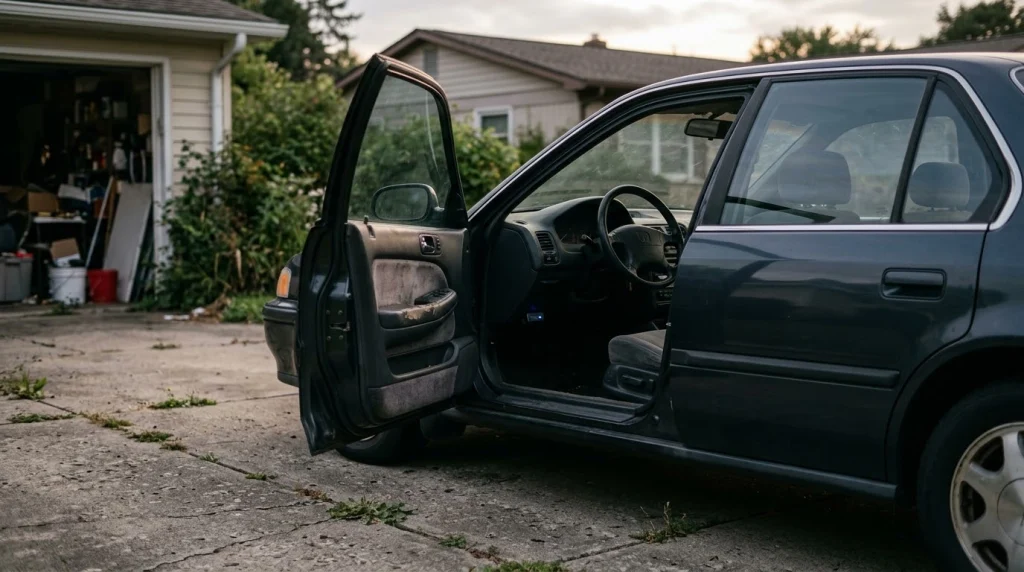
A Bluetooth adapter can drain the battery when it stays in the port while the car sits parked. A wired handheld cannot drain the battery after you remove it, because it draws no power once it is unplugged.
The port supplies power through pin 16, which stays live with the ignition off on many cars. That live pin lets a scanner read stored codes with the engine off. It also gives a plugged-in adapter a direct path to the battery at all times.
Sleep mode changes the risk. An adapter with sleep mode drops to a low draw when the car network goes quiet. An adapter without sleep mode can keep drawing power, and it can keep car modules awake by polling the car network. That second effect can raise the draw far above the adapter draw alone.
Warning
A Bluetooth adapter left in the port can draw power while the car sits parked, so a battery may crank slowly after a few days. Unplug the adapter when the car will sit unused.
Daily driving hides a small drain, because the alternator recharges the battery. Parking for days lets the same small draw add up, and a weak or old battery shows the effect first. Cold weather also cuts battery strength, so a drain that passes in warm weather can cause a slow start on a cold morning.
For signs, tests, and fixes, read OBD battery drain before you leave an adapter in the port for days. A simple light test after shutdown can show whether your port stays powered.
Which Scanner Fits Your Situation?
Your situation decides the fit more than any feature list. A driver who checks codes once a month needs a different tool from a driver who logs live data on every drive.
Use the cards below as a short decision guide. Pick the card that matches your daily use, then check phone fit, system reach, and update terms for that type.
If you
Want phone graphs, saved reports, and live data logs
Choose Bluetooth, because the app gives a larger screen and a saved record.
If you
Want a quick check with no phone, app, or pairing
Choose wired, because the tool is ready as soon as you plug it in.
If you
Share cars, help family, or keep a tool in the glovebox
Choose wired, because anyone can use it with no phone setup.
Advanced work adds one more check. A premium Bluetooth adapter can work well with strong brand software on supported cars. A standalone full-system scanner can be easier when you work across many makes and want one controlled platform. In both cases, check vehicle coverage for ABS, airbag, and transmission systems before you buy.
Common Mistakes When Choosing a Scanner Type
Most scanner mistakes come from a mismatch, not from a bad tool. A good adapter with the wrong app can fail, while a good wired reader with the wrong system reach can miss the fault.
One common error is to assume that Bluetooth means more coverage. Connection type does not set system reach. App, adapter, and vehicle coverage set that reach. Another error is to assume that wired means outdated. Wired tools still suit quick checks, shared cars, and drivers who want no phone in the job.
A third error is to pick the lowest cost adapter with no check for phone fit, app cost, or sleep mode. That pick can lead to a failed link, a paid app surprise, or a parked battery drain. A short fit check before you buy can stop all three faults.
Do
- Check adapter type and app fit for your phone
- Save codes and freeze frame data before you clear them
- Unplug a Bluetooth adapter when the car will sit for days
Avoid
- Buying on adapter price alone, with no app check
- Clearing a code before you save the fault record
- Replacing a part from a code alone, with no test
A code points to a system, not to a failed part by itself. Test the wiring, hose, and part that fit the code before you replace anything. That test matters for both scanner types.
OBD2 Scanner
A scanner in this category lets you read codes, view live data, and check readiness from the driver seat.
Frequently Asked Questions
Can a Bluetooth OBD2 scanner read the same codes?
A Bluetooth OBD2 scanner can read the same shared engine codes as a wired reader on a car with an OBD2 port. The link type does not change the shared code set. System reach still depends on the adapter, the app, and the car, so check ABS and airbag coverage for your model.
Do I need a phone for a wired OBD2 scanner?
A wired OBD2 scanner does not need a phone for core code reading, because the screen and buttons live in the tool. Some larger handheld models offer an optional app for extra guidance. That app adds notes, while the core scan still works with no phone.
Which OBD2 scanner is easier for a beginner?
A wired OBD2 scanner is easier to start, because you plug it in and read the screen with no app or pairing. A Bluetooth scanner is easier to understand after setup, because the app can explain codes in plain words. Pick the start you trust more, then learn the other steps.
Can I leave a Bluetooth adapter plugged in?
A Bluetooth OBD2 adapter can stay plugged in only when it has sleep mode and the car is driven often. An adapter without sleep mode should come out after each drive. Unplug any adapter before the car sits for days, and check the maker guide for standby behavior.
Does a wired scanner work without an app?
A wired OBD2 scanner works without an app for code reading, live data, and readiness on supported cars. The tool software lives in the handheld, not on a phone. Updates may need a computer link, but daily scans need no app, account, or wireless link.
Can either scanner read ABS or airbag codes?
Either scanner type can read ABS or airbag codes only when the tool and the car support those modules. A basic engine reader cannot read those systems, whether it is wired or Bluetooth. Check the maker coverage list for your exact make, model, and model range before you buy.
Conclusion
Bluetooth vs wired OBD2 scanners differ in screen, setup, and app use, not in the port they read. If you like phone graphs and saved reports, pick Bluetooth after you check phone fit. If you want a tool with no phone, pick a wired handheld and keep it in the car.

I’m Alex Rahman, a car enthusiast and automotive writer focused on practical solutions, car tools, and real-world driving advice. I share simple and honest content to help everyday drivers make better decisions.
