
How Does an OBD2 Scanner Work? Steps, Codes, and Data
Quick Answer
An OBD2 scanner works by plugging into the 16-pin port under the dashboard, sending a request to the car computer, and turning the reply into codes and live readings you can read on a screen or phone.
- The car computer stores a code when a sensor reading falls outside its set range.
- The scanner asks for stored codes, pending codes, and live sensor values.
- The scanner translates raw replies into plain words, numbers, and graphs.
- A code points to a system, not to a failed part by itself.
Your check engine light is on, and you want a clear answer before you visit a shop. This guide is for a driver with a scanner in hand and no wish to guess. After reading, you will know how an OBD2 scanner works, what it shows, and what it cannot prove.
What is an OBD2 scanner?
An OBD2 scanner is a diagnostic tool that reads data from the car computer through a standard port. OBD2 stands for On-Board Diagnostics, second generation. The tool does not repair the car. It opens a line of talk between you and the car computer.
The scanner may be a handheld unit with its own screen, a small dongle that pairs with a phone, or a shop tool with a large screen. Each type asks the same basic questions. The difference lies in how much data it can reach and how it shows the reply. A what an OBD2 scanner does guide lists the main jobs in more detail.
Sensors watch the engine, fuel system, exhaust, and transmission while you drive. The car computer compares each reading with a set range. When a reading stays outside that range, the computer stores a code and may switch on the check engine light. The scanner gives you a way to see that stored record.
How does an OBD2 scanner work step by step?
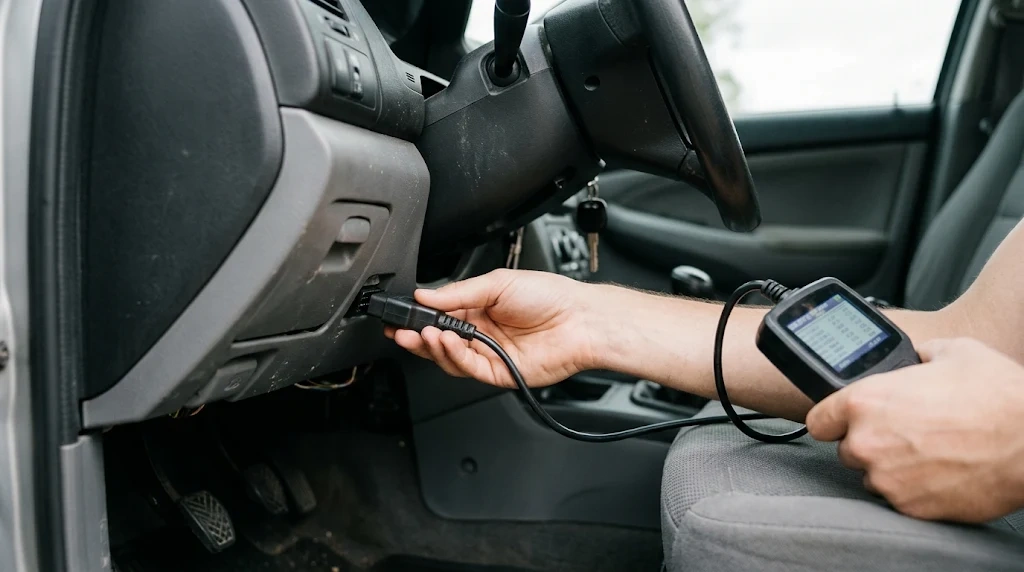
An OBD2 scanner works in a short request and reply loop. The scanner asks, the car computer answers, and the scanner turns the answer into readable text. The loop below shows each move in order.
Step 1
Plug in the scanner
Push the plug into the 16-pin port under the driver side dashboard. The port gives the scanner power from the car battery.
Step 2
Switch the ignition on
Turn the key to the on position, with the engine off unless the scan needs the engine on. This wakes the car computer and its network.
Step 3
Let the scanner link up
The scanner finds the right talk method for the car. It may ask for the make, model, and model year, or it may link up on its own.
Step 4
Send a request for data
Choose read codes, live data, or readiness. The scanner sends a coded request for that set of data through the port.
Step 5
Read the translated reply
The car computer sends back raw data. The scanner turns it into a code, a short line of text, a number, or a graph.
To use an OBD2 scanner well, save the codes before you clear them. A saved code, with its freeze frame data, is the record you need for the next test. Clearing a code erases that record and resets readiness monitors.
What happens inside your car before a scan?
The car computer watches sensors all the time while the car runs. Sensors measure oxygen in the exhaust, coolant heat, air flow, throttle place, engine speed, and fuel trim. Each value moves as you drive, and the computer checks it against a set range.
When a value leaves that range, the computer does not stop at once. It may watch for the fault to repeat on more than one trip. A fault that repeats earns a stored code. A fault seen once may stay as a pending code. This split helps you tell a one-off glitch from a fault that keeps coming back.
The computer also runs self-tests on emissions parts, such as the catalytic converter and the evaporative system. These tests are called readiness monitors. The U.S. Environmental Protection Agency describes OBD as software that watches emissions parts and lights the check engine lamp when a fault can harm emissions. That link explains the system behind the scan.
How does the scanner talk to the car computer?
The scanner talks to the car computer through the port and the car network. The port is the door. The network is the path. The scanner and the car computer share a set of rules for requests and replies.
Once linked, the scanner does not pull all data at once. It asks for one set at a time, such as stored codes or engine speed. The car computer answers with raw values, often in hex form. The scanner chip or app turns those values into units you know, such as RPM, degrees, and volts.
What is CAN?
CAN is short for Controller Area Network. CAN is the network that lets car modules share data on shared wires. Most modern cars use CAN for OBD2 talk. Older cars may use other methods, such as ISO 9141 or KWP2000.
CAN lets the engine module, transmission module, and other modules send short messages to each other. The scanner joins that talk as a guest. It sends a request to a module, and the module sends a reply back on the same network. If you need to identify an OBD2 protocol, check the port pins and the scanner link screen.
What are PIDs and modes?
A PID is a Parameter ID, a short code that names one live value. PID 0C asks for engine speed. PID 0D asks for road speed. PID 05 asks for coolant heat. The scanner asks for a PID, and the car computer sends the value for that PID.
A mode is a type of request. One mode asks for live data. One mode asks for stored codes. One mode asks for freeze frame data. One mode clears codes. Each mode has a set job, so the scanner can ask for the exact set it needs.
Tip
Write down each code, its status, and the freeze frame values before you clear anything, so you keep the fault record for testing.
What does an OBD2 scanner show you?
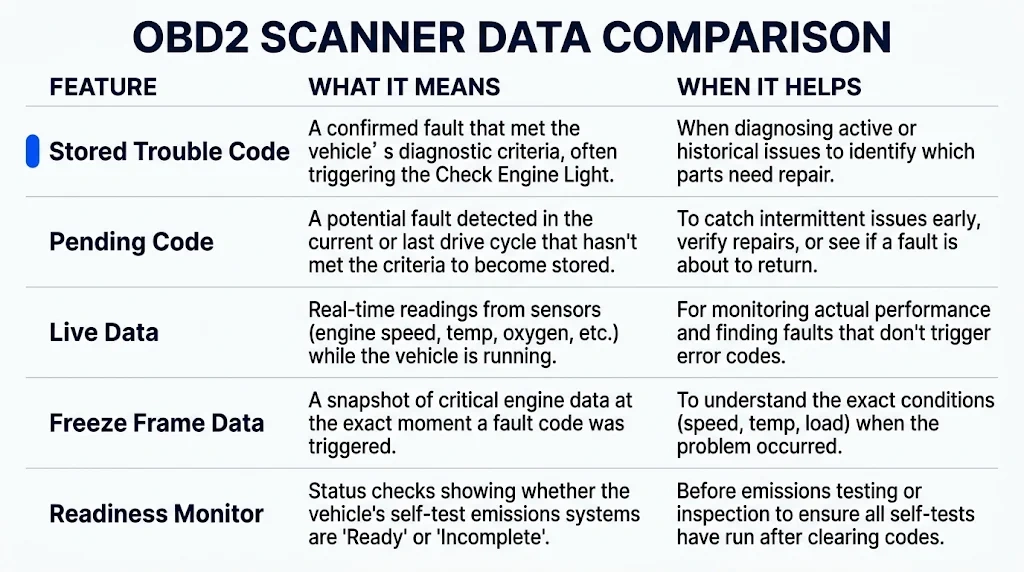
An OBD2 scanner shows five main sets of data. The table below compares each set, what it means, and when it helps you most.
| What you see | What it means | When it helps |
|---|---|---|
| Stored trouble code | A confirmed fault the computer logged | When the check engine light stays on |
| Pending code | A fault seen once, not yet confirmed | When a fault comes and goes |
| Live data | Sensor values as they change | When you test a sensor under load |
| Freeze frame data | A snapshot from the fault moment | When you need the fault conditions |
| Readiness monitor | A self-test that is done or not done | Before an emissions test |
Codes use a five-part form. The first letter names the system: P for powertrain, B for body, C for chassis, and U for network. The second digit tells you if the code is generic or maker-specific. The last three digits name the fault area. How a scanner reads codes is explained in the same way by EngineerFix, with P0420 as a catalyst example.
Live data shows values such as engine speed, coolant heat, fuel trim, and oxygen sensor voltage. Watch a value change while you drive or rev the engine. A flat line or a wild swing can point to a sensor or wiring fault, but it does not name the part on its own.
How do handheld, Bluetooth, and advanced scanners differ?
All three types use the same port and the same request loop. They differ in screen, reach, and control. Pick the type that fits the job you plan to do.
Handheld scanner
Best for: quick code checks at home
- Screen: built-in screen and buttons
- Data: codes, live data, freeze frame
- Link: cable to the port
Bluetooth dongle
Best for: phone dashboards and logs
- Screen: phone app with graphs
- Data: codes, live data, trip logs
- Link: Bluetooth or Wi-Fi to a phone
Advanced scanner
Best for: multi-system shop work
- Screen: large screen with guided tests
- Data: engine, ABS, airbag, transmission
- Link: cable or wireless, with controls
A basic reader reads generic powertrain codes. An advanced tool can reach more modules and, in some cases, send a command back to a part for a test. That two-way control is called bi-directional control. It lets a tool ask a part to move, such as a fuel injector test, and watch the result.
What can an OBD2 scanner not do?
An OBD2 scanner cannot name the failed part from a code alone. A code names the system and the fault area. It does not tell you why the fault happened. A lean code, such as P0171, may come from a vacuum leak, a weak fuel pump, a dirty air sensor, or a clogged filter.
The scanner also cannot see a worn part, a loose wire, or a leak by itself. It shows data, and you must test the part, wire, and hose that fit the code. The scanner collects data for a tech to read, as BlueDriver notes, and the data must still be read with care.
Some maker-specific data stays out of reach for a generic scanner. A generic tool reads the shared codes and live values. A maker tool may reach more modules, more codes, and more service steps. Check the tool list for your make and model before you buy or borrow one.
Warning
Do not replace a part from a code alone, or you may spend money on the wrong fix. Test the wiring, hose, and part first.
Why does a scanner sometimes fail to connect?
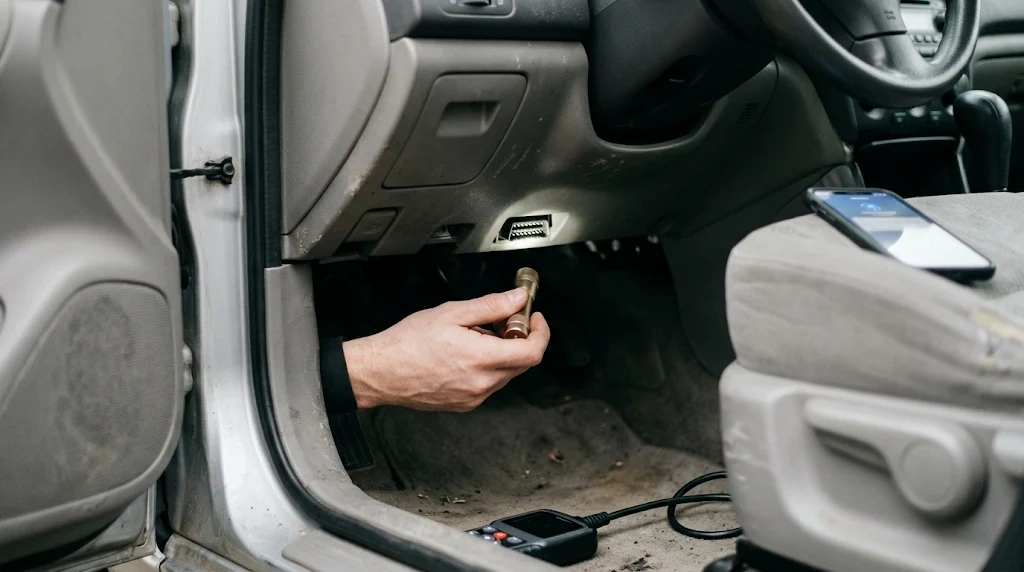
A scanner fails to link when power, ignition, or talk method is wrong. Check the simple causes first. A blown fuse can cut power to pin 16, the power pin in the port. A weak battery can also cut the link.
Ignition place matters too. Many scans need the key on with the engine off. Some live data scans need the engine on. If the scanner asks for a make and model, pick the right one. A wrong pick can lead to a wrong talk method.
A dirty or bent port can break contact. A cheap dongle can fail to pair with a phone app. A car with a gateway module may block some data from a generic tool. In each case, fix the link first, then read the codes again.
OBD2 Scanner
A scanner in this category lets you read codes, view live data, and check readiness from the driver seat.
Frequently Asked Questions
Does an OBD2 scanner need the engine on to work?
An OBD2 scanner needs the ignition on to talk to the car computer in most cases. Code reading often works with the key on and the engine off. Live data may need the engine on, so follow the scanner screen for the scan you chose.
Can an OBD2 scanner read live data while driving?
An OBD2 scanner can show live data while you drive when the tool and the car support that scan. The screen or phone app updates values such as speed, engine load, and fuel trim. Ask a passenger to watch the screen, and keep your eyes on the road.
Why does my scanner show no codes with the light on?
A scanner shows no codes with the light on when the fault sits in a module that a basic tool cannot reach. The light may come from a body, chassis, or network fault. An advanced multi-system tool may reach that module and show the code.
Does clearing a code fix the fault?
Clearing a code does not fix the fault that caused the code. Clearing erases the stored code and switches off the light for a time. If the fault stays, the computer will set the code again and switch the light back on.
Can one scanner work on any car?
One OBD2 scanner can work on many cars that share the same port and talk method. Coverage still varies by make, model, and system. Check the tool list for your car before you rely on it for ABS, airbag, or transmission work.
What is the difference between a stored code and a pending code?
A stored code is a fault that met the set test for a confirmed fault. A pending code is a fault seen once that has not yet met that test. Pending codes can warn you of a fault that is still forming.
Conclusion
An OBD2 scanner works by asking the car computer for stored codes and live readings, then turning that reply into plain words on a screen. If your check engine light is on, read the codes first, save the freeze frame data, and test the system before you replace a part.

I’m Alex Rahman, a car enthusiast and automotive writer focused on practical solutions, car tools, and real-world driving advice. I share simple and honest content to help everyday drivers make better decisions.
