
What Can an OBD2 Scanner Do? Functions Explained48 characters
Quick Answer
An OBD2 scanner reads fault codes from your car computer, shows live sensor data, and checks emissions readiness. It turns a warning light into a clear starting point for diagnosis, but it does not name the exact failed part or fix the fault.
- Reads stored and pending trouble codes
- Shows live data such as engine speed and coolant temperature
- Captures freeze frame data from the moment a fault was set
- Checks emissions monitors before an inspection
- Clears codes after a repair, when the fault is fixed
Your check engine light is on, and you want a plain answer before you visit a shop. An OBD2 scanner gives you that answer in minutes, with codes and sensor readings you can read and record. This guide explains what an OBD2 scanner can do, what it cannot do, and how to use the results.
What does an OBD2 scanner do in plain terms?
An OBD2 scanner talks to your car computer through the diagnostic port under the dashboard. The scanner asks the computer for stored faults and sensor readings, then shows the answers in plain words and numbers.
OBD2 stands for On-Board Diagnostics, second generation. The system watches engine, fuel, and emissions systems, and it stores a code when a reading moves outside the expected range. A scanner reads that stored information so you can see which system reported a problem.
A scanner is a measurement tool, not a repair tool. It points to a system or circuit, and then you or a technician test that system to find the cause. That first step saves guesswork and helps you ask a shop a clear question.
What can an OBD2 scanner read and show?
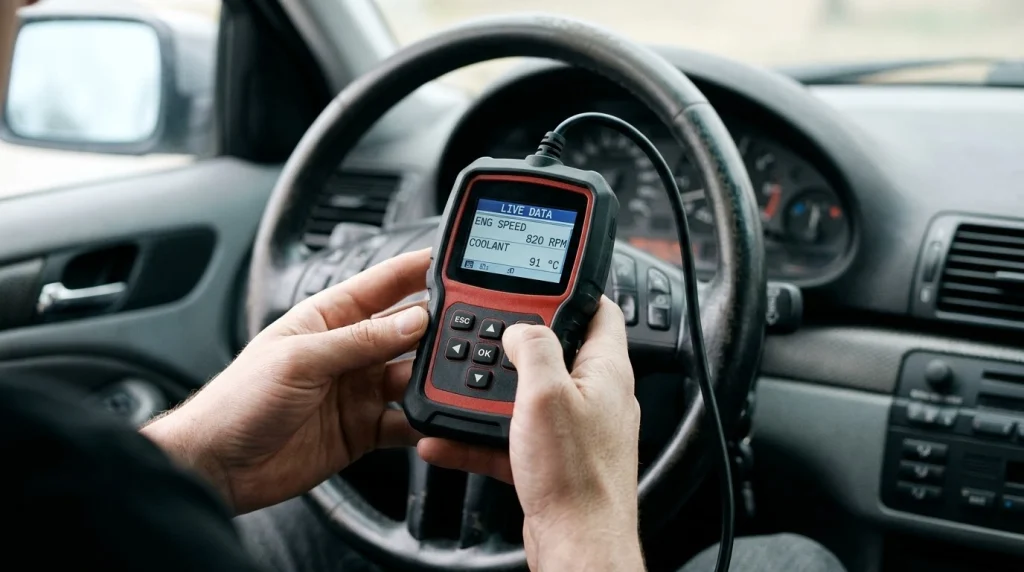
An OBD2 scanner can read stored codes, pending codes, live sensor data, freeze frame data, and readiness monitor status. The exact list depends on your car and on the scanner type, because basic readers cover less than full scan tools.
Stored codes are faults the computer has confirmed. Pending codes are faults the computer has seen once and is still watching. A pending code can help you catch a fault early, before it turns on the warning light for good.
Live data shows sensor readings while the engine runs. Common readings include engine speed, coolant temperature, engine load, fuel trim, oxygen sensor voltage, and vehicle speed. You can watch a reading change as you drive, which helps you spot a sensor that reads wrong under load.
Freeze frame data is a snapshot from the moment a code was set. It can show engine speed, load, temperature, and speed at that moment. That context helps you link a fault to a cold start, a hard pull, or a long idle.
Readiness monitors show whether the car has finished its own emissions checks. A monitor can read incomplete after a battery change or after codes are cleared. You need complete monitors for an emissions inspection in many areas, so check this status before you book a test.
How do trouble codes point to a problem?
Trouble codes use a letter and four digits to name a system area. The letter shows the broad system, and the digits narrow the fault to a smaller group. A code alone does not prove which part failed.
The table below shows the four code groups. Use it to read the first letter of a code and to see which system needs a closer look.
| Code letter | System area | Example focus |
|---|---|---|
| P | Powertrain | Engine, transmission, fuel, and emissions |
| B | Body | Airbags, lights, locks, and comfort systems |
| C | Chassis | Brakes, steering, and suspension |
| U | Network | Module communication and wiring links |
The code group tells you where to look, not what to replace. A P0171 code can point to a lean fuel mix, and the cause can be a vacuum leak, a dirty sensor, low fuel pressure, or an exhaust leak. Test the system before you buy a part.
For a clear view of how an OBD2 scanner works, compare the code with the symptom, the freeze frame data, and the live readings. That mix gives you a stronger lead than a code number on its own.
How do you use an OBD2 scanner?
An OBD2 scanner plugs into a 16-pin port, most often under the driver side dashboard near the steering column. The port shape is standard on cars built after 1996 in the United States, so most scanners fit the same connector.
Follow the steps below for a first scan. Record each code and reading before you clear anything, because clearing erases the evidence you need for the next step.
Step 1
Find the port and plug in the scanner
Look under the driver side dashboard, near the steering column or behind a small cover. Push the plug in straight until it seats, and do not force it.
Step 2
Turn the ignition on
Switch the ignition to On without starting the engine, unless the scanner asks for a running engine. The scanner draws power from the port and starts its menu.
Step 3
Read stored and pending codes
Choose Read Codes or Scan on the menu. Write down each code, its short description, and whether it is stored or pending.
Step 4
Check freeze frame and live data
Open freeze frame for each code, then watch live data for the sensors tied to that system. Note any reading that looks far from the expected range.
Step 5
Check readiness, then decide the next step
Open the readiness screen and note any incomplete monitors. Clear codes only after a repair, then drive and scan again to see if the code returns.
For the full walkthrough, see how to use an OBD2 scanner on this site. The walkthrough covers port location, menu choices, and the checks to run after a repair.
Tip
Take a photo of the code screen and the freeze frame screen before you clear a code, so you keep the code number, the sensor values, and the fault conditions.
What can an OBD2 scanner do beyond engine codes?
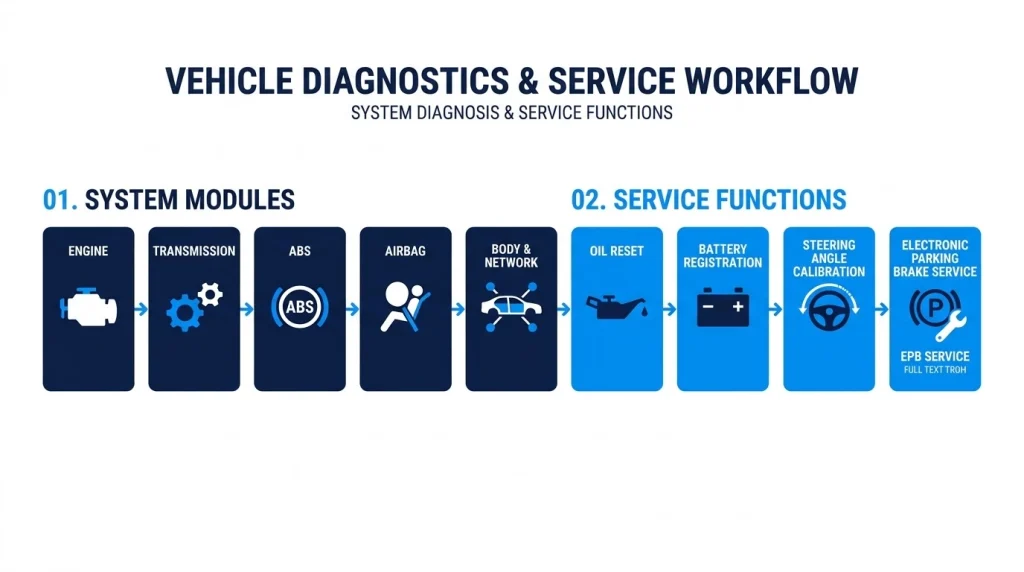
An advanced OBD2 scanner can reach more than the engine computer on many cars. It can read codes from transmission, ABS, airbag, body, and network modules when the car and the scanner both support that access.
Basic readers often stop at engine and emissions codes. That limit matters when the warning light is for brakes or airbags, because the fault lives in a module a basic reader cannot see. A full scan tool lists each module it can reach, so you can see the gap before you trust a clean result.
Some advanced tools also offer service functions on supported cars. Examples include oil reset, battery registration, steering angle calibration, and electronic parking brake service. Each function needs the right car, the right software, and the right steps, so check coverage for your exact model first.
Bi-directional control is a step beyond reading data. A bi-directional tool can send a command to a part, such as cycling a solenoid or running a pump test, to see if the part responds. Shops use this test to separate a dead part from a wiring fault, and most home tools do not offer it.
For the limits on brand codes, read about manufacturer-specific codes before you buy. Generic codes follow a shared format, while maker codes can mean a different fault on a different brand.
If your warning is for brakes or airbags, look at scanners with ABS and SRS coverage. Those tools list the safety modules they can read, and that list is the key detail to check.
What can an OBD2 scanner not do?
An OBD2 scanner cannot name the exact failed part, inspect worn metal, or fix a fault on its own. It reports what the computer saw, and a human still needs to test the circuit, the wiring, and the part.
A scanner cannot see a cracked hose, a loose plug, low oil, worn brakes, or a weak battery by itself. It can show a code or a reading that points to those faults, but you still need a visual check and a hands-on test to confirm the cause.
A scanner cannot reach every module on every car. Maker systems, hybrid systems, and some safety systems need maker software or a higher level tool. A clean scan from a basic reader does not prove that a hidden module is free of faults.
Clearing a code does not repair a car. The light turns off, and the code can return after a drive cycle if the fault is still there. Clearing also resets readiness monitors, so a car can fail an emissions test until the monitors run again.
Warning
Do not replace a part based on a code number alone, because the wrong part wastes money and leaves the fault in place. Test the wiring and the part first, or ask a qualified technician to test it.
For a clear view of the split between help and limits, see what an OBD2 scanner does and what it cannot prove. The page lists live data, freeze frame, and readiness checks next to the limits on root cause.
Which type of OBD2 scanner fits your need?
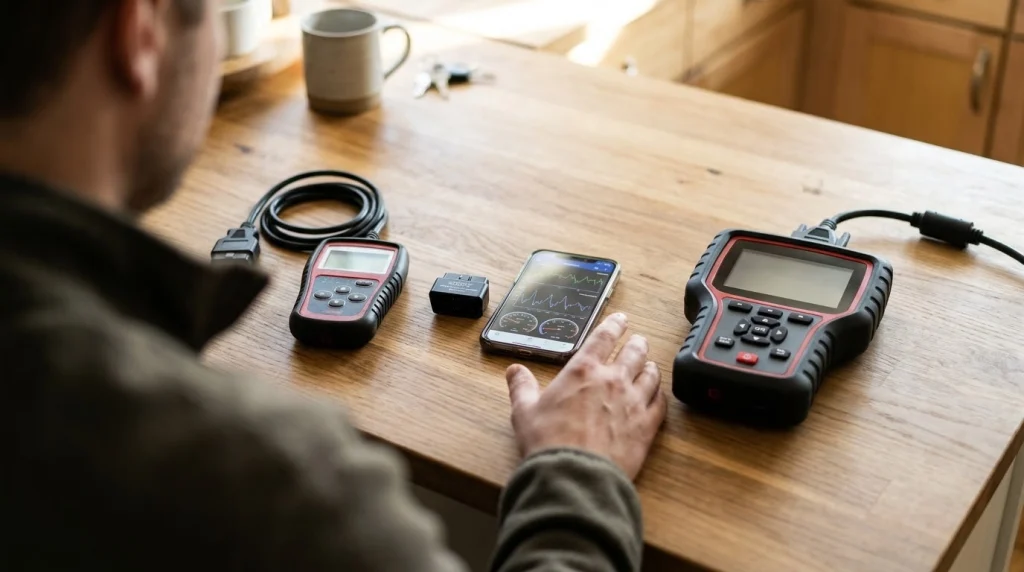
The right OBD2 scanner fits the job you need it to do, not the longest feature list. A basic reader fits a quick warning light check, while a full tool fits deeper work on more than one system.
Basic code readers read and clear generic engine codes, and they may show a small set of live readings. Bluetooth adapters pair with a phone app and add charts, logs, and a larger screen, but they still need the right app and car support.
Handheld mid-range tools add live data graphs, freeze frame, readiness, and often ABS, SRS, and transmission access. Professional tools add maker codes, bi-directional tests, and service functions, and they cost far more than a home tool.
If you
Only need to read a warning light now and then
Choose a basic code reader, because it covers generic codes and readiness at a low cost.
If you
Want live data and phone charts for DIY checks
Choose a Bluetooth adapter with an app, because it adds graphs and logs to the same code read.
If you
Need ABS, airbag, or transmission codes too
Choose a full scan tool, because a basic reader cannot reach those modules on most cars.
Check car coverage before you buy, and check the update terms as well. Some tools need a paid update to keep new models in the list, and that cost can change the value of a low price.
For a phone setup, compare an OBD2 app with the adapter it pairs with. The app decides how the data looks, and the adapter decides which data the car will share.
For the working view, see how an OBD2 scanner works in a repair workflow. The page shows pre-repair scans, post-repair scans, and the data a code reader alone cannot prove.
OBD2 Scanner
An OBD2 scanner helps you read fault codes, watch live sensor data, and check emissions readiness from the driver seat.
Frequently Asked Questions
Can an OBD2 scanner tell me which part to replace?
An OBD2 scanner cannot tell you which part to replace with certainty. It names the system or circuit that reported a fault, and the cause can be a part, a wire, a leak, or a sensor reading. Test that system before you buy a part.
Can an OBD2 scanner read ABS and airbag codes?
An OBD2 scanner can read ABS and airbag codes only when the tool and the car both support those modules. Basic readers often cover engine codes only, while full scan tools can reach ABS and SRS systems. Check the module list for your car before you scan.
Can an OBD2 scanner clear the check engine light?
An OBD2 scanner can clear the check engine light after you record the codes and fix the fault. Clearing alone does not repair the car, and the light can return if the fault is still there. Clearing also resets readiness monitors, so drive the car and scan again.
Does an OBD2 scanner work on all cars?
An OBD2 scanner works on most cars built after 1996 in the United States, because those cars use the standard 16-pin port. Some older cars, heavy trucks, and maker systems need a different connector or tool. Check the port and the car coverage first.
Can an OBD2 scanner show live data while I drive?
An OBD2 scanner can show live data while you drive when the tool supports live data and the car shares those readings. You can watch engine speed, coolant temperature, fuel trim, and oxygen sensor values in real time. Use a passenger to watch the screen, and keep your eyes on the road.
Will an OBD2 scanner help before I buy a used car?
An OBD2 scanner can help before you buy a used car by showing stored codes, pending codes, and readiness status. Pending codes and incomplete monitors can point to a fault that was cleared just before the sale. Use the scan with a road test and a full inspection.
Conclusion
An OBD2 scanner reads fault codes, shows live sensor data, and checks emissions readiness, which turns a warning light into a clear first step. If you only need a warning light check, choose a basic reader, and if you need ABS, airbag, or transmission data, choose a full scan tool.

I’m Alex Rahman, a car enthusiast and automotive writer focused on practical solutions, car tools, and real-world driving advice. I share simple and honest content to help everyday drivers make better decisions.
