Can an OBD2 Scanner Read Manufacturer Codes?
Quick Answer
Yes, an OBD2 scanner can read manufacturer-specific trouble codes, but the level of access depends on the scanner and vehicle. Basic readers may retrieve manufacturer-specific engine or emissions codes, while enhanced OBD2 scanners can access additional OEM codes stored in systems such as ABS, airbags, and transmission modules when supported. Not every scanner can read every manufacturer code.
You connect an OBD2 scanner to your vehicle, expecting it to identify a fault, but the scanner displays an unfamiliar P1 code or reports no trouble codes even though a warning light is illuminated.
This situation often comes down to the difference between standard OBD2 diagnostics and manufacturer-specific diagnostics. Understanding that difference helps you determine whether your scanner has enough access to investigate the problem.
What Are Manufacturer-Specific OBD2 Codes?
Manufacturer-specific diagnostic trouble codes (DTCs) are fault identifiers whose definitions are assigned by vehicle manufacturers rather than being universally defined across all makes.
For example, a generic code such as P0300 identifies a random or multiple-cylinder misfire. Its basic meaning is standardized across OBD2-compliant vehicles.
A manufacturer-specific P1 code, however, may describe different faults depending on whether it appears in a Ford, Toyota, Honda, or another vehicle.
These codes allow manufacturers to monitor systems and operating conditions that require more specialized definitions.
Manufacturer-specific information may involve:
- Engine management and fuel-control functions.
- Automatic transmission operation.
- Vehicle-specific emissions controls.
- Anti-lock braking and stability-control systems.
- Airbag and supplemental restraint systems.
- Body electronics and module communication.
However, manufacturer-specific powertrain codes and codes stored in other control modules are not the same access requirement. A scanner may understand an OEM engine code without supporting a complete scan of the vehicle’s electronic systems.
Can a Basic OBD2 Scanner Read Manufacturer Codes?
Some basic OBD2 scanners can retrieve manufacturer-specific powertrain codes through standard emissions-related diagnostic functions. They may display the complete code, a manufacturer-dependent description, or only the code number.
For example, a scanner may retrieve a P1xxx code from the engine computer but lack the manufacturer’s definition database needed to explain it accurately.
This does not automatically mean the scanner failed. Retrieving a code and interpreting its meaning are two different capabilities.
A basic scanner generally focuses on:
- Emissions-related engine and powertrain trouble codes.
- Standardized diagnostic information.
- Check engine light status.
- Supported freeze-frame information.
- OBD2 readiness monitor status.
- Common engine live-data parameters.
It may not communicate directly with the anti-lock brake controller, airbag controller, body control module, or other systems outside its supported diagnostic functions.
For a broader explanation of scanner capabilities, see our guide on what to look for in an OBD2 scanner.
Generic vs. Manufacturer-Specific OBD2 Codes
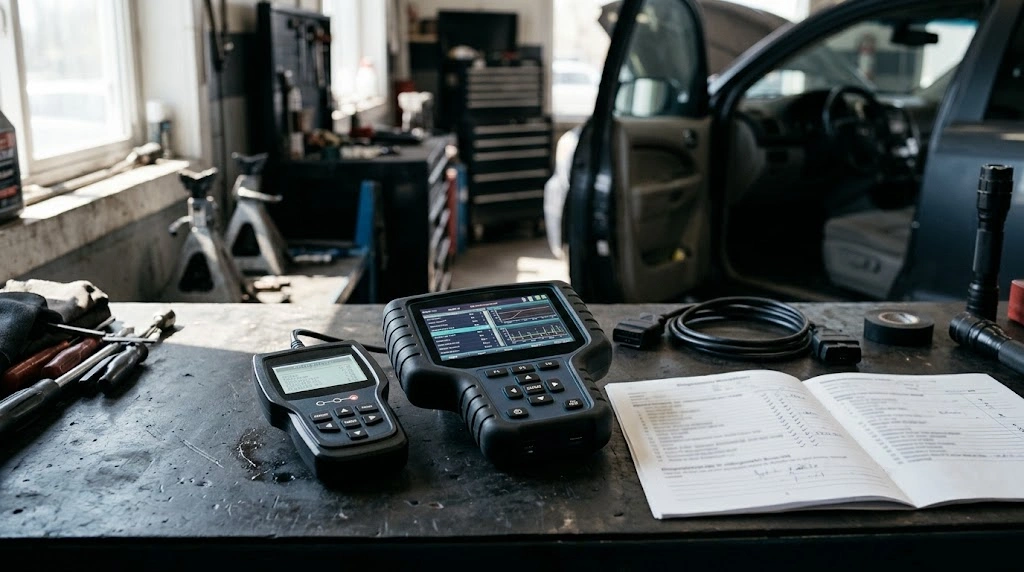
Generic and manufacturer-specific trouble codes use similar five-character formats, but their definitions and diagnostic access requirements can differ.
| Feature | Generic Codes | Manufacturer-Specific Codes |
|---|---|---|
| Definition | Standardized meaning | Manufacturer-defined meaning |
| Examples | P0xxx, P2xxx | P1xxx, certain P3xxx |
| Basic reader | Generally supported for emissions-related faults | Some powertrain codes may be available |
| Enhanced scanner | Supported | Additional codes and modules where compatible |
| Meaning across brands | Consistent standardized definition | Can vary by manufacturer |
The code prefix provides a useful clue, but it does not reveal the complete capabilities of your scanner.
How to Recognize a Manufacturer-Specific Code
Diagnostic codes generally begin with a letter identifying the system: P for powertrain, B for body, C for chassis, or U for network communication.
For powertrain codes, P1xxx is manufacturer-specific. P0xxx and P2xxx are generally standardized, while the P3xxx range contains both standardized and manufacturer-specific codes.
Similar distinctions exist in other code families. For example, B1xxx, C1xxx, and U1xxx commonly identify manufacturer-specific definitions.
Do not assume every code beginning with the same letter uses the same diagnostic access method. The control module containing the fault also matters.
Why Some Scanners Cannot Access OEM Codes
Scanner compatibility is determined by more than the shape of the diagnostic connector.
Although many vehicles have a standard 16-pin OBD2 port, manufacturers use additional diagnostic messages, module addresses, communication networks, and software definitions for their proprietary systems.
Limited Control Module Access
A basic code reader may communicate with the engine control module while having no supported diagnostic connection to the ABS or airbag computer.
Consequently, an illuminated ABS warning light can remain unexplained even when the scanner reports no engine trouble codes.
Missing Manufacturer Software
Enhanced diagnostics often require software containing manufacturer-specific communication instructions and code definitions.
Some devices also require downloadable vehicle-brand packages or paid software options to unlock supported functions.
Vehicle and Model-Year Restrictions
A scan tool might support enhanced diagnostics for one model year but offer fewer functions for an older or newer version of the same vehicle.
Compatibility can also depend on the engine, installed modules, regional vehicle specifications, and supported communication network.
According to OBDLink’s enhanced diagnostics coverage guidance, supported OEM functions must be checked against vehicle models, model years, and control-module coverage.
Key Insight
A scanner advertised as compatible with your car may support only standard OBD2 functions. Compatibility with manufacturer-specific ABS, transmission, airbag, or body modules must be verified separately.
How to Check Whether Your Scanner Reads Manufacturer Codes
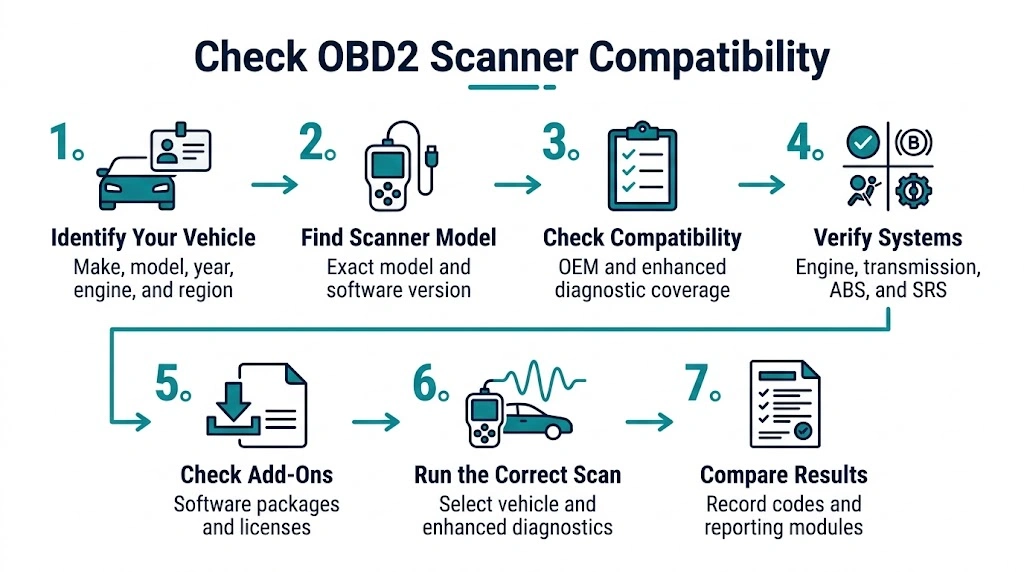
You can verify your scanner’s capabilities before assuming it can diagnose every electronic system in your vehicle.
- Identify your vehicle. Record the manufacturer, model, model year, engine, and market or region.
- Find your scanner’s exact model. Check the model number and installed software version, not just the brand name.
- Examine the compatibility list. Look for manufacturer-specific DTCs, enhanced diagnostics, or OEM module coverage.
- Check the individual systems. Confirm whether the scanner supports engine, transmission, ABS, SRS, and other modules you need.
- Check required add-ons. Determine whether additional software or licensing is needed.
- Run the appropriate scan. Select the manufacturer or vehicle profile and perform a supported enhanced or all-system scan.
- Compare the results. Record all retrieved codes and determine which control module reported each fault.
If your scanner provides only a generic OBD2 menu, it may not offer the advanced diagnostic functions required for deeper module access.
For basic scanning and code retrieval, our step-by-step OBD2 scanner guide explains how to connect the tool and interpret diagnostic information.
What Type of Scanner Is Needed for Enhanced Diagnostics?
An enhanced OBD2 scanner or manufacturer-compatible diagnostic tool is generally the appropriate choice when you need to investigate faults outside standard emissions diagnostics.
There are several levels of diagnostic equipment.
Basic OBD2 Code Reader
A basic reader is suitable for common check engine light investigations. It can retrieve standardized trouble codes and may display some manufacturer-specific powertrain codes, depending on the vehicle and device.
It is not necessarily designed for full-system diagnosis.
Enhanced or All-System Scanner
An enhanced scanner can support additional modules and OEM-defined trouble codes. Depending on its coverage, it may retrieve ABS, SRS, transmission, or body-system faults.
Some enhanced scanners also provide manufacturer-specific live data or service functions, but those abilities must be confirmed individually.
Manufacturer-Specific Diagnostic Software
Brand-focused diagnostic software can offer deeper access to supported vehicle systems. This may be useful when investigating complex electrical faults, module communication problems, or service procedures.
However, even specialized software does not automatically guarantee every programming, coding, or calibration function.
For transmission-related limitations, see whether OBD2 scanners can read transmission codes.
What If Your Scanner Shows No Codes?

A scanner reporting no codes does not always establish that the entire vehicle is free from faults.
If a warning light remains illuminated, first identify the system associated with that warning. Then confirm your scanner can communicate with the relevant control module.
For example, a generic engine scan may show no trouble codes while a separate ABS controller contains a stored fault.
Also check whether the scanner successfully established communication and whether you selected the correct diagnostic menu.
Possible explanations include:
- The affected module is not included in the scan.
- The scanner lacks required manufacturer coverage.
- The fault is intermittent or has not met storage conditions.
- The device is using an incorrect vehicle profile.
- A communication problem is preventing module access.
Where a manufacturer-specific code appears without a definition, record the exact code and the reporting module. Use the vehicle manufacturer’s technical documentation or an appropriate diagnostic database to interpret it.
A code identifies a diagnostic condition; it does not prove that a particular component needs replacement.
Warning
Do not erase trouble codes before recording them and any available freeze-frame information. Clearing emissions-related codes can reset readiness monitors and remove useful diagnostic evidence. Treat active brake or airbag warnings seriously even if a basic engine scan shows no codes.
Our guide to how clearing codes affects readiness monitors explains another important consequence of using the erase function.
How to Interpret an OEM Trouble Code Correctly
Once you retrieve a manufacturer-specific code, accurate interpretation requires the vehicle’s identity and diagnostic context.
Start by recording the exact five-character code, the control module reporting it, and its status if available.
Then check the manufacturer-specific definition rather than relying entirely on a generic internet code description.
Look for related codes, relevant live-data readings, operating conditions, and the diagnostic tests recommended in the vehicle’s service information.
For example, a code related to sensor performance could result from a sensor problem, damaged wiring, an electrical supply issue, or an unexpected operating condition. The code alone cannot distinguish every possibility.
Accurate diagnosis comes from using the fault code as a starting point and verifying the underlying cause before replacing parts.
Related Product
Enhanced OBD2 Scanner with OEM Diagnostics
An enhanced diagnostic scanner may help retrieve manufacturer-specific trouble codes from supported vehicle modules. Before choosing one, confirm coverage for your exact vehicle, model year, and required system.
As an Amazon Associate, we earn from qualifying purchases.
Frequently Asked Questions
1. Can an ELM327 Adapter Read Manufacturer-Specific Codes?
Some ELM327-compatible adapters can retrieve manufacturer-specific powertrain codes through standard OBD2 commands. Additional module access depends on the adapter, software, vehicle communication network, and supported enhanced diagnostic functions.
2. Can a Cheap OBD2 Scanner Display P1 Codes?
Yes, some inexpensive readers display P1xxx codes from the powertrain computer. However, they may not provide the correct manufacturer-specific definition or access faults stored in other control modules.
3. Are Manufacturer-Specific Codes Always More Serious?
No. A manufacturer-specific code is not automatically more serious than a generic code. Severity depends on the actual fault, affected system, symptoms, and diagnostic findings rather than the code category.
4. Can an OBD2 Scanner Read Manufacturer-Specific ABS Codes?
Yes, if the scanner supports enhanced ABS diagnostics for the specific vehicle. A basic emissions-focused OBD2 reader generally cannot be relied upon to retrieve faults directly from the ABS control module.
5. Do Manufacturer Codes Have the Same Meaning Across Car Brands?
Not necessarily. Manufacturer-specific code definitions can vary between vehicle brands. Check the manufacturer’s definition and the relevant model information before interpreting a code or choosing a repair.
6. Does an All-System Scanner Read Every Code in a Vehicle?
No. All-system scanners are designed to access multiple control modules, but their actual coverage differs by manufacturer, model, year, software package, and vehicle configuration. Always verify the specific supported systems.
Final Thoughts
An OBD2 scanner can read manufacturer-specific codes, but its capabilities depend on the supported vehicle systems and diagnostic software.
A basic reader may be sufficient for certain manufacturer-specific engine codes. For ABS, airbags, transmission modules, and other specialized systems, choose a scanner with verified enhanced coverage for your exact vehicle.
Most importantly, retrieve and interpret the correct code before making repairs. Accurate diagnostic information is more valuable than simply clearing a warning light.

I’m Alex Rahman, a car enthusiast and automotive writer focused on practical solutions, car tools, and real-world driving advice. I share simple and honest content to help everyday drivers make better decisions.
