How to Use an OBD2 Scanner: Read & Clear Codes Properly
Quick Answer
To use an OBD2 scanner, turn your vehicle completely off, plug the tool into the 16-pin diagnostic port underneath the driver-side dashboard, and switch the ignition to the ON position without starting the engine. Navigate the scanner menu to select “Read Codes,” record any alphanumeric codes displayed, and avoid clearing the codes until you have saved the diagnostic data and addressed the underlying mechanical issue.
What to Check Before Plugging In the Scanner
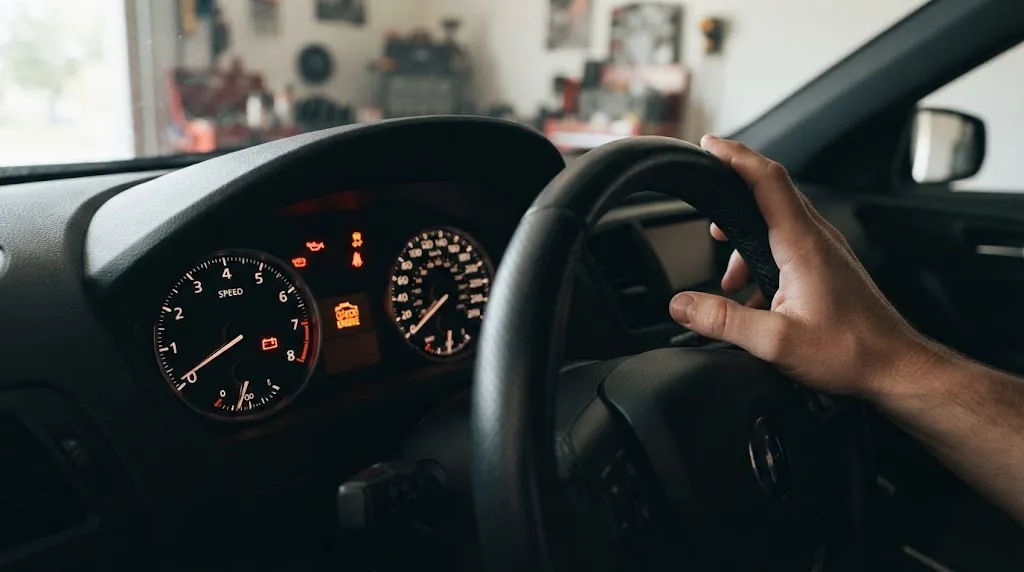
Before connecting a diagnostic tool, confirm that your vehicle is compatible with the OBD2 standard and that the car is parked safely with the ignition turned off. Every passenger car and light truck sold in the United States since January 1, 1996, is required to use a standardized On-Board Diagnostics II (OBD2) system.
Check three specific conditions before starting the scan:
- Dashboard warning light behavior: Note whether the check engine light is glowing steadily or flashing. A steady light indicates a stored fault that requires investigation, whereas a flashing check engine light signals an active, severe engine misfire that can rapidly overheat and destroy your catalytic converter.
- Battery voltage health: The vehicle’s 12-volt battery powers most handheld corded scanners and Bluetooth dongles directly through the diagnostic port. If your battery is severely drained, the scanner screen may fail to turn on or drop communication mid-scan.
- Scanner type requirements: Corded handheld readers display data directly on their own screen as soon as they receive power. Wireless Bluetooth or Wi-Fi adapters require you to download a compatible smartphone app and pair the adapter inside the app settings—not just your phone’s general Bluetooth menu—before reading vehicle data.
Where to Find the OBD2 Port in Your Vehicle
The OBD2 port—officially called the Data Link Connector (DLC)—is almost always located underneath the dashboard on the driver’s side, within 18 to 24 inches of the steering wheel column. It is a standardized, trapezoid-shaped 16-pin female connector that fits every compliant OBD2 plug regardless of the vehicle manufacturer.
To find the port quickly without straining your back, look in these primary locations first:
- Directly beneath the steering column, slightly above the brake or clutch pedal.
- Along the lower left kick panel, near the hood release lever or parking brake pedal.
- To the right of the steering wheel, tucked underneath the lower edge of the center console trim.
In some European and Asian models, the port is hidden behind a small plastic cover labeled “OBD,” “DIAG,” or marked with an engine icon. Occasionally, manufacturers place the connector inside the center console storage bin, behind a removable ash tray panel, or beneath a flip-down fuse box cover on the lower left side of the dash.
Tip
Instead of kneeling on the ground to search under a dark dashboard, turn on your smartphone’s camera flash, switch to video or selfie mode, and hold the phone under the steering column to spot the 16-pin trapezoid port immediately.
Step-by-Step: How to Connect and Read OBD2 Codes
Connecting the tool and retrieving diagnostic trouble codes (DTCs) takes less than three minutes when done in the proper sequence. Following the exact ignition order ensures the scanner establishes a clean handshake with the vehicle’s Engine Control Unit (ECU).
- Turn the vehicle completely off: Park on a level surface, engage the parking brake, and turn the ignition key to the OFF position (or ensure push-button start vehicles are fully powered down). Plugging a scanner in while the ignition is live can occasionally cause communication errors on sensitive CAN bus networks.
- Plug the scanner into the 16-pin DLC port: Align the wider edge of the trapezoid plug with the wider side of the vehicle’s port and push firmly until it seats. Corded scanners will usually beep and light up immediately because Pin 16 of the port supplies constant 12-volt battery power even when the key is off.
- Turn the ignition to ON without starting the engine: Turn your physical key two clicks forward until all dashboard warning lights illuminate, or press your push-button start twice without putting your foot on the brake pedal. This state—known in automotive diagnostics as Key On, Engine Off (KOEO)—wakes up the vehicle’s computer modules so they can transmit data.
- Establish the communication link: Wait 5 to 15 seconds while the scanner automatically detects your vehicle’s communication protocol (such as ISO 15765-4 CAN) and reads the Vehicle Identification Number (VIN). If the scanner asks you to select your vehicle make and year manually, enter those details using the arrow buttons.
- Navigate to the “Read Codes” menu: Select “Diagnostics,” “OBDII,” or “Read Codes” from the main screen. Most tools will display two or three categories of codes: Stored (Confirmed), Pending, and Permanent.
- Record every code and its description: Write down the exact five-character alphanumeric code (for example, P0420 or P0171) or photograph the screen. Check all available code tabs before unplugging the device.
How to Understand What Your OBD2 Codes Mean
An OBD2 diagnostic trouble code does not tell you which specific car part to replace; it tells you which electrical circuit, sensor reading, or system parameter fell outside the manufacturer’s expected range. Treating a code as an automatic shopping list for replacement parts is the single most expensive mistake DIY vehicle owners make.
Decoding the Five-Character Code Structure
Every standard OBD2 code consists of one letter followed by four digits. Understanding each position helps you narrow down where the problem originates before you open the hood.
| Code Position | Character / Value | System or Meaning |
|---|---|---|
| 1st Character (System) | P / B / C / U | P = Powertrain (Engine/Transmission) B = Body (Airbags, seatbelts, HVAC) C = Chassis (ABS, traction, suspension) U = Network / UART (Module communication) |
| 2nd Character (Code Type) | 0 (or 2, 3) 1 |
0 = Generic SAE standard code (same meaning on all brands) 1 = Manufacturer-specific code (unique to Ford, Toyota, GM, etc.) |
| 3rd Character (Subsystem) | 1–8 | 1–2: Fuel & air metering 3: Ignition system & misfires 4: Auxiliary emissions controls (EVAP, catalytic converter) 5: Vehicle speed & idle control 6: Computer & output circuits 7–8: Transmission controls |
| 4th & 5th Characters | 00–99 | Specific fault index identifying the exact sensor, cylinder, or condition (e.g., 01 in P0301 indicates Cylinder 1 misfire). |
Basic entry-level code readers only pull P-codes (Powertrain) that trigger the check engine light. If your ABS, traction control, or airbag warning light is on, you need a mid-range or enhanced scanner capable of reading C-codes and B-codes.
Stored vs. Pending vs. Permanent Codes
Modern vehicles categorize fault codes into three distinct memory states based on how recently and consistently the failure occurred:
- Pending Codes: The vehicle’s computer detected an abnormal reading during a single drive cycle, but the fault has not recurred enough times to illuminate the dashboard check engine light. If the condition does not happen again over subsequent trips, the pending code clears itself automatically.
- Stored (Confirmed or Active) Codes: The fault occurred across two or more consecutive drive cycles—or was severe enough to trigger immediately—causing the ECU to turn on the check engine light.
- Permanent Codes (Mode $0A): Introduced on vehicles manufactured from 2010 onward, permanent codes cannot be erased with a scanner button or by disconnecting the battery. The vehicle’s computer will only erase a permanent code after it independently runs and passes the specific diagnostic monitor for that system during normal driving.
Key Insight
A code naming a specific sensor does not mean the sensor itself is broken. For example, code P0171 (System Too Lean Bank 1) often triggers oxygen sensor warnings, yet the actual cause is frequently an inexpensive cracked vacuum hose or dirty mass airflow sensor letting unmeasured air into the engine.
Using Freeze Frame and Live Data Before You Clear Anything
Before you exit the diagnostic menu or clear any trouble codes, check the Freeze Frame section on your scanner. Freeze Frame data is an electronic snapshot of your engine’s exact operating conditions at the exact split-second the check engine light was triggered.
Looking at Freeze Frame parameters takes the guesswork out of intermittent problems:
- Engine RPM and Vehicle Speed: Shows whether the fault happened while idling at a stoplight (pointing toward a vacuum leak or idle control valve) or while accelerating at 65 mph on the highway (pointing toward fuel delivery or ignition load).
- Engine Coolant Temperature (ECT): Reveals whether the problem only occurs during a cold start in the morning or after the engine reaches full operating temperature.
- Short-Term and Long-Term Fuel Trims (STFT / LTFT): Expressed as positive or negative percentages, fuel trims show whether the computer is actively adding extra fuel to compensate for an air leak (+10% or higher) or pulling fuel back because the engine is running too rich (-10% or lower).
While reading static codes and Freeze Frame data requires only the ignition to be in the ON position, viewing Live Data (Data Stream) requires you to start the engine and let it idle safely in a well-ventilated area. Live data displays real-time sensor readings—such as oxygen sensor voltage switching, mass airflow rates, and alternator charging voltage—allowing you to see how components behave while the engine is running.
How and When to Clear Codes (And Why Resetting Before State Inspection Fails)
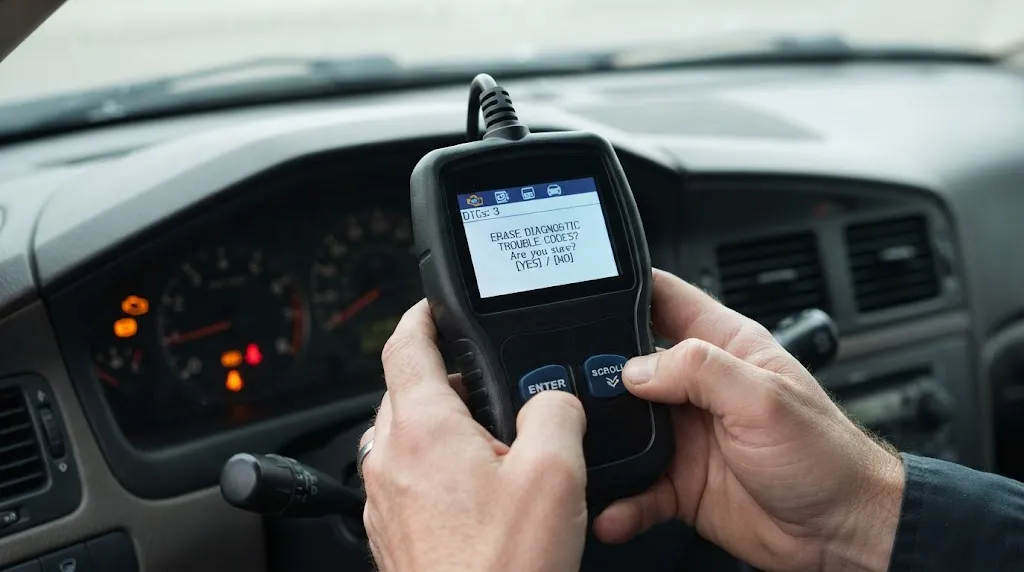
To clear codes with an OBD2 scanner, keep the ignition in the ON position with the engine off, navigate to “Erase Codes” or “Clear DTCs” in the menu, and confirm the prompt. The check engine light will turn off the next time you start the vehicle, provided a hard electrical fault does not immediately re-trigger it.
However, you should only clear codes after you have completed a repair or verified an obvious temporary trigger, such as tightening a loose gas cap. Erasing codes prematurely creates two major problems:
- It wipes out diagnostic evidence: Clearing codes deletes all Freeze Frame snapshots and fuel trim history. If you take your car to a mechanic after clearing the codes, the technician has no data to inspect and must charge you diagnostic time to drive the vehicle until the fault happens again.
- It resets your emissions I/M Readiness Monitors to “Not Ready”: You cannot pass a state emissions test by clearing your check engine light in the inspection station parking lot. When you erase codes, all internal self-tests (monitors for the catalytic converter, EVAP system, and oxygen sensors) reset to an incomplete status. State inspection computers check these readiness flags directly and will automatically fail or reject your vehicle until you drive the car through a complete multi-day drive cycle to reset the monitors to “Ready.”
Warning
Never clear codes while the engine is running unless your scanner manufacturer explicitly instructs you to do so. Sending a Mode $04 clear command while the ECU is actively managing ignition timing and fuel injection can cause the engine to stumble, stall, or fail to clear the memory registers properly.
Troubleshooting: Why Your OBD2 Scanner Won’t Connect or Power On
If you plug your scanner into the port and the screen stays blank, or the tool displays a “Link Error” or “Communication Failed” message, the fault is almost always a simple power or ignition issue rather than a broken vehicle computer.
Work through these checks in order:
- Check the cigarette lighter / 12V accessory fuse: On the vast majority of vehicles, Pin 16 of the OBD2 port shares the exact same fuse as the dashboard 12-volt power outlet or cigarette lighter. If a phone charger previously blew that fuse, your corded OBD2 scanner will receive zero power and remain completely dead when plugged in.
- Verify the ignition is fully in the ON position: A scanner can power up its screen with the key off, but it cannot talk to the ECU unless the dashboard warning lights are illuminated. On push-button start cars, press the start button twice without touching the brake pedal until the instrument cluster wakes up.
- Inspect the 16-pin connector for bent pins or loose seating: Aftermarket GPS trackers, insurance telematics dongles, or heavy feet can bend the metal terminals inside the DLC port or push the connector loose from its plastic mounting bracket. Ensure the plug seats flush all the way in.
- Connect Bluetooth scanners through the app, not phone settings: Most Bluetooth Low Energy (BLE) OBD2 adapters will reject pairing or fail to communicate if you try to pair them in your iPhone or Android system Bluetooth menu. Open the diagnostic app first and select the adapter from the app’s internal connection menu.
Related Product
Handheld & Bluetooth OBD2 Diagnostic Scanners
A reliable OBD2 scan tool with Freeze Frame and I/M readiness support lets you read trouble codes, monitor live sensor data, and verify emissions readiness from your driveway.
As an Amazon Associate, we earn from qualifying purchases.
Frequently Asked Questions
Should the car engine be running or off when using an OBD2 scanner?
To read or clear diagnostic trouble codes, the engine should be off while the ignition key is turned to the ON position (Key On, Engine Off). You only need to start and run the engine if you want to monitor real-time Live Data streams, such as active oxygen sensor voltages, engine RPM, or fuel trim fluctuations.
Can plugging in an OBD2 scanner damage my car’s computer?
No, plugging a standard OBD2 code reader into the diagnostic port will not damage your car’s Engine Control Unit (ECU). Standard scanners operate in a read-only mode when pulling codes and live sensor parameters, and the 16-pin connector is physically keyed so it cannot be plugged in backward.
Is it safe to leave a Bluetooth OBD2 scanner plugged in all the time?
It is generally not recommended to leave an inexpensive Bluetooth OBD2 dongle plugged in permanently when the car sits parked for several days. Because Pin 16 of the OBD2 port supplies constant 12-volt power even when the ignition is off, adapters without an automatic low-power sleep mode can slowly drain your car battery and leave the vehicle vulnerable to unauthorized wireless connections.
Why did my check engine light come back on after I cleared the codes?
If the check engine light returns shortly after clearing the codes, the underlying mechanical, electrical, or emissions fault is still present. Clearing a code only resets the warning indicator and memory log; as soon as the vehicle’s computer runs its next self-test and detects the same out-of-range sensor reading, it will trigger the code again.
Will a standard OBD2 scanner read ABS, airbag, or transmission codes?
Basic entry-level OBD2 code readers only access generic engine and emissions-related Powertrain (P) codes that trigger the check engine light. To read anti-lock brake (ABS), airbag (SRS), body control, or manufacturer-specific transmission codes, you need a multi-system or enhanced scanner designed to communicate with those separate control modules.
Can I use an OBD2 scanner on a car made before 1996?
Most cars built before 1996 use older, manufacturer-specific OBD1 systems with incompatible port shapes and communication protocols, meaning a standard OBD2 scanner will not work without specialized adapter cables and OBD1-capable software. A small number of 1994 and 1995 transitional models came equipped with early OBD2 systems—check the emissions label under your hood for the phrase “OBD II Certified” to confirm.
Conclusion
Using an OBD2 scanner properly is about gathering diagnostic evidence rather than rushing to turn off a dashboard warning light. By plugging the tool in with the vehicle off, switching the ignition to the Key On, Engine Off state, and recording both your trouble codes and Freeze Frame data before touching the erase button, you protect the exact information needed for an accurate repair. Once you identify whether a code is stored, pending, or permanent—and verify whether a faulty sensor or a simple mechanical leak caused the abnormal reading—you can either complete the fix yourself or hand your mechanic a clear starting point without paying for unnecessary guesswork.

I’m Alex Rahman, a car enthusiast and automotive writer focused on practical solutions, car tools, and real-world driving advice. I share simple and honest content to help everyday drivers make better decisions.
