Should I Remove My Dash Cam at Night? The Honest Answer
You should remove your dash cam at night if you park on a public street in a high-crime area, especially if the camera is visible through the windshield. If you use parking mode with a hardwire kit, or your cam is small and discreet, leaving it in is often fine — and sometimes better for your safety.
I used to leave my dash cam in every single night. Then one morning I walked out to a smashed passenger window and a missing camera. The thief left nothing behind — not even the mount.
That one incident cost me £220 for the cam, £180 for the window, and two days of insurance headaches. All for a camera a thief sold for £30.
I’m Alex Rahman, and I’ve been writing about dash cams and vehicle security for over six years. After that break-in, I started researching exactly when removal matters — and when it honestly doesn’t. The answer surprised me. It’s not as simple as “always take it out.”
This guide walks you through every scenario, so you leave knowing exactly what the right call is for your situation.
- A visible dash cam on a city street is a real theft magnet — removing it takes 10 seconds and prevents break-ins.
- Dash cams with built-in batteries can be permanently damaged by heat above 80°C (176°F) — common inside parked cars in summer.
- Parking mode with a hardwire kit is the best reason to leave your cam in — it records incidents while you sleep.
- Capacitor-based dash cams handle heat far better than battery models and are safer to leave installed year-round.
- Removing just the SD card — not the whole unit — is a smart middle-ground if your cam is already discreet.
What Does Leaving a Dash Cam in Your Car Actually Risk?

Leaving a dash cam in your parked car overnight carries two real risks: theft and heat damage. The risk level depends heavily on where you park and what type of cam you own. Understanding both risks helps you make the right call every night.
Does a Visible Dash Cam Make Your Car a Target for Break-Ins?
Yes — a clearly visible dash cam sitting on your windshield is a signal to opportunistic thieves. Smash-and-grab car break-ins cost UK drivers alone over £490 million per year according to the Association of British Insurers (2022 data). Thieves scan parked cars in seconds. A mounted camera tells them two things: the car has electronics, and the owner probably forgot to take it.
The camera itself is the prize. A Nextbase 622GW retails for around £200. Thieves resell them in minutes through marketplaces. The broken window costs you more than the camera ever did.
The risk rises significantly in urban areas, near public transit hubs, and in poorly lit streets. Suburban driveways and private garages carry much lower risk.
Don’t assume a suction mount left on the windshield is safe. The ring-shaped mark it leaves tells thieves you recently removed a cam — and they may break in looking for it hidden in the glovebox anyway. Always take the mount off too.
How Much Heat Can a Dash Cam Handle Before It Gets Damaged?
Most dash cam manufacturers rate their devices to operate safely up to 60°C to 80°C (140°F to 176°F). Car interiors in direct summer sun can reach 70°C to 90°C within 30 minutes — well above the safe limit for battery-powered units. Prolonged heat exposure degrades lithium-ion batteries, causes lens fogging, and in rare cases triggers battery swelling.
Capacitor-based dash cams handle heat dramatically better than battery models. Brands like Vantrue and Garmin offer capacitor versions specifically because batteries fail faster in hot climates.
If you live in a warm region — or park in direct sunlight during summer — heat damage is a genuine risk worth taking seriously. A battery-based cam left in a 90°C car every day for a summer will degrade far faster than its rated lifespan.
Check your dash cam’s spec sheet for its maximum operating temperature. If it’s rated below 70°C and you park in the sun, removal or a shade screen is worth it in summer months.
When Should You Definitely Remove Your Dash Cam at Night?
Certain situations make overnight removal the clear, right choice. These aren’t edge cases — millions of drivers face at least one of these conditions every day. If you recognise your situation here, remove the cam tonight.
You Park on a Street in a High-Crime Area
Street parking in high-theft neighbourhoods is the number-one reason to build a removal habit. Data from the UK’s Office for National Statistics shows vehicle crime clusters heavily in urban postcodes — particularly around city centres, entertainment districts, and transport hubs.
If your area has a history of car break-ins, a dash cam on the windshield is low-hanging fruit for thieves. The removal takes less time than locking your door. Make it a reflex every time you leave the car after dark.
Your Dash Cam Has a Built-In Battery (Not a Capacitor)
Battery-based dash cams suffer in heat more than any other component. Lithium-ion batteries degrade when exposed to temperatures above 60°C repeatedly. A cam left in a hot car every summer day will hold less charge, record shorter clips, and fail years before its time.
If your cam has a battery — not a supercapacitor — removal in hot weather protects your investment. Check your manual. Most budget dash cams under £80 use batteries. Premium models from Garmin and Vantrue increasingly use capacitors.
Your Car Sits in Direct Sun All Day
Even if your neighbourhood is completely safe, a car baking in direct sunlight poses a real hardware risk. A black dashboard amplifies heat. A south-facing windshield in July channels it directly at your cam.
In this situation, removal isn’t about theft — it’s about protecting a £100 to £300 device from preventable damage. Alternatively, a windshield sun shade can cut interior temperatures by up to 15°C, which is enough to keep most cams in the safe zone.
When Is It Safe to Leave Your Dash Cam In the Car?
Removal is not always the right answer. In some situations, leaving the cam installed overnight is smarter — especially if it’s actively recording while parked. Here is when keeping it in makes sense.
You Have Parking Mode Set Up with a Hardwire Kit
Parking mode is the feature that transforms a dash cam from a driving tool into an all-night security guard. When triggered by motion or impact, it records a short clip and saves it. But parking mode needs constant power — and that means a hardwire kit connected directly to your car’s fuse box.
A hardwire kit (typically £20 to £40) includes a low-voltage cutoff that protects your car battery. It draws minimal current and shuts the cam down before the battery drops below safe levels.
If you have parking mode running, leaving the cam in is not just fine — it’s the whole point. You will capture hit-and-runs, vandalism, and theft attempts on camera. Removing it defeats the purpose entirely.
Your Cam Uses a Supercapacitor Instead of a Battery
Supercapacitor dash cams store energy in a capacitor instead of a lithium-ion battery. Capacitors charge and discharge faster, last longer, and survive extreme temperatures far better. Vantrue’s E1 Lite and several Garmin Dash Cam models use this design.
If your cam uses a capacitor, you don’t need to worry about summer heat damaging the power unit. It’s built for exactly this environment. Leave it in with confidence during warm months — the hardware can handle it.
Your Dash Cam Is Small, Dark, and Hard to Spot
Not all dash cams look like obvious electronics from outside the car. Compact models like the Garmin Dash Cam Mini 2 — roughly the size of a car key — are nearly invisible from the street when mounted low behind the rear-view mirror.
A camera a thief can’t see is a camera they won’t steal. If your model is small and dark-coloured, and you mount it in a discreet position, the theft risk drops dramatically. Pair that with nothing else visible in the car and your risk profile looks much better.
Mount your dash cam directly behind the rear-view mirror. From outside the car, the mirror blocks the camera completely. It records unobstructed but stays invisible to anyone walking past.
What Is Parking Mode and Does It Change the Decision?
Parking mode is one of the most misunderstood features on a dash cam. Many drivers pay for it and never use it properly — or don’t realise it requires specific hardware to function overnight. Getting this right completely changes whether you should remove your cam or not.
How Parking Mode Works on a Dash Cam
In parking mode, your dash cam stays in a low-power standby state while the car is off. When the camera’s G-sensor detects a physical impact — like a bumper tap — or its motion sensor spots movement nearby, it activates and records a 30 to 60-second clip. The clip saves automatically to your SD card.
This means a hit-and-run at 2am gets captured. A car door dinging your side panel gets recorded. Vandalism in a dark car park leaves evidence behind. Parking mode turns your cam into a 24-hour witness, even when you’re asleep.
Learn more about how modern dash cam sensors work at Which? Dash Cam Reviews — they publish independent tests on parking mode sensitivity.
Do You Need a Hardwire Kit for Parking Mode to Work?
Yes — in most cases. When your car engine turns off, the cigarette lighter socket loses power. That means a plug-in dash cam goes dark immediately. Parking mode cannot run without constant power.
A hardwire kit solves this by connecting directly to a fused circuit in your car’s fuse box. It provides continuous low-level power even with the ignition off. Most kits include a voltage cutoff — typically at 11.6V — that shuts the cam down before your battery drains enough to prevent starting.
- Buy a hardwire kit compatible with your dash cam brand (Nextbase, Vantrue, and Garmin each sell their own).
- Run the power cable from your cam along the windshield trim and down the A-pillar.
- Connect the kit’s leads to an ignition-switched fuse (for power) and a constant fuse (for ground reference).
- Set the low-voltage cutoff in your cam’s settings — 11.8V is safe for most car batteries.
- Enable parking mode in the dash cam menu and choose motion detection or impact detection (or both).
- Test it: park the car, turn it off, walk away, then nudge the bumper and check if a clip saves.
How to Hide Your Dash Cam So Thieves Don’t See It
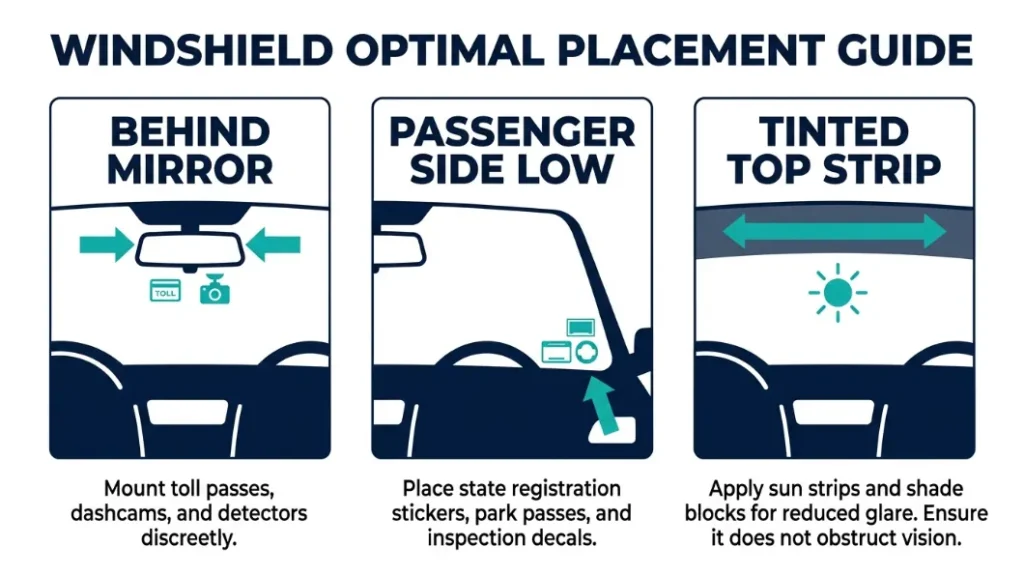
If removal isn’t your preference — or parking mode means you need to leave the cam in — making it invisible is your next best move. Discreet placement and compact designs dramatically reduce theft risk overnight.
Best Mounting Positions That Reduce Visibility
Where you mount your cam matters as much as which cam you choose. Thieves do a quick visual scan through the glass. Make them miss it entirely.
- Behind the rear-view mirror: The most effective position. The mirror blocks the cam from street-side view completely.
- Low on the passenger side: Less intuitive, still records forward, and far less visible from the driver’s side pavement where thieves approach.
- High on the windshield at the tinted band: Many windshields have a dark-tinted strip at the top. A small cam tucked here disappears against it.
Avoid centre-windshield mounting at eye level. It’s the first place any thief scans when walking past a parked car.
Which Dash Cam Brands Make the Most Discreet Models?
Not all cameras are built for stealth. Some are deliberately designed to be nearly invisible.
| Brand & Model | Size | Power Source | Discreet Rating |
|---|---|---|---|
| Garmin Dash Cam Mini 2 | 31mm wide | Capacitor | Excellent |
| Vantrue E1 Lite | Compact cube | Capacitor | Very Good |
| Nextbase 222X | Mid-size | Battery | Moderate |
| BlackVue DR770X | Tube-shaped | Capacitor | Very Good |
The Garmin Dash Cam Mini 2 is roughly the size of a car key fob. Mounted behind the mirror, it genuinely disappears. If you want to leave your cam in overnight with minimal risk, this is the type of unit to use.
The Middle-Ground Option Most Drivers Overlook
Full removal and leaving everything in place are not your only two choices. There is a smart middle-ground that most drivers never think about — and it solves the problem without sacrificing parking coverage or risking your hardware.
Remove the Camera But Leave the Mount
Most dash cam mounts stay locked to the windshield permanently. The camera unit itself clips in and out in under five seconds. Many drivers don’t realise they can take just the camera — drop it in a bag — and leave the mount completely hidden behind the mirror.
This protects the expensive part (the camera) while keeping your setup ready to go in seconds the next morning. No suction cup ring left on glass. No re-routing cables. Just click out, drop in a bag, done.
The fastest removal habit: keep a small drawstring bag in your door pocket. Every time you park at night, drop the cam unit in the bag and tuck it in the glovebox. Takes eight seconds. Costs you nothing. Saves your hardware and your window.
Take Out the SD Card and Leave the Unit
Here’s another option worth knowing: the real data is on the SD card, not the camera body. If someone breaks in and steals the dash cam, the footage of any incidents — including the break-in itself — goes with it.
If your cam is discreet and low-theft-risk but you want to protect your recorded footage, remove just the microSD card. Slip it in your wallet. The camera body stays in the car, parking mode keeps running on internal buffer or cloud if supported, and your footage stays safe.
This is especially useful if you’ve recorded something important during the day — a near-miss, a bad driver — and you want to make sure that clip doesn’t disappear overnight.
If you remove the SD card, parking mode clips have nowhere to save. Your cam may record to a small internal buffer, but most units won’t retain footage through a power cycle without a card. Only use this method if parking mode isn’t a priority for that night.
Park in a high-crime area → remove the full camera every night. Use parking mode with hardwire → leave it in, mount it discreetly. Drive a hot-climate battery cam → remove in summer months. Want footage protection → take just the SD card. Want the easiest habit → pop the cam off the mount, tuck it in the glovebox, done in 8 seconds.
For deeper guidance on vehicle security and smash-and-grab prevention, Auto Express covers dash cam security stories regularly with real-world case studies worth reading.
Conclusion
So — should you remove your dash cam at night? The honest answer is: it depends on four things. Where you park. What type of cam you own. Whether you use parking mode. And how hot your car gets.
If you park on a busy street in an urban area with a visible, battery-powered cam, take it out every night without question. If you have a hardwire kit running parking mode with a compact capacitor cam mounted behind your mirror, leaving it in makes complete sense.
Most drivers fall somewhere in between. The middle-ground options — clip out just the camera, or remove just the SD card — solve the problem without any real sacrifice.
I’ve been parking in London for years now, and my habit is simple: every time I turn the engine off after dark, the cam comes off the mount in five seconds and goes in the door pocket. Reinstalling it takes the same time. After that break-in years ago, it’s the one habit I’ve never skipped.
Pick the approach that fits your situation, build the habit, and stick with it. Your camera — and your window — will thank you.
Frequently Asked Questions
Does leaving a dash cam in your car overnight attract thieves?
Yes, a visible dash cam on a windshield is a common target for opportunistic thieves, especially in urban areas. Thieves can spot mounted cameras in seconds and will break a window to grab one worth £100 or more. Removing the camera and the mount eliminates this risk entirely.
Can a dash cam get damaged by heat if left in a parked car?
Yes — car interiors can reach 70°C to 90°C in direct summer sun, which exceeds the safe operating limit of most battery-powered dash cams. Capacitor-based models handle heat much better and are safer to leave installed year-round. If your cam has a lithium-ion battery, remove it during hot months or use a windshield sun shade.
What is parking mode and is it worth using instead of removing my dash cam?
Parking mode keeps your dash cam in standby while the car is off, activating to record when it detects motion or an impact. It requires a hardwire kit to function overnight since the cigarette lighter socket loses power when the ignition is off. If you park in areas where hit-and-runs or vandalism are a risk, parking mode is absolutely worth the setup cost.
Should I remove my dash cam mount when I take out the camera?
Yes — always remove the mount alongside the camera. A suction cup ring left on the windshield tells thieves you recently removed a dash cam, and some will break in searching for it hidden inside. A clean windshield with no visible marks gives no indication a cam is used at all.
Is it safe to leave a dash cam in an underground car park overnight?
Underground car parks carry lower theft risk than open street parking since access is restricted, but they are not theft-free. Parking mode is particularly valuable in these settings since incidents in enclosed garages are often poorly covered by CCTV. If you have parking mode enabled, leave the cam in. If not, the lower risk makes this a personal judgement call.
Can I just remove the SD card instead of the whole dash cam?
Yes — removing the SD card protects your footage even if the camera body is stolen. It also prevents a thief from viewing or deleting footage of their own crime. The trade-off is that parking mode clips won’t save without a card present, so only use this approach when overnight recording isn’t a priority.

I’m Alex Rahman, a car enthusiast and automotive writer focused on practical solutions, car tools, and real-world driving advice. I share simple and honest content to help everyday drivers make better decisions.
