How Does a Dash Cam Work? A Complete Beginner’s Guide
A dash cam is a small camera that mounts on your windshield and records video the moment your car starts. It uses a wide-angle lens, an image sensor, and a microSD card to capture continuous footage. When the card fills up, it loops back and records over the oldest clips. A built-in G-sensor locks footage automatically if a collision is detected.
I remember the first time I witnessed a fender-bender where both drivers gave completely different versions of what happened. Neither had a dash cam. The whole thing became a nightmare of “he said, she said” with the insurance company. That day changed how I think about driving forever.
I’m Alex Rahman, and I’ve spent years reviewing and testing car tech for Leadfoot Automotive. One question I get more than almost any other is: how does a dash cam actually work? It looks like a simple little box on your windshield. But there’s real technology packed inside.
In this guide, I’ll break down every part of a dash cam in plain English — no tech jargon, no fluff. By the end, you’ll know exactly how these devices work, what features matter, and how to pick the right one for your car.
- A dash cam starts recording automatically when your car turns on — no button needed.
- Loop recording means the camera never “fills up” — it continuously overwrites the oldest footage.
- The G-sensor detects a crash and instantly locks that clip so it cannot be deleted.
- Parking mode lets some dash cams keep recording even when your engine is off.
- Most dash cams store footage on a microSD card; some newer models also offer cloud backup.
What Is a Dash Cam and What Does It Actually Do?
A dash cam — short for dashboard camera — is a compact video recorder designed to mount on your car’s windshield or dashboard. Its job is simple: record everything that happens in front of (and sometimes behind) your vehicle while you drive.
Think of it as a silent witness. It runs in the background, capturing clear video of the road, other drivers, road conditions, and anything unexpected. You never have to press record. It starts on its own and stops when you park and cut the engine.
Drivers use dash cams for several key reasons:
- Accident evidence — Prove what really happened in a collision.
- Insurance fraud protection — Guard yourself against staged crashes.
- Teen driver monitoring — Know how your new driver behaves on the road.
- Fleet management — Companies use dash cams to track and coach professional drivers.
- Peace of mind — Some drivers simply like knowing they have a record of every trip.
The technology inside a dash cam is more sophisticated than it looks. Let’s open it up and see what’s inside.
The Main Parts Inside a Dash Cam (And What Each One Does)
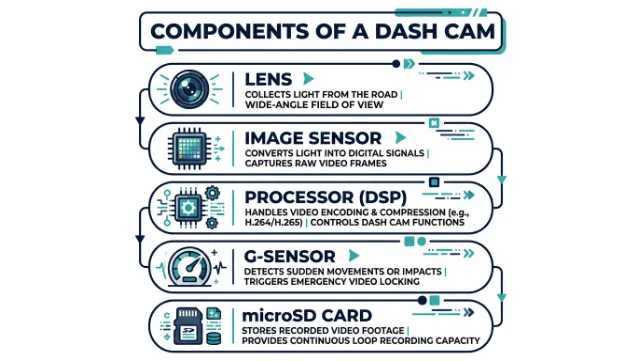
Every dash cam — cheap or expensive — has the same core components. Understanding each part helps you understand why some cameras perform far better than others.
The Lens
The lens is the eye of the camera. It determines how wide a view the dash cam captures. Most dash cams use a wide-angle lens with a field of view between 130° and 170°. The wider the angle, the more road and lane area you can see in the frame.
A narrow lens might miss a car cutting in from the side. A 170° lens captures almost everything in front of you. For most drivers, 140°–170° is the sweet spot.
The Image Sensor
The image sensor is the component that converts incoming light into digital video. The quality of this sensor determines how sharp your footage looks — especially at night.
The Sony STARVIS sensor (a CMOS-based image sensor used in cameras like REDTIGER and VIOFO models) has become the gold standard for night vision performance in consumer dash cams. It gathers more light in dark conditions, which means cleaner, clearer footage when streetlights are the only source of illumination.
If you do a lot of night driving, look for a dash cam that specifically lists a Sony STARVIS or STARVIS 2 image sensor. It makes a dramatic difference in low-light video quality.
The Processor
The processor is the brain of the dash cam. It handles everything: compressing video files, running the loop recording system, managing the G-sensor triggers, and controlling any smart features like WiFi or GPS. A faster processor means smoother video, faster file saves, and more reliable overall performance.
The G-Sensor
The G-sensor (also called a gravity sensor or accelerometer) is one of the most important safety features in a dash cam. It measures sudden changes in force — like when your car gets hit or slams on the brakes.
When the G-sensor detects an impact above a set threshold, it instantly locks the current video clip. That file gets moved to a protected folder on the SD card and cannot be overwritten by loop recording. This ensures your accident footage is always saved, even if you’re too shaken up to think about it right away.
The Storage (microSD Card)
Almost all consumer dash cams store video on a removable microSD card. Card sizes typically range from 32GB to 512GB. Here’s a rough guide to how much footage fits on each:
| Card Size | Approx. Recording Time (1080p) |
|---|---|
| 16GB | ~2 hours |
| 32GB | ~4 hours |
| 64GB | ~8 hours |
| 128GB | ~16 hours |
Higher resolution (4K) footage takes up more space, so actual times will vary. This is exactly why loop recording exists — more on that next.
How Does Loop Recording Work?
Loop recording is the feature that makes a dash cam practical for daily use. Without it, you’d have to manually delete footage every few hours to make room for new recordings.
Here’s how it works: the dash cam divides recordings into short video clips — usually 1, 3, or 5 minutes long. Each clip gets saved separately on the microSD card. When the card runs out of space, the camera automatically goes back to the oldest clip and records over it.
The result? You always have the most recent footage available without ever touching the camera. It runs completely on its own.
The genius of loop recording is that it combines the simplicity of “set it and forget it” with smart protection. Regular old footage gets overwritten automatically — but anything flagged by the G-sensor stays locked and safe, no matter how many times the loop cycles.
The key point to remember: only unlocked clips get overwritten. Anything the G-sensor has flagged stays protected until you manually delete it.
How Does the G-Sensor Save Your Footage in a Crash?
The G-sensor is always running in the background, measuring the forces acting on your car. Under normal driving, those forces are small and gentle. The moment something sharp happens — a hard brake, a pothole, or a collision — the G-sensor registers a spike in force.
When that spike crosses the sensitivity threshold you’ve set in the dash cam’s settings, the camera immediately locks the current video clip. That means the footage from the seconds before, during, and after the impact is saved permanently in a protected folder.
Most dash cams let you adjust G-sensor sensitivity. Set it too high and it won’t trigger in a real accident. Set it too low and every speed bump will lock a clip and eat up your storage. A medium sensitivity setting works for most everyday drivers.
If you set your G-sensor sensitivity too low, locked clips can fill up your SD card quickly. When the card is full of locked files, loop recording stops working. Check your protected folder regularly and delete clips you don’t need.
Some premium dash cams — like the Nexar series, which is the best-selling dash cam brand in the United States — go further. They can detect a serious collision and automatically send an alert to your emergency contacts, including your GPS location and a video clip.
Does a Dash Cam Record When the Car Is Off? (Parking Mode Explained)
Standard dash cams only record while your car is running. Cut the engine, lose the power, and the camera stops. But many modern dash cams include a parking mode feature that keeps the camera active even when the vehicle is off.
Parking mode works in two ways:
- Motion detection — The camera wakes up and starts recording when it detects movement near your car.
- Impact detection — The G-sensor stays active and triggers recording if something bumps into your parked vehicle.
This feature is incredibly useful for catching hit-and-run drivers or vandalism while you’re away. But it requires a continuous power source.
A standard cigarette lighter connection loses power when you turn the key off. To use parking mode, you either need to hardwire the dash cam directly to your car’s fuse box — or use a model with an internal battery.
Running a hardwired dash cam in parking mode for too long can drain your car battery. Always choose a dash cam or hardwire kit with low-voltage cutoff protection — this feature automatically shuts the camera off before it pulls your battery too low to start the car.
Parking mode keeps your dash cam recording after you park. It needs either a hardwire kit connected to the fuse box or a model with a built-in battery. Always use low-voltage protection to avoid draining your car battery overnight.
How Is a Dash Cam Powered?
A dash cam needs power to run, and there are three ways to provide it:
- Cigarette lighter / 12V port — The easiest setup. Plug in, and it works. Loses power when the ignition turns off. No parking mode.
- Hardwired to the fuse box — More permanent. Cleaner installation with no dangling cords. Enables full parking mode. Requires a hardwire kit.
- Internal battery — Some compact models have a small built-in battery for brief periods of parking surveillance. Limited recording time compared to hardwired.
For most everyday drivers, a cigarette lighter connection is perfectly fine. If you want parking mode and a clean installation, hardwiring is the way to go. A professional installer can do it in under an hour.
How Good Is Dash Cam Video Quality? Night Vision Explained
Video quality in a dash cam comes down to three factors: resolution, frame rate, and the image sensor.
Resolution describes how many pixels make up the image. Most mid-range dash cams record at 1080p Full HD. Better models record at 1440p (Quad HD) or 2160p (4K). Higher resolution means clearer license plate reads from a distance — which matters when it counts most.
Frame rate is usually 30fps (frames per second) for standard models. Some offer 60fps for smoother video, which helps capture fast-moving objects with less blur.
Night vision is where image sensor quality truly shows. Cameras using the Sony STARVIS 2 sensor — found in popular brands like VIOFO and REDTIGER — gather significantly more light in dark conditions. Look for specs like WDR (Wide Dynamic Range) or HDR (High Dynamic Range), which help balance the exposure between bright headlights and dark surroundings.
For daytime driving, even a basic 1080p dash cam captures plenty of detail. But if your commute involves dark roads, tunnels, or a lot of early-morning or late-night driving, invest in a model with a Sony STARVIS sensor and WDR or HDR support.
Next, let’s look at the extras that newer dash cams are adding — and whether they’re worth paying for.
GPS, WiFi, and Cloud Storage — Do You Really Need Them?
Many modern dash cams pack in extra features beyond basic recording. Here’s what each one actually does:
GPS records your exact location and speed alongside the video. This data gets embedded in the footage, which can be incredibly useful in insurance disputes. If you want to prove you weren’t speeding, GPS data gives you hard evidence. Brands like Garmin include GPS in nearly all their dash cam models.
WiFi connectivity lets you connect the dash cam to your smartphone. Instead of pulling out the SD card, you can view, download, and share clips directly from the companion app. Cobra (an American electronics brand known for radar detectors and dash cams) integrates WiFi in several of its smart dash cam models and links them to a real-time driver alert community through its Drive Smarter app.
Cloud storage automatically backs up your footage to a remote server. Nexar, for example, offers unlimited cloud storage with all of its dash cams — meaning your footage survives even if the camera itself is stolen or damaged. Cloud-connected cameras are especially popular for fleet management, where managers need to review footage remotely.
For a personal vehicle, GPS and WiFi are nice-to-haves. Cloud storage is optional unless you want the extra security of off-device backup.
REDTIGER 4K Dash Cam Front Rear, STARVIS 2 Sensor, Free Card Included, 5.8GHz WiFi-20MB/s Fast Download, Dash Camera for Cars with GPS, WDR Night Vision, 170° Wide Angle, 24H Parking Mode (F7NP)
This REDTIGER model is one of the top-selling dash cams on Amazon — it covers every major feature covered in this guide: 4K front recording, Sony STARVIS 2 night vision, GPS, WiFi, a G-sensor, 24-hour parking mode, and loop recording, all in one ready-to-go package.
Does a Dash Cam Record Audio? (And Is It Legal?)
Yes — most dash cams include a built-in microphone that records sound inside the cabin. This picks up conversations, music, and even sirens outside the car. You can usually disable audio recording in the camera’s settings if you prefer.
In the United States, recording video on public roads is legal in all 50 states. Audio recording gets more complicated. Some states — including California, Illinois, and Pennsylvania — are two-party consent states for audio recordings. That means technically, you should inform passengers that audio is being recorded.
The safest and simplest approach: turn off audio recording unless you specifically need it. Most drivers don’t need audio evidence from a dash cam. Video is enough.
According to The Dashcam Store’s legal FAQ, it’s also good practice to inform any police officer you interact with that your dash cam is recording them, just to be transparent.
How to Install a Dash Cam in Your Car (Step-by-Step)
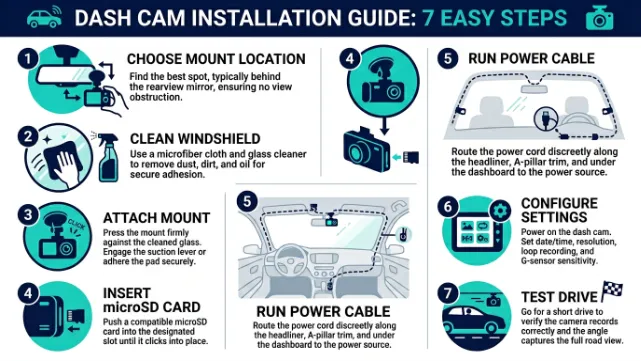
- Choose your mount location — Mount behind the rearview mirror to minimize windshield obstruction. Avoid placing it directly in your line of sight.
- Clean the windshield — Wipe the glass surface with isopropyl alcohol where you’ll place the mount. This ensures a strong adhesive or suction bond.
- Attach the mount — Press the suction cup or adhesive pad firmly onto the cleaned spot. Give it 30 seconds to set.
- Insert the microSD card — Use a card that the manufacturer recommends. Format it in the camera (not on your computer) before first use.
- Run the power cable — Tuck the cable along the headliner and down the A-pillar to the cigarette lighter port. Most cams come with a trim removal tool or you can use a plastic pry tool.
- Power on and configure — Start your car, confirm the camera turns on automatically, and run through the settings to set date, time, G-sensor sensitivity, and recording resolution.
- Test a short drive — Review the first few minutes of footage on the camera’s screen or via the companion app to confirm the angle and quality are correct.
The whole process takes about 15–20 minutes for a basic cigarette lighter install. A hardwired setup takes a bit longer and may require basic knowledge of your car’s fuse box — or a quick trip to a local car audio shop.
How to Choose the Right Dash Cam for Your Car
With hundreds of models available, it helps to narrow down your priorities before you buy. Here are the questions that matter:
- Do you want front-only or front and rear? Front-only cameras are cheaper and simpler. A dual dash cam gives you full coverage — especially useful if someone rear-ends you.
- Do you need parking mode? If your car spends time in unsecured parking lots or on the street, parking mode with a hardwire kit is worth the investment.
- How important is video quality? For insurance purposes, 1080p is the minimum. For license plate clarity from a distance, 1440p or 4K is better.
- Do you want GPS? GPS data embedded in your footage can be the deciding factor in a disputed claim.
- What’s your budget? A reliable basic front-only camera starts around $50. A premium 4K dual camera with GPS and WiFi runs $100–$200.
For most drivers in the US, a 1080p or 1440p front-and-rear dash cam with a G-sensor, loop recording, and optional GPS covers every scenario you’re likely to encounter. You don’t need to spend a fortune to get solid protection.
For a deeper look at video quality comparisons and real-world test results, The Hook Up’s 2024 Dash Cam Comparison is one of the most thorough independent reviews available.
The must-haves are: loop recording, a G-sensor for emergency clip locking, and at least 1080p resolution. Nice-to-haves are GPS, WiFi, and a rear camera. Parking mode is worth it if your car is often parked in exposed locations. Always use a high-endurance microSD card rated for continuous recording.
Conclusion
A dash cam is one of the smartest investments you can make as a driver. Once you understand how they work — from the lens and image sensor down to loop recording and the G-sensor — it’s easy to see why so many people consider them essential.
The technology does the hard work for you. It starts recording when your car starts, protects important footage automatically, and loops seamlessly in the background without any input from you. Features like GPS, WiFi, night vision, and parking mode build on that simple core to give you more coverage and peace of mind.
I’m Alex Rahman, and if there’s one thing I’d tell every driver, it’s this: you hope you never need your dash cam footage — but the one time you do, you’ll be incredibly glad it was there.
Ready to pick yours? Check out our full buying guide at Leadfoot Automotive for side-by-side comparisons and top picks at every price point.
Frequently Asked Questions
Does a dash cam record all the time?
Yes. Most dash cams record continuously while your car is running, using loop recording to overwrite old footage once the SD card is full. The only exceptions are clips locked by the G-sensor, which stay protected until you manually delete them.
Does a dash cam work when the car is off?
Only if it has parking mode and a continuous power source. Standard dash cams plugged into the cigarette lighter stop recording when the ignition turns off. A hardwired dash cam with parking mode can keep recording using motion or impact detection even with the engine off.
What triggers a dash cam to save footage permanently?
The G-sensor (accelerometer) inside the dash cam detects sudden impacts or hard braking. When it registers a force above its set sensitivity level, it immediately locks the current video clip in a protected folder so loop recording cannot overwrite it.
How long does dash cam footage last on the SD card?
It depends on card size and recording resolution. A 32GB card holds roughly 4 hours of 1080p footage before loop recording starts overwriting the oldest clips. Larger cards — 64GB, 128GB, 256GB — hold proportionally more. Locked emergency clips are stored separately and are not overwritten automatically.
Do I need to hardwire my dash cam?
Not for basic recording. A cigarette lighter connection works perfectly for standard use. Hardwiring is only needed if you want parking mode functionality and a cleaner, cord-free installation. Most drivers are satisfied with the simple plug-in setup.
Can police access my dash cam footage?
In the US, police can ask for your dash cam footage voluntarily, or obtain it with a warrant. You are not legally required to hand it over without a warrant in most states. If you captured footage of an incident, sharing it with law enforcement is generally in your interest.

I’m Alex Rahman, a car enthusiast and automotive writer focused on practical solutions, car tools, and real-world driving advice. I share simple and honest content to help everyday drivers make better decisions.
