Can You Watch a Dash Cam From Home?
Yes, you can watch a dash cam from home — but only if your camera has 4G LTE connectivity or uploads to a cloud platform via Wi-Fi. Standard dash cams store footage on an SD card only. You need a connected dash cam paired with a companion app to view live footage or recorded clips remotely.
A few months ago, I got a text from my neighbor saying my car had been bumped in the driveway. I ran outside, heart racing. The other driver was long gone.
My dash cam had captured everything. But here’s where it got frustrating. I had to physically pull the SD card, carry it inside, plug it into my laptop, and then hunt through hours of footage. It took nearly 40 minutes to find the clip I needed.
That moment made me wonder — why wasn’t I watching this from my phone, right from my couch?
I’m Alex Rahman, and I’ve been testing and reviewing dash cams for several years. That driveway incident pushed me to dig deep into remote dash cam access. What I found surprised me. The technology exists and works beautifully — but most buyers don’t know what to look for, and a lot of marketing language creates real confusion.
This guide answers exactly one question: can you watch a dash cam from home? And then it tells you everything you need to know to actually do it.
- You can only watch a dash cam from home if it has 4G LTE or Wi-Fi cloud connectivity — standard dash cams store footage on SD cards only.
- There is a big difference between “cloud backup” and “live streaming” — most dash cams only offer backup, not real-time viewing.
- 4G LTE dash cams give you remote access anywhere, not just at home, because they use mobile data — not your home network.
- Parking mode and remote viewing can work together, but you need a hardwire kit or battery pack to avoid draining your car battery.
- Reputable brands like BlackVue, Vantrue, and Thinkware use end-to-end encryption to keep your footage private and secure.
What Does “Watching a Dash Cam From Home” Actually Mean?
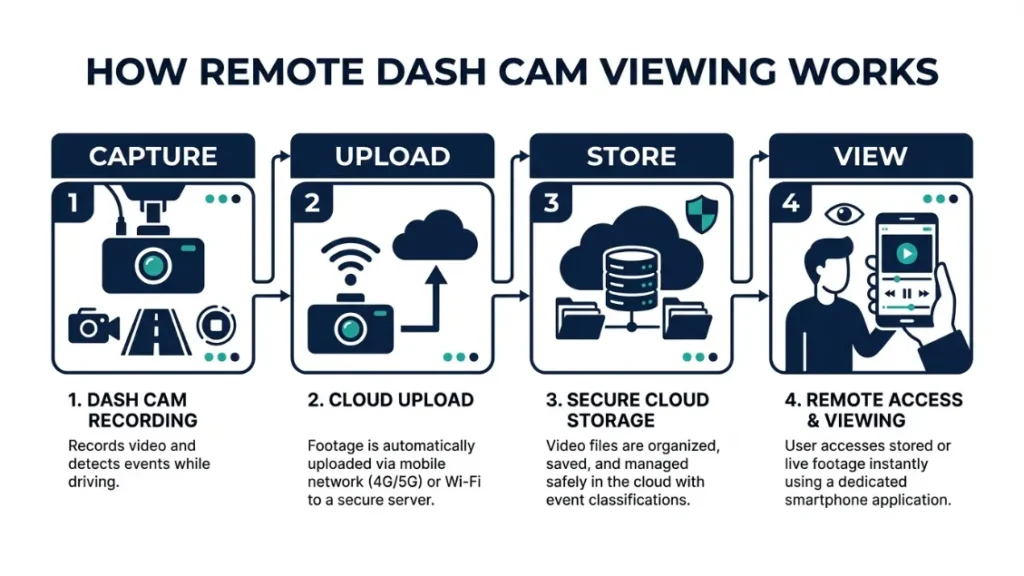
Watching a dash cam from home means accessing your vehicle’s camera feed or recorded footage through an internet-connected device — your phone, tablet, or computer — without physically touching the camera or the SD card. The key requirement is that your dash cam must have some form of internet connectivity built in.
This sounds simple. But here’s where most buyers get confused.
When you search for “remote view dash cam,” you’ll find two very different products grouped together. One lets you truly watch live footage from anywhere. The other just automatically backs up your clips to a cloud server after the fact. Both get called “connected dash cams.” Only one actually lets you watch from home in real time.
The Difference Between Cloud Backup and Live Streaming
Cloud backup means your dash cam uploads video clips to a server — either automatically over Wi-Fi when you park near your home network, or continuously via 4G. You can then log in later and play back those clips. You are not watching live. You are watching a recording that was already uploaded.
Live streaming means the camera sends a real-time video feed to your phone right now. You open the app, tap “Live View,” and you see what the camera sees — with a delay of just a few seconds. This is the feature most people actually want when they imagine watching their dash cam from home.
Not every cloud-connected dash cam supports live streaming. Always check for that specific feature before buying.
When shopping, look for the phrase “live view” or “real-time streaming” in the spec sheet — not just “cloud connected” or “Wi-Fi enabled.” Those terms often refer to backup only.
Why Most Standard Dash Cams Won’t Let You Watch From Home
A standard dash cam — the kind that costs $50 to $100 — records footage to a microSD card inside the camera. It has no Wi-Fi radio, no 4G modem, and no way to send video to any network. To get your footage, you pull the card, plug it in, and watch it manually.
These cameras do their core job brilliantly. They record accidents, capture license plates, and protect you from fraud. But they are completely offline. No app, no remote access, no way to watch from home.
For remote viewing, you need a camera specifically built for network connectivity — and that costs more, typically $150 to $400+.
How Does Remote Dash Cam Viewing Work Step by Step?
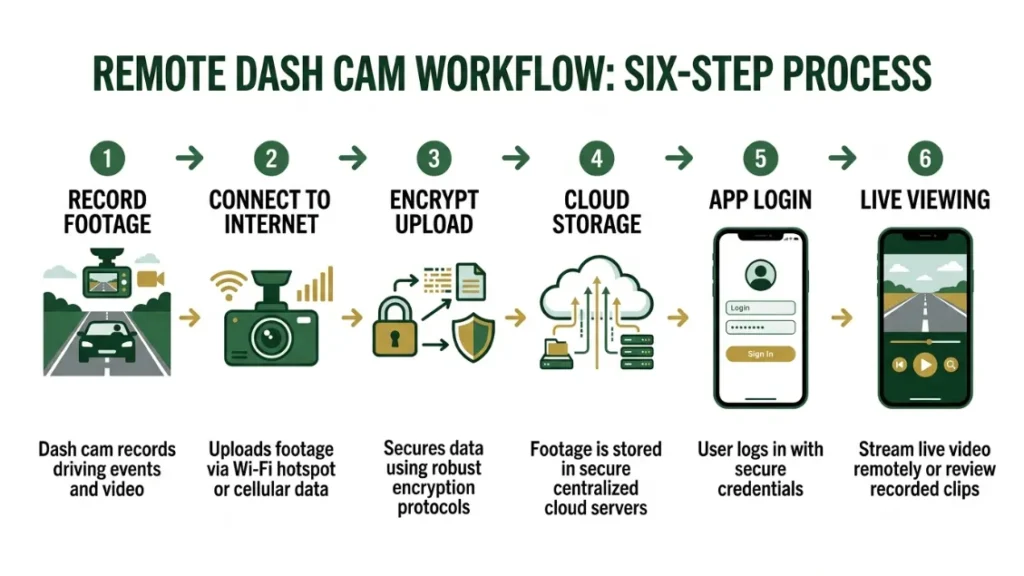
Remote dash cam viewing works through a chain: the camera captures video, encodes it, sends it over an internet connection (Wi-Fi or 4G), routes it through a cloud server, and delivers it to your phone via a companion app. The whole process happens in near real time or as an asynchronous upload, depending on your camera’s features
Understanding this chain helps you troubleshoot problems and choose the right setup from the start.
- Your dash cam records footage continuously while driving or in parking mode.
- The camera connects to the internet — either via your car’s Wi-Fi hotspot, a dedicated SIM card, or your home Wi-Fi when parked nearby.
- Video is encoded and compressed, then sent to the manufacturer’s cloud server over an encrypted connection.
- The cloud server processes and stores the footage in your account.
- You open the companion app on your phone and log in with your account credentials.
- You tap “Live View” for real-time streaming or browse your clip library for saved recordings.
How Wi-Fi Dash Cams Connect to Your Home Network
A Wi-Fi dash cam broadcasts its own short-range hotspot so you can connect your phone directly. But for home viewing, you need a camera that can join an existing Wi-Fi network — your home router — rather than just hosting its own.
When the car is parked in your driveway or garage within range of your home Wi-Fi, the camera connects automatically. It then uploads recent clips to the cloud. You can view those clips from inside your house using the app.
The catch: once you drive away from home, the Wi-Fi connection drops. The camera stops uploading. You lose remote access until the car returns to a connected network.
This is a major limitation. If someone breaks into your car three streets away, you won’t get an alert. You won’t see the footage until the car comes back in range. Wi-Fi-only dash cams are good for driveway monitoring — not true on-the-road remote access.
How 4G LTE Dash Cams Stream From Anywhere — Not Just Home
A 4G LTE dash cam contains a built-in SIM card slot or eSIM. It connects to the mobile data network exactly like your phone does. The camera is always online, always uploading, always reachable — from any location with cell coverage.
This is what gives you true remote access. You can watch live footage of your car while it’s parked downtown, two miles from home, or in another city entirely. You get push notifications when the camera detects motion. You can pull up the live feed any time from your app.
4G dash cams are the real answer to watching your dash cam from home — because they don’t depend on proximity to any specific Wi-Fi network.
If you want to monitor a parked car at home overnight, a Wi-Fi-connected dash cam parked in range of your router is a cost-effective option. If you want access anywhere, anytime, a 4G model is worth the extra investment.
Which Dash Cams Let You Watch Footage From Home Right Now?
The best dash cams for remote home viewing come from a small group of brands that have invested heavily in cloud infrastructure and app development. Here are the ones worth knowing about in 2024.
BlackVue Cloud — The Gold Standard for Live Streaming
BlackVue (a South Korean brand with a global reputation for professional-grade dash cams) built the BlackVue Cloud platform specifically for remote access. Their flagship models — the DR970X and DR750X series — support both live video streaming and real-time GPS tracking through the BlackVue app.
You can watch your car’s camera feed live, receive motion alerts, review clips, and track the vehicle’s location — all from your phone at home. The platform uses HTTPS encryption for data in transit and stores footage in a secure server environment.
BlackVue cameras work with both Wi-Fi and 4G. For always-on remote access, pair a 4G-capable BlackVue model with an Over the Cloud subscription. Plans start around $6.99 per month for basic cloud storage.
Vantrue 4G Dash Cams — Best for Always-On Remote Access
Vantrue (a US-market brand known for feature-rich cameras at competitive prices) released their E1 Lite 4G and E-Series 4G models to address the always-online use case directly. These cameras include a nano SIM card slot and connect to any carrier’s 4G network independently.
The Vantrue app delivers live view, motion alerts with push notifications, GPS location, and two-way audio on select models. For families monitoring a teen driver or a caregiver vehicle, this is one of the most capable setups at under $250.
Nextbase and Garmin — Good Cloud Backup, Limited Live View
Nextbase (a UK brand trusted by over 3 million drivers) and Garmin (the GPS company with a strong dash cam line) both offer cloud-connected cameras — but their remote access is primarily backup-based rather than live streaming.
Nextbase’s MyNextbase Cloud platform automatically uploads emergency clips when an incident is detected. Garmin’s Vault platform backs up footage over Wi-Fi when near a connected network. Both let you review clips remotely through their apps. Neither currently offers robust live streaming the way BlackVue does.
For home viewing of saved clips and incident alerts, both work well. For real-time live view, look elsewhere.
| Brand | Live Streaming | Cloud Backup | 4G Option | Monthly Cost |
|---|---|---|---|---|
| BlackVue | Yes | Yes | Yes | From $6.99 |
| Vantrue 4G | Yes | Yes | Yes (built-in) | SIM plan required |
| Thinkware | Limited | Yes | With module | From $4.99 |
| Nextbase | No | Yes | No | From $3.99 |
| Garmin | No | Yes | No | Vault from $4.99 |
Can You Watch Parking Mode Footage From Home?
Yes — you can watch parking mode footage from home, and this is actually one of the most useful remote viewing scenarios. When your car sits parked in a lot, driveway, or on the street, a connected dash cam with parking mode stays active, detects motion or impacts, and sends you an alert with a clip — all viewable from your phone at home.
This is how you catch a hit-and-run. This is how you know if someone tried your car door handle at 2 a.m. Real-world cases like these are exactly why parking mode and remote access are such a powerful combination.
How Parking Mode and Remote Access Work Together
In parking mode, the dash cam draws power from your car’s battery and watches for motion using either a G-sensor (impact detection) or PIR sensor (heat/movement). When triggered, it records a short clip — typically 30 to 60 seconds — and uploads it to the cloud.
On a 4G-connected camera, that upload happens instantly, no matter where the car is parked. On a Wi-Fi-only camera, the upload happens when the car returns within range of a known network. With 4G, you can receive that parking alert clip on your phone within seconds of the event.
Some cameras — including select BlackVue and Vantrue 4G models — even let you trigger a live view session during parking mode. You see what the camera sees, right now, in real time, from your couch.
Does Remote Viewing While Parked Drain Your Car Battery?
This is the question most buyers forget to ask — and it matters a lot. Running a dash cam in parking mode while connected to 4G draws continuous power from your car’s 12V system. Without protection, this can drain a typical car battery in 12 to 24 hours.
Never run a 4G dash cam in parking mode without a hardwire kit that includes a low-voltage cutoff. This safety feature cuts camera power when your battery drops below a set voltage — typically 11.8V — protecting your ability to start the car.
The safest solutions are a professional hardwire kit with low-voltage cutoff, or a dedicated dash cam battery pack like the BlackVue B-130X or Vantrue EAN2 power bank. These external batteries power the camera for 12 to 24+ hours without touching your car battery at all.
What Does Remote Dash Cam Access Cost Per Month?
Remote dash cam access costs between $0 and $20 per month, depending on the brand, storage tier, and whether you need a 4G data plan. Most brands offer a free tier with limited cloud storage — usually 1 to 3 days of rolling backup — and paid tiers for longer storage and more features.
Free vs. Paid Cloud Storage Plans Compared
Here is how the major brands stack up on cloud storage pricing in 2024:
- BlackVue Over the Cloud: Free tier includes 1 day of cloud storage. Paid plans range from $6.99/month (7 days) to $16.99/month (30 days).
- Thinkware Connected: Free tier available. Paid plans start at $4.99/month for extended storage and features.
- Garmin Vault: Starts at $4.99/month for 1GB of storage. Auto-uploads incident clips when near Wi-Fi.
- Nextbase MyNextbase Cloud: Free emergency clip storage included. No ongoing cost for basic access.
- Vantrue: Cloud access included with camera. Extended plans vary by region and carrier partnership.
If you just want incident clips backed up automatically and viewable from home, free tiers from Nextbase or a basic Garmin Vault plan will cover you. If you want live streaming and 24/7 remote access, budget $7 to $17 per month for a BlackVue or Vantrue cloud plan — plus a separate 4G data SIM if using a cellular-connected model.
4G Data Costs — What to Expect Monthly
A 4G dash cam needs its own SIM card and data plan. This is a separate cost from the cloud subscription. For parking mode and occasional remote viewing, a 1GB to 2GB monthly data plan is usually enough — expect to pay $5 to $15 per month depending on your carrier.
Continuous live streaming uses far more data. One hour of 1080p live stream can consume 1 to 3GB. Most users don’t stream continuously — they check in briefly and receive motion-triggered clips. Realistic monthly data usage for typical remote monitoring is 2 to 5GB.
Many users use a low-cost IoT SIM card from carriers like Hologram, Ting, or T-Mobile’s connected device plans to keep 4G dash cam costs down.
Is It Safe and Private to Watch Dash Cam Footage Remotely?
Remote dash cam viewing is generally safe and private when you use a reputable brand with proper encryption and strong account security. Your footage travels over an encrypted connection, is stored in a secured cloud account, and is accessible only with your login credentials.
That said, like any cloud-connected system, the security is only as strong as your account practices. Weak passwords and shared login credentials create real risk.
How Encryption Protects Your Video Feed
Major brands — including BlackVue, Thinkware, and Vantrue — use HTTPS (TLS encryption) to protect data in transit between the camera, cloud server, and your phone. This means no one can intercept and read your footage as it travels over the internet.
Some manufacturers also offer end-to-end encryption for stored footage. Always check whether the brand you choose encrypts both in transit and at rest. Brands that are vague about their security practices are a red flag.
In 2023, cybersecurity researchers flagged vulnerabilities in several low-cost dash cam brands that exposed live footage to unauthorized access. Stick with established brands that publish their security practices openly — the cost difference is worth the peace of mind.
Who Else Can Access Your Dash Cam Footage?
Your footage is stored in the manufacturer’s cloud servers. By default, only your account can access it. However, you should read the brand’s privacy policy carefully. Some manufacturers reserve the right to access footage for technical support or law enforcement requests.
Fleet management setups often give employers access to employee vehicle footage — always disclose this clearly. In personal use, sharing your account credentials with a family member is the only way another person can view your footage.
For the highest privacy, choose a brand that offers local-only storage with optional cloud sync — so your footage stays on your SD card by default and only uploads when you choose.
What Should You Look for Before Buying a Remote-View Dash Cam?
Before buying a dash cam for remote home viewing, check these six factors. Missing even one can leave you frustrated with a camera that doesn’t work the way you expect.
- Live view capability: Confirm the spec sheet says “live streaming” or “live view” — not just “cloud connected.”
- 4G vs. Wi-Fi: For access anywhere, you need 4G. For home-only driveway monitoring, Wi-Fi is enough.
- App quality: Read recent app store reviews. A great camera with a buggy app is a poor remote-viewing tool.
- Cloud storage cost: Factor in the monthly subscription before your total budget. Some cameras look cheap until you see the cloud fee.
- Parking mode power: If you want remote viewing while parked, confirm the camera supports parking mode and plan for a hardwire kit or external battery.
- Encryption and privacy policy: Check what data the manufacturer collects and how your footage is protected.
Avoid budget no-name 4G dash cams from unknown brands on marketplaces like Amazon or AliExpress. Many have poor app infrastructure, unreliable cloud servers, or non-existent security practices. A $80 saving is not worth losing access to critical footage when you need it most.
The Consumer Reports dash cam guide is a reliable reference for verified testing of specific models across brands.
Frequently Asked Questions

I’m Alex Rahman, a car enthusiast and automotive writer focused on practical solutions, car tools, and real-world driving advice. I share simple and honest content to help everyday drivers make better decisions.
