Can the Human Eye See the Difference Between 2K and 4K?
Yes, the human eye can see the difference between 2K and 4K, but only under the right conditions. You need a large screen and close viewing distance. On small screens or from far away, the difference becomes hard or impossible to notice.
I remember sitting in my living room, staring at a new TV demo. The salesperson switched between 2K and 4K. At first, I saw no difference. That moment confused me.
I’m Alex Rahman, and I write about real-world tech decisions people face daily. Resolution sounds simple, yet it often misleads buyers.
Many people expect 4K to look four times better. That rarely happens. The truth depends on how your eyes work and how you watch.
Let’s break it down in a simple, practical way.
- 4K shows more detail only at close distances or large screens.
- Your eyes have limits, so extra pixels often go unseen.
- Screen size and distance matter more than resolution alone.
- Streaming quality can hide the real benefit of 4K.
What Is the Real Difference Between 2K and 4K Resolution?
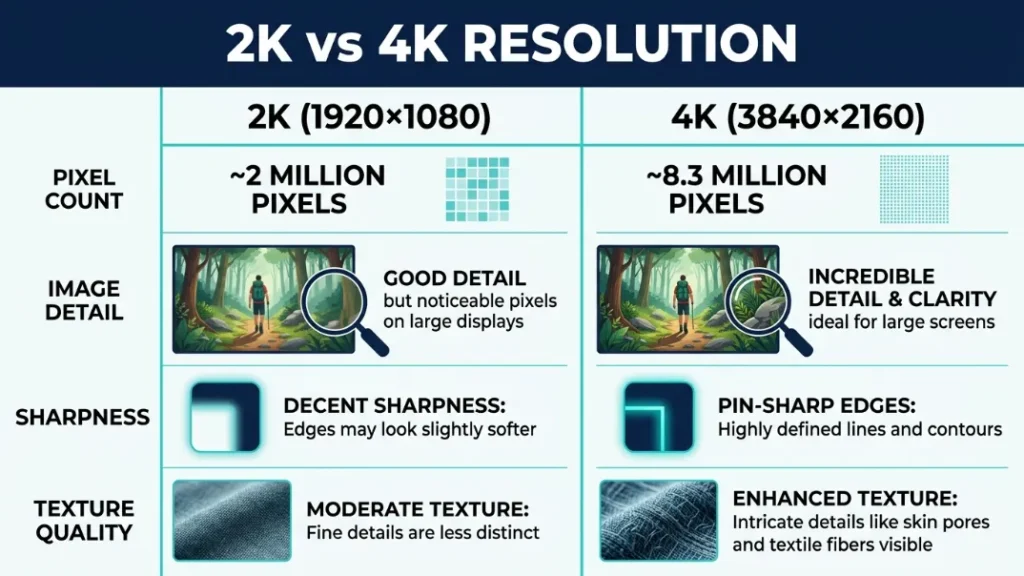
2K and 4K differ mainly in pixel count, where 4K packs four times more pixels than 2K, which allows more detail, sharper edges, and finer textures when displayed under the right viewing conditions.
2K usually refers to 1920×1080 resolution, also called Full HD. 4K refers to 3840×2160 resolution, known as Ultra HD.
More pixels mean more image detail. Each pixel carries color and brightness data. More pixels create smoother edges and finer textures.
The rule is simple: More pixels help only when your eyes can see them.
If your eyes cannot detect the extra detail, both resolutions look the same.
That leads to the next question.
Can the Human Eye Actually See the Difference Between 2K and 4K?
The human eye can see the difference between 2K and 4K only when the screen is large enough and the viewing distance is close enough for your eyes to resolve the extra pixels.
Human vision has limits. Scientists like :contentReference[oaicite:0]{index=0} studied how much detail eyes can detect.
This concept is called :contentReference[oaicite:1]{index=1}. It defines how small a detail your eye can see.
If pixels are too small or too far away, your eye blends them together.
Key insight: If you cannot resolve individual pixels, higher resolution gives no visible gain.
So yes, you can see the difference—but only in specific setups.
Sit closer to your screen if you want to notice sharper detail from 4K.
How Does Viewing Distance Affect What You See?
Viewing distance directly affects resolution visibility because the farther you sit, the harder it becomes for your eyes to distinguish fine pixel details, making 4K and 2K appear identical at long distances.
Your eyes act like a resolution filter. Distance reduces visible detail.
For example, a 55-inch TV viewed from 10 feet away often shows no clear difference between 2K and 4K.
But move closer, and details become sharper.
Simple rule: Closer distance increases visible detail.
- Measure your screen size.
- Check your seating distance.
- Compare with recommended viewing charts.
- Adjust seating to test sharpness difference.
You can explore viewing guidelines from TV size and distance charts.
Next, let’s look at screen size.
Does Screen Size Change Whether 4K Looks Better?
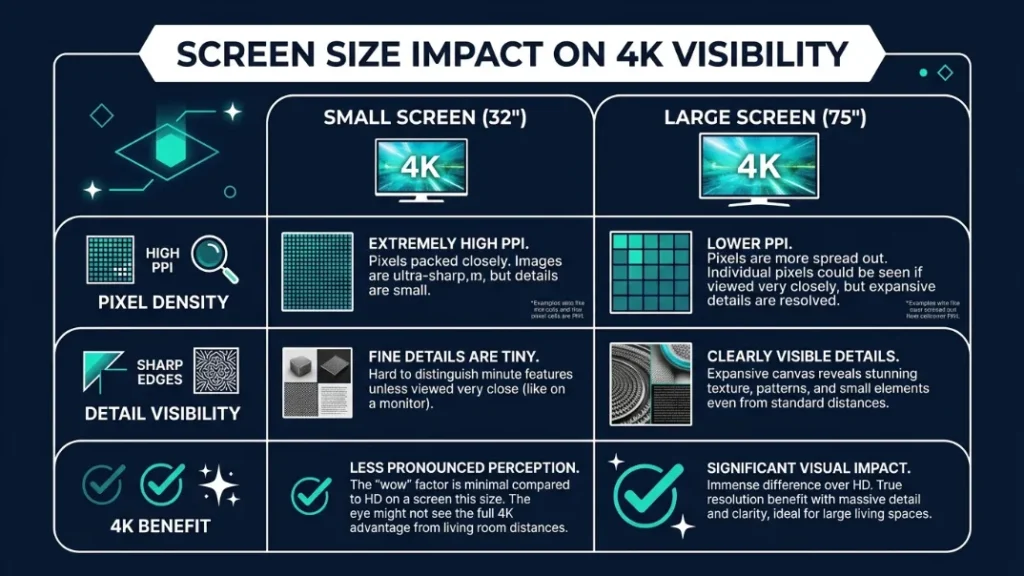
Screen size plays a major role because larger displays spread pixels over a bigger area, making the extra detail of 4K easier to see compared to smaller screens where pixel density already looks sharp.
Small screens pack pixels tightly. This is called :contentReference[oaicite:2]{index=2}.
High pixel density makes images look sharp even at lower resolutions.
Example: A 32-inch TV shows little difference between 2K and 4K.
But a 75-inch TV shows clear detail improvement with 4K.
Brands like :contentReference[oaicite:3]{index=3} and :contentReference[oaicite:4]{index=4} push larger 4K screens because size reveals resolution benefits.
So, bigger screens make 4K more useful.
Why Does 4K Sometimes Look the Same as 2K?
4K can look identical to 2K when content quality is low, viewing distance is too far, or the video is compressed, which removes fine detail and cancels the advantage of higher resolution.
Streaming platforms compress video to save bandwidth. This reduces detail.
Even 4K streams may not show full quality.
This process relates to :contentReference[oaicite:5]{index=5}. TVs stretch lower-resolution content to fit 4K screens.
Key insight: Upscaled content never matches true 4K detail.
Many “4K” streams are compressed, so you may not see real 4K quality.
For deeper understanding, see how 4K resolution works.
Now, let’s see when 4K truly shines.
When Does 4K Make a Noticeable Difference?
4K makes a noticeable difference when you use a large screen, sit close enough, and watch high-quality native 4K content with minimal compression, allowing your eyes to detect finer textures and sharper edges.
- Large TVs (65 inches or more)
- Close viewing distance
- High-quality Blu-ray or native 4K content
- High bitrate video sources
OLED displays from :contentReference[oaicite:6]{index=6} improve perceived sharpness further with better contrast.
Rule: Resolution + contrast + content quality work together.
4K looks better only when screen size, distance, and content quality align. If one factor fails, the difference shrinks or disappears.
Is 4K Worth It for Movies, Gaming, and Everyday Use?
4K is worth it for movies and gaming on larger screens, but for everyday use on smaller displays, the difference often feels minimal because your eyes cannot detect the extra detail.
Is 4K better for movies?
Yes, 4K improves movie quality with sharper detail and better color depth when using high-quality sources like Blu-ray discs.
Does 4K improve gaming?
Yes, 4K gaming looks sharper, but it demands powerful hardware and may reduce frame rates.
Is 4K useful for small screens?
No, small screens already look sharp at lower resolutions due to high pixel density.
Gaming setups benefit from 4K when paired with strong GPUs and large monitors.
Streaming services like Netflix 4K requirements explain how bandwidth affects quality.
What Are the Limits of the Human Eye?
The human eye has a resolution limit defined by visual acuity, which means it can only distinguish details down to a certain size, beyond which extra pixels provide no visible improvement.
Experts like :contentReference[oaicite:7]{index=7} estimate that normal vision resolves about 60 pixels per degree.
This creates a natural cap on visible detail.
Key idea: More pixels do not always mean better vision.
When resolution exceeds what your eyes can detect, improvements become invisible.
This explains why 8K often shows no benefit in normal setups.
How to Tell If You Should Upgrade to 4K
You should upgrade to 4K if your screen is large, your seating distance is close, and you regularly watch high-quality content that can take advantage of the extra resolution.
- Check your screen size.
- Measure your viewing distance.
- Assess your content quality.
- Decide if you can notice extra detail.
Simple rule: If you cannot see the difference, do not upgrade.
Make your decision based on real use, not marketing.
What Happens Beyond 4K — Does 8K Even Matter?
8K offers more pixels than 4K, but most people cannot see the difference because human visual limits, typical screen sizes, and normal viewing distances prevent the extra detail from becoming visible.
The :contentReference[oaicite:8]{index=8} already pushed resolution beyond practical needs for many homes.
Future gains will focus more on contrast, color, and brightness.
Key insight: Resolution gains now show diminishing returns.
So, 8K matters less than better display quality.
Conclusion
The human eye can see the difference between 2K and 4K, but only in the right conditions. Screen size, distance, and content quality matter more than resolution alone.
Most people will not notice a big jump in everyday use. Large screens and close seating reveal the real benefit.
I’m Alex Rahman, and I always suggest testing your setup before upgrading. Your eyes decide, not marketing claims.
Focus on what you actually see. That is what matters.
Frequently Asked Questions
Can the human eye see 4K resolution?
Yes, but only under ideal conditions. You need a large screen and close viewing distance to notice the difference clearly.
Is 4K always better than 2K?
No, not always. It depends on screen size, distance, and content quality. Many setups show little difference.
How far should you sit from a 4K TV?
You should sit closer than with 2K TVs. Sitting too far removes the visible benefit of higher resolution.
Does Netflix show true 4K quality?
Not always. Streaming compression reduces detail, so it may not match true 4K Blu-ray quality.
Is 4K worth it on a small TV?
No, small screens already look sharp. The extra pixels rarely make a visible difference.
Why does 4K sometimes look the same?
Low-quality content, compression, or long viewing distance can hide the extra detail of 4K.

I’m Alex Rahman, a car enthusiast and automotive writer focused on practical solutions, car tools, and real-world driving advice. I share simple and honest content to help everyday drivers make better decisions.
