Can a Dash Cam Drain Car Battery and How Do You Stop It?
Yes, a dash cam can drain your car battery — but only under specific conditions. Normal driving use is safe. The real risk is parking mode, which keeps the cam recording while your engine is off. A hardwire kit with a low-voltage cutoff prevents drain and protects your battery automatically.
I came back to a completely dead battery after a weekend trip. My car had been parked at the airport for four days. My dash cam had been running in parking mode the entire time.
I’m Alex Rahman, and that expensive lesson taught me more about dash cam power draw than any manual ever could. I’ve since spent a lot of time researching how these cameras interact with car batteries — and how to use them safely.
The truth is, most people plugging in a dash cam have no idea when it’s drawing power, how much it uses, or when it crosses from “fine” into “flat battery territory.” That’s exactly what this guide covers — start to finish.
By the end, you’ll know exactly how to run your dash cam — including parking mode — without ever worrying about your battery again.
- A dash cam using a cigarette lighter socket is safe — it cuts power when the engine turns off.
- Parking mode is the main cause of battery drain — it keeps the cam running when the car is off.
- A hardwire kit with low-voltage cutoff protects your battery by shutting the cam off before damage occurs.
- A typical dash cam draws 200–500mA — enough to flatten a battery in 24–72 hours without protection.
- External battery packs like the Cellink Neo let you run parking mode indefinitely with zero battery risk.
What Gives a Dash Cam Power and When Does It Draw from Your Battery?
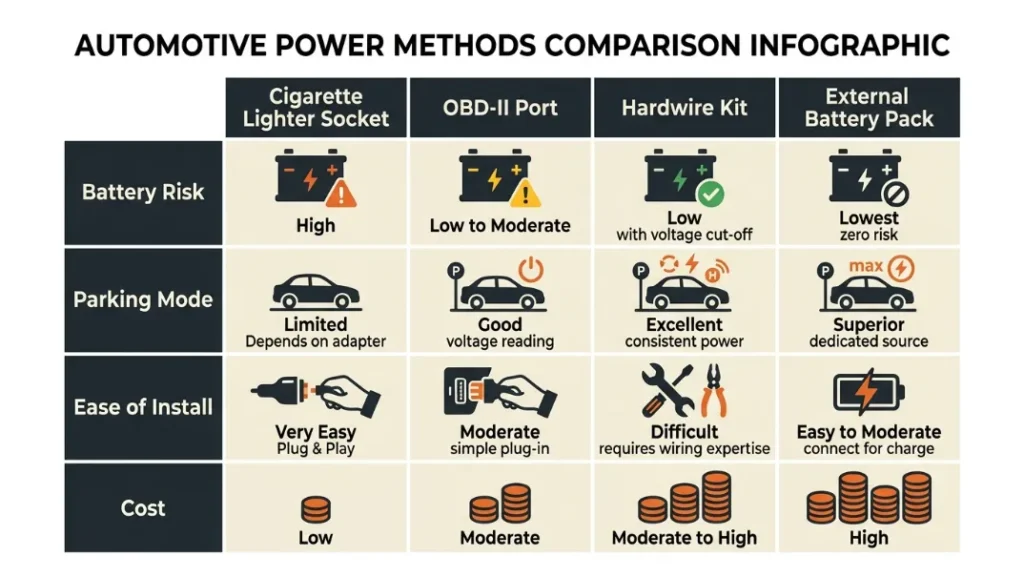
A dash cam gets its power from your car’s 12V electrical system — and it only drains your battery when it draws power while the engine is off. When the engine runs, your alternator recharges everything. The drain happens in the gaps.
Most drivers connect their dash cam in one of three ways: the cigarette lighter socket, the OBD-II port, or a hardwire kit connected directly to the fuse box. Each method behaves very differently when it comes to battery protection.
Understanding which method you’re using — and what it does when the engine stops — is the first step to protecting your battery.
How a Cigarette Lighter Socket Cuts Power Automatically
In most modern vehicles, the cigarette lighter socket is switched — meaning it only receives power when the ignition is on. Turn the engine off, the socket goes dead, and your dash cam stops drawing power completely.
This makes the cigarette lighter socket the safest and simplest way to run a dash cam for everyday driving. No battery drain risk at all. The downside is that your cam stops recording the moment you leave the car — so parking mode is not possible with this setup.
Not all cigarette lighter sockets cut out at ignition off. In some older vehicles, the socket stays live all the time. Test yours with a cheap socket tester or multimeter before assuming you’re protected.
Why Hardwiring a Dash Cam Changes the Drain Risk
A hardwire kit connects your dash cam directly to your car’s fuse box — giving it a permanent power source even when the engine is off. This is what enables parking mode. But it also introduces direct battery drain if not set up correctly.
The critical component in any hardwire kit is the low-voltage cutoff circuit. This monitors your battery voltage constantly. When it drops to a preset threshold — usually around 11.8V to 12.0V — the kit cuts power to the cam automatically. That protects your battery from going flat.
Without that cutoff, a hardwired dash cam will drain your battery until the car won’t start. That’s the scenario you want to avoid entirely.
Can a Dash Cam Really Kill Your Car Battery Overnight?
Yes — a dash cam running in parking mode can kill your car battery overnight, particularly in older vehicles with smaller or weakened batteries. Whether it does depends on how much power the cam draws, how long it runs, and how much charge your battery holds to begin with.
The maths here is straightforward. And once you understand it, you’ll know exactly how much risk your specific setup carries.
How Much Power Does a Dash Cam Actually Use?
Most dash cams draw between 200mA and 500mA (milliamps) during normal recording. In parking mode, many drop to a lower-draw standby state — around 80mA to 200mA — while waiting for motion or impact triggers.
Here’s a quick look at real-world power draw figures across popular models:
| Dash Cam Model | Normal Recording Draw | Parking Mode Draw |
|---|---|---|
| Viofo A129 Pro | ~350mA | ~120mA |
| Nextbase 622GW | ~450mA | ~180mA |
| BlackVue DR900X-2CH | ~600mA | ~250mA |
| Thinkware U1000 | ~400mA | ~150mA |
At 12V, a 200mA draw equals about 2.4 watts. That sounds tiny. But left running for 24 hours, it adds up to 57.6 watt-hours — a meaningful chunk of a standard car battery’s usable capacity.
How Long Before Parking Mode Drains a Standard Car Battery?
A standard 12V lead-acid car battery holds around 40–60Ah (amp-hours) of capacity. You should never discharge it below 50% — doing so repeatedly shortens its lifespan significantly.
Here’s the practical math for a 50Ah battery at 50% usable capacity (25Ah safe zone):
- At 200mA draw → 125 hours of safe parking mode
- At 300mA draw → 83 hours of safe parking mode
- At 500mA draw → 50 hours of safe parking mode
That sounds generous. But in practice, most car batteries are not at full charge, lose capacity in cold weather, and are often older than ideal. A real-world battery might give you 24–48 hours of parking mode before you hit dangerous territory.
A battery that has been deeply discharged even once loses measurable capacity. If your dash cam killed your battery, get it tested before relying on it. A weakened battery is far more vulnerable to a second drain event.
What Is Parking Mode and Why Does It Drain Your Battery Faster?
Parking mode is a dash cam feature that keeps the camera active after you switch off the engine — recording footage triggered by motion, impact, or continuously — to capture incidents while your car is unattended. It requires a constant power source, which means it always draws from your battery.
It’s genuinely useful. Hit-and-run parking lot incidents, vandalism, and break-in attempts are exactly what parking mode catches. But it comes with a real power cost that you need to manage.
Motion Detection vs Continuous Recording in Parking Mode
Most dash cams offer two parking mode options. Motion detection puts the camera in a low-power standby state and only starts recording when movement enters the frame. Continuous recording keeps the cam recording at all times — using significantly more power.
For battery health, motion detection is always the better choice when running from your car battery directly. It cuts standby draw dramatically and extends how long you can safely run parking mode.
Some premium cams — like the BlackVue DR900X-2CH (a high-end Korean-made dual-channel camera popular with fleet drivers) — also offer a “time lapse” parking mode that captures a frame every few seconds instead of full video. This draws even less power and can extend safe parking mode duration considerably.
Is Parking Mode Safe to Use Every Night?
Parking mode is safe every night if — and only if — you have a hardwire kit with a properly set low-voltage cutoff installed. Without that protection, nightly parking mode use will degrade your battery faster than almost anything else.
If you drive daily for at least 30–45 minutes, your alternator has enough time to partially recover the overnight draw. Short urban commutes may not be enough to fully recharge the battery before the next night’s drain begins.
If you park for more than 48 hours at a time — at airports, on holiday, or working away — disable parking mode entirely or switch to an external battery pack. Your car’s battery simply cannot sustain multi-day parking mode safely.
What Is Low-Voltage Cutoff and Why It Could Save Your Battery?
Low-voltage cutoff is a protection feature built into quality hardwire kits that monitors your car battery’s voltage and automatically cuts power to the dash cam when voltage drops to a preset minimum — preventing your battery from draining to the point where the car won’t start.
This is the single most important feature to look for in any hardwire kit. Without it, your dash cam has no idea it’s killing your battery. It just keeps recording until there’s nothing left.
Brands like Viofo (a Chinese manufacturer trusted by dash cam enthusiasts globally for their affordable, reliable kits) include adjustable voltage cutoff in their hardwire kits as standard. Nextbase’s own hardwire kit does the same. Thinkware hardwire kits add a timer cutoff option too — shutting the cam off after a set number of hours regardless of voltage.
What Voltage Level Should You Set the Cutoff At?
For a standard lead-acid battery, set your low-voltage cutoff between 11.8V and 12.0V. This leaves enough charge in the battery to start the engine reliably while still giving you meaningful parking mode recording time.
- 12.4V+ — battery is fully charged
- 12.2V — 50% charge — getting low
- 12.0V — recommended cutoff point
- 11.8V — minimum safe cutoff for healthy batteries
- Below 11.6V — battery may not start the engine
For AGM batteries — which are found in newer vehicles with start-stop systems — the voltage curve is slightly different. AGM batteries tolerate deeper discharge better, but you should still set cutoff no lower than 12.0V to protect the battery’s long-term health.
The rule is simple: If your hardwire kit does not have a low-voltage cutoff, do not use parking mode. Full stop. No other precaution compensates for a missing cutoff circuit.
Hardwire Kit vs OBD-II Port vs Cigarette Lighter Which Is Safest for Your Battery?
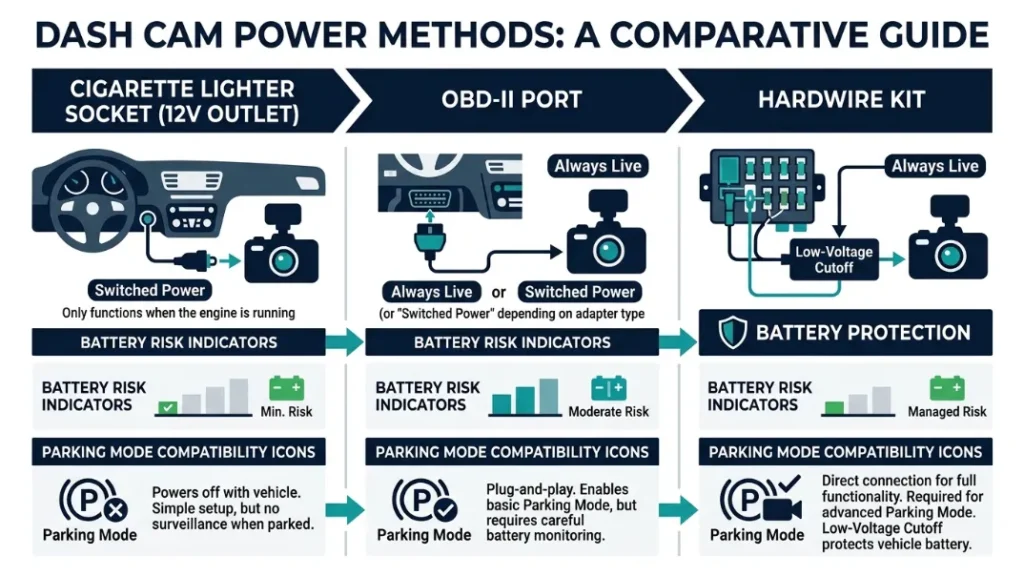
The power source you choose for your dash cam has a direct impact on battery drain risk. Each method offers a different level of safety, convenience, and parking mode compatibility — and the right choice depends entirely on how you use your cam.
| Power Method | Battery Risk | Parking Mode | Ease of Install | Cost |
|---|---|---|---|---|
| Cigarette Lighter Socket | Very Low | No | Plug and play | Free (included) |
| OBD-II Port | High | Yes (no cutoff) | Easy | $15–$30 |
| Hardwire Kit (with cutoff) | Low | Yes (protected) | Moderate | $20–$50 |
| External Battery Pack | None | Yes (unlimited) | Easy | $80–$150 |
The OBD-II port deserves a special warning. It is always live — even with the ignition off. There is no voltage cutoff built in. Plugging a dash cam into an OBD-II adapter and leaving it overnight in parking mode is one of the fastest ways to flatten your battery. Many drivers don’t realise this until it’s too late.
Never use an OBD-II port adapter for dash cam parking mode. The port is permanently powered and has no low-voltage cutoff. Using it this way risks draining your battery flat within 24–48 hours.
Does a Capacitor Dash Cam Drain Your Car Battery Less Than a Battery Dash Cam?
A capacitor dash cam uses a supercapacitor instead of a lithium battery for internal power storage — and while this does not reduce how much power the cam draws from your car battery during recording, it does offer meaningful benefits for battery safety in specific situations.
Here’s the key distinction. The internal capacitor or battery in a dash cam is only used to save footage and shut down safely when power is suddenly cut. It does not power the recording itself. Both capacitor and battery-based cams draw the same current from your 12V system while running.
Where capacitor cams shine is in hot climates. Lithium battery-based dash cams degrade in heat — and a swollen or failed internal battery can cause the cam to behave erratically, sometimes drawing more current than intended. Capacitor cams — like the popular Viofo A119 Mini 2 — don’t have this issue. They’re more reliable in warm environments and maintain consistent power draw throughout their lifespan.
Capacitor dash cams don’t draw less power — but they’re more reliable long-term, especially in hot weather. If you live somewhere warm and want consistent, predictable power draw, a capacitor cam is the smarter choice.
How to Use Parking Mode Without Draining Your Car Battery at All
The most reliable way to use parking mode without any risk to your car battery is to power the dash cam from a dedicated external battery pack — completely separate from the vehicle’s 12V system. This eliminates battery drain entirely.
How an External Battery Pack Like the Cellink Neo Works
The Cellink Neo (made by Blackmagic Design’s partner brand, widely considered the gold standard in dash cam battery packs) is a lithium battery pack designed specifically for dash cam parking mode. It sits between your car battery and your dash cam. While the engine runs, the car charges the Cellink. While the engine is off, the Cellink powers the dash cam — without touching your car battery at all.
The Cellink Neo B holds around 9,000mAh and can power a typical single-channel dash cam for 40–50 hours of parking mode. The larger Cellink Neo G supports multi-camera setups. At around $120–$150, it’s the most effective battery protection solution available — and the one I personally recommend for anyone who parks for long periods.
You can find detailed Cellink Neo reviews and setup guides at BlackboxMyCar, one of the most trusted dash cam specialist retailers in North America.
Step-by-Step: How to Set Up Your Dash Cam to Protect Your Battery
- Check your cigarette lighter socket — test whether it cuts power at ignition off using a phone charger.
- If you only need driving recording, use the cigarette lighter socket. No further action needed.
- If you want parking mode, buy a quality hardwire kit (Viofo, Thinkware, or your cam brand’s own kit).
- Wire the hardwire kit to a switched or permanent fuse — your cam’s manual specifies which to use.
- Set the low-voltage cutoff to 12.0V for standard batteries, or 11.8V for newer AGM batteries.
- Enable motion-detection parking mode in your cam’s settings — not continuous recording.
- If you park for 48+ hours regularly, add a Cellink Neo external battery pack between the kit and the cam.
For a detailed hardwiring walkthrough, The Dash Cam Store’s hardwiring guide is one of the most thorough free resources available online.
Signs Your Dash Cam Is Already Draining Your Battery
Sometimes the drain has already started before you think to check. These are the warning signs that your dash cam setup may be quietly pulling more power than your battery can handle.
- Slow engine crank in the morning — the starter motor struggles, especially after the car sits overnight.
- Battery warning light — appears on the dashboard during or after a cold start.
- Dash cam restarting on its own — often means the battery voltage has dropped and the cutoff has triggered repeatedly.
- Car needs a jump start after 24–48 hours parked — the most obvious sign of excessive parasitic drain.
- Shorter than expected parking mode recording times — the cam is cutting off earlier because the battery is degraded.
If you notice any of these signs, stop using parking mode immediately and get your battery tested. A load test at any auto parts store — most do it for free — will tell you exactly how much capacity your battery has left.
According to the AA’s battery guidance, a car battery typically lasts 3–5 years — and deep discharge events accelerate degradation significantly.
Most auto parts retailers — including AutoZone, Halfords, and Repco — will test your battery for free in the car park. If your battery is below 80% health, replace it before relying on parking mode again.
Frequently Asked Questions

I’m Alex Rahman, a car enthusiast and automotive writer focused on practical solutions, car tools, and real-world driving advice. I share simple and honest content to help everyday drivers make better decisions.
