Is a 16GB SD Card Enough for a Dash Cam, or Will You Lose Critical Footage?
A 16GB SD card holds roughly 2–3 hours of 1080p dash cam footage. That covers a short daily commute with loop recording, but it is not enough for parking mode, dual-channel cameras, or drives longer than a few hours. Most drivers do better with a 64GB or 128GB high-endurance card.
I bought my first dash cam in 2019. It came with a tiny 16GB microSD card tucked inside the box. I figured — free card, great start.
Then I parked my car in a shopping center lot. Someone clipped my rear bumper and drove away. I ran out to check the footage. Nothing. The card had already overwritten every clip from that morning.
That experience taught me something most dash cam guides skip entirely. The card size is not just a spec. It is the difference between having proof and having nothing.
I’m Alex Rahman, and I’ve spent years testing dash cams, digging into SD card specs, and figuring out what actually works for real drivers. In this guide, I’ll show you exactly how much footage a 16GB card holds, when it works fine, and when it will silently delete the one clip you needed most.
- A 16GB SD card holds 2–3 hours of 1080p dash cam footage before loop recording overwrites old clips.
- Parking mode drains a 16GB card fast — often before you even return to your car.
- Dual-channel (front + rear) cameras fill a 16GB card in roughly half the time of a single-camera setup.
- Most daily drivers need at least 64GB; parking mode users and road trippers should go 128GB or higher.
- High-endurance microSD cards outlast regular cards by months — the card type matters as much as the size.
What Does a Dash Cam SD Card Actually Do While You Drive?
Your dash cam records continuously and saves that footage to the SD card in short video clips — usually 1, 2, or 3 minutes each. The card stores every clip until it runs out of space. Then the oldest clips get deleted automatically to make room for new ones. That process is called loop recording, and it runs without you doing anything.
This design is intentional. You never have to manually delete files. The dash cam manages itself. But here is the catch — once that old footage is gone, it is gone for good.
How Loop Recording Works And Why It Changes Everything
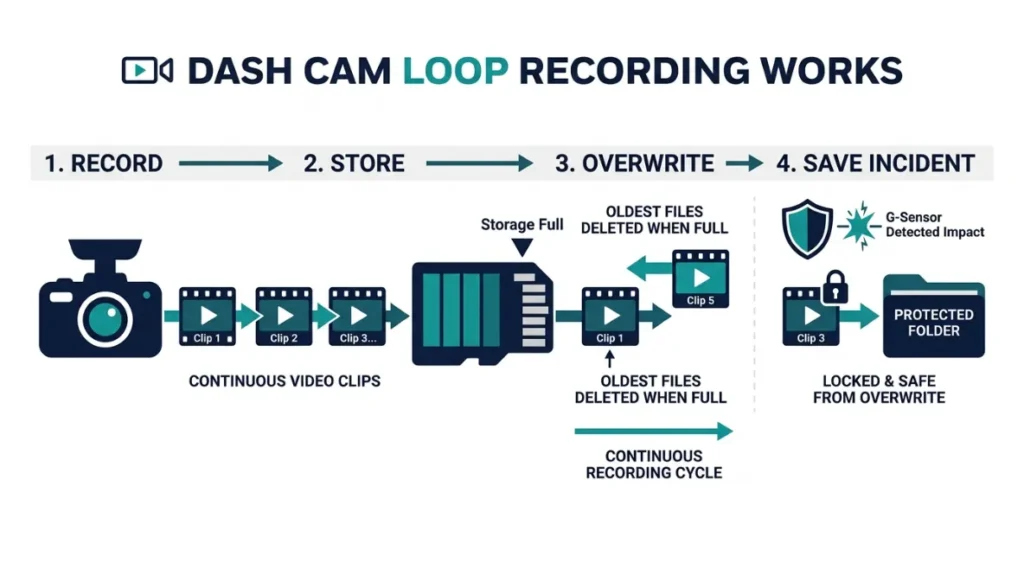
Loop recording means your dash cam constantly cycles through the card. Think of it like a conveyor belt. New footage enters one end. Old footage falls off the other end to make space. The card never truly “fills up” in a way that stops recording — it just overwrites.
Most dash cams, including popular models from Viofo, BlackVue, Nextbase, and Vantrue, use this system by default. Some cameras let you lock a clip — often triggered automatically by the G-sensor during a sudden impact — so that locked footage does not get overwritten. But standard driving footage stays on a rolling loop.
After any incident, manually lock or copy the clip to another device as soon as possible. Even with a large SD card, loop recording will eventually reach that file and delete it.
What Happens When Your Dash Cam SD Card Fills Up?
Nothing dramatic happens. The camera does not freeze or crash. It simply deletes the oldest video files and keeps recording over them. This is normal and expected behavior. The only risk is losing footage you needed before you had a chance to save it.
On a 16GB card recording at 1080p, that window is just 2–3 hours. Drive for a long day, use parking mode overnight, or run a front-and-rear setup — and critical footage from earlier in the day can vanish by the time you go looking for it.
How Many Hours of Video Does a 16GB SD Card Hold at Each Resolution?
The amount of footage a 16GB card holds depends almost entirely on your dash cam’s recording resolution. Higher resolution means bigger file sizes, which means the card fills up faster. Here is exactly what you can expect at each common setting.
720p, 1080p, 1440p, and 4K — Side-by-Side Recording Times
| SD Card Size | 720p | 1080p (Full HD) | 1440p (2K) | 4K |
|---|---|---|---|---|
| 16GB | ~4 hrs | ~2–3 hrs | ~1.5 hrs | ~1 hr |
| 32GB | ~8 hrs | ~4–6 hrs | ~3 hrs | ~2 hrs |
| 64GB | ~16 hrs | ~8–10 hrs | ~6 hrs | ~4 hrs |
| 128GB | ~30+ hrs | ~16–20 hrs | ~12 hrs | ~8 hrs |
| 256GB | ~60+ hrs | ~32–40 hrs | ~24 hrs | ~16 hrs |
These figures assume a single-channel dash cam using H.264 compression at 30fps. Real numbers vary slightly by camera brand and bitrate setting.
Does Frame Rate (FPS) Change How Much Storage You Use?
Yes, and more than most people expect. Recording at 60fps captures twice as many frames as 30fps, which means roughly double the file size per hour. If your dash cam supports 1080p at 60fps and you run it at that setting, your 16GB card fills up in about 1–1.5 hours instead of 2–3 hours.
For most drivers, 1080p at 30fps delivers sharp, usable footage — good enough to read license plates in daylight. Pushing to 60fps is only worth the storage cost if you need smoother slow-motion playback.
If you drop your resolution to 720p to stretch your 16GB card further, you may lose the detail needed to read a license plate after an accident. Balance storage with the footage quality you actually need as evidence.
When Is 16GB Enough — and When Will It Let You Down?
A 16GB SD card works in one specific scenario: a single-camera dash cam, recording in 1080p, used for a short daily commute with no parking mode. Outside that narrow window, it will consistently fail you at the worst possible moment.
The Short Commuter: The One Driver a 16GB Card Works For
If your round-trip commute is 30–45 minutes each way, a 16GB card at 1080p keeps about 2–3 hours of footage in the loop. That means you always have today’s drive covered, plus a little buffer from the previous day.
For this driver — single camera, no parking mode, short predictable trips — a 16GB card is technically sufficient. But for just a few dollars more, a 64GB card gives 8–10 hours of coverage at the same resolution. The upgrade pays for itself the first time something unexpected happens.
Even for short commuters, keeping a spare 16GB or 32GB card in the glove box is smart. Dash cam experts at BlackboxMyCar recommend this so you can swap cards instantly if the primary card fails or fills during a long unexpected drive.
The Parking Mode Problem: Why 16GB Gets Wiped Before You Return
Parking mode is where 16GB cards cause the most damage. When your car sits parked, the dash cam stays on and records continuously — or records whenever motion or impact is detected. That footage is still stored on the same 16GB card, overwriting your driving footage in the process.
One real-world user shared exactly this problem on the DashCamTalk forum: they started with a freshly formatted 16GB card at 6:45 AM, parked at work by 7:00 AM with parking mode running, and returned at 5:15 PM. By then, all driving footage from that morning was already gone — overwritten by parking mode clips accumulated throughout the day.
Their dash cam ran in parking mode all day with a 16GB card and wiped 6+ hours of footage before they even got back to check it.
The parking mode trap: You use your dash cam specifically because you park in risky areas. But a 16GB card in parking mode wipes the footage of any incident that happened earlier in the day — long before you return to check. The camera that should protect you ends up protecting nothing.
Dual-Channel Dash Cams: Why 16GB Disappears in Half the Time
A front-and-rear dash cam records two simultaneous video streams. Both streams write to the same SD card at the same time. That means a 16GB card with a dual-channel setup — like the popular Vantrue N2 Pro or Viofo A129 Plus — fills up in roughly half the time of a single-camera unit. At 1080p front and 1080p rear, you are looking at just 1–1.5 hours of total coverage.
For any dual-channel setup, 16GB is not a starting point — it is a liability. 64GB is the minimum to consider, and 128GB is the smarter choice.
16GB vs 32GB vs 64GB vs 128GB — Which Size Actually Fits Your Drive?
The right card size depends on how you drive, how long you park, and whether you run one camera or two. Here is a clear breakdown by driver type to cut through the confusion.
| Driver Type | Setup | Recommended Size |
|---|---|---|
| Short commuter, single cam, no parking mode | 1 camera, 30–60 min/day | 32GB–64GB |
| Daily commuter, single cam, parking mode on | 1 camera, parked 8+ hrs | 64GB–128GB |
| Daily driver, dual-channel, no parking mode | Front + rear, 1–2 hrs/day | 64GB |
| Rideshare or delivery driver | Long hours, often dual-channel | 128GB–256GB |
| 4K recording, any usage pattern | High-res single or dual cam | 128GB+ |
16GB only makes sense for the simplest possible setup — one camera, no parking mode, short drives. Everyone else benefits from stepping up. A 64GB high-endurance card costs under $15 in 2025 and gives most drivers full-day coverage with room to spare.
Does Your SD Card Type Matter as Much as the Size?
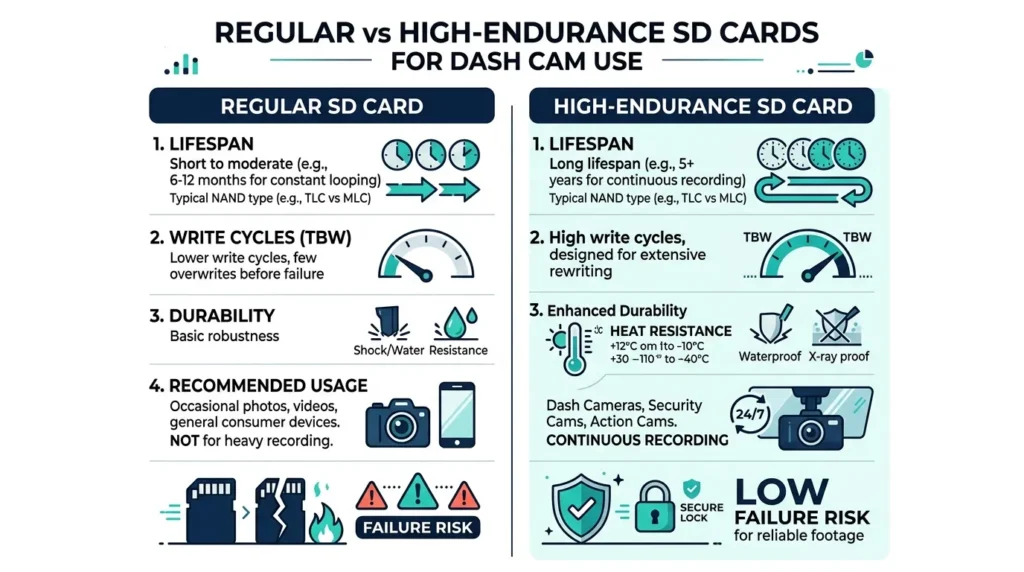
Yes — and this is where many drivers make a mistake they do not discover until the card fails. The size of your card tells you how much it holds. The type of card tells you how long it will last under the brutal write cycles a dash cam puts it through.
Regular SD Cards vs High-Endurance Cards — What’s the Real Difference?
A regular SD card — the kind that comes with your phone or camera — is designed for occasional writes. You take a photo. You save a file. The card writes data infrequently and rests in between.
A dash cam writes data non-stop, 24 hours a day, looping over and over. Over time, the flash memory cells in a regular card degrade from this constant rewriting. Kingston Technology, one of the most trusted names in memory hardware, explains that dash cam usage can invalidate a regular card’s manufacturer warranty and cause premature failure within weeks or months.
High-endurance cards — like the Samsung PRO Endurance, SanDisk High Endurance, or Kingston High Endurance — are built specifically for constant write applications. They use more durable flash memory cells and are rated to survive thousands of hours of continuous recording.
- Regular SD card lifespan in a dash cam: Weeks to a few months
- High-endurance card lifespan in a dash cam: 1–3 years or more
The price difference is small — often just $3–5 between a standard and high-endurance version of the same capacity. The reliability difference is enormous.
What SD Card Speed Class Does a Dash Cam Need?
Dash cams write video data continuously, so the card must write fast enough to keep up without dropping frames. Most 1080p dash cams need a card rated at minimum Class 10 or UHS Speed Class 1 (U1), which guarantees a write speed of at least 10MB/s.
For 2K or 4K dash cams, or any camera that records to two channels simultaneously, look for UHS Speed Class 3 (U3) or Video Speed Class 30 (V30). These cards deliver 30MB/s write speeds, which keeps high-resolution footage smooth and uninterrupted.
- Check your dash cam’s manual for the maximum supported card size (most support up to 128GB or 256GB).
- Choose a card size based on your driver type from the table above.
- Pick a high-endurance model — Samsung PRO Endurance, SanDisk High Endurance, or Kingston High Endurance.
- Match the speed class: U1 for 1080p, U3 or V30 for 2K or 4K or dual-channel.
- Format the card inside the dash cam (not on your computer) before first use.
- Reformat the card inside the dash cam every 4–8 weeks to prevent data fragmentation and file corruption.
How Does Video Compression (H.264 vs H.265) Stretch Your Storage Further?
Video compression is the hidden multiplier most buyers ignore. Two dash cams with identical 64GB cards can store very different amounts of footage depending on which compression format they use — and the difference is significant.
H.264 (also called AVC) is the older standard. Most dash cams released before 2021 use it. It produces good video quality but larger file sizes.
H.265 (also called HEVC) is the newer standard. Newer models from BlackVue, Viofo, and Vantrue support it. H.265 compresses the same video data into files roughly 40–50% smaller than H.264, with no noticeable loss in image quality.
What that means in practice: a dash cam using H.265 on a 16GB card effectively acts like a 24–28GB card in H.264 terms. A 64GB H.265 card behaves closer to a 96–128GB H.264 card for storage purposes.
If your dash cam supports H.265, enable it. It is the easiest storage upgrade you will never have to pay for. The only minor downside is that older computers and smartphones can struggle to play back H.265 files without a codec update — but that is a one-time fix.
How Long Does a Dash Cam SD Card Last Before It Wears Out?
Flash memory cells can only be written so many times before they degrade. Dash cam usage is especially hard on cards because the camera writes data non-stop every minute it runs. A regular SD card used as a dash cam card can fail in as little as a few months. A high-endurance card is designed to survive this load and typically lasts 1–3 years of normal use.
The useful life of any card also improves with larger capacity. A 128GB card going through the same daily loop recording as a 64GB card will wear out at roughly half the rate — because the camera takes twice as long to complete each full rewrite cycle across the card. Dash cam testing experts confirm that statistically, a 128GB card lasts roughly twice as long as a 64GB card under identical use conditions.
Watch for these signs that your SD card is wearing out:
- The dash cam shows SD card errors or stops recording unexpectedly
- Footage files appear corrupted or refuse to play back
- The camera frequently prompts you to format the card
- Clips are shorter than expected or have gaps in the timeline
If you notice any of these, replace the card immediately. A failing card in a dash cam means no protection at all.
Never use a dash cam SD card that shows signs of wear. A corrupted card can also corrupt the dash cam’s firmware in some models. Replace it straight away and format a fresh card before inserting.
Which SD Card Size Should You Buy for Your Dash Cam Right Now?
Here is the honest, direct answer — the one I give friends who ask me in person.
Skip 16GB entirely unless it came free with your cam and you just want to test the setup. It is not a real long-term solution for any driver who wants reliable coverage.
Buy 64GB if you are a daily commuter with a single-channel 1080p dash cam, park in reasonably safe areas, and do not use parking mode overnight. This gives you 8–10 hours of coverage at 1080p — more than enough for most driving days.
Buy 128GB if you use parking mode, run a dual-channel setup, record in 2K or 4K, or take long road trips. This card lets you sleep without worrying that the previous morning’s drive has been overwritten by the time you check.
Buy 256GB if you drive professionally — rideshare, delivery, long-haul — or if you want the absolute maximum coverage window before loop recording touches anything.
Whatever size you choose, always buy a high-endurance card designed for continuous recording. The Samsung PRO Endurance, SanDisk High Endurance, and Kingston High Endurance series are all reliable choices tested by real dash cam users. Regular cards simply do not last.
For most drivers, a 64GB or 128GB high-endurance microSD card is the sweet spot. It gives full-day coverage, survives the constant write cycles of a dash cam, and costs well under $20 in 2025. The peace of mind it buys is worth every cent.
Frequently Asked Questions

I’m Alex Rahman, a car enthusiast and automotive writer focused on practical solutions, car tools, and real-world driving advice. I share simple and honest content to help everyday drivers make better decisions.
