
Do Dash Cams Drain Your Car Battery and How Do You Actually Prevent It?
Yes, dash cams can drain your car battery — especially in parking mode. A typical dash cam draws 200–500 mA and can kill a standard 45Ah battery in 8–18 hours when parked. A hardwire kit with a voltage cutoff set at 12.0–12.2V is the most reliable way to prevent a dead battery.
I walked out to my car one Tuesday morning, turned the key, and got nothing. Complete silence. My first thought was the alternator. My second thought — after a jump start and some detective work — was my new dash cam.
I’m Alex Rahman, and I’ve been testing and reviewing car tech for years. I’ve seen this exact scenario happen to dozens of drivers who installed a dash cam, left parking mode on overnight, and came back to a flat battery.
The frustrating part? It’s completely preventable. You just need to understand what is actually happening under the hood — and make one or two smart decisions about how your dash cam gets its power.
This guide covers everything. How much power a dash cam really uses. Why parking mode is the main culprit. And the exact methods — with pros and cons — that keep your battery safe no matter how long your car sits.
- A dash cam running in parking mode can drain a standard car battery in under 12 hours.
- Most dash cams draw between 200 mA and 500 mA — parking mode often cuts that in half, but the time adds up.
- A hardwire kit with a voltage cutoff is the safest and most reliable power method for parked dash cams.
- Capacitor dash cams handle heat better but need constant power — they are not battery-free.
- An AGM battery is a smart upgrade if you rely heavily on parking mode surveillance.
What Does a Dash Cam Do to Your Car Battery When the Engine Is Off?
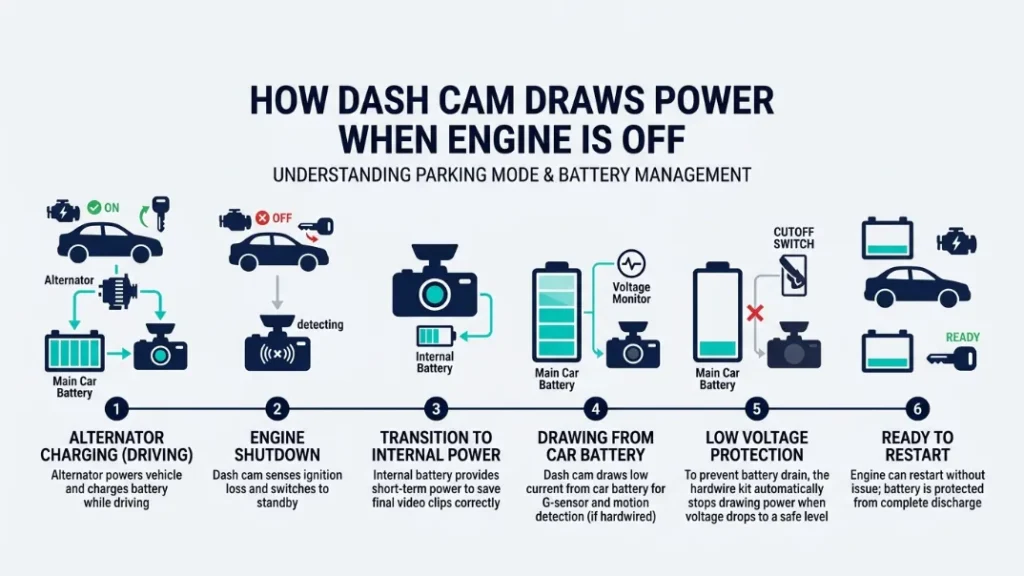
A dash cam pulls power continuously from your 12V electrical system. When your engine runs, the alternator recharges the battery fast enough to cover that drain. When the engine is off, it is just the battery — and it only holds so much charge before it dies.
Most drivers do not realize their dash cam stays on after they park. Many models activate parking mode automatically when motion stops. That means the camera is recording, processing, and transmitting data from a battery that is not being recharged.
The alternator — the component that generates electricity while the engine runs — completely offsets any dash cam drain during driving. A typical alternator produces 13.5V to 14.5V and easily covers a dash cam’s 5–10 watts of demand. The danger starts the moment you turn the key off.
How Much Power Does a Dash Cam Actually Draw?
Most dash cams draw between 200 milliamps (mA) and 500 mA during normal recording. In parking mode, many models drop to 80–200 mA to extend the recording window. Here is what that looks like across popular models:
| Dash Cam Model | Normal Recording Draw | Parking Mode Draw |
|---|---|---|
| Nextbase 622GW | ~350 mA | ~170 mA |
| Viofo A129 Pro | ~310 mA | ~140 mA |
| BlackVue DR900X-2CH | ~530 mA | ~290 mA |
| Thinkware U1000 | ~400 mA | ~180 mA |
These numbers matter because they tell you how fast your battery depletes. A higher-resolution camera — like the BlackVue DR900X-2CH with its 4K dual-channel recording — pulls nearly 530 mA during active recording. That is more than double what a budget single-channel unit uses.
How Long Before a Dash Cam Kills a Standard Car Battery?
A standard 45Ah car battery holds roughly 45,000 mAh of charge. But you should never discharge a lead-acid battery below 50% — that permanently damages the cells. So your usable capacity is around 22,500 mAh.
Here is the math for a dash cam drawing 180 mA in parking mode:
22,500 mAh ÷ 180 mA = 125 hours theoretical maximum
That sounds reassuring — until you factor in real conditions. Battery age, cold weather, and parasitic drain from other systems cut that figure dramatically. A three-year-old battery in winter might give you 30–40% of its rated capacity. Suddenly 125 hours becomes 40 hours. Add a camera drawing 290 mA and you are looking at under 20 hours before the battery is too flat to start the engine.
Never discharge a standard lead-acid car battery below 12.0V (roughly 50% charge). Doing so repeatedly shortens battery life dramatically and can cause permanent cell damage. An old or weak battery can fail after just a few deep discharge cycles.
What Is Parking Mode and Why Does It Drain Your Battery So Fast?
Parking mode is a dash cam feature that keeps the camera active while your car is parked, monitoring for motion, impact, or both. It is the single biggest cause of dash cam battery drain because it runs for hours or days without the alternator to compensate.
When you drive, the alternator tops up your battery constantly. The moment you park, that recharging stops. If parking mode stays on, the camera quietly pulls current from a battery with no way to refill it.
There are three types of parking mode detection:
- Motion detection — camera records when movement appears in frame
- Impact/G-sensor detection — records when the car is bumped or hit
- Time-lapse mode — captures one frame every few seconds continuously
Time-lapse mode is the lightest on power. Full motion detection — especially with Wi-Fi or LTE upload running — is the heaviest. The BlackVue DR900X, which supports cloud connectivity even while parked, can drain a healthy battery in under 24 hours on parking mode alone.
Which Dash Cams Use the Most Power in Parking Mode?
Dual-channel cameras (front and rear) and cloud-connected models are the biggest consumers in parking mode. A single-channel budget cam from Viofo might draw 100–140 mA parked. A dual-channel 4K BlackVue with cloud access active can exceed 300 mA even in parking mode.
The rule is simple: more lenses + more features = more drain. If you park for more than 8 hours regularly, a basic plug-in setup is not enough. You need proper power management.
How Do You Know If Your Dash Cam Drained Your Battery?
The signs are clear once you know what to look for. A dash cam battery drain typically shows up as a slow or failed engine crank in the morning, particularly after a long park. The starter motor turns slowly or not at all — but your lights and electronics still work faintly.
Other signs include:
- Battery warning light appearing after a long park
- Dash cam showing a “low voltage” warning on startup
- Battery consistently needing a jump after overnight parking
- Battery health tests showing faster-than-expected degradation
If you suspect your dash cam, disconnect it for a week. If the battery starts fine every morning without it, the camera was the culprit.
Most auto parts stores test your car battery for free. If your battery fails a load test, replace it before hardwiring a dash cam. A weak battery cannot safely support parking mode regardless of how good your setup is.
How Do You Power a Dash Cam Without Draining Your Battery?
There are four main ways to power a dash cam when parked — and they vary significantly in safety, convenience, and cost. Choosing the right method depends on how long you park, what dash cam you run, and whether you want parking mode active.
Cigarette Lighter Socket — Convenient but Risky
Plugging your dash cam into the 12V cigarette lighter socket is the easiest method. Most sockets cut power when you turn the ignition off, which actually protects your battery — but it also means parking mode does not work at all.
Some vehicles have always-on 12V sockets, though. If yours is one of them, parking mode runs indefinitely with no voltage protection. That is a recipe for a dead battery.
| Method | Parking Mode | Battery Risk | Cost |
|---|---|---|---|
| Cigarette Lighter (ignition-switched) | No | None | Free (included cable) |
| Cigarette Lighter (always-on) | Yes | High | Free (included cable) |
| OBD-II Port | Yes | Medium–High | $10–$25 adapter |
| Hardwire Kit | Yes | Low (with cutoff) | $15–$40 + install |
| External Battery Pack | Yes | None | $150–$300 |
OBD-II Port — Easy to Use but Not Always Safe
The OBD-II port (the diagnostic socket under your dashboard) is always live — it never cuts power, even with the ignition off. An OBD-to-USB or OBD-to-miniUSB adapter lets you power a dash cam directly from there.
It is convenient, tidy, and requires no wiring. But it carries real risks. The OBD port has no built-in voltage protection. It will drain your battery to zero if the dash cam runs long enough. Some modern vehicles also report security alerts or log errors if a device draws current from the OBD port continuously.
For short overnight parks with a low-draw dash cam, it can work. For longer parks or higher-draw cameras, it is a gamble that often ends with a flat battery.
Hardwire Kit — The Safest Long-Term Solution
A hardwire kit connects your dash cam directly to the fuse box, giving it permanent power from two circuits: a constant live feed and an ignition-switched feed. The critical component is the built-in voltage cutoff module — a small unit that monitors battery voltage and cuts power to the dash cam when it drops below a set threshold.
This is the setup I personally use and recommend for anyone running parking mode regularly. It takes about 30–45 minutes to install, costs $15–$40 for a quality kit, and gives your dash cam reliable power without any risk of over-discharging the battery.
Popular hardwire kits compatible with most dash cams include the Nextbase Hardwire Kit, Viofo HK3, and the Cellink hardwire adapter. Each connects via fuse tap and includes a voltage cutoff relay.
When choosing a hardwire kit, pick one specifically designed for your dash cam brand. Generic kits work, but brand-matched kits carry the correct voltage tolerances and connector types out of the box.
External Battery Pack — The Isolated Power Option
An external dash cam battery pack — like the Cellink Neo — sits between your car battery and your dash cam. It charges from the alternator while you drive and then powers the dash cam exclusively while parked. Your car battery never takes any load at all.
The Cellink Neo holds around 8,000–25,000 mAh depending on the model and can run a dash cam in parking mode for 12–72 hours without touching the car battery. It is the most battery-safe option available, and it is the go-to choice for fleet operators and drivers who park in high-risk areas for extended periods.
The downside is cost — a Cellink Neo runs $150–$280 — and installation requires the same under-dashboard wiring as a hardwire kit.
How Does a Hardwire Kit Voltage Cutoff Actually Protect Your Battery?
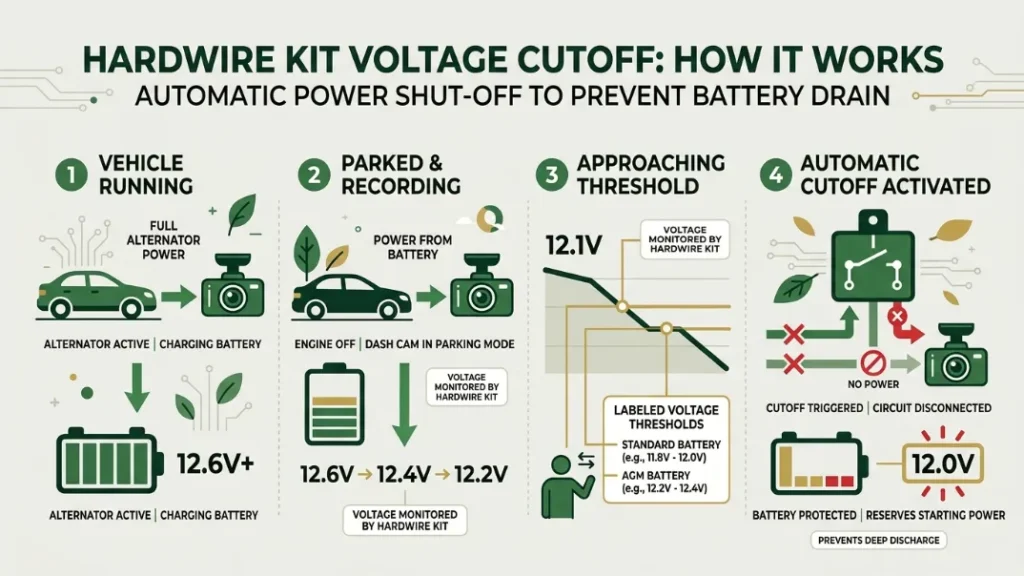
The voltage cutoff is a relay inside the hardwire kit that monitors your battery’s voltage in real time. When voltage drops to your set threshold — say, 12.0V — it cuts power to the dash cam instantly, preventing further discharge. Your battery stays above the safe minimum, and the engine starts normally when you return.
Think of it as a circuit breaker for your dash cam. Without it, the camera draws power until the battery is dead. With it, the camera stops the moment the battery reaches a pre-set safety floor.
This is how premium dash cams like the Thinkware U1000 implement their built-in parking mode protection — they monitor voltage internally and shut down automatically. Budget cameras have no such protection, which is exactly why you need an external hardwire kit with a dedicated cutoff module.
What Voltage Cutoff Setting Should You Use?
The right cutoff voltage depends on your battery type. Here is a reliable reference:
| Battery Type | Recommended Cutoff | Why |
|---|---|---|
| Standard Lead-Acid | 12.0V–12.2V | Keeps battery above 50% charge |
| AGM Battery | 12.0V–12.4V | AGM tolerates deeper discharge |
| Older / Weak Battery | 12.4V | Extra margin for degraded capacity |
When in doubt, set the cutoff at 12.2V. That gives your battery enough charge to start the engine reliably even in cold weather, while still allowing several hours of parking mode recording.
How Do You Install a Hardwire Kit Without an Electrician?
- Download your car’s fuse box diagram — check the owner’s manual or search online for your model.
- Identify an ignition-switched fuse (powers on with the key) and a constant live fuse (always on).
- Connect the red wire from the hardwire kit to the constant live fuse using the included fuse tap.
- Connect the yellow wire to the ignition-switched fuse using the second fuse tap.
- Connect the black ground wire to a metal bolt on the vehicle’s chassis near the fuse box.
- Set the voltage cutoff dial or switch to your target threshold (12.0V–12.2V for standard batteries).
- Route the cable neatly along the headliner and A-pillar to your dash cam mount position.
- Plug in the dash cam, turn the ignition on, and confirm the camera powers up and off correctly.
The full job takes 30–45 minutes with basic tools — a fuse puller, a trim removal tool, and a multimeter to confirm your fuse choices. If you are unsure about fuse identification, most auto electricians complete this job in under an hour for $50–$100.
You can find detailed guidance on dash cam hardwiring at BlackVue’s official hardwiring guide and at Nextbase’s step-by-step installation advice.
Capacitor vs Battery Dash Cam — Which One Is Safer for Your Car?
This is a question I get often — and it is a genuine source of confusion. A dash cam’s internal power storage (capacitor or battery) is separate from your car battery question, but it affects reliability and safety in important ways.
Capacitor dash cams use a small supercapacitor instead of a lithium battery to store a tiny amount of power. They hold only enough charge to safely save and close a video file if power is suddenly cut. They do not run the camera at all without external power — they still draw from your car battery continuously.
Battery dash cams have a small internal lithium cell. In some cases, this lets them record for a short window after the car power is cut. But lithium batteries degrade fast in heat — dashboards in summer can hit 70°C+ — and a swollen or failed internal battery is a fire risk.
The bottom line: Neither type saves your car battery. Both draw equally from it. But capacitor models like the Viofo A129 Pro are safer in hot climates because there is no internal battery to swell or fail. In temperate climates, either works fine.
Should You Upgrade to an AGM Battery If You Use Parking Mode?
An AGM (Absorbent Glass Mat) battery handles repeated partial discharges far better than a standard flooded lead-acid battery. If you park for more than 8 hours regularly and rely on parking mode, an AGM upgrade is worth serious consideration.
Standard lead-acid batteries tolerate roughly 200–300 deep discharge cycles before significant capacity loss. AGM batteries handle 500–700+ cycles under the same conditions. They also recharge faster from the alternator, which matters if your daily drives are short.
AGM batteries cost $150–$250 versus $80–$130 for a standard unit. But when you factor in the shortened lifespan of a standard battery under parking mode stress, the AGM pays for itself within 2–3 years for most drivers who use this feature daily.
Brands like Optima (RedTop and YellowTop), Bosch S5 AGM, and Varta Silver Dynamic AGM are widely trusted options. Always confirm your vehicle’s charging system is AGM-compatible before switching — most vehicles made after 2012 are, but older cars with basic alternators may not charge an AGM correctly.
Five Mistakes That Drain Your Car Battery Faster With a Dash Cam
Even drivers with a proper hardwire setup make avoidable errors. Here are the five most common ones — and the quick fixes that go with them.
- Setting the voltage cutoff too low. A cutoff at 11.6V sounds cautious but it means your battery is already at 20–25% charge by the time the camera shuts off. Set it at 12.0V minimum — 12.2V is safer for older batteries.
- Running parking mode on a battery older than 3–4 years. An aging battery loses capacity significantly. A battery that tests at 60% health gives you 40% less parking mode time than you calculate. Test your battery annually if you use parking mode regularly.
- Using an always-on OBD adapter with no cutoff. OBD ports stay live forever. Without a dedicated cutoff device, a dash cam connected here will drain your battery to zero given enough time.
- Leaving Wi-Fi or cloud upload active in parking mode. BlackVue’s cloud feature and similar always-connected modes roughly double the power draw in parking. Disable cloud sync in parking mode unless you have an external battery pack.
- Installing a dual-channel camera without upgrading the power setup. Adding a rear camera nearly doubles the power draw. What worked safely with a single-channel cam will drain faster with front and rear recording running simultaneously.
If your car battery has failed a load test, do not rely on any voltage cutoff to protect it. A degraded battery can drop below starting voltage almost instantly under load, even if the cutoff shuts the dash cam off at 12.2V. Replace the battery first.
Dash cams drain car batteries primarily through parking mode. A hardwire kit with a voltage cutoff at 12.0–12.2V is the best prevention. For extended parking, an external battery pack like the Cellink Neo removes all risk to your car battery entirely. Match your power solution to how long you park and how much your camera draws.
I’ve been through the flat battery experience once — and I made sure I never would again. With the right setup, a dash cam and a healthy battery coexist perfectly. The camera protects your car. The cutoff protects your battery. Everyone wins.
If you found this guide useful, you might also want to read Consumer Reports’ dash cam safety overview for an independent perspective on parking mode and vehicle security.
Frequently Asked Questions

I’m Alex Rahman, a car enthusiast and automotive writer focused on practical solutions, car tools, and real-world driving advice. I share simple and honest content to help everyday drivers make better decisions.
