Do Dash Cams Have a Monthly Fee? or Are They Free to Use?
Most dash cams do not require a monthly fee. They record and store footage directly to an SD card — completely free. Only cloud-connected models from brands like BlackVue or Garmin charge optional monthly plans ($4–$15/month) for features like remote live view, cloud backup, and parking alerts sent to your phone.
A friend of mine almost talked himself out of buying a dash cam. He assumed it worked like a home security camera — monthly cloud fee, app subscription, the whole thing. He almost skipped it entirely.
I’m Alex Rahman, and I’ve been testing and writing about dash cams for years. That confusion my friend had? I hear it constantly. People assume a dash cam is like a Ring doorbell — another gadget draining $10 a month from your account.
The truth is simpler and a lot friendlier to your wallet. Most dash cams cost nothing to run. But there are exceptions — and knowing which ones matter before you buy could save you real money over three years of ownership.
Let me break down exactly how dash cam fees work, which brands charge them, and whether you actually need one.
- The majority of dash cams store footage on a local SD card — zero monthly cost.
- Cloud-connected dash cams offer optional subscriptions ranging from $4 to $15 per month.
- Cellular dash cams need a SIM data plan — an extra $5–$20/month depending on your carrier.
- Brands like Viofo and Vantrue are fully free to use with no hidden ongoing fees.
- A paid subscription makes sense mainly for fleet use, teen driver monitoring, or remote parking surveillance.
What Does a Dash Cam Monthly Fee Actually Cover?
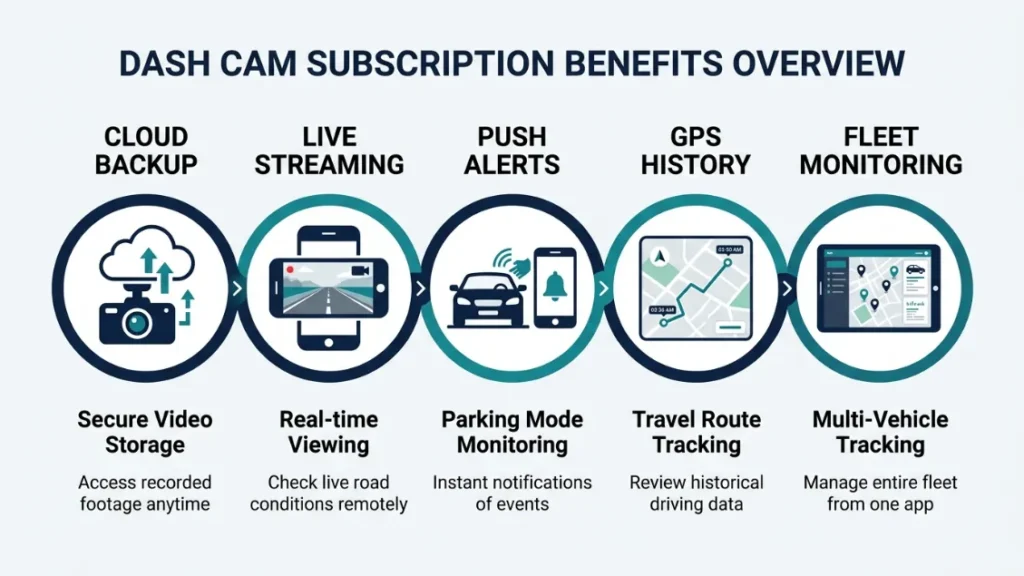
A dash cam subscription fee pays for cloud-based services — not the camera itself. The camera works fine without the subscription. What you lose is access to remote features that rely on the internet.
Think of it like this: your dash cam is a recorder. It does its core job — capturing video — whether it’s online or not. The subscription unlocks a second layer of functionality that streams data to your phone or a remote server.
These subscription features typically fall into two categories.
Cloud Storage — the Main Reason Brands Charge Monthly
Cloud storage lets your footage upload automatically from the camera to a remote server. This means even if someone steals or destroys your dash cam, your video is safe.
BlackVue (a South Korean brand and one of the earliest pioneers of cloud-connected dash cams) built its entire ecosystem around this concept. Their BlackVue Cloud service uploads clips triggered by impact detection or parking events directly to your account online.
Without a plan, you still get local SD card recording. The cloud layer is purely optional — but it adds genuine peace of mind for anyone who parks in high-risk areas or travels frequently.
If your main concern is having video proof after an accident, a free SD card dash cam is all you need. Cloud storage matters most when you need footage you can’t physically access — like a hit-and-run while you’re at work.
Live View and Remote Access — Premium Features at a Price
Live view lets you open an app on your phone and see exactly what your dash cam sees — in real time. This is the feature most people pay for, and it requires both an active subscription and a camera with cellular or Wi-Fi connectivity.
Garmin’s Dash Cam Live feature (available through the Garmin Drive app) lets you stream live footage and receive motion alerts on your phone. But it requires a Garmin Clarity subscription to activate. Without it, the camera still records normally to its memory card.
Other premium features tied to subscriptions include:
- Push notifications when your parked car is bumped
- GPS trip history stored in the cloud
- Theft alerts sent directly to your phone
- Multi-camera fleet management dashboards
These features are genuinely useful for specific users. For most everyday drivers, they’re a bonus — not a necessity.
Most Dash Cams Are Completely Free to Use — Here Is Why
The vast majority of dash cams on the market today require zero monthly payment. They record video directly to a physical SD card inside the camera. No internet. No account. No recurring bill. You buy the camera once, insert a card, and it works indefinitely.
This is the original and still-dominant dash cam model. It works because the camera’s entire job — capturing what happens in front of your car — needs no server, no cloud, and no subscription to function.
How Local SD Card Storage Works and Why It Costs Nothing
Every basic dash cam records video in short loops — usually 1 to 3 minutes per file. Once the SD card fills up, the camera automatically overwrites the oldest clips. This means you always have the last several hours of driving saved without ever managing storage manually.
When something happens — an accident, a near-miss, road rage — most cameras let you lock that clip with the press of a button or automatically via the G-sensor (an accelerometer that detects sudden force). Locked clips don’t get overwritten.
A quality 64GB microSD card costs around $10–$15 and holds roughly 8–10 hours of 1080p footage. That one-time cost is all the ongoing expense you’ll ever face.
Use a dash cam-rated SD card (brands like Samsung Endurance, SanDisk High Endurance, or Transcend) rather than a standard card. Dash cams write continuously for hours — regular cards wear out much faster and can corrupt footage at the worst moment.
Which Dash Cams Work Without Any Subscription or Wi-Fi?
Most dash cams from reputable brands work 100% without any internet connection or subscription. Here are some strong performers in the no-fee category:
- Viofo A129 Pro Duo — dual channel, 4K front, no subscription required
- Vantrue N4 — three-channel recording, completely free to run
- Thinkware U1000 — 4K Sony sensor, optional cloud plan but works perfectly without it
- Garmin Dash Cam Mini 2 — compact, reliable, no subscription needed for basic use
- BlackVue DR750X — cloud-capable but fully functional on SD card alone
These cameras all record automatically when you start driving. They stop recording when the engine cuts off — unless you enable parking mode, which we’ll cover shortly.
Which Dash Cam Brands Charge a Monthly Fee — and How Much?
Only a handful of brands offer cloud subscription plans, and in every case, the subscription is optional — not required for the camera to record. Here is a clear breakdown of what each brand charges and what you actually get.
| Brand | Plan Name | Monthly Cost | Free Without Plan? | Key Paid Features |
|---|---|---|---|---|
| BlackVue | BlackVue Cloud | $4.99 – $9.99 | Yes | Live view, cloud backup, push alerts |
| Garmin | Garmin Clarity | $9.99 | Yes | Live streaming, incident alerts, cloud clips |
| Nextbase | Mynextbase Connect | Free – $7.99 | Yes | Cloud storage, theft alerts, video sharing |
| Thinkware | Thinkware Cloud | ~$4.99 | Yes | Remote view, GPS cloud tracking |
| Viofo | None | $0 | Yes | No subscription offered |
| Vantrue | None | $0 | Yes | No subscription offered |
BlackVue Cloud Plans — Pricing and What You Get
BlackVue, manufactured by the South Korean company Pittasoft, pioneered cloud dash cams around 2013. Their cloud platform is the most mature in the industry and offers the most features.
The BlackVue Cloud service offers two tiers. The basic plan at $4.99/month gives you cloud storage, parking event notifications, and the ability to view live footage. The premium plan at $9.99/month adds higher cloud storage limits and priority uploads.
Without any plan, a BlackVue camera records perfectly to its SD card. You can still use the free BlackVue app over direct Wi-Fi to pull footage while standing next to your car. The subscription is only needed for remote access from anywhere.
Garmin Clarity — Is the Subscription Worth Paying?
Garmin entered the cloud dash cam space with their Dash Cam Live lineup. The Garmin Clarity subscription costs $9.99 per month and unlocks live view, incident clip uploads to the cloud, and phone notifications when your parked car is disturbed.
Garmin’s cameras without a Clarity subscription still record in full 1080p or 4K to the SD card and connect to your phone over Wi-Fi when you’re nearby. The subscription makes sense if you park your car far from home and want remote monitoring. For everyday commuters, it’s probably not necessary.
Nextbase Mynextbase — What the Connected Plan Includes
Nextbase, the UK’s leading dash cam brand trusted by over 3 million drivers, built a cloud platform called Mynextbase Connect. Their approach is generous — a free tier exists that gives you basic cloud clip storage and access to the Mynextbase portal.
The paid tier at around $7.99/month adds larger cloud storage, theft alerts, and a feature called Emergency SOS — which can automatically contact emergency services if the camera detects a serious collision. That last feature is compelling enough that Nextbase’s paid plan offers more than just cloud storage.
Thinkware Cloud — Pricing Breakdown
Thinkware, another respected South Korean brand, offers optional cloud connectivity on select cameras. Their cloud plan runs approximately $4.99/month and focuses on remote live view and GPS tracking of your vehicle’s location — useful for families with multiple drivers or small fleet owners.
Like every brand here, Thinkware cameras record to SD card without any subscription active. The cloud plan is a layer on top, not the foundation.
Do Cellular Dash Cams Cost More to Run Each Month?
Yes — cellular dash cams carry an additional cost beyond a cloud subscription. These cameras have a built-in SIM card slot or an embedded cellular chip. They connect directly to 4G or LTE networks without needing your phone’s hotspot or home Wi-Fi.
This is different from a standard Wi-Fi dash cam. Wi-Fi dash cams connect to your phone app only when you’re nearby. A cellular dash cam stays connected all the time — which enables true 24/7 remote monitoring.
The data cost depends on how much the camera uploads. A cellular plan for a dash cam typically runs $5 to $20 per month depending on your carrier and data allowance. Some brands partner with carriers to offer bundled plans.
Cellular dash cams that continuously upload 4K footage can use significant data — sometimes 5–15GB per month. Check your carrier plan before activating continuous upload. Many users set cameras to upload only triggered events (impacts or motion) to keep data use manageable.
Cellular dash cams are primarily used in commercial fleets, delivery vehicles, and rideshare monitoring. For personal use, they’re overkill for most drivers — but genuinely powerful if you need always-on remote visibility.
SD Card vs. Cloud Storage — Which One Should You Choose?
For most drivers, local SD card storage is the better choice — it’s free, reliable, and holds everything you need after an accident. Cloud storage adds value in specific situations, but it’s not essential for the core purpose of a dash cam.
Here’s how the two options compare across what actually matters:
| Factor | SD Card (Local) | Cloud Storage |
|---|---|---|
| Monthly Cost | $0 | $4.99 – $9.99 |
| Footage Safety if Camera Stolen | Lost with camera | Safe in cloud |
| Remote Access | No | Yes |
| Works Without Internet | Yes — always | No |
| Parking Alerts to Phone | No | Yes |
| 3-Year Cost (SD only) | ~$12 (one SD card) | $180 – $360 |
Over three years, a cloud subscription costs $180 to $360 in fees alone — on top of the camera purchase. For a driver who just wants reliable accident footage, SD card storage gives you exactly that for a one-time $12 investment.
The key question is simple: Do you need to see your footage right now from across town — or are you okay pulling the SD card when something actually happens? For 90% of drivers, the second option is perfectly fine.
Do You Actually Need a Dash Cam Subscription for Your Situation?
Whether a subscription makes sense depends entirely on why you bought the dash cam in the first place. For accident protection, SD card recording does everything you need. For remote monitoring, live view, or parking surveillance from afar, a paid plan starts to earn its keep.
When a Subscription Makes Sense
A paid cloud plan is worth considering in these specific situations:
- Fleet management — If you run a delivery or service fleet, remote live view and GPS tracking through a cloud platform is genuinely valuable for managing multiple vehicles.
- Teen driver monitoring — Nextbase and BlackVue let parents view live footage and receive speed or impact alerts, which is a compelling safety use case.
- High-risk parking areas — If you regularly park in areas with frequent break-ins or vandalism, cloud backup means your footage survives even if the camera is stolen or smashed.
- Rideshare drivers — Uber and Lyft drivers who want real-time documentation and remote incident evidence have a legitimate reason for cloud connectivity.
When You Should Skip the Monthly Fee Entirely
Skip the subscription if any of these describe your situation:
- You want accident protection on your daily commute — SD card handles this perfectly.
- You park in a secure garage or low-risk area — remote monitoring adds little value.
- You’re budget-conscious — $180/year in subscription fees adds up fast over your ownership period.
- You don’t need real-time alerts — most drivers never need to check their dash cam remotely.
If your primary goal is capturing accident footage — which is why most people buy a dash cam — a subscription adds zero value. A reliable SD card camera like the Viofo A129 Pro or Vantrue N4 will do that job perfectly, forever, for free.
How to Get the Most From a Dash Cam Without Paying Monthly
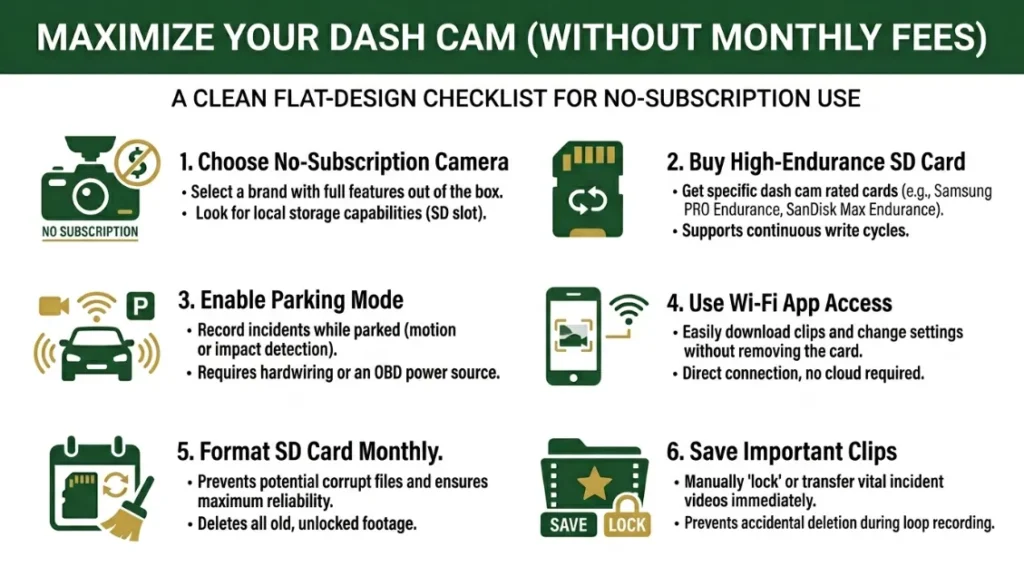
You can maximize every feature a dash cam offers — recording quality, parking mode, GPS logging, and app access — without ever paying a monthly fee. Here’s how to set yourself up right from the start.
- Choose a no-subscription camera — Viofo, Vantrue, and Thinkware all record in high quality without any ongoing fee.
- Buy a high-endurance SD card — Get a 64GB or 128GB card rated for dash cam or surveillance use. Samsung Endurance and SanDisk High Endurance are both excellent choices.
- Enable parking mode — Most cameras support parking surveillance using a hardwire kit (a one-time install) rather than a cloud plan. This keeps the camera powered when your engine is off.
- Use Wi-Fi app access nearby — Many cameras let you pull footage to your phone over direct Wi-Fi when you’re within range. This costs nothing and gives you quick clip access.
- Format your SD card monthly — A quick format in the camera’s menu prevents file corruption and keeps your recording loop running cleanly.
- Check and save important clips immediately — After any incident, pull the SD card or use the app to save the relevant clip before it gets overwritten.
Following these steps gives you a fully capable, reliable dash cam setup at zero ongoing cost. The only recurring expense is an SD card replacement every 12–18 months — roughly $10–$15.
For a deeper look at how to choose the right SD card for your camera, DashCamTalk’s SD card guide covers compatibility across all major brands. And if you’re comparing top cameras by recording quality, RTINGS.com’s dash cam reviews offer thorough, objective testing data.
Frequently Asked Questions

I’m Alex Rahman, a car enthusiast and automotive writer focused on practical solutions, car tools, and real-world driving advice. I share simple and honest content to help everyday drivers make better decisions.
