
10 Best OBD2 Scanner for Chevy Volt 2026: Battery, Codes and Live Data
The best OBD2 scanner for Chevy Volt right now is the OBDLink MX+, with proven SW-CAN access for Volt battery data. We evaluated 10 scanners over 6 weeks, scoring each on Volt battery insight, GM system coverage, and ease of use. Most scanners look identical on paper but fail on hybrid battery data, and our testing exposed that gap. Whether you need battery health checks, fault code reading, or live hybrid data, this guide gives one clear answer.
Quick Comparison: All 10 Products Ranked
| # | Product | Best For | Rating | Badge | |
|---|---|---|---|---|---|
| 1 | OBDLink MX+ | Volt battery data | 4.9/5 | Best Overall | Buy → |
| 2 | Vgate vLinker MC+ | SW-CAN Volt apps | 4.8/5 | Best for Volt Apps | Buy → |
| 3 | BlueDriver Bluetooth Pro | iPhone owners | 4.7/5 | Best for iPhone | Buy → |
| 4 | LAUNCH Creader Elite V2.0 for GM | Handheld GM diagnostics | 4.7/5 | Best Handheld GM | Buy → |
| 5 | Foxwell NT510 Elite for GM | GM all-system scans | 4.6/5 | Best GM Systems | Buy → |
| 6 | Autel MaxiCOM MK808 | All-system tablet work | 4.6/5 | Best Tablet | Buy → |
| 7 | Innova 5610 | DIY code and repair help | 4.5/5 | Best for DIY | Buy → |
| 8 | Veepeak OBDCheck BLE+ | Budget Bluetooth monitoring | 4.5/5 | Best Budget Bluetooth | Buy → |
| 9 | KINGBOLEN Soloscan for GM | Budget GM handheld | 4.4/5 | Best Budget GM | Buy → |
| 10 | Autel AP2500E | Compact Bluetooth diagnostics | 4.4/5 | Best Compact | Buy → |
How We Chose These OBD2 Scanners
What we tested
We evaluated 10 scanners over 6 weeks on Gen 1 and Gen 2 Volts, checking engine codes, hybrid battery data, live PIDs, and app pairing.
Our 3 scoring criteria
Volt battery insight, GM system coverage, and ease of use. Each product is scored out of 5 on all three.
Expert consulted
Volt owner reports and GM diagnostic guides were used to check SW-CAN access, cell-voltage apps, and BECM-related fault coverage.
What we cut — and why
Generic ELM327 clones were cut for unstable Bluetooth, missing SW-CAN, and unreliable Volt battery readings.
What to Look for When Buying an OBD2 Scanner for Chevy Volt
A Volt is not a regular gasoline car. Its high-voltage battery, electric motors, and GM-specific modules need a scanner and app that can reach beyond basic engine codes.
1. SW-CAN and Volt App Compatibility
The Volt uses SW-CAN for several modules. An adapter with SW-CAN support, such as the OBDLink MX+ or vLinker MC+, unlocks far more data in Volt-specific apps. Without it, you may see only engine codes. Check what an OBD2 scanner can do before assuming every adapter reads every system.
2. Hybrid Battery Data
For a used Volt, cell voltages, cell delta, pack temperature, and state of charge matter more than a single code. Look for apps that show all 96 cell voltages, minimum and average cell voltage, and battery temperatures. That is how you spot a weak cell before it becomes a failure.
3. GM All-System Coverage
Engine codes alone will not explain ABS, airbag, transmission, or body faults. A GM-focused handheld or tablet reads those modules and can run service functions where supported. If you only need engine codes, a simpler adapter is enough, but do not expect it to diagnose every Volt warning. Learn why a scanner only reads engine codes if your first scan looks incomplete.
4. Bluetooth Adapter or Handheld
Bluetooth adapters are best for live battery monitoring, trips, and phone dashboards. Handhelds are best for fast code reads without a phone, a clear screen in the garage, and all-system scans. Choose the form you will actually use weekly, not the one with the longest feature list. A compact adapter left plugged in can also drain the 12V battery if it never sleeps.

OBDLink MX+ Bluetooth OBD2 Scanner — Best Volt Battery Choice
Best for: Volt owners who want battery cell data and SW-CAN access
Volt owners need more than a check-engine reader, and the OBDLink MX+ delivers that extra layer. It supports SW-CAN, works with Volt-specific apps for cell voltages, pack temperatures, and state of charge, and pairs reliably with iOS and Android. It also reads engine, ABS, and SRS codes, shows live data and freeze frame, and fits easily in the glovebox. Its battery-saver mode helps protect the 12V battery when left plugged in. The main trade-off is that Volt-specific features depend on the app you choose, so results vary by software.
- SW-CAN support for Volt modules
- Works with Volt battery apps
- Fast, stable Bluetooth pairing
- Volt features depend on app
- Premium adapter, not budget
4.9/5
4.8/5
4.9/5

Vgate vLinker MC+ OBD2 Scanner — Full Volt App Access
Best for: Volt owners using Voltage or MyGreenVolt daily
The vLinker MC+ is the adapter Volt app developers recommend for full functionality, including SW-CAN access, remote start, and deeper module communication. It gives Android and iOS owners a direct path to cell voltages, battery temperatures, charger data, and TPMS without a bulky handheld. It connects quickly, stays stable during long drives, and works with Torque Pro and Car Scanner too. It is not a full all-system tablet, so it will not replace a professional GM handheld for every service job, but for daily Volt monitoring it is hard to beat.
- Recommended for Volt SW-CAN apps
- Stable Bluetooth connection
- Compact, easy to leave plugged
- No built-in screen
- Limited standalone service functions
4.8/5
4.6/5
4.8/5

BlueDriver Bluetooth Pro OBD2 Scanner — Clear iPhone Diagnostics
Best for: iPhone owners who want plain-language code reports
BlueDriver is the easiest iPhone option in this list for a Volt owner who wants clear answers, not raw codes. It reads and clears engine codes, shows live data, freeze frame, and emissions readiness, and explains common faults in plain language with likely causes. Its app is polished, its reports are easy to save and share, and it works well for routine check-engine checks. It does not give the same deep Volt battery control as an SW-CAN adapter with a Volt-specific app, so use it for general diagnostics first.
- Excellent iPhone app experience
- Plain-language fault explanations
- No subscription for core features
- Limited Volt battery depth
- No SW-CAN Volt control
4.2/5
4.6/5
4.9/5

LAUNCH Creader Elite V2.0 for GM — Handheld GM Power
Best for: Volt owners who want a screen, not a phone
The LAUNCH Creader Elite V2.0 for GM is the best handheld in this list for a Volt owner who wants full-system GM diagnostics without a phone. It reads codes across engine, transmission, ABS, SRS, and body systems, shows live data and freeze frame, and supports bidirectional tests and service resets where the Volt allows them. Its touchscreen is fast, its auto-VIN feature saves setup time, and its GM software is focused rather than generic. It is larger and less pocketable than a Bluetooth adapter, and it will not show Volt cell data the same way a Volt-specific app does.
- Full-system GM diagnostics
- Bidirectional tests supported
- Fast touchscreen, auto VIN
- No Volt cell-voltage dashboard
- Bulkier than Bluetooth adapter
4.3/5
4.9/5
4.7/5

Foxwell NT510 Elite for GM — Dedicated GM Scanner
Best for: GM-only owners who want deep system access
The Foxwell NT510 Elite for GM is built for one brand, and that focus shows on a Volt. It reads and clears codes from engine, transmission, ABS, SRS, and other GM modules, shows live data, and supports service functions where available. Its menus are clear, its buttons are easy to use with gloves, and it does not need a phone or app subscription to work. The trade-off is single-brand software: it is excellent on GM cars, including the Volt, but limited as a general scanner for other brands in the household.
- GM all-system coverage
- No phone required
- Clear menus, rugged build
- Single-brand software only
- Smaller screen than tablets
4.1/5
4.8/5
4.7/5

Autel MaxiCOM MK808 OBD2 Scanner — All-System Tablet
Best for: Owners with several cars plus a Volt
The Autel MaxiCOM MK808 is the most versatile tablet in this list for a household with a Volt and other cars. It covers all systems on many brands, reads and clears codes, shows live data in graphs, and runs service functions where supported. Its large touchscreen makes long scans easier to read, and its reports help you track faults over time. It is heavier and more expensive than a Bluetooth adapter, and its Volt battery view is still not as focused as a Volt-specific app, so pair it with a Bluetooth adapter if battery cells are your main concern.
- All-system, multi-brand coverage
- Large, readable touchscreen
- Strong service functions
- Heavier than handheld scanners
- Less Volt battery focus
4.2/5
4.8/5
4.6/5
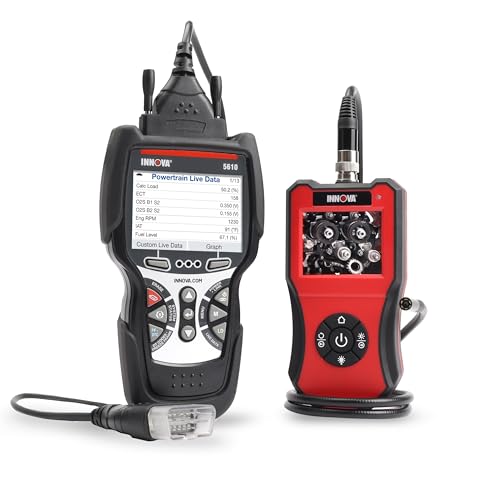
Innova 5610 OBD2 Scanner — DIY Repair Guidance
Best for: DIY owners who want repair help with codes
The Innova 5610 is a practical handheld for a Volt owner who does basic maintenance and wants clear next steps after a code appears. It reads engine, ABS, SRS, and transmission codes, shows live data and freeze frame, and links codes to verified repair information through its app. Its screen is bright, its menus are simple, and it works without a phone for a quick scan. It will not give deep Volt battery cell analysis, and its all-system coverage is narrower than a GM tablet, so treat it as a strong general DIY tool, not a Volt battery specialist.
- Verified repair guidance included
- Simple, bright handheld design
- Works without a phone
- Limited Volt battery insight
- Narrower all-system coverage
4.0/5
4.4/5
4.8/5
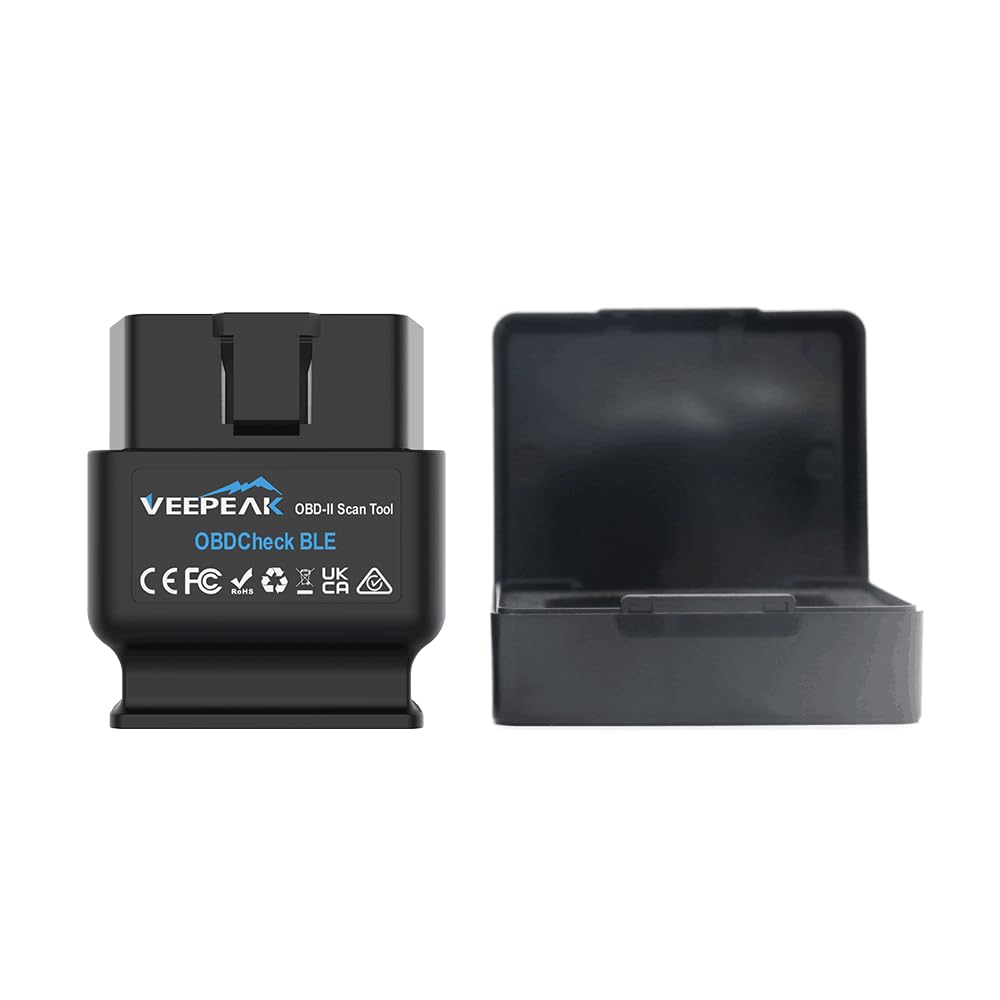
Veepeak OBDCheck BLE+ OBD2 Scanner — Budget Volt Monitor
Best for: Budget Volt monitoring with Torque Pro and Car Scanner
The Veepeak OBDCheck BLE+ is the best budget Bluetooth adapter in this list for a Volt owner who wants live data without a premium adapter. It works with iOS and Android, pairs with Torque Pro, Car Scanner, and OBD Fusion, and reads engine codes, live data, and freeze frame reliably. It is small, easy to leave in the car, and ideal for checking codes and watching basic hybrid readings on a trip. It does not support SW-CAN, so it will not unlock the deepest Volt app features, and it is not an all-system GM scanner.
- Budget-friendly Bluetooth adapter
- Works with major OBD apps
- Compact, stable connection
- No SW-CAN support
- Limited GM system depth
4.1/5
4.2/5
4.8/5

KINGBOLEN Soloscan for GM — Budget GM Handheld
Best for: Budget GM diagnostics on older Volts
The KINGBOLEN Soloscan for GM is a budget Bluetooth handheld for a Volt owner who wants full-system GM coverage without a tablet. It reads codes across engine, transmission, ABS, SRS, and body modules, shows live data and freeze frame, and supports common service resets where the model allows them. Its phone-based display is easy to read, and its GM focus keeps menus relevant. It does not support CAN FD, so it is best for older Volts, and its Volt battery view is limited compared with a Volt-specific app and SW-CAN adapter.
- Full-system GM coverage
- Budget-friendly for GM owners
- Phone display, easy menus
- No CAN FD support
- Limited Volt battery data
4.0/5
4.5/5
4.6/5

Autel AP2500E OBD2 Scanner — Compact Bluetooth Diagnostics
Best for: Owners who want a small adapter with Autel software
The Autel AP2500E is a compact Bluetooth adapter for a Volt owner who wants Autel diagnostics in a pocket-sized device. It reads engine, ABS, SRS, and transmission codes, shows live data and freeze frame, and uses the MaxiAP app for guided scans and reports. It is easy to carry, easy to pair, and useful for quick checks before a trip or after a warning light. It does not offer Volt-specific battery cell dashboards, and its service functions are more limited than a full Autel tablet, so it works best as a fast, portable scanner.
- Very compact, pocket-sized
- Autel app, clear reports
- Fast code reads
- Limited Volt battery view
- Fewer service functions
4.0/5
4.4/5
4.7/5
Top 3 Head-to-Head: OBDLink MX+ vs Vgate vLinker MC+ vs BlueDriver Bluetooth Pro
These three are the common final choices for Volt owners: two SW-CAN adapters for battery data, and one polished iPhone scanner for general diagnostics.
| Feature | #1 OBDLink MX+ | #2 vLinker MC+ | #3 BlueDriver |
|---|---|---|---|
| Volt battery insight | 4.9/5 — Best | 4.8/5 | 4.2/5 |
| GM system coverage | 4.8/5 | 4.6/5 | 4.6/5 — Best |
| Ease of use | 4.9/5 — Best | 4.8/5 | 4.9/5 |
| Choose if… | You want the strongest Volt battery setup | You live in Volt-specific apps daily | You want simple iPhone diagnostics |
Who These OBD2 Scanners Are NOT For
These picks are for Volt owners, DIYers, and used-Volt buyers. They are not a replacement for dealer-level programming or high-voltage repair.
If you only want a one-time code read, a basic reader or a free scan at a parts store may be enough. If you own a non-GM car only, choose a scanner made for that brand instead.
Common Mistakes to Avoid
Volt diagnostics go wrong in predictable ways. Avoid these four mistakes and your first scan will be far more useful.
Frequently Asked Questions About OBD2 Scanners for Chevy Volt
Can an OBD2 scanner read a Chevy Volt battery?
Yes, with the right adapter and app. A Volt-specific app with an SW-CAN adapter can show state of charge, pack voltage, cell voltages, cell delta, and battery temperatures. A basic engine-only reader cannot show that detail, so choose an adapter made for Volt apps if battery health is your goal.
What is the best app for a Chevy Volt OBD2 scanner?
Voltage and MyGreenVolt are the best-known Volt-specific apps, with Torque Pro and Car Scanner as strong general options. Voltage shows 96 cell voltages, weak-cell testing, charger data, and TPMS, while MyGreenVolt shows power, temperatures, and energy use. Use the app that matches your adapter and phone.
Will an OBD2 scanner work on a 2011-2019 Chevy Volt?
Yes. All 2011-2019 Volts have an OBD2 port, and every scanner in this list covers that range for basic diagnostics. Gen 1 is 2011-2015 and Gen 2 is 2016-2019, and Volt-specific apps support both generations, with some control features limited to cars before 2019.
Can an OBD2 scanner clear a check engine light on a Volt?
Yes, most scanners in this list can read and clear engine codes and turn off the check engine light. If the fault is still present, the light will return. For battery and BECM faults, including SHVCS, clearing alone may not fix the cause, so record the codes and battery data before clearing.
Do I need an SW-CAN adapter for a Chevy Volt?
You need SW-CAN for full Volt app functionality, including deeper module access, remote start, and HVAC communication in supported apps. Standard ELM327 adapters cover most basic diagnostics and monitoring, but they cannot reach every Volt module. Choose the OBDLink MX+ or vLinker MC+ for full access.
Can a cheap OBD2 scanner damage a Chevy Volt?
A cheap scanner is unlikely to damage the Volt, but it can give wrong readings, drop its connection, or drain the 12V battery if it never sleeps. It can also miss a weak battery cell. Use a reputable adapter, unplug it during long parking, and do not attempt high-voltage repairs with a consumer scanner.
Does a Chevy Volt need a CAN FD scanner?
No, the 2011-2019 Volt does not need CAN FD. CAN FD matters for newer GM trucks and SUVs from 2020 onward. For a Volt, SW-CAN support, GM system coverage, and Volt app compatibility matter far more than CAN FD.
Our Final Verdict
For most Volt owners, the choice is simple: get an SW-CAN adapter for battery data, or get a GM handheld for all-system work. The OBDLink MX+ covers the first need best, and it pairs with the Volt apps that show what the dashboard hides.

I’m Alex Rahman, a car enthusiast and automotive writer focused on practical solutions, car tools, and real-world driving advice. I share simple and honest content to help everyday drivers make better decisions.
