What Is OBD2 PID 01? Monitor Status Explained
Quick Answer
OBD2 PID 01 is Mode 01, PID 01, called Monitor Status Since DTCs Cleared. In one 4-byte reply it reports whether the check-engine light is on, how many confirmed emissions-related trouble codes are stored, which readiness monitors the vehicle supports, and whether each supported monitor has finished its self-test.
Most scan tools hide PID 01 behind a label such as I/M Readiness or Monitor Status. A car can show no check-engine light and still have a stored code, or show no codes and still be unready for an emissions check because several monitors have not finished yet.
What PID 01 Actually Returns
PID 01 lives inside Mode 01, the service that shows current powertrain data. The request is two bytes, 01 01: the first 01 is the mode, the second 01 is the PID. The reply starts with 41 01, where 41 means a positive answer to a Mode 01 request, followed by four data bytes labelled A, B, C, and D.
Those four bytes are not a sensor reading. There is no temperature, speed, or percentage to convert. PID 01 is bit-encoded: each bit carries its own yes-or-no meaning, and a scanner normally decodes the bits for you.
The full name gives the scope away: Monitor Status Since DTCs Cleared. The results are counted from the last time codes were cleared, not from the last drive. Clearing codes or disconnecting the battery resets that clock, and the monitors must run again before they can report complete.
How to Read Byte A: MIL Status and DTC Count
Byte A packs two facts into eight bits. Bit A7, the most significant bit, is the malfunction indicator lamp, or MIL, status. A 1 means the MIL is on; a 0 means it is off. Bits A6 through A0 form a seven-bit number, from 0 to 127, giving the number of confirmed emissions-related DTCs stored in that control unit.
That split explains a common surprise: the MIL can be off while the DTC count is greater than zero, when a code is stored but the fault has not met the conditions to command the light on. A count of zero is a good sign, but not a pass by itself. Pending and permanent codes are handled elsewhere, so read a zero together with the readiness bits. The guide to what OBD2 Mode 01 is and how its PIDs work explains the wider service.
Bytes B, C, and D: Supported, Ready, or Not Ready
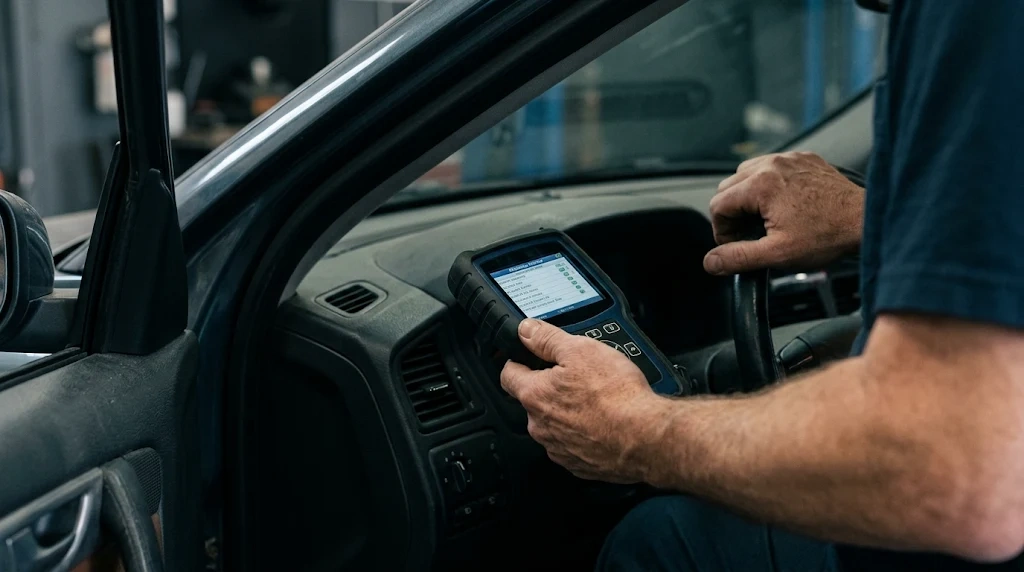
Bytes B, C, and D describe the readiness monitors. Byte B covers the common monitors and the engine type. Bytes C and D cover the remaining monitors, and their meaning changes with engine type, so byte B must be read first. Byte B, bit 3, is the switch: 0 means petrol, spark ignition, and 1 means diesel, compression ignition.
The logic here is the part most people get backwards. For supported status, a 1 means the monitor is supported and a 0 means it is not supported. For completeness, the sense flips: a 0 means the monitor has completed its test, and a 1 means it has not completed it yet. In scanner language, complete usually appears as ready, and incomplete appears as not ready.
Key Insight
Supported and ready are opposite in PID 01. A 1 means supported, but a 1 in the matching completeness bit means not ready yet. A 0 in the completeness bit is the good result: the test has finished.
Bits B0, B1, and B2 say whether misfire, fuel system, and comprehensive component monitoring are supported. Bits B4, B5, and B6 give the matching completeness results, in the same order. These three are called common monitors because they apply to both petrol and diesel engines.
Byte C lists which remaining monitors are supported, and byte D lists whether each has completed, paired positionally: C0 with D0, C1 with D1, and so on. For petrol, the pairs are catalyst, heated catalyst, evaporative system, secondary air, oxygen sensor, oxygen sensor heater, and EGR or VVT. For diesel, the same positions mean NMHC catalyst, NOx after-treatment, boost pressure, exhaust gas sensor, PM filter, and EGR or VVT. See the x-engineer guide to Mode 01 and PID 01 and the CSS Electronics OBD2 PID table for the full layout.
Not every car supports every monitor, and that is normal. The useful question is narrower: of the monitors this car does support, how many are still incomplete. An evaporative monitor is often the last to complete because it needs specific fuel-level, temperature, and parking conditions.
A Worked Example, Byte by Byte
Take a hypothetical reply of 41 01 81 07 65 05. This is an example to show the decoding, not a reading from a real car. The last four bytes are the PID 01 data: A is 81, B is 07, C is 65, and D is 05.
Byte A, 81, is 10000001 in binary: bit A7 is 1, so the MIL is on, and bits A6 to A0 are 0000001, so one confirmed DTC is stored. Byte B, 07, is 00000111: bits B0 to B2 are 1, so misfire, fuel system, and comprehensive component monitoring are supported; bit B3 is 0, so this is a petrol engine; bits B4 to B6 are 0, so all three common monitors have completed.
Byte C, 65, is 01100101 in binary. Catalyst, evaporative system, oxygen sensor, and EGR or VVT are supported; heated catalyst, secondary air, and oxygen sensor heater are not. Byte D, 05, is 00000101 in binary. Paired with byte C, the catalyst and evaporative monitors are supported but incomplete, while the oxygen sensor and EGR or VVT monitors have completed. Together, the example says: the light is on, one code is stored, the basic monitors are done, and two supported monitors still need to finish.
PID 01, PID 00, PID 41, and the Code Modes
PID 00 is the supported-PIDs map for PIDs 01 to 20. If PID 01 is not supported, the car will not answer a 01 01 request, and the scanner should show no data rather than a row of zeros.
PID 41 is Monitor Status This Drive Cycle, using the same four-byte layout but only for the current drive cycle, not the period since codes were cleared. For emissions testing, PID 01 is the one that matters. Mode 03 returns the stored codes themselves, Mode 07 returns pending codes, and Mode 0A returns permanent codes. PID 01 gives the count that points toward Mode 03; it never replaces it. The difference between those code types is covered in the guide to stored versus pending trouble codes.
How to Check PID 01 on a Scanner
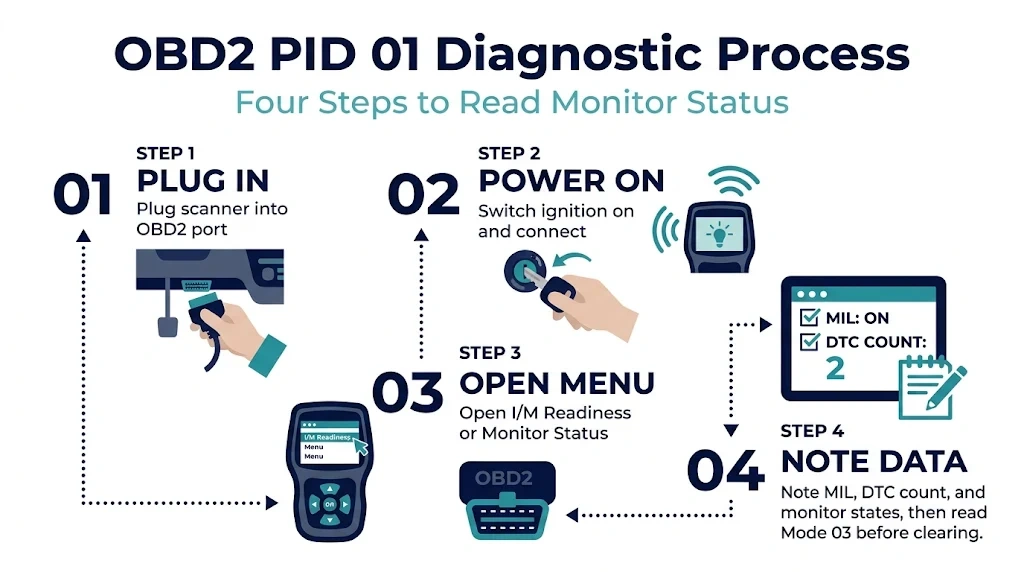
Most drivers never need to type 01 01 by hand. A handheld scanner, a Bluetooth adapter, or a laptop tool will request PID 01 automatically and show it as I/M Readiness or Monitor Status. Plug the scanner into the OBD2 port, usually under the dashboard on the driver side, switch the ignition on, and let the tool connect. Then open I/M Readiness or Monitor Status and note the MIL state, the DTC count, and the supported monitors with their ready or not-ready state.
Save the screen before clearing anything. If a code is stored, read Mode 03 first: clearing destroys the freeze-frame and readiness evidence that helps explain the fault.
Tip
Save the PID 01 screen before you clear codes. Once Mode 04 runs, every monitor resets to not ready and the DTC count drops to zero.
Why Monitors Show Not Ready After Clearing Codes

Clearing codes with Mode 04 does more than erase the code list: it also resets the readiness monitors to not ready and restarts the since-cleared clock that PID 01 reports. That is why a car can look clean immediately after a clear and still be unready for an emissions test.
A battery disconnect or module replacement has the same effect. The monitors complete only when the car is driven through the conditions each one needs, such as a cold start, steady cruising, and a parked soak for the evaporative test. That sequence is often called a drive cycle, and the exact conditions vary by make and model.
Emissions programs usually allow a small number of incomplete monitors, often fewer for newer cars, but the exact allowance is set by the local inspection program, not by PID 01. The guide to what incomplete readiness means explains that allowance, and the guide to what OBD2 data is used for emissions testing puts PID 01 alongside the other data an inspector reads. A recent clear is also visible in related data, which is why a scanner can often detect a recently cleared code even when the code list is empty.
Common Mistakes When Reading PID 01
First, treating a 1 as ready in the completeness bits: in byte B, a 1 in bit B4 means misfire monitoring is not ready. Second, treating not supported as failed: a monitor the car does not have cannot complete. Third, reading PID 01 as a diagnosis. It reports status, not cause: an incomplete catalyst monitor proves the test has not finished, not that the catalyst is faulty. Fourth, assuming zero codes means the car is ready for inspection: zero codes with several incomplete monitors is a normal result right after a clear.
Related Product
OBD2 Scanner With Live Data and I/M Readiness
A scanner that shows I/M readiness, MIL status, and DTC count makes PID 01 readable without decoding raw hex by hand.
As an Amazon Associate, we earn from qualifying purchases.
Frequently Asked Questions
Is OBD2 PID 01 the same as Mode 01?
No. Mode 01 is the whole service for current powertrain data, with many PIDs. PID 01 is one item inside that service, the monitor-status reply about MIL status, DTC count, and readiness.
Does PID 01 show the actual trouble codes?
No. It shows how many confirmed emissions-related codes are stored, not which ones. Use Mode 03 for stored codes, Mode 07 for pending codes, and Mode 0A for permanent codes.
Why does my scanner show PID 01 as not ready after I cleared a code?
Clearing codes resets all readiness monitors to not ready. They must run again during normal driving, and the evaporative monitor is often last because it needs specific fuel-level and parking conditions.
Can a car pass an emissions test with an incomplete monitor?
Sometimes, depending on local rules and model year. Many programs allow one incomplete monitor on newer cars and two on older cars, but the exact allowance varies by state or country.
What is the difference between PID 01 and PID 41?
PID 01 reports monitor status since DTCs were cleared, while PID 41 reports monitor status for the current drive cycle only. A monitor can be complete in PID 01 yet incomplete in PID 41 if it has not run yet in the current drive.
Does PID 01 work on diesel cars?
Yes, with different monitor names in bytes C and D. Byte B, bit 3, is 1 for a diesel engine, so the same positions are read as NMHC catalyst, NOx after-treatment, boost pressure, exhaust gas sensor, and PM filter.
Conclusion
OBD2 PID 01 is a compact status report, not a sensor value and not a code list. Its four bytes say whether the check-engine light is on, how many confirmed emissions-related codes are stored, which monitors the car supports, and which have finished since the codes were last cleared. Remember the flipped completeness bit: supported is shown by a 1, while complete is shown by a 0. Read the DTC count and the readiness bits together, save the screen before clearing anything, and give the car varied driving time to complete its monitors before an emissions test.

I’m Alex Rahman, a car enthusiast and automotive writer focused on practical solutions, car tools, and real-world driving advice. I share simple and honest content to help everyday drivers make better decisions.
