
10 Best OBD2 Scanners With Battery Registration for 2026: Register It Right
The best OBD2 scanner with battery registration right now is the Autel MaxiCOM MK808S — its manual lists BMS registration for a new battery. We compared 10 scanners, scoring each on Battery Registration and BMS Depth, Vehicle Coverage and Compatibility, and Ease of Use. Most scanners look identical on paper but fail on your exact make, model, and battery type. Whether you need a BMW registration, a shop tablet, or a budget handheld, this guide gives you one clear answer.
Quick Comparison: All 10 Products Ranked
| # | Product | Best For | Rating | Badge | |
|---|---|---|---|---|---|
| 1 | Autel MaxiCOM MK808S | Most owners, all-round use | 4.9/5 | Best Overall | Buy → |
| 2 | LAUNCH X431 PROS V5.0 | Workshops and coding work | 4.8/5 | Best for Workshops | Buy → |
| 3 | FOXWELL NT809 | Full-system value tablet | 4.8/5 | Best Full-System Value | Buy → |
| 4 | Autel MaxiSys MS906 Pro | Pro-level diagnostics | 4.7/5 | Best Pro Tablet | Buy → |
| 5 | LAUNCH X431 CRP919X | Wireless mid-range use | 4.7/5 | Best Wireless Mid-Range | Buy → |
| 6 | FOXWELL NT510 Elite | BMW and Mini owners | 4.6/5 | Best for BMW and Mini | Buy → |
| 7 | Autel MaxiCOM MK808BT Pro | Bluetooth tablet use | 4.6/5 | Best Bluetooth Tablet | Buy → |
| 8 | TOPDON ArtiDiag800 BT | DIY depth on a budget | 4.5/5 | Best for DIY Depth | Buy → |
| 9 | ANCEL BM700 PRO | BMW-only battery jobs | 4.5/5 | Best BMW-Only Pick | Buy → |
| 10 | Autel MaxiDiag MD808 Pro | Budget handheld use | 4.4/5 | Best Budget Handheld | Buy → |
How We Chose These Scanners
What we compared
We compared 10 scanners with a listed BMS or battery registration function, checking the function name, supported battery types, and system coverage in the makers’ manuals and listings.
Our 3 scoring criteria
Battery Registration and BMS Depth, Vehicle Coverage and Compatibility, and Ease of Use. Each product is scored out of 5 on each criterion.
How ratings work
Scores are editorial ratings based on listed specifications and documented BMS support, not lab or hands-on test results. No test period is claimed.
What we left out — and why
We left out basic code readers with no listed BMS function, including BlueDriver, because a code reader alone cannot register a battery on most cars that need it.
What to Look for When Buying an OBD2 Scanner With Battery Registration
Battery registration is not a generic OBD2 function. It lives in the car’s battery management system, and support varies by make, model, year, and battery type. Check the exact function before you buy.
1. BMS Function for Your Make
Look for a named BMS, BAT, or battery registration function in the maker’s manual or function list, not just the words battery test. If you are unsure whether a scan tool can perform battery registration, check that page first, then check your exact car against the tool’s supported list. A tool that registers a BMW battery may not register a Mercedes or Audi battery.
2. AGM and EFB Support, and Capacity Changes
Most cars that need registration use AGM or EFB batteries, often with start-stop. Registration alone covers a like-for-like swap. Changing capacity or chemistry usually needs extra coding, so confirm whether the tool lists that step. A battery test is not registration, and a good voltage reading does not mean the new battery is registered.
3. Vehicle Coverage Checked by VIN
Coverage lists change with software updates, so a brand name on the box is not enough. Send the seller or maker your VIN, year, make, and model before buying, and ask for the exact BMS function in writing. Learn how to use an OBD2 scanner on your car first, so the registration menu is not your first test of the tool.
4. Updates and Subscription Terms
BMS coverage grows and changes with software, so free-update length matters. Some tablets include one or two years, some include three, and some need a paid renewal to keep adding cars. A tool that worked on a 2018 model may need an update for a 2024 model, so read the renewal terms before you choose the cheapest tablet.

Autel MaxiCOM MK808S — The All-Round Registration Tablet
Best for: Most owners who want registration and full-system diagnostics in one tablet
Your new battery is only half the job if the car still thinks the old one is fitted. The MK808S is built for that moment, with a BMS service in its manual that evaluates charge state, monitors closed-circuit current, registers the replacement, and activates the vehicle’s rest state. It also covers all systems on most supported cars, with 28+ service functions, bidirectional control, and a 7-inch tablet screen that keeps menus readable. The trade-off is the update clock: after the included period, new coverage needs a renewal, so check that term before you buy.
- Documented BMS registration function
- 28+ service functions listed
- All-system coverage, 80+ makes
- Updates need renewal after included period
- BMS varies by vehicle, not universal
4.9/5
4.9/5
4.8/5

LAUNCH X431 PROS V5.0 — The Workshop Registration Tablet
Best for: Workshops that register batteries across many makes
A workshop cannot guess at battery registration, because each make asks for the job in a different way. The PROS V5.0 lists BMS reset, battery register, and battery maintenance among 37+ service functions, with OE-level full-system diagnostics and bidirectional control. Its 8-inch tablet and wireless DBSCar VII VCI keep the tool usable around a car, and CAN FD and DoIP support helps on newer vehicles where older tools stop. The trade-off is size and learning curve: this is a pro tablet first, so a one-car owner may find it more than the job needs.
- BMS reset and battery register listed
- 37+ service functions listed
- CAN FD and DoIP support
- Pro size, steep for one car
- Two years free updates, then paid
4.9/5
4.8/5
4.7/5

FOXWELL NT809 — The Value Full-System Tablet
Best for: Owners who want full-system depth without a pro price
If the battery job is the trigger, the rest of the car still matters. The NT809 lists battery registration among 30+ reset and service functions, with all-system diagnostics, bidirectional control, and a 7-inch touchscreen. Its manual describes BMS as registering a new battery to the ECU, which is exactly the step a like-for-like swap needs. It also lists three years of free updates in its manual, longer than many rivals. The limit is the usual one: BMS support still varies by vehicle, so confirm your car before you buy. That breadth matters when one battery job turns into a wider check.
- Battery registration listed for 49 brands
- 30+ reset functions listed
- Three years free updates listed
- BMS varies by vehicle, not universal
- No ECU coding on this model
4.8/5
4.8/5
4.7/5

Autel MaxiSys MS906 Pro — The Pro Registration Tablet
Best for: Technicians who need pro depth and fast scans
When a battery swap is one job among many, a pro tablet earns its place by doing the rest well too. The MS906 Pro lists BMS among its service functions, with full-system diagnostics, bidirectional control, and a fast all-system scan on supported cars. Its larger screen and stronger processor help when you are moving between modules, live data, and service menus in one visit. The trade-off is cost and commitment: it is a pro tool with a pro update path, so it suits regular use more than a single battery job.
- BMS listed among service functions
- Fast all-system scan listed
- Bidirectional control included
- Pro cost, overkill for one job
- Update renewal needed after period
4.8/5
4.7/5
4.6/5

LAUNCH X431 CRP919X — The Wireless Mid-Range Tablet
Best for: Owners who want wireless freedom without a pro tablet
A cable is the last thing you want when you are already working around a battery. The CRP919X uses a wireless VCI, so the tablet stays in your hand while the car stays on the bench, and it lists BMS among its service functions. It also covers all systems on supported cars, with CAN FD support and a 7-inch screen that keeps the registration steps readable. The trade-off is depth: it is a strong mid-range tool, not a full pro tablet, so check the exact BMS menu for your make before you rely on it.
- BMS listed among service functions
- Wireless VCI, cable-free use
- CAN FD support listed
- Less depth than pro tablets
- BMS varies by vehicle, not universal
4.7/5
4.7/5
4.6/5

FOXWELL NT510 Elite — The BMW and Mini Specialist
Best for: BMW and Mini owners who register batteries often
BMW owners face battery registration more than most drivers, because most BMWs since 2002 need it after a swap. The NT510 Elite is made for that world, with full-system BMW and Mini coverage and a battery registration function that supports AGM and EFB batteries, with BMS matching. It also reads and clears codes across engine, ABS, airbag, transmission, and TPMS systems, so it stays useful after the battery job. The trade-off is narrow scope: it is a BMW and Mini tool first, not a multi-make shop tablet. That focus keeps the menus short and the registration steps clear.
- AGM and EFB registration listed
- Full-system BMW and Mini coverage
- One-click BMS matching described
- Narrow make coverage, BMW and Mini
- Smaller screen than tablets
4.7/5
4.4/5
4.6/5

Autel MaxiCOM MK808BT Pro — The Bluetooth Registration Tablet
Best for: Owners who want a wireless Autel tablet
The MK808BT Pro takes the MK808S formula and cuts the cable, pairing the tablet with a Bluetooth VCI. It lists battery registration and reset among its service functions, with all-system diagnostics and bidirectional control on supported cars. That wireless link helps when the OBD port sits in an awkward spot, and the 7-inch screen keeps the BMS steps readable. The trade-off is the usual Bluetooth one: pairing and range can vary by car and phone-free tablet setup, so keep the VCI charged and close. It is a good fit when you already trust Autel menus.
- Battery registration and reset listed
- Bluetooth VCI, wireless use
- All-system diagnostics listed
- Bluetooth pairing can vary
- BMS varies by vehicle, not universal
4.7/5
4.6/5
4.5/5

TOPDON ArtiDiag800 BT — The DIY Depth Tablet
Best for: DIY owners who want depth without a pro tablet
Some DIY owners do more than read a code, and the ArtiDiag800 BT is aimed at them. It lists BMS reset among 28 service functions, with all-system diagnostics, bidirectional control, and a wireless Bluetooth VCI. The 7-inch tablet keeps live data and service menus readable, and the tool covers a wide range of makes on supported cars. The trade-off is support depth: on newer or less common cars, the exact BMS menu may be thinner than on the Autel or LAUNCH pro tablets, so check your VIN first. That depth helps when a battery job turns into a wider diagnostic check.
- BMS reset listed
- 28 service functions listed
- Wireless Bluetooth VCI included
- Thinner BMS depth on some cars
- BMS varies by vehicle, not universal
4.5/5
4.5/5
4.5/5
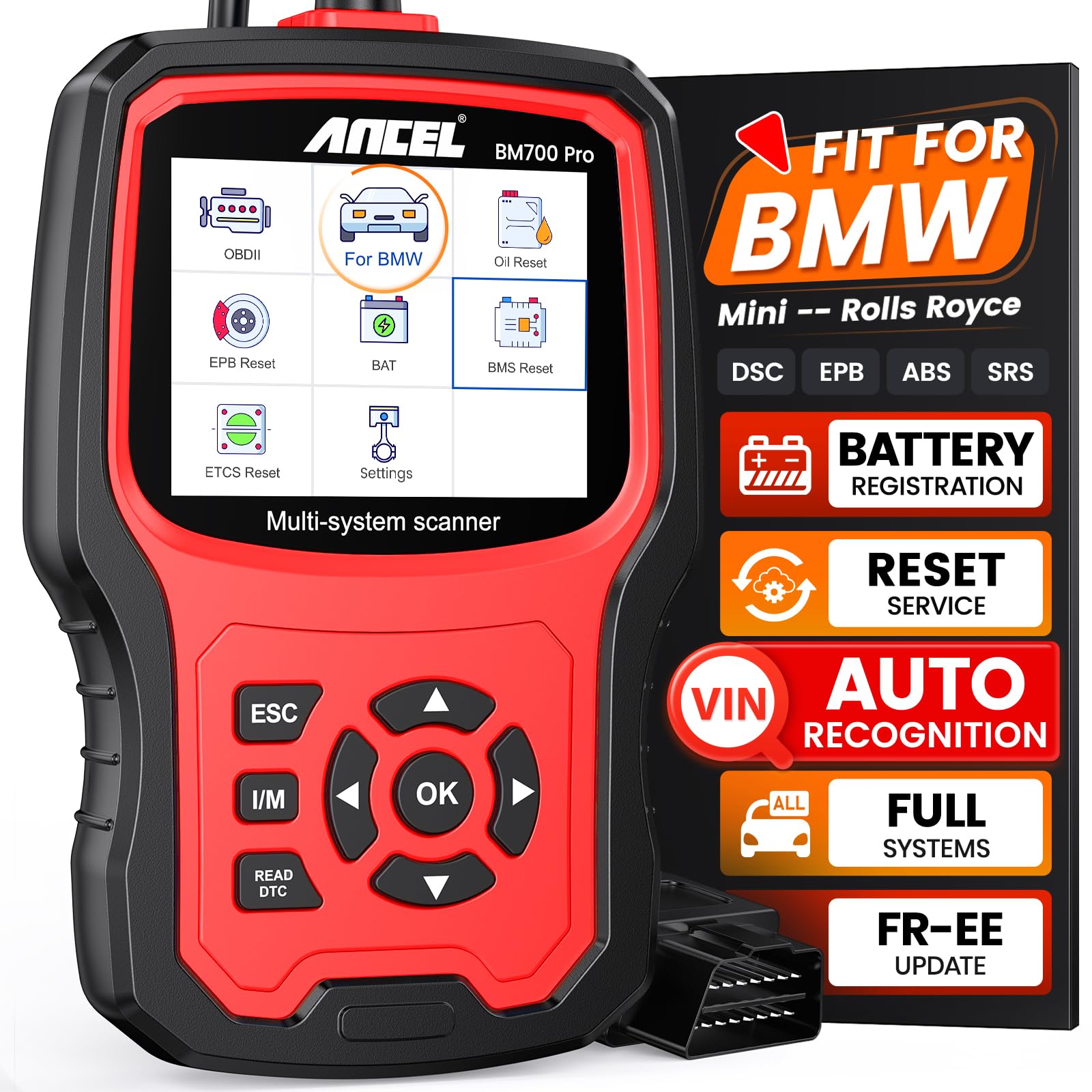
ANCEL BM700 PRO — The BMW-Only Battery Tool
Best for: BMW, Mini, and Rolls-Royce owners only
If you only own a BMW, a multi-make tablet can feel like paying for cars you will never scan. The BM700 PRO is built for BMW, Mini, and Rolls-Royce, with Auto VIN, a full-system scan in under a minute in its listing, and battery registration and reset as a headline function. It also covers oil, EPB, and other common resets for those cars. The trade-off is obvious and total: it is not a general scanner, so a second car from another make will need a different tool. That focus keeps the menus short and the registration steps clear for those cars.
- Battery registration headline function
- Auto VIN, fast full-system scan
- Focused BMW, Mini, Rolls-Royce coverage
- BMW-only, useless for other makes
- Registration flow could be smoother
4.6/5
4.3/5
4.6/5

Autel MaxiDiag MD808 Pro — The Budget BMS Handheld
Best for: Owners who want BMS in a simple handheld
Not every battery job needs a tablet, and the MD808 Pro proves it. This wired handheld lists BMS among seven service functions, alongside oil, EPB, SAS, DPF, throttle, and air-fuel adjustment, with all-system diagnostics on supported cars. Its 4-inch screen and simple buttons suit a quick job in a driveway, and it avoids the tablet update and charging routine. The trade-off is screen and depth: menus are smaller, and its service list is shorter than the tablets above, so check your exact BMS menu first. That simplicity suits a quick job in a driveway, without a tablet to charge.
- BMS listed among seven services
- Simple wired handheld, no charging
- All-system diagnostics listed
- Small 4-inch screen
- Shorter service list than tablets
4.4/5
4.4/5
4.5/5
Top 3 Head-to-Head: Autel MaxiCOM MK808S vs LAUNCH X431 PROS V5.0 vs FOXWELL NT809
These three are the common final choices because each one lists a real BMS function, yet they suit different owners. The MK808S is the all-rounder, the PROS V5.0 is the workshop tool, and the NT809 is the value tablet.
| Feature | #1 MK808S | #2 PROS V5.0 | #3 NT809 |
|---|---|---|---|
| Battery Registration and BMS Depth | 4.9/5 — Best | 4.9/5 | 4.8/5 |
| Vehicle Coverage and Compatibility | 4.9/5 | 4.8/5 | 4.8/5 — Best |
| Ease of Use | 4.8/5 — Best | 4.7/5 | 4.7/5 |
| Choose if… | You want one tablet for most cars | You run a workshop, need coding | You want value and long updates |
Who These Scanners Are NOT For
A battery registration scanner is a specific tool, not a cure for every electrical fault.
They also will not fix a weak alternator, a bad battery sensor, or a wiring fault. Registration tells the car a new battery is fitted, but it cannot repair the charging system. Learn the problems an OBD2 scanner cannot detect before you buy a tool for a fault it was never meant to find.
Common Mistakes to Avoid
Most battery registration failures come from a skipped check, not a bad tool.
Frequently Asked Questions About OBD2 Scanners With Battery Registration
Do I need to register a new car battery after replacement?
Yes, on many modern cars, especially BMW, Audi, VW, Mercedes, Mini, and other cars with a battery management system. Registration tells the car a new battery is fitted and resets the old charging history. Older cars with a simple flooded battery and no battery sensor usually do not need it, so check your owner’s manual first.
What happens if I do not register a new battery?
The car keeps charging the new battery with the old battery’s profile, which can shorten its life and cause start-stop faults, battery warnings, and comfort features switching off. The car will usually start on day one, so the damage is slow and easy to miss until the new battery dies early.
Can any OBD2 scanner register a battery?
No. Most basic code readers only read and clear engine codes, and they have no BMS function. You need a scanner that lists battery registration or BMS for your exact make, model, and year. Always check the maker’s function list by VIN, because a tool that works on one brand may not work on another.
What is the difference between battery registration and battery coding?
Registration is for a like-for-like swap, when the new battery has the same type and capacity as the old one. Coding is the extra step when you change type, capacity, or chemistry, such as flooded to AGM. Registration tells the car the battery is new, while coding tells it the battery is different.
Can I register a battery myself with a scan tool?
Yes, on many cars, if you have a scanner that supports the exact BMS function for your car. The usual steps are to plug in the tool, open the BMS or battery service menu, enter the new battery details, and confirm the registration. If the menu is missing or locked, stop and ask a shop, because forcing it can store the wrong data.
Which cars need battery registration most often?
BMW and Mini need it most often, with most BMWs since 2002 using a battery sensor. Audi, VW, Porsche, Mercedes, Volvo, Jaguar, and Land Rover also need it on many models, especially cars with start-stop and AGM or EFB batteries. Always check the exact year and model, because the same brand can differ by year.
Our Final Verdict
Most owners should start with the Autel MaxiCOM MK808S, because it pairs a documented BMS function with broad coverage. Check your exact car by VIN first, because BMS support is never universal. For a workshop, the LAUNCH PROS V5.0 adds coding depth, while the FOXWELL NT809 offers strong value.

I’m Alex Rahman, a car enthusiast and automotive writer focused on practical solutions, car tools, and real-world driving advice. I share simple and honest content to help everyday drivers make better decisions.
