Can a Scan Tool Perform Battery Registration?
Quick Answer
Yes, a scan tool can perform battery registration if it supports the required battery management service function for your specific vehicle. Advanced diagnostic scanners and some manufacturer-specific tools can register a replacement battery through the OBD2 diagnostic port. However, basic code readers generally cannot perform this procedure. Some vehicles also require separate battery coding when the replacement battery has a different capacity or technology.
Replacing a car battery is not always the end of the job. On vehicles equipped with an intelligent battery management system, the computer may need to know that a new battery has been installed.
This is where battery registration comes in. Instead of simply checking battery voltage or clearing a warning light, a compatible scan tool communicates with the vehicle’s power management system and records the battery replacement.
The important distinction is that not every OBD2 scanner supports battery registration, even if it can diagnose multiple vehicle systems. Understanding the required functions helps you avoid using the wrong tool or leaving the battery replacement procedure incomplete.
What Does Battery Registration Actually Do?
Battery registration tells a compatible vehicle’s battery management system that its previous battery has been replaced.
Many modern charging systems monitor battery condition, electrical demand, temperature, and charging history. As a battery ages, the power management system may adapt its charging strategy based on the information it has collected.
After installing a new battery, that historical information may no longer accurately represent the replacement battery.
Registration allows the vehicle to update its replacement record and, depending on the system, reset or adjust battery-related management information.
For example, BMW service procedures include a specific function for registering battery replacement. Volkswagen Group vehicles may use battery adaptation channels to record replacement battery information.
These operations vary by manufacturer, and they should not be treated as one universal reset procedure.
Why the Battery Management System Matters
The battery management system, often abbreviated BMS, helps control electrical power usage and battery charging.
Depending on the vehicle, the system may monitor battery current, voltage, temperature, and estimated state of charge. Some vehicles use an intelligent battery sensor attached near the battery terminal.
Battery registration helps the system account for a replacement battery instead of continuing to operate solely from information associated with the old one.
However, registration does not repair a defective alternator, damaged battery sensor, poor electrical connection, or faulty replacement battery.
Which Scan Tools Can Perform Battery Registration?
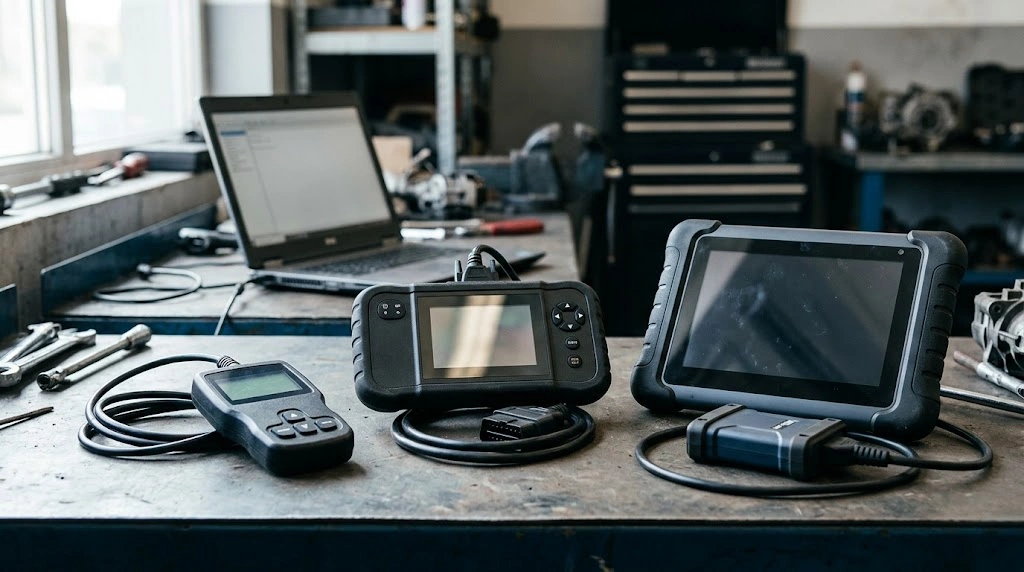
Battery registration generally requires a diagnostic tool with vehicle-specific service functions, not merely standard OBD2 communication.
Basic code readers concentrate on emissions-related diagnostic trouble codes and engine data. Battery registration usually requires access to a manufacturer-specific control module or service routine.
The following comparison explains the practical differences.
| Scan Tool Type | Battery Registration | Main Limitation |
|---|---|---|
| Basic OBD2 code reader | Generally no | Usually limited to generic diagnostics |
| Enhanced multi-system scanner | Sometimes | Depends on specific vehicle and service coverage |
| Advanced professional scan tool | Often supported | Not guaranteed for every model |
| Manufacturer-specific diagnostic software | Supported where the vehicle provides the procedure | Requires compatible hardware and software access |
For example, certain Autel diagnostic tools include a BMS service menu with a battery replacement registration function. The Autel BMS service documentation specifically describes battery registration while emphasizing that the function is not supported on every vehicle.
Some Volkswagen Group vehicles can use VCDS for battery adaptation, provided the particular vehicle and controller are supported.
If you are evaluating scanner capabilities more broadly, our guide to essential OBD2 scanner features explains the difference between basic diagnostics and advanced service functions.
How to Check Whether Your Scan Tool Supports Battery Registration
Before connecting a scanner to register a replacement battery, verify the function for the exact vehicle rather than relying on a general compatibility claim.
- Identify your vehicle: Record its make, model, model year, engine configuration, and VIN when needed.
- Check the scanner’s supported functions: Look for Battery Registration, Battery Replacement, Battery Adaptation, BMS Service, or an equivalent manufacturer-specific routine.
- Confirm vehicle coverage: Use the scanner manufacturer’s compatibility database or official support information.
- Check for coding requirements: Determine whether the replacement battery has a different capacity or technology from the original.
- Confirm software access: Some procedures require a specific software version, license, or diagnostic communication method.
A scanner displaying a BMS menu does not automatically mean it can register every battery in every supported vehicle.
Practical Tip
Check the scanner’s coverage using the exact vehicle before attempting registration. If the documentation only says “BMS supported,” confirm whether that means battery testing, battery replacement registration, battery coding, or some combination of those functions.
How to Register a New Car Battery With a Scan Tool
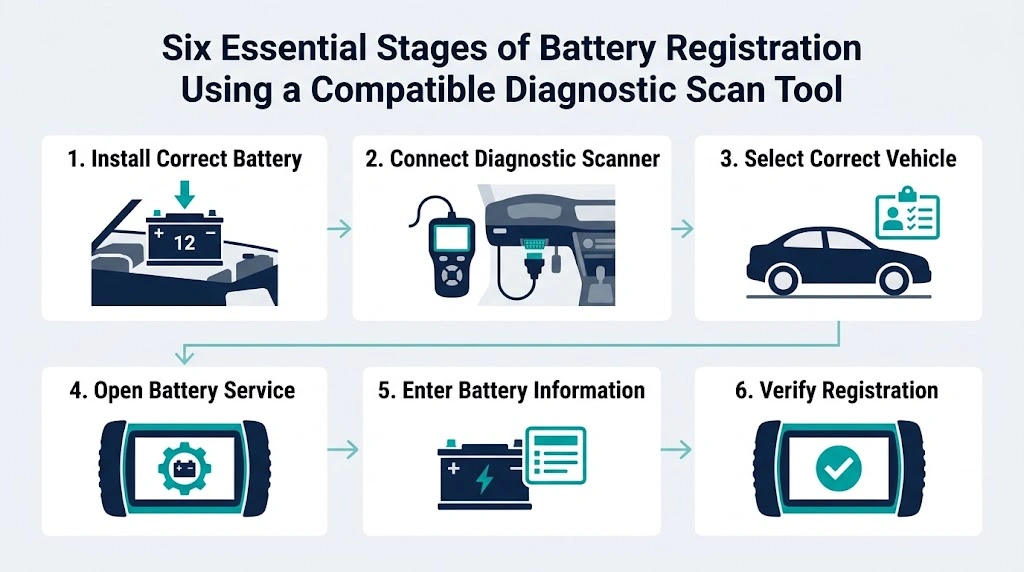
The exact procedure depends on the manufacturer and diagnostic equipment. However, compatible vehicles commonly follow a similar workflow.
Step 1: Install the Correct Replacement Battery
Confirm that the replacement battery meets the vehicle manufacturer’s requirements.
Check the specified battery technology, physical fitment, electrical ratings, and capacity. If the replacement differs from the original, determine whether additional coding or configuration is necessary.
Step 2: Connect the Diagnostic Scanner
Locate the vehicle’s diagnostic connector and connect the compatible scan tool.
Switch the ignition to the position required by the service procedure, commonly ignition on with the engine off. Follow the vehicle and scanner instructions because some systems specify different conditions.
Step 3: Select the Correct Vehicle
Choose the vehicle manufacturer and model, or allow the scanner to identify the VIN if that feature is available.
Confirm the identification before entering any service function. Incorrect vehicle selection can result in unavailable menus or inappropriate procedures.
Step 4: Open the Battery Service Function
Navigate to the relevant service menu. Depending on the vehicle, the procedure may appear under BMS, Power Supply, Battery Replacement, Service Functions, or a specific control module.
Select the battery registration or replacement adaptation function rather than an unrelated battery test or generic reset.
Step 5: Enter the Required Battery Information
Some vehicles only require confirmation that a battery has been replaced. Others may request battery capacity, manufacturer information, serial number, or battery technology.
Use the actual replacement battery information and follow the displayed instructions. Do not guess specifications or change unrelated module settings.
Step 6: Complete and Verify the Registration
Run the procedure and check for a successful completion message.
When supported, read back the stored replacement information to confirm the values were accepted. Check for relevant diagnostic faults and follow any vehicle-specific post-service instructions.
Do not assume the procedure succeeded merely because the scanner returned to its main menu.
Warning
Maintain the voltage required by the manufacturer throughout the procedure. Avoid disconnecting the scan tool or battery while a service operation is writing configuration information. If the scanner requests settings you cannot verify, stop rather than entering guessed values.
Battery Registration vs. Battery Coding: What Is the Difference?
Battery registration records that a replacement has occurred, while battery coding or adaptation may configure the vehicle for the replacement battery’s specifications.
The terminology varies by manufacturer, and some systems combine these operations into a single workflow.
For example, a vehicle originally fitted with an AGM battery of a specified capacity may require only replacement registration when an equivalent battery is installed.
If the replacement uses a different supported technology or capacity, the vehicle may also need updated battery configuration data.
This distinction is documented in the Ross-Tech battery replacement procedures, which describe several Volkswagen Group battery adaptation methods and the information required by different control modules.
Battery coding should also not be confused with rewriting an ECU’s firmware. Our article explaining scan tool ECU programming capabilities covers the difference between programming, coding, and adaptation.
Which Vehicles May Require Battery Registration?
Battery registration is common on certain vehicles using advanced battery and energy management systems, particularly those with intelligent battery monitoring.
Examples include selected BMW models and various Volkswagen Group vehicles, including certain Audi and Volkswagen applications.
However, requirements differ across models, generations, electrical architectures, and model years.
Two vehicles from the same manufacturer may use different procedures. One may require registration, another may require battery adaptation with stored specifications, and another may not require a diagnostic registration procedure at all.
The presence of a start-stop system or battery monitoring sensor can be a reason to investigate the requirement, but neither feature alone proves that registration is mandatory.
Consult the manufacturer’s service information for the specific vehicle rather than relying on a universal list of brands.
What Happens if You Skip Battery Registration?
On a vehicle that requires registration, skipping the procedure can leave the battery management system operating with outdated battery replacement information.
The consequences depend on the charging system. Possible issues include inaccurate battery management calculations, charging behavior that does not properly reflect the replacement battery, and reduced availability of certain electrical functions.
That does not mean every unregistered battery will immediately fail or prevent the engine from starting.
A vehicle may appear to operate normally while the required service procedure remains incomplete.
Registration is also not a substitute for diagnosing an existing charging fault. If battery voltage, starting performance, or electrical operation remains abnormal after registration, the battery and charging system still need appropriate testing.
Why Might a Scan Tool Fail to Register a Battery?

If the registration option is unavailable or the procedure fails, first check compatibility and procedure requirements.
- Unsupported service function: The scanner may read diagnostic codes without supporting battery registration for the vehicle.
- Incorrect vehicle selection: The chosen model or control system may not match the car.
- Outdated scanner software: The required vehicle coverage may be absent from the installed software.
- Communication problems: A weak connection, unstable voltage, or module communication issue can prevent completion.
- Incorrect battery information: Some systems reject invalid capacity, manufacturer, or identification data.
- Additional access requirements: A particular vehicle may require manufacturer-specific software, permissions, or another supported diagnostic method.
If the scanner powers on but cannot communicate with the vehicle, follow a structured diagnostic process before attempting registration again. Our guide to OBD2 scanner communication problems explains several useful first checks.
When a scanner reports that the function is unsupported, repeatedly clearing fault codes or disconnecting the battery will not create the missing registration capability.
Frequently Asked Questions
Can a basic OBD2 scanner register a new battery?
Generally, no. Basic OBD2 readers are designed for generic diagnostics rather than manufacturer-specific battery service procedures. Battery registration requires a scanner or application that explicitly supports the function for your vehicle.
Can battery registration be performed without a scan tool?
Some vehicles do not require diagnostic battery registration, while others require a compatible diagnostic interface and software. There is no universal manual method that replaces the specified diagnostic procedure on every vehicle.
Do you need to register a battery if it is the same type and size?
Yes, if the vehicle requires replacement registration. Installing an equivalent battery may avoid additional configuration changes, but it does not automatically remove the registration requirement.
Is a BMS reset the same as battery registration?
Not necessarily. Some scan tools combine the functions or use similar menu names, but BMS reset can describe different procedures. Confirm that the selected function specifically registers or adapts the replacement battery for the vehicle.
Can a Bluetooth OBD2 adapter perform battery registration?
Sometimes. The adapter must support the required communication, and the connected application must provide the manufacturer-specific battery registration function. A generic Bluetooth adapter with a basic code-reading app is not sufficient by itself.
How can you confirm battery registration was successful?
Look for the scanner’s successful completion message and, when available, read back the battery replacement data stored in the vehicle. A completed procedure should also be consistent with the manufacturer’s specified verification steps.
Conclusion
A scan tool can perform battery registration when it has the correct manufacturer-specific service function and supports the exact vehicle.
Basic OBD2 readers generally cannot complete this task, while capable aftermarket scanners and manufacturer diagnostic systems may offer the necessary registration or adaptation procedure.
Before attempting the service, verify the replacement battery specifications, check the scanner’s vehicle coverage, and determine whether separate battery coding is required. Completing the correct procedure helps the vehicle’s battery management system recognize the replacement battery and manage it as intended.

I’m Alex Rahman, a car enthusiast and automotive writer focused on practical solutions, car tools, and real-world driving advice. I share simple and honest content to help everyday drivers make better decisions.
