10 Best OBD2 Scanner Under $500 for 2026: Clear Diagnostics Without Overspending
The best OBD2 scanner under $500 right now is BlueDriver Bluetooth Pro — the pick that pairs code reading with vehicle-specific repair reports. We evaluated 10 OBD2 scanners, scoring each on diagnostic coverage, ease of use, and value for money. Most scanners look identical on paper but disappoint in real garages — that gap shaped our comparison. Whether you need a code reader, a phone scanner, or an all-system tablet, this guide gives one clear answer.
Quick Comparison: All 10 Products Ranked
| # | Product | Best For | Rating | Badge | |
|---|---|---|---|---|---|
| 1 | BlueDriver Bluetooth Pro OBDII Scan Tool for iPhone & Android | Phone-first diagnostics | 4.9/5 | Best Overall | Buy → |
| 2 | Autel MaxiCOM MK808S | Serious home diagnostics | 4.8/5 | Best Professional Tablet | Buy → |
| 3 | Innova 5610 | All-system handheld work | 4.8/5 | Best All-System Handheld | Buy → |
| 4 | Launch CRP129X Elite | Multi-system value | 4.7/5 | Best All-System Value | Buy → |
| 5 | OBDLink MX+ | Advanced app users | 4.7/5 | Best Advanced Bluetooth | Buy → |
| 6 | FOXWELL NT301 | Simple handheld checks | 4.6/5 | Best Budget Handheld | Buy → |
| 7 | Innova 5210 | First-time DIY owners | 4.6/5 | Best for First-Time DIY | Buy → |
| 8 | Autel AutoLink AL519 | Everyday code reading | 4.5/5 | Best Mid-Range Reader | Buy → |
| 9 | Ancel AD310 | Lowest-cost checks | 4.5/5 | Best Ultra-Budget Reader | Buy → |
| 10 | Launch CR529 | Pocket code reading | 4.4/5 | Best Simple Pocket Reader | Buy → |
Scores below are editorial ratings based on listed specifications and documented coverage, not lab or hands-on test results.
How We Chose These OBD2 Scanners
What we compared
We compared 10 scanners across system coverage, live-data support, connectivity, service functions, update terms, and ease of use.
Our 3 scoring criteria
Diagnostic coverage, ease of use, and value for money, each scored out of 5 as an editorial rating.
Expert consulted
No outside expert is named here, because none was interviewed for this editorial shortlist; coverage claims rest on manufacturer documentation.
What we cut — and why
We cut shop-only tools and scanners that duplicate a ranked pick without adding coverage, a clearer screen, or a better app.
What to Look for When Buying an OBD2 Scanner
Start with the job you actually do, not the longest feature list. A clear match for what to look for in a scanner saves more time than any extra menu.
1. Diagnostic Coverage
Generic OBD2 covers engine codes, but ABS, airbag, transmission, and all-system access vary sharply by model. Check your vehicle year, make, and the exact systems listed before you buy, because a missing system cannot be added later by an app update alone. This is where cheap versus expensive OBD2 scanners usually diverge most.
2. Live Data and Service Functions
Live data helps you see a fault while it happens, rather than guessing from a stored code. Freeze frame, graphing, I/M readiness, and service resets such as oil or battery registration matter if you maintain your own car. If you only want a code and a clear explanation, do not pay for bidirectional controls you will never use.
3. Display and Connectivity
A handheld with its own screen works without a phone, a charged battery, or a signal. A Bluetooth adapter is smaller and easier to store, but it depends on your phone and app. Weigh the choice between a handheld scanner versus phone app against where you actually scan: driveway, roadside, or a dim garage.
4. Updates, Support, and Long-Term Value
Check whether updates are lifetime, time-limited, or subscription-based, and whether the maker still supports your model. A strong scanner with dead software becomes a basic reader over time. Read the update terms in the listing, not just the headline features, before you commit.

BlueDriver Bluetooth Pro OBDII Scan Tool for iPhone & Android — Best phone-first diagnostic pick
Best for: Phone-based diagnostics
For most drivers, this is the easiest path from a warning light to a plan. Plug the small adapter into the port, open the app, and you get codes in plain language, live data, and repair reports matched to your vehicle. It covers ABS, SRS, and TPMS on many models, so it goes beyond a basic engine reader. The trade-off is dependence on your phone and app, and deeper manufacturer-specific coverage still varies by vehicle. If you want a pocketable tool you will actually use, start here.
- Vehicle-specific repair reports in app
- Compact adapter, no screen needed
- Live data, ABS, SRS coverage
- Needs phone and app to scan
- Deep brand coverage varies by vehicle
4.8/5
4.9/5
4.9/5

Autel MaxiCOM MK808S — Strongest tablet for home garages
Best for: Serious home diagnostics on a tablet
Serious DIY owners who want tablet diagnostics without a shop tool should look here first. The large touchscreen makes live data, system scans, and service menus easier to read than a small handheld, and all-system coverage reaches far beyond engine codes. Bi-directional controls and a wide service menu suit owners who do brakes, resets, and deeper troubleshooting. The trade-off is size, weight, and update terms after the included period, so check those terms before buying. For a home garage workhorse, this is the strongest tablet pick.
- All-system diagnostics on one tablet
- Large touchscreen for live data
- Wide service and reset menu
- Larger and heavier than handhelds
- Updates may cost after included period
4.9/5
4.6/5
4.7/5

Innova 5610 — Pro coverage in handheld form
Best for: Confident DIY owners who want all-system handheld work
Owners who want pro-level coverage in a handheld, not a tablet, will appreciate this balance. It scans all systems, offers bidirectional controls for selected tests, and adds battery and alternator checks that help separate a weak battery from a charging fault. Live data graphing makes intermittent problems easier to follow than a single code alone. The trade-off is a higher learning curve and a larger handheld than a basic reader, so beginners should expect some setup time. For confident DIY owners, it is a strong long-term pick.
- All-system scan with bidirectional controls
- Battery and alternator testing included
- Live data graphing for intermittent faults
- Steeper learning curve for beginners
- Bulkier than basic code readers
4.9/5
4.7/5
4.6/5

Launch CRP129X Elite — Balanced multi-system handheld value
Best for: Owners maintaining several family cars
This is the pick for owners who want multi-system coverage without jumping to a full tablet. It covers engine, transmission, ABS, and SRS on many vehicles, adds live data and service resets, and keeps the interface on a single handheld touchscreen. That combination suits owners who maintain several family cars and want more than engine codes. The trade-off is that advanced brand-specific functions still vary, and the screen is smaller than a tablet. For balanced multi-system value, it is hard to beat. Check your exact models before ordering.
- Four-system coverage on many vehicles
- Handheld touchscreen, no phone needed
- Service resets for routine maintenance
- Smaller screen than a tablet
- Brand-specific depth varies by model
4.8/5
4.7/5
4.7/5

OBDLink MX+ — Fast, flexible app-based diagnostics
Best for: Advanced users who choose their own app
Advanced app users will like the speed and flexibility here. This Bluetooth adapter works with popular third-party apps, so you can choose the interface that fits your car, from general diagnostics to brand-focused tools. Fast data rates help live graphs stay smooth, and a sleep mode helps protect the battery when parked. The trade-off is that you must supply the app and learn its menus, and features depend on the app you choose. If you already enjoy app-based diagnostics, this is a powerful upgrade for most owners.
- Works with popular third-party apps
- Fast live-data performance
- Battery-saving sleep mode
- App must be supplied separately
- Features depend on chosen app
4.6/5
4.6/5
4.8/5

FOXWELL NT301 — Simple, reliable handheld checks
Best for: Simple engine-code checks without a phone
For simple, reliable handheld checks, this is a sensible starting point. It reads and clears engine codes, shows live data and freeze frame, and checks I/M readiness before an inspection. The color screen and direct buttons keep the process clear, with no phone or app to set up. The trade-off is narrower system coverage than multi-system tools, so ABS and airbag lights may still need a different scanner. If your main job is engine codes, this does it well. Keep it in the glovebox for quick checks.
- Simple buttons, no phone needed
- Live data and freeze frame
- I/M readiness check included
- No all-system coverage
- Small screen for graphing
4.3/5
4.9/5
4.8/5
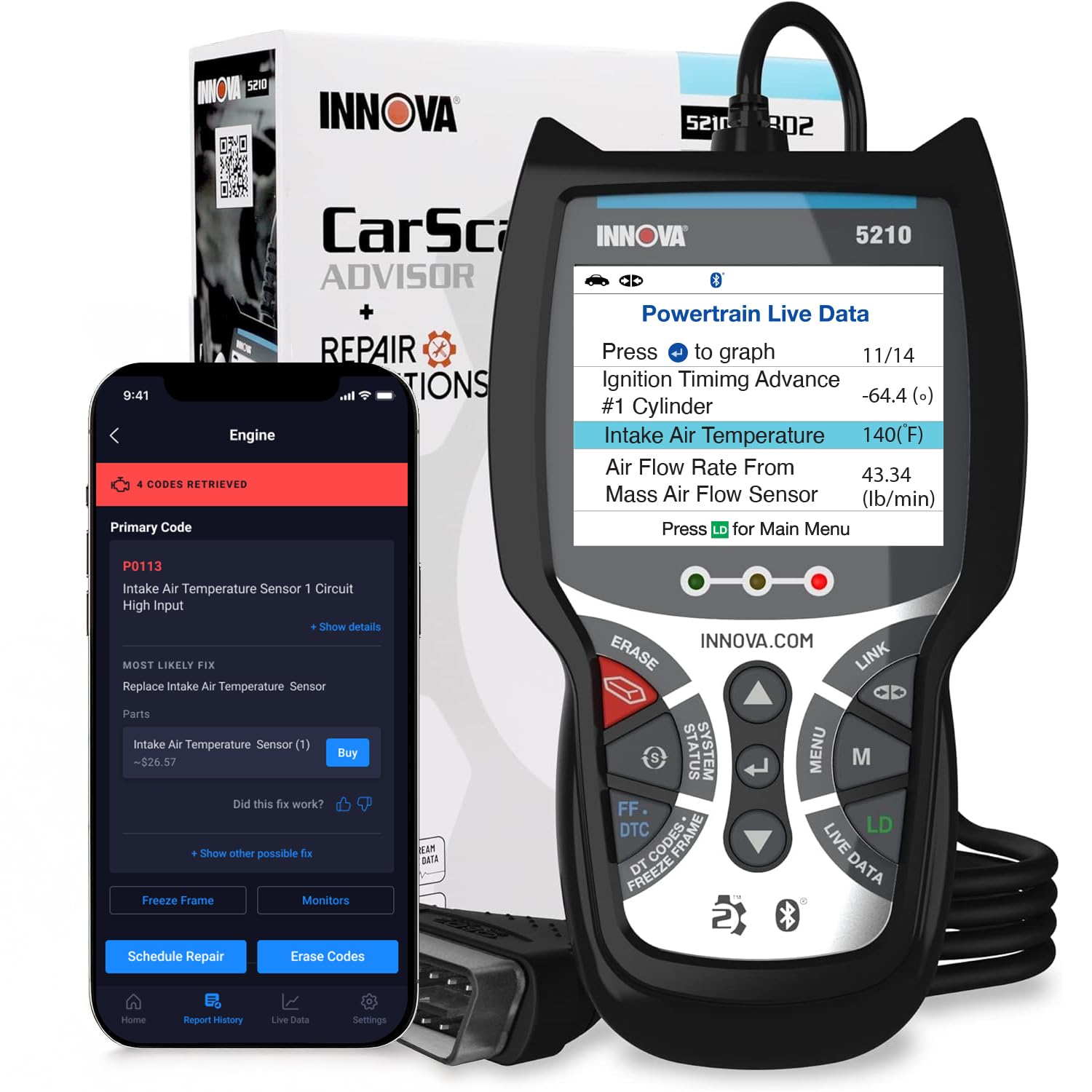
Innova 5210 — Friendly first serious scanner
Best for: First-time DIY owners
First-time owners will find this a friendly step up from a basic reader. It works as a standalone handheld, connects to a phone app when you want more detail, and adds battery testing and an oil reset for routine care. The color screen and code explanations help you understand what a fault means before you clear it. The trade-off is that deeper all-system coverage is limited compared with higher-ranked handhelds. For a first serious scanner, it is a balanced choice for most households and easy to store.
- Standalone plus phone app support
- Battery test and oil reset
- Clear code explanations
- Limited all-system depth
- App features vary by phone
4.5/5
4.8/5
4.6/5

Autel AutoLink AL519 — Dependable everyday code reader
Best for: Everyday engine diagnostics
Everyday owners who want a dependable handheld without tablet complexity will like this balance. It covers full OBD2 functions, shows live data, and offers a one-click I/M readiness check that is useful before an inspection. The color screen keeps codes and values easy to read in a garage. The trade-off is that it does not replace an all-system tool for ABS, airbag, or transmission faults. If engine diagnostics are your main need, this is a solid mid-range reader. It draws power from the vehicle port for quick use.
- Full OBD2 functions, clear screen
- One-click I/M readiness check
- No phone or charging needed
- No all-system coverage
- Limited advanced service functions
4.3/5
4.8/5
4.7/5

Ancel AD310 — Lowest-cost engine code reader
Best for: Occasional engine-code checks on a tight budget
Buyers who want the lowest-cost way to read a check engine light should start here. This compact reader plugs in, reads codes, and clears them, with live data and I/M readiness for basic checks. Its simple buttons and small screen keep the learning curve short, and it draws power from the vehicle port. The trade-off is basic coverage and a small display, so graphing and multi-system work are limited. For occasional engine checks, it is excellent value. Keep expectations focused on engine codes, and it stores easily.
- Lowest-cost engine code reading
- Simple plug-and-read design
- Live data for basic checks
- Small screen, basic graphing
- No multi-system coverage
4.0/5
4.9/5
4.9/5

Launch CR529 — Dependable pocket code reader
Best for: Fast pocket engine checks
Drivers who want a pocket reader for quick engine checks will appreciate this simple tool. It covers full OBD2 functions, reads and clears codes, and shows live data without a phone, app, or separate screen setup. Its compact shape stores easily and suits a glovebox or tool bag. The trade-off is limited depth beyond engine diagnostics, so warning lights from other systems may need a stronger scanner. For fast, no-fuss checks, it is a dependable pocket pick. Use it before a shop visit to describe the fault clearly.
- Pocket size, no phone needed
- Full OBD2 code functions
- Easy live-data viewing
- Engine-focused coverage only
- No advanced service menu
4.2/5
4.8/5
4.6/5
Top 3 Head-to-Head: BlueDriver Bluetooth Pro vs Autel MaxiCOM MK808S vs Innova 5610
These three are the common final choices because they cover phone simplicity, tablet depth, and handheld all-system work.
| Feature | #1 BlueDriver | #2 MK808S | #3 Innova 5610 |
|---|---|---|---|
| Diagnostic Coverage | 4.8/5 | 4.9/5 — Best | 4.9/5 |
| Ease of Use | 4.9/5 — Best | 4.6/5 | 4.7/5 |
| Value for Money | 4.9/5 — Best | 4.7/5 | 4.6/5 |
| Choose if… | You want phone-first simplicity | You want tablet depth | You want handheld all-system work |
Who These OBD2 Scanners Are NOT For
These scanners are not a replacement for manufacturer-level programming, security access, or complex module coding.
They are also a poor fit if you expect one tool to cover every make, every system, and every future update without limits. Before you buy, confirm how much to spend on a code reader for the jobs you actually do.
Common Mistakes to Avoid
A few avoidable errors turn a good scanner into a frustrating purchase.
Frequently Asked Questions About OBD2 Scanners
What is the best OBD2 scanner under $500 for most drivers?
BlueDriver Bluetooth Pro is the best choice for most drivers, because it combines code reading, live data, and vehicle-specific repair reports in a phone app you already know how to use. It suits owners who want a clear next step, not just a code number. Check ABS, SRS, and TPMS coverage for your exact model, because coverage varies by vehicle. If you prefer a standalone screen, Innova 5610 is the stronger handheld alternative.
Do I need an all-system scanner, or is a basic code reader enough?
A basic code reader is enough if you only need engine codes, live data, and I/M readiness. An all-system scanner is better if you also need ABS, airbag, transmission, or service resets, because those systems sit outside generic engine coverage. Think about the warning lights you have seen and the jobs you plan to do yourself. Buying extra coverage you never use adds cost and complexity without helping your next repair.
Will an OBD2 scanner work on my car?
Most OBD2 scanners work on gasoline cars and light trucks sold in the United States from 1996 onward, because that is when the standard became mandatory. Diesel, hybrid, electric, and non-US models can differ, so check your model year, fuel type, and the scanner’s vehicle list before buying. Also confirm the port location and whether your car uses a gateway that limits generic access. When in doubt, match the exact make, model, and year first.
Can a Bluetooth OBD2 scanner work with iPhone and Android?
Yes, many Bluetooth scanners work with both iPhone and Android, but the Bluetooth type matters. Some adapters use Bluetooth Low Energy for iPhone, while older classic Bluetooth adapters may not pair through iPhone settings in the same way. Always pair inside the scanner app when the maker instructs you to do so, and check app compatibility before buying. If you switch phones often, a handheld with its own screen removes that pairing question entirely.
Can an OBD2 scanner clear codes and turn off the check engine light?
Yes, most scanners can clear stored codes and turn off the check engine light, but clearing does not fix the underlying fault. If the problem remains, the light will usually return after the car completes its checks. Note freeze frame and live data before clearing, and check readiness monitors if an inspection is near, because clearing can reset those monitors. Use clearing as a diagnostic step, not as a repair by itself.
What live data is most useful for a beginner?
Start with engine RPM, coolant temperature, fuel trims, and oxygen sensor readings, because together they show whether the engine is running lean, rich, hot, or normally. A scanner that is good for live data should let you graph values and compare them while the fault occurs, rather than showing a single frozen number. Record the values before clearing a code, and compare them after a repair. If graphs look confusing, focus on one value at a time.
Do OBD2 scanners require a subscription?
No, many basic and mid-range scanners work without a subscription, especially for code reading and live data. Some tablet scanners include updates for a set period and then charge for continued updates, so read the update terms before buying. A subscription does not automatically mean better diagnostics, and a free-update reader can be the better long-term value. Check what stops working when updates end, not just the first-year features.
Our Final Verdict
The field splits cleanly: phone simplicity, handheld balance, and tablet depth. BlueDriver is the easiest first choice for most drivers, while the tablet and Innova handheld suit owners who want deeper system access. Pick by the systems you actually need, then check update terms before you buy.

I’m Alex Rahman, a car enthusiast and automotive writer focused on practical solutions, car tools, and real-world driving advice. I share simple and honest content to help everyday drivers make better decisions.
