Best OBD2 Scanners for Live Data: What to Look For & Top Picks
Quick Answer
An OBD2 scanner is good for live data if it offers rapid refresh rates, multi-parameter graphing, bi-directional controls (for advanced diagnostics), and broad PID compatibility. Mid-range handheld diagnostic tools and high-end app-based OBD2 dongles paired with smartphone software like Torque Pro or OBD Fusion generally deliver the most reliable real-time sensor streaming for DIYers and professional mechanics alike.
Understanding Live Data in OBD2 Diagnostics
When diagnosing modern vehicles, basic code readers that only display diagnostic trouble codes (DTCs) leave out crucial diagnostic clues. A standard code reader tells you what failed after the fact, but live data reveals how engine components, sensors, and computer modules are performing in real time while the vehicle is running.
Live data streaming allows technicians and vehicle owners to monitor parameter IDs (PIDs) such as short and long-term fuel trims, oxygen sensor voltage, coolant temperature, mass air flow (MAF) rates, and manifold absolute pressure (MAP). A scanner capable of processing live data transforms raw sensor inputs into actionable numbers and graphs, making intermittent faults or performance lags much easier to isolate.
Key Features That Make an OBD2 Scanner Good for Live Data
Not all diagnostic scanners handle real-time data equally. Evaluating hardware specifications and software capabilities helps determine whether a unit will meet diagnostic needs without lagging or freezing during data logging.
Fast Refresh Rates and Low Latency

Real-time troubleshooting requires immediate feedback. Scanners with slow processing speeds suffer from high latency, meaning there is a noticeable delay between an engine change and its representation on the screen. High-quality diagnostic tools utilize fast processors and stable Bluetooth or Wi-Fi protocols to maintain smooth refresh rates across multiple PIDs.
Multi-Parameter Graphing and Merging
Viewing dozens of numerical values simultaneously makes trend analysis nearly impossible. A good live data scanner provides multi-line graphical displays that let users overlay or merge related parameters—such as comparing engine RPM directly against ignition timing advance or oxygen sensor switching behavior.
Extensive PID Support and Customization
Generic OBD2 provides standard emissions-related data across almost all modern vehicles. However, advanced diagnostic scenarios require manufacturer-specific PIDs for ABS modules, transmission oil temperature, steering angle sensors, and turbocharger boost pressures. The best scanners offer customizable data lists so you can filter out irrelevant clutter and focus entirely on the parameters related to the current symptom.
Data Recording, Playback, and Exporting
Diagnosing an intermittent hesitation or rough idle often happens while driving under load. Scanners that support data recording let you capture live data streams during a test drive, save the session, and replay it later or export the file to a computer for detailed analysis.
Handheld Scanners vs. App-Based OBD2 Adapters
Choosing the right form factor depends heavily on budget, workflow preferences, and the depth of diagnostics required.
| Scanner Type | Strengths | Limitations | Best Suited For |
|---|---|---|---|
| Dedicated Handheld Units | Rugged build, standalone operation, physical buttons, integrated firmware stability. | Screen size is fixed, software updates can sometimes be cumbersome. | Mechanics and DIYers wanting a dedicated tool ready out of the box. |
| App-Based Bluetooth/Wi-Fi Dongles | High-resolution tablet/phone displays, highly customizable dashboards, portable size. | Relies on phone battery, potential wireless connection drops, app licensing fees. | Tech-savvy users, enthusiasts, and budget-conscious live data monitors. |
Evaluating these options ensures you select hardware that matches your comfort level with mobile interfaces versus traditional workshop tools.
Essential Live Data Parameters to Monitor
Knowing what data to watch prevents guesswork during troubleshooting. Certain sensor combinations provide instant insight into common vehicle malfunctions.
- Fuel Trims (Short and Long Term): High positive or negative trims indicate unmeasured vacuum leaks, failing fuel pumps, or dirty fuel injectors.
- Coolant Temperature: Verifies whether the thermostat is sticking open or closed before relying entirely on dashboard gauge readouts.
- Mass Air Flow (MAF) Rate: Confirms if the sensor is accurately reporting airflow volume under acceleration compared to expected engine displacement specs.
- Oxygen Sensor Voltage: Demonstrates closed-loop fuel control efficiency and catalyst converter performance.
- Engine RPM and Throttle Position: Helps diagnose throttle body lag, accelerator pedal sensor failures, or erratic idle control valves.
Tip
When examining fuel trim live data, check readings at both idle and a steady 2,500 RPM cruise. If fuel trims drop back toward normal levels at higher RPMs, a vacuum leak is usually present.
Common Mistakes When Analyzing Live Data
Interpreting live data streams requires context. Misunderstanding sensor behavior often leads to replacing healthy components.
One common mistake is misinterpreting normal fluctuating sensor values as faults. For instance, upstream oxygen sensors naturally oscillate rapidly between rich and lean states during closed-loop operation; looking for a static flat line on an active sensor will lead to a false diagnosis.
Another error is ignoring vehicle operating temperature. Many parameters, such as fuel trim adaptations and closed-loop status, operate differently during cold engine start-up compared to fully warmed-up running conditions.
Warning
Never attempt to hold a laptop, wired scanner, or smartphone while driving a vehicle alone to observe live data. Always secure the device safely or have a passenger manage the recording equipment to maintain road safety.
How to Choose the Right Tool for Your Needs
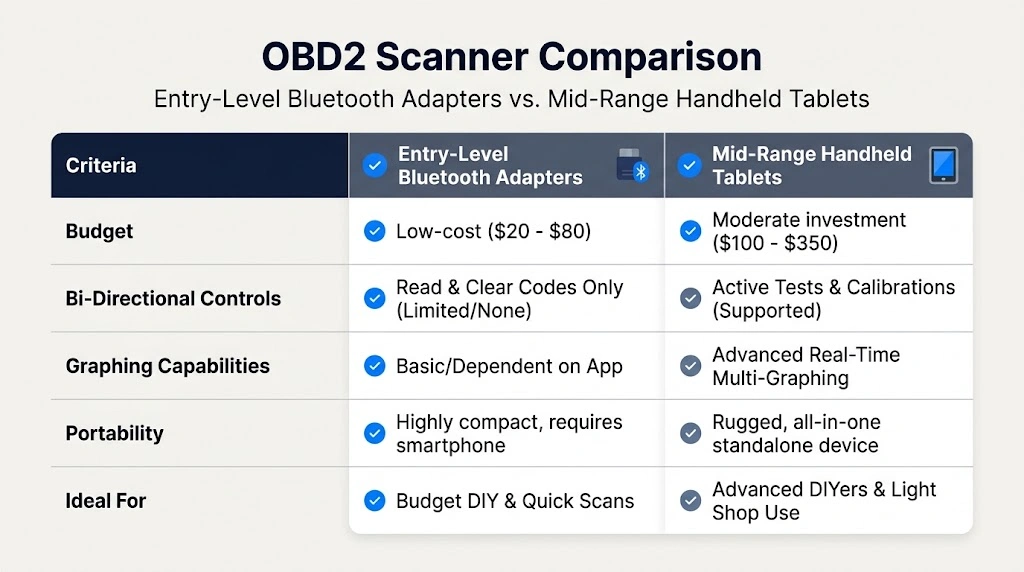
Selecting the optimal device involves balancing your technical scope with your budget. If you only need to verify basic emissions readiness and monitor primary engine sensors, an entry-level Bluetooth dongle paired with a reliable mobile application is usually sufficient.
However, if you work on multiple vehicle makes, require bi-directional actuation controls to test components like fuel pumps or cooling fans, or need robust graphing capabilities without relying on phone notifications and battery life, investing in a mid-range standalone diagnostic tablet provides significantly better long-term value.
Related Product
OBD2 Bluetooth Diagnostic Scanners & Adapters
Compact wireless adapters let you stream real-time sensor data, graph PIDs, and clear trouble codes directly from your smartphone or tablet.
As an Amazon Associate, we earn from qualifying purchases.
Frequently Asked Questions
Do all OBD2 scanners support live data?
No. Basic entry-level code readers are strictly designed to read and clear Diagnostic Trouble Codes (DTCs) and check emissions readiness monitors. To view real-time sensor information, the scanner specifications must explicitly state support for live data streaming or PID monitoring.
What is the difference between generic PIDs and manufacturer-specific PIDs?
Generic PIDs are mandated by law across all OBD2-compliant vehicles sold since 1996, covering emissions and basic powertrain sensors. Manufacturer-specific PIDs unlock deeper data streams for advanced systems like ABS, SRS airbags, transmission temperatures, and body control modules that standard generic scanners cannot access.
Can wireless OBD2 adapters stream live data as fast as wired handheld units?
Modern Bluetooth 4.0+ and Wi-Fi OBD2 adapters offer refresh rates fast enough for most DIY diagnostic tasks. However, high-end professional wired tools still hold an advantage when processing massive multi-channel parameter graphs without any packet loss or latency.
Why does live data stutter or freeze on my scanner screen?
Data lag usually occurs when too many PIDs are selected simultaneously, overwhelming the processing speed of the scanner or the wireless connection bandwidth. Selecting only the specific parameters relevant to your current diagnosis will restore smooth refresh rates.
Can I record live data while driving for later review?
Yes. Many quality handheld diagnostic tools and mobile scanner apps feature data logging functions. This allows you to capture live sensor readings during a test drive under load and review the saved data logs safely once the vehicle is parked.
Do I need an internet connection to view live data?
No. Live data streaming relies entirely on the direct communication link between the scanner plugged into your vehicle’s OBD2 port and the car’s computer network. An internet connection is only required if you are downloading software updates or looking up repair references.
Conclusion
Finding a good OBD2 scanner for live data depends heavily on your diagnostic goals, whether you prefer standalone handheld units or wireless smartphone adapters, and how deeply you need to analyze sensor parameters. Prioritizing fast refresh rates, multi-parameter graphing, and custom PID selection ensures you can accurately track down complex vehicle faults, monitor fuel trims, and perform effective real-time diagnostics.

I’m Alex Rahman, a car enthusiast and automotive writer focused on practical solutions, car tools, and real-world driving advice. I share simple and honest content to help everyday drivers make better decisions.
