Should You Unplug Your Dash Cam When Your Car Is Off?
You do not need to unplug your dash cam if it is connected to a cigarette lighter socket — that socket cuts power when the ignition turns off. If it is plugged into an OBD-II port or hardwired, it draws power constantly and can drain your battery overnight without a voltage cutoff device installed.
I killed my car battery on a Tuesday morning. Stone dead. I had left my dash cam plugged into the OBD-II port for three nights running, and I had no idea it was pulling power the entire time.
I’m Alex Rahman, and I’ve been testing and installing dash cams for years. That dead battery taught me something most dash cam guides skip entirely — not all power sources behave the same way.
Whether you need to unplug your dash cam depends completely on where it gets its power. Get that one thing wrong and you could be calling roadside assistance on a cold morning. Get it right, and your cam can watch your car 24/7 without touching your battery.
Here is exactly what you need to know — and what to do about it.
- Cigarette lighter sockets cut power with the ignition — no unplugging needed.
- OBD-II ports stay live after the car turns off and can drain your battery.
- A hardwire kit with voltage cutoff is the safest long-term power solution.
- Parking mode requires constant power — only a hardwire kit does this safely.
- Most dash cams draw 200–500 mA in standby — that adds up fast overnight.
What Happens to Your Dash Cam When You Turn the Engine Off?
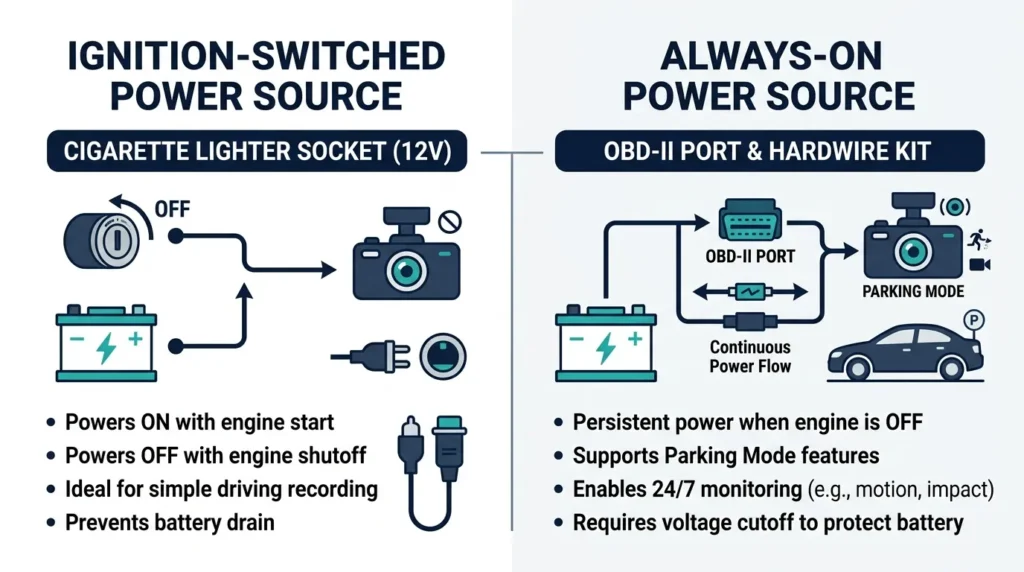
Your dash cam does whatever its power source tells it to do. Some sources cut out when the ignition switches off. Others keep feeding power to anything connected to them. That single difference is everything.
Two types of power sources exist in most cars. One type is ignition-switched — it only carries power when the key is in the on position. The other type is always-on — it stays live regardless of whether the engine runs or not.
Your dash cam cannot tell the difference. It will happily draw power from either one, right through the night, for as long as the electricity flows.
How Ignition-Switched Sockets Cut Power Automatically
Most cigarette lighter sockets and 12V accessory sockets are ignition-switched by design. The moment you turn the key off — or press the stop button in a modern keyless car — the socket loses power. Your dash cam shuts down cleanly with it.
This is the safest setup for casual users who do not need parking mode. No action required. No unplugging. No risk to your battery. The car itself handles everything automatically.
The catch is that not every socket works this way. Some manufacturers wire certain sockets to the always-on circuit, especially in newer vehicles with persistent USB ports. You can check yours with a cheap multimeter or a USB power meter — plug it in, turn the car off, and see if it still shows voltage.
Plug a USB phone charger into your socket and turn the car off. If your phone stops charging, the socket is ignition-switched and safe for dash cam use without unplugging.
How Always-On Ports Keep Your Dash Cam Running Nonstop
The OBD-II port sits under your dashboard, usually near the steering column. It stays live 24 hours a day, seven days a week, with no exceptions. That is by design — mechanics and diagnostic tools need constant access to vehicle data even when the engine is off.
Plug a dash cam into an OBD-II adapter and it draws power continuously. Your dash cam records or sits in standby mode all night. Your battery slowly drains. After one or two nights, depending on battery health and ambient temperature, you may not start your car in the morning.
A hardwired dash cam connected directly to the fuse box behaves the same way — constant power — unless you install a voltage cutoff module that monitors battery voltage and disconnects the dash cam before damage occurs.
Will Leaving Your Dash Cam Plugged In Actually Drain Your Battery?
Yes — if your power source stays live after the ignition turns off, your dash cam will drain your battery. How fast depends on your dash cam model, its power draw, and how healthy your battery is.
A brand-new, fully charged car battery holds roughly 40 to 80 amp-hours of usable capacity, depending on vehicle size. That sounds like a lot. But cars use power for alarm systems, keyless entry modules, and ECU memory even when parked. Add a running dash cam and the math shifts quickly.
How Much Power Does a Dash Cam Actually Use When Parked?
Most dash cams draw between 200 mA and 500 mA during active recording. In standby or parking mode, that typically drops to 100–250 mA. That is the equivalent of leaving a small LED bulb on inside your car all night.
Here is what that looks like in real numbers for a mid-size car battery rated at 45 amp-hours:
| Dash Cam Draw | Hours to 50% Drain | Risk Level |
|---|---|---|
| 100 mA (standby) | ~225 hours | Low |
| 250 mA (parking mode) | ~90 hours | Moderate |
| 500 mA (active record) | ~45 hours | High |
| 800 mA (4K model) | ~28 hours | Very High |
How Long Before a Dash Cam Kills a Typical Car Battery?
An older or partially degraded battery is far more vulnerable. A battery at 70% health might only hold 30 usable amp-hours. Cold weather reduces capacity further — sometimes by 20–30% at temperatures below 0°C (32°F).
In real-world terms: a dash cam in active parking mode can drain a weak battery in as little as 18–24 hours. A new, healthy battery gives you more headroom — but it is still not something you want running unchecked week after week.
Draining a car battery below 12V repeatedly shortens its lifespan significantly. Lead-acid batteries can fail permanently after just a few deep discharge cycles. If your battery is older than three years, take extra precautions with always-on power sources.
What Is Parking Mode and Does It Need Constant Power to Work?
Parking mode is a dash cam feature that keeps recording — or starts recording — after you leave your car. It monitors for motion, impacts, or both. And yes, it absolutely requires constant power to function.
This is the main reason drivers look for a permanent power solution beyond the standard cigarette lighter. If your socket cuts power with the ignition, your dash cam goes to sleep the moment you lock the car. Parking mode becomes useless.
How Parking Mode Recording Works While Your Car Sits Still
Parking mode works in one of three ways depending on the dash cam model. Motion detection wakes the camera when something moves within the frame. Impact detection uses a G-sensor to trigger recording after a bump or collision. Time-lapse recording captures one frame every few seconds continuously to build a compressed video of everything that happened.
Brands like BlackVue (a Korean premium dash cam manufacturer used by fleet operators and security-conscious drivers worldwide) go further — their DR970X and DR750X models support cloud-connected parking mode with live view, remote event alerts, and GPS tracking even while the car is unattended.
Viofo, a budget-friendly Chinese dash cam brand popular for its A119 and A229 series, offers solid parking mode performance at a fraction of the BlackVue price point — making it a favorite for drivers who want functionality without the premium cost.
Which Dash Cams Support Parking Mode Without a Hardwire Kit?
Some dash cams have a built-in supercapacitor or a small internal battery that powers a brief parking mode session without any external always-on power. The Nextbase 622GW (a top-rated UK dash cam with built-in Alexa and a 3-inch touchscreen) uses a supercapacitor that can power the cam for a short burst after the ignition cuts out.
But here is the honest truth: built-in capacitors and internal batteries last minutes, not hours. For meaningful parking protection — anything longer than 10–15 minutes — you need a hardwire kit connected to a constant power source.
Parking mode needs always-on power. A cigarette lighter alone cannot provide it. For true overnight parking protection, you need a hardwire kit — or at minimum an OBD-II adapter with a voltage cutoff, which I explain below.
What Is a Hardwire Kit and Why Do Serious Drivers Use One?
A hardwire kit connects your dash cam directly to your car’s fuse box, giving it a permanent, managed power supply. It is the cleanest, safest, and most capable way to power a dash cam long-term — especially if you want parking mode to work properly.
Unlike a cable dangling from a cigarette lighter socket, a hardwire kit hides behind your dashboard. No visible wires. No socket occupied. And most importantly — a built-in voltage cutoff module that disconnects the dash cam automatically when your battery drops to a preset threshold.
How a Hardwire Kit Connects Directly to Your Fuse Box
- Locate your car’s fuse box (usually under the dashboard on the driver’s side).
- Use a fuse tap to connect the hardwire kit to a constant 12V fuse and a ground point.
- Set the voltage cutoff threshold on the inline module (typically 11.8V for standard batteries).
- Route the cable along the headliner and A-pillar to hide it behind trim panels.
- Connect the kit’s output cable to your dash cam’s power input.
- Test with the ignition off to confirm parking mode activates.
If you are not comfortable working near your fuse box, any auto electrician can install a hardwire kit in under an hour. The parts themselves cost between $15 and $40 depending on the brand — Nextbase, Viofo, and BlackVue all sell kits matched to their own cameras.
What Voltage Cutoff Setting Should You Use to Protect Your Battery?
Most hardwire kits ship with adjustable cutoff settings. The right threshold depends on your battery type.
| Battery Type | Recommended Cutoff | Why |
|---|---|---|
| Standard lead-acid | 11.8V | Leaves enough charge to start the car |
| AGM battery | 12.0V | AGM batteries handle deeper discharge less well |
| Older or weak battery | 12.2V | Higher threshold protects degraded cells |
| EV / hybrid 12V aux | 12.0V+ | Smaller aux batteries have less reserve capacity |
If you drive an electric or hybrid vehicle, check your owner’s manual before hardwiring a dash cam. Many EVs have a small 12V auxiliary battery that is not designed to support parasitic loads for long periods. A lower cutoff threshold — or a dedicated dash cam battery pack — is a smarter choice.
Is the OBD-II Port Safe for Powering Your Dash Cam Long-Term?
Using the OBD-II port for dash cam power is convenient but genuinely risky without a voltage management device. The OBD-II port delivers constant 12V power with no ignition-linked shutoff — ever. That makes it a tempting shortcut for parking mode power, but it comes with real dangers.
First, there is no built-in voltage protection. Unlike a proper hardwire kit that includes a cutoff module, a basic OBD-II adapter just passes through whatever voltage is in your battery. Leave it running long enough and your battery drops below the safe starting threshold.
Second, some vehicle manufacturers use the OBD-II port to communicate with onboard systems during sleep state. Keeping an active device plugged in can prevent the car’s ECU from entering its low-power sleep mode — which adds another layer of parasitic drain on top of the dash cam draw itself.
The verdict: avoid the OBD-II port for permanent dash cam power. If you must use it, pair it with a dedicated OBD-II voltage cutoff adapter — devices like the Dod Tech or Cellink versions monitor voltage and cut power at a set threshold, mimicking what a hardwire kit does.
Plugging a dash cam into the OBD-II port without a voltage cutoff is one of the most common causes of dead car batteries among new dash cam owners. It looks like a harmless adapter. It is not.
Cigarette Lighter vs. OBD-II Port vs. Hardwire Kit Which One Should You Use?
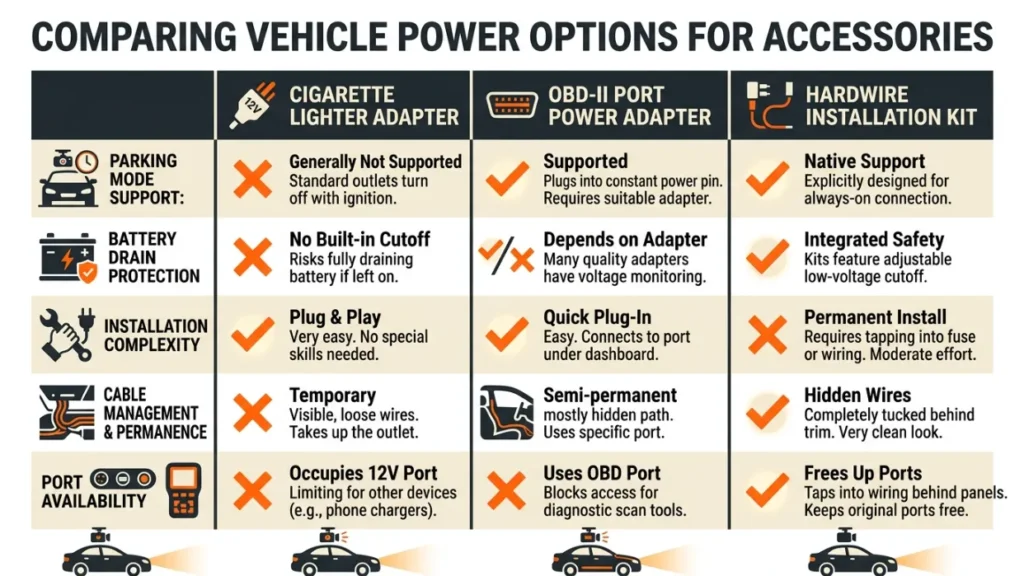
Each power method suits a different driver. Here is the full comparison so you can choose what actually fits your situation.
| Power Method | Powers When Off? | Parking Mode? | Battery Risk | Best For |
|---|---|---|---|---|
| Cigarette lighter | No (usually) | No | None | Casual daily drivers |
| OBD-II port | Yes | Yes (risky) | High | Short-term only |
| Hardwire kit | Yes | Yes (safe) | None (with cutoff) | Anyone wanting parking mode |
The cigarette lighter wins for simplicity. The hardwire kit wins for everything else. The OBD-II port is a distant third — acceptable only as a temporary measure with proper voltage management added on top.
Capacitor vs. Internal Battery Dash Cams — Which Is Better for Parked Vehicles?
When you shop for a dash cam, you will notice two types of internal energy storage: supercapacitors and lithium-ion batteries. They behave very differently, especially in hot and cold climates.
Supercapacitors charge and discharge thousands of times without degrading. They handle extreme heat — up to 85°C (185°F) inside a parked car in summer — without failing. But they store very little energy. They power the dash cam for seconds to minutes after the main power cuts, long enough to save the last clip and shut down cleanly. Internal lithium batteries store far more energy and can power parking mode for hours without external power — but they degrade in heat and cold, and they have a finite charge cycle life.
For a parked car in a hot climate — think summer in Texas, the UAE, or southern Europe — a capacitor-based dash cam like the Viofo A229 Pro or Nextbase 622GW is the more reliable long-term choice. The battery will not swell or fail from heat exposure.
For a driver in a moderate climate who genuinely wants parking mode to run for hours without a hardwire kit, a battery-based model makes more sense — as long as temperatures stay reasonable.
For most drivers who do install a hardwire kit, the internal storage type matters less. The kit supplies the power. The capacitor or battery just handles the clean shutdown when the cutoff triggers. Either works fine in that scenario.
Should You Unplug Your Dash Cam Every Night — The Honest Answer?
Here is the direct answer: probably not, but it depends on your setup. Let me break it down clearly.
Unplug every night if:
- Your socket is always-on and you do not have a voltage cutoff device
- Your car battery is older than three years or known to be weak
- Your dash cam plugs into the OBD-II port with no cutoff adapter
- You park for multiple days at a time without driving
You do not need to unplug if:
- Your cigarette lighter socket cuts power with the ignition
- You have a hardwire kit with a proper voltage cutoff module installed
- You want parking mode active — and you have the right setup to support it
If you are unsure about your socket, test it. If you want parking mode, invest in a hardwire kit. The kit costs less than a single call to roadside assistance — and far less than a new battery.
If you travel internationally or leave your car parked for a week or more, unplug your dash cam regardless of your setup. Even a well-managed hardwire kit draws some power at idle, and extended parked periods can still deplete a battery slowly over days.
I’ve seen drivers obsess over unplugging every single night — taking the cam off the windshield, coiling the cable, storing it in the glovebox. That level of effort is unnecessary for most setups. Know your power source, set up the right solution once, and let the system handle itself.
As I tell anyone who asks me about this topic: the answer is always in the wiring, not the camera.
For deeper technical reading on automotive electrical systems and safe dash cam wiring, check out The Dash Cam Store’s installation guides and the r/Dashcam community on Reddit — both are excellent practical resources maintained by real-world installers and enthusiasts.
Frequently Asked Questions

I’m Alex Rahman, a car enthusiast and automotive writer focused on practical solutions, car tools, and real-world driving advice. I share simple and honest content to help everyday drivers make better decisions.
