Kenwood DRV-A610WDP Review: 4K Dual Dash Cam with GPS
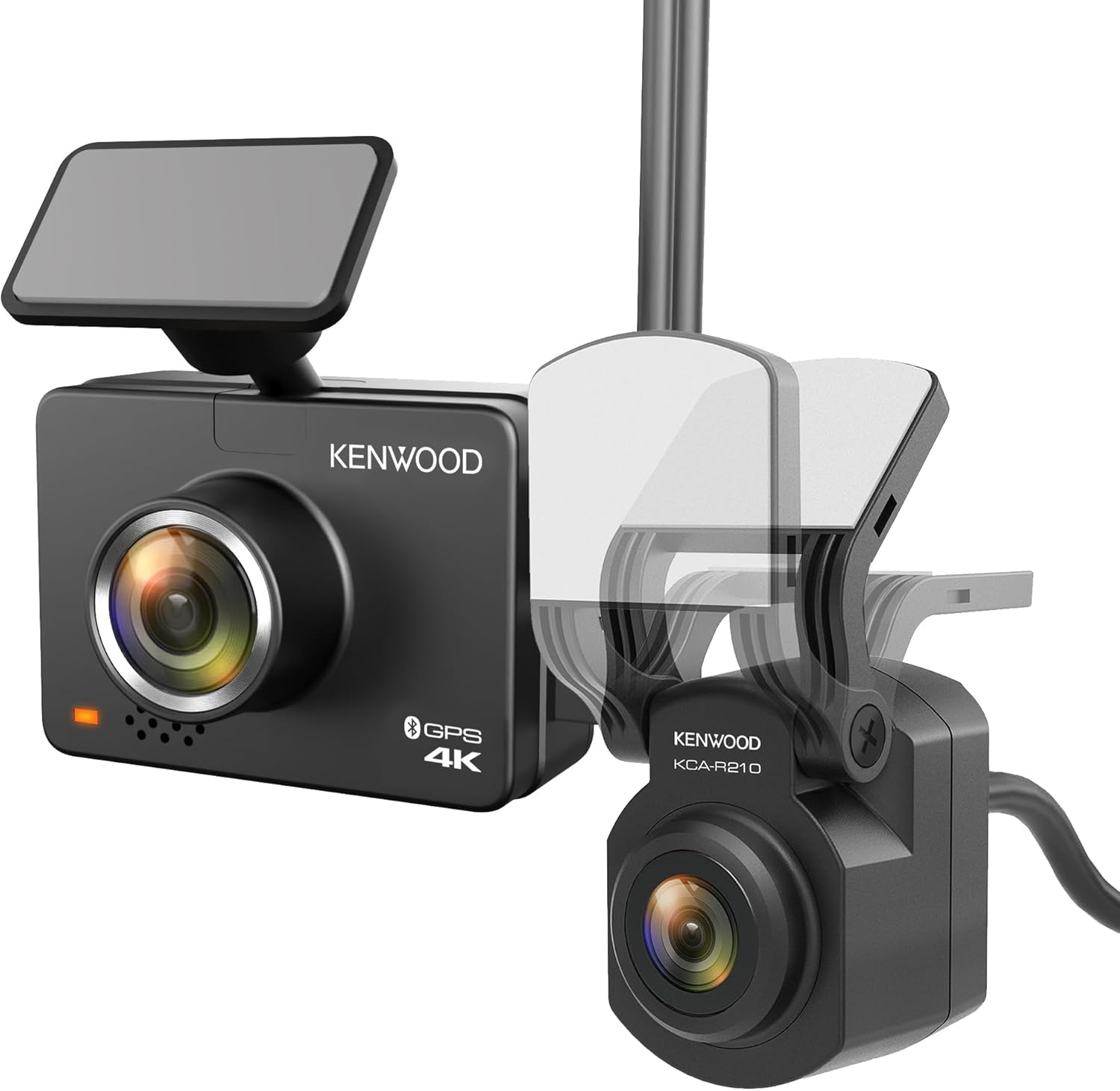
The Kenwood DRV-A610WDP is a dual-channel dash camera system that records 4K Ultra HD video from the front and Wide Quad HD from the rear. It is designed for drivers who want high-resolution front and rear coverage in a single package, with GPS, Wi-Fi, and a 64GB microSD card included.
This review examines the DRV-A610WDP using verified manufacturer specifications, product documentation, and available buyer feedback to determine whether it fits your vehicle and recording needs.
Quick Verdict
Reviewed Product
KENWOOD DRV-A610WDP Dash Cam Front and Rear
A dual-channel 4K front and WQHD rear dash camera system with GPS, Wi-Fi, and a 64GB microSD card.
Rating:
★★★★☆
4.0/5
Research-based editorial assessment using verified product information, buyer-use factors, limitations, and comparison context.
Best For:
Drivers who want a trusted-brand 4K front and rear dash cam with GPS and a bundled memory card, without paying for premium cloud or 3-channel features.
Key Specs
4K (3840×2160) front • WQHD (2560×1440) rear • Built-in GPS • 2.0″ LCD • 64GB microSD included
Key Advantage
Dual-channel 4K front and WQHD rear recording with GPS overlay and a bundled 64GB card.
Main Trade-off
Parking mode requires an optional hardwire kit that is not included.
Bottom Line
The DRV-A610WDP delivers strong dual-channel resolution and Kenwood build quality at a competitive price. Buyers who need 24/7 parking surveillance should factor in the cost of the optional hardwire kit.
At a Glance
- Dual-channel recording: 4K front and WQHD rear simultaneously
- Built-in GPS for speed and location overlay on video
- Wi-Fi and Bluetooth support via the KENWOOD DASH CAM MANAGER app
- 64GB microSD card included in the box
- Parking mode ready but requires an optional CA-DR1130 hardwire kit
- 2.0-inch full-color LCD display for on-camera playback and settings
Verified Specifications & Buyer Implications
| Attribute | Verified Detail | Why It Matters |
|---|---|---|
| Front Resolution | 4K Ultra HD (3840×2160) at 30fps | Captures high-detail footage for reading license plates and road signs. The 30fps rate is adequate for most driving conditions. |
| Rear Resolution | WQHD (2560×1440) | Provides clear rear coverage with more detail than standard 1080p. Useful for capturing rear-end collisions and lane-change incidents. |
| Image Sensor | 1/2.8″ CMOS, 8.3MP front / 3.7MP rear | A larger sensor generally performs better in low light than smaller sensors. Supports HDR and WDR for improved exposure balance. |
| Dimensions | 58.5 × 42.8 × 24.4 mm (front camera) | Compact footprint that is unlikely to obstruct the driver’s view. Smaller than many mirror-style dash cams. |
| Power Supply | 12–24 VDC via included car charger | Compatible with both standard passenger vehicles and larger trucks or RVs that use 24V systems. |
| Storage | 64GB microSD included; supports up to 256GB | The included card provides immediate recording capability. Users who want longer loop-recording intervals can upgrade to a larger card. |
| Parking Mode | Ready but requires optional CA-DR1130 hardwire kit | The camera supports 24/7 surveillance, but buyers must purchase the hardwire kit separately. This is an additional cost not included in the box. |
Design & Build Quality
The DRV-A610WDP front camera measures approximately 2.3 inches wide and weighs about 2.3 ounces, making it one of the more compact 4K dash cams available. The compact footprint means it should sit discreetly behind the rearview mirror without blocking the driver’s field of view.
The front unit includes a 2.0-inch full-color TFT LCD display for on-camera playback and settings adjustment. The rear camera is a separate unit that connects via a 26-foot cable, which is long enough for most sedans, SUVs, and trucks.
The mounting system uses a detachable bracket, which allows the camera to be removed from the windshield without removing the adhesive mount. This is useful for transferring the camera between vehicles or for security when parking in high-theft areas.
Setup & Ease of Use
- Insert the included 64GB microSD card into the front camera before first use.
- Connect the front camera to the detachable mount and attach it to the windshield using the 3M adhesive or suction cup.
- Route the rear camera cable along the headliner and door seals to the rear window.
- Plug the included car charger into the vehicle’s 12V outlet and connect it to the front camera.
- Download the KENWOOD DASH CAM MANAGER app (iOS or Android) to adjust settings via Wi-Fi.
- The camera starts recording automatically when powered on; no manual start is required.
How This Review Was Researched
This review evaluates the product using verified specifications from Kenwood’s official product documentation, the instruction manual, current product listing information from authorized retailers, and available buyer feedback from major retail platforms. No personal hands-on testing is claimed. The assessment focuses on documented attributes, practical buyer implications, and comparison context where reliable data is available.
Category-Specific Performance
Front Recording Quality
The 8.3-megapixel CMOS sensor records 4K Ultra HD at 30fps, which is more than twice the pixel count of 2K Quad HD. For buyers, this translates to higher detail capture that can make license plates and road signs easier to read in footage.
The 30fps frame rate is standard for 4K dash cams. It is generally sufficient for capturing clear still frames of incidents, though it provides less smoothness in fast-action playback than a 60fps camera would offer.
Rear Recording Quality
The rear camera records at WQHD (2560×1440), which is higher than the 1080p resolution found on many dual-camera systems. This gives buyers clearer rear footage for incidents such as rear-end collisions or lane-change disputes.
The rear camera’s 3.7-megapixel sensor is smaller than the front sensor, so low-light performance may not match the front camera. Buyers who frequently drive at night should expect the front camera to produce stronger footage than the rear.
Low-Light and HDR Performance
The DRV-A610WDP includes HDR (High Dynamic Range) and WDR (Wide Dynamic Range) technologies. These features are designed to balance exposure in scenes with bright highlights and dark shadows, such as driving into a sunset or through a tunnel.
For buyers, HDR and WDR can improve the readability of footage captured in challenging lighting. However, these technologies cannot fully overcome the physical limitations of a small image sensor in very dark conditions.
GPS and Speed Logging
Built-in GPS records the vehicle’s speed and location data, which is overlaid onto the video footage. This is a valuable feature for buyers who want documented evidence of their speed and route in the event of an incident.
The GPS data is embedded in the video files and can be viewed during playback. This adds a layer of objective context to the footage that a camera without GPS cannot provide.
Expert Insight
The DRV-A610WDP’s dual-channel resolution combination (4K front + WQHD rear) is a strength for buyers who want high-detail coverage in both directions. However, the lack of an included hardwire kit means the parking mode feature cannot be used out of the box, which is a practical gap for buyers who prioritize 24/7 surveillance.
Key Features Explained
Dual-Channel 4K/WQHD Recording
The DRV-A610WDP records from both the front and rear cameras simultaneously. The front captures 4K Ultra HD while the rear captures WQHD, providing buyers with high-resolution coverage in both directions.
This dual-channel capability is the primary reason to choose this model over a single-camera dash cam. It eliminates the need to purchase and install two separate camera systems.
Built-In GPS
The integrated GPS receiver logs speed and location data directly onto the video files. For buyers, this creates a more complete record of driving events that can include when, where, and how fast the vehicle was traveling.
The GPS data is viewable during playback through the Kenwood Video Player application on a PC or Mac. This feature adds evidentiary value to the footage without requiring additional hardware.
KENWOOD DASH CAM MANAGER App
The camera supports Wi-Fi and Bluetooth connectivity through the KENWOOD DASH CAM MANAGER app for iOS and Android. Buyers can use the app to adjust settings, view footage, and download clips to their smartphone without removing the memory card.
The app also supports over-the-air firmware updates, which simplifies keeping the camera software current. The wireless connection adds convenience for buyers who want to review footage on a larger screen without a computer.
Parking Mode Readiness
Parking mode is supported but requires the optional CA-DR1130 hardwire kit, which is not included. When the vehicle is parked and the ignition is off, the camera can automatically record 30-second clips if it detects a collision or physical impact.
For buyers who park in public areas or on the street, this feature adds valuable surveillance capability. The requirement to purchase the hardwire kit separately is an important cost consideration.
Real-World Usability & Maintenance
The DRV-A610WDP is designed for set-and-forget operation. Once installed and configured, it starts recording automatically each time the vehicle is powered on. The loop recording feature overwrites the oldest files when the memory card is full, so buyers do not need to manually manage storage.
Maintenance is minimal: the memory card should be formatted periodically, and the camera lens and windshield area should be kept clean for optimal footage clarity. Firmware updates can be performed wirelessly through the app, which reduces the need for manual maintenance.
The 64GB card included in the box provides immediate use, but buyers who want longer recording intervals before overwriting should consider upgrading to a larger card, up to 256GB.
Pros & Cons
Pros
- 4K front and WQHD rear dual-channel recording
- Built-in GPS for speed and location overlay
- 64GB microSD card included
- Compact front camera design
Cons
- Hardwire kit not included for parking mode
- 30fps only at 4K resolution
- Rear camera has a smaller sensor than front
Common Issues & Fixes
Camera Does Not Power On
Cause:
The camera may require more current than some vehicle USB ports provide. Kenwood recommends using the included car charger.
Fix:
Use only the included Kenwood car charger. Do not connect the camera to a standard USB port in the vehicle.
Overheating During Extended Use
Cause:
Dash cams can generate heat during continuous 4K recording, particularly in warm climates or when parked in direct sunlight.
Fix:
Ensure the camera has adequate ventilation around the mount. If overheating persists, consider using a lower resolution setting or parking in shaded areas.
Wi-Fi Connection Drops
Cause:
The camera’s Wi-Fi may disconnect if the smartphone moves too far from the vehicle, or if other wireless networks interfere.
Fix:
Keep the smartphone within close range of the camera when using the app. Reconnect through the KENWOOD DASH CAM MANAGER app if the connection drops.
What to Know Before You Buy
Before purchasing the DRV-A610WDP, buyers should verify that their vehicle has a 12V power outlet available for the included car charger. The camera does not include a hardwire kit, so parking mode cannot be used without purchasing the optional CA-DR1130 accessory.
Buyers should also consider the 30fps frame rate at 4K resolution. While this is standard for 4K dash cams, drivers who want smoother playback or higher frame rates may prefer a camera that records at 60fps in a lower resolution.
The rear camera cable is 26 feet long, which should be sufficient for most vehicles. However, buyers with unusually long vehicles, such as extended-length vans or buses, should measure their cable routing path before purchasing.
Who Should Consider It / Who Should Look Elsewhere
Who Should Consider It
- Drivers who want 4K front and WQHD rear coverage
- Buyers who value Kenwood brand reliability
- Users who want GPS and a bundled memory card
Who Should Look Elsewhere
- Buyers who need parking mode out of the box
- Drivers who want 4K at 60fps
- Users who prefer a built-in screen larger than 2 inches
Alternatives to Consider
Reviewed Product
Kenwood DRV-A610WDP
Best For: Drivers who want dual-channel 4K/WQHD coverage with GPS and a bundled card.
Key Specs: 4K front, WQHD rear, GPS, 64GB card included
Advantage: Strong dual-channel resolution at a competitive price
Trade-off: Parking mode requires separate hardwire kit
Alternative A
Nextbase 622GW
Best For: Buyers who want a 3-inch touchscreen and voice control features.
Key Specs: 4K at 30fps, 3″ touchscreen, Alexa built-in
Advantage: Larger touchscreen and built-in voice assistant
Trade-off: Single-channel only; rear camera sold separately
Alternative B
Vantrue N4
Best For: Drivers who want 3-channel coverage including cabin recording.
Key Specs: 3-channel, 4K front, IR night vision, supercapacitor
Advantage: Adds interior recording and heat-resistant supercapacitor
Trade-off: Larger physical footprint than the Kenwood
Is It Worth It?
The DRV-A610WDP is worth considering for buyers who prioritize dual-channel 4K and WQHD coverage from a well-established brand. The inclusion of GPS and a 64GB card adds immediate value by reducing the need for additional purchases.
The main trade-off is the parking mode limitation. Buyers who want 24/7 surveillance will need to purchase the CA-DR1130 hardwire kit separately, which adds to the total cost of ownership. For buyers who do not need parking mode, this is not a significant drawback.
Compared to alternatives, the Kenwood offers a strong balance of resolution, brand trust, and included accessories. Buyers who want a larger screen or voice control may prefer the Nextbase 622GW, while those who need cabin recording should consider the Vantrue N4.
Final Verdict
The Kenwood DRV-A610WDP is a strong choice for drivers who want high-resolution front and rear dash cam coverage with GPS and a bundled memory card. Its 4K front and WQHD rear recording provide detailed footage in both directions, and the compact front camera design minimizes windshield obstruction.
The most meaningful limitation is the parking mode requirement. Buyers who need 24/7 surveillance must budget for the optional hardwire kit, which is not included. For buyers who primarily need reliable driving footage, the DRV-A610WDP delivers solid performance and value.
This camera is best suited to drivers who want a trusted-brand dual-channel system without the complexity of 3-channel setups or cloud-connected features. Buyers who need those advanced capabilities should consider the alternatives listed above.
Frequently Asked Questions
Does the DRV-A610WDP include a hardwire kit for parking mode?
No, the hardwire kit is not included. Parking mode requires the optional CA-DR1130 hardwire kit, which must be purchased separately. The camera is parking mode ready but cannot use the feature without the kit.
What size microSD card does the DRV-A610WDP support?
The camera supports microSD cards from 8GB to 256GB. A 64GB card is included in the box. Kenwood recommends UHS Speed Class 3 (U3) cards for reliable 4K recording.
Can I use the DRV-A610WDP in a truck or RV?
Yes, the camera supports 12–24 VDC power input. This makes it compatible with both standard passenger vehicles and larger trucks or RVs that use 24V electrical systems.
Does the DRV-A610WDP have a screen?
Yes, it has a 2.0-inch full-color TFT LCD display. The screen allows for on-camera playback and settings adjustment without needing a smartphone.
How do I update the firmware on the DRV-A610WDP?
Firmware can be updated via the KENWOOD DASH CAM MANAGER app. The app supports over-the-air updates through the camera’s Wi-Fi connection. Alternatively, you can download firmware from Kenwood’s website and update via a memory card.
Is the rear camera cable long enough for an SUV?
The rear camera cable is 26 feet long. This should be sufficient for most sedans, SUVs, and trucks. Buyers with unusually long vehicles should measure their routing path before purchasing.
Affiliate disclosure: Leadfoot Automotive earns a small commission when you purchase through links on this page — at no extra cost to you. Our editorial process is independent: affiliate relationships never influence which products we recommend or how we rank them.

I’m Alex Rahman, a car enthusiast and automotive writer focused on practical solutions, car tools, and real-world driving advice. I share simple and honest content to help everyday drivers make better decisions.
