How to Keep a Dash Cam from Killing the Car Battery
A dash cam drains your car battery when it draws power while the engine is off. The fix is a hardwire kit with a low-voltage cutoff, which automatically shuts the camera off before your battery drops too low to start your car. Parking mode is safe only with the right power setup.
I walked out to my car one cold Tuesday morning and nothing happened. Dead silence. Dead battery. My dash cam had been running all night in parking mode — plugged into my 12V socket — and quietly drained every amp out of my battery.
I’m Alex Rahman, and that frustrating morning sent me down a deep rabbit hole of voltage cutoffs, hardwire kits, and capacitor cameras. I’ve spent years writing about car tech, and battery drain from dash cams is one of the most common — and most preventable — problems drivers face.
If your dash cam keeps killing your battery, or you’re worried it might, this guide gives you every fix. We’ll cover why it happens, which solution fits your setup, and how to protect your battery without giving up parking mode.
- A dash cam plugged into a 12V socket can drain a standard car battery in as little as 24–72 hours if parking mode is active.
- A hardwire kit with a low-voltage cutoff is the most reliable fix for most drivers.
- Capacitor dash cams consume less idle power and handle heat better than battery-based models.
- A dedicated battery pack like the Cellink Neo protects your car battery completely while still running parking mode.
- Setting your voltage cutoff between 11.8V and 12.0V protects most standard 12V lead-acid batteries.
What Actually Causes a Dash Cam to Drain Your Car Battery?
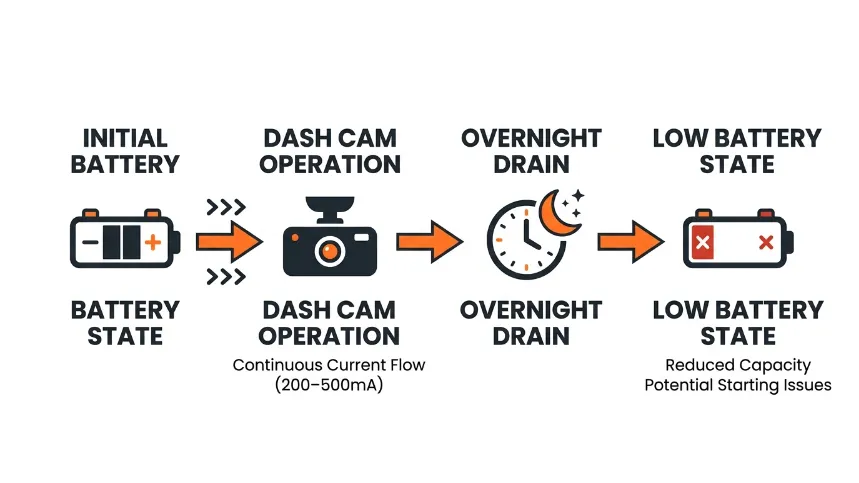
A dash cam drains your car battery by drawing a continuous trickle of current even after the engine stops. Most dash cams pull between 200mA and 500mA during active recording. That might sound tiny — but left unchecked overnight or over several days, it depletes a standard 60Ah battery faster than you’d expect.
Your car battery is designed to deliver a big burst of power to start the engine, then recharge through the alternator while you drive. It is not built for deep, slow discharge cycles. Every time a dash cam drains it below 50%, you shorten its lifespan. Do it repeatedly and the battery fails early — sometimes within a year.
The real danger isn’t a single night. It’s the cumulative effect of slow parasitic drain that drivers never notice until the car won’t start.
How Much Power Does a Dash Cam Actually Draw?
Most single-channel dash cams draw around 250–350mA in active recording mode. Dual-channel setups with a front and rear camera can pull 400–600mA combined. In parking mode, the draw drops — but it never reaches zero unless the device shuts off completely.
Here’s a simple way to think about it. A standard car battery holds roughly 45–75Ah of usable capacity. At 300mA of continuous draw, that’s around 150–250 hours of theoretical runtime. But your battery shouldn’t discharge below 50%. That cuts practical parking mode time to 75–125 hours — around 3 to 5 days — before you risk a battery too flat to start your car.
Real-world conditions are harsher. Cold weather reduces battery capacity by 20–40%. An older battery with degraded cells has far less usable reserve. A single hot summer day shortens everything.
If your car sits parked for more than 48 hours regularly, treat battery drain as a serious risk — not just a minor inconvenience. Plan your power solution before it becomes a problem.
Why Parking Mode Makes Battery Drain So Much Worse
Parking mode is a feature that keeps your dash cam recording while the engine is off. It monitors for motion or impact and captures footage of hit-and-run incidents, vandalism, or accidents in car parks. It is genuinely useful — but it is the single biggest cause of battery drain.
In parking mode, the camera stays in a low-power standby state, waiting for a trigger. This continuous standby current draw — sometimes called vampire drain — adds up fast. Brands like Blackvue (the South Korean company known for their premium cloud-connected cams) and Viofo (a Chinese manufacturer trusted by enthusiasts for value and performance) both warn in their manuals that parking mode requires either a hardwire kit or a dedicated battery pack.
Without voltage protection, parking mode is essentially a slow battery killer. The camera doesn’t know when to stop. It just keeps drawing power until there’s nothing left.
Why Using the 12V Socket Is the Riskiest Way to Power Your Dash Cam
Powering your dash cam through the 12V cigarette lighter socket is convenient but dangerous for long-term use. Many 12V sockets stay live even after the ignition is off, meaning your dash cam runs continuously — drawing power around the clock with no cutoff protection.
This is the number-one reason drivers find dead batteries after a single night. The socket provides no voltage protection whatsoever. It simply delivers power until the source is empty.
Does the Cigarette Lighter Stay On When the Car Is Off?
In many vehicles, yes — the 12V socket remains powered after the engine stops. Whether it stays live depends entirely on how the manufacturer wired it. Some vehicles cut power to accessories the moment you remove the key. Others keep the socket live until the door opens, or even indefinitely.
The simplest check: plug in a phone charger, turn the car off, remove the key, and walk away. If the charger light stays on, your socket is always-on. That means your dash cam runs non-stop unless you physically unplug it every time you park.
For most drivers, remembering to unplug daily is neither realistic nor practical. That’s why a hardwire kit is the proper solution.
How Long Before a Dash Cam Kills a Battery Through the 12V Port?
A healthy 60Ah battery powering a 300mA dash cam in parking mode will start struggling after roughly 48–72 hours of continuous drain. With an older battery rated at 40% of original capacity, that window shrinks to under 24 hours.
Cold weather accelerates the problem significantly. At 0°C (32°F), a lead-acid battery can lose up to 35% of its rated capacity. What might last 3 days in summer may fail overnight in January.
Never leave a dash cam in parking mode through the 12V socket if your car sits unused for more than one day. Even a single overnight drain cycle on a weak battery can leave you stranded. Always unplug if you don’t have a hardwire kit installed.
How Does a Hardwire Kit Stop Your Dash Cam from Draining the Battery?
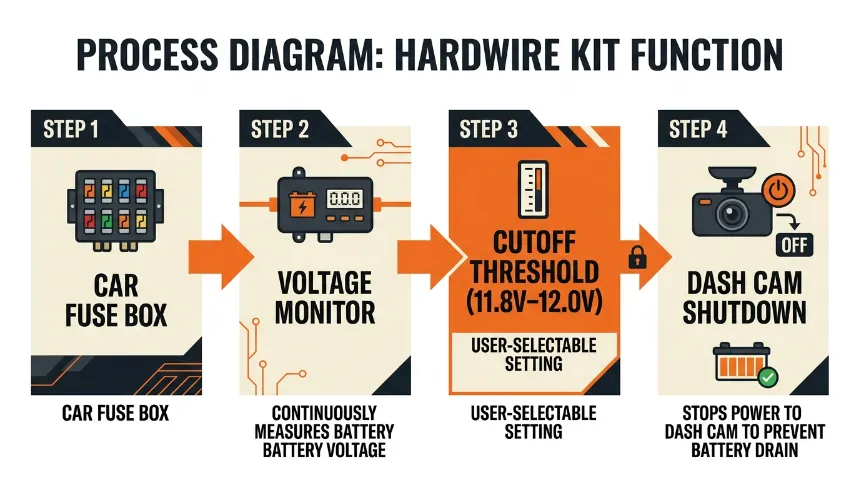
A hardwire kit connects your dash cam directly to your vehicle’s fuse box, providing a permanent, clean power source with built-in voltage protection. Unlike the 12V socket, a hardwire kit includes a low-voltage cutoff module that monitors your battery in real time and shuts the dash cam off automatically when voltage drops to a preset threshold.
This is the most popular and cost-effective solution for drivers who want parking mode without the battery risk. A good hardwire kit costs between $15 and $40 and takes about 30–60 minutes to install.
What Is a Low Voltage Cutoff and Why Does It Matter?
A low voltage cutoff (LVC) is a safety threshold built into your hardwire kit. When your car battery drops to the set voltage — typically between 11.6V and 12.2V — the kit cuts power to the dash cam automatically. This protects your battery from deep discharge and ensures you can always start your car.
Think of it as a circuit breaker for your battery. Your car needs roughly 12V to 12.4V to start reliably. If a dash cam drains the battery below 11.6V, starting the engine becomes difficult or impossible. The LVC steps in before that happens.
Most quality hardwire kits — including those made by Nextbase (the UK brand that dominates European dash cam sales), Viofo, and Thinkware (a South Korean manufacturer known for premium parking mode features) — allow you to select from multiple cutoff thresholds. Setting it at 12.0V gives a safe buffer for most standard batteries.
How to Hardwire a Dash Cam to Your Fuse Box Step by Step
- Purchase a hardwire kit compatible with your dash cam brand (most use a mini or micro USB connector).
- Locate your vehicle’s fuse box — usually under the dashboard on the driver’s side or in the engine bay.
- Use a fuse tester to identify a switched fuse (one that goes live with the ignition) for the ACC wire, and a permanent live fuse for the battery wire.
- Connect the hardwire kit’s ACC lead to the switched fuse using an add-a-fuse adapter.
- Connect the permanent live lead to a constant fuse (e.g., the clock or alarm circuit).
- Connect the ground wire to a metal bolt on the car’s chassis near the fuse box.
- Route the dash cam cable along the headliner and A-pillar, tucking it neatly under the trim.
- Set your voltage cutoff threshold on the hardwire module (12.0V is safe for most batteries).
- Test by starting the car and verifying the camera powers on, then turning the car off to confirm parking mode activates.
If you’re not comfortable working with your fuse box, any auto electrician or car accessories shop can install a hardwire kit in under an hour. The cost is usually $30–$60 for labour — well worth the peace of mind.
OBD-II Port vs Fuse Box — Which Is the Safer Power Source?
Some drivers power their dash cam through the OBD-II diagnostic port using a small adapter, avoiding fuse box work entirely. This is convenient but carries a real risk: many OBD-II ports remain live at all times, even with the ignition off, because they power the car’s onboard diagnostic system continuously.
A dash cam drawing power from a live OBD-II port in parking mode has no voltage protection unless the adapter itself includes an LVC module — and most cheap OBD-II adapters do not. The fuse box method with a proper hardwire kit remains the safer, more reliable choice for long-term parking mode use.
The fuse box hardwire method with a low-voltage cutoff kit is the gold standard for protecting your battery. The OBD-II method is only acceptable if the adapter includes its own voltage cutoff — verify this before using it for parking mode.
Should You Use a Capacitor Dash Cam Instead of a Battery-Powered One?
A capacitor dash cam stores energy in a small supercapacitor instead of a lithium battery. This design change reduces idle power consumption and makes the camera far more resistant to heat damage — a major advantage in hot climates. However, capacitor cams cannot run parking mode independently; they rely entirely on your vehicle’s power supply.
What Is the Difference Between a Capacitor and a Battery Dash Cam?
The internal storage method is the key difference between these two types.
| Feature | Capacitor Dash Cam | Battery Dash Cam |
|---|---|---|
| Heat tolerance | Excellent (up to 80°C) | Limited (swells above 60°C) |
| Idle drain on car battery | Lower | Slightly higher |
| Independent parking mode | No | Limited (minutes only) |
| Longevity | 10+ years typical | 3–5 years typical |
| Best for | Hot climates, long-term reliability | Parking mode without hardwire |
Neither type eliminates battery drain on its own. Both still need a hardwire kit with voltage cutoff if you want safe, long-term parking mode operation.
Which Brands Make Reliable Capacitor Dash Cams?
Viofo is one of the most respected names for capacitor dash cams among enthusiasts. Their A119 Mini 2 and A229 Pro both use supercapacitors and deliver excellent video quality. Blackvue also offers capacitor variants in their DR900X series. Garmin’s Dash Cam lineup uses batteries, making them better suited to temperate climates with proper hardwiring.
For drivers in consistently hot environments — think Texas summers, Middle Eastern markets, or Australian outback roads — a capacitor cam paired with a quality hardwire kit is the most durable long-term combination.
What Is a Dedicated Dash Cam Battery Pack and When Do You Need One?
A dedicated dash cam battery pack is an external lithium battery unit that sits between your car’s electrical system and your dash cam. It charges from your car while the engine runs, then powers the dash cam independently once you park. Your vehicle’s battery is never directly drained during parking mode.
This is the most complete solution available — and the most expensive. It’s ideal for drivers who park in high-risk areas, leave their car for days at a time, or run dual-channel setups with higher power demands.
How Does the Cellink Neo Work With Parking Mode?
The Cellink Neo (made by the Swedish company Cellinktech, one of the pioneering brands in dash cam battery technology) is a lithium iron phosphate battery pack designed specifically for dash cam use. It connects inline between your hardwire kit and camera. While you drive, it charges from your car. When you park, it powers your dash cam entirely from its own reserve.
The Cellink Neo B model provides around 9,900mAh of capacity, delivering approximately 40 hours of parking mode on a typical front-and-rear dash cam setup. Your vehicle’s 12V battery is completely isolated. Even if the Cellink Neo fully depletes, your car starts normally.
Viofo offers a similar product called the VB-30, which is smaller and less expensive, providing around 6,000mAh — suitable for single-channel cameras parked for up to 24 hours.
Is a Battery Pack Worth the Cost vs a Standard Hardwire Kit?
A hardwire kit costs $15–$40 and protects your battery through voltage cutoff. A dedicated battery pack costs $120–$250 and completely isolates your vehicle battery from the dash cam. The right choice depends on your situation.
If you park in a secure location and just want basic parking mode protection, a hardwire kit is entirely sufficient. If you regularly park in high-theft areas, travel and leave your car for multiple days, or run a dual-camera setup with heavy power demands, a dedicated battery pack pays for itself the first time it saves you a battery replacement.
The golden rule: Never treat your car’s starter battery as a dash cam power bank. It was designed to start an engine — not to cycle through deep discharges every night. The moment you protect it with a proper power setup, you protect both the camera and the battery.
How to Set Parking Mode Without Destroying Your Battery
Setting up parking mode correctly is as important as having the right hardware. Even with a hardwire kit installed, poor parking mode settings can trigger constant recording, accelerate memory card wear, and still push your battery close to the cutoff threshold faster than expected.
What Voltage Cutoff Setting Should You Use?
The right voltage cutoff depends on your battery type. For standard flooded lead-acid batteries — the most common type in petrol and diesel cars — set your cutoff between 11.8V and 12.0V. This leaves a reserve that reliably starts most engines.
AGM (Absorbent Glass Mat) batteries, often found in newer vehicles with start-stop systems, hold voltage higher under load. For AGM batteries, some manufacturers recommend a slightly higher cutoff of 12.2V to protect the battery chemistry. Check your vehicle handbook or ask your dealer if you’re unsure which battery type you have.
For reference, a fully charged 12V lead-acid battery reads approximately 12.6–12.8V. At 12.0V it holds roughly 50% charge. Below 11.8V, the battery is approaching deep discharge territory.
Time-Lapse vs Motion Detection Parking Mode — Which Uses Less Power?
Motion detection parking mode only records when the camera detects movement or an impact, keeping the camera in low-power standby the rest of the time. Time-lapse mode records continuously at a reduced frame rate — typically one frame every one to three seconds — which means the camera processes data constantly.
Motion detection uses significantly less power for most real-world parking scenarios. Unless you park in an extremely busy area where constant motion would trigger recording anyway, motion detection mode is the smarter choice for battery protection.
Brands like Blackvue and Thinkware also offer a hybrid mode — low-resolution time-lapse combined with full-resolution motion recording — which balances coverage and power consumption well.
If your dash cam app allows it, reduce parking mode sensitivity slightly. High sensitivity in busy car parks triggers constant recording, burns through your memory card faster, and drains the battery harder than necessary.
Which Solution Is Right for Your Setup? (Decision Guide)
The best fix for dash cam battery drain depends on three things: how long you park, whether you need parking mode, and how comfortable you are with basic electrical work.
| Your Situation | Best Solution | Estimated Cost |
|---|---|---|
| You don’t need parking mode | Use ignition-switched 12V socket or basic hardwire | $0–$20 |
| You want parking mode, park overnight | Hardwire kit with low-voltage cutoff | $15–$40 |
| You park for multiple days at a time | Dedicated battery pack (Cellink Neo or Viofo VB-30) | $120–$250 |
| You live in a hot climate | Capacitor dash cam + hardwire kit | $80–$200 |
| You run front and rear cameras | Dedicated battery pack with high capacity | $180–$280 |
For most drivers, a hardwire kit is the answer. It’s affordable, effective, and widely available for every major dash cam brand. If you want to go deeper on installation tips and product comparisons, The Dash Cam Store’s installation guide covers the major brands in detail. For battery health fundamentals, Battery University’s guide to battery charging is an excellent reference for understanding voltage thresholds.
Conclusion
A dash cam killing your battery is a fixable problem — and it usually comes down to one missing piece: a hardwire kit with a low-voltage cutoff.
The 12V socket is fine for basic use when you drive daily and don’t need parking mode. The moment you want that protection while parked, you need proper voltage cutoff hardware between your camera and your battery.
Start with a quality hardwire kit. Set your cutoff to 12.0V for a standard battery. Switch to motion detection parking mode. If you park for multiple days or run a dual-camera setup, consider a dedicated battery pack like the Cellink Neo.
I’ve seen too many drivers replace perfectly good car batteries because their dash cam drained them repeatedly over months. Protect your battery, and your battery will protect you — every morning, without fail.
If this guide helped you, share it with someone who’s had the same frustrating dead battery morning I did.
Frequently Asked Questions

I’m Alex Rahman, a car enthusiast and automotive writer focused on practical solutions, car tools, and real-world driving advice. I share simple and honest content to help everyday drivers make better decisions.
