10 Best Dash Cam GPS Combo for Reliable Driving Protection
Dash cams record the road ahead and can provide useful video after a collision, traffic dispute, or unexpected event. Adding GPS gives the footage location and speed data, which can help document when and where an incident occurred. A combo unit also saves space by combining two devices in one dashboard-mounted system.
The best dash cam GPS combos offer clear video, reliable GPS data, simple controls, and storage that is easy to manage. We also look for a wide viewing angle, strong performance at night, secure mounting, and features such as parking mode or smartphone access. Buyers should check whether the camera includes a memory card, supports loop recording, and needs a separate hardwire kit for parked-car monitoring.
We compared leading models and focused on video quality, GPS accuracy, ease of use, and overall value to identify the dash cam GPS combos worth buying.
Best Dash Cam GPS Combos
We reviewed dash cams with built-in GPS to identify the best options for clear video, reliable location data, and useful driving features. Our list includes models for daily commutes, road trips, and drivers who want added evidence after an incident.
ROVE R2-4K Dual Dash Cam

We recommend this dash cam for drivers who want front and rear recording, built-in GPS, and quick phone access in one package.
Key Pros
- Clear front footage with good low-light performance
- Built-in GPS records routes, speed, and direction
- Includes a 128GB memory card and useful setup tools
Key Cons
- Front video uses upscaled rather than native 4K
- Parking mode needs a separate hardwire kit
- Rear-camera wiring takes time to hide neatly
We found the ROVE R2-4K Dual easy to set up with the included mounts, clips, trim tool, and long rear-camera cable. The front camera gives us sharp 1440p footage that it upscales to 4K, while the rear camera records in 1080p. Together, they cover both directions without needing a second system.
Night driving looked better than it does with many basic dash cams. The Sony STARVIS 2 sensor, wide aperture, and HDR helped preserve detail in dim streets and around headlights. We would still avoid treating any dash cam as a guarantee that every license plate will remain readable in poor weather.
GPS adds useful context to each recording. We can review the route, speed, and direction later with ROVE’s computer player, while the 3-inch screen shows live speed and compass data during a drive.
The phone app is another strong point. Its 5.8GHz Wi-Fi connection made it practical to preview and download clips without removing the memory card. The included 128GB card also lets us start recording right away, though larger cards may help drivers who record long trips.
Parking protection works in several ways, including motion, impact, and time-lapse recording. We would need to buy and install the optional hardwire kit for that feature, which adds cost and installation work. Overall, this model suits drivers who value detailed coverage, GPS evidence, and convenient video sharing.
Garmin DriveCam 76

We recommend the Garmin DriveCam 76 for drivers who want a large GPS screen and a built-in dash cam in one device.
Key Pros
- Clear 7-inch screen with useful lane guidance
- Dash cam records detected incidents and stores clips online
- Voice control, Wi-Fi updates, and travel tools add convenience
Key Cons
- The large body can block some windshield views
- Setup and app features may take time to learn
- Some users report connection or reliability problems
On the road, the large display makes turns, lane guidance, and upcoming alerts easy for us to see. Voice assist also helps us enter destinations without reaching for the screen.
The built-in camera adds useful protection while driving. It records detected incidents, and the Garmin Drive app lets us review or share saved clips through the online Vault. We should check local privacy and recording laws before using it.
Wi-Fi map updates simplify maintenance because we do not need a computer. Pairing the unit with a phone also adds live traffic, weather, fuel prices, notifications, and hands-free calling.
The suction-cup mount feels less flexible than some drivers may expect, and the screen’s size requires careful placement. We also found that the many alerts and travel features can make the first setup feel busy. This combo works best for drivers who value a dedicated GPS as much as dash cam recording.
Garmin dēzlCam OTR725

We recommend this combo for truck drivers who want reliable navigation and a built-in camera in one large, easy-to-read unit.
Key Pros
- Clear 7-inch screen with truck-focused routing
- Built-in 1080p camera saves incident footage
- Helpful parking, loading dock, and arrival tools
Key Cons
- Several features require the dēzl smartphone app
- The camera may need occasional memory-card maintenance
- Some areas restrict dash cam use
We found the bright screen easy to read from the driver’s seat, and the truck routing felt more useful than standard car navigation. Entering a truck’s size and weight helped the unit plan routes around low bridges and other restrictions, although we still checked road signs and conditions.
The built-in dash cam records in 1080p with a wide view. Video quality works for documenting incidents, but it does not match the sharpest standalone cameras. The included memory card adds convenience, though some owners report needing to reformat cards when recording problems occur.
Pairing the navigator with the dēzl app adds truck parking, shared loading locations, wind alerts, traffic information, and PrePass support. These tools make the OTR725 more useful on long routes, but they also add setup steps and depend on a compatible phone connection.
BirdsEye overhead views helped us identify truck entrances, gates, and loading areas before arrival. CAT Scale searches and break planning also fit regular trucking needs. We should note that the device weighs routing, camera, and app features against a higher price than a basic dash cam or GPS alone.
70mai T800E 4K GPS Dash Cam

We recommend the 70mai T800E for drivers who want sharp front video, interior and rear coverage, GPS data, and a memory card in one package.
Key Pros
- Clear 4K front footage with 1080p interior and rear cameras
- Built-in GPS, voice controls, and fast app transfers
- Simple setup with a 64GB card included
Key Cons
- The small screen limits on-device viewing
- Parking monitoring needs a separate hardwire kit
- The system does not support 4G connectivity
During testing, the three-camera layout gave us useful coverage of the road, cabin, and rear view. The 4K front camera showed clear road details, while the interior and rear cameras added helpful context during rideshare or family driving.
GPS records the vehicle’s location, speed, and route with the video. We also found the voice controls useful for locking clips or taking photos without reaching for the camera. The 70mai app handles setup and file transfers, although reviewing long recordings on a phone can take time.
Installation felt manageable because the package includes the cables, mount, tools, and 64GB microSD card. The camera supports larger cards up to 512GB, which helps drivers who record often.
Parking protection requires extra wiring, so the camera will not provide full parked-car monitoring straight out of the box. The super capacitor should also handle a wide temperature range, and the 18-month warranty adds useful support for long-term ownership.
REDTIGER F7N TOUCH Dash Cam

We recommend this combo for drivers who want sharp front and rear video, built-in GPS, and simple phone access in one package.
Key Pros
- Clear 4K front and 1080p rear recordings
- Built-in GPS, touch controls, and voice commands
- Includes a 128GB memory card
Key Cons
- Parking monitoring needs a separate hardwire kit
- The rear-camera cable may take time to hide neatly
- The small screen limits detailed playback
During testing, the front camera produced clear daytime footage, while the wide view helped capture more of the road. The rear camera added useful coverage behind the vehicle, and low-light video remained usable for nighttime driving.
We found the touch screen easy for quick changes, such as locking a clip or turning on Wi-Fi. Voice controls helped us keep our hands on the wheel, although phone control through the app worked better for reviewing and sharing recordings.
The built-in GPS recorded speed and route details with the video. The included 128GB card also reduced the need for an immediate upgrade, while loop recording and impact protection helped preserve important clips.
Installation was straightforward with the suction mount and included cable tools. Running the long rear-camera cable took some effort, especially when keeping it out of sight. Parking mode adds value, but buyers must purchase the separate hardwire kit to use it continuously.
70mai A810 Lite 4K Dash Cam

We recommend this dash cam for drivers who want sharp front footage, useful GPS data, and rear coverage in one compact system.
Key Pros
- Clear 4K front video with 1080p rear recording
- Built-in GPS, voice control, and fast phone transfers
- Compact design with a 64GB card included
Key Cons
- Parking mode requires a separate hardwire kit
- Some owners report setup and reliability problems
- Rear camera mounting may not suit every vehicle
We found the front video sharp enough to capture road signs and nearby plate details in daylight. The rear camera adds helpful coverage, though its 1080p image looks less detailed than the front recording.
Night footage benefits from HDR and the wide aperture, but glare can still appear around headlights. The compact body fits neatly behind the mirror, and the included adhesive mount makes basic installation fairly quick.
GPS records the route, speed, and location with the video. The app also lets us preview and download clips over Wi-Fi, which is more convenient than removing the memory card.
Remote viewing and vehicle tracking sound useful, but they require the optional UP05 4G hardwire kit and a compatible service plan. Parking mode also needs a separate hardwire kit, so the listed price does not cover every feature.
The 70mai A810 Lite includes a 64GB card and an 18-month warranty. We would choose it for its strong front image and broad feature set, but buyers should check recent reliability feedback and confirm that the rear camera will mount correctly in their vehicle.
Icesky S03 4K GPS Dash Cam
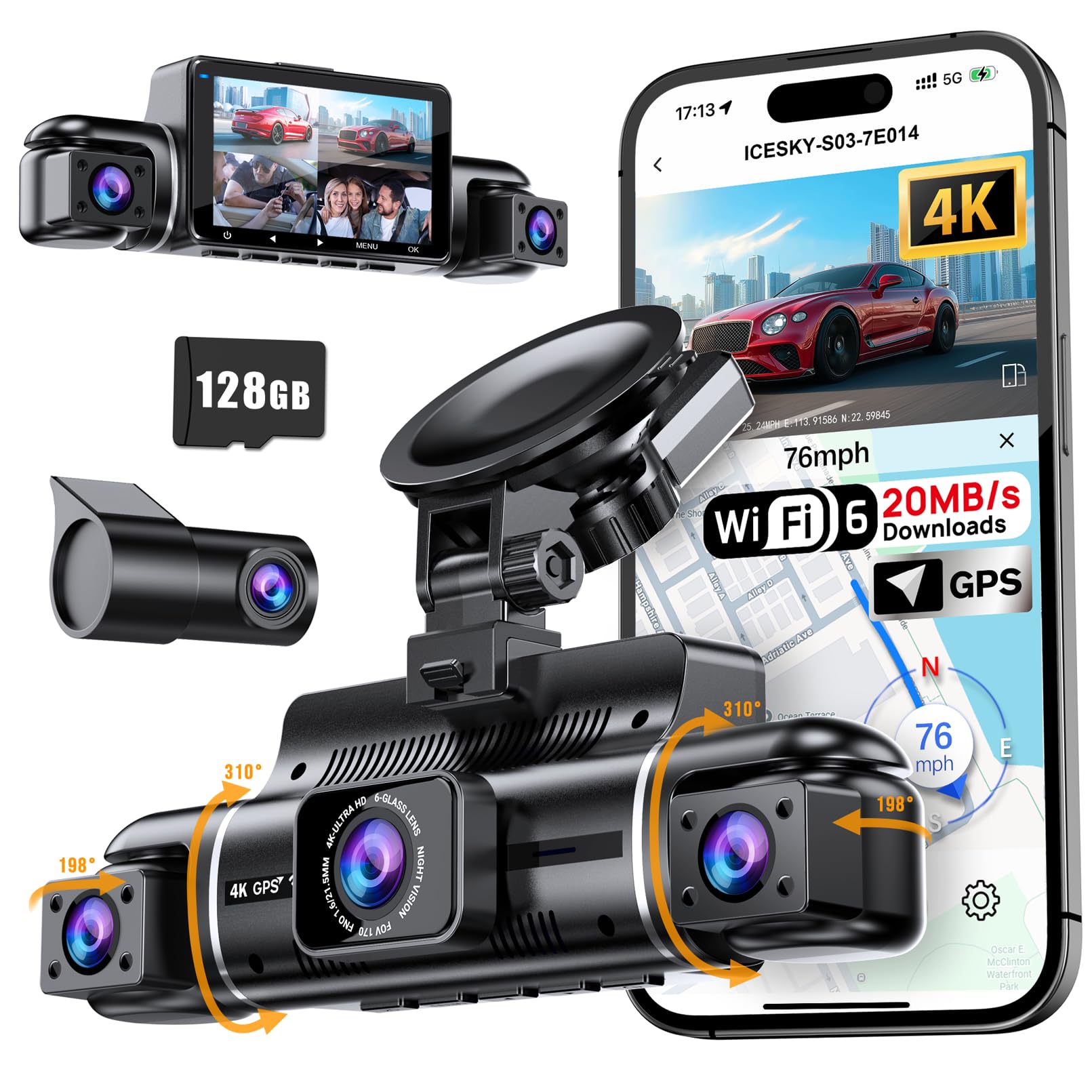
We recommend this dash cam for drivers who want broad four-camera coverage, clear front video, and built-in GPS in one system.
Key Pros
- Four cameras cover the front, rear, and both sides
- Fast app transfers through Wi-Fi 6
- Includes a 128GB memory card
Key Cons
- Parking mode needs a separate hardwire kit
- Side and rear cameras record at lower resolution
- The multi-camera setup takes more time to install
After using the S03, we found its four-camera layout more useful than a standard front-and-rear model. The front view records in 4K, while the rear and side views help capture nearby traffic, parking incidents, and lane changes.
The built-in GPS adds speed, location, and route data to recordings. We could review that information through the app or a GPS player, which can help when documenting an accident or road dispute.
The app connects over 5.8GHz Wi-Fi 6 and transfers clips without removing the memory card. In daily use, that made sharing short videos much easier. The included 128GB card also gives us useful storage from the start.
Installation requires more planning because we must position three additional cameras. The side cameras improve coverage, but their 1080p footage will not show as much detail as the 4K front view. Parking monitoring also requires the separately sold hardwire kit.
BOTSLAB G980H 4-Channel Dash Cam
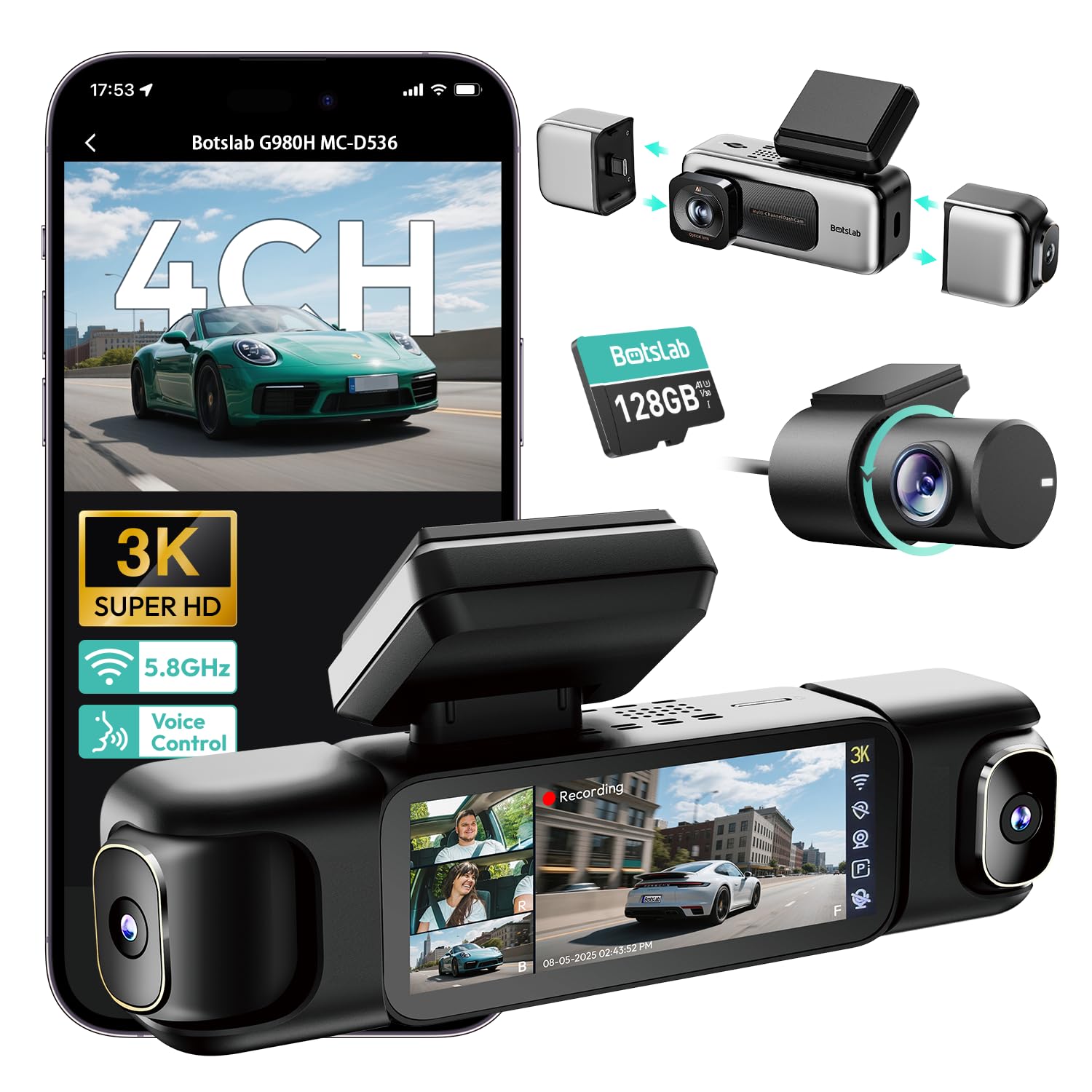
We recommend this dash cam for drivers who want GPS, broad coverage, and clear video from several angles in one system.
Key Pros
- Four-camera coverage helps monitor the front, sides, and rear.
- Built-in GPS records speed, location, and driving routes.
- Includes a 128GB memory card and supports larger cards.
Key Cons
- Installation takes time because several cameras need wiring.
- Parking mode requires a separate hardwire kit.
- App use may raise privacy concerns for some buyers.
We found the G980H useful when we wanted more than a standard front-and-rear setup. Its four cameras record at the same time, while the wide viewing angles help cover areas beside the vehicle. The detachable side cameras also give us more flexibility when we do not need all four channels.
Video quality looked clear in daylight, and the night footage benefited from the wide aperture and infrared lighting. We could also check all four views on the 3.18-inch screen, which made reviewing an incident more convenient.
The built-in GPS adds speed, location, and route data to recordings. Its 5.8GHz Wi-Fi helped us transfer clips quickly at close range, though it does not provide remote access. We also appreciated the included 128GB card and the supercapacitor design, which avoids relying on a battery in hot or cold conditions.
Setup was manageable but not especially quick. Hiding wires through the vehicle trim took the most effort, and parking monitoring requires BOTSLAB’s separate hardwire kit. Buyers should also review the app’s data permissions before connecting the camera.
Garmin RVcam 795 GPS Navigator

We recommend the Garmin RVcam 795 for RV owners who want GPS routing and a built-in dash cam in one large, easy-to-see unit.
Key Pros
- RV-focused routing considers vehicle size, weight, and height.
- Large screen makes directions and campground details easier to read.
- Built-in camera saves incident clips for later viewing.
Key Cons
- The windshield mount may not work well in some Class A motorhomes.
- Menus can feel difficult to use while driving.
- Routing and camera warnings may not always match real road conditions.
We like the 7-inch display because it keeps maps, warnings, and upcoming turns visible without relying on a phone. The RV routing also helps identify steep grades, sharp curves, weight limits, and other concerns that matter when driving a large vehicle.
The dash cam adds useful protection without requiring a separate camera. It records detected incidents and can upload saved clips to Garmin’s online Vault through the Garmin Drive app. We found the camera placement important, since some dashboards can block its view.
Garmin also includes RV parks, service locations, scenic routes, campground information, and satellite imagery. These tools make trip planning more convenient, though the system may miss some addresses or provide incomplete fuel details.
The main concern involves installation. The camera works best from the windshield, but that position may be too far away or obstructed in certain motorhomes. We should also treat the safety alerts as reminders, not replacements for posted signs and careful driving.
WOLFBOX G840S 4K Mirror Dash Cam
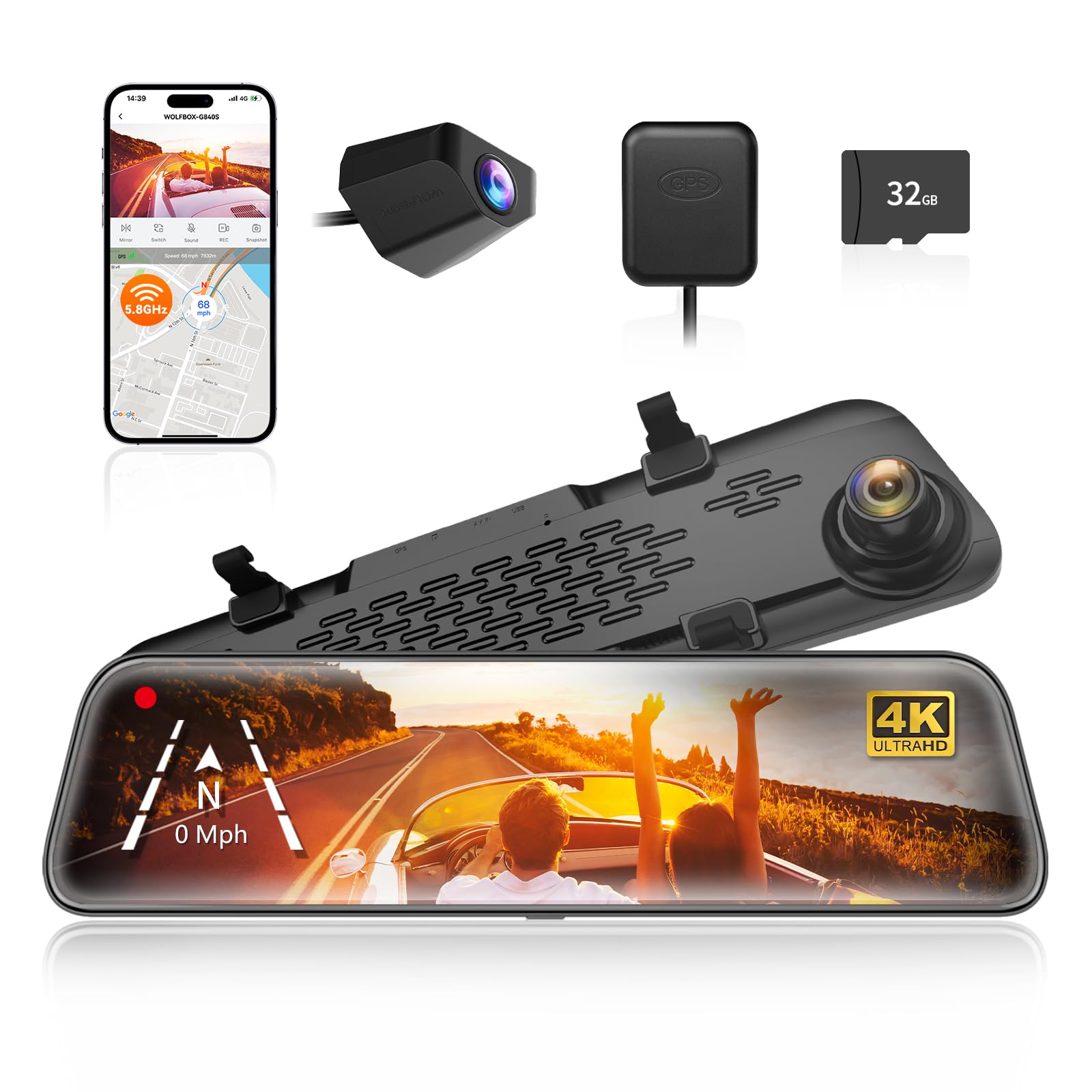
We recommend this dash cam for drivers who want a large rearview display, clear front video, GPS tracking, and a wide view behind the vehicle.
Key Pros
- Sharp front video with a useful 12-inch display
- GPS, Wi-Fi, and a helpful backup camera view
- Wide viewing angles can reduce blind spots
Key Cons
- Rear video quality drops in low light
- Parking monitoring requires a hardwire kit
- The large mirror screen may take time to adjust to
We found the 12-inch screen easy to read while driving. It gives us a wider view than a standard mirror, and the touch controls respond well. The front camera records detailed 4K video, which helps when we need to review road signs or license plates.
The rear camera makes reversing easier and gives us a broad view behind the vehicle. However, its image looks less clear after dark than the front view. Installation also depends on the vehicle, since we need to route the rear camera cable and attach the included GPS antenna.
GPS data appears on recordings, while the phone app lets us view and share clips over Wi-Fi. The included 32GB card helps us start quickly, but regular users may want a larger compatible card. We also need the optional hardwire kit to use parking monitoring when the vehicle is off.
With a 4.3-star rating from more than 14,800 customers, the G840S offers a strong mix of visibility and recording features. Its main drawbacks are the weaker night view from the rear camera and the extra work required for parking mode.
Buying Guide
We should match the dash cam to our driving needs, vehicle, and budget. A GPS combo should record clear video while adding useful location and speed data.
| Feature | What to look for |
|---|---|
| Video quality | At least 1080p resolution, with good detail in daylight and low light |
| GPS accuracy | Reliable speed and location data embedded in the video |
| Viewing angle | A wide view that captures nearby lanes without excessive image distortion |
| Storage | Support for a high-endurance microSD card and loop recording |
| Power | A stable car adapter, with hardwiring available if we need parking mode |
| Safety features | Optional alerts such as lane departure or forward collision warnings |
We should check whether the camera records the front only or includes rear coverage. A dual-camera setup can provide more evidence, but it may cost more and require extra installation work.
A polarizing filter can reduce dashboard reflections and glare. Night vision, automatic exposure, and strong image processing also help us capture plates and road details in changing light.
We should confirm that the GPS data can be viewed easily through the camera’s app or computer software. The controls should be simple, and the mount should hold the camera firmly without blocking our view.
Before buying, we should check the warranty, return policy, memory-card requirements, and replacement costs. If we want parking mode, we should verify whether the camera needs a separate hardwire kit and whether our vehicle supports the installation.
Editor’s Choice
We choose the Garmin Dash Cam X310 as our top dash cam GPS combo. It records in 4K, includes built-in GPS, and offers a compact design that fits neatly behind most rearview mirrors.
Its GPS adds location and speed data to recorded videos. The camera also supports voice control, automatic cloud backup with a subscription, and a wide viewing angle for capturing more of the road.
| Feature | Details |
|---|---|
| Video quality | 4K |
| GPS | Built in |
| Display | No built-in screen |
| Storage | microSD card |
| Best for | Drivers who want clear footage and GPS data |
We like the X310 because it focuses on core driving needs without adding a large screen to the windshield. The smartphone app lets us review clips, change settings, and manage saved footage.
We should note that the camera needs a separate microSD card. Some features also require a paid subscription, and the compact design may not suit drivers who prefer a built-in display.
Conclusion
Choosing the best dash cam GPS combo depends on our driving needs, budget, and preferred features. We should look for clear video, reliable GPS data, a wide viewing angle, and simple controls.
A good model should also offer:
- Loop recording to manage storage
- Parking mode for added protection
- Night vision for low-light roads
- Wi-Fi or app support for quick file transfers
- A durable mount that stays secure
We should check whether the camera includes a memory card or requires a separate purchase. A high-end model may provide better video and more features, but a lower-cost option can still meet our needs for daily driving.
Before buying, we should confirm the camera’s GPS accuracy, storage limits, warranty, and power requirements. The right choice gives us useful location data and dependable footage without adding unnecessary complexity.
FAQS
What does GPS add to a dash cam?
GPS records our vehicle’s speed, location, and route. We can use this data to review trips or provide extra details after a crash.
Do we need a separate GPS device?
No. A dash cam GPS combo includes a built-in GPS receiver. This keeps the setup simple and reduces the number of devices on our windshield.
Does GPS work without mobile service?
Yes. The GPS receiver can track location without cellular service. However, features such as cloud video access may require a phone connection or subscription.
What should we look for in a GPS dash cam?
- Video quality: We recommend at least 1440p for clearer plates and road signs.
- Wide viewing angle: A broad lens helps capture more of the road.
- Parking mode: This can monitor impacts while our vehicle is parked.
- Easy-to-read data: Speed and location details should appear clearly in the app or video player.
- Reliable storage: We should use a compatible, high-endurance microSD card.
Can GPS footage prove who caused a crash?
GPS data can support our account of an incident, but it does not prove fault by itself. Video quality, local laws, and other evidence also matter.
Does GPS reduce battery life?
A built-in GPS receiver uses some power, but the effect is usually small while the dash cam runs. Parking mode may need a hardwire kit or an external battery to prevent vehicle battery drain.

I’m Alex Rahman, a car enthusiast and automotive writer focused on practical solutions, car tools, and real-world driving advice. I share simple and honest content to help everyday drivers make better decisions.
