Are Dashcams Worth It? Everything Drivers Need to Know Before Buying
Yes, dashcams are worth it for most drivers. They record continuous video of your drive, protect you in insurance disputes, and can capture hit-and-run events while your car sits parked. A solid dashcam costs between $50 and $250 — a small price compared to a wrongful claim that could raise your premiums for years.
A driver ran a red light and hit my friend’s car last year. It was a clear-cut case — until the other driver lied to their insurer. No witnesses. No traffic camera nearby. Just two people with two different stories.
My friend lost the dispute. His premiums went up. The whole situation cost him over $1,800.
He had no dashcam. I did. That is the difference a small camera on your windshield can make.
I’m Alex Rahman, and I’ve been researching and testing car tech for over eight years. In this guide, I’ll walk you through exactly what dashcams do, who benefits most, and whether the cost makes sense for your situation. No fluff. Just the facts you need to decide.
- Dashcams record continuous video while you drive — and many protect your car while parked too.
- Footage can prove fault in accidents and speed up insurance claims significantly.
- Some UK insurers offer premium discounts of 10–15% for verified dashcam users.
- A quality dashcam costs $50–$250 — far less than one wrongful insurance claim.
- Dashcam footage is legally admissible in courts across the US, UK, Canada, and Australia.
What Is a Dashcam and How Does It Protect You While Driving?
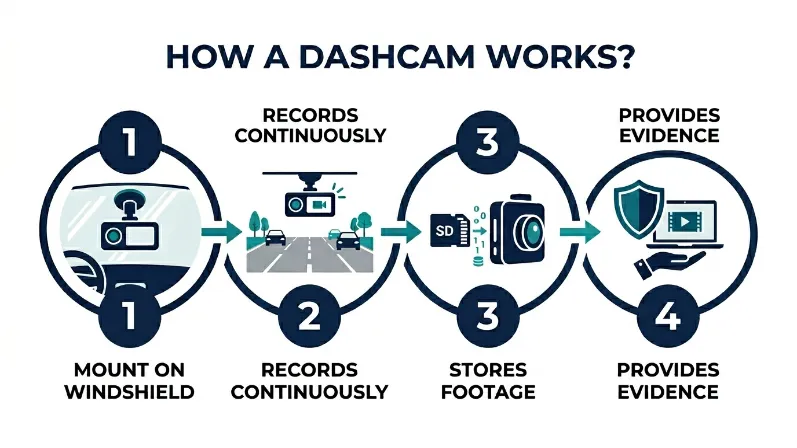
A dashcam is a compact camera that mounts on your windshield or dashboard and records video continuously while your vehicle moves. It captures your road view in real time — everything from minor fender benders to major collisions — and stores that footage on a memory card or in the cloud.
Most dashcams plug into your car’s 12V socket or hardwire directly to your fuse box. They start recording the moment you turn the ignition on and stop when you park — unless you enable parking mode, which keeps them running.
Modern dashcams from brands like Nextbase, Vantrue, and Garmin Dash Cam go beyond basic recording. They include GPS to log your speed and route, Wi-Fi for easy footage transfer to your phone, and night vision for clear low-light video.
The core protection is simple: video does not lie. When a crash happens, the camera shows exactly what occurred — no guessing, no he-said-she-said.
How Does Loop Recording Keep Your Footage Organized Automatically?
Loop recording means your dashcam continuously overwrites the oldest footage once your SD card fills up — so you never have to delete files manually. The camera splits recordings into short clips, usually one to three minutes long, and replaces the oldest clips first when storage runs out.
This is important because it means your dashcam runs forever without you touching it. You do not need to manage files. The camera handles everything in the background.
One thing to know: important footage gets locked automatically when the G-sensor triggers — more on that next. Locked clips are never overwritten, so crash footage stays safe even as new recordings roll in.
Use a high-endurance SD card rated for dashcam use — standard cards wear out fast from constant rewriting. Samsung and SanDisk both make excellent options designed for this purpose.
What Does a G-Sensor Do and Why Does It Matter in a Crash?
A G-sensor (or gravity sensor) detects sudden changes in force — like a hard brake, sharp swerve, or collision impact. When it triggers, the dashcam automatically locks the current video clip so loop recording cannot overwrite it.
This means you do not need to do anything in an accident. The camera reacts faster than you can. The footage is saved the moment the impact registers.
Most dashcams let you adjust G-sensor sensitivity. Too high and every speed bump locks a clip. Too low and a minor collision might not trigger it. Medium sensitivity works best for most drivers.
What Are the Real Benefits of Having a Dashcam?
Dashcams offer five concrete benefits: accident protection, insurance claim support, parking security, safer driving habits, and legal evidence. Each one has real monetary and personal value — and together they make dashcams one of the most practical car accessories you can buy.
Let me break each one down so you can see exactly what you are getting.
How Does Dashcam Footage Help You Win an Insurance Dispute?
Dashcam footage gives your insurer a clear video record of who caused the accident — which removes the guesswork that turns minor claims into long disputes. Instead of two conflicting accounts, your adjuster watches the video and sees exactly what happened.
This matters more than most people realize. Insurance fraud costs US drivers an estimated $308 per year each according to the Insurance Information Institute, and staged accidents are a real tactic some bad actors use. A dashcam kills that play immediately.
In the UK, the Association of British Insurers has publicly acknowledged that dashcam footage speeds up claims resolution and reduces fraudulent claims. Several UK insurers now have dedicated dashcam portals where you upload footage directly after an incident.
The bottom line: a dashcam does not just record — it defends you.
Can a Dashcam Actually Lower Your Car Insurance Premium?
Some insurers do offer dashcam discounts, though the amount and availability vary by country and provider. In the UK, companies like Direct Line and Nextbase’s insurance partner network offer verified discounts of 10–15% for dashcam users who share footage history.
In the US, the market is less standardized. Most major insurers do not advertise a flat dashcam discount. However, dashcam footage can prevent a rate increase after a disputed accident — and avoiding one wrongful at-fault claim can save you hundreds annually over the following years.
Think of the savings this way: if a dashcam prevents even one wrongful at-fault mark on your record, it pays for itself ten times over in avoided premium increases.
How Does Parking Mode Protect Your Car When You Are Not There?
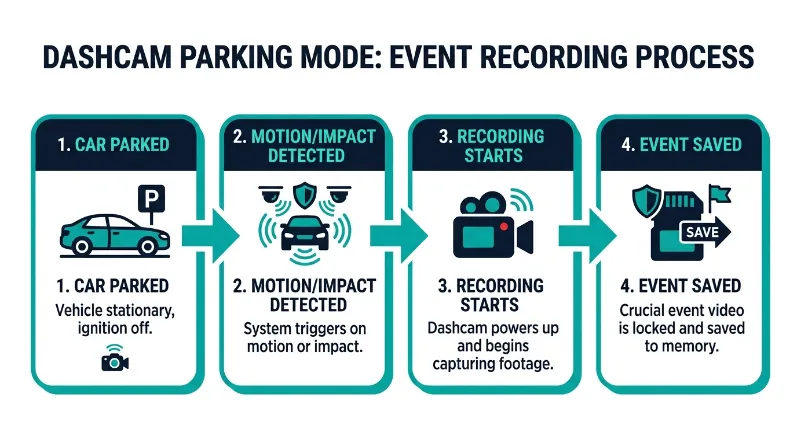
Parking mode keeps your dashcam active when your engine is off — recording if someone hits your car, breaks in, or vandalizes it in a parking lot. The camera uses motion detection or impact sensing to trigger recording only when needed, so it does not drain your battery unnecessarily.
Hit-and-runs in parking lots are among the most frustrating situations for car owners. No witnesses. No plate. No recourse. A dashcam in parking mode changes that completely.
Brands like BlackVue and Vantrue offer dashcams with buffered parking mode — they record a few seconds before the impact trigger too, so you see what happened leading up to the hit, not just the aftermath.
If you use parking mode regularly, hardwire your dashcam to your fuse box using a hardwire kit. This draws power from a circuit that cuts off before your battery drains too low — protecting your battery automatically.
Are There Any Downsides to Owning a Dashcam?
Dashcams have a few real drawbacks worth knowing: battery drain risk with parking mode, heat sensitivity in hot climates, and the small upfront cost. None of these are dealbreakers, but they are worth planning for so you get the most out of your camera.
Does Parking Mode Drain Your Car Battery Overnight?
Parking mode can drain your battery if your dashcam is not set up correctly. A dashcam running all night on a standard 12V socket connection will pull continuous power — and that can leave you with a dead battery by morning.
The solution is straightforward. Use a hardwire kit with a low-voltage cutoff. This connects the dashcam to a fuse that monitors battery voltage and cuts power before the battery drops below a safe threshold — usually around 11.8 volts.
Never run parking mode through a cigarette lighter socket overnight. This socket stays live on many vehicles and has no low-voltage cutoff — you risk draining your battery completely. Always use a proper hardwire kit with voltage protection.
What Happens to Your Dashcam Footage in Extreme Heat?
Dashcams mounted directly on windshields can overheat in very hot climates. In summer, a parked car’s interior can reach 140°F (60°C) or higher — enough to damage camera sensors, warp housings, or corrupt SD cards in lower-quality models.
Premium dashcams from Garmin and Nextbase are built with wider operating temperature ranges and capacitors instead of internal batteries — making them much more heat-resistant. Avoid dashcams with internal lithium batteries if you live in a hot region — capacitor-based models handle heat far better.
Positioning helps too. Place your dashcam behind your rearview mirror to keep it in the mirror’s shade and reduce direct sun exposure.
Is Dashcam Footage Legal Evidence in Court and on the Road?
Yes — dashcam footage is legally admissible in courts across the US, UK, Canada, and Australia, provided the recording was made lawfully. Courts treat dashcam video as documentary evidence, the same way they handle CCTV footage or phone recordings made with the driver’s consent.
In the United States, laws around recording vary by state, but recording video in public spaces — including public roads — is generally legal. The key restriction in some states is audio: a handful of states require two-party consent for audio recording. Disabling the microphone on your dashcam removes that concern entirely.
In the United Kingdom, dashcam footage submitted to police through initiatives like Operation Snap has directly led to prosecutions for dangerous driving, road rage, and traffic violations. UK police actively encourage dashcam use.
In most countries, the rule is this: if you are recording in a public place and not violating privacy laws, your footage holds up. Check your local regulations for audio specifically — and when in doubt, mute the mic.
Front Dashcam vs Rear Dashcam vs Dual-Channel: Which Do You Actually Need?
A front-only dashcam covers the most common collision scenario — rear-end hits and front-facing incidents. A rear dashcam adds coverage for tailgating and rear-end collisions. A dual-channel dashcam gives you both simultaneously from one unit and one power connection.
| Type | Coverage | Best For | Price Range |
|---|---|---|---|
| Front Only | Forward road view | Budget-conscious drivers, city driving | $30–$100 |
| Rear Only | Behind the vehicle | Rideshare drivers, frequent highway use | $40–$90 |
| Dual-Channel | Front + rear simultaneously | Most drivers — best all-round protection | $100–$250 |
| Interior Cam | Cabin-facing | Rideshare and taxi drivers, teen monitoring | $80–$200 |
For most everyday drivers, a dual-channel dashcam is the smartest choice. Rear-end collisions are the most common crash type in the US according to the NHTSA — and a front-only camera misses those entirely from the victim’s perspective.
If you can only afford one camera, put it at the front. If your budget allows $130 or more, go dual-channel. The rear lens has saved more insurance claims than most people expect — tailgating disputes settle instantly with rear footage.
How Much Does a Good Dashcam Cost and Is the Price Worth It?
A reliable dashcam costs between $50 and $250 depending on features, resolution, and brand. Budget models in the $50–$100 range handle daily recording well. Mid-range options at $100–$180 add rear cameras, better night vision, and GPS. Premium models above $180 offer 4K resolution, cloud connectivity, and ADAS safety alerts.
Installation adds minimal cost. Most drivers install a dashcam themselves in under 30 minutes using the supplied mount and 12V adapter. A professional hardwire installation at a car audio shop typically costs $50–$100 extra.
Budget Dashcam vs Premium Dashcam: What Does the Extra Money Buy?
| Feature | Budget ($50–$100) | Premium ($150–$250) |
|---|---|---|
| Resolution | 1080p Full HD | 1440p / 4K Ultra HD |
| Night Vision | Basic — adequate in streetlit areas | Excellent — reads plates in darkness |
| GPS | Rarely included | Built-in — logs speed and location |
| Parking Mode | Basic motion detection | Buffered + time-lapse + impact |
| Connectivity | None or basic app | Wi-Fi, Bluetooth, cloud upload |
| Heat Resistance | Internal battery (heat risk) | Capacitor-based (heat safe) |
For most drivers, a $100–$150 dual-channel dashcam hits the sweet spot. You get solid resolution, a rear camera, basic parking mode, and enough features to handle real-world situations — without paying for cloud features you may never use.
Who Should Buy a Dashcam and Who Might Not Need One?
Most drivers benefit from a dashcam — but some situations make it especially valuable. If you commute daily in heavy traffic, drive for Uber or Lyft, have a new teen driver in the family, or live somewhere with high accident fraud rates, a dashcam is a clear yes.
Buy a dashcam if you:
- Drive frequently in busy urban areas with high accident risk
- Work as a rideshare or delivery driver and need liability protection
- Have a teenage driver who uses your car
- Park in public lots or on-street regularly
- Drive long distances or road trips often
- Live in an area with known insurance fraud activity
You might not need one if you:
- Drive fewer than 2,000 miles per year
- Always park in a secure private garage
- Live in a very low-traffic rural area with minimal accident risk
Even in low-risk situations, the peace of mind factor is real. Knowing you have video proof of any incident is worth something — and the cost of a basic dashcam is low enough that very few drivers would regret the purchase.
How Do You Install a Dashcam Without Damaging Your Car?
Installing a dashcam yourself takes 15–30 minutes and requires no special tools for a basic setup. Here is exactly how to do it cleanly.
- Choose your mount position — behind the rearview mirror is ideal for minimal obstruction.
- Clean the windshield with the alcohol wipe included in your kit before attaching the mount.
- Attach the mount firmly and press for 30 seconds to ensure the adhesive sets.
- Insert a formatted, high-endurance SD card into the dashcam slot.
- Route the power cable along the windshield trim, across the headliner, and down the A-pillar — tuck it neatly with a trim removal tool or a flat plastic card.
- Plug the cable into your 12V socket — or have a professional hardwire it to your fuse box for a cleaner look and parking mode support.
- Power on the dashcam, set the date and time, and confirm recording starts automatically.
The cable routing step trips most people up. Take your time tucking the cable under the headliner and A-pillar trim — it makes the installation look factory-clean and keeps the cable away from your vision.
What Features Should You Look for in a Dashcam in 2024?
The most important dashcam features are resolution, night vision quality, parking mode type, loop recording, G-sensor sensitivity, and build quality. Secondary features like GPS, Wi-Fi, and ADAS alerts add significant value if your budget allows.
Here is what each feature actually means for your daily driving:
- 1080p minimum resolution: You need to read license plates clearly. 1080p works in daylight. 1440p or 4K is better for night use and close calls at speed.
- Wide dynamic range (WDR): This balances bright and dark areas in the frame — critical for tunnels, bright sunshine, and night driving.
- 140° or wider field of view: A narrow field of view misses lane changes and side collisions. 140–170° covers most situations well.
- GPS logging: Embeds your speed and route into the footage. Powerful evidence when speed is disputed in a claim.
- Wi-Fi connectivity: Lets you pull footage to your phone instantly after an incident — no SD card removal needed.
- ADAS alerts: Advanced dashcams from Vantrue and Garmin now include lane departure warnings and forward collision alerts — turning your dashcam into a partial safety system.
Check out RTINGS dashcam reviews for objective lab-tested comparisons on real-world performance — they test night vision, resolution clarity, and heat resistance with consistent methodology.
Dashcams are worth it for the vast majority of drivers. They protect you in accidents, defend you against insurance fraud, and keep watch over your car when you walk away. A $100–$150 dual-channel model covers most needs. Buy one before you need it — because by then, it’s too late.
Frequently Asked Questions
Does a dashcam record when the car is off?
Yes — if your dashcam has parking mode enabled and is connected to a constant power source, it records when the engine is off. Most dashcams use motion or impact detection in parking mode to save battery and storage. A hardwire kit with a low-voltage cutoff is the safest way to run parking mode overnight.
Can dashcam footage be used against you in court?
Yes, dashcam footage can be used against you if it shows you breaking traffic laws or causing an accident. Courts treat it as objective evidence regardless of who submits it. Be aware that if you voluntarily share footage with police or your insurer, it can work both ways.
How long does dashcam footage stay on the SD card?
Footage duration depends on your SD card size and video resolution. A 64GB card at 1080p typically holds around 6–8 hours of continuous footage before loop recording overwrites the oldest clips. Higher resolutions like 4K fill the card faster. Impact-triggered clips are locked and never overwritten.
Do dashcams work at night?
Yes — most modern dashcams record at night, though quality varies widely. Budget models produce grainy footage in low light. Mid-range and premium dashcams with wide dynamic range (WDR) sensors and Sony STARVIS image sensors deliver clear footage in near-total darkness. Night vision quality is one of the biggest differences between price tiers.
Is it hard to install a dashcam yourself?
No — a basic dashcam installation takes 15 to 30 minutes and requires no tools. You mount the camera, tuck the power cable along the trim, and plug into the 12V socket. A cleaner hardwire installation costs $50–$100 at a car audio shop and gives you proper parking mode support without cable clutter.
Are dashcams worth it for new drivers?
Absolutely — new drivers benefit most from dashcams. They provide honest feedback on driving habits, protect against false fault claims, and give parents peace of mind when a teen takes the car. Some insurers also factor in dashcam use when calculating premiums for high-risk driver profiles.
Conclusion
Dashcams are one of the few car accessories with a clear, provable return on investment. They protect your finances in disputes, defend you against fraud, and give you eyes on your car around the clock.
The one-time cost of $50 to $250 is a fraction of what one wrongful insurance claim costs you over three to five years of raised premiums. As I tell every driver I know — buy the dashcam before the accident, not after it.
I’m Alex Rahman, and I hope this guide gave you everything you needed to make a confident decision. If you found it helpful, share it with a friend who is on the fence — it might save them exactly the headache my friend went through.

I’m Alex Rahman, a car enthusiast and automotive writer focused on practical solutions, car tools, and real-world driving advice. I share simple and honest content to help everyday drivers make better decisions.
