Are Dash Cams Bluetooth? What Drivers Need to Know Before Buying
Most dash cams are not Bluetooth in the traditional sense. Some models use Bluetooth Low Energy (BLE) to launch apps and pair with your phone. But actual video transfer and live view require Wi-Fi — not Bluetooth. Always check the spec sheet before you buy.
I picked up my first dash cam six years ago and made a classic mistake. I saw “wireless” on the box and assumed I could pull up footage on my phone instantly — like AirDrop. I was wrong. The camera connected to an app, sure. But it used Wi-Fi, not Bluetooth, and the setup took longer than I expected.
I’m Alex Rahman, and I’ve tested and researched dash cams for drivers who want real answers — not marketing language. The question “are dash cams Bluetooth?” trips up a lot of buyers. The honest answer has a few layers to it.
By the end of this guide, you’ll know exactly what Bluetooth does in a dash cam, which brands actually include it, and whether you need it at all. Let’s get into it.
- Most dash cams use Wi-Fi — not Bluetooth — to transfer video files to your phone.
- Some dash cams include Bluetooth Low Energy (BLE) for app pairing and notifications only.
- Brands like Nextbase combine Bluetooth and Wi-Fi in the same camera for the best experience.
- You do not need Bluetooth to use a dash cam app — Wi-Fi alone handles video and settings.
- If your dash cam has no wireless features, an SD card reader for your phone is a cheap fix.
What Does Bluetooth in a Dash Cam Actually Do for You?
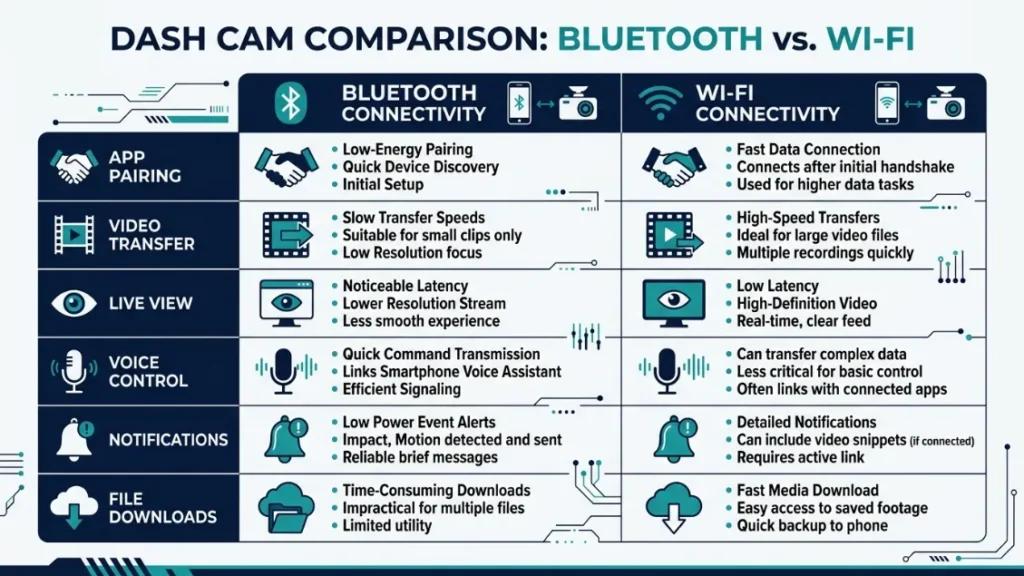
Bluetooth in a dash cam handles two things: app pairing and hands-free calling. It does not stream video, and it does not transfer footage files on its own. Think of it as the handshake — the part that gets your phone talking to the camera. The heavy lifting happens over Wi-Fi.
Most drivers assume Bluetooth means full wireless control. That is not how it works in practice. A dash cam with Bluetooth can wake up the companion app, push notifications to your phone, and in some models, integrate with your car’s hands-free calling system.
Those are genuinely useful features. But they are not the same as wireless video download.
How Bluetooth Low Energy (BLE) Makes Dash Cam Pairing Effortless
Bluetooth Low Energy (BLE) is the version of Bluetooth used in most modern dash cams. It draws far less power than standard Bluetooth, which matters because your dash cam runs continuously while you drive. BLE lets the camera stay in a low-power standby mode and wake up the moment you open the companion app.
The Bluetooth Special Interest Group (Bluetooth SIG) standardized BLE as part of the Bluetooth 4.0 specification in 2010. Since then, most connected electronics — including dash cams — have adopted it for exactly this kind of always-on, low-drain use case.
In practical terms, BLE means you open the app, the camera is already found, and you’re in. No hunting through settings. No manual Wi-Fi password entry every time. The BLE pairing just happens in the background.
If your dash cam uses BLE for pairing, keep Bluetooth enabled on your phone at all times. The camera will connect faster and your app will load footage with fewer steps.
Why Bluetooth Alone Cannot Transfer Dash Cam Video to Your Phone
Bluetooth maxes out at around 3 Mbps of real-world data transfer speed — far too slow for HD or 4K dash cam footage. A single minute of 1080p dash cam video typically sits between 150 MB and 300 MB depending on the camera. Sending that over Bluetooth would take several minutes per clip.
Wi-Fi, by comparison, runs at 150 Mbps to 600 Mbps on modern 802.11ac (Wi-Fi 5) connections. That same one-minute clip transfers in seconds. This is exactly why every major dash cam brand routes video through Wi-Fi — and uses Bluetooth only for lightweight tasks.
The short answer: Bluetooth in a dash cam is a remote control. Wi-Fi is the actual data pipe.
Why Do Most Dash Cams Use Wi-Fi Instead of Bluetooth?
Dash cam manufacturers chose Wi-Fi because it handles large video files quickly and reliably. Speed is the deciding factor. A driver who spots an accident wants to pull that clip in seconds — not sit and wait for a slow Bluetooth transfer to crawl through a 400 MB file.
Wi-Fi also gives companion apps the ability to show a live view of the road, which Bluetooth cannot support at all. Live preview requires a continuous high-bandwidth stream, and Bluetooth simply cannot deliver that.
How Wi-Fi Transfers Video Faster Than Bluetooth Ever Could
Wi-Fi direct connections between a dash cam and a phone can hit speeds of 20 to 40 Mbps in practice. That means a 3-minute 1080p clip transfers in roughly 20 to 40 seconds. The same clip over Bluetooth would take 10 to 15 minutes.
Dash cams create their own Wi-Fi hotspot — a direct connection that does not go through your home router or mobile data. Your phone connects to the camera’s network, opens the app, and pulls footage straight to your camera roll. The whole process is clean and fast once you’ve done it a couple of times.
This is why brands like Blackvue (a South Korean camera maker trusted by commercial fleets worldwide) built their DR900X series entirely around Wi-Fi and cloud connectivity — with no Bluetooth included at all.
Can a Dash Cam Have Both Bluetooth and Wi-Fi at the Same Time?
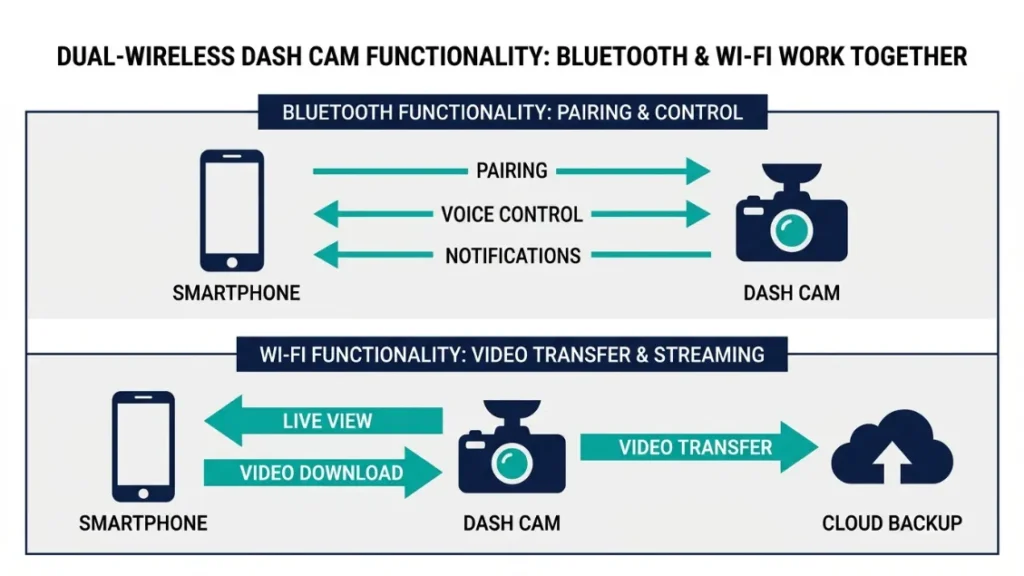
Yes — several premium dash cams include both Bluetooth and Wi-Fi, and this combination gives you the best of both worlds. Bluetooth handles the initial pairing and keeps the connection alive in the background. Wi-Fi kicks in the moment you need to transfer a video or adjust settings.
This dual-wireless setup makes the companion app experience noticeably smoother. You open the app, Bluetooth confirms the camera is nearby, and the app switches to Wi-Fi automatically for footage access. No manual steps required.
If you want the smoothest wireless experience, look for a dash cam that explicitly lists both Bluetooth and Wi-Fi on its spec sheet. One without the other is a compromise.
Which Popular Dash Cam Brands Include Bluetooth Connectivity?
Only a handful of brands include genuine Bluetooth in their dash cams — most rely on Wi-Fi alone. The table below breaks down the wireless features across the biggest names on the market right now.
| Brand / Model | Bluetooth | Wi-Fi | Companion App |
|---|---|---|---|
| Nextbase 622GW | Yes (BLE) | Yes | MyNextbase Connect |
| Nextbase 522GW | Yes (BLE) | Yes | MyNextbase Connect |
| Garmin Dash Cam 67W | No | Yes | Garmin Drive |
| Vantrue E1 Lite | No | Yes | Vantrue App |
| Blackvue DR900X-2CH | No | Yes + LTE Cloud | BlackVue App |
| Thinkware U1000 | No | Yes | Thinkware Dash Cam |
Nextbase Dash Cams and Their Bluetooth App Integration
Nextbase is the brand most associated with Bluetooth dash cams — and for good reason. Their 622GW and 522GW models use BLE to power seamless pairing with the MyNextbase Connect app. The moment you start your engine, the camera connects to your phone without any manual input from you.
Nextbase (a UK-based brand that sold over 4 million cameras globally by 2023) designed their Bluetooth integration specifically to support Alexa hands-free voice commands on the 622GW. You can ask Alexa to start or stop recording, check the weather, or make a call — all without touching your phone.
That is a genuinely useful safety feature for drivers who want to keep both hands on the wheel. The Bluetooth handles the voice handshake. Wi-Fi handles the footage.
Garmin, Vantrue, and Blackvue — What Wireless Features They Offer
Garmin, Vantrue, and Blackvue all offer wireless connectivity — but through Wi-Fi only, not Bluetooth. Each brand has built a stable companion app experience around Wi-Fi direct connections.
Garmin’s Dash Cam 67W uses the Garmin Drive app and connects instantly over Wi-Fi. Vantrue’s E1 series connects the same way. Blackvue goes further — their premium models support LTE cloud connectivity, which means you can check live footage from anywhere with a data plan.
None of these cameras are worse for lacking Bluetooth. They simply use Wi-Fi for everything, which means one less thing to pair and one fewer wireless protocol to manage.
Before buying, download the companion app for the dash cam you’re considering. Check its App Store or Google Play rating. A bad app ruins even the best camera hardware.
How Do You Connect a Dash Cam to Your Phone Without Bluetooth?
You connect a Wi-Fi-only dash cam to your phone by joining the camera’s Wi-Fi hotspot directly from your phone’s settings. No Bluetooth needed. The process takes under 60 seconds once you know the steps. Here is exactly how to do it.
Step-by-Step: Connecting Your Dash Cam to a Smartphone App via Wi-Fi
- Power on your dash cam and wait for the Wi-Fi indicator light to appear.
- Open your phone’s Settings and go to Wi-Fi.
- Find your dash cam’s network name in the available networks list (usually the brand name + a number).
- Enter the default Wi-Fi password from your camera’s manual or the sticker on the device.
- Open the companion app. The camera should appear and connect automatically.
- Browse footage, adjust settings, or trigger a download from inside the app.
Most companion apps remember this connection. After the first setup, connecting takes just a few seconds each time. The experience is smooth on both iOS and Android with all major brands.
What to Do If Your Dash Cam Has No Wireless Features at All
If your dash cam has no Wi-Fi and no Bluetooth, you have two reliable options: remove the SD card manually, or use a USB dash cam cable. Neither option is as fast as wireless, but both get the job done.
For SD card removal, you simply eject the card, plug it into an SD card reader (many newer phones support this via USB-C), and copy the files directly. A good micro SD card reader costs under $10 and works with any camera brand.
Never pull an SD card from a running dash cam. Always turn the camera off first or wait for the power-off sequence to complete. Removing the card mid-write can corrupt footage and damage the card.
Do You Actually Need Bluetooth in a Dash Cam?
For most drivers, Bluetooth is a nice bonus — not a necessity. If your main goal is recording footage, reviewing clips, and adjusting settings through an app, Wi-Fi alone handles all of that perfectly well. Bluetooth adds convenience but rarely changes the core experience.
That said, there are specific situations where Bluetooth makes a real difference.
When Bluetooth Connectivity Makes a Real Difference for Drivers
Bluetooth matters most when you want hands-free voice control, automatic app launch, or emergency alert features. If you drive long distances, use voice commands regularly, or want the camera to notify your phone when it detects an impact — Bluetooth earns its place.
Nextbase’s Emergency SOS feature, for example, uses the BLE connection to detect a crash and automatically contact emergency services with your GPS location. That is a feature Bluetooth enables that Wi-Fi cannot replicate without a constant internet connection.
If you value safety features like that, Bluetooth is worth paying extra for.
When You Can Skip Bluetooth and Still Get Full App Control
You can skip Bluetooth entirely if you just want to review footage and change settings through an app. Cameras like the Garmin Dash Cam 67W and Vantrue E1 series prove that Wi-Fi alone delivers a smooth, capable app experience.
The only friction point is the initial Wi-Fi setup. Once that is done, you’ll barely notice the absence of Bluetooth. The app connects, footage loads fast, and settings update instantly.
Bluetooth in a dash cam is useful for hands-free features and seamless app pairing. But it is not required for video transfer, live view, or settings control. Wi-Fi handles all of that on its own. Buy Bluetooth if you want voice commands or emergency alerts. Skip it if you just need core wireless footage access.
Bluetooth vs Wi-Fi in Dash Cams — Which Wireless Feature Wins?
Wi-Fi wins for video and live preview. Bluetooth wins for pairing and hands-free control. The best dash cams do not make you choose — they include both. Here is a direct side-by-side comparison.
| Feature | Bluetooth | Wi-Fi |
|---|---|---|
| Video File Transfer | No | Yes — fast |
| Live View | No | Yes |
| App Pairing | Yes — seamless | Yes — manual first time |
| Hands-Free / Voice | Yes | No |
| Emergency Alerts | Yes (select models) | No |
| Battery Impact | Very low (BLE) | Moderate |
| Range | ~10 metres | ~15 metres |
| Setup Complexity | Low | Low (once configured) |
The takeaway is clear. If your dash cam only has one wireless option, Wi-Fi is the more capable choice. But a camera with both gives you a noticeably smoother daily experience.
For further reading on dash cam wireless standards, the Bluetooth SIG’s official technology overview explains BLE in plain terms. And if you’re comparing specific models, RTINGS.com’s dash cam reviews include detailed wireless feature breakdowns.
When shopping, search for “dash cam with Wi-Fi and Bluetooth” specifically — not just “wireless dash cam.” Some listings use “wireless” loosely to mean either one. Always confirm both are listed on the actual spec sheet.
Final Thoughts — Are Dash Cams Bluetooth?
Here is the short version of everything I’ve covered. Most dash cams are not purely Bluetooth devices. The majority use Wi-Fi for video transfer, live view, and app control. Some premium models — especially from Nextbase — add Bluetooth Low Energy on top of Wi-Fi for smoother pairing, voice control, and safety features like emergency alerts.
If you want wireless footage access, look for Wi-Fi. If you want hands-free control and seamless app launch, look for Bluetooth alongside it. If budget is tight, Wi-Fi alone does the job well.
I’m Alex Rahman, and I hope this cleared up one of the most misunderstood specs in the dash cam world. The right camera is the one that fits how you actually drive — not the one with the longest feature list.
Check the spec sheet, download the companion app before you buy, and prioritize video quality above wireless features. The rest is just convenience.
Frequently Asked Questions

I’m Alex Rahman, a car enthusiast and automotive writer focused on practical solutions, car tools, and real-world driving advice. I share simple and honest content to help everyday drivers make better decisions.
