10 Best Dash Cam With Voice Control for 2026: Hands-Free Picks for Safer Recording
Trying to save an incident clip while driving is exactly when you do not want to reach for a tiny dash-cam button. Voice control solves that problem, but the usefulness varies sharply between cameras because some support only a few commands while others let you lock footage, take photos, manage audio, control Wi-Fi, or change the displayed camera. For this guide, we compared 10 current models with manufacturer-documented voice-control functions and weighed their recording quality, coverage, parking features, and everyday usability. You will leave knowing which camera fits a simple commute, a multi-camera vehicle setup, a tight budget, or a driver who wants maximum video detail.
Quick Comparison: All 10 Dash Cams Ranked
| # | Product | Best For | Rating | Badge | |
|---|---|---|---|---|---|
| 1 | Garmin Dash Cam X310 | Premium everyday driving | 4.8/5 | Best Overall | Buy → |
| 2 | Vantrue E1 Lite | Budget voice control | 4.4/5 | Best Budget | Buy → |
| 3 | VIOFO A329 2CH | Maximum video detail | 4.7/5 | Best Video | Buy → |
| 4 | Vantrue N4 Pro | Three-camera coverage | 4.6/5 | Best 3-Channel | Buy → |
| 5 | Garmin Dash Cam Mini 3 | Discreet installation | 4.3/5 | Best Compact | Buy → |
| 6 | VIOFO A119 Mini 2 | Single-camera value | 4.5/5 | Best 2K Value | Buy → |
| 7 | VIOFO A229 Pro 3CH | Rideshare drivers | 4.6/5 | Best Rideshare | Buy → |
| 8 | Vantrue N5 | Four-camera coverage | 4.4/5 | Best 4-Channel | Buy → |
| 9 | Garmin Dash Cam Live | Remote connectivity | 4.2/5 | Best Connected | Buy → |
| 10 | Vantrue E1 Pro | Compact 4K recording | 4.5/5 | Best Compact 4K | Buy → |
How We Chose These Dash Cams
What we verified
We evaluated 10 current voice-control dash cams using manufacturer product pages, manuals, firmware information, and our existing model research. We specifically rechecked documented voice commands, channel count, recording resolution, parking support, connectivity, and storage-related specifications. We do not present these editorial comparisons as a laboratory test.
Our 3 scoring criteria
Every model is scored on the same three factors: Voice Control Capability, Video Evidence Quality, and Ease of Use. Voice scoring rewards useful commands such as locking footage and taking photos; video scoring weighs resolution, HDR, sensors, and channel coverage; ease of use considers physical controls, app workflow, Wi-Fi, and installation complexity.
Expert consulted
No outside expert was directly interviewed for this update, so we do not invent a credentialed consultant. Instead, technical claims were cross-checked against current manufacturer documentation and LeadFootAutomotive’s existing dash-cam coverage. The numerical scores are editorial comparisons derived from those documented capabilities rather than claimed instrument measurements.
What we cut — and why
We excluded cameras where we could confirm only spoken notifications rather than actual voice commands, and models whose main appeal was unrelated to hands-free use. We also avoided filling the list with near-identical variants when another model offered a clearer reason to buy, such as stronger video, more channels, smaller size, or useful connected features.
What to Look for When Buying a Dash Cam With Voice Control
The phrase “voice control” can describe anything from three basic commands to a genuinely useful hands-free interface. These five factors help you avoid buying a camera whose headline feature sounds better than it works for your driving routine.
1. Useful Voice Commands, Not Just Voice Notifications
Start by checking exactly what the camera can do when you speak. The most useful command is usually locking or saving the current clip because that prevents important footage from disappearing into the normal recording loop. Photo capture, microphone control, screen control, and Wi-Fi commands are useful secondary functions. A camera that merely announces “recording started” or “memory card error” is providing voice notification, not full voice control.
2. Video Quality That Matches Your Evidence Needs
Voice control cannot rescue unreadable footage. A sharp 4K front camera gives you more pixels for road signs and plates, while a strong 2K model can still be the smarter buy when sensor quality, HDR, and exposure handling are better. Multi-channel systems divide attention between front, rear, and cabin views, so compare the resolution of every channel rather than looking only at the largest number printed on the box.
3. Channel Coverage
A front-only camera keeps installation simple and is enough for drivers mainly concerned about proving what happened ahead. Front-and-rear systems cover rear impacts, while a cabin camera matters for rideshare drivers, family vehicles, and anyone who wants a record of activity inside the car. Four-channel systems go further but add cables, storage demand, and installation work, so more cameras are valuable only when you actually need the angles.
4. Parking Power and Buffered Recording
Parking mode deserves separate attention because most dash cams cannot keep monitoring for long after the ignition is switched off without an appropriate constant-power connection. A compatible hardwire kit or constant-power accessory is commonly required. Buffered parking is especially useful because it can retain footage from before a detected event rather than recording only after the trigger. Our guide to dash cam recording while parked overnight explains the power issue in more detail.
5. App, Wi-Fi, Storage, and Subscription Requirements
Voice control is most convenient when the rest of the workflow is equally simple. Fast Wi-Fi can make clip retrieval less frustrating, GPS adds useful time and location context, and higher-resolution multi-camera systems benefit from larger endurance-rated storage. Cloud or LTE features can add remote monitoring but may involve optional subscriptions, while ordinary voice commands on many cameras work locally without cellular service. See our breakdown of dash cam wireless and subscription requirements before paying for connectivity you may never use.

Garmin Dash Cam X310 — Best Balance of Clarity and Control
Best for: Premium everyday driving
If you want voice control without giving up straightforward on-camera operation, the X310 is the cleanest all-rounder here. Garmin documents 4K HDR recording at 30fps and the familiar “OK, Garmin” system can save video, manage audio, and control Travelapse recording. The 140-degree field of view avoids the extreme edge distortion that comes with some ultra-wide cameras, while the built-in Clarity polarizer is designed to reduce windshield glare. Its biggest limitation is that it remains a front-facing camera rather than an integrated front-and-rear package.
- Records up to 3840 x 2160 with HDR at 30fps.
- Voice command can save footage without reaching for the camera.
- Integrated polarizer and 2.4-inch touchscreen improve everyday usability.
- Drivers wanting rear or cabin coverage need additional camera hardware.
| Maximum video | 4K HDR, 30fps |
| Field of view | 140 degrees |
| Display | 2.4-inch touchscreen |
| Voice wake word | OK, Garmin |
9.6/10
9.7/10
9.4/10

Vantrue E1 Lite — Voice Control Without Feature Overload
Best for: Budget voice control
If your main goal is hands-free clip control rather than maximum resolution, the E1 Lite gives you the core conveniences without forcing you into a complex multi-camera system. Vantrue lists smart voice control, 5GHz Wi-Fi, GPS logging, buffered motion detection, and parking monitoring in a compact front-camera format. That combination makes it particularly approachable for a first dash cam or a second vehicle. The trade-off is obvious: its front-only recording and lower resolution leave less visual detail than the 4K options higher in this ranking.
- Smart voice control is documented rather than implied by notification features.
- 5GHz Wi-Fi supports quicker phone-based clip access.
- Buffered motion detection can preserve footage before a parking event.
- Front-only coverage is limiting if rear impacts are a major concern.
| Recording | 1080p-class front |
| Wi-Fi | 5GHz |
| GPS | Built in |
| Parking | Buffered support |
8.9/10
7.6/10
9.0/10
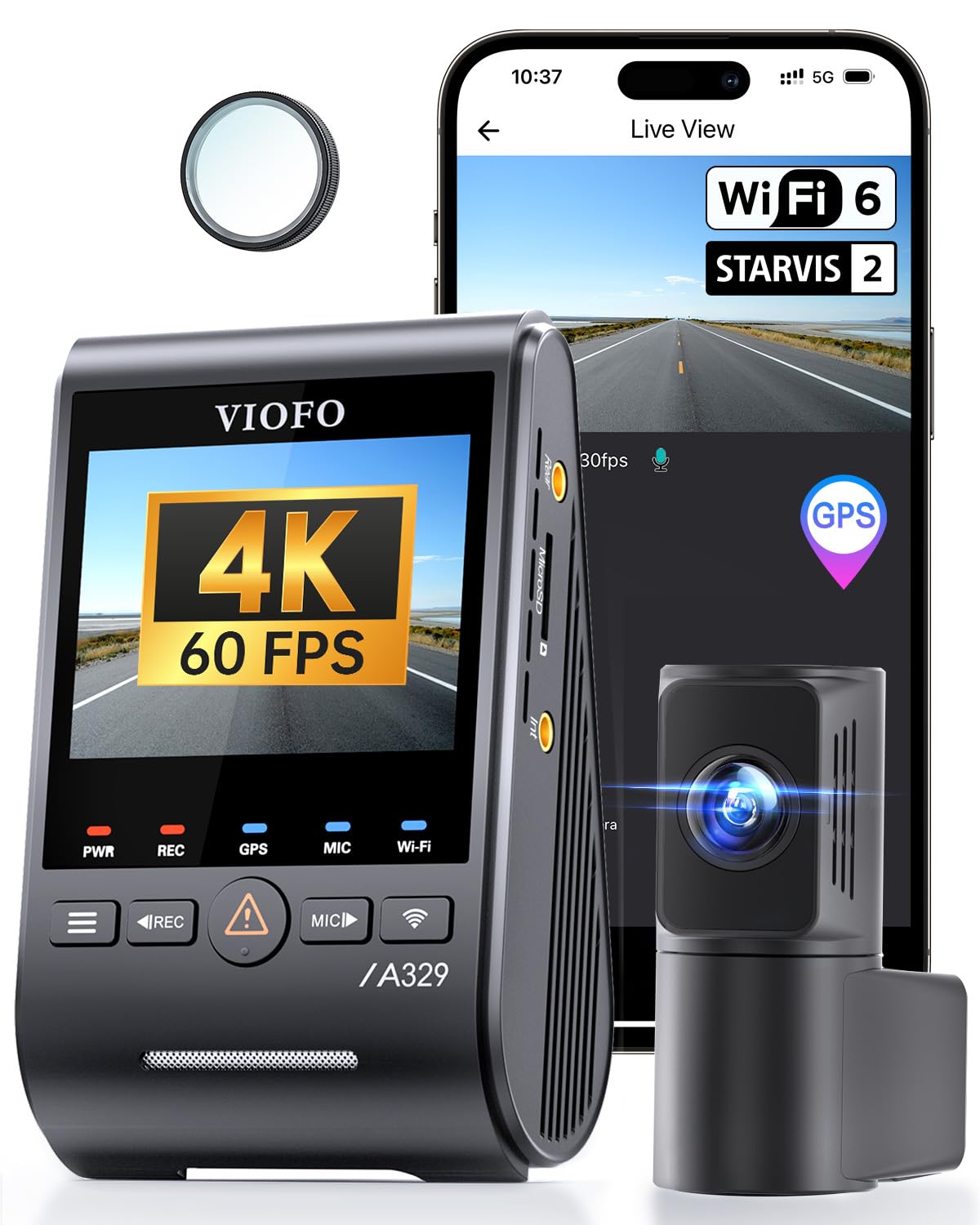
VIOFO A329 2CH — Built for High-Detail Evidence
If plate detail and fast-moving road footage matter more than a simplified consumer interface, the A329 2CH belongs near the top of your list. Its front camera supports 4K at 60fps while the rear camera records 2K, and VIOFO pairs that with Sony STARVIS 2 sensors, HDR support, dual-band Wi-Fi 6, quad-system GPS, and voice control. Spoken commands can start or stop recording, take photos, and switch Wi-Fi without reaching for the unit. The compromise is complexity: its storage options, parking features, accessories, and advanced settings give enthusiasts more control but create a steeper learning curve for casual buyers.
- Front recording reaches 4K at 60fps with 2K rear coverage.
- Sony STARVIS 2 sensors and HDR target difficult lighting conditions.
- Supports smart voice control plus voice notifications.
- More configuration choices mean more setup work than Garmin’s simpler models.
| Channels | Front + rear |
| Front video | 4K up to 60fps |
| Rear video | 2K |
| Storage support | microSD + external SSD |
9.0/10
9.8/10
8.4/10

Vantrue N4 Pro — Best for Front, Cabin, and Rear
If one incident can happen outside the windshield or inside the cabin, a three-channel system makes more sense than a premium front-only model. The N4 Pro combines 4K front recording with separate cabin and rear cameras, 5GHz Wi-Fi, GPS, HDR-oriented night recording, and voice commands for operations such as taking a photo, controlling audio, and locking video. That makes it particularly useful for rideshare and family vehicles. Our full Vantrue N4 Pro review goes deeper into the trade-offs. The main weakness is physical bulk and installation complexity compared with a tiny front-only camera.
- Three channels cover the road, cabin, and rear simultaneously.
- 4K front capture gives the primary view strong evidence detail.
- Voice commands include photo, audio, recording, and clip-lock functions.
- Multiple cameras and cables make installation less discreet.
| Channels | 3 |
| Front | 4K |
| Wi-Fi | 5GHz |
| Power design | Supercapacitor |
9.2/10
9.2/10
8.2/10

Garmin Dash Cam Mini 3 — Tiny Camera, Useful Voice Commands
If you dislike a large screen hanging below the mirror, the Mini 3 is the easiest camera on this list to forget is installed. Garmin pairs a compact screen-free body with 1080p recording, a 140-degree field of view, an integrated polarizer, and voice commands triggered by the Garmin wake word. You can save video and control audio by voice, while most configuration is handled through the Garmin Drive app. The compromise is image resolution: 1080p can document the overall event well, but it gives you less room to crop distant plate detail than 2K or 4K models.
- Ultra-compact body minimizes windshield obstruction.
- Built-in polarizer reduces distracting windshield reflections.
- Voice control can save video and manage audio recording.
- 1080p offers less fine-detail headroom than higher-resolution rivals.
| Resolution | 1080p |
| Field of view | 140 degrees |
| Display | None |
| Storage | Up to 512GB microSD |
9.4/10
7.8/10
9.6/10

VIOFO A119 Mini 2 — Strong Single-Camera Value
If you want better-than-1080p detail without wiring a rear camera through the vehicle, the A119 Mini 2 is one of the more focused choices here. It records 2K at up to 60fps using a Sony STARVIS 2 IMX675 sensor and supports HDR, built-in GPS, dual-band Wi-Fi, Bluetooth accessory support, voice notification, and actual voice control. VIOFO documents commands for recording, photos, audio, screen, Wi-Fi, and clip locking, giving this compact model a surprisingly broad hands-free toolset. The weakness is coverage: it is still a one-channel camera, so there is no rear or cabin evidence unless you choose a different system.
- 2K recording reaches 60fps for smoother road motion.
- Sony STARVIS 2 sensor and HDR strengthen the video package.
- Voice system supports up to 10 documented commands.
- No rear camera means evidence is limited to the road ahead.
| Video | 2K, 60fps |
| Sensor | STARVIS 2 IMX675 |
| Field of view | 140 degrees |
| Storage | Up to 512GB |
9.0/10
9.1/10
8.8/10

VIOFO A229 Pro 3CH — High-Detail Rideshare Coverage
If you drive passengers and need the cabin recorded as carefully as the road, the A229 Pro 3CH gives you a more evidence-focused setup than a standard dual camera. The system combines 4K front, 2K rear, and 1080p infrared cabin recording, with HDR support and voice commands for recording, photos, Wi-Fi, and other commonly used functions. The cabin camera is the key difference because it can document disputes or incidents that never appear through the windshield. Installation, cable routing, and managing three streams are the unavoidable costs of that coverage, so ordinary commuters may find this system excessive.
- 4K front plus 2K rear preserves strong exterior detail.
- Infrared cabin camera adds nighttime interior evidence.
- Voice control supports core recording and connectivity commands.
- Three-camera installation is unnecessary complexity for many commuters.
| Channels | 3 |
| Front | 4K |
| Rear | 2K |
| Cabin | 1080p IR |
9.1/10
9.6/10
8.3/10

Vantrue N5 — Maximum Coverage From Four Cameras
If blind spots matter more to you than installation simplicity, the N5 is built around coverage rather than minimalism. Its four-channel layout records multiple exterior and cabin angles, and Vantrue documents a broad voice-command set including taking photos, starting video, managing audio, controlling the screen or Wi-Fi, locking clips, and switching displayed camera views. A supercapacitor design suits continuous automotive use better than relying on a large rechargeable battery. The limitation is that four channels create more wiring and more footage to manage, making the N5 excessive for a driver who only wants front evidence.
- Four channels provide unusually broad vehicle coverage.
- Voice commands include screen, Wi-Fi, audio, and camera-view controls.
- Supercapacitor power design is well suited to vehicle heat cycles.
- Four-camera wiring and footage management add significant complexity.
| Channels | 4 |
| Wi-Fi | 5GHz |
| Parking | Buffered support |
| Power | Supercapacitor |
9.2/10
8.8/10
7.8/10

Garmin Dash Cam Live — Best for Remote Connectivity
If you care about checking on the vehicle remotely rather than just retrieving clips after an incident, the Dash Cam Live is the specialist option in this ranking. It records at 1440p with a 140-degree field of view and supports Garmin voice commands for saving footage, taking pictures, managing audio, and Travelapse recording. Its defining feature is LTE connectivity for services such as remote live view, vehicle location, theft alerts, and parking notifications. Those connected functions require an appropriate subscription, which is also the reason this is not our default recommendation for buyers who only need local recording.
- LTE enables genuinely remote vehicle-monitoring functions.
- 1440p resolution provides more detail than basic 1080p cameras.
- Garmin voice system covers several practical driving commands.
- Its signature remote features depend on an ongoing connected-service plan.
| Resolution | 1440p |
| Field of view | 140 degrees |
| Connectivity | LTE + app |
| Voice | Garmin commands |
9.5/10
8.6/10
8.7/10

Vantrue E1 Pro — Compact 4K With Modern Controls
If you want 4K detail in a smaller front-camera package without moving to a multi-channel installation, the E1 Pro fills that gap neatly. Vantrue specifies a Sony STARVIS 2 IMX678 sensor, 5GHz Wi-Fi, smart voice control, buffered parking detection, and 4K recording in the compact Element format. The voice function keeps common actions accessible without touching the camera, while the free app handles setup and clip access. Its limitation is the same one shared by most compact front-only designs: you gain simplicity and image quality but give up integrated rear and cabin views.
- 4K recording in a compact front-only package.
- Sony STARVIS 2 IMX678 is a strong foundation for detailed footage.
- Smart voice control and 5GHz Wi-Fi keep interaction convenient.
- No integrated rear channel for drivers who want full exterior evidence.
| Maximum video | 4K |
| Sensor | STARVIS 2 IMX678 |
| Wi-Fi | 5GHz |
| Parking | Buffered support |
9.1/10
9.2/10
8.9/10
Top 3 Head-to-Head: Garmin X310 vs Vantrue E1 Lite vs VIOFO A329
These three represent the clearest buying paths: premium simplicity, budget hands-free control, and maximum video capability. Your priority matters more than chasing the longest specification list.
| Feature | #1 X310 | #2 E1 Lite | #3 A329 |
|---|---|---|---|
| Voice Control | 9.6/10 — Best | 8.9/10 | 9.0/10 |
| Video Quality | 9.7/10 | 7.6/10 | 9.8/10 — Best |
| Ease of Use | 9.4/10 — Best | 9.0/10 | 8.4/10 |
| Choose if… | You want the most polished everyday balance. | You mainly want affordable hands-free control. | Video detail and storage flexibility come first. |
Who These Dash Cams Are NOT For
Not every driver benefits enough from voice control to make it a major buying criterion.
You should also deprioritize voice control if you regularly drive with extremely loud cabin noise and are comfortable using a physical remote button instead. In that situation, image quality, channel coverage, and reliable event locking may matter more than microphone-based commands.
Common Mistakes to Avoid
A good voice-controlled dash cam can still disappoint if the setup prevents its most useful features from working when you need them.
Frequently Asked Questions About Dash Cams With Voice Control
Do dash cams with voice control need internet?
Usually not for basic commands. Many models process commands such as saving footage or taking a photo locally,

I’m Alex Rahman, a car enthusiast and automotive writer focused on practical solutions, car tools, and real-world driving advice. I share simple and honest content to help everyday drivers make better decisions.
