10 Best Single-Channel Dash Cam Buying Guide for 2026
A single-channel dash cam records the road ahead through one front-facing camera. It can provide useful video after a crash, help document unsafe driving, and make it easier to review what happened on the road. These cameras are usually smaller and simpler than dual-channel models, making them a practical choice for drivers who do not need cabin or rear coverage.
The best single-channel dash cams balance clear video, reliable recording, easy controls, and useful safety features without adding unnecessary cost. When comparing models, we pay close attention to video quality in daylight and at night, license-plate clarity, viewing angle, mounting options, storage, and whether the camera can save footage during an impact. Parking-mode recording and a durable design may also matter, depending on how and where you park.
We tested and researched single-channel dash cams to find the models that offer dependable recording, simple setup, and useful features for everyday driving.
Best Single-Channel Dash Cams
We reviewed single-channel dash cams for video quality, ease of use, storage, and useful safety features. Our list highlights the best options for different driving needs and budgets.
AZDOME M200 Mini Dash Cam
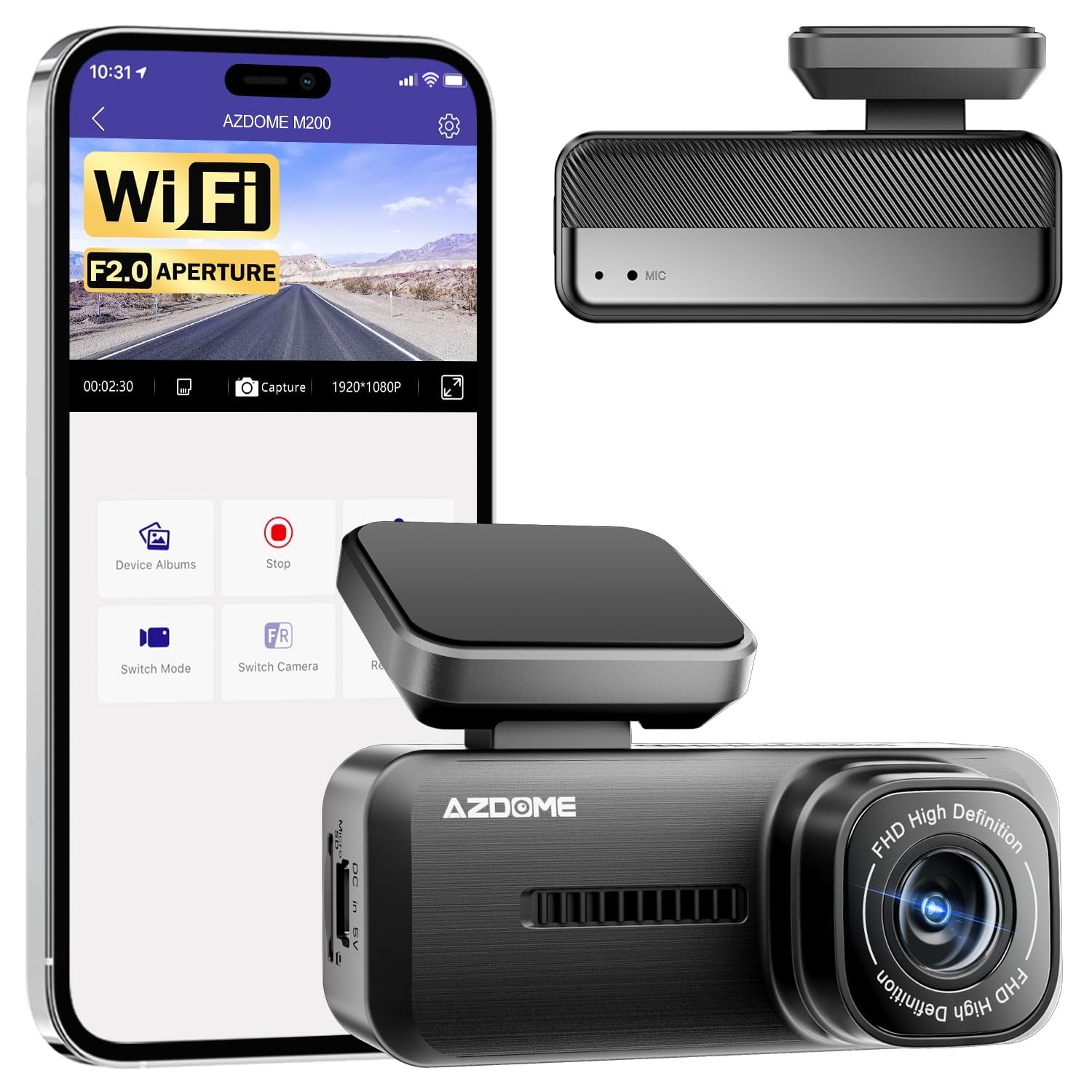
We recommend the AZDOME M200 for drivers who want a compact, affordable front-facing dash cam with phone access and parking monitoring.
Key Pros
- Small design stays discreet behind the mirror
- Wide view captures more of the road
- Wi-Fi makes clip access quick
Key Cons
- App connection may take extra effort
- Some users report playback and date issues
- Requires a separate microSD card
The M200 fits neatly in the car and avoids the bulky look of larger cameras. During daily driving, its 1080p video and 150-degree view should cover nearby lanes, traffic lights, and license plates in good daylight.
We like the built-in Wi-Fi for checking clips without removing the memory card. The app setup can feel inconsistent, though, and some owners report trouble reconnecting the camera or playing recorded sound.
Night vision, loop recording, and collision detection add useful protection for routine driving. Parking monitoring also helps when the car sits unattended, but we would check the installation requirements before relying on that feature.
The camera supports microSD cards up to 128GB, which we would purchase separately. Overall, the M200 offers useful core features in a small package, but its app and software issues may frustrate drivers who want a completely trouble-free setup.
Garmin Dash Cam Mini 3

We recommend this dash cam for drivers who want a small, discreet camera with reliable recording and simple voice controls.
Key Pros
- Compact design stays nearly hidden behind the mirror
- Clear 1080p video with glare reduction
- Voice commands make saving clips easy
Key Cons
- No built-in screen for quick playback
- Cloud features require a paid subscription
- Video resolution is limited to 1080p
After installing the Garmin Dash Cam Mini 3, we found it easy to position and connect. Its small body takes up little windshield space, and the included adhesive mount keeps the camera firmly in place.
During daytime drives, the footage looked clear enough to read important details. The 140-degree view covered a wide section of the road, while the polarizer helped reduce reflections from the windshield. Low-light footage remained usable, though it did not match higher-resolution cameras.
We also liked the voice controls for saving video without reaching for the camera. The lack of a screen keeps the unit small, but we had to use the Garmin Drive app to review clips.
The main drawback involves Garmin’s Vault service. Remote viewing, parking alerts, and automatic online storage require a paid subscription, an active Wi-Fi connection, and constant power. Without Vault, we could still access recordings nearby through the app, but the process was less convenient.
VIOFO A119 V3 Dash Cam

We recommend the VIOFO A119 V3 for clear front-facing video, useful GPS data, and a compact design at a reasonable price.
Key Pros
- Sharp 1440p video with strong daytime detail
- HDR improves visibility in difficult lighting
- GPS mount and flexible parking modes
Key Cons
- Requires a separate hardwire kit for parking mode
- No rear camera or Wi-Fi
- Small screen makes menu navigation less convenient
During testing, the A119 V3 produced crisp footage with enough detail to capture road signs and license plates at a useful distance. Its 140-degree view covered the lane ahead without making nearby objects look overly stretched.
Night recording remained clear, especially with HDR enabled. HDR lowers the frame rate to 30fps, but it helped balance bright headlights and darker roads. The camera’s compact shape also stayed mostly out of our view behind the mirror.
The GPS mount added speed and location data to saved clips, which can help document an incident. The camera started recording automatically, and its loop recording kept daily use simple.
Parking features worked well after setup, but we needed the optional HK3 hardwire cable to switch modes with the ignition and monitor battery voltage. We also had to supply a compatible microSD card, so the total cost can exceed the camera’s listed price.
Controls and the small display handled basic tasks, though reviewing clips was easier on a computer. Overall, we found the A119 V3 a strong choice for drivers who want dependable front coverage without paying for extra cameras or connected features.
Vantrue E1 Lite 1080P Mini Dash Cam
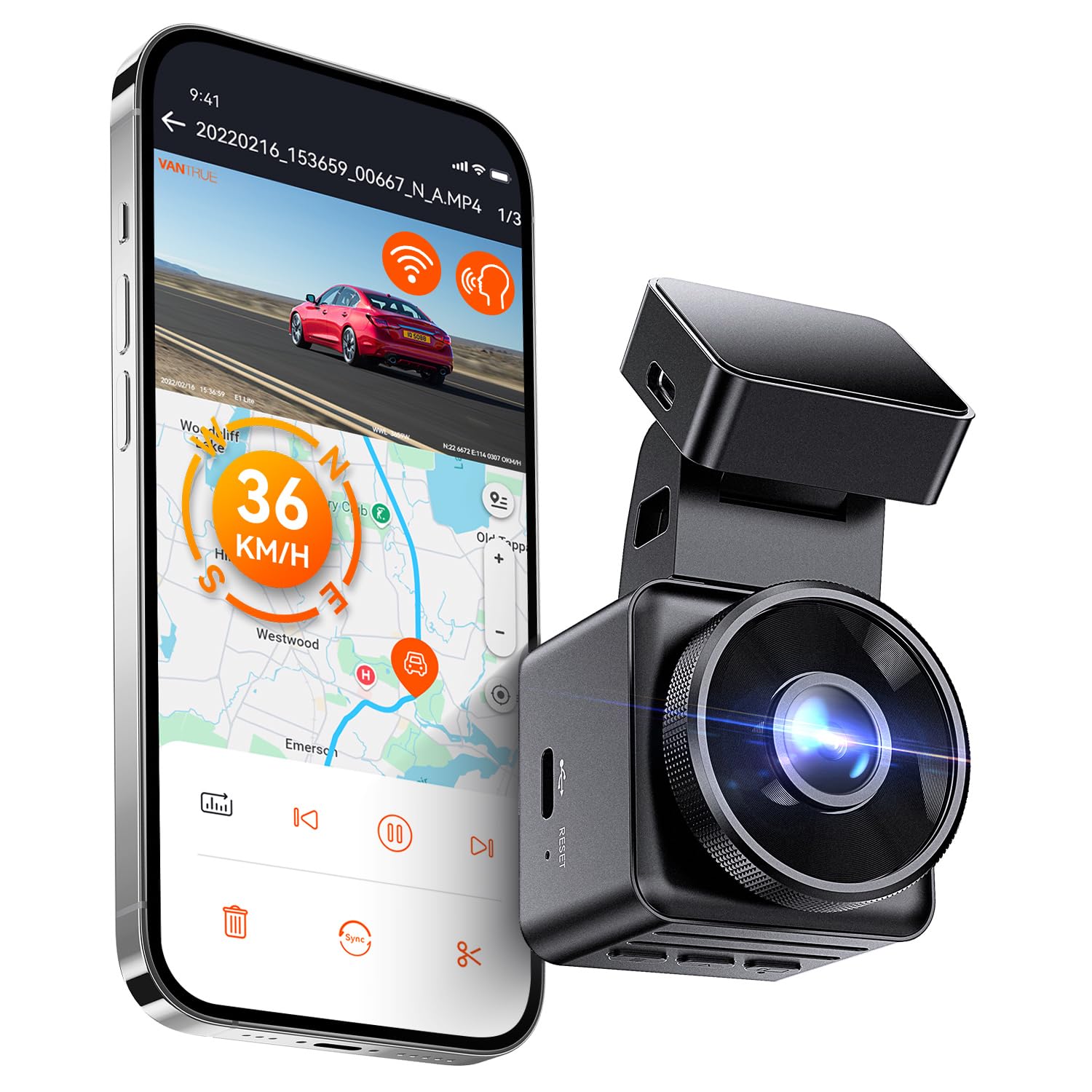
We recommend the Vantrue E1 Lite for drivers who want a small, feature-rich camera with clear Full HD video, GPS, and app control.
Key Pros
- Compact design stays mostly out of our view
- Built-in GPS and Wi-Fi add useful tracking and sharing tools
- Voice controls make basic actions easier while driving
Key Cons
- The hardwire kit for parking mode costs extra
- The adhesive mount may need replacement
- The app and settings take some time to learn
During use, the E1 Lite felt easy to hide behind the rearview mirror. Its 1080p video captured clear road details in daylight, while HDR helped balance bright and dark areas. Night footage remained useful, though very dark scenes may limit license plate detail.
The built-in GPS records speed, direction, and location with the video. We found this helpful when reviewing trips or organizing footage after an incident. Wi-Fi also lets us view and download clips through the Vantrue app without removing the memory card.
Voice control adds convenience for locking clips, taking photos, or switching Wi-Fi on and off. The camera also supports parking monitoring, but continuous parking protection requires Vantrue’s separate hardwire kit. We also needed to use the included charger because the camera does not support USB-PD fast charging.
The small body, GPS, and straightforward app make this a strong single-channel choice. However, buyers should plan for a short learning curve and check that the adhesive mount stays secure in their vehicle.
ROVE R2-4K Dual Dash Cam

We recommend this dash cam for drivers who want clear front and rear coverage, useful phone controls, and GPS without buying a memory card separately.
Key Pros
- Sharp front footage with strong low-light performance
- Fast Wi-Fi transfers through the ROVE app
- Includes a 128GB microSD card and useful mounting tools
Key Cons
- Front video uses upscaling rather than native 4K
- Parking mode requires a separate hardwire kit
- Rear-camera wiring takes time to hide neatly
During setup, we found the included tools and mounts helpful. The 3-inch screen made aiming both cameras simple, while the long rear cable gave us enough reach for most vehicle interiors.
The front camera produced detailed daytime footage, and its Sony STARVIS 2 sensor helped preserve useful detail in dim streets and tunnels. The rear camera records in 1080p, so it looks less sharp than the front view but still provides solid coverage behind the vehicle.
The ROVE app made it easy for us to check clips and download them to a phone. Its faster 5.8GHz connection helped reduce transfer time, and built-in GPS added speed and route information to recorded videos.
We also liked receiving a 128GB card in the box. However, drivers who want parking protection must purchase and install a compatible hardwire kit, which adds cost and installation work.
Pelsee P1 Duo 4K Dash Cam

We recommend this compact dash cam for drivers who want sharp front footage, useful phone controls, and a rear camera in one affordable kit.
Key Pros
- Clear 4K front video and 1080p rear video
- Wi-Fi, app control, and voice commands
- Includes a 64GB memory card
Key Cons
- Parking mode needs a separate hardwire kit
- Small 1.5-inch screen limits on-camera viewing
- Rear-camera installation takes extra time
After testing the Pelsee P1 Duo, we liked how neatly the front unit fits behind a rearview mirror. Its front footage looks sharp in daylight, while the wide view captures several lanes without making the camera feel bulky.
The rear camera adds helpful coverage, especially in traffic or during a parking incident. Night footage remains usable, though bright headlights can still create glare. We found the small screen useful for checking settings, but the phone app works better for reviewing clips.
Wi-Fi makes file transfers simple without removing the memory card. Voice commands can lock a clip or take a photo while we keep our hands on the wheel, although we would still use the physical controls when conditions are noisy.
The included 64GB card supports a quick start, and loop recording replaces older files automatically. Drivers who want parking monitoring should plan for the optional hardwire kit, since the included car charger does not provide continuous parked-car power.
REDTIGER F7N TOUCH Dash Cam

We recommend the REDTIGER F7N TOUCH for drivers who want sharp front video, a useful rear camera, and simple phone controls in one kit.
Key Pros
- Clear 4K front video with good low-light performance
- Touchscreen, voice control, GPS, and fast Wi-Fi
- Includes a 128GB memory card
Key Cons
- Rear camera records at a lower 1080p resolution
- Parking monitoring needs a separate hardwire kit
- The app and extra wiring may take time to set up
During testing, we found the front camera produced detailed footage in daylight, while the wide view captured several lanes without feeling overly distorted. The rear camera added useful coverage behind the car, although its image looked less detailed than the front recording.
The touchscreen made common tasks quick, such as locking a clip or switching Wi-Fi on. We also liked having voice controls and physical buttons, since they reduced the need to reach toward the camera while driving.
Installation was manageable because the kit includes a long rear-camera cable, clips, and a pry tool. The suction mount held well in our use, but drivers who want parking recording should plan to buy the optional hardwire kit.
GPS records the vehicle’s route and speed, and the phone app makes video transfers easier than removing the memory card. Loop recording and the impact sensor help protect important clips, while the included 128GB card provides useful storage for daily driving.
Garmin Dash Cam 67W

We recommend the Garmin Dash Cam 67W for drivers who want a compact camera with wide coverage, clear video, and useful connected features.
Key Pros
- Wide view captures cross traffic and more roadside detail
- Small design stays discreet behind the windshield
- Clear 1440p video with voice controls
Key Cons
- Parking Guard and Live View need Wi-Fi and constant power
- Setup and app features may take time to learn
- Local laws may limit recording or driver alerts
During use, we found the camera easy to hide behind the windshield. Its 180-degree lens covers more of the road than many standard dash cams, while 1440p recording and HDR help preserve useful details in both daylight and low light.
The magnetic mount made removal simple, and the included 16GB card provided a ready starting point. Garmin’s app lets us review footage, manage settings, and connect multiple compatible cameras, though some features depend on a reliable Wi-Fi connection.
Voice control worked well for basic commands such as saving clips and taking photos. Parking monitoring adds value for parked vehicles, but it requires extra power and an active Wi-Fi setup. We also recommend checking local privacy and recording laws before installation.
Garmin Dash Cam Mini 3
We recommend this renewed Garmin for drivers who want a discreet front-facing camera with simple controls and dependable 1080p recording.
Key Pros
- Tiny design stays out of our view
- Polarizer helps reduce windshield glare
- Voice controls make saving clips easy
Key Cons
- Phone syncing can feel slow
- Adhesive mount is not easy to reuse
- Renewed units include only a 90-day warranty
After mounting it behind the rearview mirror, we found the Mini 3 easy to hide and simple to set up. It starts recording when the vehicle powers on, so we did not need to press a button before driving.
The 140-degree view covers the lane ahead well, while the polarizer helps limit reflections in bright conditions. Video looks clear for everyday incident recording, though reading distant license plates may be difficult.
Voice commands let us save clips and take photos without reaching for the camera. The Garmin Drive app handles video access, but connecting or transferring files may take longer than expected.
As a renewed model, condition can vary. Some owners report reliable performance, while others mention early failures or trouble syncing. We would choose it for its small size and useful features, but we would test the camera and app soon after delivery.
VIOFO VS1 Mini Dash Cam
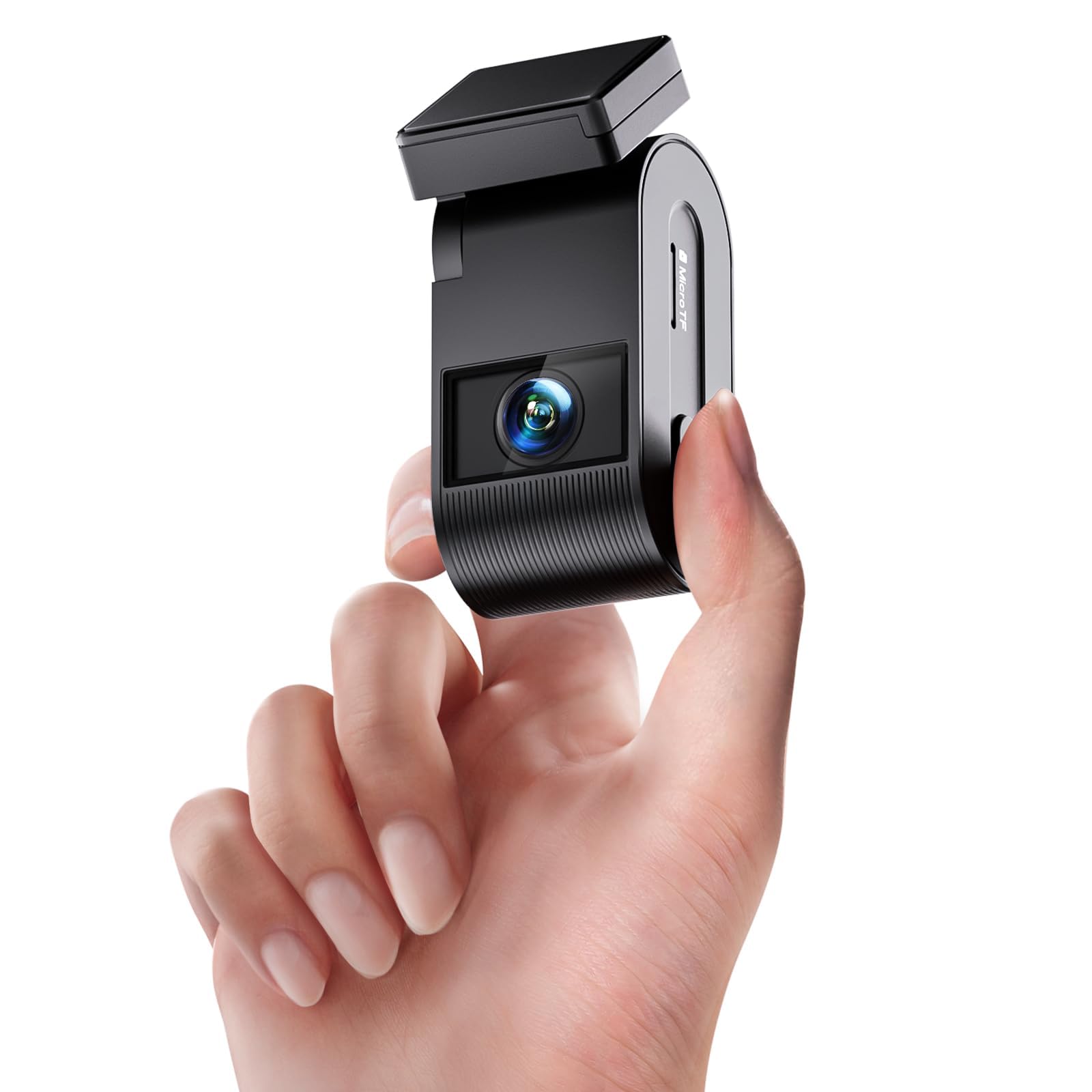
We recommend the VIOFO VS1 for drivers who want a small, screen-free dash cam with clear 2K video, GPS, and easy phone access.
Key Pros
- Compact design stays hidden behind the mirror
- Clear daytime and nighttime video
- Includes a 32GB memory card and GPS
Key Cons
- Phone app is required to review footage
- Adhesive mount may struggle in extreme heat
- No built-in display for quick playback
The VS1 takes up little windshield space and looks much less noticeable than larger dash cams. We found the installation simple, with the included adhesive mount and long power cable helping us keep the wiring tidy.
Its 2K video captures road details clearly in daylight, while HDR and the STARVIS 2 sensor improve footage in darker conditions. Plates and signs remain easier to read, though nighttime clarity still depends on lighting and driving conditions.
Without a screen, we used the VIOFO app over 5GHz Wi-Fi to check clips and change settings. The connection worked well for short transfers, but reviewing footage on a phone takes more steps than using a camera with its own display.
GPS adds speed and location data to recordings, and voice control lets us save clips without reaching for the camera. The included 32GB card helps us start recording immediately, while loop recording replaces older files as storage fills.
Buying Guide
We should start by checking video quality. A resolution of at least 1080p can capture useful details, while a wider lens records more of the road. We should also look for clear night footage, since many incidents happen in low light.
| Feature | What to look for |
|---|---|
| Video quality | Sharp footage in daylight and at night |
| Storage | microSD support and loop recording |
| GPS | Speed and location data, if needed |
| Parking mode | Recording while the vehicle is parked |
| Power | A reliable cable and suitable installation options |
| Controls | Simple buttons, menus, and mobile access |
We should choose a model with loop recording, which replaces older files when the memory card fills. A removable microSD card makes it easier to transfer clips, but we should check the recommended card type and capacity.
Parking mode can help record impacts or activity near a parked vehicle. We should confirm whether it needs a hardwire kit, a separate battery, or another power source before buying.
A built-in GPS can add location and speed data to recordings. We should choose this feature only if we expect to use those details, since it may increase the price.
We should also check the camera’s size, mounting system, warranty, and companion software. A discreet design and simple controls can reduce distractions while driving.
Editor’s Choice
We choose the Viofo A119 Mini 2 as our top single-channel dash cam. Its compact design, sharp 2K video, and Sony STARVIS 2 sensor provide clear footage during the day and at night.
The camera records in 1440p at 60 frames per second, which helps capture moving details such as license plates. Its HDR support also helps balance bright headlights and dark roads.
| Feature | Details |
|---|---|
| Video quality | 2K at 60 fps |
| Night recording | Sony STARVIS 2 sensor |
| Storage | microSD card |
| GPS | Built in |
| Parking mode | Supported with hardwire kit |
We like the A119 Mini 2 because it keeps the controls simple and avoids features that many drivers do not need. Built-in GPS adds speed and location data, while the polarizing filter can reduce dashboard reflections.
The camera does not include a rear camera or a built-in screen. We recommend adding a high-endurance microSD card and a hardwire kit if we want reliable parking-mode recording.
Conclusion
We should choose a single-channel dash cam based on video quality, ease of use, and useful safety features. A clear front-facing camera can record license plates, road signs, and important details when lighting and weather change.
We also need to check storage options, parking mode, GPS, and night recording before buying. These features can improve daily use, but they may require extra setup, a larger memory card, or a hardwire kit.
| Priority | Feature to look for |
|---|---|
| Clear evidence | 1440p or 4K video |
| Simple operation | Automatic recording and loop storage |
| Night driving | Strong low-light performance |
| Parked protection | Buffered parking mode |
| Easy review | Wi-Fi or a removable memory card |
A single-channel model suits drivers who want a compact setup that records the road ahead. We can save money and avoid the added installation work of a rear camera while still gaining useful driving footage.
FAQs
What is a single-channel dash cam?
We use “single-channel” to describe a dash cam that records the road ahead through one camera. It suits drivers who want a simpler setup and lower cost than a front-and-rear system.
What features should we look for?
We should prioritize clear video, a wide viewing angle, reliable loop recording, and a parking mode. GPS can record location and speed, while Wi-Fi can make it easier to save clips to a phone.
Is 4K better than 1080p?
A 4K dash cam can capture more detail, which may help us read signs or identify license plates. However, 1080p models often cost less and use less storage. Image quality also depends on the lens, sensor, and lighting.
Do we need a memory card?
Yes. Most dash cams require a microSD card, which we usually buy separately. We should choose a high-endurance card because dash cams write data continuously.
Can a dash cam record while the car is parked?
Many models support parking mode, but we may need a hardwire kit or an external battery. Professional installation can help prevent battery drain and keep the wiring secure.
Does a single-channel dash cam record inside the car?
No. It normally records only the road ahead. We should choose a dual-channel model if we need cabin or rear coverage.

I’m Alex Rahman, a car enthusiast and automotive writer focused on practical solutions, car tools, and real-world driving advice. I share simple and honest content to help everyday drivers make better decisions.
