10 Best OBD2 Scanners Under 400 for 2026: Strong Diagnostics Without a Pro Budget
The best OBD2 scanner under 400 in this 10-model comparison is Innova 5610 — a handheld all-system scanner with broad service coverage. We evaluated 10 OBD2 scanners by specification, scoring each on diagnostic depth, ease of use, and value for money. Most scanners look similar on paper but fall short on system coverage — and that gap is what this comparison focuses on. Whether you need basic code reading, all-system diagnostics, or a phone-based scanner, this guide gives you one clear answer.
Quick Comparison: All 10 Products Ranked
| # | Product | Best For | Rating | Badge | |
|---|---|---|---|---|---|
| 1 | Innova 5610 | Home all-system diagnostics | 4.8/5 | Best Overall | Buy → |
| 2 | Autel MaxiDiag MD808 Pro | All-system value | 4.7/5 | Best All-System Value | Buy → |
| 3 | Foxwell NT809 | Touchscreen diagnostics | 4.6/5 | Best Touchscreen Pick | Buy → |
| 4 | TOPDON ArtiDiag800 BT | Wireless tablet use | 4.6/5 | Best Wireless Tablet | Buy → |
| 5 | Launch CRP129X | Budget handheld use | 4.5/5 | Best Budget Handheld | Buy → |
| 6 | BlueDriver Pro | Phone-based diagnostics | 4.7/5 | Best Bluetooth Pick | Buy → |
| 7 | OBDLink MX+ | Third-party app use | 4.6/5 | Best App Flexibility | Buy → |
| 8 | Autel AL619 | ABS and SRS checks | 4.4/5 | Best for ABS and SRS | Buy → |
| 9 | Launch CRP123X | Simple four-system use | 4.3/5 | Best Simple Upgrade | Buy → |
| 10 | Veepeak OBDCheck BLE+ | Low-cost Bluetooth use | 4.4/5 | Best Low-Cost Adapter | Buy → |
How We Chose These Scanners
What we compared
Published specifications for 10 scanners: system coverage, connectivity, live data, service functions, and display type.
Our 3 scoring criteria
Diagnostic depth, ease of use, and value for money, applied identically to every product.
Limits of this comparison
This is a specification comparison. No hands-on testing, test duration, or expert consultation is claimed.
What we cut — and why
Professional dealer-level tools and single-brand adapters were cut because they do not fit a general under-400 home-use list.
What to Look for When Buying an OBD2 Scanner
Start with the job you actually need to do, not the longest feature list. A scanner that cannot reach the system behind your warning light will disappoint, however good its screen looks.
1. System Coverage
Engine-only readers clear a check-engine code, but they cannot explain ABS, airbag, or transmission warnings. All-system tools cover more control units, though exact coverage still depends on make, model, and year. Before you buy, learn how to choose an OBD2 scanner for the systems your cars actually use.
2. Handheld or Phone-Based
Handheld tools work without a phone, which helps in a garage with poor signal or a flat phone battery. Bluetooth adapters are smaller and often easier to read on a large phone screen, but their features depend heavily on the app. For a practical overview, see the best type of OBD2 scanner for DIY use for home mechanics.
3. Vehicle Compatibility
Most petrol cars from 1996 onward and many later diesel cars use OBD2, but protocols, connector behaviour, and enhanced functions still vary. Check the year, market, and any model-specific notes before ordering, especially for older or imported vehicles. It is worth taking a moment to check your vehicle’s OBD2 compatibility against the scanner’s supported list.
4. Live Data, Service Functions, and Updates
Live data and freeze frame help you see what changed when a code appeared, rather than guessing from the code alone. Common service functions include oil resets and steering-angle calibration on supported models, but they are never universal. Also check update terms, because a tool that stops updating may lose value on newer cars. Review the features an OBD2 scanner should have before paying for functions you may never use.

Innova 5610 — Broad handheld diagnostics, simply presented
Best for: Home all-system diagnostics
For a home user who wants one tool for most family cars, the Innova 5610 is a practical starting point. It covers engine, ABS, SRS and transmission systems on many vehicles, so a warning light does not automatically mean a separate trip to a shop. Live data, freeze frame and battery and alternator checks help you describe a fault more clearly before buying parts. The colour screen and guided menus keep common jobs readable, although model-specific coverage still varies and should be checked first. It suits drivers who want broad handheld diagnostics without relying on a phone for every scan.
- All-system coverage for many vehicles
- Battery and alternator checks included
- Guided menus simplify common diagnostics
- Coverage varies by vehicle model
- Bulkier than a Bluetooth adapter
4.8/5
4.7/5
4.7/5

Autel MaxiDiag MD808 Pro — All-system reach, handheld simplicity
Best for: All-system value
For a buyer who wants more than engine codes without moving to a large tablet, the MD808 Pro is a strong middle step. It offers all-system scanning on supported models, plus common service functions such as oil resets and steering-angle calibration where the vehicle allows them. The wired connection avoids phone pairing problems, and the handheld layout keeps routine scans fast and repeatable. Its screen is smaller than a tablet, so long live-data sessions feel more cramped, and advanced functions still vary by brand. It suits a keen home user who wants broad coverage at a sensible mid-range level.
- All-system scanning for many brands
- Service functions for common resets
- Wired connection avoids phone pairing
- Screen smaller than tablet tools
- Advanced functions vary by vehicle
4.7/5
4.6/5
4.8/5

Foxwell NT809 — Tablet feel for serious home use
Best for: Touchscreen diagnostics
For a user who reads live data for longer and wants a larger, clearer view, the NT809 is an easy step up from a small handheld. Its touchscreen makes graphing and menu navigation more comfortable, and its all-system scope on supported models covers more than a basic code reader. Service functions and active tests are available on supported vehicles, which helps with common maintenance checks and fault tracing. The larger body takes more storage space, and beginners may need time to learn the deeper menus. It suits a confident home user who values a clear, tablet-style diagnostic view.
- Large touchscreen for live data
- All-system coverage on supported vehicles
- Service menu for common maintenance
- Larger to store than adapters
- Learning curve for beginners
4.7/5
4.8/5
4.5/5

TOPDON ArtiDiag800 BT — Wireless freedom, tablet display
Best for: Wireless tablet use
For a user who dislikes cables around the driver’s footwell, the ArtiDiag800 BT separates the tablet from the vehicle connector. The wireless link lets you read codes and live data from a more comfortable position, while the tablet screen keeps graphs and menus readable. All-system coverage on supported models and common service functions make it useful beyond basic code reading, although coverage and service availability still vary by vehicle. The tablet needs charging, and wireless setup adds one more step than a simple wired handheld. It suits users who want tablet comfort without a cable.
- Wireless link to vehicle
- Tablet display for graphs
- All-system scanning supported
- Charging needed for tablet
- Wireless setup adds a step
4.6/5
4.6/5
4.5/5

Launch CRP129X — Simple, capable, easy to keep
Best for: Budget handheld use
For a driver who wants a dedicated tool without tablet complexity, the CRP129X keeps the job simple. It reads engine, transmission, ABS and SRS codes on supported models, with live data and a colour screen for clearer fault review. The handheld form needs no phone, app account, or wireless pairing, which makes quick checks less fiddly. It does not offer the full service menu of larger tablets, and brand coverage still needs checking before purchase. It suits a first handheld upgrade from a basic code reader, or a second tool to keep in the car.
- Simple handheld operation
- Covers four main systems
- Colour screen and live data
- No full tablet service menu
- Coverage varies by brand
4.3/5
4.8/5
4.7/5

BlueDriver Pro — Phone diagnostics, done well
Best for: Phone-based diagnostics
For a user who already carries a phone everywhere, BlueDriver Pro turns that phone into a clear diagnostic display. The compact adapter plugs into the OBD2 port, while the app shows codes, live data, freeze frame, and repair guidance in plain language. Enhanced diagnostics are available for many supported models, which can add useful context beyond generic codes. It still needs a charged phone and a supported app version, and advanced coverage varies by model. It suits drivers who want a small adapter, a readable phone interface, and easy code history.
- Compact adapter, phone display
- Enhanced codes on supported models
- Live data and freeze frame
- Needs phone and app
- Advanced coverage varies by model
4.4/5
4.9/5
4.7/5

OBDLink MX+ — For users who choose their app
Best for: Third-party app use
For a user who already likes a particular OBD app, the OBDLink MX+ is built around that freedom. It works with many third-party apps, so you can keep the interface and features you already know, rather than learning a new system. Fast data handling helps live graphs feel responsive, and a low-power sleep mode reduces drain when the adapter stays plugged in. It has no built-in screen, so your phone or tablet becomes the display, and the final feature set depends on the app you choose. It suits experienced users who want adapter flexibility over a fixed interface.
- Works with many third-party apps
- Fast data for live graphs
- Low-power sleep mode
- No built-in screen
- App choice affects features
4.5/5
4.7/5
4.6/5

Autel AL619 — Focused ABS and SRS diagnostics
Best for: ABS and SRS checks
For a user whose warning is not the check-engine light, the AL619 targets the gap most basic readers leave. It reads engine, ABS and SRS codes on supported models, with live data to help trace intermittent faults. The colour screen and simple menus keep the workflow short, which matters when you are checking a car before a longer drive. It is not a full all-system tablet, and its service functions are limited, so it should not be bought as a do-everything tool. It suits drivers who mainly need ABS and airbag coverage plus solid engine diagnostics.
- ABS and SRS coverage
- Colour screen, simple menus
- Live data for diagnosis
- Not a full all-system tablet
- Service functions are limited
4.4/5
4.7/5
4.8/5
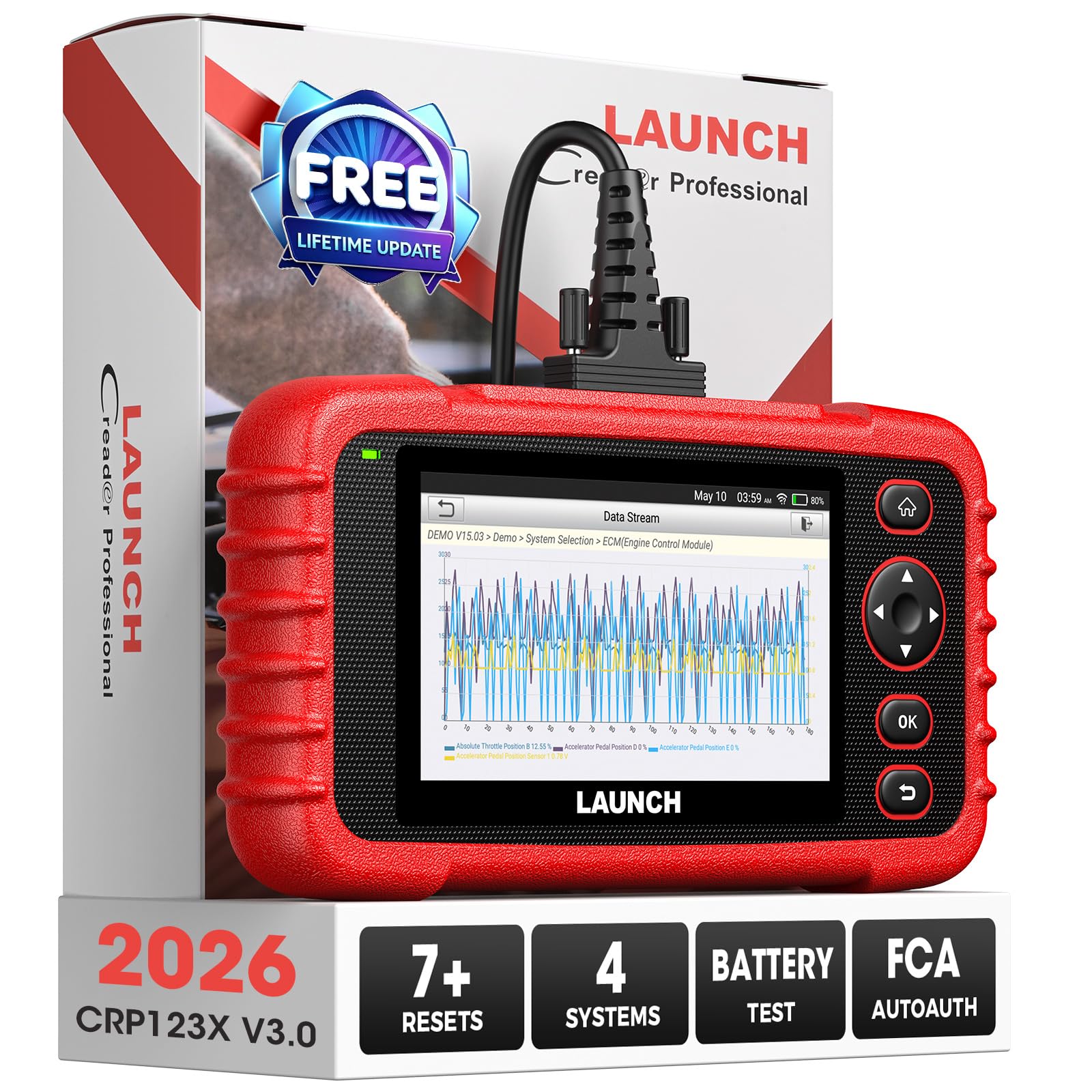
Launch CRP123X — A clear step up, nothing extra
Best for: Simple four-system use
For a user who finds a basic code reader too narrow but does not want tablet menus, the CRP123X is a balanced middle choice. It covers engine, transmission, ABS and SRS on supported models, with clear code definitions and live data for basic fault checks. The handheld design needs no phone, which keeps the workflow direct for quick garage checks. Its feature set is smaller than larger tablets, and update support should be checked for newer models. It suits a buyer who wants a simple, focused upgrade without paying for functions they will rarely use.
- Four-system coverage at entry level
- Handheld, no phone needed
- Clear code definitions
- Smaller feature set than tablets
- Updates may be limited
4.2/5
4.8/5
4.8/5

Veepeak OBDCheck BLE+ — Small adapter, phone-first use
Best for: Low-cost Bluetooth use
For a user who wants the cheapest useful entry into phone diagnostics, the OBDCheck BLE+ keeps the hardware simple. The small Bluetooth adapter connects to popular OBD apps, where you can read codes, view live data, and check freeze frame. Its size makes it easy to keep in a glovebox or leave plugged in for short checks, although long-term use still depends on the app. It cannot replace a handheld for users who want a standalone screen, and its feature set follows the chosen app. It suits a first adapter, a second car, or a simple code-checking tool.
- Very compact Bluetooth adapter
- Works with popular OBD apps
- Simple pairing with supported apps
- Features depend on chosen app
- No screen or standalone use
4.2/5
4.8/5
4.9/5
Top 3 Head-to-Head: Innova 5610 vs Autel MD808 Pro vs Foxwell NT809
These three are the common final choices for a buyer who wants broad coverage without a professional tool. The difference is mainly form: a guided handheld, a value handheld, or a larger touchscreen tablet.
| Feature | #1 Innova 5610 | #2 Autel MD808 Pro | #3 Foxwell NT809 |
|---|---|---|---|
| Diagnostic depth | 4.8/5 — Best | 4.7/5 | 4.7/5 |
| Ease of use | 4.7/5 | 4.6/5 | 4.8/5 — Best |
| Value for money | 4.7/5 | 4.8/5 — Best | 4.5/5 |
| Choose if… | You want guided handheld diagnostics | You want all-system value | You want a large touchscreen view |
Who These Scanners Are NOT For
These tools are for home and keen DIY diagnostics, not a substitute for dealer-level access on every vehicle.
If you need brand-specific coding, key programming, or module programming, a general under-400 scanner will fall short. In that case, a specialist tool or a professional inspection is the safer route.
Common Mistakes to Avoid
Most disappointment comes from a coverage mismatch, not a faulty tool.
Frequently Asked Questions About OBD2 Scanners
Will an OBD2 scanner work on my car?
Most petrol cars from 1996 onward support OBD2, but enhanced functions still vary by make, model, and year. Check the connector, the model year, and the scanner’s supported list before you buy. Diesel coverage, older imports, and some hybrids need extra care, because a generic connection does not guarantee every system will respond.
Do I need an all-system scanner or just a code reader?
A code reader is enough if you only need engine codes and a check-engine reset. An all-system scanner is better if ABS, airbag, transmission, or other warning lights matter to you. It costs more in features and complexity, but it avoids buying a second tool later when a different warning appears.
Are Bluetooth scanners as capable as handheld scanners?
Bluetooth scanners can be very capable, but their final features depend on the app, not just the adapter. A good app gives clear live data, code history, and repair guidance, while a weak app limits even a good adapter. Handheld tools offer a fixed, self-contained interface, which many users prefer for repeated garage use.
Can an OBD2 scanner reset ABS or airbag lights?
Yes, but only if the scanner supports ABS and SRS on your exact vehicle and the underlying fault has been fixed. Clearing a code does not repair a sensor, wiring fault, or faulty module. If the light returns, treat it as a real fault signal and check live data and freeze frame before clearing again.
Do OBD2 scanners need updates or subscriptions?
Many scanners need software updates to support newer models and fix bugs, and some advanced features may require a subscription. Check update terms before buying, especially if you plan to keep the tool for several cars or several years. A tool with clear, ongoing updates is usually a safer long-term choice.
Can I use one scanner on multiple cars?
Yes, most OBD2 scanners work across multiple compatible cars, which makes them useful for a household with more than one vehicle. Coverage still varies, so a scanner that reads all systems on one car may read fewer systems on another. Check each car’s year, make, and model against the supported list before relying on it.
Our Final Verdict
The under-400 range is wide enough for a serious home tool, but system coverage matters more than screen size. Start with the coverage your cars actually need, then choose handheld convenience or phone flexibility. For most home users, the Innova 5610 gives the broadest, simplest starting point in this list.

I’m Alex Rahman, a car enthusiast and automotive writer focused on practical solutions, car tools, and real-world driving advice. I share simple and honest content to help everyday drivers make better decisions.
